


Are you looking for the best SEO tips that actually bring consistent traffic from Google instead of just empty promises? If yes, you have arrived at the right place.
I understand that most SEO advice you read is either outdated, overcomplicated, or simply doesn’t work anymore!
After blogging for over a decade, I’ve learned that ranking on Google isn’t about tricks! It’s about understanding what users want and delivering it better than anyone else.
I’ve personally used some strategies to drive millions of visitors through organic search, and the same principles continue to work even with constant algorithm changes.
In this guide, I’m going to share practical SEO tips that are built on real experience, and these strategies focus on what Google actually values today.
Whether you’re a beginner or an experienced blogger, these proven SEO best practices tips will help you increase search visibility, drive targeted traffic, and establish credibility in your niche.
Before we get into the topics, let me share some essential points to deepen your understanding of SEO.
Why SEO Still Matters In 2026?
SEO isn’t dead! It still matters in 2026.
Even with AI search results and ever-changing Google algorithms, organic search traffic is still one of the most reliable and high-converting traffic sources you can get.
Unlike paid ads that stop the moment you stop spending, SEO keeps working for you 24/7, and brings your targeted audience.
SEO today isn’t just about stuffing keywords anymore. It’s about understanding search intent, creating helpful content, and building topical authority in your niche.
Google now focuses heavily on E-E-A-T (Experience, Expertise, Authoritativeness, Trustworthiness), which means your real-world experience and credibility actually matter.
On top of that, factors like page speed, mobile-friendliness, Core Web Vitals, and user experience play a huge role in rankings.
From my 15 years of experience, I can see that the blogs that invest in SEO see steady growth in organic traffic and brand visibility over time.
And in a crowded online space, that’s exactly what helps you stand out. Hence, I would say that SEO is still alive and can help your website achieve a great digital presence.
What Makes My SEO Tips Different?
Before we dive into the main topic, let me quickly tell you what makes my SEO optimization tips different from the usual advice you see online.
I’m not going to share outdated tactics or generic theory. Every tip in my guide is based on real blogging experience, practical implementation, and what’s actually working right now.
I’ve tested these strategies on real websites, tracked results, and refined them based on what drives organic traffic, search rankings, and user engagement.
Instead of chasing shortcuts, I’ll show you the ways Google and other search engines truly reward today and it will help you build a solid foundation.
Most importantly, I’ll keep things simple and beginner-friendly. No fluff, no confusion! Just clear, actionable SEO strategies to get your aimed traffic from search engine results.
I’m sure that you’ll find these SEO tricks practical, proven, and easy to follow. Shall we start now?
19 Best SEO Practices for Long-Term Blog Success
Here are some of the most effective SEO tips you can start using right away to improve your rankings, boost organic traffic, and grow your website faster.

1. Find Low-Competition Keywords That Are Easy to Rank
If you ask me what helped my blogs get early traffic, it was not “common keywords”! It was low-competition keywords.
In simple terms, these are keywords that have decent search volume but are not heavily targeted by authority sites.
Instead of competing with huge websites, you focus on long-tail keywords, niche topics, and specific search queries where ranking is actually possible.
How I approach it?
- I look for long-tail keywords (3–5 words) like “SEO advice for beginners 2026”
- I check keyword difficulty (KD) and avoid highly competitive terms
- I analyze Google’s first page, if there is any weak or outdated content to treat it as an opportunity
- I use tools and also rely on Google autocomplete, related searches, and People Also Ask

Why does this work?
Low-competition keywords help you build early organic traffic, topical authority, and search visibility without waiting months or years.
One well-targeted low-competition keyword can bring more consistent traffic than a high-volume keyword you never rank for.
I hope I’m very clear about this first SEO tip. You can go through this post on how to find keywords with Semrush to easily find low-competitive yet highly profitable keywords.
2. Optimize Your Keywords Naturally (Without Keyword Stuffing)
Once you find the right keywords, the next step is to optimize them. But this is where most bloggers make mistakes.
Earlier, they used to repeat keywords again and again. Today, that approach doesn’t work. Google is much smarter and focuses on semantic SEO, content relevance, and user intent.
Here’s how I optimize keywords in my content:
- I place the primary keyword in the title, URL, meta description, and first 100 words
- I naturally include secondary keywords and semantic keywords throughout the content
- I use variations instead of repeating the same phrase
- I optimize headings (H2, H3) only where it makes sense
- I make sure the content reads naturally for humans first
Example:
Instead of repeating “SEO tips” again and again, I use – SEO strategies, SEO tricks, search engine optimization techniques, Google ranking factors, and organic traffic growth.
You may use the Rank Math SEO plugin to better optimize your blog posts and pages for your target keywords easily.
Why does this matter?
Proper keyword optimization improves on-page SEO, content relevance, and ranking potential across multiple search queries.
In my own blogging experience, pages that are written naturally with keyword variations consistently perform better than heavily optimized content.
3. Understand Search Intent Before Creating Content
If I had to pick one SEO skill that changed everything for me, it’s understanding search intent.
Search intent simply means: what is the user really looking for when they type a query into Google? There are usually 4 types, and I have explained these well in this article.
How do I use this in blogging?
Before writing any article, I first check Google’s top results. If the top pages are:
- List posts – I write a list post
- Guides – I write a detailed guide
- Tutorials – I create step-by-step content
- I don’t guess – I match what Google is already rewarding.
Example:
If the keyword is “SEO trends,” users are clearly looking for Practical strategies, Actionable steps, and updated advice (not theory).
So I structure my content accordingly instead of writing generic explanations.
Aligning content with search intent is one of the fastest ways to improve rankings and reduce bounce rate because users find exactly what they are expecting.
4. Create High-Quality Content That Actually Ranks (EEAT Matters Most)
I’ve learned that SEO is no longer about publishing more content; it’s about publishing better content.
Google now heavily evaluates Experience, Expertise, Authoritativeness, and Trustworthiness (EEAT) before deciding which pages deserve to rank.
That means your content should not just explain a topic! It should prove understanding and usefulness.
Here’s how I approach content creation:
- I focus on solving a specific problem instead of writing generic posts
- I include real insights from my own blogging experience
- I make sure every section adds value, not just filler text
- I structure content so it’s easy to scan and understand
Example:
Instead of saying, “SEO is important for traffic,” I explain:
- Why SEO drives long-term organic traffic
- How it compares with paid ads
- What actually worked for me in real blogging scenarios
Blog articles that include personal insights and practical examples consistently perform better in search results because they are more trustworthy and useful.
5. Use Semantic Keywords & Topic Clusters (Modern SEO Approach)
Modern SEO is not about targeting one keyword, it’s about covering an entire topic deeply.
This is where semantic keywords and topic clusters come in.
Semantic keywords are related terms that help Google understand the full context of your content. Instead of repeating one keyword, you have to include connected terms that expand the meaning.
For example, if your main keyword is “SEO Practices,” semantic keywords include on-page SEO techniques, Google SEO guidelines and content optimization.
How do I use topic clusters?
I don’t write isolated articles anymore. Instead, I:
- Create a main pillar article (like Blogging Tips)
- Then support it with related subtopics (Blogging Skills, Mistakes, Monetization ways)
- Internally link everything together
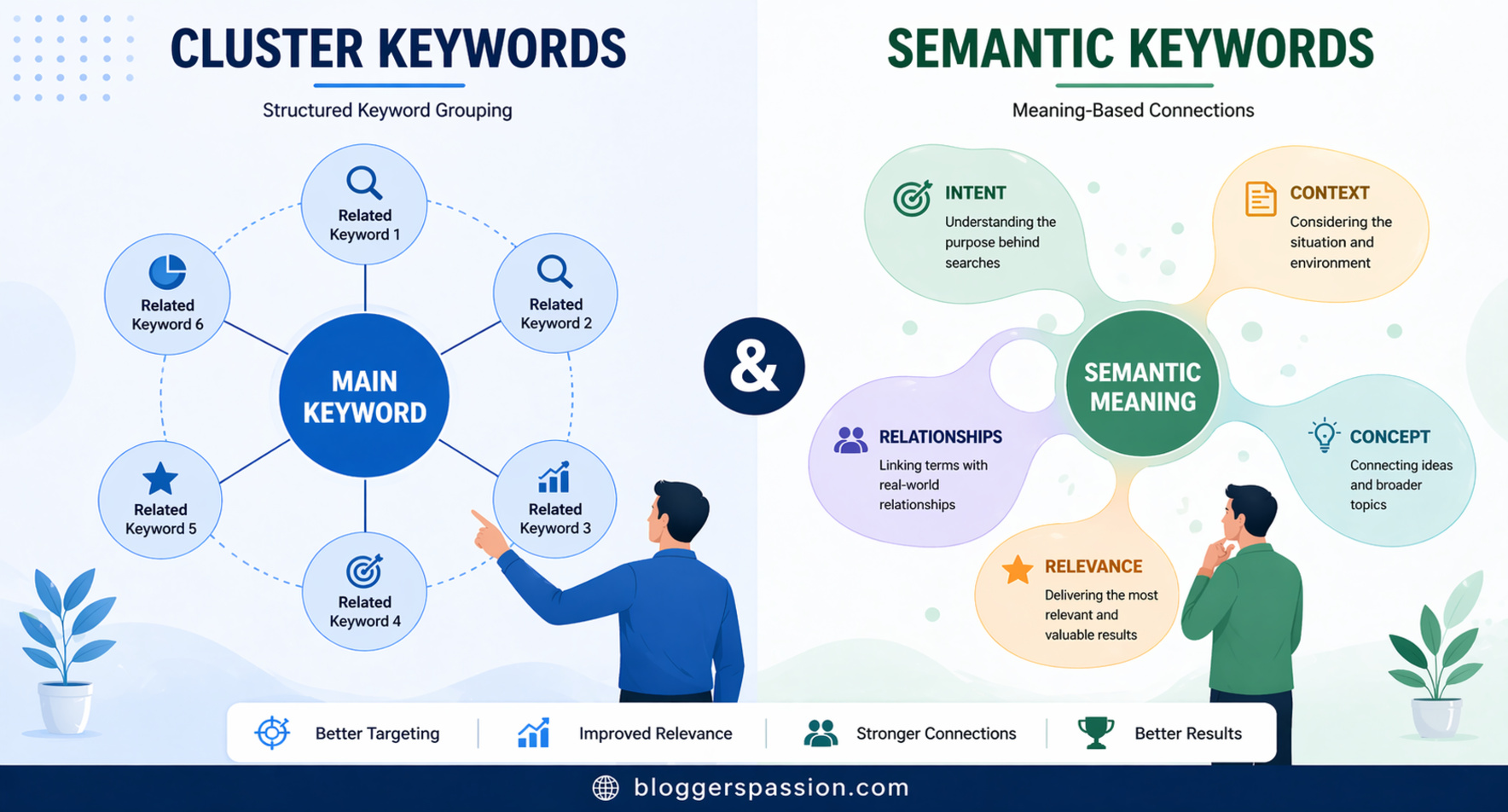
This helps build topical authority, which is a strong ranking signal in 2026.
Once I started using topic clusters instead of standalone posts, my blog visibility and rankings improved across multiple keywords, not just one.
6. Add FAQ Sections to Capture More Search Traffic
One of the simplest but most underrated SEO strategies is adding FAQ sections at the end of your content.
Because FAQs help you target long-tail keywords and “People Also Ask” queries, which can bring extra organic traffic without writing new articles.
How do I structure FAQs?
- I include real questions that users search on Google
- I keep answers short, clear, and direct
- I naturally include semantic keywords in responses
- I format them in a way that is easy for both users and search engines
Example:
If your topic is SEO Tricks & Tips, FAQs could include:
- What are the best SEO tactics for beginners in 2026?
- How long does SEO take to show results?
- Is SEO still effective for new blogs?
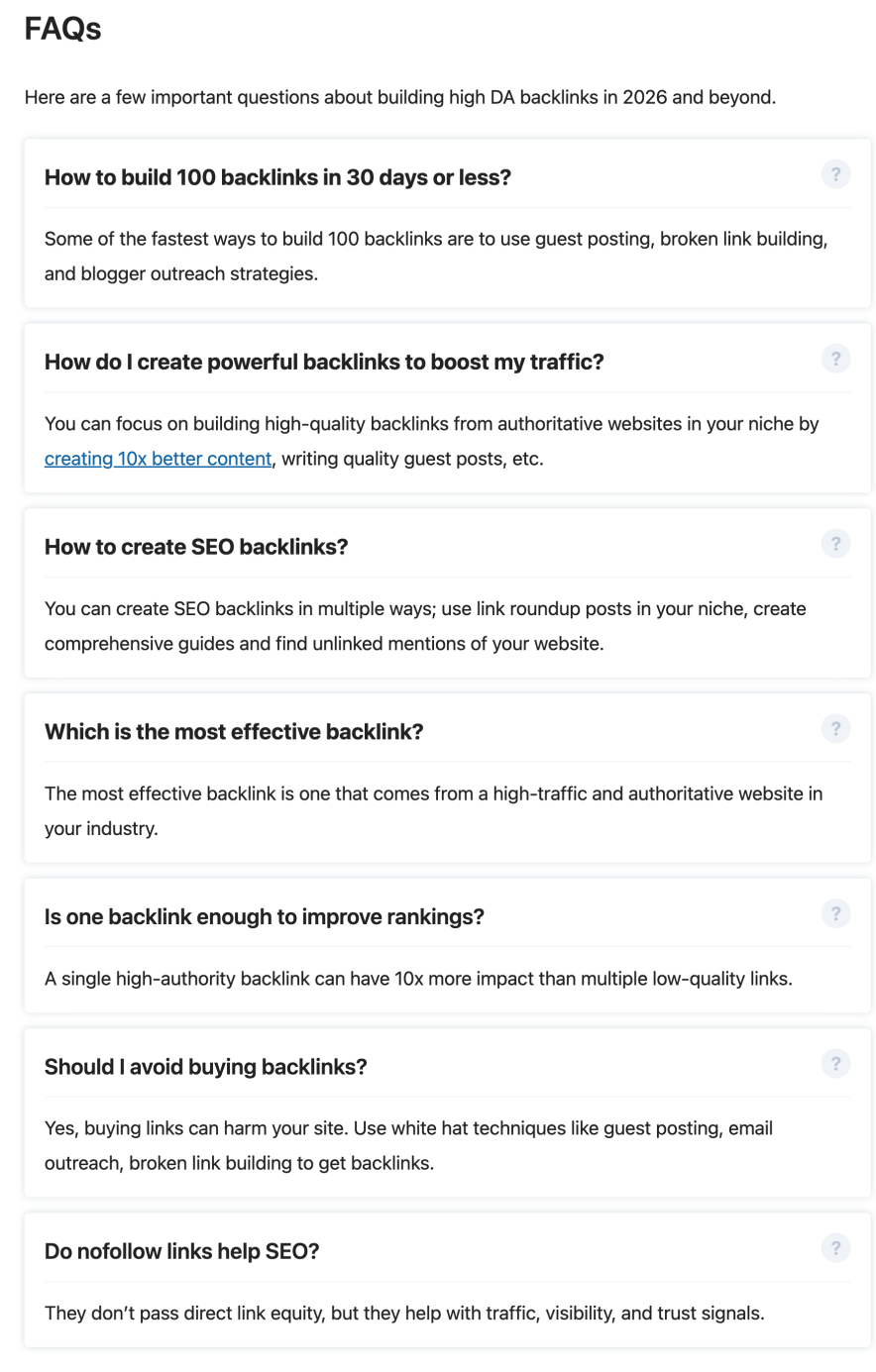
A well-optimized FAQ section helps your content rank for additional keywords you didn’t even target directly. Check our customized FAQ section created for this blog.
7. Full On-Page SEO Optimization
I see beginners are underestimating on-page SEO. This is where you directly help Google understand what your page is about and it still plays a huge role in rankings.
On-page SEO is not just about placing keywords. It’s about structuring your content in a way that is both search-engine friendly and user-friendly.
Here’s how I handle on-page SEO:
- I optimize the title tag with a clear primary keyword and search intent
- I write a meta description that improves CTR (not just keywords)
- I use a clean URL structure (short, readable, keyword-focused)
- I structure content using H1, H2, and H3 headings properly
- I place the primary keyword naturally in the first 100 words
- I include semantic terms related to the topic for better understanding
- I add internal links to related blog posts
- I optimize images with alt text and compressed sizes
- I used to add interactive tables and a call to action at the end

Why does this matter?
On-page SEO helps search engines clearly understand what your content is about, which keywords you target, and how useful your page is compared to competitors.
Even small on-page improvements (like better headings or meta description) can significantly improve click-through rate and rankings. I have made a detailed guide on On-Page optimization with all essential details.
8. Use AI Tools Smartly to Improve Your Workflow
AI has completely changed how I approach blogging and SEO. But I don’t treat it as a replacement for writing. I treat it as a support system to speed up research, planning, and optimization.
The real power of AI in SEO is not in generating full articles, but in improving efficiency and content quality.
Here’s how I actually use AI for SEO:
- Finding content ideas and keyword variations
- Understanding search intent patterns faster
- Creating content outlines and blog structures
- Improving readability and sentence clarity
- Identifying semantic keywords and related topics
Important thing I’ve learned:
Google doesn’t rank AI content! It ranks as helpful, experience-driven content. So I always make sure my final content includes my own insights, real examples and practical explanations.
AI SEO tools work best when they support my writing process and not when they replace my writing tone.
9. Build High-Quality Backlinks That Actually Matter
Backlinks are still one of the strongest ranking signals in SEO, but the way you build them matters more than ever.
Earlier, bloggers focused on quantity. Now, it’s all about relevance, authority, and natural link building.
My approach to backlinks:
- I focus on getting links from niche-relevant websites
- I prioritize editorial links over spammy submissions
- I create content that people naturally want to reference
- I use guest posting and outreach strategically, not aggressively
Example:
Instead of chasing random backlinks, I focus on writing in-depth guides that others in my niche can cite and building content that solves specific problems.
One high-quality backlink from a relevant site is far more powerful than several low-quality links. Check the screenshot to understand how this blog has built quality backlinks.

Backlinks don’t just improve rankings; they also build domain authority and trust signals, which help your entire website perform better in search results.
10. Analyze Your Competitors to Find Ranking Opportunities
One of the smartest SEO habits I’ve built over time is not guessing what works but studying what already ranks.
Your competitors are basically showing you what Google is currently rewarding, and you can use that insight to improve your own strategy.
Competitor analysis is not about copying! It is about finding content gaps, keyword opportunities, and better ways to present your content.
Here’s how I do it in practice:
- I search my target keyword and study the top 10 ranking pages
- I check what topics they cover (and more importantly, what they don’t cover)
- I analyze their content depth, structure, and readability
- I identify keywords they are ranking for using SEO tools
- I look at their backlink sources and authority level
What do I specifically look for?
- Weak or outdated content on page one
- Missing subtopics that users might expect
- Poor formatting or thin explanations
- Low EEAT signals (no experience, examples, or depth)
Why does this work?
Competitor analysis helps you reverse-engineer success. Instead of starting from zero, you already understand what Google considers relevant, what users are engaging with and where you can create a better, more complete version.
Some of my best-ranking articles came from simply improving on what was already ranking and not reinventing the topic.
The goal is simple: don’t just match your competitors! Aim to outperform them in clarity, depth, and usefulness.
11. Improve Website Speed & Core Web Vitals
If your website is slow, even the best content won’t rank well for long.
Google has made it very clear that page experience matters, and that includes Core Web Vitals like loading speed, interactivity, and visual stability.
What I focus on:
- Reducing large image sizes
- Using lightweight themes and clean code
- Minimizing unnecessary plugins
- Enabling caching and compression
- Using reliable hosting services with CDN
Why does it matter?
A fast website improves User experience, Bounce rate, Crawl efficiency and Overall rankings. Improving your site loading speed can noticeably increase engagement and reduce drop-offs.
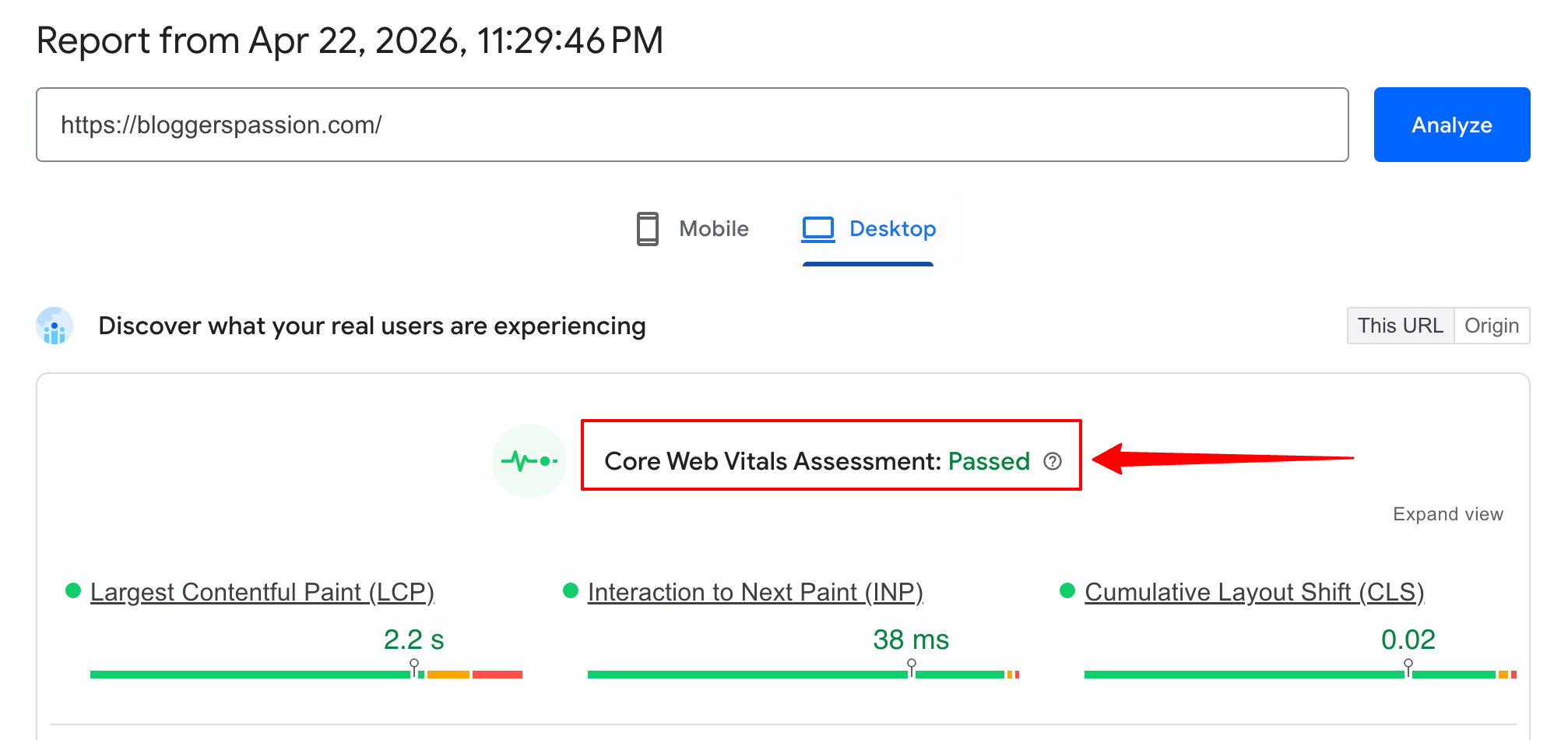
Look at my blog speed score passing core web vitals assessments!
12. Make Your Website Mobile-Friendly (Mobile-First Indexing)
Today, most users come from mobile devices, and Google primarily uses the mobile version of your site for indexing and ranking.
If your site’s mobile experience is poor, your rankings will suffer (even if your desktop version looks perfect)
What do I ensure on every blog?
- Responsive design that adjusts to all screen sizes
- Easy-to-read fonts and spacing
- Fast mobile loading speed
- No intrusive pop-ups blocking content
- Properly visible tables without any hiding
- Simple navigation and clean layout
Example:
I’ve seen pages with good desktop performance struggle simply because the text was too small on mobile, the layout broke on smaller screens and images were not optimized for mobile.
From my experience, optimizing for mobile-first indexing is no longer optional, it directly impacts how Google evaluates your entire site.
13. Build Strong Technical SEO Foundations
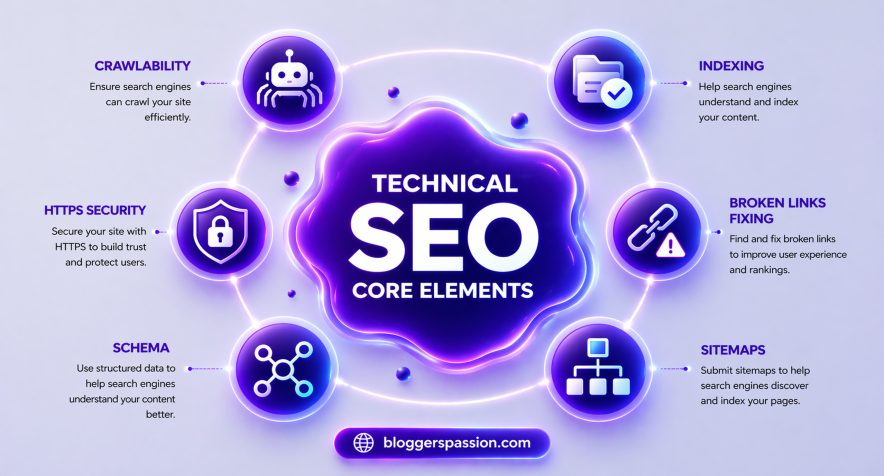
Technical SEO is often ignored by beginners, but it’s what ensures your content is actually discoverable, readable, and indexable by search engines.
Key areas I always focus on:
- Moving to HTTPS for security and trust
- Adding schema markup to make Google understand context better
- Removing dead links and toxic backlinks (if any) to boost crawlability
- Fixing crawl errors and broken pages
Why does this matter?
Technical SEO helps Google to understand your content better, index pages faster and show rich snippets in search results.
Even great content can struggle to rank if technical SEO is weak, because Google can’t properly crawl or interpret your site.
14. Create Custom 404 Pages for Better User Experience
Most bloggers fail to create a custom 404 for removed pages. It can actually improve SEO indirectly.
Instead of showing a dead “page not found” error, you can guide users back into your website.
What I include in a 404 page:
- Clear message (friendly tone)
- Links to important pages
- Search bar for navigation
- Suggestions for popular posts
Why does it matter?
- Reduces bounce rate
- Improves user retention
- Keeps visitors inside your site
From my experience, a well-designed 404 page can recover traffic that would otherwise be completely lost. Look at the customized design for 404 pages.

15. Use SILO Structure for Better SEO Organization
If you want long-term SEO success, you can’t rely on random blog posts. You need a structured content system, and that’s where SILO architecture comes in.
A SILO structure means organizing your content into clear topic clusters so Google can understand your website’s authority on a specific topic.

Example:
Main Pillar Page: Latest SEO Trends
Supporting Articles: Keyword Research Guide, On-Page SEO Guide, Backlink Building Strategies, Technical SEO Checklist, Best SEO Tools and more SEO related articles. All of these are internally linked together.
How do I implement the SILO structure?
- I group related topics under one main category
- I interlink all supporting posts back to the pillar page
- I avoid mixing unrelated topics within the same cluster
- I keep internal linking intent-based and structured
Why SILO structure work?
- Builds topical authority
- Helps Google crawl your site better
- Improves rankings across multiple keywords
- Strengthens internal link equity
Once I started using the SILO structure properly, my blog started ranking for multiple keywords instead of just one.
16. Track Keyword Rankings & SEO Performance
If you’re not tracking your SEO performance, you’re basically flying blind. SEO is not a “publish and hope” game! It’s a “measure and improve” game.
Tracking keyword rankings and performance shows you what’s working, what’s stuck, and what needs fixing.
How do I track the performance?
- After publishing a post, I monitor:
- Which keywords does it rank for
- How its position changes over time
- Clicks, impressions, and CTR
- If I notice a post stuck on page 2, I optimize it.
Example:
If a post is ranking #11 for a keyword, it’s very close to page 1. A few small improvements can push it into the top 10, where real traffic comes.
Keyword rank tracking helps you focus on opportunities instead of guessing what to do next.
Because in SEO, small data-driven tweaks often lead to big traffic gains.
17. Remove or Update Content That’s Not Performing
Low-quality or outdated content can actually hurt your overall SEO performance.
Instead of letting it sit there, you should either improve it or remove it.
How do I handle low-performing posts?
Every few months, I audit my content and ask: Is this still relevant? Is it getting traffic? Is it helpful compared to competitors?
If the answer is no, I take action:
- Update it with better information
- Expand it with more value
- Merge it with another related post
- Or delete it if it’s beyond saving
Example:
If I have a 500-word article that’s outdated and not ranking, I don’t just leave it. I either turn it into a 2,000-word high-quality guide or remove it completely.
This process is called content pruning and it helps to improve overall site quality, Boost rankings of stronger pages, and make your website more authoritative.
18. Learn SEO by Implementing (Not Just Reading)
You don’t truly learn SEO by watching videos or reading guides. You will learn it by doing.
Theory gives you knowledge, but implementation gives you results.
The biggest mistake beginners make is consuming too much and applying too little.
How do I implement SEO?
Whenever I learn a new SEO strategy, I immediately test it on my own site.
- I don’t wait for the “perfect plan.”
- I publish articles
- Experiment with keywords
- Try different formats
- Analyze what works and what doesn’t
Example:
Instead of just reading about “topic clusters,” I create them. Some things work, some don’t!
But every test teaches something valuable. SEO rewards action, not perfection. The faster you implement, the faster you improve and that’s how real growth happens.
Bonus Tip – How To Optimize Your Content AI SEO?
If you want to win in SEO in 2026, you need to optimize not just for rankings but for AI extraction.
AI search engines don’t just list pages. They scan, select, and summarize the best answers. Your goal should be simple: make your content easy to extract, trust, and cite.
What do I do for AI SEO?
When creating content, I structure it in a way that AI can lift answers directly.
- Answer the main question in the first 2–3 lines
- Use clear question-based headings (like H2s and H3s)
- Break content into small, scannable sections
- Add bullet points and step-by-step answers
- Include real examples and first-hand insights (EEAT)
I don’t just write for readers! I write for machines that summarize content.
Example:
If the query is “how to improve SEO rankings,” I start with a direct answer: “Improve SEO rankings by targeting low-competition keywords, matching search intent, and building high-quality backlinks.”
Then I expand each point in detail below. This makes it easy for AI to extract a clean, complete answer.
AI tools prefer content that is:
- Structured in Q&A format
- Easy to scan and summarize
- Factually clear and specific
- Backed by real experience and credibility
Don’t just try to rank, try to become the answer. In AI search, visibility doesn’t go to the longest content; it goes to the most extractable content.
Frequently Asked Questions
How long does SEO take to show results?
SEO usually takes 3 to 6 months to show noticeable results, depending on competition and consistency. New websites may take longer because they need to build trust and authority.
If you consistently publish optimized content and build backlinks, results will compound over time. SEO is slow at the start, but powerful in the long run.
What are the most important SEO tips for beginners?
The most important SEO tips for beginners are focusing on low-competition keywords, understanding search intent, and creating high-quality content.
They should start simple by targeting easy keywords, writing helpful content and optimizing titles and headings. SEO is not about tricks; it’s about solving user problems better than others.
What is the best SEO strategy in 2026?
The best SEO strategy in 2026 is combining high-quality content, search intent optimization, and AI-friendly formatting.
Wrapping Up
SEO in 2026 isn’t about chasing algorithms! It is about building topical authority and consistently publishing content that genuinely helps users.
From my experience, the biggest ranking improvements don’t come from one “trick.” They come from doing the fundamentals repeatedly:
- Choosing the right keywords
- Matching search intent
- Creating structured, high-quality content
- Improving and updating what already exists
When you do this consistently, something powerful happens like your content starts compounding, your search rankings stabilize and your traffic grows without relying on shortcuts.
What You Should Do Now?
Don’t try to implement everything at once! That’s where most bloggers fail. Instead, do this:
- Pick one low-competition keyword
- Create one genuinely helpful, well-structured article
- Optimize it for both users and AI search
- Track its performance and improve it
- Then repeat the process.
If you’re serious about growing your organic traffic, save this guide and use it as your working SEO tips checklist. If you need any help, catch me in the comment section.





![How to Level Up Your Blogging Skills [2026 Complete Guide]](https://bloggerspassion.com/wp-content/uploads/2019/12/blogging-skills-300x157.jpg.webp)


Nice article Anil, you have given extremely helpful SEO tips. And yes, we can’t avoid using plugins for better SEO analysis, especially for beginner bloggers. Great piece of information, liked reading it.