Note: This article is supported by funding from WordPress.com. The insights are based on our own research & not influenced by them.
Are you trying to decide between a platform that does everything for you (WordPress.com) or a server where you have total control (HostGator)?
When I first started testing these hosts, everything seemed good, but after monitoring them for a few days, the reality is quite different.
WordPress.com is a hosting service from the same company that contributed to the development of the most popular CMS called WordPress.org. On the other hand, we have the 2 decades oldest hosting service HostGator. It is loved by millions of entry-level sites.
So which one is better for you?
We will finalize the winner based on criteria such as performance, value, hosting features, and more.
So let’s begin the comparison.
Table of Contents
Which Offers Affordable Pricing & Long Term Money Value
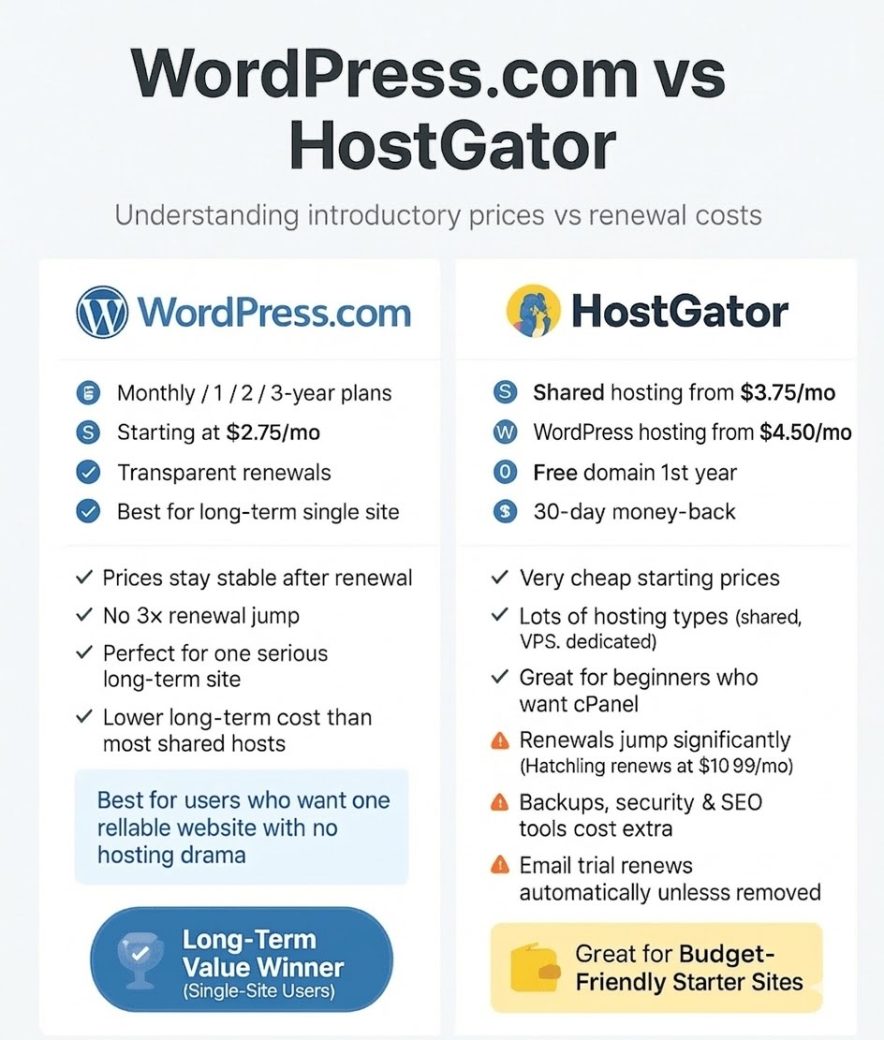
Pricing structures and renewal rates are crucial for long-term budget planning.
Now to the part that usually decides everything: money.
WordPress.com pricing and renewals
- Monthly, 1-year, 2-year, and 3-year plans
- Personal plan around $2.75/month
- Main advantage: transparent renewals. Pricing stays close to what you saw initially.
- No “triple the price after one year” shock most other hosts have
- Best when you want to host a single serious website and keep it for years
If your plan is:
“I just want one strong site that grows over time, no hosting drama.” Then this host often becomes cheaper in the long run, even if it looks similar or slightly higher at the beginning.
Explore WordPress.com [Get Extra 30% OFF]
HostGator pricing and renewals
- Shared hosting from $3.75/month
- WordPress hosting from $4.50/month
- VPS, reseller, dedicated and eCommerce hosting available for higher needs
- Free domain for the first year
- 30-day money-back guarantee
- But: renewal prices jump a lot, especially for shared plans. Example: the famous Hatchling plan renews at about $10.99/month
HostGator sits in the middle of the hosting market:
- Cheaper than some big names like GoDaddy
- More expensive than ultra-budget providers like IONOS if you look only at intro prices
You also need to remember:
- Some features are paid add-ons: advanced backups, extra security, SEO tools
- Professional email is added as a free trial then renews unless you remove it
So the real cost of this host is not just the promo price. You must factor in renewals and any add-ons you plan to keep.
Compared for Performance and Reliability:
WordPress.com stands out for its exceptional reliability and its ability to handle sudden, high-volume traffic spikes.
Here are the benchmarks I recorded during the testing:
| Metric | Scores |
| Average Uptime | 99.999% |
| Stress Test Score | 100% Score |
| Response Time (Stress Test) | 5.5 ms |
| High Burst Capacity | Supported |
Our stress test, involving 26k bulk traffic, confirmed that WordPress.com’s servers are well-equipped for burst scaling, managing to respond with a very fast 5.5 ms time without any crashes or downtime.

This level of burst capacity is a major advantage for sites that may experience sudden popularity or traffic surges.
Here’s the average page loading time: 3.66s without a third-party CDN, its performance is extremely strong in the USA and UK, where it has its own data centers. For other regions, integrating a CDN like Cloudflare Enterprise is recommended for better performance.
| Location | Average Page Loading Time |
| USA | 2.8s |
| UK | 3.4s |
| Average (Global) | 3.66s |
HostGator benchmarks surprised me a lot because most of the entry level hosts don’t usually perform well.
| Metric | Scores |
| Uptime Guarantee | 99.9% |
| Tested Uptime | 100% |
| Average Response Time | 112.04 ms |
| Largest Contentful Paint (LCP) | 0.793s |
| Fully Loaded Time | 0.821s |
Their servers show 100% uptime during testing. The average response time of 112.04 ms is considered very good, and its fully loaded time of 0.821s is excellent for SEO and user satisfaction.
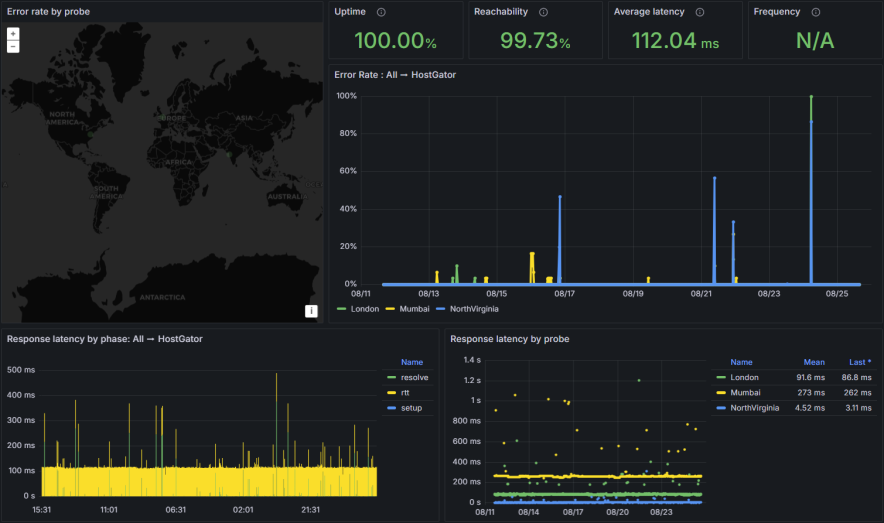
HostGator also successfully handled a stress test of 50 simultaneous virtual users, maintaining a stable 21 ms response time, proving its suitability for small to medium sites with occasional traffic increases.
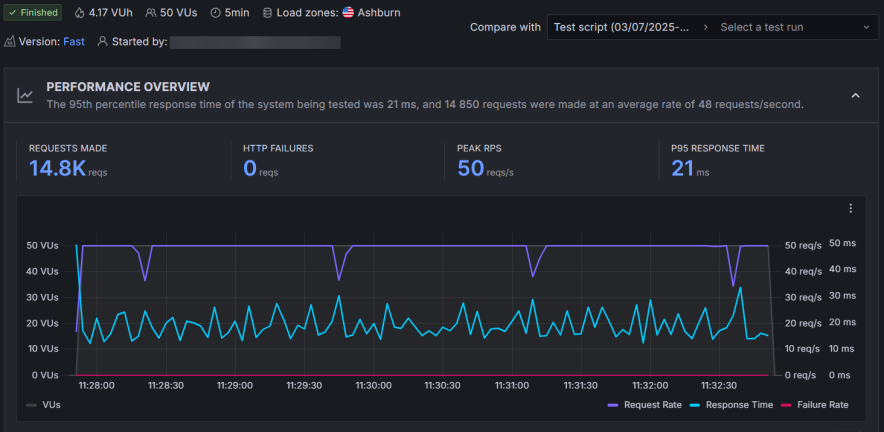
However, it might now be suitable for high-growing sites where bulk traffic comes in large amounts. WordPress.com handles 26k bulk traffic easily and shows a great response time.
The main limitation for HostGator is its server location: its servers are only located in the US. For reliable global performance, users will need to enable Cloudflare.
Hosting Features Comparison:
| Feature | WordPress.com | HostGator |
|---|---|---|
| cPanel | Not available | Available (Traditional cPanel) |
| AI Website Builder | Available | Not supported |
| Storage | 6 GB – 350 GB | 10 GB – 100 GB |
| AI Assistant | Included | Not included |
| Free Domain (1st Year) | Yes | Yes |
| Free SSL | Yes | Yes |
| Automated Daily Backups | Free in Higher Plans | Yes (Daily) |
| Staging Tool | Available | Available (WordPress plans) |
| Free CDN | Yes (Basic) | Yes (Cloudflare) |
| High Burst Capacity | Supported | Not explicitly supported (Good stress test results) |
| Money Back Guarantee | 7-14 Days | 30 Days |
| Global Data Centers | USA, UK (Own DCs) | Only in the US |
| Number of Sites | 1 per license | Up to 100 (in higher WP plans) |
Key Hosting Features Takeaways:
- For Beginners: WordPress.com offers an AI Website Builder and AI Assistant to help with design and technical queries.
- For Control: HostGator gives users access to the traditional cPanel but WordPress lacks it.
- For High Traffic: WordPress.com has a unique advantage with High Burst Capacity and resource auto-scaling.
- For Multiple Sites: HostGator higher-tier WordPress plans allow you to host up to 100 websites in a single license, whereas WordPress.com limits you to one site per license.
Before deciding on any of them, it is best to review their features carefully. I personally prefer WordPress.com for those who are beginners and just want to install a single site. The AI website builder saves a lot of money.
However, HostGator can work too if you’re looking to setup multiple sites in a single license.
Ease of Use:
WordPress.com keeps things very straightforward: They don’t offer cPanel at all. You get a clean, focused dashboard.
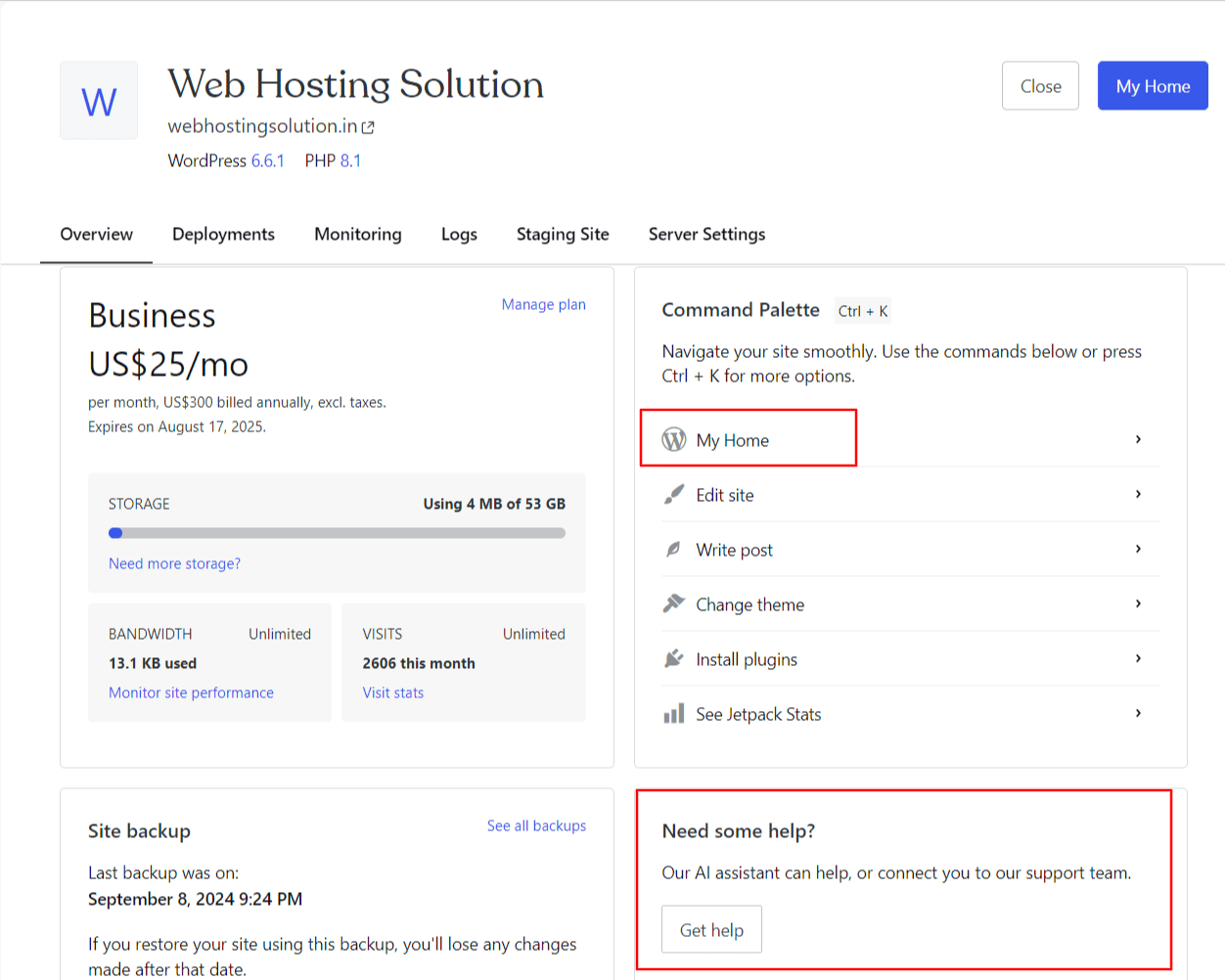
Everything important is grouped neatly:
- Backups
- Data center selection
- WordPress admin shortcut
- Security and performance settings
They intentionally avoid clutter. You do not see twenty random icons or technical terms.
For someone who only wants WordPress and nothing else, WordPress.com feels like using a well-organized app, not a server panel.
HostGator takes a more traditional path:
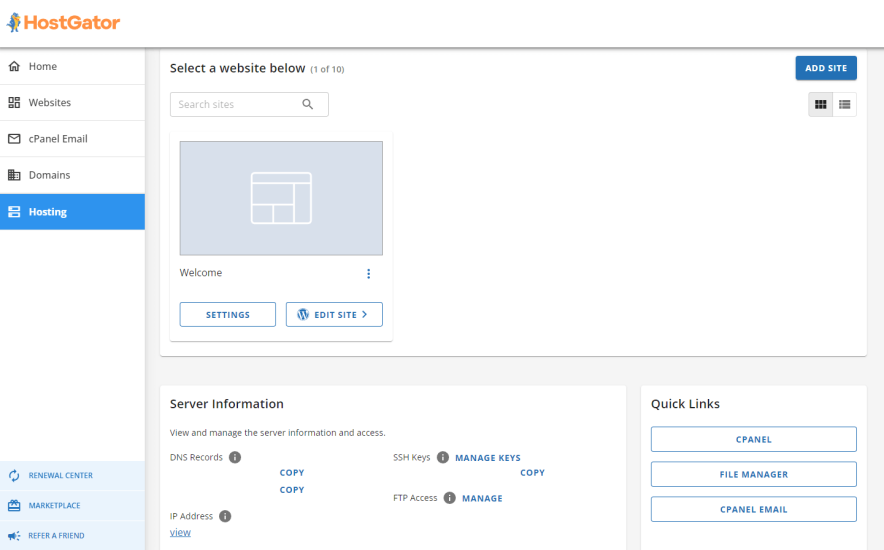
- You get a custom dashboard plus full cPanel access.
- The dashboard lets you:
- Install WordPress in one click
- Manage SSL
- Create email accounts
- Access your file manager and databases
- cPanel sits behind the scenes for full control. From there you can:
- Manage domains and subdomains
- Install apps via Softaculous
- Work with advanced settings
Complete beginners might feel a little overwhelmed when they first see cPanel. Yet, if you’ve ever used shared hosting before, HostGator’s interface will feel familiar and comfortable.
Customer Support
Both providers offer 24/7 support, but with different availability and response times.
| Support Channel | WordPress.com | HostGator |
|---|---|---|
| 24/7 Live Chat | Available | Available |
| Phone Support | Not Available | Available (Not in entry plans) |
| Email/Ticket | Via Live Chat/AI Assistant | Not available by default |
| AI Assistant | Available (Highly skilled) | Not available |
| Average Response Time | ~10 minutes (Priority in higher plans) | Minimal waiting time |
- HostGator: Offers 24/7 Phone Support (though not on entry plans) and has a fast live chat response time.
- WordPress.com: Relies solely on Live Chat and its AI Assistant. While the technical help is great, the average response time of 10 minutes is slower than HostGator’s.
Final Verdict: Which Host Should You Choose?
Choose WordPress.com if:
- You need high reliability and stability for burst traffic and high-demand situations (due to its high burst capacity).
- You want a predictable long-term budget with transparent renewal prices that don’t double or triple.
- You are a beginner and want a simplified, fully managed platform with an AI website builder and assistant.
- Your primary audience is in the US/UK, where its own data centers provide excellent performance without extra CDNs.
Choose HostGator if:
- You want the lowest entry price and are comfortable with price increases upon renewal.
- You need to host multiple websites under a single license.
- You prefer the traditional cPanel for advanced hosting management.
- You require 24/7 phone support as a key customer service channel.
FAQs:
Which one is better for complete beginners?
If you are a complete beginner who only wants WordPress and no other apps then WordPress.com feels simpler. No cPanel, no clutter, everything is designed around WordPress. If you are willing to learn a bit and want a more “classic web hosting” feel then HostGator is beginner-friendly too, but the presence of cPanel and add-ons might feel like extra steps at first.
Which host handles high traffic better?
WordPress.com is built with high burst capacity in mind. It can automatically scale resources during traffic spikes. It performed very well in stress tests with large amounts of traffic without crashing. On the other hand, HostGator handled 50 simultaneous users perfectly in testing, which is good for small to medium traffic spikes. For serious viral traffic or rapidly growing sites, WordPress.com is the safer pick.
Do both hosts include a free domain and SSL?
Yes, both do. Just remember that domain fees are usually non-refundable if you cancel.
Explore More: