

Key Takeaways
- Title tags are the main headlines people see on Google before they visit your page
- A powerful SEO title = more clicks, visibility, and traffic
- Best length: keep titles short and clean (around 50–60 characters) so they don’t get truncated
- Not the same as H1: title tags show in search results; H1 headings appear inside the page
Want more search traffic? It starts with better title tags.
Your SEO title is the first thing people see on Google. If it’s weak, they won’t click, no matter how good your content is.
What Are SEO Title Tags?
Title tags are the clickable headlines shown in search results, browser tabs, and social media shares. An SEO-friendly title clearly tells what the page is about.
Here’s what SEO titles look like in Google;
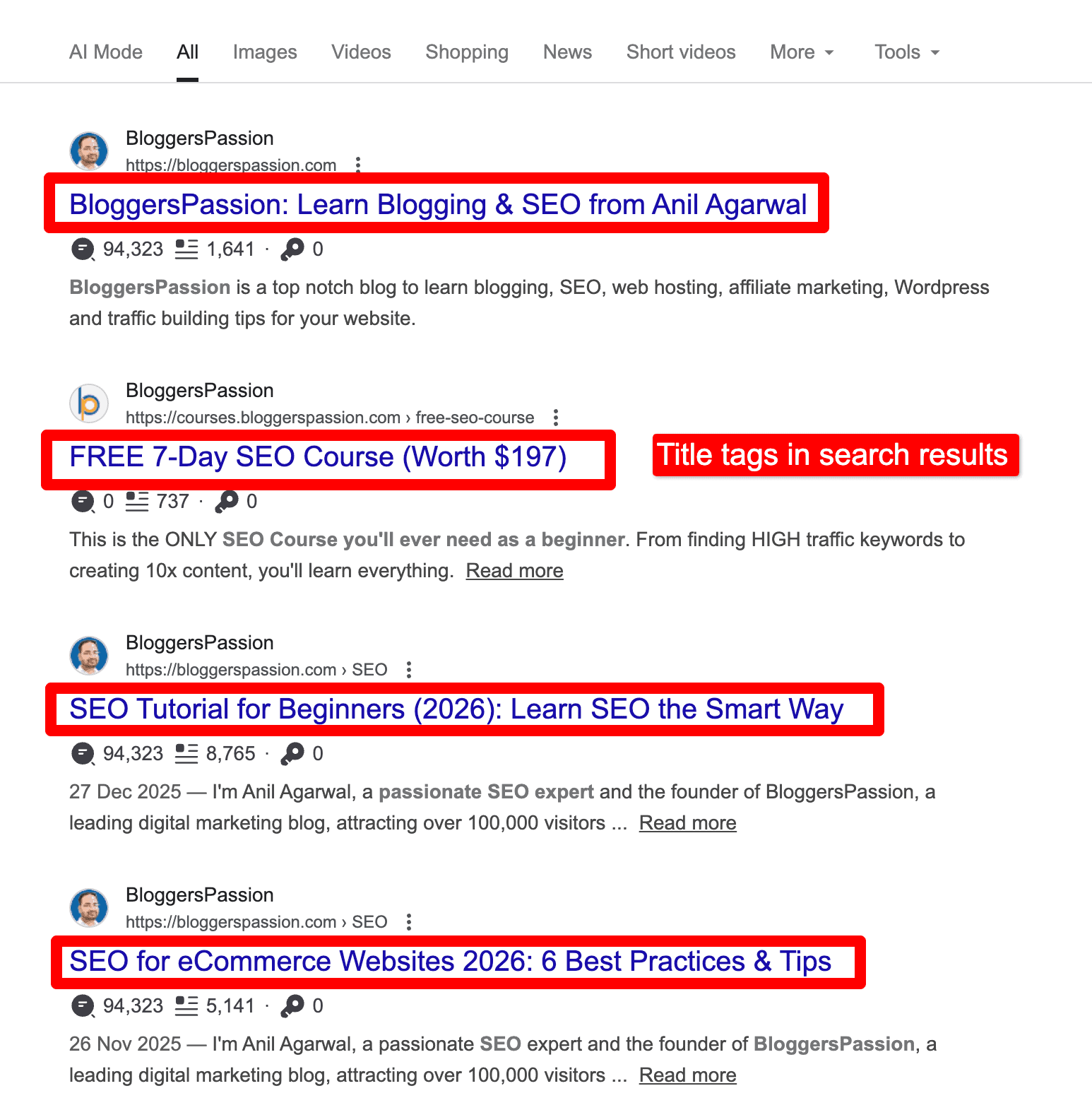
Your goal when writing title tags is simple: keep them relevant, accurate, and clear.
Are title tags still important?
Yes, they are extremely important, as titles are the first thing people see.
Title tags are important because they:
- Explain what the page is about to users and search engines
- Give users a quick preview before they click
- Help search engines understand the page’s topic and context
Did you know that 8 out of 10 people read your headlines first before they even decide to read your blog posts? That’s the reason why you should craft high-quality and compelling titles for your blog posts.
Let’s now talk about how you can create SEO title tags for your pages to improve your organic rankings in 2026 and beyond.
6 Best Practices for Writing SEO Titles In 2026
1. Write “unique” titles
“Uniqueness” in titles is non-negotiable in 2026.
One page = one title = one intent
Google sees your title tag as a strong relevance signal. If multiple pages share the same title, Google gets confused. Avoid AI-generated duplicate titles. Even if you’re using AI, tweak titles manually to make them unique.
Every page on your site should have one clear and unique title that’s relevant to your topic.
Write titles for humans first, but make them easy for search engines to understand. Keep them accurate, specific, and match the page content. Irrelevant or generic titles hurt rankings and clicks.
Also, keep an eye on your internal linking. If two pages have similar titles, Google may treat them as duplicates, even if the content is different.
2. The length of your titles matters
One of the most important things for SEO friendly titles is using an optimal title length.
Google often shows the first 50 to 60 characters of a title tag. There’s no thumb rule, though, but it’s a smart idea to keep your titles short and compelling.
- Title Maximum Length: 580 pixels or 60 characters.
- Title Minimum Length: 200 pixels or 30 characters.
If your title gets cut off from search results, your click-through rate will go down. Simple as that.
In 2026, Google still displays about 50–60 characters of a title, but what really matters is pixel width, not character count. Titles that exceed ~580 pixels are truncated.
Another smart thing to do is to avoid characters that usually take up more space. For instance, a character like uppercase “W” is wider than a lowercase character like “e”, “l”, “i”, “t”, and so on.
Have a look at the screenshot below to understand it better:

As you can see from the above example, width matters a lot. That’s why smartly use characters that don’t take up more space while displaying in search results.
Avoid ALL CAPS at all costs. They’re harder to read, take up more space, and get cut off faster.
Quick tips:
- Focus on pixel width, not just character count
- Put the main keyword at the start of your title
- Cut filler words like “best”, “ultimate”, “complete” if space is tight
- Test titles with a SERP preview tool before publishing
3. Stop using “stop words”
Stop words are common words like a, an, the, and, or, with, etc. Search engines often ignore them to save space and process pages faster.
In 2026, Google is smarter, but the title space is still limited. Every extra word you add reduces visibility and CTR.
For example:
- Instead of “How to Write the Best SEO Titles for Your Website”
- Write, “How to Write SEO Titles That Get Clicks”
If you’re wondering about different types of stop words to avoid in title tags, here’s a list of some.
- A
- And
- But
- So
- On
- Or
- The
- Was
- With
- much
Check out the complete list of stop words in SEO here.
Try to avoid using stop words as much as you can, especially in title tags, to save more space.
Also, avoid using these stop words in your URLs, and keep them short and sweet by keeping your primary keywords in mind. Here’s what it looks like;
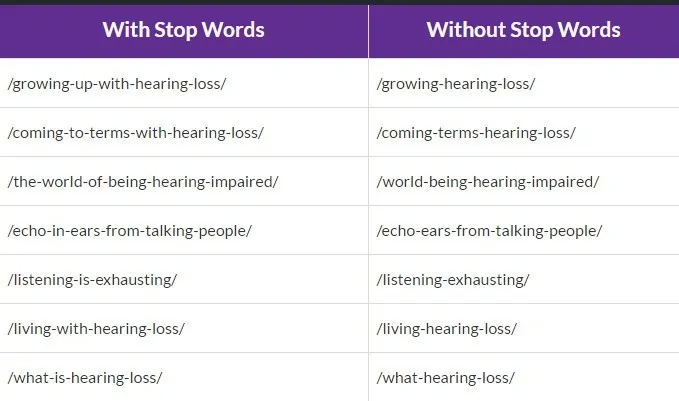
As you can see above, without stop words, your URLs will look SEO-friendly and great for user experience.
Instead, what else can you do?
You can try these tips;
- Remove stop words only if the title still sounds natural
- Prioritize clarity over jargon
- Use related keywords (not fluff) to improve relevance and clicks
- Keep URLs short and readable without filler words
4. Create headlines that get more clicks
Ranking is pointless if no one clicks.
Your title has one job: make the searcher click on your link.
In 2026, click-worthy titles still come down to three things:
- Curiosity
- Benefit
- Emotion
Use at least one. Two is even better.
Let’s briefly talk about each one of them with good SEO title examples.
#1. Curiosity: Create a small knowledge gap that makes people want to click.
Example: SEO Trends in 2026: What’s Actually Working Right Now?
If someone wants SEO rankings, they’ll click to find out.
#2. Benefit: Tell readers exactly what they’ll gain. Numbers, outcomes, or results work best.
Example: Websites That Pay $50–$200 Per Post (Updated List)
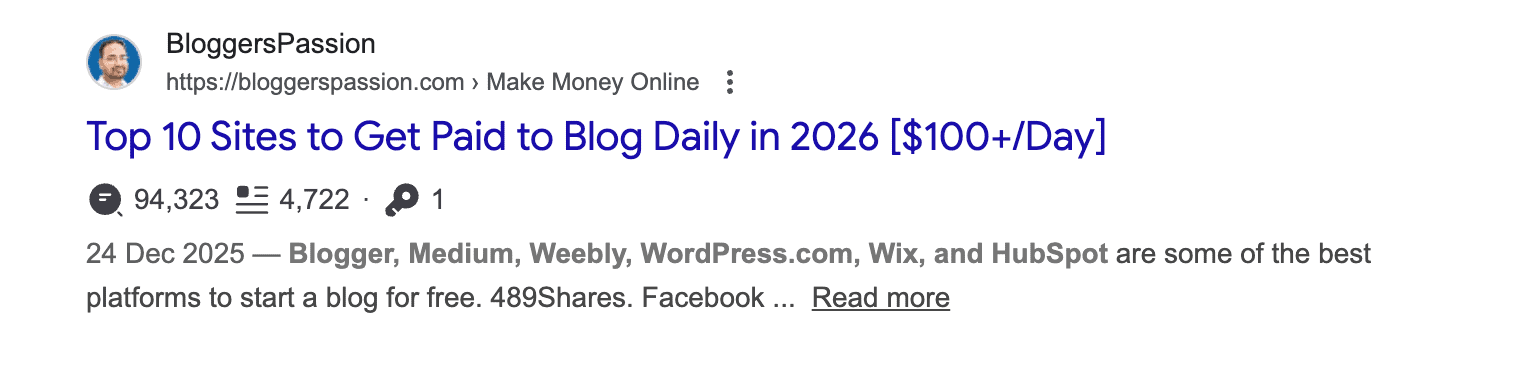
As you can see from the SEO title examples above, it’s a benefit-oriented title that says “Pay $50 to $200 Per Post,” which is really interesting, especially for those searching for blogging sites that pay.
#3. Emotion: You can tap into urgency, fear, or excitement, without using clickbait titles.
Example: Why Most New Websites Fail in 2026 (And How to Fix Them)
5. Use this simple 3-step SEO title framework
If you want titles that rank and get clicks, follow this framework. It works in 2026.
- Match the search intent, not the keyword
- Add a CTR hook that AI can’t ignore
- Reverse-engineer the top 10 results
Step 1: Focus on the search intent, not the keyword
Before writing any title, ask: Why is someone searching this?
Are they looking to learn, compare, fix a problem, or take action?
Your title should answer that intent instantly.
If the intent is unclear, Google will rewrite your title or ignore it.
Example intent signals:
- Learn: How, Why, Guide
- Compare: Best, Vs, Alternatives
- Fix: Fix, Avoid, Mistakes
Step 2: Add a CTR hook that AI can’t ignore
Adding strong hooks to your titles can boost your CTR (click-through rate).
Add ONE strong hook:
- Specific outcome (Increase CTR by 32%)
- Mistake / contrast (Most New Websites Fail Because…)
- Authority signal (Based on 1,000+ Pages)
Step 3: Analyse the top 10 search results for your topic
Last but not least, keep an eye on all the top 10 ranking titles for the topic you’re writing about. Find out if they are using how-to’s, list posts or something else. Did you notice anything in common? Craft your titles accordingly.
Important tip: Put important keywords first
Do you want to know the BEST SEO tip for writing SEO friendly page titles? Use your primary keyword first.
For example, if you are targeting a keyword like “belly fat reduction tips”, there are several ways to craft SEO titles including;
- Belly fat reduction tips: How to lose tummy fat fast
- How to lose tummy fat: Belly fat reduction tips
The first one works better because Google and users see the topic instantly.
Keywords still matter in 2026, especially when they appear early in the title. It helps search engines understand the page faster and improves clicks.
Just don’t overdo it. One main keyword is enough. Keyword stuffing kills readability and CTR.
6. Add freshness + power words (the right way)
Google ALWAYS favors content that feels current and up-to-date. Your title should signal that “freshness factor” instantly.
Add freshness using:
- The current year (2026)
- Words like updated, latest, new
- Covering trending topics in your niche
Next, use power words, but don’t overdo it. They should add value, not hype.
Good power words:
- Simple, proven, practical
- Fast, easy, effective
- Mistakes, secrets, framework
Here is an example of a title with freshness and powerful words:
How to Make Money With AI Starting from Scratch in 2026 [8 Easy Ways]
Why it works:
- Current year = freshness
- Clear benefit = clicks
A Free Tool to Generate SEO-Friendly Titles
Semrush offers a free and beginner-friendly SEO Title Generator that makes writing titles much easier.
You just enter a keyword or topic (like how to write SEO titles), and the tool instantly suggests multiple title ideas.
All the title suggestions are grouped into How-to guides, questions, listicles, and creative angles, so you can quickly pick what fits your content.
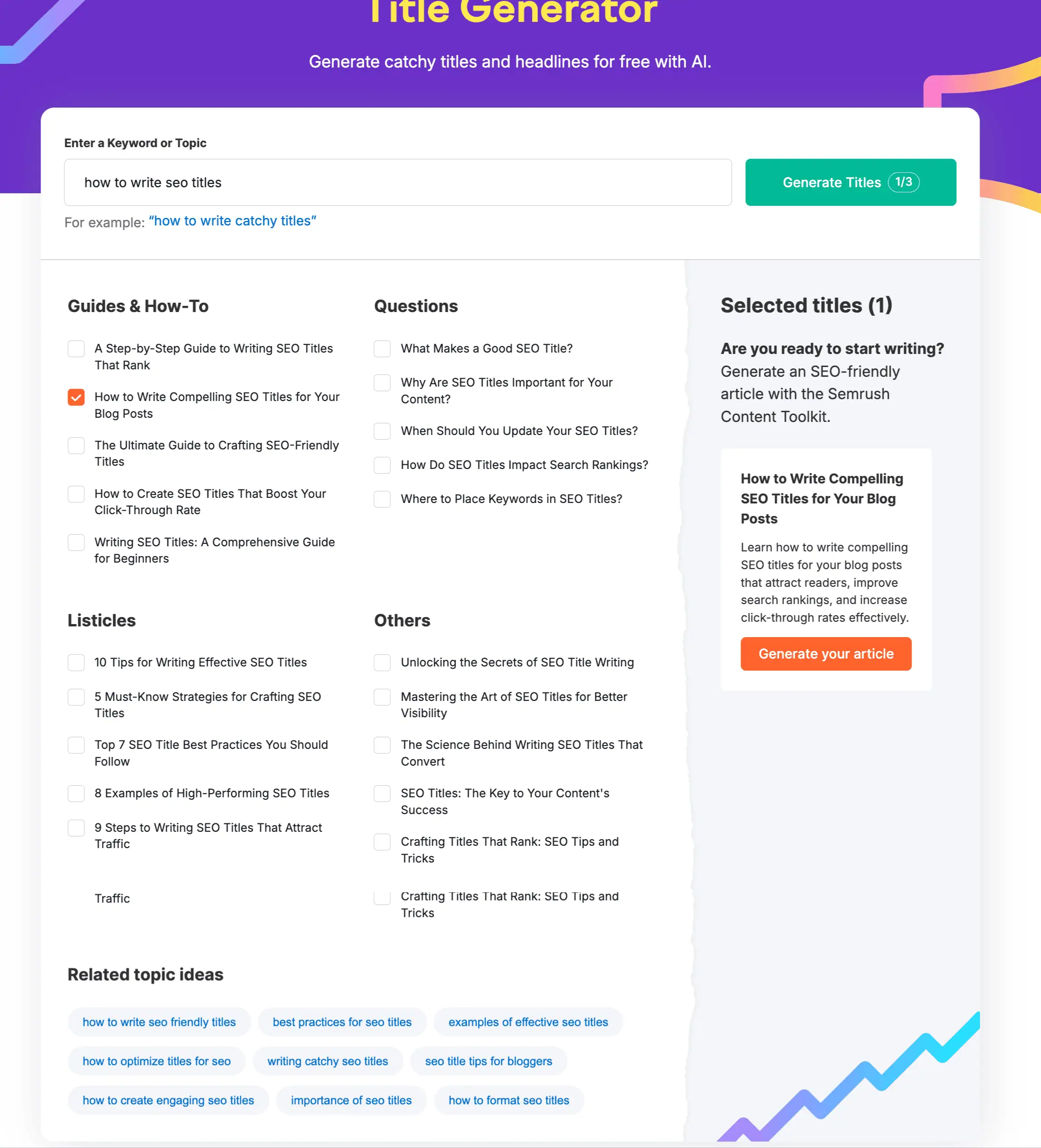
The tool also shows related topic ideas, which helps if you’re planning content clusters or future posts.
If you struggle with title writing or want quick ideas without spending too much time, give this tool a try, as it’s simple, practical, and free to use.
SEO Title Examples
Crafting a compelling SEO title is the key to getting more traffic to your website from search engines. A properly optimized title provides relevant context about your content to search engines. Also, it entices search users to click on your links.
Here are some examples of effective SEO titles across different content formats:
1. Listicle Title
A listicle title is often structured as a numbered or bulleted list format.
Listicle Title Examples:
- 300+ Free Guest Posting Sites Where Can Submit Guest Posts
- 110 Blog Names by Niche to Help You Choose the Best One
2. Review Title
A review post offers a detailed breakdown of a product or service.
Review Title Examples:
- Elementor Review 2026: Sharing our Experience with Elementor
- Semrush Review 2026: My Experience & Results – Worth It?
3. Comparison Title
A comparison post title analyzes the similarities and differences between two or more products or topics.
Comparison Title Examples:
- GeneratePress vs Divi: Which is Best in 2026?
- Hostinger vs HostGator: Which Web Host is Best in 2026?
4. Guides Titles
A guide provides detailed information on one topic, often offering step-by-step instructions, practical tips or expert advice.
Examples:
- Stop Words In SEO 2026: An Expert Guide on Their Impact & Best Practices
- SEO Case Study 2026: How Long Does It Take to Rank for a Keyword?
5. Tutorial Titles
A tutorial shows people how to perform a specific task, such as installing WordPress or starting a YouTube channel, often with clear explanations.
Examples:
- How To Install WordPress on Hostinger? Step-by-Step Tutorial For Beginners
- Step By Step SEO Tutorial For Beginners in 2026 (Our Traffic Stats Included)
Bonus Read: Ending your post feels confusing? Learn how to write a blog post conclusion that actually works.
How to Write an SEO-Friendly Title Tag? A Quick Checklist for 2026
Here’s a handy checklist on creating a good SEO title tag that attracts clicks and improves your search engine rankings.
- Include your main keyword (naturally)
- Place the primary keyword at the beginning
- Keep the title under 60 characters (ideal: 50–55)
- Check how it looks in Google SERP preview
- Make sure the title clearly matches the page content
- Write for humans first, search engines second
- Make the title click-worthy, not boring
- Use clear intent words (best, guide, tips, list, how to)
- Add a year when relevant (2026, 2027)
- Avoid ALL CAPS or excessive symbols
- Match the title with the H1 (but don’t copy it exactly)
- Remove unnecessary words like “welcome to” or “official site”
- Update old titles that are not getting clicks
Consider using title generator tools or brainstorming different headlines to come up with unique and engaging titles.
Difference Between Title Tag and H1 Tags
Title tags appear in search results and browser tabs, while H1 tags are the main visible headings users will see on your webpage.
Here’s a simple breakdown of the differences between title tags and H1 tags.
Title Tags
Title tags are essential for SEO and user experience. This is because title tags appear in search engine results and browser tabs, summarizing the page’s content.
For example, a page about “Quora stats” might have a title tag like “Latest Quora Statistics In 2026.”

As you can see above, the title tag appears prominently in search engine results pages (SERPs). If your title tags are not engaging, you may get low click-through rates (CTR), which can negatively impact your search engine rankings.
H1 Tags
H1 tags are the most important headings on a web page. They are used to indicate the main topic or title of the content. While H1 tags don’t appear directly in search engine results pages (SERPs), they are essential for proper on-page SEO and user experience.
For instance, the H1 tag for the same page might be “Quora Statistics (2026): Complete Insights Quora Users and More”.
The H1 tag provides a more detailed description of the page’s main topic than the title tag. This helps both users and search engines quickly understand the content.
Final Thoughts On SEO Titles
SEO titles are simple but powerful. Make sure to spend some time crafting them, as they matter a lot.
Keep them short (under 60 characters), clear, and focused on one main keyword. Put the most important keyword first, write for humans, and avoid over-optimization.
A good title helps Google understand your page. A great title makes people click.
Have questions about writing better SEO titles? Drop them in the comments.
FAQs About SEO Title Tags
Here are some of the most frequently asked questions around title tags.
Google may not rank your titles if they’re too long (more than 60 words), the content is weak, or your page lacks quality backlinks.
Title tags are the names of your web pages that appear in search results and the browser tab, while heading tags are used to organize and break up the content on your page, making it easier to read.
Google currently shows up to 580 pixels on a desktop. So it’s better to keep your title characters under 50 to 60 characters.
You can use Google Search Console (GSC) to see which titles trigger impressions, clicks, and average positions for your keywords under the Search Results → Queries report.
You should NEVER over-optimize your titles with too many keywords. That being said, you can use ONE primary keyword for each title.
Put the keyword first, match search intent, add a clear benefit, and avoid fluff.
Google rewrites title tags when your original title is too long, misleading, or doesn’t match the page content.
An SEO title is the primary heading tag that appears in search engine results pages (SERPs).







Hi Anil,
Your post is thorough and fits well as a complete guide to seo-friendly headlines. Blogging and content marketing success requires knowledge in SEO. However, one doesn't have to be an expert to implement it correctly. Knowing the fundamentals will keep you going as you home your skills. Your articles is breathtaking in this regard.
However, Toast SEO is fantastic in helping bloggers optimize their blog posts including headings. I use both Toast and Coschedule Headline Analyzer for gauging my title length.
Thanks a lot for sharing!