


Product Name: DreamHost
-
Performance
(4.8)
-
Hosting Features
(4.2)
-
User Experience
(4.7)
-
Support
(4.5)
Summary
DreamHost hosting is reliable and shows amazing results related to performance, support, features, and so on. Although there are some hidden costs involved, by careful analysis, you can grab the right plan.
Their performance is good, but you must enable caching either by WordPress caching plugin in starter plans, or else you can grab DreamPress plans, which support inbuilt caching & CDN.
Key hosting features like Daily Backups, Simple hosting dashboard, Phone support, eCommerce functionality, etc, are all included.
Overall, DreamHost is a considerable option for small sites to growing ones. The security is not that great, so I don’t think this host will suit enterprise-level sites.

Table of Contents
My Evaluation: DreamHost Pros and Cons
DreamHost is a good fit for beginners and growing sites whose main goals are affordability and good performance, especially in the USA, UK, and CA regions.
They offer plenty of freebies, with an AI website builder responsible for quick store and blog setup. The customer support team is fast and highly knowledgeable.
The scalability is great; you can host a site with up to 1920 GB of Storage. One can choose hosting from different servers, including Shared to Dedicated.
DreamHost’s first plan, “Hosting Launch,” is not good at all. You should choose either the Growth plan or optimized DreamPress plans to handle a high-traffic site.
One should be aware that migration from other hosts done by experts costs $99 per site, and there are some hidden costs involved related to email accounts, security add-ons, and phone support.
| Pros | Cons |
| Offers a 100% uptime guarantee | Only offers 3 dedicated data centers across the globe |
| Good speed in the USA, UK, & Canada regions | Free CDN & Built-in Caching features are not available in the starting plans. Users have to depend on caching plugins for site performance enhancement |
| AI Website builder is available for free of cost for quick store and blog setup | Launch plan doesn’t offer better money value |
| Free migration is possible through a WordPress plugin | NVMe based storage is only available in VPS plans |
| Shows good performance results without turning on the CDN | “Migration done by experts” includes extra charges – $99/per site |
| Phone support is available | Basic security perks like Malware scanning is available through paid-addon |
| Lot’s of customer support options are there: Live chat, Ticket, AI assistant, etc. | Doesn’t support other CMS except WordPress |
| Customer support agents respond fast and solve queries in a practical approach | Emails are not free in some plans |
| They used to offer 97 days refund policy but now they changed it to only 30 days |
DreamHost Hosting: The Introduction

DreamHost is a Los Angeles based web hosting company founded in 1996. They have been dealing in web hosting & domain registration services for almost 3 decades.
It is often preferred by beginners or small sites, but they have plans for all kinds of websites. Their AI website builder promotes quick site setup & creation.
Here you’ll find Shared Hosting, WordPress Hosting, VPS Servers, Dedicated, and Cloud servers.
Their primary data centers are situated in the USA, and hence, it is widely picked by USA users, but now they are expanding their reach globally by offering a free CDN service.
Their entry level plans lie in an affordable range which includes a lot of freebies, including free domain, free backups, free SSL, and more.
Compared to others, DreamHost offers a phone support benefit, a 100% uptime guarantee, and the longest refund policy of 30 days.
Performance Tests – Is DreamHost Fast?
During multiple tests of DreamHost, I encountered both bad and good results… Yes, there’s good news, but also bad news.
My DreamHost Test site configuration:
- Plan: WordPress Hosting Growth
- Page Size: 2.69 MB (Medium sized)
- CDN: Not Enabled (Default)
To make this test 100% unbiased, we tested the efficiency of DreamHost servers multiple times and performed a total of 6 types of tests.
1. DreamHost Speed Test:
Scenario A: CDN – Disabled, Caching – Disabled
| Location | Speed Score | Page Loading Time |
| Asia | 60% | 4.2s |
| UK | 75% | 3.0s |
| USA | 95% | 2.0s |
| Australia | 73% | 3.5s |
| Canada | 100% | 1.8s |
| Brazil | 55% | 5.0s |
| Average | 76% | 3.25s |
It can be clearly seen that DreamHost’s servers performed below average without CDN and caching. As of 2026, for good search engine rankings and a good user experience, your page should load within at least 3.0 seconds.
Scenario B: CDN – Disabled, Caching – Enabled
Since a built-in caching feature is absent, I enabled basic optimizations like caching and CSS, JS, Images, etc., on my DreamHost site using speed performance plugins like Auto-optimize & W3TC. When I ran the tests again using GTMetrix, the results were as follows:
| Location | Speed Score | Page Loading Time |
| Asia | 66% | 3.9s |
| UK | 77% | 2.7s |
| USA | 97% | 1.5s |
| Australia | 75% | 3.0s |
| Canada | 100% | 1.1s |
| Brazil | 61% | 4.6s |
| Average | 79% | 2.8s |
The average loading time decreased from 3.25 seconds to 2.8 seconds, which shows an improvement in DreamHost’s page loading time.
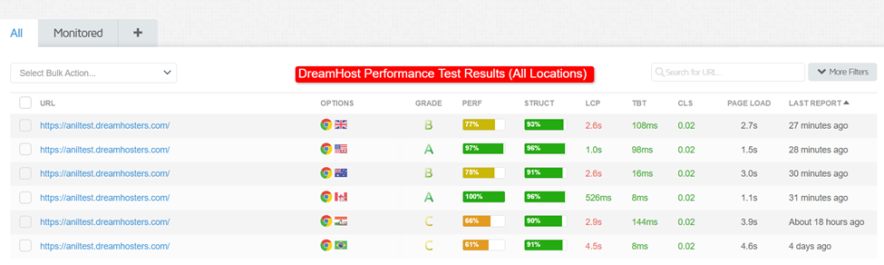
Overall, you cannot get a good page speed score with DreamHost servers without enabling a CDN & Caching.
Since DreamHost only offers data centers in the USA & UK, you will get a good speed score in these locations even without a CDN, but you will see slow loading speeds in distant countries. For example, the loading time turned out to be 3.9 seconds in Asia and 4.6 seconds in Brazil, which is below average.
To deal with such performance problems, either you have to subscribe to their built-in CDN & caching plans (that are expensive) or you have to take help from WordPress performance optimization plugins.
The satisfaction with DreamHost speed test results is 50%. CDN enabled plans are expensive, and it can be difficult for a beginner to optimize performance themselves using caching plugins. Therefore, DreamHost servers should be optimized by default.
2. Server Response Time Test:
During the page loading test, we have also recorded the DreamHost server TTFB or Server response time from various locations. Here are the benchmarks:
| Location | TTFB |
| Asia | 144 ms |
| UK | 108 ms |
| USA | 98 ms |
| Australia | 16 ms |
| Canada | 8 ms |
| Brazil | 8 ms |
| Average | 63 ms |
Looks like DreamHost servers react very quickly as soon as the browser sends them a page request. The 63 ms average TTFB is a good sign.
3. Core Web Vitals Test:
You cannot achieve the top rankings in the Google search engine if your core web vitals metrics scores are low.
There are plenty of metrics included in core web vitals, but the LCP is the primary one, and this metric should load within the first 2.5 seconds.
Again, I took the help of the GTMetrix tool for this test.
| Location | FCP | LCP |
| Asia | 1.6s | 2.5s |
| UK | 517ms | 1.6s |
| USA | 1.0s | 1.7s |
| Australia | 918ms | 1.6s |
| Canada | 408ms | 665ms |
| Brazil | 1.3s | 2.3s |
| Average | 0.957s | 1.7s |
The difference due to CDN being disabled was also seen in core web vitals. But the average LCP is 1.7 seconds, which is not great but not bad either.
4. Uptime Test:
DreamHost offers a 100% uptime guarantee. Yes, that’s written on their terms and policy page. You get compensated if their system fails and your site becomes eligible.

I have been monitoring the DreamHost test site server for the last 1 year, and here’s the score I got:
| Month | Uptime |
| Feb 2026 | 100% |
| Jan 2026 | 100% |
| Dec 2025 | 100% |
| Nov 2025 | 99.945% |
| Oct 2025 | 99.936% |
| Sept 2025 | 100% |
| Aug 2025 | 100% |
| July 2025 | 100% |
| June 2025 | 100% |
| May 2025 | 99.820% |
| April 2025 | 99.976% |
| Mar 2025 | 100% |
| Feb 2025 | 100% |
| Average Uptime | 99.973% |

Yes, I did get 100% uptime in the last 3 months. But the last year’s average is 99.973%.
To be honest, I don’t think DreamHost servers will give you 100% uptime every month, but 99.9% uptime is average here. You can apply for compensation, but hosting companies’ rules are very complex, and generally, getting compensation for downtime is difficult.
5. Stress Test:
Without stress testing, the hosting server test is incomplete. To test how much load DreamHost servers can handle, we set up a test where approximately 20k traffic was sent simultaneously to my DreamHost test site from various locations.
You won’t believe the first DreamHost load test failed:
- Number of requests: 747 (20k is a Goal), but it broke down, the server crashed… crashed 222 times.
- Test Duration: 5 Min
- Average Response time: 60ms
- HTTP Failures: 222
- Score Achieved: 76 (Not passed)

In the 2nd attempt, I enabled caching with a WordPress caching plugin and re-ran the test. This time, the DreamHost servers passed the test without a single crash.
- Number of requests: 18.4k
- Test Duration: 5 Min
- Average Response time: 315ms
- HTTP Failures: 0
- Score Achieved: 92 (Passed)

Overall, DreamHost’s servers are capable of handling sudden loads or high traffic websites, but if you haven’t done proper optimization, your site might break down.
And unfortunately, if you are thinking of subscribing to DreamHost’s starting plans, manual optimization with WordPress plugins is a difficult task.
6. Comparing DreamHost Performance Benchmarks with Other Hosting:
Is DreamHost fast? Well, based on our latest findings of fast web hosting servers, we’ve learned that DreamHost’s servers are in the 2nd position compared to its main entry-level hosting rivals.
Here are the benchmarks:
| Performance | DreamHost | Hostinger | Bluehost |
| Avg Speed Score | 79% | 94% | 60% |
| Avg Page Loading Time | 2.8 Seconds | 1.78 Seconds | 6.76 Seconds |
User Interface
I get mixed feelings after playing with the DreamHost user interface or the custom hosting dashboard.
I like how DreamHost organizes different tools in the left sidebar, but there are so many ads, or you can say ads of DreamHost other services that DreamHost is trying to sell through their user interface.
First, I purchased a DreamHost hosting plan by creating a new account here.
As soon as I logged into my DreamHost account, I saw all the options in their cPanel on the left, including Websites, Domains, etc. I like that they have grouped common tools together and show them in a single tab.

Next, to add a website, there is a section called “Managed Websites” located in the left navigation bar. From here, you can see all the websites that you have hosted with DreamHost. But it will look blank if you are coming to this panel for the very first time.

Adding a new site to DreamHost:
Setting up a WordPress site on DreamHost is simple. First, you have to enter the domain name (either you can register a new domain or enter a domain already registered on another host).

You have to change the nameservers if your domain is already hosted on another site. The process is simple; you’ll get step by step instructions from the DreamHost AI assistant.
Once I completed the domain linking part, I saw the hosting that I had purchased. Basically, at this point, you need to link your hosting, and you’re good to go.

The processing takes a couple of minutes.
One Click Installer for WordPress & Other Apps:
DreamHost offers a one-click installer for WordPress. However, you cannot install any other CMS besides WordPress here, so remember that if you want to install another CMS on DreamHost hosting, it won’t be possible.
Backups & Staging is Manual & 1-Click Restore Process:
DreamHost does support daily automated backups, but you can also create backups manually. The backup retention period is 14 days.
My plan doesn’t support staging, but DreamHost allows you to set up a one-click staging environment. You can easily test Plugins, Themes, and even custom code before making it live.
DIY Migration is Free But the Process isn’t Beginners Friendly:
DreamHost allows you free migration, but the thing is, you have to do it on your own. For that, you have to install a couple of WordPress plugins. Although step-by-step instructions are present within the DreamHost hosting panel, if you are a beginner and have never used WordPress before, this process will be technical for you.

DreamHost does offer a fully automated migration service, but it is paid, starting from $99 per site. I don’t know why DreamHost charges for this basic service when its main competitors migrate users’ sites free of cost.

Overall, DreamHost custom dashboard is easy to use, but the ads of their external services displaying everywhere seems annoying. I faced no problem in adding a domain, setting up hosting, and installing a WordPress CMS for my site.
Liftoff AI Website Builder:

DreamHost has launched an AI website builder for beginners. With this AI website builder, users can make their site live in 60 seconds or hardly 5 minutes.
I have tested a couple of AI website builder tools from various hosting companies, but the biggest problem with the majority of them was that once you designed a website with the AI website builder, you couldn’t migrate it to WordPress CMS or edit it in the WordPress editor in the future.
But I don’t find a similar disadvantage with the DreamHost AI website builder tool.
When I installed the DreamHost AI website builder, it asked me simple details about the site, like name and purpose. In the website purpose section, I explained my site’s goal, nature, and other details in 5-6 lines, and based on that, DreamHost builds my site.

Even if you want to have functionality like eCommerce or appointment bookings, this DreamHost site builder would automatically provide all the necessary tools based on your input.
The great thing with it is that it gives you 100+ themes, page blocks, and patterns for customizing the design further. Once your design is ready, you can even generate content, images, etc, with this amazing AI website builder.

It is available free of cost and included in all the DreamHost Plans. Overall, my experience with it is good. It is able to generate accurate design and content based on my prompt.
Servers Resources & Scalability:
DreamHost servers offer good scalability. How much you can scale will depend on your chosen hosting type.
The bandwidth is unmetered in all the plans. However, it is clearly mentioned that if the traffic spikes in shared plans, the performance will suffer for sure. That’s the disadvantage.
Beyond 100 GB Storage, you can explore VPS plans where scalability of up to 360 GB is possible. Also, you can utilize CPU power up to 6v and 12 GB RAM.
If you want ultra-high scalability, then DreamHost also has dedicated server-based plans where you get up to 1920 GB SSD and 128 GB RAM.
For high-traffic sites where there’s an occasional extra requirement for resources, those sites can explore DreamHost’s cloud-based plans, in which automated scalability of server resources is possible, and the main thing here is usage-based billing, so you only pay for the server resources your site uses.
Overall, the scalability with DreamHost plans is good. But the RAM and CPU power in entry level plans seem insufficient.
Words on DreamHost Security:
DreamHost hosting comes in an entry level segment, and hence, you get good medium level security perks here.
You get security features including:
- Free SSL
- Automated WordPress Updates
- Automated daily & on-demand backups
- Domain Privacy
- WAF (Server Firewall)
- Malware monitoring & removal
- File Access Protection
- User Access Control
- More
However, there is a catch here! Or you can say there is a BIG disadvantage with DreamHost. You’ll have to pay $3/month (or $29.99/yr) to onboard most of the essential security features for your DreamHost hosting.
DreamShield is a paid add-on that gets you security features like Daily Malware Scans, Email & Panel Alerts, File Access Protection, Google Safe Browsing, SSL scans, Suspicious Login Detection, and more.
I don’t know why DreamHost has made these basic security features a paid add-on.
On other competitors, you get all these features free of cost. Because of this paid add-on, your hosting costs will increase by an extra $30 every year. So, ‘No’ thanks to DreamHost.
Words on DreamHost Customer Support:
DreamHost after-sales customer support service is good. Here, you get plenty of ways through which you can directly connect and interact with their customer support team.
DreamHost even offers phone support, which you don’t see in other popular web hosts like Hostinger. Plus, for quick guidance, they also offer a support AI assistant directly accessible from the cPanel.

DreamHost offers customer support in 6 ways:
- Live chat: 24*7 available
- Phone support: Paid callbacks available starting from $9.95/month
- Email: 24*7
- Ticket system: 24*7
- AI Assistant
- Knowledge base
Accessing the live chat support widget from DreamHost cPanel is super easy. You can either enter through the left sidebar or by tapping the “Support” button shown at the top nav bar.
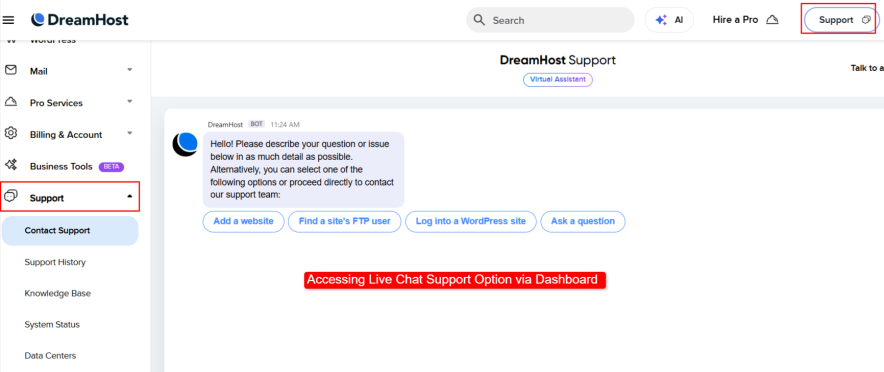
A Bot welcomes you once you are inside the chat support window. This is basically a live chat window where you can ask questions.
I wanted to connect with a real human agent rather than a bot, so I asked the bot to connect me to one. But it kept insisting with a prompt that included 2 options: Talk to an agent and Ask a question.
When I chose the “Talk to an agent” option, it redirected me to a new window where I was given a detailed step-by-step process to connect with the DreamHost support team.

First, I was required to input my question. Then, when I pressed continue, DreamHost gave me all the support options that were available in real-time.

What I liked the most was that DreamHost clearly told me the waiting time for all support options.
I chose the live chat option, and I got a response in 7 minutes, even though the waiting time was listed as 10 minutes. So yes, the response time is good, but could be even better.
To assess the knowledge of DreamHost customer agents, I directly asked them a difficult question, and in their response, they gave me clear instructions on how to point a domain to their servers.
Most hosting companies just send you links to their knowledge base or tutorials, but DreamHost agents seemed proactive in connecting with you personally and providing direct, step-by-step solutions.

Overall, I liked how the DreamHost customer support team responds. They seem quick and knowledgeable. They believe in giving practical solutions rather than referring to guides and tutorials. Their knowledge base solves 9 out of 10 queries.
The only thing that bothers me is the paid phone support service.
For beginner plans, you have to pay $9.95 for a one-time callback request, and you’ll be charged $14.95/month for 3 calls per month. What’s even worse is that they only offer phone support assistance to USA & CA phone numbers.

DreamHost Hosting Pricing – Fair or Not?
Some DreamHost plans are not worth it! Yes, that’s the final verdict, and if you don’t pay attention, you might end up going with the less valuable plan and get charged even higher, which includes some hidden amount as well.
In DreamHost, the most common plans are Shared / WordPress and DreamPress. Both categories are different. In shared plans, you will find two plans starting from $1.99/month, but DreamPress is a fully managed plan that starts from $11.99/month.
| Factors | WordPress Launch | WordPress Growth | DreamPress |
| Cost | $1.99/mo (4 years) | $3.49/mo (4 years) | $11.99/mo (3 years) |
| Renewal | $7.99/mo | $8.99/mo | $16.99/mo |
| Website | 25 | 50 | 1 |
| Bandwidth | Unmetered | Unmetered | Unmetered |
| Storage | 25 GB | 50 GB | 15 GB |
| Free CDN | X | X | ✓ |
| Staging | X | X | ✓ |
| WordPress Installer | ✓ | ✓ | ✓ |
| Built-in Caching | X | X | ✓ |
| Migration | DIY (Plugin) | DIY (Plugin) | Priority Migration By Team |
| Free Priority WordPress Migration | X | X | ✓ |
| AI Website Builder | ✓ | ✓ | ✓ |
| Free SSL | ✓ | ✓ | ✓ |
| Free Automated Daily Backups | ✓ | ✓ | ✓ |
| On-Demand Backups | X | X | ✓ |
| Free Domain | ✓ | ✓ | ✓ |
| Free Domain Privacy | ✓ | ✓ | ✓ |
| Email Account | $1.67/month | Free | Free |
| Live Chat Support | ✓ | ✓ | ✓ |
| 24*7 Ticket Support | ✓ | ✓ | ✓ |
| Phone Support | Paid | Paid | Paid |
| Priority Support | X | X | X |
| Money Back Policy | 30 Days | 30 Days | 30 Days |
Shared & WordPress Plans
In DreamHost’s shared and WordPress plans, you see 2 plans: Launch and Growth. You can grab these plans for multiple tenures – 1 month, 1 year, or 4 years at a time.
Both plans show perks like a free domain, an AI website builder, 1-Click WordPress installer, and free daily backups.
The main difference between these two plans is the number of sites and storage. In terms of money value, I didn’t find the Launch plan valuable. It doesn’t offer extra CPU & RAM power, and you have to pay $1.67 per month per email account.
Instead of paying an extra $1.67 per email account every month, it’s better to grab the Growth plan.
I also set up the Shared Growth plan for my site, and the great thing is that this hosting plan has good performance. You can see the performance benchmarks in the early section of this article.
Overall, DreamHost shared plans can be a good choice to host one or multiple small sites with traffic under 10k/month.
DreamPress Plans:
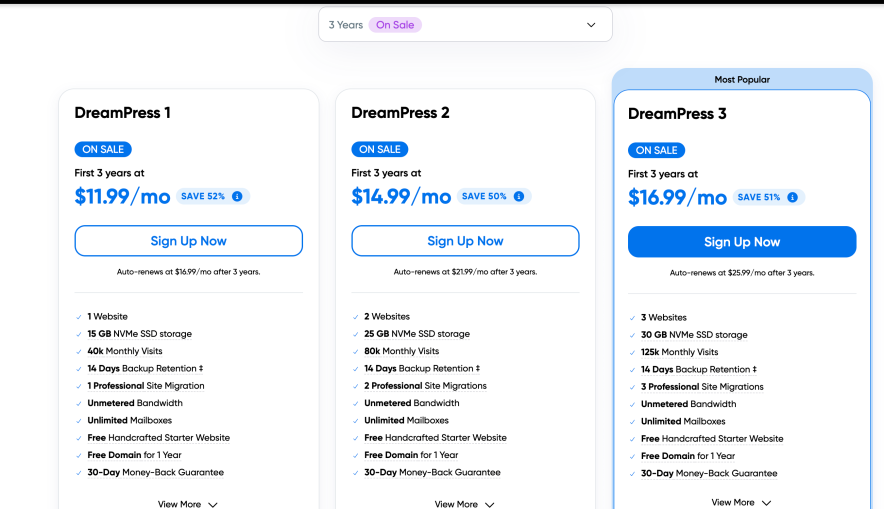
Under the DreamPress segment, you’ll only find fully managed WordPress plans. Here, you get scalability up to 200 GB of storage. These plans are more performance-optimized, and the main advantage they have compared to shared plans is free CDN and built-in caching.
In case you have a growing site (traffic: 10k plus monthly), then you can consider these plans because globally, these plans will give your site good reach.
And you don’t have the problem of migrating the site yourself in these plans because experts manage all the technical tasks of your site themselves.
Still, there are a few bad things about these plans. Despite the high pricing, I don’t know why DreamHost doesn’t offer free phone support and priority response time support benefits in these plans.
I mentioned “Hidden charges” at the beginning of this section.
Despite a lot of freebies, I would like to highlight some hidden charges that you should be aware of before making any final call on DreamHost hosting.
- Setup: No charges
- Migration: $99 per site charges are applicable if you’re seeking experts’ help for this task.
- Backups: No additional charges
- Phone Support: $9.95 per call
- Security Addon: $3/mo – $29.99/yr
- Email Account: $1.67/mo (Only applicable in Shared Launch plan)
FAQs:
Who owns DreamHost?
DreamHost is owned by its parent company “New Dream Network, LLC”
Where is DreamHost located?
The DreamHost headquarters are situated in Los Angeles, USA.
What are the disadvantages of DreamHost?
Some common problems found in DreamHost hosting are fewer data centers, Hidden pricing related to email, migration, security add-on, and paid phone support.
What are some good alternatives to DreamHost hosting?
If DreamHost doesn’t suit you, you can try these options: Hostinger: For more money value, Bluehost: For better 1-year plans, WPX: For better performance, NameCheap: For domain transfer.
More Web Hosting Resources:
- WordPress Review [Official Hosting From WordPress.com]
- Hostinger Hosting Review [Complete Details]
- Bluehost Review [Complete Details With Pros and Cons]
- ChemiCloud Review [Is It Worth it in 2026]






Really appreciate how detailed this DreamHost review is. It’s getting harder to find honest, experience-based hosting breakdowns these days, and this post helped clarify a lot. I’ve personally been testing different hosting setups over the past few months for one of my side projects, [boxofficetrailer.com], and I can confirm that speed and uptime make a huge differenc especially for content-heavy sites. Seeing how DreamHost handles support and scalability gives me more confidence to explore it further. Keep up the great content, it’s refreshing to read something this useful without being overly promotional
Well-detailed and honest review! I’ve been exploring hosting options for my next project, and this post gave me real clarity on DreamHost’s strengths — especially the uptime, SSD storage, and their generous pricing. I also liked the comparison with other hosts, which helps beginners make informed decisions. Kudos to BloggersPassion for keeping it transparent and user-focused!