


Note: This article is supported by funding from WordPress.com. The insights are based on our own research & not influenced by them.
WordPress.com and Kinsta are often placed in the same category: managed WordPress hosting. In practice, they feel very different once you start using them.
WordPress.com is built for people who want WordPress without worrying about infrastructure, updates, or ongoing maintenance.
Everything lives under one roof, and the platform prioritizes stability and predictability over control.
Kinsta sits on the opposite end of the spectrum. It’s designed around performance first, runs on Google Cloud, and gives developers and agencies deep visibility into how their sites behave under load.
But the real question is:
- Is Kinsta’s high pricing justified in 2026?
- Can WordPress.com deliver comparable performance at a much lower cost?
- Which platform offers better long-term value for a single website?
That’s why we’ve updated this WordPress.com vs Kinsta comparison for 2026, using real data, hands-on testing insights, and a clear breakdown of features, performance, pricing, and support.
My team personally tested both platforms by purchasing their hosting plans.
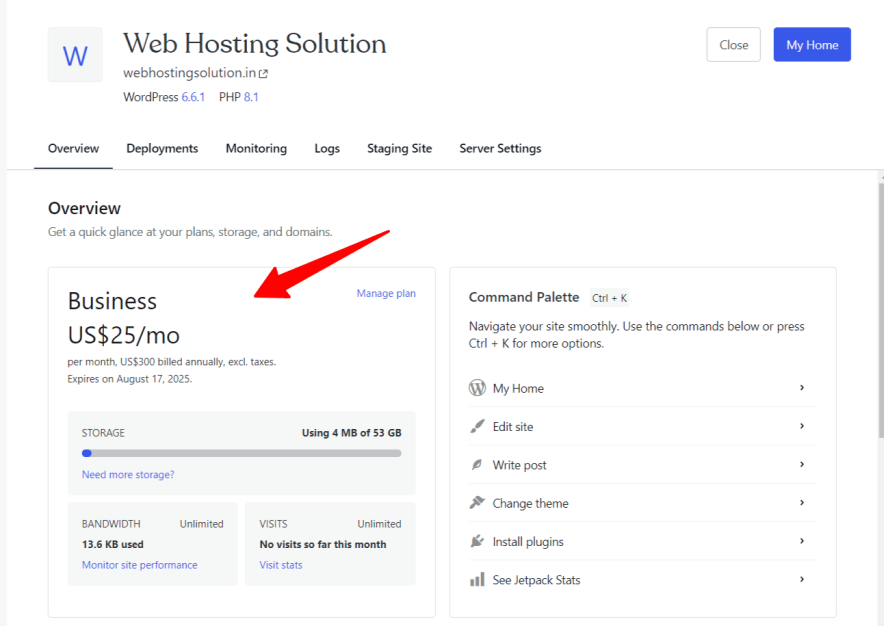
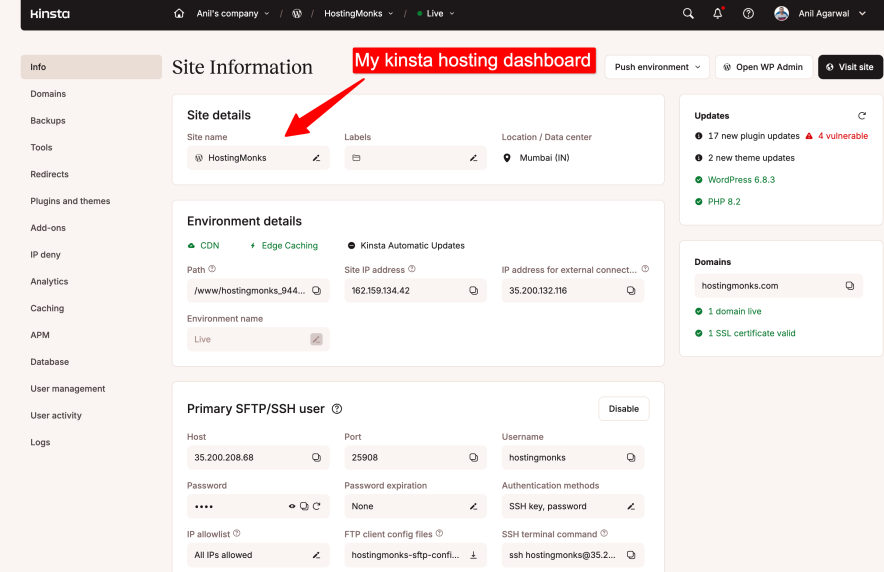
The comparison below is based on real usage, not marketing claims.
So without any delay, let’s get started.
Table of Contents
Comparison Summary [Based on Testing]
WordPress.com and Kinsta are both premium managed WordPress hosting platforms, but they are built for very different types of users.
In our testing, Kinsta clearly leads in raw performance, infrastructure quality, and developer-focused tooling, while WordPress.com stands out for affordability, ease of use, and long-term value for single-site owners.
If budget is not a concern and you want enterprise-grade performance powered by Google Cloud, Kinsta is hard to beat.
However, if you’re running a single website and want a fully managed experience without paying enterprise-level prices, WordPress.com delivers significantly better money value in the long run.
WordPress.com fits better if:
- You run one site and want everything managed for you
- You don’t want traffic spikes to turn into billing surprises
- You prefer stability over fine-grained server control
- You want themes, plugins, backups, and security handled centrally
Kinsta fits better if:
- Performance directly affects revenue or clients
- You manage multiple sites or agency projects
- You want access to advanced debugging and monitoring tools
- You’re comfortable paying more for infrastructure-level control
Comparing Main Factors Side By Side
![wordpress.com vs kinsta [which offers better money value]](https://bloggerspassion.com/wp-content/uploads/2026/01/wordpress.com-vs-kinsta-which-offers-better-money-value-884x471.png)
Here’s how WordPress hosting and Kinsta hosting compare for Features, Pricing, Ease of Use, and Performance in 2026.
Feature Comparison: Different Priorities, Not Missing Features:
Winner: Depends on Use Case (Value vs Performance)
Let’s break it down with a detailed feature comparison.
| Features | WordPress.com | Kinsta |
| Type of Hosting | Fully Managed WordPress Hosting | Premium Managed WordPress Hosting |
| Free Domain | Yes | ❌ No |
| Fully Managed | Yes | Yes |
| Free SSL | Yes | Yes (Wildcard SSL) |
| AI Website Builder | Advanced | ❌ Not available |
| Number of Websites | 1 per license | 1 – Multiple (plan-based) |
| Storage | 6 GB – 350 GB | 10 GB – 20 GB+ (plan-based) |
| Bandwidth | Unlimited | Visit-based limits |
| CDN | Yes (Global CDN) | Yes (Kinsta CDN via Cloudflare) |
| Email Hosting | Paid | ❌ Not available |
| Free Daily Backups | Higher plans only | Yes (all plans) |
| Free Weekly Backups | Yes | Yes |
| Staging Tool | Available | Available |
| 1-Click WordPress Install | Supported | Supported |
| eCommerce (WooCommerce) | Supported | Supported |
| Burst Traffic Handling | Supported | Supported |
| Proactive Plugin Monitoring | Supported | ❌ Not available |
| Malware Scanning & Removal | Supported | Supported (free cleanup) |
| DDoS Protection | Supported | Supported |
| Web Application Firewall (WAF) | Supported | Supported |
| Google Cloud Platform | ❌ No | ✅ Yes |
| Developer Tools (APM, Debugging) | Limited | Advanced |
| Multisite Support | ❌ Not supported | Supported |
| Domain Privacy | Paid | Not included |
| Migration | Free | Free (automated) |
| Money-Back Guarantee | 7–14 days | 30 days |
On paper, WordPress.com and Kinsta share most of the essentials: managed updates, security, backups, staging, and CDN support.
The difference shows up in how those features are delivered.
WordPress.com bundles everything into a single ecosystem. Hosting, themes, plugins, backups, and security are tightly integrated. You give up flexibility, but you gain consistency and fewer moving parts.
Kinsta takes a modular, performance-driven approach. You get container isolation, Google Cloud infrastructure, advanced caching, and developer tools — but you’re expected to know what to do with them.
Neither approach is objectively better. They simply optimize for different users.
What stands out with WordPress.com
- One dashboard for everything
- Burst traffic handling without visit-based billing
- Large storage headroom for media-heavy sites
- Less ongoing maintenance work
What stands out with Kinsta
- Google Cloud infrastructure
- Built-in performance monitoring (APM)
- Daily backups on all plans
- Strong isolation between sites
The trade-off is cost and complexity. Kinsta gives you more control, but also more responsibility.
Performance Tests Comparison:
Winner: Kinsta (Raw Performance), WordPress.com (Traffic Stability & Value)
Performance is one of the biggest reasons users consider managed WordPress hosting, and both web hosting companies take this area very seriously.
Based on hands-on testing data, Kinsta clearly excels in pure speed, latency, and infrastructure quality.
But WordPress.com performs exceptionally well in traffic handling, uptime stability, and real-world consistency, especially for content-heavy sites.
| Performance Factor | WordPress.com | Kinsta |
| Uptime Guarantee | Not specified | 99.9% |
| Recorded Uptime | 99.999% | 99.99–100% |
| Server Infrastructure | Managed WordPress environment | Google Cloud Platform |
| Storage Type | NVMe | NVMe |
| Average Response Time | ~0.245s | ~461 ms |
| Fully Loaded Time | ~3.6s (heavy pages) | ~1.4s |
| Traffic Spike Handling | Excellent (Burst Scaling) | Excellent (Auto-scaling) |
| CDN Coverage | 28+ global locations | Cloudflare-powered global CDN |
| Data Centers | Primarily US-based | 37 locations worldwide |
What the Tests Reveal:
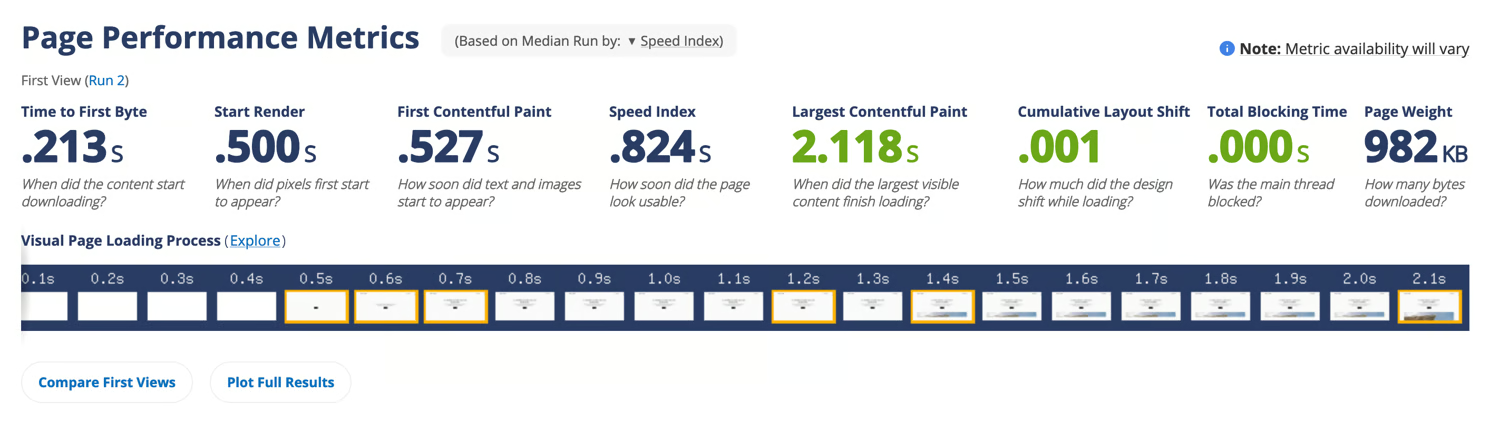
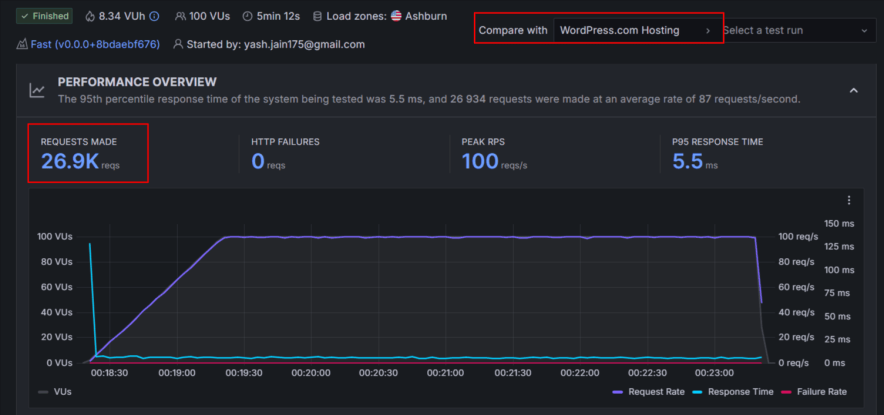
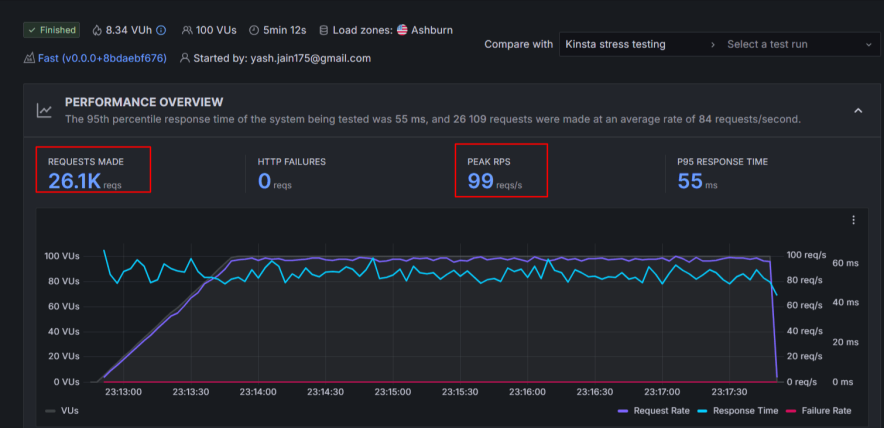
Kinsta delivers faster page loads and lower latency thanks to its Google Cloud infrastructure, aggressive server-side caching, and container-based architecture.
In speed benchmarks, it consistently loads pages quickly, even under stress.
WordPress.com works better when handling sudden traffic spikes and heavy content. Its burst scaling helps maintain uptime and responsiveness during viral traffic or high-concurrency situations.
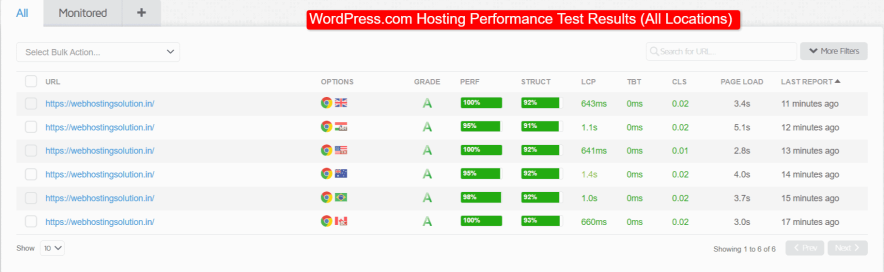
Both platforms show near-perfect uptime, making them reliable for business-critical websites.
In stress testing scenarios, Kinsta remained extremely stable even with rapid increases in concurrent users, while WordPress.com handled bulk traffic without crashes or downtime—something many mid-tier hosts fail to achieve.
Ease of Use:
Winner: Tie (Beginner vs Developer-Friendly)
Both platforms avoid cPanel and use custom dashboards, but they feel very different.
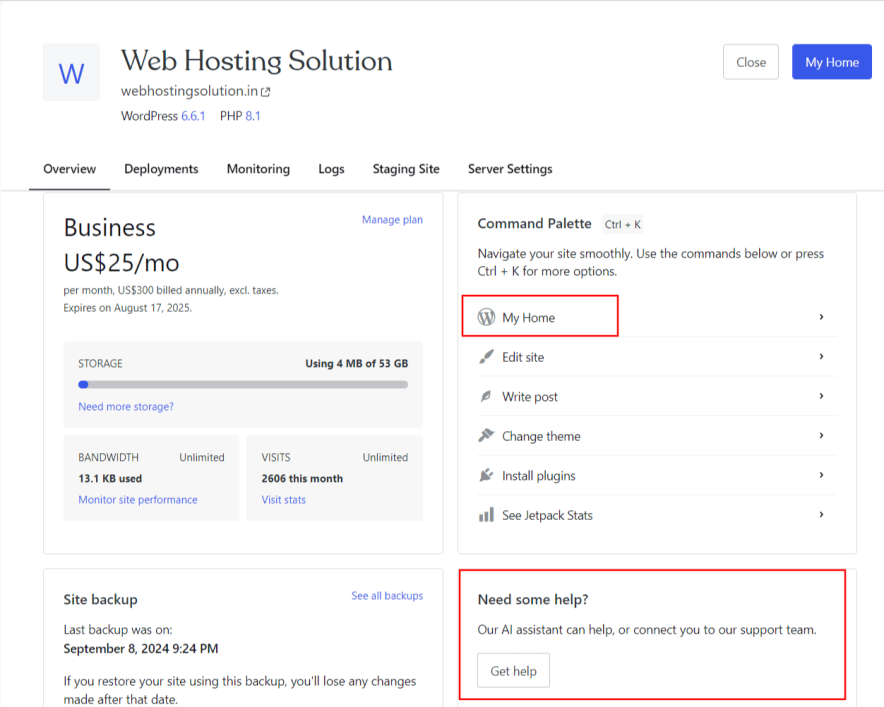
WordPress.com is built for non-technical users. You log in, manage content, update plugins, and publish. Most infrastructure decisions are hidden from you — intentionally.
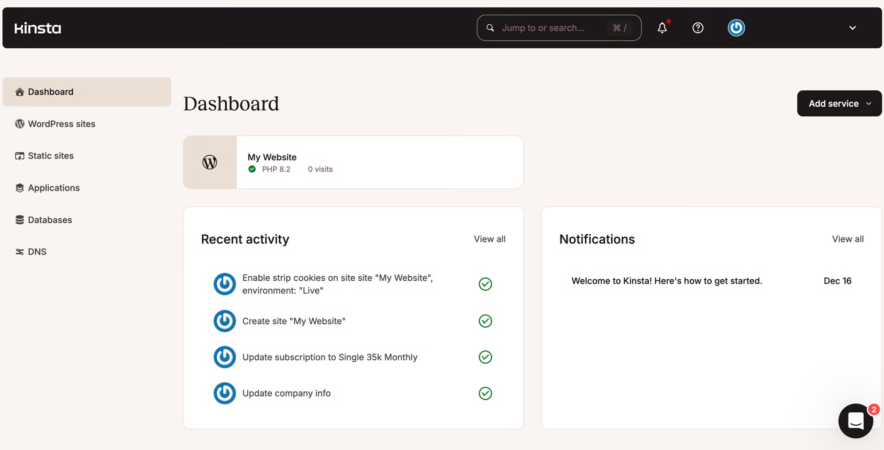
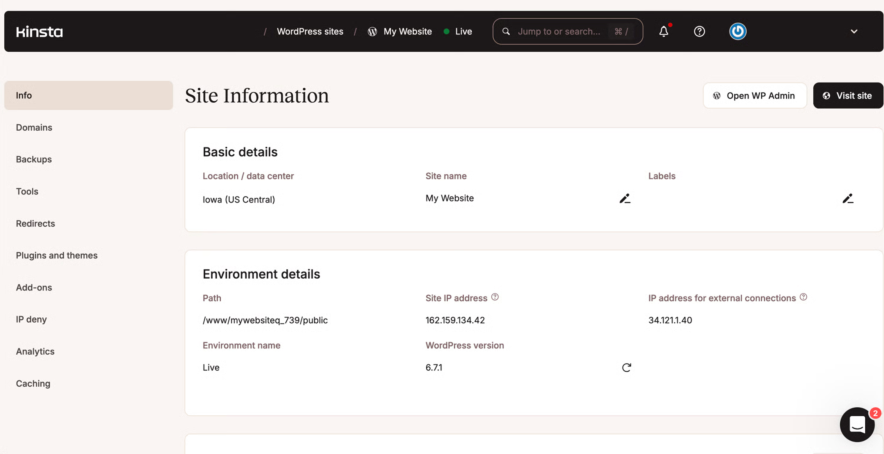
Kinsta’s MyKinsta dashboard is clean and well-designed, but it assumes you care about PHP versions, caching layers, and performance metrics. It’s friendly, but it’s not simplified.
Neither dashboard is difficult. They’re just designed for different mindsets.
Customer Support:
Winner: Kinsta (More Support Channels)
Customer support plays a critical role in managed WordPress hosting, especially when your site is business-critical. Both WordPress.com and Kinsta offer high-quality support, but the approach and availability differ.
WordPress.com Customer Support
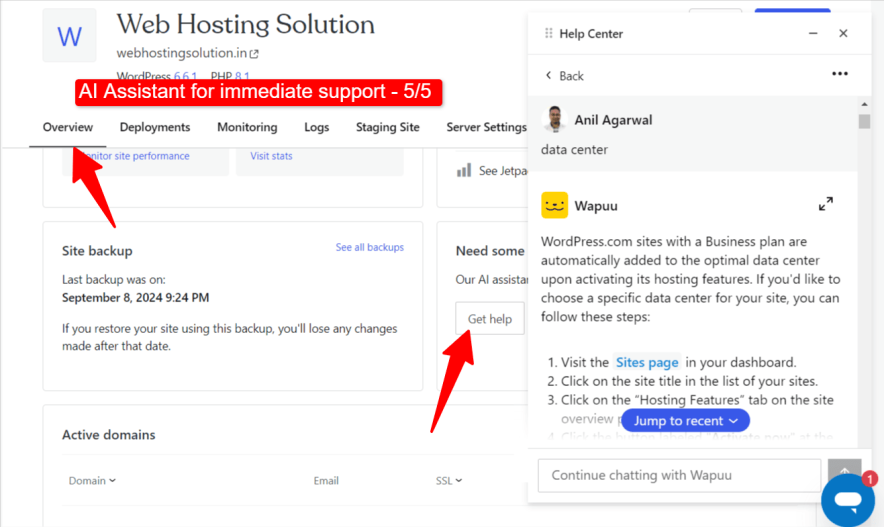
WordPress.com provides support mainly through:
- AI Support Assistant
- 24/7 live chat
- Extensive documentation & guides
Since WordPress.com is a fully managed platform, many technical issues are handled automatically in the background.
During testing, the AI assistant handled basic issues well and routed complex queries to human agents when needed.
Live chat responses usually take a few minutes, and the agents are knowledgeable, especially with WordPress-specific problems.
Instead of generic replies, support focuses on fixing issues directly, which is a big plus for beginners and site owners who don’t want to troubleshoot.
Limitation:
- No phone support
- No email or WhatsApp support
Kinsta Customer Support
Kinsta offers a broader range of support options:
- 24/7 live chat
- Phone support
- Email support
- WhatsApp support
- Free onboarding demos
- Detailed knowledge base
During testing, Kinsta’s live chat response time was extremely fast (often under a minute).
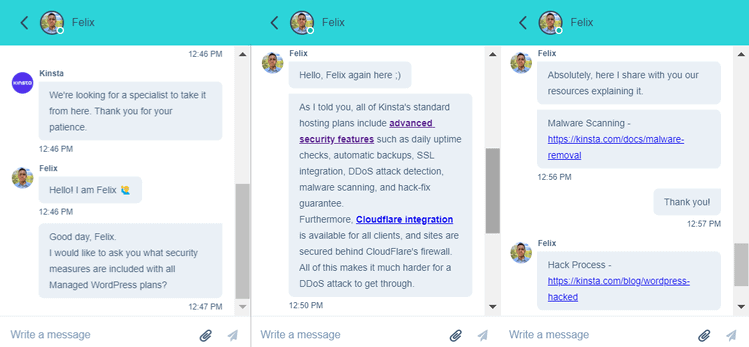
The agents were highly technical, provided precise answers, and shared relevant documentation proactively.
This level of support is especially valuable for developers, agencies, and high-traffic business sites, where downtime or performance issues must be resolved immediately.
Pricing: Which Saves More in the Long Run?
Winner: WordPress.com
| Pricing Factor | WordPress.com | Kinsta |
| Starting Price | From $2.75/month | From $35/month |
| Websites Allowed | 1 per plan | 1 – Multiple (plan-based) |
| Storage | 6 GB – 350 GB | 10 GB – 20 GB+ |
| Bandwidth | Unlimited | Visit-based limits |
| Free Domain | Yes | ❌ No |
| Free SSL | Yes | Yes |
| Daily Backups | Higher plans only | Included in all plans |
| CDN | Included | Included |
| eCommerce Plan | Dedicated Commerce plan | No dedicated eCommerce plan |
| Billing Options | 12–36 months | Monthly & yearly |
| Money-Back Guarantee | 7–14 days | 30 days |
| Hidden Costs | Email, domain privacy | Overages, domain |
WordPress.com offers one of the lowest entry prices in the managed WordPress space, making it extremely attractive for bloggers, creators, and small businesses.
Its pricing is predictable, with no traffic-based billing, which helps avoid unexpected overage charges.
Storage scalability is generous, especially for media-heavy websites.
The dedicated Commerce plan makes it easier for eCommerce users to get started without piecing together add-ons.
On the other hand:
Kinsta’s entry plan starts at $35/month, which is over 10× more expensive than WordPress.com’s base plan.
Pricing is based on monthly visits, which means fast-growing sites can see costs rise quickly.
There is no free domain or email hosting, increasing total ownership cost.
Overall, For a single website, WordPress.com is simply easier to justify financially. Kinsta only starts to make sense when performance is worth paying a premium for.
Pros & Cons After Comparison
WordPress.com Pros over Kinsta
- Affordable pricing for hosting a single website
- Fully managed environment with minimal technical work
- Supports burst scaling, ideal for traffic spikes
- Generous storage scalability (up to 350 GB)
- Free premium themes and essential plugins included
- Built-in security with proactive plugin monitoring
WordPress.com Cons
- Only one website per plan
- Daily backups available only on higher-tier plans
- Email hosting and domain privacy cost extra
- Less developer-level control compared to Kinsta
Kinsta Pros over WordPress.com
- Exceptional performance powered by Google Cloud Platform
- Advanced developer tools, including APM and debugging
- Free daily backups on all plans
- Enterprise-grade security with free malware removal
- Multiple global data centers (37 locations)
- Excellent multi-channel customer support
Kinsta Cons
- Very high starting price ($35/month)
- Visit-based pricing can lead to overage costs
- No free domain or email hosting
- Overkill for small or low-traffic websites
Final Verdict
Neither platform is trying to replace the other.
Kinsta is built for teams, agencies, and businesses that care deeply about performance and control. WordPress.com is built for people who want WordPress to “just work” without becoming a hosting expert.
If you’re running one site and value simplicity, WordPress.com feels more reasonable in 2026. If your site is performance-critical and budget isn’t a constraint, Kinsta earns its price.
FAQs:
Which hosting is cheaper: WordPress.com or Kinsta?
WordPress.com is significantly cheaper than Kinsta. WordPress.com plans start at around $2.75/month, while Kinsta’s managed WordPress hosting starts at $35/month for a single website.
Is Kinsta faster than WordPress.com?
Yes, in raw speed tests. In day-to-day usage, the difference matters mostly for performance-sensitive sites.
Is WordPress.com suitable for high traffic?
Yes. Burst handling helps it stay stable during traffic spikes without requiring manual scaling.
Is Kinsta worth the price?
Only if performance and control directly impact your business. Otherwise, it’s more than most users need.
Which is better for beginners?
WordPress.com. It removes most technical decisions and ongoing maintenance work.
Explore More:





![wordpress.com vs wp engine [compared for performance]](https://bloggerspassion.com/wp-content/uploads/2026/01/wordpress.com-vs-wp-engine-compared-for-performance.webp)
