

Want more clicks from Google? Start with your blog description.
Most bloggers spend hours creating content. But they ignore the one thing people actually see first in search results.
Your blog description.
It’s that short snippet below your title in Google. And it can make or break whether someone clicks your link or ignores it.
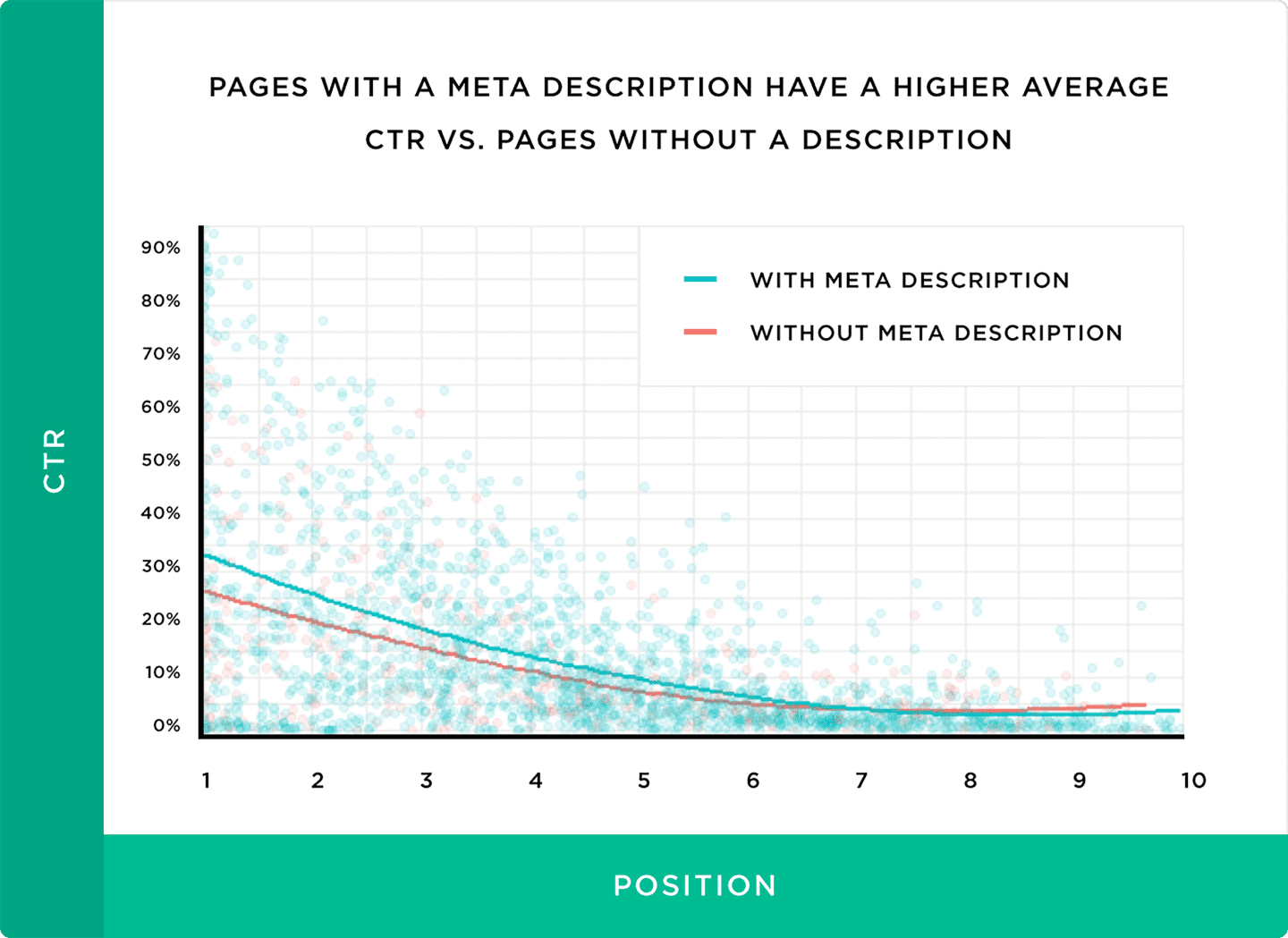
Here’s the thing. Pages with a meta description get 5.8% more clicks than pages without one.
In this guide, you’ll learn exactly how to write blog descriptions that get clicks. I’ll share step-by-step instructions, real-world examples, and the mistakes to avoid.
Let’s get started.
Table of Contents
- What Is a Blog Description?
- Why Blog Descriptions Matter?
- How to Write a Blog Description (Step-by-Step)
- Blog Description Formula (Copy This Template)
- 5 Blog Description Examples (Good vs. Bad)
- How to Add a Blog Description in WordPress
- 7 Blog Description Mistakes That Kill Your CTR
- FAQs About Blog Descriptions
What Is a Blog Description?
A blog description is a short summary that appears below your page title in Google search results. It tells the reader what your post is about before they click.
You might also hear it called a “meta description.” Same thing. Different name.
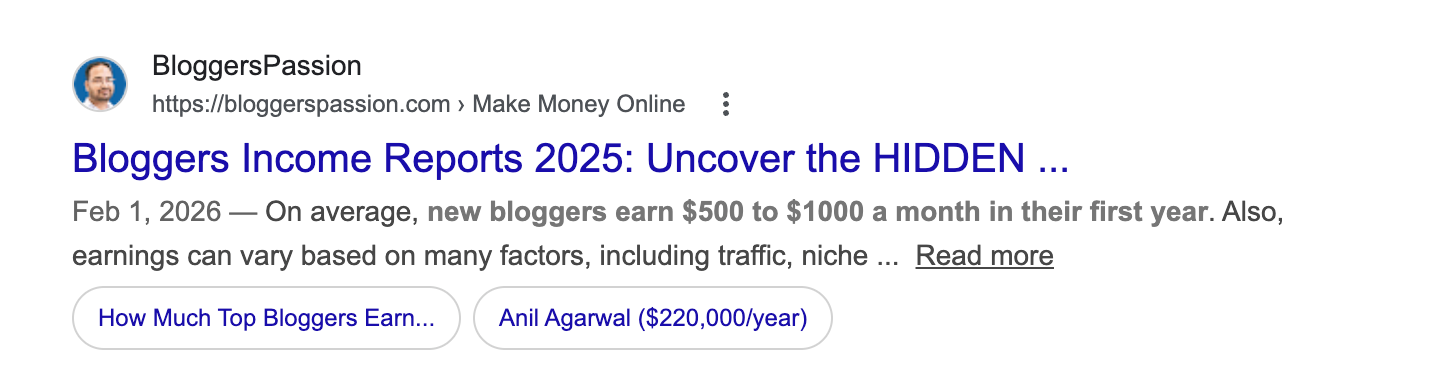
Here’s what it looks like in Google:

Google pulls this description from two places. Either it uses the meta description you wrote. Or it automatically grabs a snippet from your content.
Like this;

And here’s something most bloggers don’t know: Google rewrites meta descriptions about 70% of the time. That number is even higher for some niches.
So why bother writing one?
Because when Google uses your description, it directly affects whether people click your link. And a well-written description increases your chances of Google keeping it as-is.
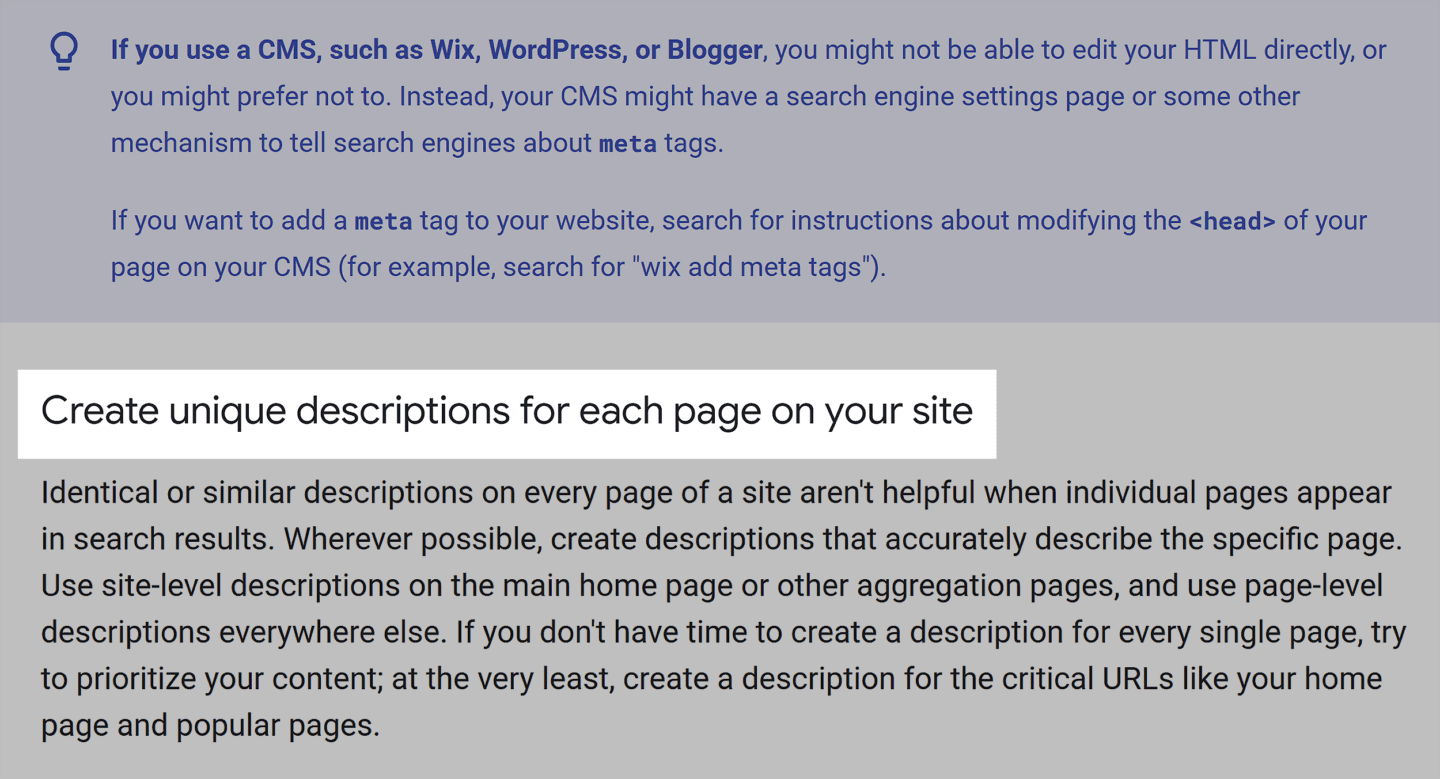
Even Google suggests writing a unique meta description for every page on your site.
Why Blog Descriptions Matter?
Blog descriptions seem small. But they have a HUGE impact on your traffic.
Here’s why.
They boost your click-through rate (CTR): A study found that 63% of searchers said the meta description is the biggest factor in deciding whether to click a search result. Not the title. Not the URL. The description.
They set expectations: A good description tells the reader exactly what they’ll get. This means fewer people leaving your page. And lower bounce rates send positive signals to Google.
They give you an indirect SEO boost: Google has said meta descriptions aren’t a direct ranking factor. But a higher CTR signals to Google that your page is highly relevant. That can boost your rankings over time.
The takeaway?
You could rank #5 for a keyword. But if your description gets more clicks than the results above you, Google rewards you with better rankings.
How to Write a Blog Description (Step-by-Step)
Writing a good blog description isn’t rocket science. Follow these six steps every time you publish a post.
Step 1: Start With Your Target Keyword
Insert your main keyword near the beginning of your description.
Why? Because Google bolds words that match the search query. Bolded words catch the eye. More attention means more clicks. Here’s an example;
For example, if your keyword is “email marketing tips,” don’t write:
“This post covers a bunch of useful strategies for people who want to get better at email marketing tips.”
Instead, write:
“Email marketing tips that actually work. Learn 7 proven strategies to boost your open rates and get more clicks.”
See the difference? The keyword appears first.
Step 2: State the Value in the First Line
Your reader is asking one question: “What’s in it for me?”
Answer that immediately. Don’t waste characters on fluff.
Bad: “In this article, we will discuss some things related to blog SEO.”
Good: “Learn 5 simple blog SEO techniques that helped us increase organic traffic by 34% in 3 months.”
The good version clearly tells you what you’ll get, such as numbers, a result, and a timeframe.
Step 3: Keep It Under 155 Characters
Google displays roughly 155 characters in search results. Anything beyond that gets cut off with a “…”
You don’t need to hit exactly 155. Just make sure your key message fits within that limit.
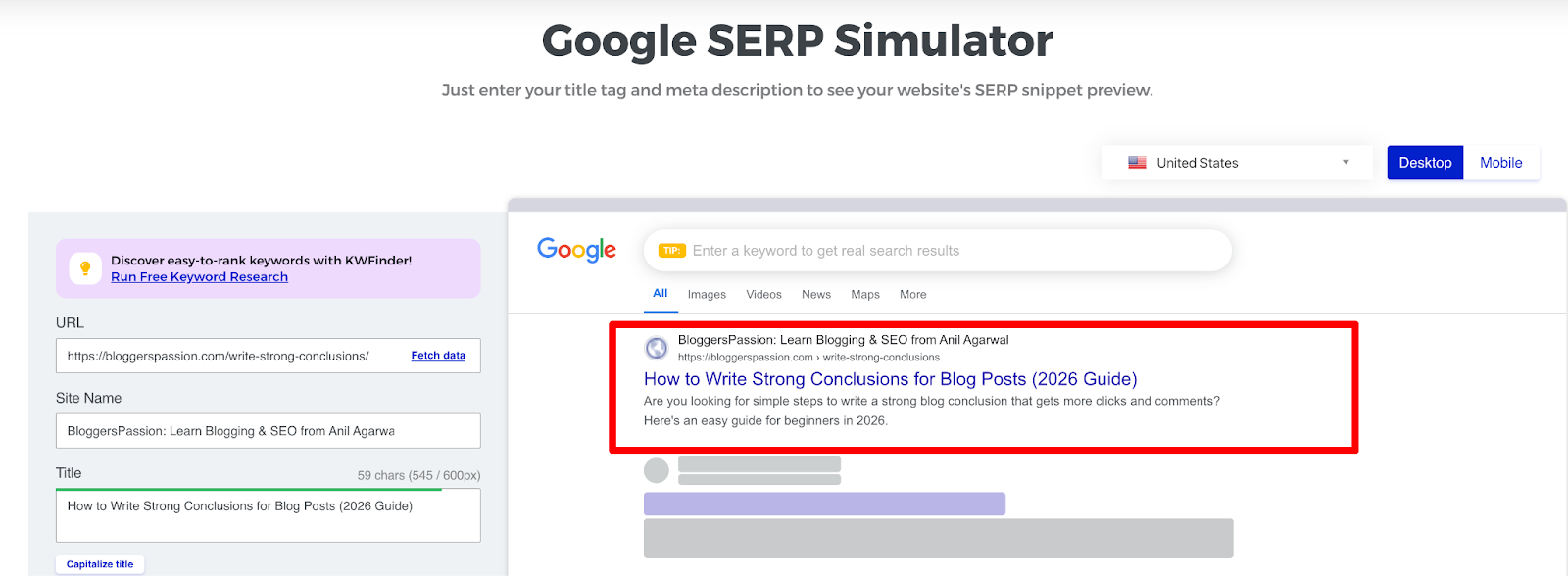
Quick tip: Use a free tool like Mangools SERP Simulator or SERPSim to preview how your description looks in Google before you publish.
Step 4: Use Active Voice
Using the passive voice makes your description sound boring.
- Passive: “SEO strategies that can be used by beginners are discussed in this guide.”
- Active: “Discover 10 beginner-friendly SEO strategies you can use today.”
Active voice is shorter, clearer, and more direct. It also sounds more human.
Step 5: Add a Call-to-Action
Tell the reader what to do next. A small CTA (call to action) makes a big difference.
Good CTA phrases for blog descriptions:
- Learn how
- See the examples
- Find out why
- Try these steps
- Get the free template
Avoid generic CTAs like “click here” or “read more.” They add nothing.
Step 6: Use Power Words (But Don’t Overdo It)
Power words trigger emotion. They make people curious enough to click.
Some that work well in descriptions: free, proven, simple, step-by-step, fast, easy, mistakes, secrets, best.
Example: “7 proven ways to write headlines that get clicks. Simple techniques any beginner can use.”
One or two power words per description is enough. More than that, and it starts sounding like clickbait.
Bonus: Test and Update Old Descriptions
Don’t write a description and forget it. Check your CTR in Google Search Console every few months. If a page gets impressions but low clicks, rewrite the description and see what happens.
Blog Description Formula (Copy This Template)
Don’t want to start from scratch every time? Use these formulas.
| Formula | Structure | Example |
| Keyword + Benefit + Proof | [Keyword]: [what reader gets] + [number/result] | Affiliate marketing for beginners: 9 steps to earn your first commission (with real income screenshots). |
| Question + Answer + CTA | [Question reader is asking] + [quick answer] + [nudge to click] | How long does SEO take to work? See real ranking timelines from 50+ websites and learn what speeds it up. |
| Problem + Solution + Timeframe | [Pain point] + [the fix] + [how fast] | Struggling with low blog traffic? These 7 on-page SEO fixes can boost your rankings in under a week. |
Pick whichever formula fits your post. Simply replace with your keyword and details.
One rule: Always check the character count before publishing. If it’s over 155 characters, trim the fat.
Want to know how long it actually takes to rank? Check out our detailed guide on how long it takes to rank on Google.
5 Blog Description Examples (Good vs. Bad)
Let’s look at real examples. I’ll show you what doesn’t work, why it fails, and how to fix it.
Example 1:
Bad: “This post talks about keyword research and some tools you can use for it.”
Why it fails: Too thin. No benefit. No reason to click. Sounds like every other result on the page.
Good: “Keyword research made simple. Learn 5 free tools that help you find low-competition keywords in minutes.”
Why it works: It’s specific. Has a number. Offers a clear benefit. Uses a power word (free).
Example 2:
Bad: “Read this article to learn everything about link building strategies for your website.”
Why it fails: Generic. “Everything” means nothing. No proof, no hook.
Good: “Link building strategies that work in 2026. See the exact methods we used to earn 130+ backlinks in 6 months.”
Why it works: Current year adds freshness. Real numbers build trust. First-person experience signals E-E-A-T.
Example 3:
Bad: “WordPress SEO plugins for people who want to rank their blog higher on Google search.”
Why it fails: Too long. Gets truncated in search results. No CTA.
Good: “10 WordPress SEO plugins to rank higher on Google. Beginner-friendly plugins to use today.”
Why it works: Starts with a number. Keyword upfront. Has a CTA (apply today).
Example 4:
Bad: “Click here to learn about email list building.”
Why it fails: “Click here” is a wasted CTA. No value. No specifics.
Good: “How to build an email list from scratch. 6 tactics that grew our list to 10,000 subscribers.”
Why it works: Clear how-to promise. Real result. Makes you curious about the tactics.
Example 5:
Bad: “We discuss blogging mistakes in this comprehensive guide for new bloggers.”
Why it fails: Passive voice. “Comprehensive guide” is an AI red flag. No hook.
Good: “7 blogging mistakes killing your traffic (and how to fix each one). Based on 15 years of blogging.”
Why it works: Specific number. Creates urgency. Experience-based credibility.
How to Add a Blog Description in WordPress
You need an SEO plugin to add blog descriptions in WordPress. Here are the two best options.
Using Rank Math (Free)
- Install and activate the Rank Math plugin
- Open any post or page in the WordPress editor
- Scroll down to the Rank Math SEO meta box
- Click “Edit Snippet”
- Type your description in the “Description” field
- Watch the character counter. Keep it green (under 155 characters)
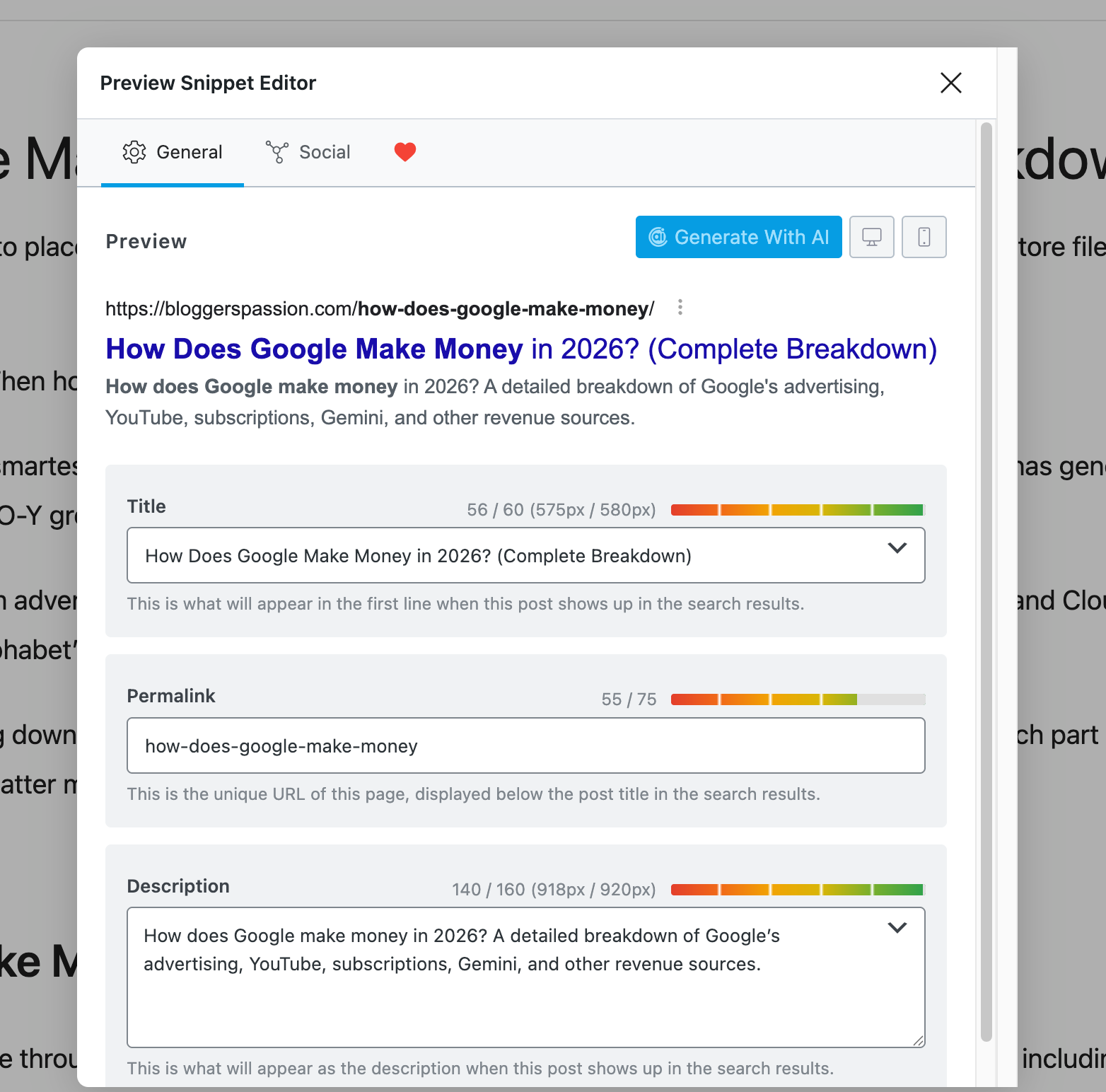
For your blog’s homepage description, go to Rank Math > Titles & Meta > Homepage. You’ll find a separate field there.
Using Yoast SEO (Free)
Same idea. Open your post, scroll to the Yoast meta box, and click “Edit Snippet.” Add your description in the meta description field.
Both plugins show you a live preview of how your result will look in Google. Use it.
Check Your Results
After publishing, don’t just guess. Open Google Search Console, go to Performance, and filter by that specific page.
Look at your CTR. If you’re getting impressions but low clicks, rewrite the description and test again.
You can also preview your description before publishing using free tools like Mangools SERP Simulator. It shows exactly how your snippet will appear in search results.
7 Blog Description Mistakes That Kill Your CTR
Avoid these. I see them on almost every blog I audit.
1. Writing descriptions that don’t match your content: If your description says “10 free tools” but your post lists 5 paid ones, readers bounce. Google notices. And it’ll replace your description with its own.
2. Stuffing keywords: Putting your keyword three times in 155 characters looks spammy. Once is enough.
3. Going over the character limit: Your best description means nothing if Google cuts it off. Always preview before publishing.
4. Using clickbait: Yes, the clickbait description gets clicks. But it also gets high bounce rates. That hurts your rankings long-term. Promise only what your post delivers.
5. Using the same description for multiple posts: Duplicate descriptions confuse Google. It won’t know which page to show. Write a unique description for every post. No exceptions.
6. Forgetting a CTA: You wrote a great description. The reader is interested. But you never told them what to do next. Add a simple “Learn how” or “See the examples” at the end. That small CTA gets clicks.
7. Being too vague: “This post is about SEO” tells the reader nothing. What about SEO? What will they learn? Be specific, or you won’t get clicks.
Quick fix for all of these: Before hitting publish, read your description out loud. If it sounds boring to you, it’ll sound boring to everyone else.
FAQs About Blog Descriptions
A good blog description is clear and under 155 characters. It includes your target keyword, tells the reader what they’ll get, and gives them a reason to click.
Aim for 120 to 155 characters. Google’s display limit is actually based on pixel width (roughly 920 pixels on desktop).
Yes. “Blog description” and “meta description” mean the same thing. Both refer to the short summary that appears below your title in search results.
No. Google rewrites descriptions about 70% of the time. But writing a good one increases the chance Google keeps it.
Not directly. Google has confirmed meta descriptions aren’t a ranking factor. But they affect your CTR. Higher CTR can improve your rankings over time.
Check Google Search Console every few months. If a page has high impressions but low CTR, rewrite the description. Also, update descriptions when you refresh old content.






True sir Blog description really helps to get a higher rank in search engines and if you optimize it with your seed keyword and make it eye-catchy then you will rank higher and CTR will also improve. My blog really got better rankings in search engines after keeping these things in mind.
Thanks, sir for this valuable and informative post.
Regards
Ayush