

TLDR: Dofollow links boost rankings by passing SEO value (ranking strength), while nofollow links don’t pass value but can still drive traffic.
Table of Contents
- How Dofollow and Nofollow Links Impact Links in 2026
- The True Value of a Backlink
- How to Check if a Link is Dofollow or Nofollow?
- Nofollow vs Dofollow Links: What is the Difference?
- What Type of Links are Generally Nofollow?
- Benefits of Nofollow Links
- Difference Between Nofollow and Noindex
- When Should You Use No Follow Links?
- How to find the Follow and Nofollow Links Ratio?
- How Do I Use Nofollow Links on My Site?
- New link attributes
- FAQs
- Conclusion
What Are Dofollow Links?
Dofollow links, also known as “follow” links, are regular hyperlinks that pass SEO value (“link juice”) to another website and help it rank better in Google.
Example: If a blog links to your site like <a href=”https://example.com”>Best SEO Guide</a>, that’s a dofollow link.
What Are Nofollow Links?
Nofollow links are hyperlinks that include the `rel=”nofollow”` attribute, links that tell search engines NOT to pass SEO value (link juice) to the linked site, so they don’t directly help rankings.
Example: <a href=”https://example.com” rel=”nofollow”>Visit site</a> is a nofollow link. There are different types of backlinks in SEO, but in today’s article, we’ll be discussing everything you need to know about nofollow vs dofollow links.
How Dofollow and Nofollow Links Impact Links in 2026

Dofollow and nofollow links behave differently in SEO and Google rankings.
A dofollow link tells search engines to follow it and pass SEO value to the page, which can help the page rank higher.
A nofollow link tells search engines not to pass that value, so it usually won’t directly improve rankings.
For example, if you link to Amazon like this:
<a href=”https://www.amazon.com/”>Amazon</a>, it becomes a dofollow link, and it can pass SEO strength to Amazon.
But if you link like this:
<a href=”https://www.amazon.com/” rel=”nofollow”>Amazon</a>, it becomes a nofollow link, meaning search engines generally won’t pass ranking power.

So, are nofollow links useless?
Not at all, as they can still bring targeted visitors, build brand awareness, and make your website’s backlink profile look natural.
The True Value of a Backlink
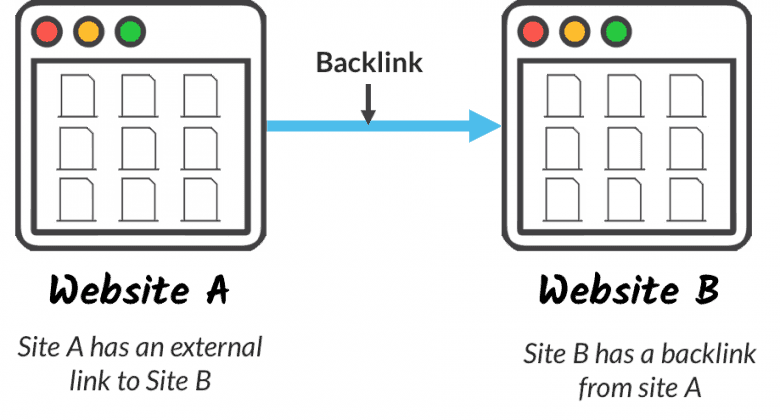
Think of a backlink as a vote of trust. When another website links to yours, it’s essentially telling Google, “this content is worth reading.”
Here’s a perfect illustration of backlinks:
Top-ranking pages have 3.8x more backlinks than pages sitting in positions 2–10.
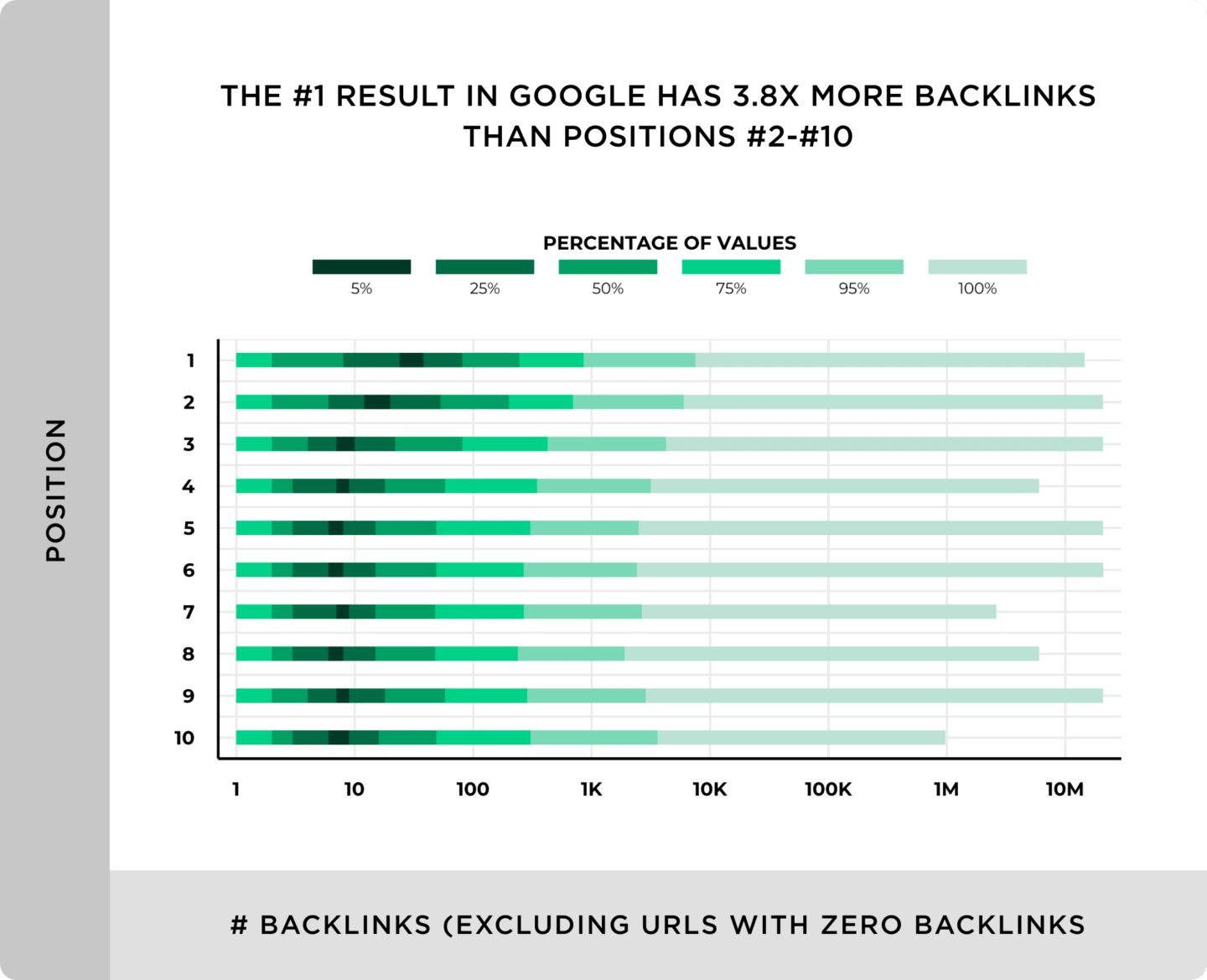
But here’s what most beginners get wrong: it’s not about collecting as many links as possible. A significant 93.8% of link builders now prioritize link quality over quantity.
But what if you want to know if a link is dofollow or nofollow? Do you know how to do that? Let’s see how:
How to Check if a Link is Dofollow or Nofollow?
You can check this in two simple ways:
1. Inspect the HTML (manual method)
Right-click the link → click Inspect.
Look at the link code:
If you see rel=”nofollow” → it’s nofollow
If not → it’s dofollow

2. Use a browser SEO extension
Install a Chrome extension like the Nofollow extension.
It automatically highlights nofollow links on any page, so you don’t need to check the code manually.
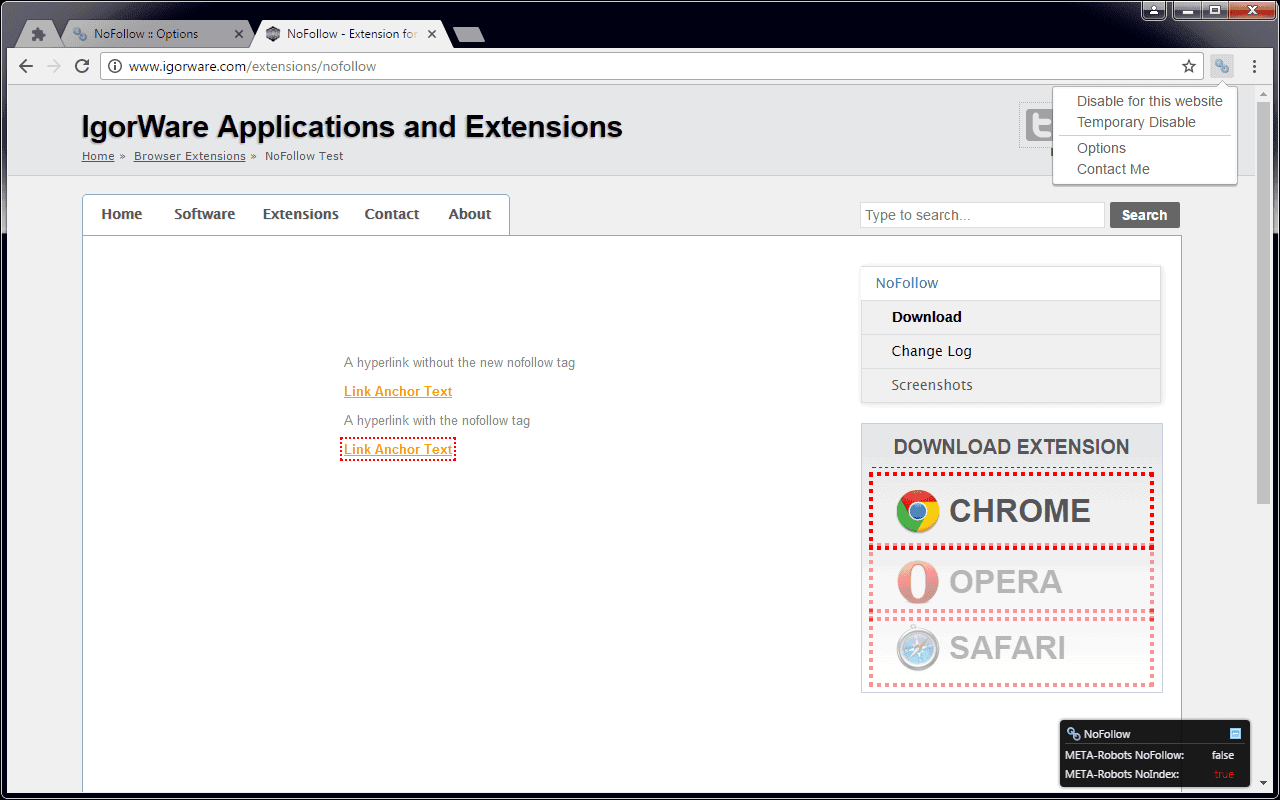
This is a useful tool that automatically puts a dotted link around any nofollow links on a page:
Nofollow vs Dofollow Links: What is the Difference?

The only technical difference between dofollow and nofollow links is that a nofollow link has a nofollow tag.
As a web user, it’s impossible to differentiate between a dofollow and a nofollow link. You can click, copy, and use a nofollow link just like any other link on the internet.
But when it comes to search engine optimization (SEO), there’s a significant difference between nofollow and dofollow backlinks.
Here’s the difference in simple terms:
Dofollow links help with search engine rankings, while nofollow links don’t.
Let me explain:
You see, Google uses links as a major ranking signal, just like other search engines.
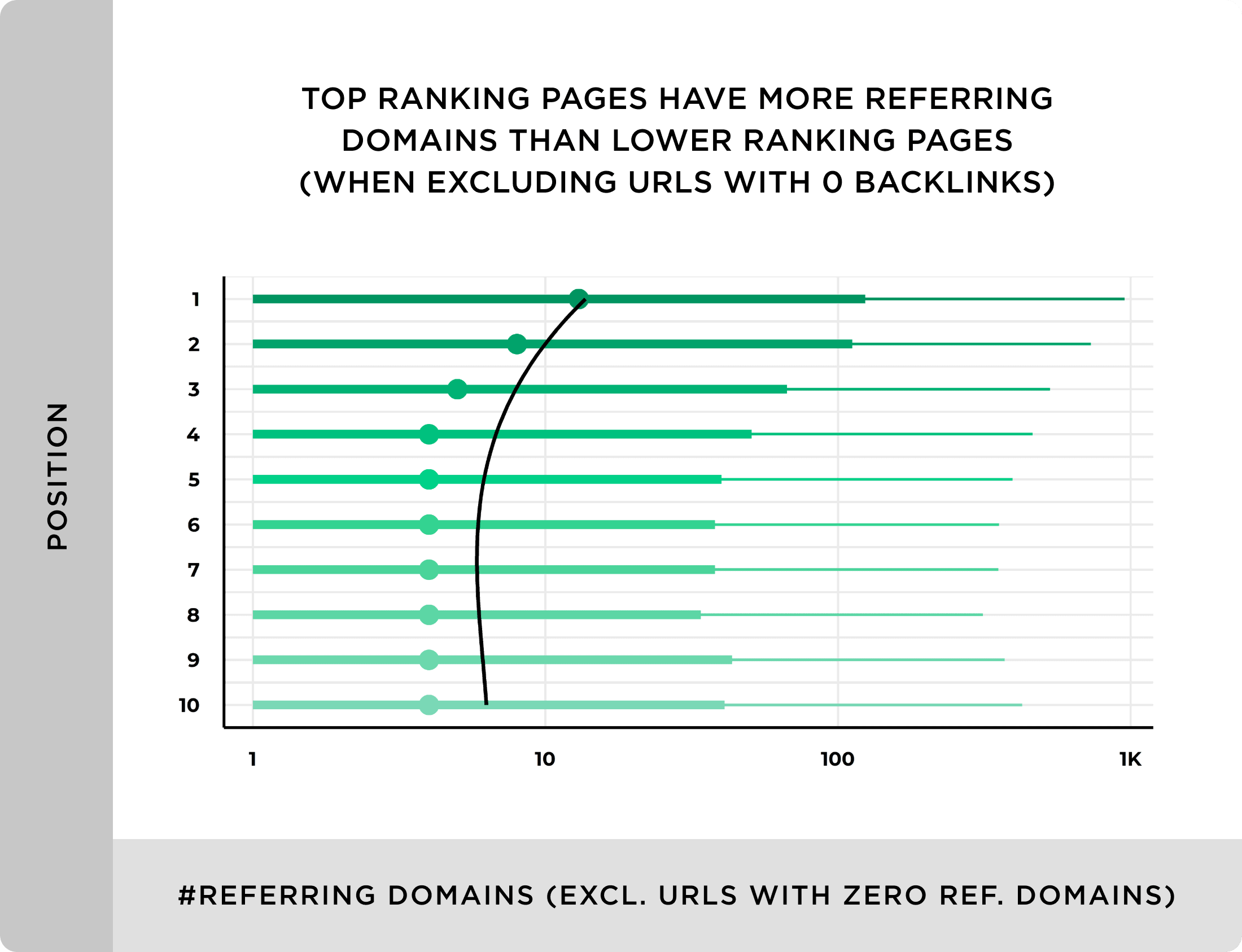
Pages that rank higher on Google usually have links from more websites. (Source)
- Position #1 pages tend to have the most referring domains (different sites linking to them).
- As rankings go down (#2, #3, #4…), the number of linking websites usually drops.
- Pages with very few or no backlinks rarely rank highly.
However, they pay attention to ONLY dofollow links in their algorithm. According to Google, nofollow links do not pass any PageRank (link juice).
Next, check the link in the page’s HTML.

If you can see a rel=”nofollow” attribute (as shown in the screenshot below), the link is nofollow. Otherwise, the link is dofollow.

What Type of Links are Generally Nofollow?
Any link that has the rel=”nofollow” tag is technically a nofollow link.
However, inbound links from the sources below generally tend to be nofollow:
- Blog comments
- Forum posts links or other forms of user-generated content
- Social media links (e.g., links in Facebook and Twitter posts)
- Some blogs and news sites (such as Entrepreneur and Huffington Post)
- Press release links
- Links from “widgets.”
And the popular sites below use the rel=”nofollow” attribute on all of their outbound links, too:
- YouTube
- Quora
- Medium
- Wikipedia
- Twitch
Benefits of Nofollow Links
Let’s now look at some of the countless benefits of nofollow links.
1. They help to diversify your link profile
Natural backlink profiles are meant to be diverse.
Some links are nofollowed, while others are followed. It’s an inevitable fact because some people will unavoidably link to you through nofollowed links – regardless of how much you might wish this wasn’t the situation.
Additionally, as I mentioned earlier, most of the links you get from the following places are nofollow:
- Social networks
- Forums
- Pingbacks
- Press releases
- Directories
- Wikipedia (anyone can edit a Wikipedia page)
Bottom line: If a blog has only dofollow links or a noticeably high percentage of dofollow backlinks, then that’s a clear sign something shady is going on. And if that’s the case, then you may be getting the Google hammer sooner or later.
This is why you need a mix of nofollow and follow backlinks.
2. They Still Drive Real Traffic
A nofollow link doesn’t pass SEO juice, but it does send you clicks.
If a high-traffic site like HuffPost links to you with a nofollow tag, their millions of readers can still land on your page.
That’s real traffic, regardless of what the link attribute says.
And if that link mentions your brand name? That’s free brand awareness on top of it.
Simply put, a nofollow link from the right website can send you more traffic than a dofollow link from one nobody reads.
3. They can protect you from Google penalties
Sometimes there are good reasons to buy links.
If a site receives a lot of traffic, paying for a sponsored post on that site may make sense. And if you’re paying a good amount of money to be featured, then you’ll perhaps want to add a link to your site so that the readers can easily locate you.
But the problem is that Google said that dofollow paid links are a violation of their Webmaster Guidelines.
However, the SEO community is divided into two groups:
- Those who believe that Google can correctly recognize paid links algorithmically
- Those who believe that Google cannot correctly recognize paid links algorithmically
Now, which group is right is a debate for another day.
But for now, let’s assume that group #2 is right and that Google struggles to figure out any and all paid links. That is to say that you’re 100% safe to sell and buy links to your best content, right?
Google has a tool that lets anyone report a website for selling or buying links.
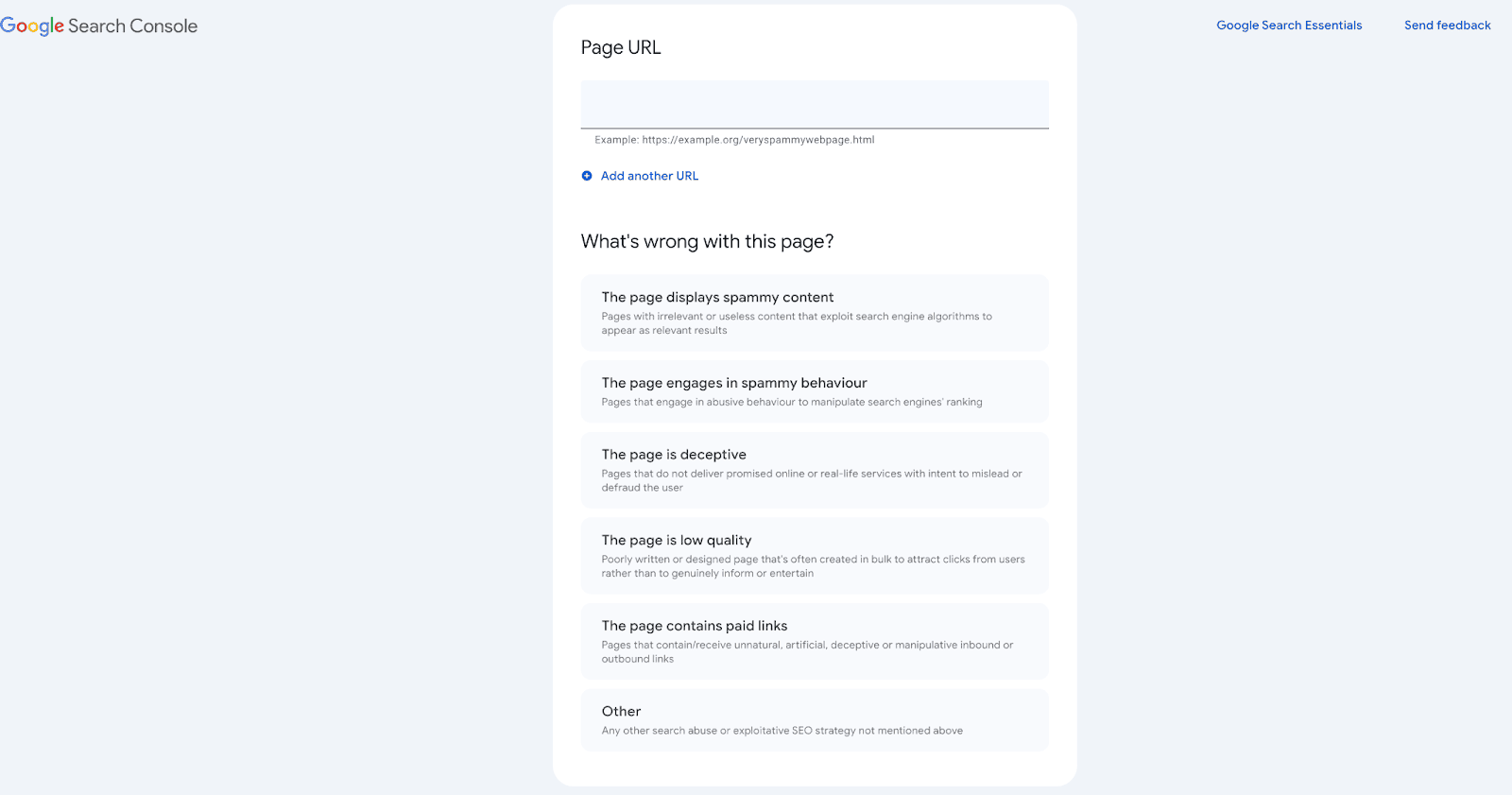
With this, it may not be Google that you should be scared of – but your competitors.
If a competitor sees you ranking above them, checks your backlinks in Ahrefs, and spots suspicious dofollow paid links… what’s stopping them from reporting your site?
If that will make Google’s webspam team take a look at your site to discover the paid links and penalize you, then that’s a minus-one competitor for them to rival with on the SERPs.
4. They Help You Get Links From Sites That Don’t Give Dofollow
Some of the biggest sites online, Wikipedia, Reddit, Quora, Forbes, HuffPost, add nofollow to most (or all) outgoing links.
If you only chased dofollow links, you would definitely miss out on some of the most trusted platforms on the internet.
A nofollow mention on Wikipedia can still boost your brand awareness.
A Reddit link can send highly targeted traffic overnight.
These sites have massive audiences, and those links have real value, whether they pass SEO juice or not.
So don’t ignore a link just because it’s nofollow.
If the site has real authority and audience, the link is worth it.
Difference Between Nofollow and Noindex
Not every page on your site is meant to rank on Google.
Some pages exist for legal reasons (privacy policy, terms), or just to complete a process (thank-you page, login page). These pages are useful to users, but you don’t want them to appear in search results.
That’s where noindex and nofollow come in.
Usually, you control this with a robots meta tag like:
<meta name=”robots” content=”index, follow”>
By default, search engines will:
- Index the page (store it in search results)
- Follow the links on it (crawl linked pages)
You can change this to:
<meta name=”robots” content=”noindex, nofollow”>
Which tells Google:
- Don’t show this page in search
- Don’t crawl links from this page
How Are They Different?
They solve different problems:
- Noindex = controls the page (and tells search engines not to show this page in search results)
- Nofollow = controls the links (and tells search engines not to follow links on this page)
Simple way to remember:
- Noindex = hide this page
- Nofollow = ignore these links
When Should I Use Each?
Use Noindex when the page shouldn’t appear on Google
Examples:
- Thank-you page after form submission
- Login or admin pages
- Duplicate pages
- Internal test pages
If someone searches your eBook, you don’t want: “Thanks for downloading our ebook” showing in Google
Interestingly, it’s effortless to apply the noindex or nofollow tag if you’re using the Rank Math SEO plugin. It’s also completely free to download.
Here’s a quick video showing it;
When Should You Use No Follow Links?
You don’t need nofollow everywhere — only where you don’t want to pass SEO trust to another site.
Here are the most common situations:
1. Comment Section Links
If comment links were dofollow, spammers would go wild.
They’d drop random comments like: “Great post! Check my site at “I’m-bad-commenter.com.”
If those links are dofollow, your site is basically promoting spam and passing SEO value to them.
That’s why comment links should be nofollow.
Good news? WordPress already does this by default.
2. Pages Outside Your Main Topic
Let’s say you run a car website, but publish:
- a post about lawn cleaning
- a local event promotion
- or a random charity page
You may still link to useful resources there. But since the topic isn’t your niche, passing SEO value might look suspicious to Google.
In such cases, you can nofollow links on that page (or sitewide if needed).
This tells Google: “I’m sharing this for users, not for SEO purposes.”
3. Linking to Sites You Don’t Fully Trust
Sometimes you have to link to a site you don’t want to support.
Examples:
- Reporting on a scam website
- Showing a hacked site as an example
- Referencing a competitor with shady practices
- Using a graphic from a questionable source
You want readers to see it, but you don’t want to boost its rankings.
Some links appear on every page of a site:
- Template/theme credits
- Sidebar partner links
- Footer credits
- “Designed by XYZ Agency” links
5. Paid, Sponsored, or Affiliate Links
This one’s non-negotiable.
If you were paid to add a link, it should NOT be dofollow.
Examples:
- Affiliate product links
- Sponsored blog posts
- Paid reviews
- Brand mentions with payment
In a nutshell;
Use nofollow when:
- Links come from comments
- You don’t fully trust the site
- The page isn’t your niche
- Links repeat across the site
- The link is paid or an affiliate
How to find the Follow and Nofollow Links Ratio?
Checking your link ratio is simple. You don’t need to inspect every link manually.
Just use Ahrefs or Semrush. Here’s how:
Using Ahrefs:
Go to Site Explorer → enter your domain → click on “Backlinks” → filter by “Dofollow” or “Nofollow.” You’ll instantly see the breakdown.
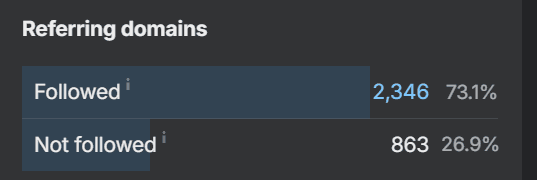
Using Semrush:
Go to Backlink Analytics → enter your domain → click “Backlinks” tab → filter by link type.
Both tools show you the exact ratio in seconds.
What’s a healthy ratio?
There’s no perfect number, but most SEO experts suggest aiming for roughly 60-70% dofollow and 30-40% nofollow. That looks natural to Google.
How Do I Use Nofollow Links on My Site?
It all depends on what technology your website runs on.
For instance, if your site runs on WordPress, all blog comment links will have the nofollow attribute applied by default.
There is also a plugin called “External Links” that’ll help make all your links nofollow:
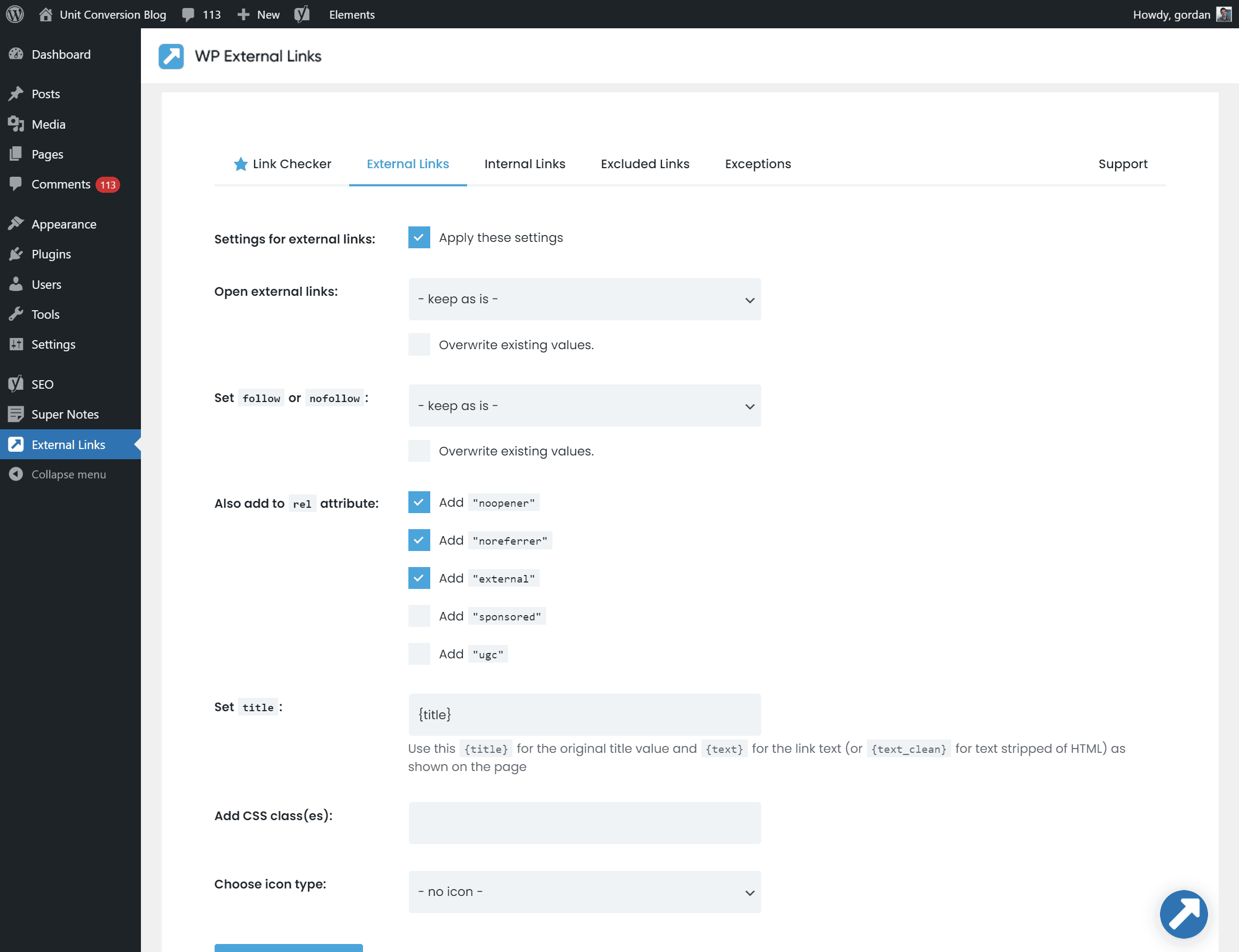
Otherwise, manually add the rel=”nofollow” attribute to your external links.
New link attributes
In September 2019, Google introduced two new link attributes, an upgrade to the old nofollow attribute, to provide new ways to identify the nature of links.
For nearly 15 years, the “nofollow” tag was the only way to disclose links that were advertised or sponsored. From now on, there are three ways to identify these links:
rel=”ugc”
UGC stands for “User Generated Content.” You can use the attribute for user-generated content such as blog comments and forum posts.
rel=”sponsored”
The rel=” sponsored attribute is meant for sponsored links and paid links.
Does this mean we should replace the nofollow tag with the new ones? Not at all, you can leave your user-generated or sponsored links with the “nofollow” attributes.
Can we use the new attributes together with “nofollow”? Yes. They can be used together if required: rel=”nofollow ugc,” rel=”nofollow sponsored.”
Bottom line: Everything’s fine, guys! There’s no need to worry, no need for any major changes, just remember the updates in the future.
FAQs
Backlinks are links from other websites pointing to your site. Google treats quality backlinks as signals of trust, which can help rankings.
Dofollow: Pass SEO value (link equity) to the linked page. (Default for links) whereas Nofollow: Tells search engines not to pass SEO value. (Added using rel=”nofollow”).
To check whether a link is dofollow or nofollow, you can check the HTML code of the link, use browser SEO extensions, or backlink analysis tools.
Use tools like Ahrefs, Semrush, Moz, or similar backlink checkers to see the ratio for any site or page.
Yes. Backlinks are still a major ranking factor. But quality, relevance, and authority matter more than the number of links.
Conclusion
Both dofollow and nofollow links matter, as they just serve different purposes.
Dofollow links help pass SEO value and can directly improve rankings. Nofollow links don’t pass ranking power, but they still help with traffic, visibility, and a natural backlink profile.
If you’re building backlinks, focus mainly on quality dofollow links. But don’t ignore nofollow links; a healthy mix keeps your link profile safe.
Got questions? Drop them below.


![Toxic Backlinks: How to Find, Remove, and Disavow Them in 2026 [A Beginner's Guide]](https://bloggerspassion.com/wp-content/uploads/2019/02/the-effect-of-bad-backlinks-and-how-to-remove-them.jpg)

No-follow and do-follow links play a crucial role in website optimization. While do-follow links pass on link equity and can positively impact search engine rankings, no-follow links are essential for maintaining a healthy link profile and signaling to search engines about the nature of the linked content. Both types of links are important tools in the hands of SEO practitioners for building a robust online presence.
Thanks for briefing us thoroughly i will apply it next.