


Homepage SEO is the practice of optimizing your website’s main page (home page) to rank higher and gain more visibility in search results.
The main SEO goal of a homepage is to rank for branded keywords (your company name), so people can find you easily in Google.
Most people think a homepage should rank only for the brand name.
That’s wrong.
Take Canva as an example.
Canva’s homepage doesn’t just rank for “Canva” or “Canva login.” It also ranks for high-traffic, non-branded keywords, like:
- FAQ templates
- Online whiteboard
- How to create invoices
- Resume format
- Canvas / docs / translate
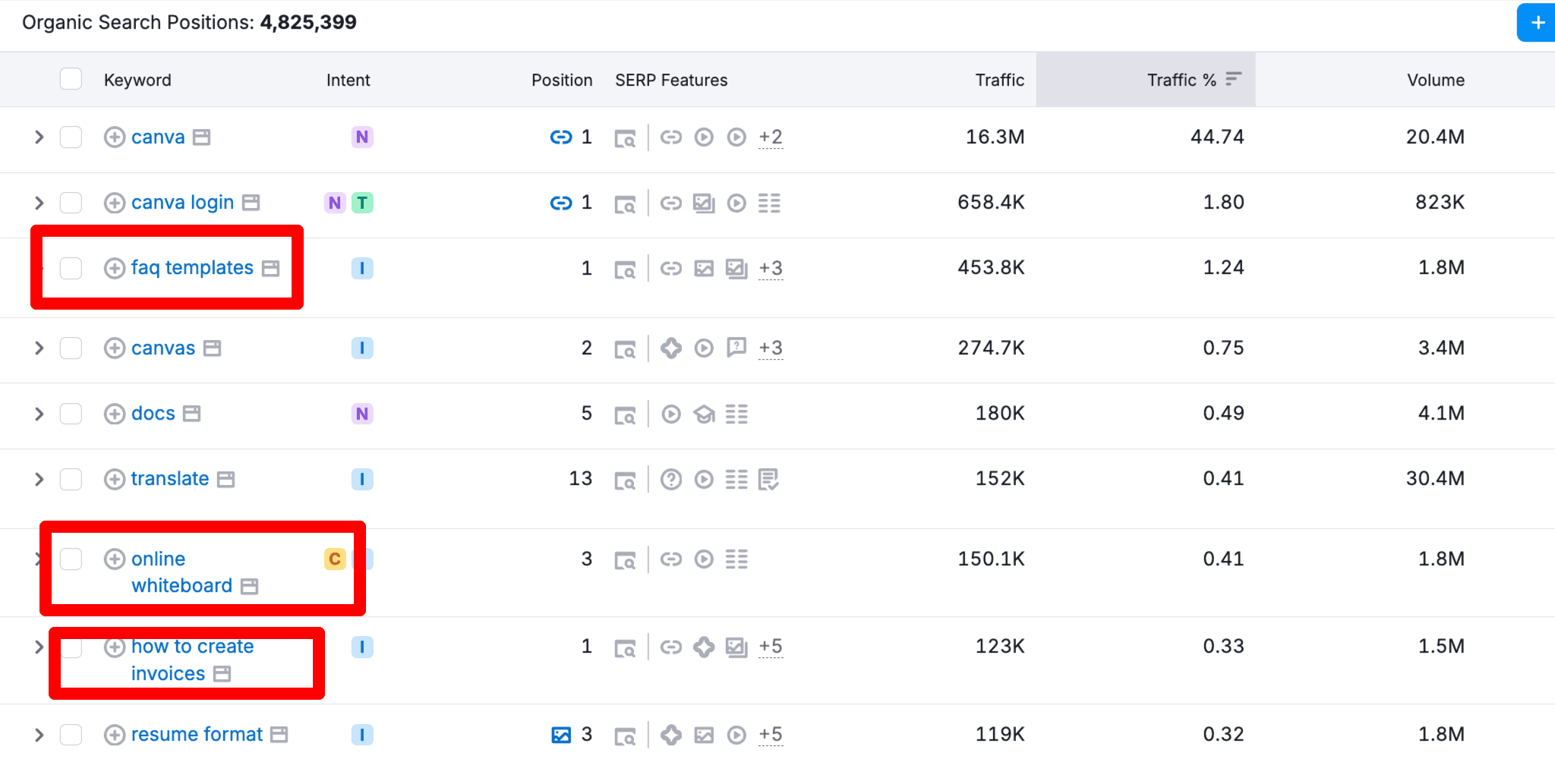
These keywords bring a steady flow of organic traffic from Google, and they match exactly what Canva offers.
That’s what smart homepage SEO looks like.
You don’t optimize your homepage to rank only for your brand name, you optimize it to rank for multiple related keywords that your audience is actually searching for.
So if you’re looking for an easy-to-implement tutorial on homepage optimization best practices for 2026, you’re in the right place. In this guide, you’ll learn;
- The best ways to optimize your website’s homepage
- With practical examples and illustrations
- A quick checklist for best practices
Let’s get started.
How to Optimize Your Homepage for SEO in 2026: 6 Simple Ways
Learn how to create an SEO-friendly homepage with these six simple tips to boost visibility and attract organic traffic:
1. Identify the RIGHT Keywords for Your Homepage
No matter your niche, using the right keywords on your homepage helps people (and AI) understand what your site is about.
Keywords are simply the words people type into Google or AI tools to find a product or service.
Ask yourself:
- What does my website offer?
- Who is it for?
- What problem do I solve?
This gives you your homepage theme.
Once you know your website’s theme, focus on finding keywords that will help you rank for what you do for your target audience or customers.
Remember, your homepage should target:
- 1 primary keyword (main idea)
- 3–7 closely related keywords (supporting keyword terms)
Remember, do NOT try to rank for a single, branded keyword. In most cases, there’s a HUGE competition for branded or short-tail keywords.
How to Find Homepage Keywords (Simple Way)
Step 1: Use Google Autosuggest (Free)
Type your main topic and see what Google suggests.
Example: If you sell WordPress plugins, try:
- wordpress plugin
- wordpress plugin for
- best wordpress plugin

By looking through Autocomplete and trying different keyword variations, you can learn what people are searching for and create keyword themes.
Step 2: Use a keyword tool for validation
Coming up with “keyword themes” is NOT enough. You need to find low-competitive yet profitable keywords to optimize your homepage.
Here’s where premium tools like Semrush come into play. You can come up with dozens of relevant keywords for your homepage (using Semrush).
Let’s say your website’s theme is “fitness”; you can enter that keyword on the Semrush Keyword Magic tool.
Have a look;

As you can see, the tool has access to over 4.5 million keyword variations related to fitness. There are a lot of keywords, right?
You can filter the keywords by using various metrics, including;
- The intent of the keyword
- Search volume
- KD% (keyword difficulty is a score from 0 to 100, with a higher score indicating a MORE competitive keyword; try to aim for keywords below 40)
- CPC (cost per click)
Once you set those filters, you’ll get a few handful of keywords you can use within your homepage title, meta description, homepage copy, etc.
Create a short list of 5–10 relevant keywords and use them naturally in:
- Title tag
- Meta description
- Headings
- Main homepage copy
2. Craft a Strong SEO Title Tag (Not a Generic One)
SEO title tags are easy to create, right?
No. Creating generic titles for your website’s homepage can hurt your site badly in search results.
Why title tags matter:
- They show up as the main clickable link in search results
- They tell Google, AI tools, and users what your site is about
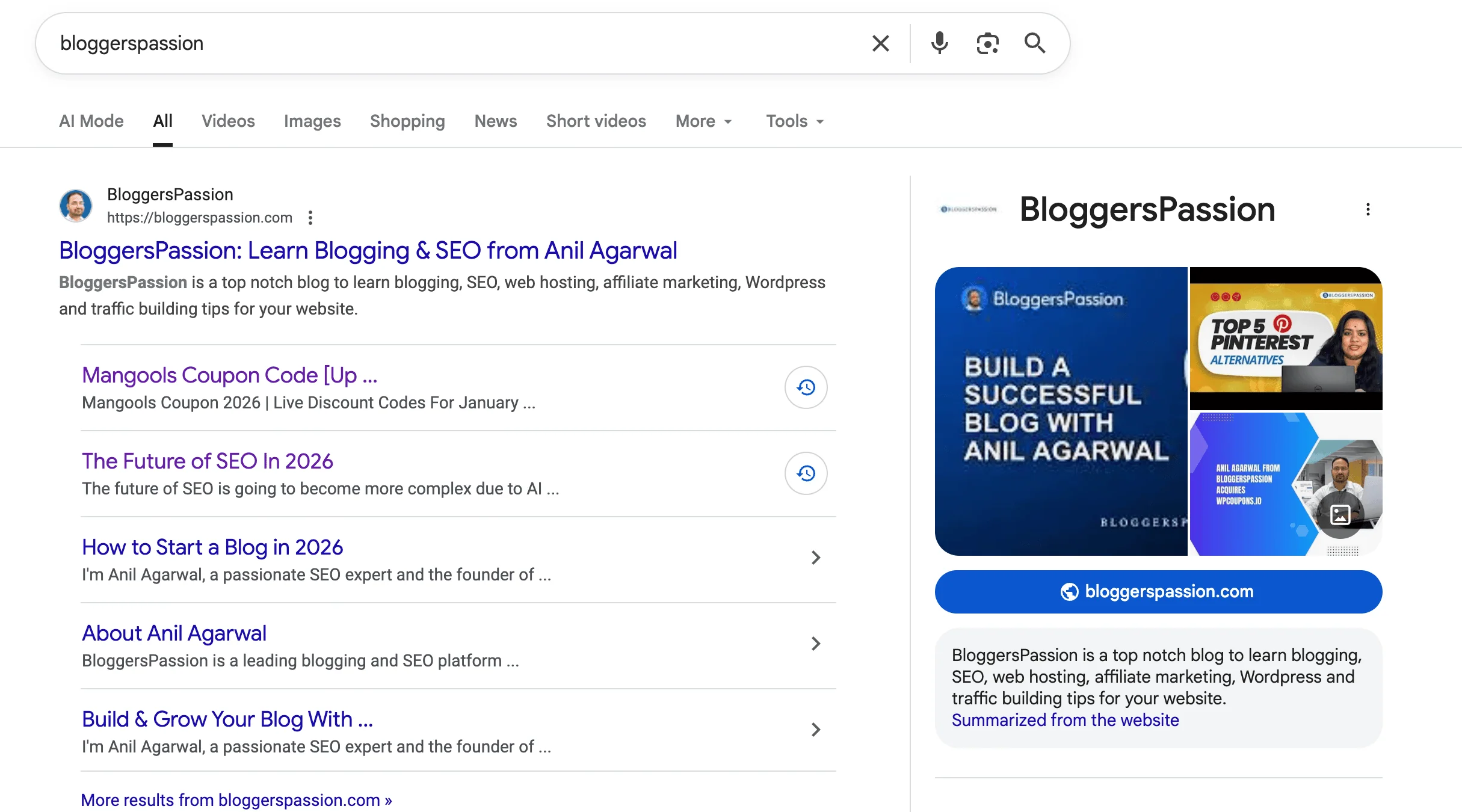
For example, our blog BloggersPassion has a simple SEO title that clearly explains what the site is about.
It focuses on blogging and SEO without trying to impress Google with keyword stuffing.
The title is short, clean, and easy to understand. Anyone searching can instantly tell that BloggersPassion helps people learn blogging, grow traffic, and build online income.
For example, take a look at these two title tags;
- SEO Tips – BloggersPassion
- SEO Tips from BloggersPassion – Become an Expert
Which one do you think is BETTER?
Obviously, the second one because it is:
- More click-worthy
- Clear
- Descriptive
Here are a few quick tips for creating a great title tag for your homepage.
- Use ONE core keyword: Pick one main keyword that defines your business. Don’t stuff multiple keywords.
- Make it human-friendly: Write for people first. If it sounds boring, no one clicks—even if it ranks.
- Keep it short and clean: Google usually shows 50–60 characters. Long titles get ignored in search results.
- Add brand value (when it makes sense): If your brand is known, include it. If not, focus more on what you offer.
Quick takeaway: Your homepage title tag should explain what you do and why to click, in one simple line. That’s how title tags work in 2026.
3. Create the Right Meta Description (For Clicks)
A meta description is the short text that appears below your homepage title in search results.
It doesn’t directly improve rankings anymore, but it affects clicks.
For example, look at Grammarly’s homepage meta description:
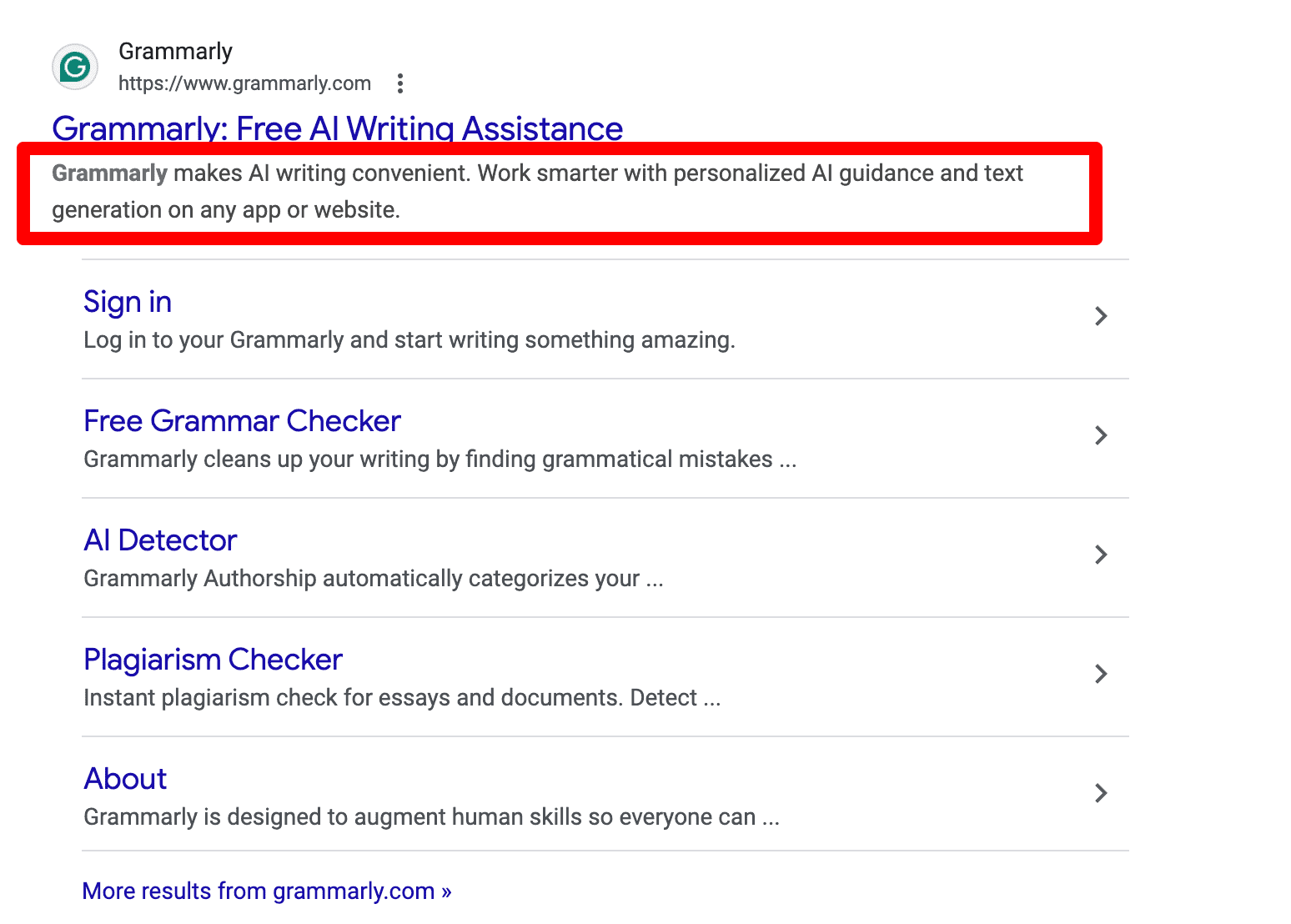
See that? It is simple, clear, and benefit-focused. That’s exactly how a homepage meta description should be.
How to Write a Good Homepage Meta Description?
- Tell people what they’ll get: In one or two lines, explain what your site offers.
- Be specific, not generic: Mention your core topics, tools, or products. Avoid generic lines like “best website online”
- Use natural keyword variations: Add related phrases, but write for humans, not bots.
- Keep it short: Keep your homepage’s meta description under 155–160 characters so it doesn’t get cut off.
- Add trust if you have it: Include users, customers, years, ratings, as social proof boosts clicks.
Make sure to proofread your homepage meta description carefully before publishing it, as it is one of the essential aspects of your website’s copy.
Looking for more tips? Check out our free guide on blog description examples for creating compelling blog descriptions.
4. Implement an Engaging Homepage Content Flow
Homepage content matters a lot for SEO.
But in 2026, it’s not about stuffing keywords.
It’s about flow.
Search engines, AI tools, and users should understand what your site is about in seconds.
A good homepage content flow:
- Explains what you do
- Shows who it’s for
- Helps visitors to go through important pages
- Makes it easy for Google and AI to scan
How to Build a Strong Homepage Flow?
First of all, you should fill your homepage with relevant content where you can mention things like;
- Your products or services
- What exactly does your website offer
- Include all the calls to action and keywords that are relevant
The simplest way to create a content flow on your site is to use a navigation menu.
Here’s an example of BloggersPassion;

The homepage has;
- Clear promise (what you’ll get)
- Real face + name (build trust fast)
- One simple action (email + CTA)
- Strong social proof (big brand logos)
- Clean layout (no distractions)
If you see our blog’s example above, you’ll notice that we clearly included a list of things that are easier to navigate, even for first-time visitors.
You’ll also see a big heading that helps people quickly understand what they’ll discover on the website.
Also, show your key offerings clearly
Mention:
- Your main products or services
- Core topics you cover
- Your USP (Unique Selling Points) in simple words
Avoid long paragraphs. Short sections often work best.
5. Use One Clear H1 (Keep It Simple)
Your homepage needs one strong H1.
That H1 should clearly explain what your website does.
Why H1 Matters in 2026?
Search engines and AI tools use your H1 to understand:
- What your homepage is about
- Who it’s for
- What problem does your website solves
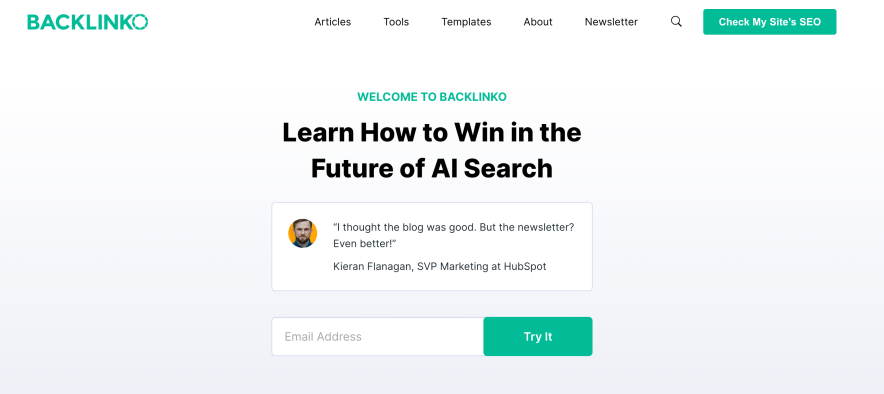
For example, take a look at Backlinko’s homepage H1 tag: “Learn How to Win in the Future of AI Search.”
It uses only one H1 to clearly define the page’s main topic. Everything else supports that H1 tag’s message. No extra H1s. That’s how you should also craft one.
Good vs Bad H1 Example
- Bad H1 tag: Best SEO Tips, SEO Tools, SEO Services for Beginners
- Good H1 tag: Actionable SEO Tips and Tools for Bloggers
The second one is:
- Clear
- Easy to understand for users (to know what the site is about)
- Easy for AI and search engines to understand the context of the site
How to Use Headings the Right Way
Mostly, you’ll only need H1 through H4 tags, where:
- H1 is the MAIN heading for the page
- H2 is a subheading (where you can list out all the supporting points)
- H3 is a subsection that comes under an H2 tag
- H4 is a subsection that comes under an H3 tag
Note: You can use as many H2, H3, or H4 tags on a page, but you should use ONLY one H1 tag for the best SEO optimization.
Some of the best practices include;
- Use one strong H1 on your homepage
- Add H2, H3, and H4s naturally with relevant keywords
- Cover all key sections your site or business offers
- Keep headings short and consistent
- Aim for 4 to 6 words per heading (short and sweet)
- Make headers easy to scan and understand
The takeaway? If someone reads just your headings, they should still understand your site.
6. Add Smart Internal Links to Improve Your SEO
Last but not least: don’t forget the importance of internal links.
On our blog, we add internal links inside real homepage sections.
From our homepage, we guide visitors to:
- Our SEO tutorials
- Blogging and affiliate marketing guides
- Recommended tools and money pages
These links are placed:
- Inside sections
- Under clear headings
- Near useful content
So users know where to click next.
What Pages Should You Link From Your Homepage?
Link to pages that actually matter, such as:
- Your main tools or products
- Key blog categories
- High-converting pages (reviews, comparisons, services)
The internal links you use on your homepage tell Google and AI, “these pages are extremely important”.
You can also check out your competitor’s homepage internal links to get an idea of how to use them smartly for your homepage.
Homepage SEO Best Practices: A Quick 10-Point Checklist
Want a quick summary of this guide? Looking for an easy checklist to follow? This list covers the key homepage optimization steps so you don’t miss anything important.

- Pick the right keywords (focus on long-tail, easier to rank)
- Optimize your homepage title tag for one main keyword. Match the title with search intent
- Write a clear and short meta description for your homepage
- Use descriptive headings (H1–H3)
- Add keywords where they make sense (don’t stuff to rank!)
- Help Google understand your site’s context
- Link to important pages from the homepage
- Compress images and use ALT text
- Make your homepage mobile-friendly and fast
- Build quality backlinks and audit SEO issues regularly
Free SEO Resources:
Final Thoughts
If you run a website, blog, product page, or online business, homepage SEO is NOT optional. It really sets the tone and context for your site and tells search engines what you’re really about.
Keep it simple. Use one clear H1, target the right keywords, match search intent, and focus on providing a better user experience, especially on mobile.
If you get the homepage right, everything else becomes easier.
So, what’s your take on homepage optimization? Did this guide help you? Got any questions or tips to add? Share your thoughts in the comments.
FAQs
Here are some commonly asked questions on SEO homepage content.
Homepage SEO means optimizing your website’s homepage so search engines understand what your site is about. This includes your title tag, meta description, headings, content, images, and links.
Yes, the homepage is the most essential part of your website. It helps search engines understand the “context” of your website. The keywords, headings, images, and everything else you use within your homepage are vital in improving your search rankings.
Focus on keywords that describe your main topic or business. You can use tools like Google Autocomplete, Search Console, or SEO tools like Semrush to find low-competition keywords.
Optimize your homepage title and meta description, use one clear H1, add relevant keywords naturally, improve internal linking, and build quality backlinks from trusted sites.
Only one. A single H1 helps search engines clearly understand the main topic of your homepage.
Yes, but naturally. Use keywords naturally in headings and content, without forcing them.






Leave a Comment
Your email address will not be published. Required fields are marked *