


![hostinger business email review [my experience]](https://bloggerspassion.com/wp-content/uploads/2026/02/hostinger-business-email-review-my-experience-300x160.png)
Product Name: Hostinger Email
Summary
Hostinger Business Email is a highly affordable alternative to Google Workspace, specifically for solo entrepreneurs and small teams already using the Hostinger ecosystem. During testing with wpcoupons.io, the platform proved easy to set up, with a modern, ad-free interface and useful AI-driven features like the Kodee assistant.
In 2026, using a generic email address like [email protected] for your business can make you look like a hobbyist.
Most customers today expect to see a professional address that matches your website, like [email protected]
Hostinger Business Email is a service designed to give you that professional look without the high cost of big-name competitors.
Hostinger has positioned itself as the “budget-friendly king” of the hosting world.
Their email service follows the same path.
In a nutshell, it is perfect for:
- Small Business Owners who find Google Workspace ($6+/month) or Microsoft 365 too expensive for a simple inbox.
- Current Hostinger Customers who want to keep their website and email management in one single dashboard.
![hostinger business email review [my experience]](https://bloggerspassion.com/wp-content/uploads/2026/02/hostinger-business-email-review-my-experience-884x471.png)
To give you a reliable review, I didn’t just look at the sales page. I used a real Hostinger account to:
- Set up a new mailbox for the domain wpcoupons.io.
- Check how long it takes to connect the email to a phone (iPhone and Android).
- Send and receive test emails to see if they land in “Spam” or the “Inbox.”
- Compare the storage limits against what a normal business actually uses in a year.
Without any delay, let me show you how things are…
Table of Contents
Features Analysis: AI, Security, and Storage
The AI Mailbox Assistant: Meet Kodee
In 2026, the biggest reason to choose Hostinger is Kodee. This isn’t just a basic chat tool; it is built directly into your inbox to save you time.
- AI Writing & Smart Replies: If you are busy, Kodee can draft an entire email for you. It looks at your previous messages to match your “voice.” Instead of typing for five minutes, you just click a “Smart Reply” that fits the context.
- Instant Summaries: If you have a long thread of 20 emails, Kodee can give you a three-bullet summary in seconds. This is a life-saver for catching up after a day off.
- Conversational Search: You don’t have to remember keywords anymore. You can just ask Kodee, “When did John say the meeting was?” and it finds the exact message.
Security and Privacy
Security is about more than just a password. Hostinger uses BitNinja and SpamAssassin to block 99.9% of junk mail and viruses before they ever reach you.
A big plus for 2026:
Unlike some free email providers, Hostinger has a strict “No Ads, No Tracking” policy. They do not read your emails to show you ads, and they do not use your private business data to train their AI models. Your information stays yours.
Storage: The 1GB vs. 50GB Reality
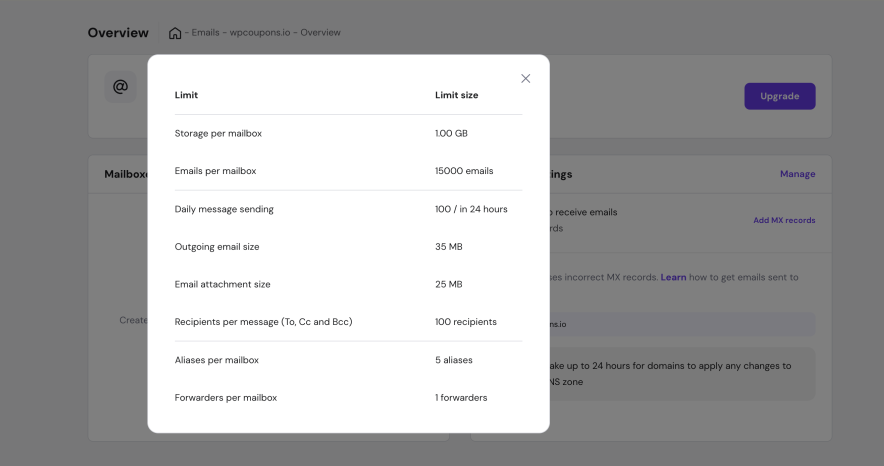
Storage is the most important part of your plan. If your inbox gets full, you stop receiving emails, which can be a disaster for business.
| Plan | Storage | Best For |
|---|---|---|
| Free (with Hosting) | 1 GB | Testing things out or very light use. |
| Business Starter | 10 GB | Most freelancers and new small businesses. |
| Business Premium | 50 GB | Power users who send lots of photos or PDFs. |
Email Marketing: Hostinger Reach
If you want to send newsletters to thousands of people, Hostinger now offers a separate tool called Hostinger Reach.
It uses AI to help you design the emails and make sure they don’t end up in the spam folder. It’s a nice extra if you plan to grow your audience.
User Experience: Managing Your Inbox
Using Hostinger Business Email is different from using Gmail or Outlook. I usually interact with two different screens: the hPanel (where you manage the account) and the Hostinger Webmail (where you read and write emails).
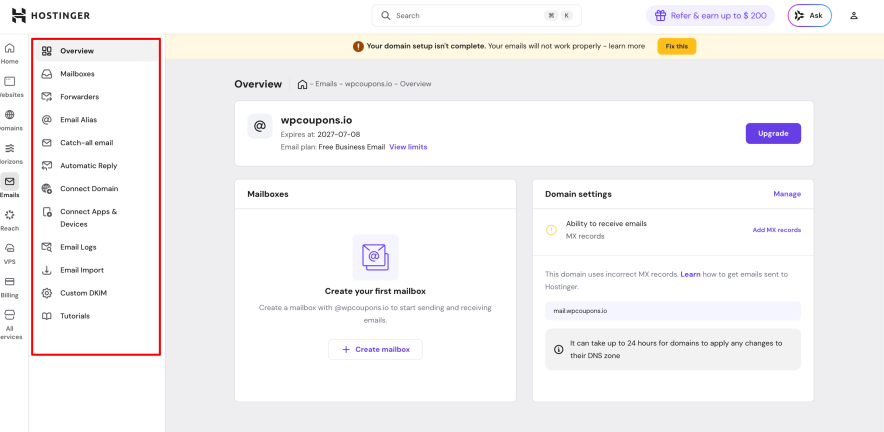
Interface Overview: The Webmail App
The Hostinger Webmail app is built for speed. It looks clean to me and does not have the “clutter” or ads you often see in other Gmail alternatives.
- The Layout: The folders (Inbox, Sent, Drafts) are on the left. My messages are in the middle. It is very easy to find what I need.
- No Ads: Unlike free Gmail, my work area is 100% focused on your messages.
- Daily Workflow: In 2026, the web app is fast enough that most people don’t even feel the need to install a desktop app like Outlook. It works directly in any browser.
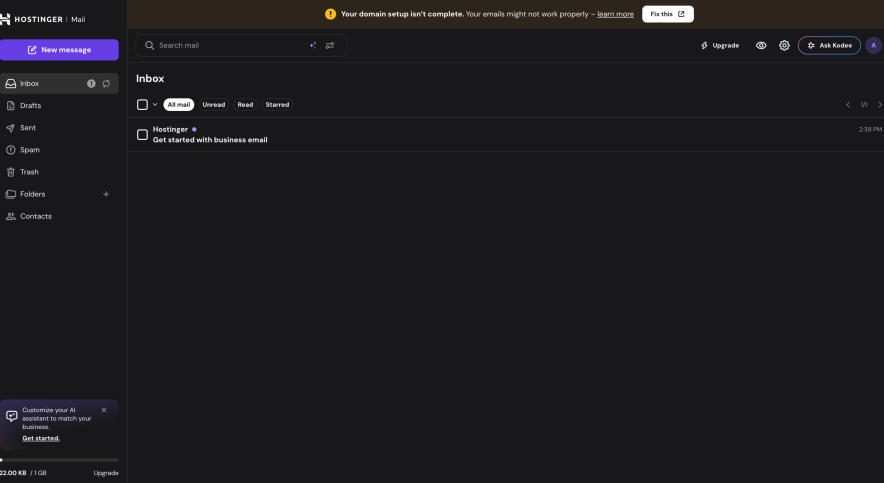
The Setup: From Domain to Inbox
The setup is the best part for me. As we saw with wpcoupons.io, Hostinger uses a “Setup Wizard.” It asks me for the name of your email and a password, and then it does the rest.
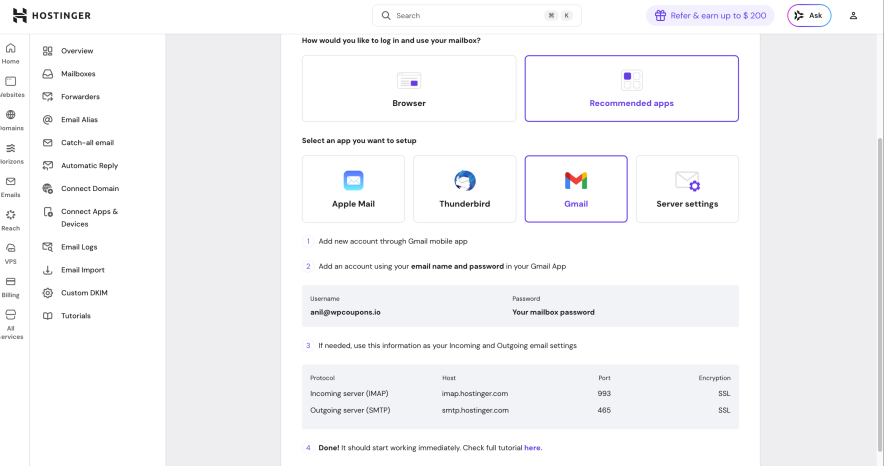
I can create new mailboxes in seconds. Setting up Email Forwarding is easy (so copies of your mail go to another address).
Create Aliases (like having [email protected] send mail to your main inbox).
Learning Curve: Is It Hard?
Not at all for me. If you can send an email on your phone, you can use this. Hostinger includes a “Check Status” feature.
If your email isn’t sending, the dashboard will show you exactly which technical setting (like an MX record) is wrong.
Mobile Access
Hostinger does not have a “fancy” native app for every single phone, but their webmail is “responsive.”
This means it changes size to fit your phone screen perfectly. You can also connect it to the mail app already on your iPhone or Android in about two minutes.
Email Clients Integration
Hostinger makes it very easy to “take your email with you.”
You don’t have to log in to the Hostinger website every time you want to check your messages.
You can connect your [email protected] account to almost any app using three standard “languages” or protocols: IMAP, POP3, and SMTP.
Manual Setup: The Technical Details
If you like to do things yourself, you will need the specific “server settings.” As we saw in your hPanel screenshot under the “Connect Apps & Devices” tab, Hostinger provides these clearly.
Here are the standard settings for 2026:
- Incoming Server (IMAP): imap.hostinger.com (Port 993 with SSL)
- Incoming Server (POP3): pop.hostinger.com (Port 995 with SSL)
- Outgoing Server (SMTP): smtp.hostinger.com (Port 465 with SSL or 587 with STARTTLS)
Which one should you choose? Always go with IMAP. It keeps your emails synced across all devices.
If you delete an email on your phone, it disappears from your computer too. POP3 is old-fashioned and usually downloads the email to one device only, which can get messy.
Hostinger knows that typing in port numbers is boring. For many popular apps, they offer an Automatic Configuration tool.
- Apple Devices: You can simply scan a QR code or download a small “profile” file. This automatically sets up your iPhone, iPad, or Mac Mail in seconds.
- Outlook & Thunderbird: Hostinger provides a small file you can download that “tells” the app exactly how to connect. No manual typing required.
Using Hostinger Email Inside Gmail
A lot of people love the Gmail interface but want to use their professional Hostinger address. You can do this by using the “Check mail from other accounts” feature in Gmail settings.
- Open Gmail Settings → Accounts and Import.
- Add your Hostinger address under “Check mail from other accounts.”
- Use the SMTP settings mentioned above to also “Send mail as” your professional address.
Pricing Analysis: Hostinger Business Email Plans Comparison
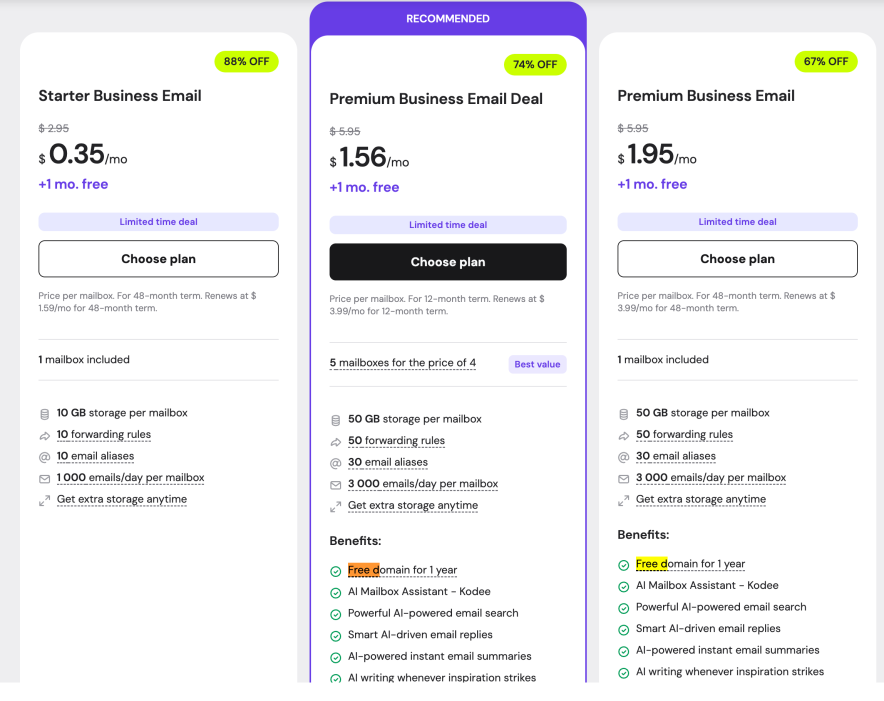
There are two main standalone plans. Most people choose based on how much storage they need.
| Feature | Business Starter | Business Premium |
|---|---|---|
| Intro Price | $0.35/mo | $1.56/mo |
| Renewal Price | $1.59/mo | $3.99/mo |
| Email Storage | 10 GB | 50 GB |
| AI (Kodee) Tools | No | Yes (Included) |
| Free Domain | No | Yes (1st Year) |
| Sending Limit | 1,000 emails / day | 3,000 emails / day |
The “Free” Email in Hosting Plans
As you saw in my experience with wpcoupons.io, many people get their email “for free” because it is included in their Hostinger web hosting plan.
- The Good News: You don’t pay anything extra for the first year.
- The Catch: You are usually limited to 1GB of storage and 1–2 mailboxes. This is fine for a single person, but a busy business will fill up 1GB very quickly.
The 48-Month Commitment
To get those super-low prices like $0.35, Hostinger usually requires you to pay for 48 months (4 years) upfront. If you only want to pay for 12 months, the price will be a little higher.
If you try the service and realize it’s not for you, Hostinger offers a 30-day money-back guarantee.
Hidden Costs to Watch For
- Renewal Jumps: Your price will almost double after your first term ends. Hostinger is very honest about this and shows the renewal price right on their website.
- Domain Renewals: After your free first year, a .com domain usually costs around $15–$17 per year.
Pros and Cons:
| Pros | Cons |
| I noticed how simple it is to get started. You don’t have to be a tech genius. Creating your mailbox for [email protected] is as simple as picking a name and a password. | The 1GB Storage Limit in a free plan is my biggest concern. If a client sends you five large PDF files or some high-quality images, your inbox will fill up fast. You’ll need to delete old emails or upgrade to the 10GB plan sooner than you think. |
| One thing you’ll notice immediately is that there are no ads. Unlike a free Gmail account that shows you ads based on your data, your Hostinger webmail is a clean, private space for your work. | That low price you see today won’t stay forever. When your first 12 or 48 months are up, the price will roughly double. It is still cheaper than Google, but you should keep this in your budget for the future. |
| If you ever get stuck—like if your email isn’t sending—the 24/7 live chat is right there in your hPanel. | No phone support is there |
| A separate cloud storage like Google drive is absent |
Final Verdict:
At the end, I just want to say, if you want a great, affordable alternative to Gmail, the Hostinger Business email is a must to explore.
I know it lacks a great cloud storage feature, but it is evolving, and we can expect this feature soon. The user interface is simple. Plus integration with Gmail, Apple, etc., offers extra flexibility in terms of usability.
Overall, I rate the service 4 out of 5. If you own a Hostinger site or are looking for the same then getting an email hosting service is a great way to save your money as it gives a free domain for a year.
FAQs:
Can I use Hostinger email on my phone and computer?
Yes. You can use the Hostinger Webmail in any browser. For your phone, you can connect it to the Gmail or Apple Mail app using IMAP. On a computer, you can use apps like Outlook or Thunderbird.
What happens if I run out of storage?
If you hit your limit (like the 1GB limit on the free plan), you will stop receiving new emails. Hostinger will usually send you a notification when you reach 80% and 90% of your limit. You can fix this immediately by upgrading to the Business Starter (10GB) or Premium (50GB) plan inside your hPanel.
Is Hostinger email better than Google Workspace?
It depends on your needs. Hostinger is much cheaper (around $1–$3 per month) compared to Google ($6+ per month). If you only need a professional email and a place to send messages, Hostinger is the better deal. If you need a massive amount of storage (over 50GB) and tools like Google Sheets, Google Drive, and Google Meet for a large team, Google Workspace might be better.
Can I move my old emails from Gmail or Outlook to Hostinger?
Yes. Hostinger has a built-in Email Import tool. You just need to provide the login details for your old account, and the tool will automatically copy all your folders and messages over to your new Hostinger inbox.





Great review! I really liked how you explained Hostinger Business Email in a practical way, especially its affordability compared to tools like Google Workspace. The point about using a professional email instead of generic ones really hit — it definitely impacts brand credibility. Also, the easy setup and clean interface seem perfect for beginners and small teams. One question: would you still recommend it for scaling businesses with larger teams and advanced collaboration needs? Thanks for the honest insights!
Hi,
You can use it for the bigger teams as long as this email service meet your storage needs.