



| Active Offers | 1 |
15% OFF
– Note: Applicable to only new users
– Note: Applicable to only annual plans
– Highlights: AI Workflows, AI Video Trends, AI Avatars, Voice Clones, 20 GB – 10 TB Storage, Unlimited Exports, and more.
How to Claim InVideo Coupon Codes? [Step By Step]
As we said earlier, we believe in total transparency.
And staying true to that, it’s clear that the InVideo.io editor currently offers savings of only up to 15%.
Let me share with you the straightforward process.
Step 1: Click Here to Activate the InVideo coupon
As soon as you click the link above, you will be redirected to the InVideo offer page.
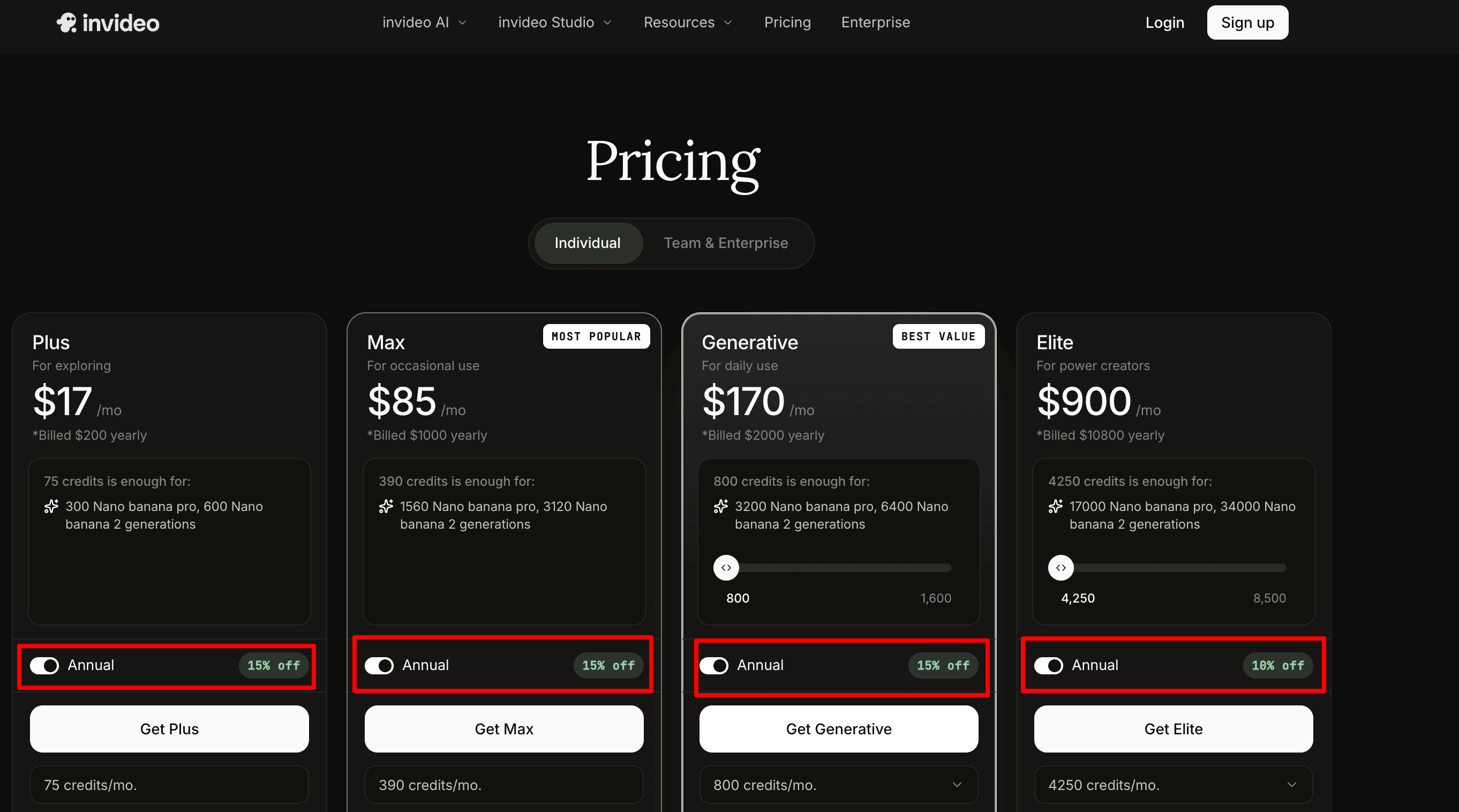
Step 2: Claim the InVideo Promo Code
As you can see, the 15% coupon is activated on the following InVideo plans (Plus, Max, Generative). The 10% OFF applies to the Elite plan.
If you see, the Plus plan now costs you $17/month instead of $20/month.
| InVideo Plans | Regular Pricing | Discounted Pricing |
| Plus | $20/month | $17/month |
| Max | $100/month | $85/month |
| Generative | $200/month | $170/month |
| Elite | $1000/month | $900/month |
Next, you have to pick the InVideo plan based on your needs.
Finally just go through the stripe payment process and InVideo will be all yours at the reduced price.
Recently Expired InVideo Coupons & Deals:
| Coupon Code | Offer | Status |
| CREATE25 | 25% Off Annual InVideo Plan | Expired |
| VIDEO50 | Up to 50% Off Creator Plan Upgrade | Expired |
| INVIDEONEW20 | 20% Off for New Users | Expired |
| AIEDITOR30 | 30% Off InVideo AI Subscription | Expired |
| START15 | Extra 15% Off Any Paid Plan | Expired |
| CONTENT40 | 40% Off Selected Annual Plans | Expired |
| SAVE2025 | Save Up to $60 on Yearly Billing | Expired |
| REELS25 | 25% Off Social Media Video Plans | Expired |
| PROUPGRADE35 | 35% Off Pro Plan Upgrade | Expired |
| WELCOME20 | 20% Off First InVideo Purchase | Expired |
About InVideo:
InVideo is an AI-powered video creation platform that simply turns ideas into professional videos in minutes.
InVideo eliminates the need for advanced editing skills. You can create all sorts of videos for various platforms such as YouTube videos, social media content, and more…
You simply describe your video idea. InVideo AI then generates:
- The script
- Visuals,
- Voice narration
- Captions
- Background music
- Scene transitions
InVideo stands out for its all-in-one workflow. The platform handles almost every part of the production process (From generating a video using a simple text prompt to fine-tuning scenes with text-based commands)
It also provides access to:
- Stock media assets
- AI Voiceovers
- Thousands of templates
Today, InVideo is used by content creators and all those businesses who want to create high-quality videos faster without investing in expensive editing software or production teams.
Why Choose InVideo?
Traditionally, creating videos can be frustrating.
You need a script writer, video editor, stock footage, voiceovers, subtitles, and plenty of time to put everything together.
InVideo removes most of that work and lets you create videos from a single prompt.
Here are a few reasons why many creators prefer InVideo:
- InVideo turns a simple idea into a complete video within minutes.
- No video editing skills are needed.
- Millions of stock videos, images, and music tracks are included in the editor
- Generate realistic AI voiceovers without recording your own voice.
- Make changes using simple text instructions instead of complicated timelines.
- Create content for YouTube, Instagram Reels, TikTok, Facebook, and other platforms.
- Save hours of work on scripting, editing, and production.
- Perfect for faceless YouTube channels and content automation workflows.
- Everything from script creation to final export happens inside a single dashboard.
FAQs:
Do I need a coupon code to claim the InVideo discount?
No. The discount is automatically applied when you use the promotional link mentioned above.
Can existing users claim the 15% InVideo discount?
Not at all. This special 15% OFF is valid for new users only.
Does InVideo offer a free plan?
Yes. InVideo offers a free plan that allows you to explore the platform before upgrading.
Which InVideo plan is best for beginners?
The Plus plan is usually the best starting point. It includes access to all AI workflows, AI video trends, AI avatars, voice clones, stock assets, and unlimited exports.
Do InVideo credits roll over to the next month?
No. According to InVideo help documentation, unused plan credits reset on your renewal date and do not carry forward to the next billing cycle.
Is InVideo worth it?
If your goal is to create YouTube videos, social media content, marketing videos, or faceless videos quickly, InVideo offers good value for money.
Explore More:
![Base44 Promo Codes 2026 September [Get 30% OFF Live]](https://bloggerspassion.com/wp-content/uploads/2026/05/base44-promo-codes-1-1-884x471-1-300x160.webp)

![22+ AppSumo Coupon & Lifetime Deals [100% Verified – Aug 2026 Updated]](https://bloggerspassion.com/wp-content/uploads/2021/10/best-appsumo-deals-300x157.jpg)


Leave a Comment
Your email address will not be published. Required fields are marked *