


Automation is the future, but do you know how you can automate the repetitive tasks of your day-to-day business operations?
Try Pabbly Connect: It can connect multiple apps together and makes business automation easy for us. Pabbly Connect has grown massively because it offers high-end advanced automation features at pocket-friendly pricing.
If you are looking for an honest unbiased Pabbly Connect review, then you came to the right article.
Today we will be sharing our experience with Pabbly Connect and a lot more, including:
- Views on security, pricing
- Words on features, support system, and working
- Pros & Cons
- Task management
- Available integrations, and many more.
Pabbly Connect Review 2026: Is It the Best Automation Tool Out There?

Story Time: Why We Choose Pabbly Connect
As a blogger, we wanted to automate a few WordPress & Social Media auto-posting-related tasks. One of our friends suggested Pabbly Connect because pricing is our biggest concern.
Initially, we didn’t actually know how many tasks we wanted, but in case our requirement increases, we might go with Lifetime deal plans (starting from just $349) because it is extremely affordable compared to other automation tools.
Besides affordable pricing, unlimited apps, team member options, and better task management are the additional perks we were getting here.
Combining all the benefits, we have chosen Pabbly Connect, and we are pleased with our decision.
Words on Pabbly Connect Pricing & Task Management System
The two big reasons we have chosen Pabbly Connect are its affordable pricing and the task management system.
Not just us, plenty of other people appreciate the Pabbly pricing, discount offers (mainly lifetime deals), and the way they are calculating the tasks.

Reviewing the Pabbly Connect Task Calculation System:
The automated action performed in a workflow is referred to as a task. The final amount you have to pay per automated task mainly depends on the automated tool’s task calculation process.
And because of the Pabbly Connect effective task calculation, Users can save huge money.
Why is Pabbly task management more effective than others?
- First reason: Pabbly doesn’t count triggers as tasks.
- Second reason: Pabbly also ignores internal tasks from its task calculation.
Essentially, triggers are fired when an event occurs in the first app. And based on that, Pabbly Connect initiates the action you configured in the second app. Some of the primary triggers you would have mostly interacted with inside Pabbly are:
- Webhooks: Used to receive the data from any software.
- Email Parser
- Scheduler
- More.
To understand the first reason, let’s have a look at the automated workflow example:

Suppose we wanted to automatically transfer all our Google Form submissions into Google sheets and MailChimp.
So we have defined a trigger (webhook). Each time someone submits the Google form, this trigger will run and send the lead to Google Sheets (Task 1) & MailChimp (Task 2).
In the above example, only 2 tasks have been counted. The trigger step would not be counted.
If this automation is performed with some other tool (for example, Make.com (formerly Integromat)), the trigger step would be considered as a task, and hence the task consumption would be more.
To understand the second reason, look at the (filter box) shown in the image below.
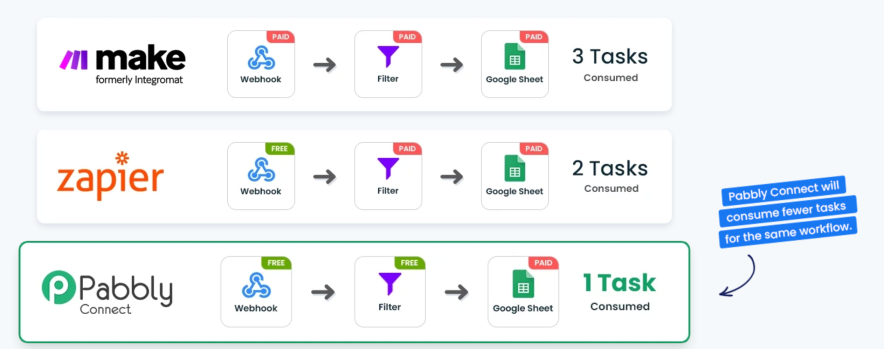
Here in the above automated workflow, “filter” is one of the internal tasks that Pabbly Connect doesn’t count, but their competitors did. Hence, Pabbly saves more tasks and more money.
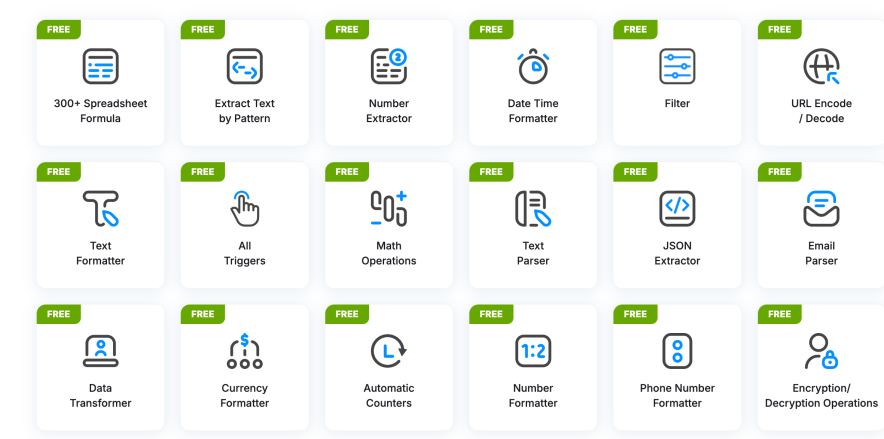
Not just filters, there are dozens of internal tasks on which Pabbly users can save their task balance. Examples: Spreadsheet formulas, Math operations, Email Parser, Data/Time formatter, Filter, and whatnot.
Internal tasks are nothing but the most common tasks users are likely to automate in their business.
Learn more about Pabbly Connect task management from the video below:
Reviewing the Pabbly Connect Pricing & Plans:
Pabbly Connect is offering a massive discount on its Lifetime and monthly plans. This would be a golden opportunity for solo creators and small organizations that cannot afford expensive automation tools.
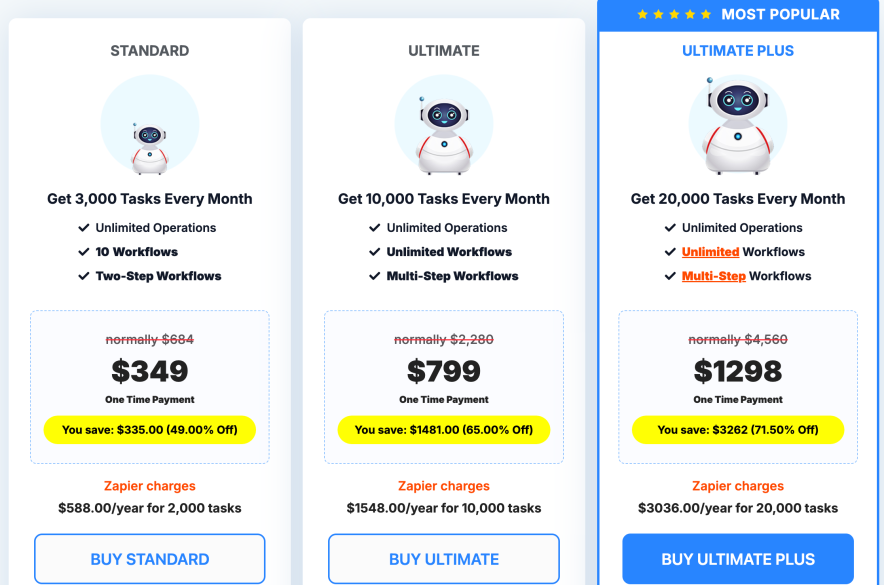
We have plans for upgrading our plan to the Pabbly Connect $349 one-time plan, in which we are getting 3,000 monthly tasks.
| Pabbly Connect Lifetime Deal | What's The Deal? | Live Deal Link |
|---|---|---|
| Standard Plan | $349 / Highlights: 49% OFF, 2000 monthly tasks, 10 workflows, 2 Step workflows. Benefit: One time payment & Lifetime access. Coupon: N/A | |
| Ultimate Plan | $799 / Highlights: 65% OFF, 10000 monthly tasks, Unlimited workflows, 2 Step workflows. Benefit: One time payment & Lifetime access. Coupon: N/A | |
| Ultimate Plus Plan | $1298 / Highlights: 71% OFF, 20000 monthly tasks, Unlimited workflows, Multi Step workflows, Unlimited Operations. Benefit: One time payment & Lifetime access Benefit: (Extra Features): Delaying, Scheduling, Email Parser, Iterator, Filter, Unlimited Path Routers, 1 Year Support & More. Coupon: N/A |
Amazing advantages of Pabbly Connect Pricing:
- Pabbly has lifetime plans. Currently, 71% discount is running on all lifetime plans.
- Pabbly also has discounted annual plans
- All app integrations can be accessible regardless of the plan you opt for.
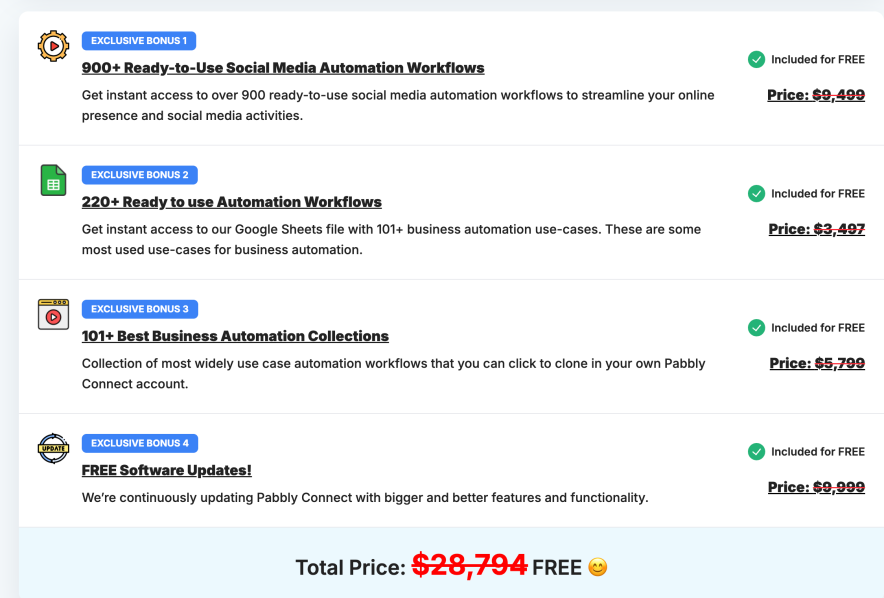
- Free Bonuses (Worth $28,794)
- Feature-wise, All plans are structured correctly.
- Free internal tasks in all plans.
- 30 days money refund policy.
However, there is one disadvantage here. Users can’t upgrade their task limit on lifetime plans.
Lifetime Plans:
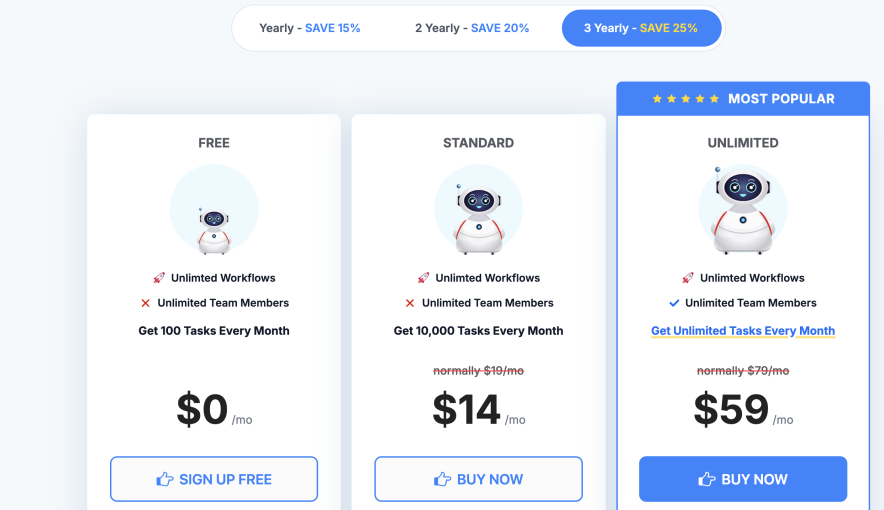
Pabbly Connect Annual Plans: (Up to 25% Discount Available)
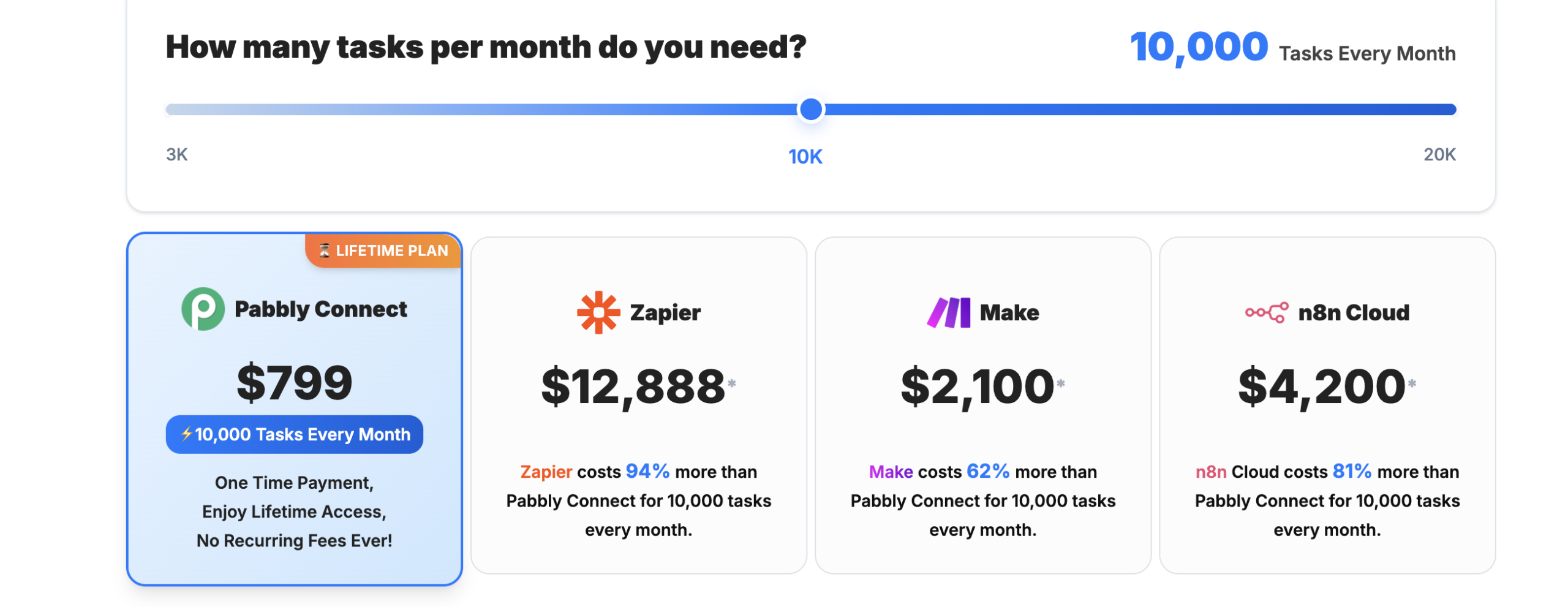
If you are curious to know how much you would be able to save with Pabbly Connect monthly plans compared with other tools, have a look at this picture.
Opinion on Pabbly Connect Features
Pabbly Connect nailed it in terms of features. Gladly, we haven’t felt any feature limitations inside Pabby Connect.
Pabbly Connect structured its plans in a way that users get all the features regardless of the plan they subscribed for. This is one of the rare advantages here, and you would not get it with other automation tools.
For example:
- Pabbly offers a feature of unlimited team members in all plans, while Zapier doesn’t.
- Pabbly Connect allows access to all applications in every plan. Zapier doesn’t.
Pabbly Connect is offering these advanced key features.
- Webhooks: To send data from one application to others.
- Multi-Step calls: To automate multiple actions based on a single trigger.
- Formatters: An internal task used to format text and numbers automatically.
- Folder Management: Automated workflows can be appropriately organized.
- 2FA: For high-level security and protection.
- Delay Module: To delay any action step inside the automation workflow.
- Schedule Module: To schedule the launch of automated workflows.
- Email Parser: To extract the data from the incoming emails and transfer it to other apps.
- Iterator: Used to process data into numerous values one by one.
- Filter: Allows to execute the workflow only when the set conditions are fulfilled.
- Path Routers: Mainly used to execute multiple actions based on the trigger event.
- API Module: Used to connect 1000’s applications that aren’t integrated with Pabbly by default.
- Workflows Auto Re-Execution: Automatically retry failed steps for a smoother workflow and less manual effort.
- Unlimited App Connections: You can establish a connection with one app to unlimited accounts of any app
- Auto Re-executions: Now Pabbly Connect supports auto-reexecution of failed steps in workflows
The only demanding features Pabbly Connect doesn’t have right now are – Send Emails & Send SMS.
Review of Pabbly Connect User Interface, Setup & Working
Shifting to a new tool always creates hesitation about the learning curve in mind. This happened to us, too. But Pabbly Connect won our hearts. It took us hardly half an hour to go through the entire automation tool. Even inexperienced people can launch their automated workflows within an hour.
Words on Pabbly Connect UI:
The Pabbly Connect cleaned user interface, attached tooltips, and detailed instructions draw our attention.
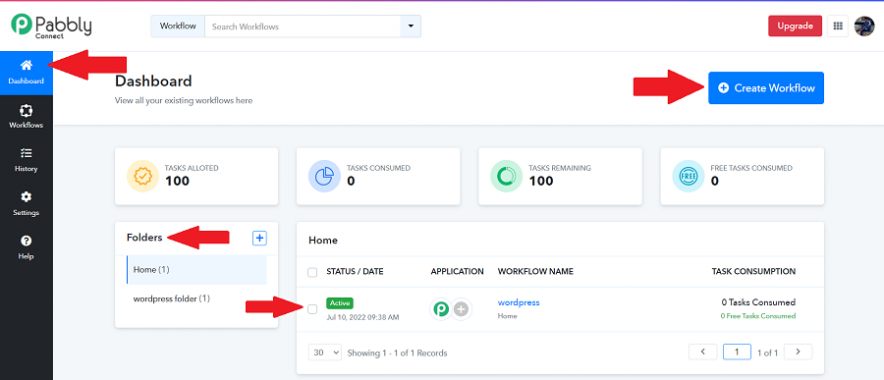
That’s the dashboard UI where the count of tasks and workflows are mentioned. The folders tab mentioned at the left can be utilized in organizing workflows.
Video tutorials regarding the app integration always are closer to you:
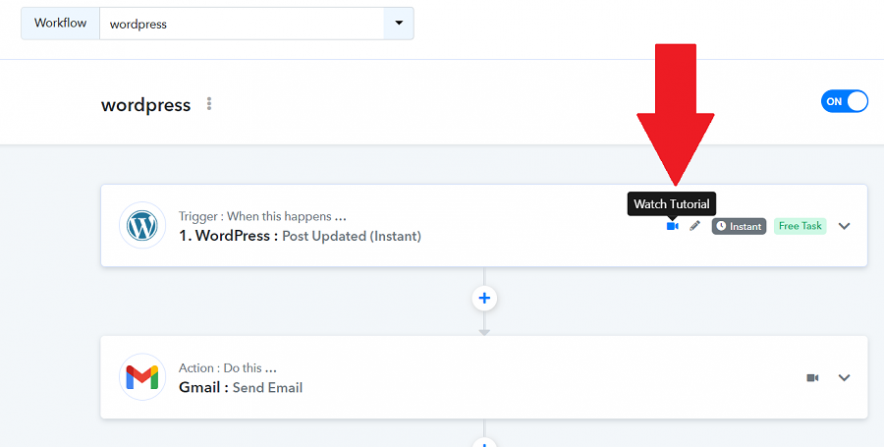
Not just a video tutorial, detailed instructions to set up triggers and actions are also described.

Tooltips: Any option bothering you? Well, just hover on it, and you will get the meaning.

Workflow Cloning is also possible with just a single click. Saves a lot of time.

With Workflow Filter, You can easily sort and manage your workflows based on specific criteria for more efficient automation.

The Pabbly Connect Working:
Creating automated workflows on Pabbly Connect is extremely easy. You just have to tap the “Create Workflow” button on the dashboard. Then define a trigger for the first app. And finally, specify the action to happen on the second (or more) apps based on the trigger.


Non-active workflow cannot be saved as a draft. – The only disadvantage we personally feel about Pabbly Connect’s working process.
Views on Pabbly Connect Customer Support
We must say Pabbly customer support agents are highly interactive. Not just before sales, they maintained the same rapid response rate even after users enrolled in their software.
We connected with the Pabbly Support team several times to clarify some pointers regarding the lifetime deal. We felt there was no need for live chat. They always replied much faster than we expected.
Here is the screenshot of the conversion we had with the Pabbly Team:

Overall, three support options can be seen inside Pabbly Connect:
- Email support (6 days a week – 10 AM to 6 PM – Sundays off)
- Pabbly forum community to ask questions and discussions
- Free video tutorials (available on YouTube as well as inside the Pabbly Connect interface)

The dozens of free tutorials can always be accessed within the Pabbly Connect dashboard.

Pabbly Connect Integrations: Does Pabbly Have Enough APP Integrations?
Another hesitation we had in our mind while finalizing the automation tool was about app integrations. But guess what? Pabbly Connect nailed it here too. Integrations with over 1,500 widely used apps, categorized into CRM, Marketing, eCommerce, Helpdesk, Collaboration, Web Forms, SMM, and more, are available inside Pabbly.
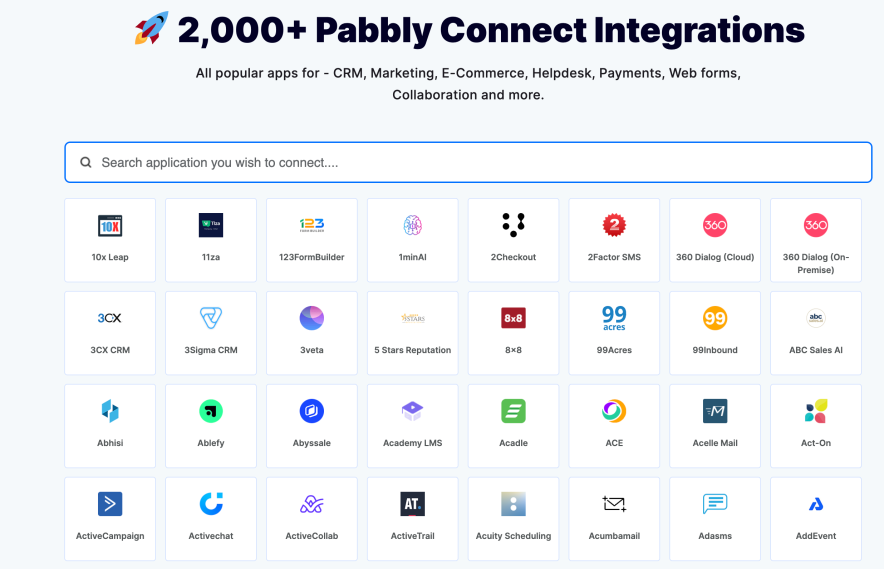
2000+ popular apps (including AppSumo apps), integrations, and plenty of actions to choose from are enough to run a business on complete automation.
To find out about your desired app, simply head over to the Pabbly Connect integrations page, then search for the first application.
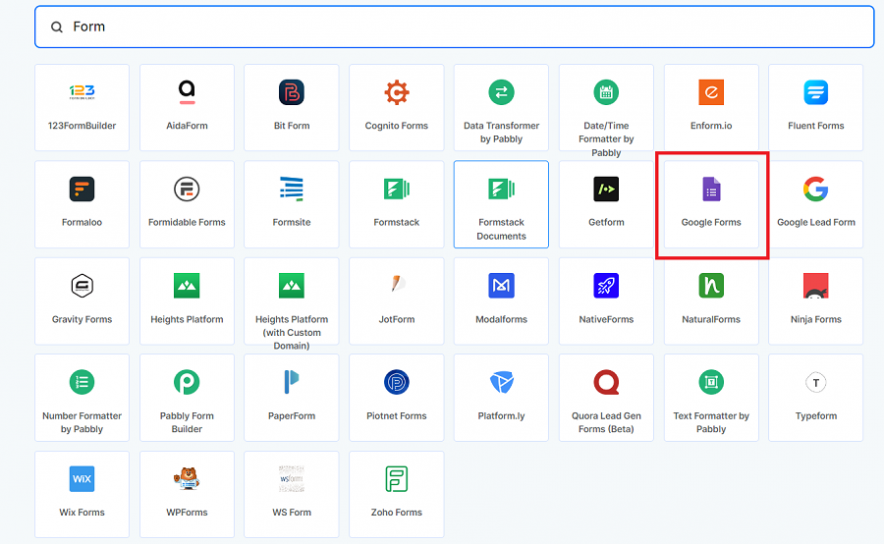
After that, search for the second app you wish to integrate with the first one.

Once you tap on the second app, a new tab will open in your browser, where you can view the available triggers and actions between the chosen apps. Plus, Pabbly Connect also suggested situations (use cases) where both applications can be automated.


This is how you can determine the automation possibilities available between the apps you wish to integrate.
If you haven’t found the desired app, navigate to the Pabbly Roadmap page and request the app. Customer satisfaction is always the Pabbly team’s first priority, and they will quickly take action on your request.

Views of Other Customers on Pabbly Connect
Obviously, our one review is not enough to make a decision on Pabbly Connect. Let’s take a look at what other customers are saying about Pabbly Connect.
On Capterra:
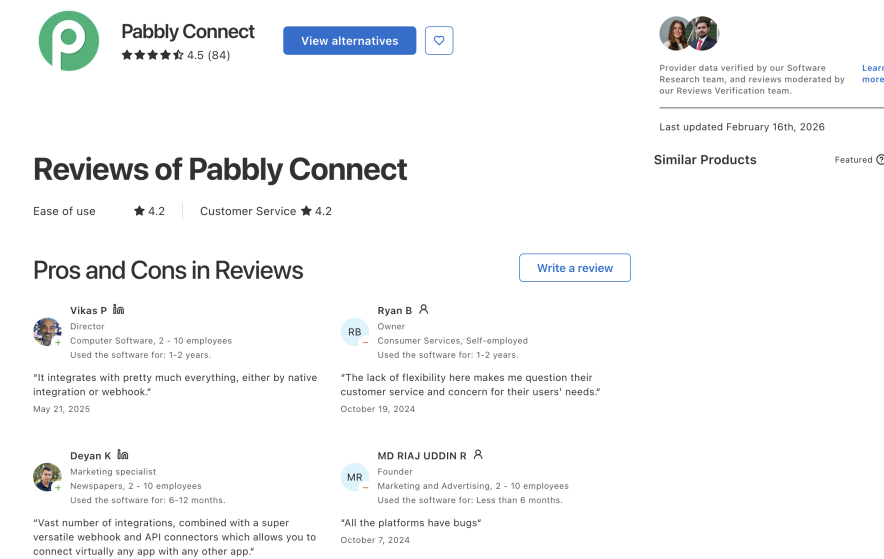
Many verified customers appreciate Pabbly Connect on Capterra. You don’t have to go through all the reviews. Here is the summary below.
Plus Points:
- People said the Pabbly team is very responsive and takes action quickly on every customer request.
- They admire Pabbly’s task management system.
- Nobody complained about the Pabbly Connect interface, its functionality, or setup.
- Unbeatable affordable pricing, benefits, and a better plan structure (in terms of features) are why most people prefer Pabbly Connect.
Negative Points:
- The only frequent complaints from other customers are about live chat support and the lack of a few app integrations. But as we mentioned, users should have checked the app integrations list before signing up for Pabbly Connect.
Bonus Read: What if you could find all the best deals for Social media, blogging, SEO, and more in one place? Check out the best AppSumo deals and claim the lifetime offers now.
List of Pros & Cons

Pabbly Connect Advantages:
- Supported widely used apps: Slack, Google Sheet, Gmail, WooCommerce, Facebook, Instagram, MailChimp, Zoom, PayPal, Stripe, etc.
- Offering remarkably low-priced discounted plans in the market.
- The biggest advantage – One-time plans – No recurring fees. The Pabbly One Time Offer (50% off) is still running.
- Users can access 2000+ apps in all plans.
- Features are perfectly structured in all plans.
- Workflows can be cloned.
- A forever-free plan is available.
- 50% saving in tasks and money because Pabbly Connect doesn’t charge for internal tasks
- Features are enough for running smooth automation operations.
- No technical knowledge or additional help is required to run workflows.
- Video tutorials can be accessible within the dashboard.
- 100% refund policy.
Pabbly Connect Cons: What Could be Improved?
- Not an app integration king.
- 24*7 live chat support should be included.
FAQs
What is Pabbly Connect?
Pabbly Connect is a platform for connecting and sending data across different apps in real-time. It works on the trigger-action approach.
Are there any alternatives to Pabbly Connect?
Zapier is the most considerable alternative to Pabbly Connect. Zapier is ahead of Pabbly Connect only in a number of integrations. However, the Zapier pricing might burn a hole in your pocket.
How does Pabbly Connect work?
Pabbly Connect works on a Trigger & Action basis. If an event happened in the first app (trigger executes), perform a defined action in the second app.
Does Pabbly Connect have bugs?
We haven’t noticed a single bug and issues like execution fail in Pabbly Connect.
Is Pabbly Connect offer a free plan?
Yes. The forever free plan is available where users get 100 free monthly tasks.
How much does pabbly connect cost?
Pabbly Connect plans starting from just $349 (one time). You can also try their free forever plan before investing in the premium version.
Is Pabbly Connect Safe?
As per our experience & 100’s of pabbly reviews, we haven’t found any user who has issues with Pabbly Connect regarding security, data breaching & leaking, etc. Pabbly Connect is totally safe, and you can always review its privacy policy before signing up.
Verdict: Is Pabbly Connect worth it
Is Pabbly Connect good? Is Pabbly Connect reliable? Well, the answer is a BIG YES!
This is what we analyzed after using Pabbly Connect. We haven’t encountered any major issues with this automation tool.
Pabbly Connect is worth it for all-sized companies. It has integrated with popular apps that Social media marketers, Consultants, Accountants, Marketers, and Content Creators use daily.
The advanced features, simple to set up, plus the advantage of better task management & low pricing make Pabbly Connect – The best-growing automation tool.
What next? Signup for Pabbly Connect and see how it can change the way you are doing business.
![Pabbly Connect Lifetime Deal: 71% Off | $349 Only [Ending Soon] – Oct 2026 Special Offer](https://bloggerspassion.com/wp-content/uploads/2022/06/pabbly-connect-lifetime-deal-300x157.jpg)

![Pabbly Connect Pricing 2026: Which Plan is Worth Your Money? [Discount Included]](https://bloggerspassion.com/wp-content/uploads/2023/02/Pabbly-Connect-Pricing-300x153.png)
![22+ AppSumo Coupon & Lifetime Deals [100% Verified – Oct 2026 Updated]](https://bloggerspassion.com/wp-content/uploads/2021/10/best-appsumo-deals-300x157.jpg)

![Link Whisper Discount Code 2026: Get Up to 90% OFF + $15 Extra Discount [Verified]](https://bloggerspassion.com/wp-content/uploads/2023/11/link-whisper-coupon-300x169.png)

I am alos use this tool The Pabbly team is also top-notch in providing swift and very helpful customer support! Honestly, watching the Pabbly team is really a joy!