


This is my honest Liquid Web review for 2026.
Looking for a better option than cheap shared ones? Well, Liquid Web is the name.
I switched to a Liquid Web VPS server from a shared host.
Why?
For enhancing my site performance & security.
I know upgrading or shifting to an expensive managed web host always involves a risk but that’s why I came up with this Liquid Web hosting review.
In this review, I will talk about:
- What is Liquid Web
- It’s performance
- My own experience of upgrading to Liquid Web
- Pros & Cons
- The “Must know” considerations
- Support & User experience
- Pricing review
- And More

Who Should Pick Liquid Web?
My answer after analysis and review:
They promise your site won’t go down and they’re efficient in scaling resources as per demand. Their customer service is responsive, and they’ll even migrate your site for you.
But if you’re a technical newbie or on a tight budget, it might not be the best choice. Overall, if you have a budget and want to upgrade from your slow shared host to a more stable, reliable service, Liquid Web could be a good option.
Liquid Web Pros:
- Plans tailored for eCommerce sites to handle high traffic are available.
- Support for unlimited sites.
- Wide range of hosting options, including dedicated servers, VPS hosting, and managed WordPress hosting.
- They are giving a 100% uptime guarantee in a written agreement.
- Free daily backups (up to 50 GB) on an offsite server are provided.
- Performance is brilliant, Liquid Web servers perform well even in locations where they don’t have a data center.
- No manual actions are required in Migration. The Liquid Web engineers would do the job for you.
- The level of Customer support is unbeatable. Their engineers are highly knowledgeable and have the knowledge to fix the website in a hack or crash situation. The live chat window begins to work in a matter of seconds.
- The “fully managed” advantage is included for free. Other web hosts charge extra for fully managed services.
- With Liquid Web, you’ll have clear billing – you only pay for what you use. Plus, their auto-scalability feature means you won’t have to switch plans if you need more resources. Liquid Web efficiently adjusts server capacity to handle fluctuations in traffic, ensuring smooth performance even during busy periods.
Liquid Web Cons:
- Shared hosting plans are unavailable
- Pricing is a bit confusing for beginners, with multiple options
- cPanel is available but comes with an extra cost, not included in the base plan. Expect to pay approximately $22-$26 extra per month for this service.
- Not a beginner friendly user interface.
- Website builder for beginners is not available.
- Users should have some knowledge about the web hosting backend to operate smoothly.
- Plan customization starting from 1 GB is an advantage you’ll find only in Liquid Web cloud plans.
- Fewer data centers.
Liquid Web: Who Are They?
Liquid Web is a 1997-based hosting provider known for providing the best VPS hosting and dedicated cloud hosting solutions.
They got several awards and were recognized especially for the most human customer support.
Most people opted for Liquid Web plans for boosting their high end traffic websites. Where shared hosting lacks, Managed Liquid Web plans come into action.
Whether you go for their VPS or the WordPress plans, you will see the “Managed” tag along with it.
Liquid Web plans seem expensive, but totally fair for the service and advanced features being offered. Unlike Hostinger, They don’t have millions of websites hosted on their servers.
Instead, they narrowed down their audience to only those enterprise-level sites (187,000+) whose budget is good and the traffic is high (more than 100k per month).
In other words, Liquid Web is not for beginners or new sites, as the pricing is high.

Liquid Web Key Highlights:
| Overall Rating: | 4.5/5 |
| Uptime Guarantee: | 100% |
| Hosting Types: | VPS, Dedicated, Cloud VPS, WordPress, WooCommerceServer Locations: US Central, US West, and EU Central |
| 24*7 Live Support: | Yes |
| Key Features: | Offsite backups, Free Migration, 24*7*365 Proactive Monitoring, Fully Managed, Root Access, Dedicated IP, cPanel Support, and Multi DDoS protection |
| Money Back: | 30 Days |
So this is a quick overview of Liquid Web.
Now let’s dive into detail where I will introduce you to my own experience with Liquid Web, problems, benefits, features, and more.
Exploring Liquid Web: Whole Experience and Review
On my website, I receive more than a million visitors annually, which caused issues with my previous host, especially in handling the load and overall performance.
After being active in the hosting space for a decade, I knew I had options like Cloudways, Liquid Web, and Kinsta.
However, I was impressed by the positive customer satisfaction reviews Liquid Web received from the majority of users.
So, what happened after I switched to Liquid Web? How does Liquid Web eliminate my web hosting problems?
I took a chance and can completely agree with other users about the good aspects of Liquid Web, especially in terms of performance and customer support.
However, I also encountered some problems that are important to discuss today.
Let’s begin with the performance metrics I am experiencing with Liquid Web.
Liquid Web Performance Tests: My Site Gets a Boost in Overall Performance
Rating: 4.9/5
Here is my site performance metrics before I invested in a Liquid Web:
- Average Page Loading Time: 0.6 seconds
- Average Response Time: 0.1 seconds
- Speed Score: 82/100
- Uptime: 99.89%
As you can see, my site’s loading time has been 2.94 seconds, which is even lower than the average. According to the Portent report, the best conversion rates occur when a page loads within 1 second.
But that wasn’t the case in the past.
Gladly, Liquid Web manages to change my site performance metrics by far the margin…
Here is my Liquid Web Plan configuration:
- Server Location: US Central (Lansing, MI)
- Plan: Essential (VPS starting plan)
And,
Here are my Liquid Web performance test findings:
| Performance Before Liquid Web | Performance After Liquid Web |
| Average Page Loading time: 2.94 Seconds | Average Page Loading time: 0.6 Seconds |
| Speed Score: 82/100 | Speed Score: 100/100 |
| Average Response Time: 2.0 Seconds | Average Response Time: 0.1 Seconds |
| Uptime: 99.89% | Uptime: 100% |
Speed Test Result on GTmetrix
First, I used GTmetrix with Liquid Web to check the page load time.
Surprisingly, our website got a 100% performance score with an A grade. The LCP (largest content element) takes only 377 milliseconds, which is fantastic.

Speed Test Result on Pingdom
I ran the same test on Pingdom, one of the most popular speed test tools from multiple server locations.
On Pingdom, my site got an 81 performance grade and 4.0 MB; the full page was loaded in just 671ms, which is very fast.

Uptime Test
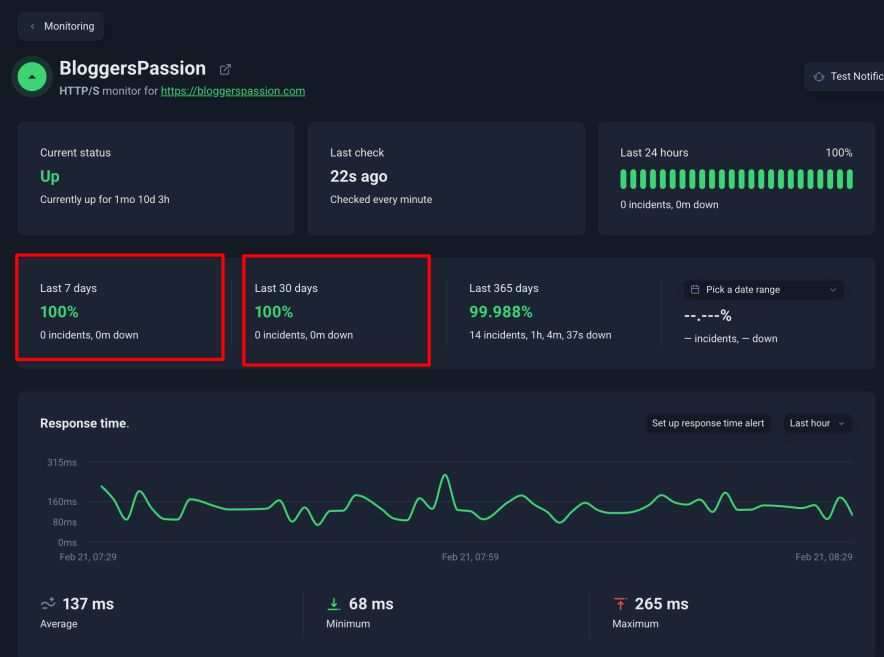
With the Uptime monitoring tool (UptimeRobot), I set up a monitor that constantly checks my Liquid Web site uptime. Liquid Web has been giving a 100% uptime guarantee and they literally meant it.
My site over the past months only faced one single downtime which lasted for just a minute.
Stress Test
All other tests are important. But the Stress Test decides how efficient your web hosting server is in a load handling situation.

In just 5 minutes, Liquid Web servers faced a total of 162,159 requests during the load test, with the highest load happening within a 5-minute window.
Liquid Web performance stayed consistently impressive even when the traffic spiked. The average response time was just 1.42 seconds, which is remarkable.
There were no errors at all.
Seeing the quick response time assures me that Liquid Web can handle sudden traffic increases without any issues. The servers stayed up throughout the test, proving their efficiency.
Overall, the speed test and load test demonstrate the excellent performance of the Liquid Web hosting. I was highly impressed with it.
Performance Optimization Features
You see in the previous section…My server data center location is in the USA.
So how does Liquid Web manage to deliver such great performance even though the majority of my site traffic has come from Asian countries?
Well, it’s the technology they have using on their servers.
1.) Liquid Web believes in the 100% Uptime
One major reason for my transfer to Liquid Web was their guarantee of 100% uptime. Initially, I wasn’t sure whether they were just making claims or would actually deliver 100% uptime.
Anyway, you’ve seen their uptime is indeed 100%. But in case of any issues, they also compensate for it.
You’ll be compensated with a 10x credit on downtime incurred. For example, one hour of downtime gives you a 10-hour credit.
I contacted the Liquid Web support team regarding the claim, and this is what they said.

Note: – There is a small catch, as downtime resulting from planned maintenance or malicious attacks is not eligible for compensation.
2.) The Auto Scaling Technique Enable My Site to Handle Unexpected Load
It often happens, especially on large websites, that when traffic suddenly spikes, web hosting providers advise users to upgrade their plans to get more bandwidth and scalability.
Users often upgrade to a higher plan in such situations. However, when the load decreases later on, the extra resources paid for go to waste.
This is simply a cheap upselling trick used by web hosting companies to extract more money from users. (My previous web hosts used to operate like this).
When we talk about Liquid Web, they automatically scale my site server resources up or down according to the traffic flow, so I don’t usually have to upgrade their plans.
I really like this “Only pay what you use” transparency from the Liquid Web team.
Remember I shared the stress test earlier? You should see how smoothly Liquid Web handles the sudden load test on my site without any crashes.
3.) Offsite Server Backups play a major role in the smoothness of the Liquid Web server:
For cost-cutting purposes, web hosts often use the same server resources for performing backups where the website is hosted.
Consequently, this increases unwanted load on your site, leading to issues like slow response times.
Thankfully, this isn’t the case with Liquid Web.
My site is large and updated on a daily basis. I needed a robust daily backup service.
Before subscribing to their plan, I made sure to inquire whether they offer off-server backups.
A Liquid Web agent informed me that they provide all users with the advantage of daily offsite backups on an external dedicated cloud server by default.

Having the facility of offsite cloud backups eliminates situations where data loss could occur. You always have your files backed up on another server.
I suggest you opt for their 50 GB free off-server backup plan. You can take a backup once and retain it for a few days, then delete the old backup and generate a new one.
This is what I do, so my backup quota never gets full.
I am pretty happy with the Liquid Web backups. At least now my site doesn’t slow down during backups as it used to with my previous web host company.
The Data Centers are Lesser Compared to the Competitors

Although Cloudflare increases the reach, It is best for a web host to have a data center across all the sections of the world.
If we talk about Liquid Web data centers, You’ll get 3 options for VPS, Cloud & Dedicated plans.
- US Central (Lansing, MI)
- US West (Phoenix, AZ)
- EU Central (Amsterdam, NL)
However, if you choose to go with Managed WordPress plans then your reach will expand to 10 global data centers.
When compared to competitors like Kinsta, Liquid Web offers slightly less reach. This could be considered a rare disadvantage of Liquid Web.
My site is hosted on their US server, but the majority of my site traffic comes from Asian countries.
As far as I know, Liquid Web’s servers have consistently delivered good performance even to audiences in regions where data centers are not located.
I guess the Cloudflare integration is the reason behind this great wider reach.
The Support for Malware Affected Site Migration is Special
Liquid Web hosting provides a free migration service to help you seamlessly transfer your existing website from your current hosting provider to Liquid Web without incurring additional costs.
There is no limit on the number of free websites migrated. All you need to do is provide SSH and control panel credentials details, and their migration team will migrate all the websites.
During my website Migration time, I just gave them my WordPress site credentials. And they do the rest.

I know most hosting services offer free migration, but are they prepared to accept a site dealing with threats that require malware removal?
When I started my first website almost 10 years ago, it was hosted on a cheap WordPress web host. After a while, it got hacked, and unfortunately, I lost my data, and the web host didn’t help me.
Since then, I decided to choose a web host that would not only restore my site if anything went wrong but also fix it.
If your site is currently experiencing any hacking or malware-related issues that your current host can’t fix, you can consult with Liquid Web’s team.
They provide clear instructions via chat and offer malware removal services during the migration process as well.
I confirmed this through the Liquid Web team via chat.
The UI of Liquid Web is Outdated
After playing a lot with Liquid Web, I must say it is not for beginners. You must take time to get used to it.
I am saying this because I have used some other web hosts like Hostinger or Bluehost where you get much better experience in terms of managing the back end of the web hosting.
No offense to Liquid Web, but I don’t know why they haven’t invested their efforts in improving their user interface. (The best part of my last web host is the user interface.
Sometimes I miss it, but anyway, Liquid Web performance & security are the only things I need for my website today.
Here, you don’t get to see a setup wizard, which is best for beginners.
Plan selection & login to the Liquid Web dashboard is easy and smooth, regardless you choose a Windows or Linux OS.
You might feel difficulty if you see technical OS names (Other than Windows & Linux) for the very first time.

This is how your dashboard looks like once you log in to your server details. Not appealing to the eyes? I know.

CMS Installation is a 1-Click Task
The WP installation can be done using a Softaculous installer. This would look familiar to you if you have used any shared web hosting dashboard in your journey.

Quick Note: The support team can handle tasks like installing SSL, managing DNS, updating PHP, and more. But if you’re a do-it-yourself kind of person, feel free to tackle these tasks yourself.
Backups Needs to be Configured First

Unlike hosting which automatically generates backups for you, Liquid Web first requires a little bit of configuration from the user end to run the backups smoothly.
In Liquid Web you can either take a backup on Liquid Web off-server OR on an Acronis (off-site backup) server.
Depending on the free / paid quota you have to first configure how you would like to take a backup.
Changing backup plan settings requires you to invest a few minutes. The process is easy and I haven’t faced any problems in this segment.
Setup a Staging Environment is Possible
There is no way for us to go for a web host that doesn’t offer a staging environment.
When I want to experiment with new WordPress versions, plugins, or PHP versions on my site, or when making design-related changes, I find the staging environment feature extremely useful.
Did you know that Liquid Web assigns 1 staging site under each plan? Well, there could be two ways to set up a staging environment:
First, by cloning an entire server, and second, by setting up a subdomain.
Cloning an entire server or setting up a staging environment is super easy. All you have to do is click Clone, select a server size and you are done.

Personally, I haven’t set up a subdomain with Liquid Web yet. But if you have a single website, it is the best approach to quickly clone it via cPanel.

Liquid Web Support is Human & Helpful
Liquid Web hosting provides 24×7 support through various channels. You can contact the support via live chat, phone, email or tickets.
In my blogging journey, I haven’t seen any web host’s customer support as helpful as Liquid Web’s.
Are you seeking support capable of fixing your site if it gets hacked? Well, Liquid Web engineers can do that.
All the positive reviews I’ve read about their support have proven true since I signed up for this web hosting service.
Since I’m on the entry-level plan, whenever I get stuck or need to do something technical, I simply send them a message through live chat, and they take care of everything.
Other web hosts only offer instructions for your technical problems, or they are unsure about the actual solution to your specific problem.
Because of this, you may end up stuck or doing something wrong and accidentally crashing your site.
This was my experience with my previous web host—they only offered technical solutions but wouldn’t fix the issue for me:

On the Other hand, Liquid Web engineers are ready to handle my hacked website and offer real support.
To assess the speed of their support, I initiated a live chat with their support team. Impressively, within 2 minutes, a support representative joined the live chat.

Most of the time they fixed my issues over the chat, I don’t have to contact them on the mobile phone.
Here is the detailed evaluation of the Liquid Web support:
- Support Channel: 24*7 Email, Ticket, Live Chat, and Phone
- Response Time (After Sales): Live Chat (2 Minutes)
- Humans Support or Bots Support: Only Humans, no interaction with bots
- Language Support: English (Most of the time)
- Technical Expertise Level: Very High
- Complexity Handling Level: Very High
- Problem Resolution Score: 5/5
They also have the tutorials and documentation in the knowledge base for quick reference to your queries.
But be aware, that most of the tutorials are outdated here! So ultimately, it is best to use chat/phone support.

Words on Liquid Web Hosting Plans & Pricing
Quick Note: You have to pay an additional $20-$26/monthly (approx) for the cPanel no matter which plans you opt for.
Quick Note: The 30-day full refund policy will be applied to all the plans.
Rather than shared hosting plans, Liquid Web provides a variety of advanced hosting plans and customisable solutions tailored to your specific needs. The most common are the VPS plans.
They have divided their plans into two categories: Self-Managed and Managed.
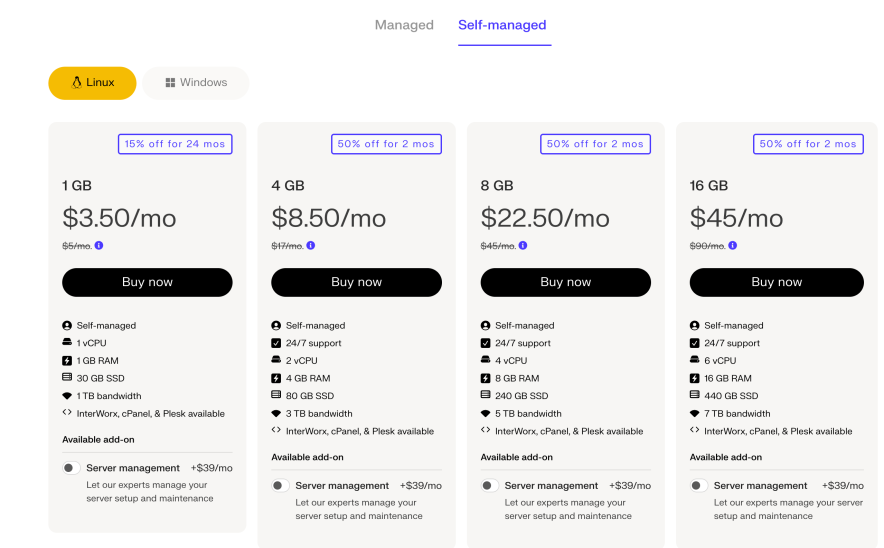
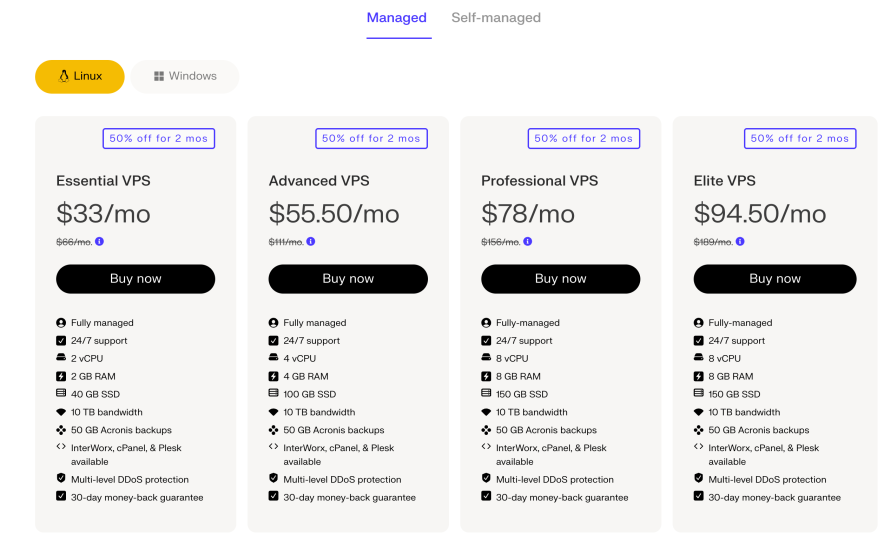
In their first plans in both categories, the RAM feels insufficient. Hence, you have to start exploring from the plans that give you at least 4 GB RAM.
If you are just launching your site, then you can consider 1 or 2 GB plans, but in the long run, you can’t ignore an upgrade.
In self-managed, you still have the option to opt for the Server Management add-on, which costs you $39/month.
This add-on is not worth it all. I mean if you want Liquid web enginners manage your hosting, then opting for Managed hosting plans is an ideal choice. You’ll save money here.
Overall, Liquid Web plans start from $3.50, but the entry-level plans do not seem feature rich.
What are the Best Alternatives to Liquid Web?
If Liquid Web doesn’t seem a good fit, then you can consider premium hosts like Kinsta and Cloudways. They both use different technology than VPS but are capable enough to produce great performance.
You can compare their benchmarks here.
Kinsta dashboard is much cleaner than Liquid Web’s outdated UI. They offer scalable resources that can handle bulk traffic without breakdown. I just want to share that you have to pay extra for email accounts. Check the full review.
Next, Cloudways is a good choice if you are looking to escape VPS technology and settle down to something different.
Yes, Cloudways is a cloud hosting that offers real time billing advantage. I really like the transparency here. I have been using it for 1000+ days. Check its ups and downsides here.
Final Thoughts
Liquid Web hosting is an excellent choice for those seeking a scalable hosting solution for their expanding blog or e-commerce site. With impressive hosting performance and top-notch customer support, it is a valuable investment for those prioritising performance and reliability.
If you are a beginner, you might find it a bit pricier and require some technical knowledge.
You can explore other hosting options tailored for beginners or check my article on the best web hosting for beginners. Discover how we conduct our hosting testing process.
![Liquid Web Coupons Oct 2026: Get Up to 85% Off on VPS & Dedicated Hosting [3 Active Promo Codes]](https://bloggerspassion.com/wp-content/uploads/2023/12/liquid-web-coupon-300x169.png)

![WPX Hosting Review 2026 [8+ Years of Ownership Experience Shared With Worldwide Performance Test Benchmarks]](https://bloggerspassion.com/wp-content/uploads/2024/05/wpx-hosting-review-300x169.png)

![My Honest Hostinger Hosting Review After Hands On Use 2026 [The Reality]](https://bloggerspassion.com/wp-content/uploads/2021/01/Hostinger-review-300x157.jpg.webp)


Leave a Comment
Your email address will not be published. Required fields are marked *