


Below are the expected Elementor Black Friday offers in 2026:
| Elementor Pro Offer | Discounted Price |
|---|---|
| Essential (1 Website) | $60 |
| Advanced Solo (1 Website) | $79 / |
| Advanced (3 Websites) | $90 / |
| Expert (25 Websites) | $164 / |
| Agency (1000 Websites) | $339 / |
| Elementor WordPress Hosting | Discounted Price |
|---|---|
| Host Cloud | $12.99 / |
| Host Cloud+ | $19.99 / |
| Host Cloud X3 | $29.99 / |
| Host Cloud X10 | $89.99 / |
| Elementor eCommerce Hosting | Discounted Price |
|---|---|
| Cloud Sell XL | $14.99 / |
| Cloud Sell XXL | $22.39 / |
| Elementor Bonus Deals | Discounted Price |
|---|---|
| Elementor AI | $3.19 / |
| Image Optimizer | $2.99 / |
| Site Mailer | $3.49 / |
| Ally Plugin | $5.99 / |
| Send | $7.59 / |
| Priority Support | $10.49 / |
| Angie | Free of Cost |
| AI Site Planner | Free of Cost |
How to Grab Elementor Black Friday 2026 Deal? [Not Live]
Hands down, Elementor is one of the most popular WordPress page builders, with over 12 million active installs all over the world!
Elementor offers you an easy-to-use drag-and-drop builder to customize your WordPress site however you want. Even if you don’t know to code, you can use their page builder to make visual changes to your site.
So if you’re looking to save more on the Elementor Pro, this is the right time.

Step 1: Click on this special link to visit Elementor’s Black Friday Offer page.
The Black Friday offer page looks like this; Then choose a “Pro Plugin” if you are interested in Page Builder plugin deals. Otherwise, proceed with the other deals.

Step 2: Once you’re on their Pricing plans page, pick a subscription plan to continue.
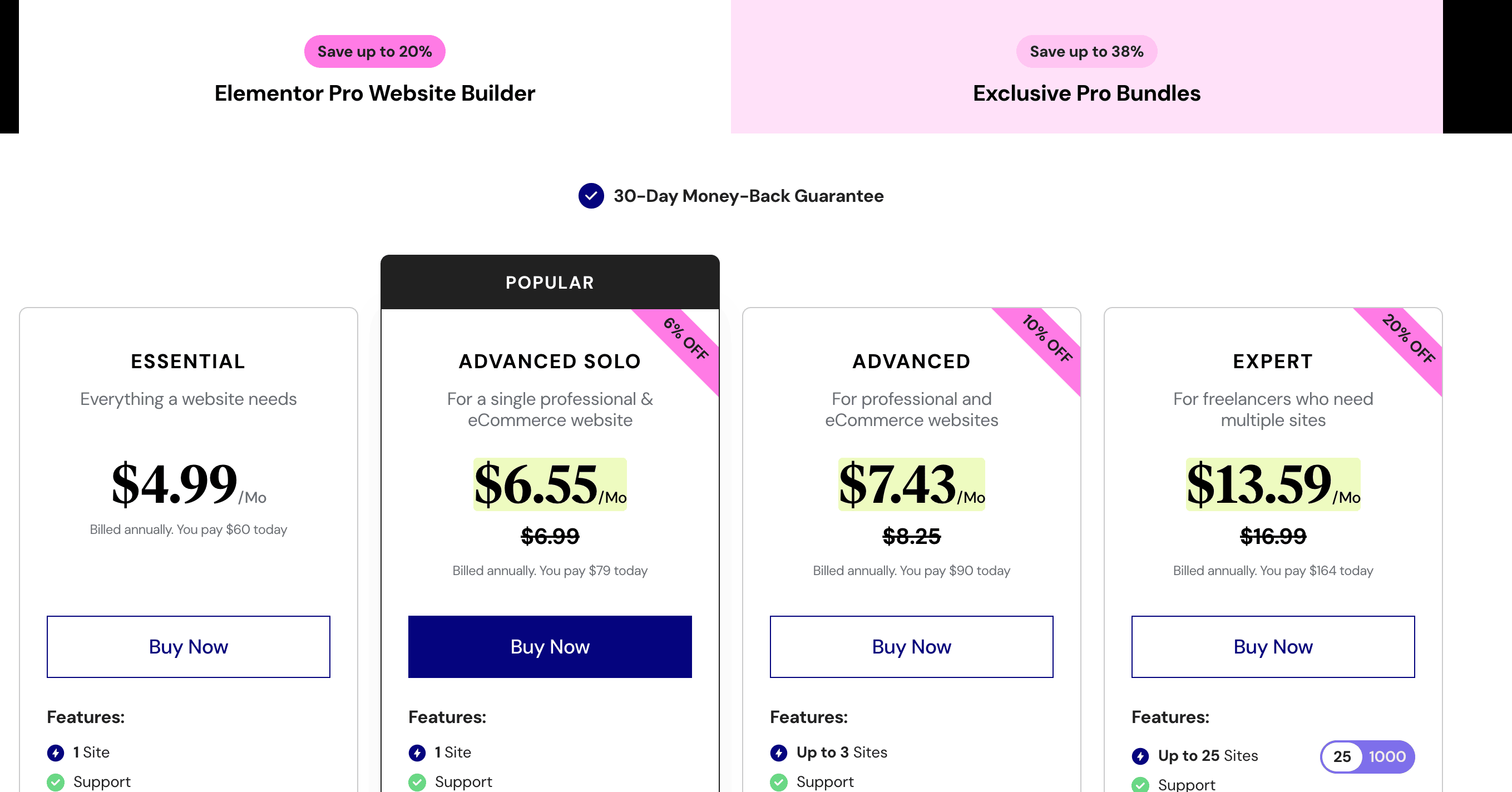
As you can see above, you’ll get up to 20% off on their plans. So pick a pricing plan that matches your needs.
Step 3: In this final step, click on the Buy Now button to continue their Checkout page. Finish the payment and you’re done.
You’ll instantly get access to Elementor Pro which you can install on your WordPress site to customize your site.
Why Choose Elementor Pro? (Key Features & Performance)
I have been using Elementor for more than 3+ years. Here’s what I think:
1.) SEO and Performance:
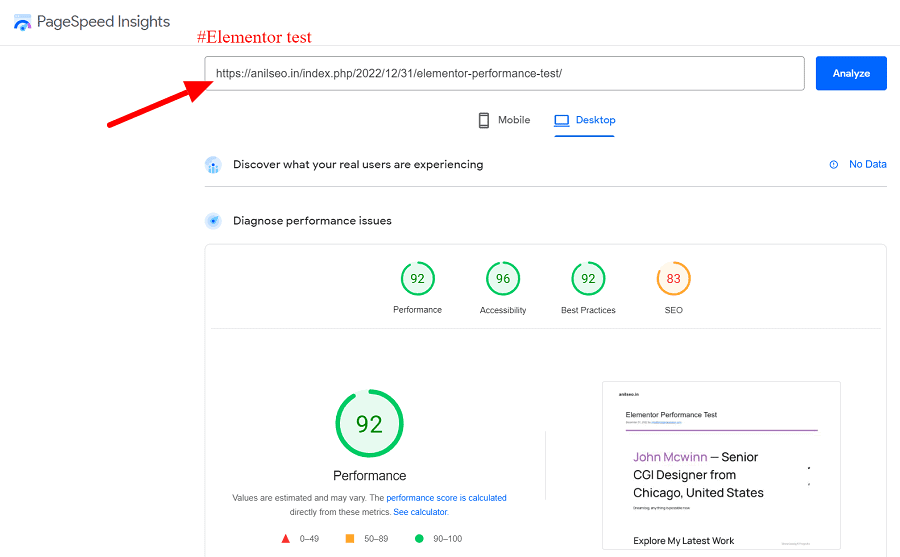
As someone who obsessively monitors search traffic and site speed, I don’t compromise on Core Web Vitals. Elementor recent shift to Flexbox Containers and a much cleaner DOM structure improved the performance a lot. You can build visually complex pages and still maintain solid LCP (Largest Contentful Paint) and CLS (Cumulative Layout Shift) scores, provided you keep your layouts clean. It simply doesn’t drag your site down like older page builders used to.
2.) Escaping Theme Limitations:
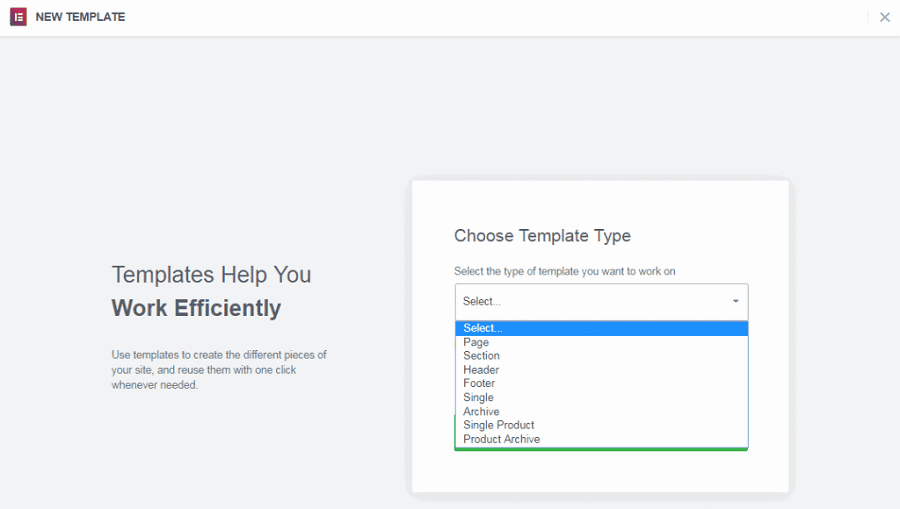
The free version is fine for structuring a basic blog post, but Pro unlocks the Theme Builder. This is where it becomes genuinely useful for a growing site. Instead of messing with PHP or hiring a developer to customize your headers, footers, or archive pages, you can design your entire site architecture visually. It saves a massive amount of time.
3.) Consolidating Plugins:
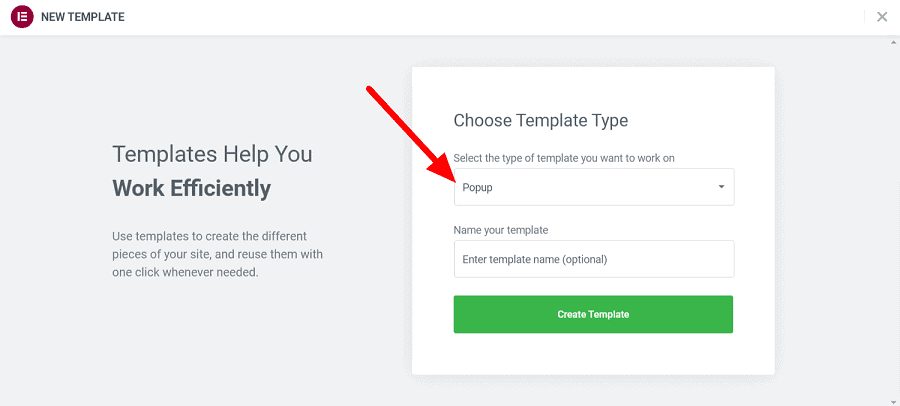
If you run a serious blog, you are likely trying to capture leads and drive conversions. Instead of installing a separate, heavy popup plugin or lead-gen tool that bogs down your WordPress backend, Elementor Pro has powerful popup and form builders built right in. Fewer plugins mean fewer conflicts and a faster website.
4.) AI Workflow: The recent addition of native AI tools isn’t going to write a masterpiece for you, but it’s a highly practical assistant. When you’re stuck trying to generate some custom CSS or need to quickly adjust placeholder text and images, you can do it without ever leaving the editor window. It just keeps your workflow moving.
The biggest limitation of Elementor is that the free version is quite restrictive. You essentially need to invest in the Pro version to build a complete, functional website with elements like custom headers and footers.
Furthermore, unlike competitors such as Divi, Elementor offers annual billing without any lifetime pricing option, meaning the recurring renewals can become expensive over time. Because the editor is packed with so many advanced design controls, beginners face a learning curve and might feel overwhelmed at first.
Finally, you have to be very careful of “add-on overload”—installing too many third-party Elementor extensions can quickly bloat your backend and drag down your site’s performance.
For more info, visit Elementor Review
FAQs:
No, the Elementor discounted price applies ONLY to the year you purchased it and will not carry over to next year’s renewal.
Yes, Elementor works flawlessly with all WordPress themes.
Yes, even if you don’t renew your Elementor Pro license, your existing website changes will remain the same. But, you won’t get access to their updates.
![26 Best WordPress Black Friday Deals 2026 [Up to 99% OFF] – Live](https://bloggerspassion.com/wp-content/uploads/2021/10/wordpress-black-friday-300x155.png)


![Top 30 AppSumo Black Friday Deals 2026: [The Biggest Sale of the Year Live Soon!]](https://bloggerspassion.com/wp-content/uploads/2020/11/appsumo-black-friday-deals-300x157.jpg.webp)

Leave a Comment
Your email address will not be published. Required fields are marked *