

Imagine you sell handmade leather wallets through your online store.
A customer places an order worth ₹1,500. Your phone chimes with a notification that the purchase is complete.
It feels like you just made ₹1,500, right? But have you really?
You actually still have a lot of work to do.
I mean verifying the order, checking your stock, packing the package, and arranging delivery. You also have to handle payments, shipping costs, and figure out what to do if problems pop up.
If a customer refuses a cash-on-delivery package or asks for a return, the whole process changes completely.
An eCommerce business basically connects your storefront, inventory, payments, fulfillment, delivery, and customer service into one single workflow.
In this guide, we will follow a single order from checkout to delivery. We will look at the systems behind it and calculate what you actually earn from a sale.
What Happens Behind the Scenes of an eCommerce Business?
You know, Every online order goes through a connected series of steps. The exact workflow depends on your platform, payment methods, and how you ship things. But the basic journey looks similar for most physical product stores.
Here is the usual path:
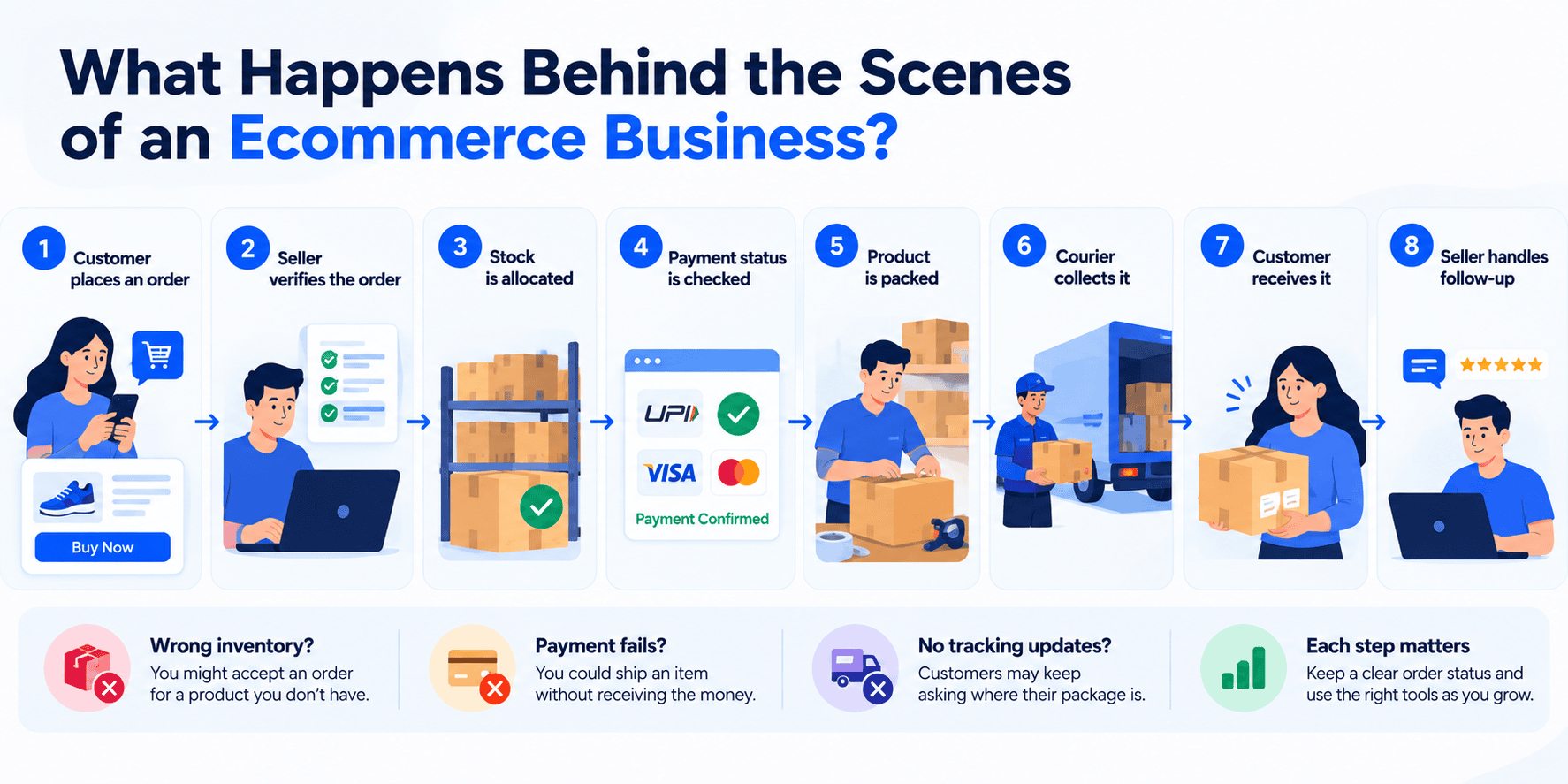
Every single step matters.
If your inventory count is off, you might accept an order for a product you don’t even have. If a payment fails but you treat the order as paid, you could ship an item for free. If you don’t update the tracking information, your customer will probably flood your inbox asking where their package is.
A small store usually manages this stuff manually. A growing business will use eCommerce software, inventory tools, and courier integrations to keep things organized.
The goal is not to automate everything on day one. The goal is to make sure every order has a clear status and that someone or some system is responsible for the next step.
Step 1: A Customer Places an Order
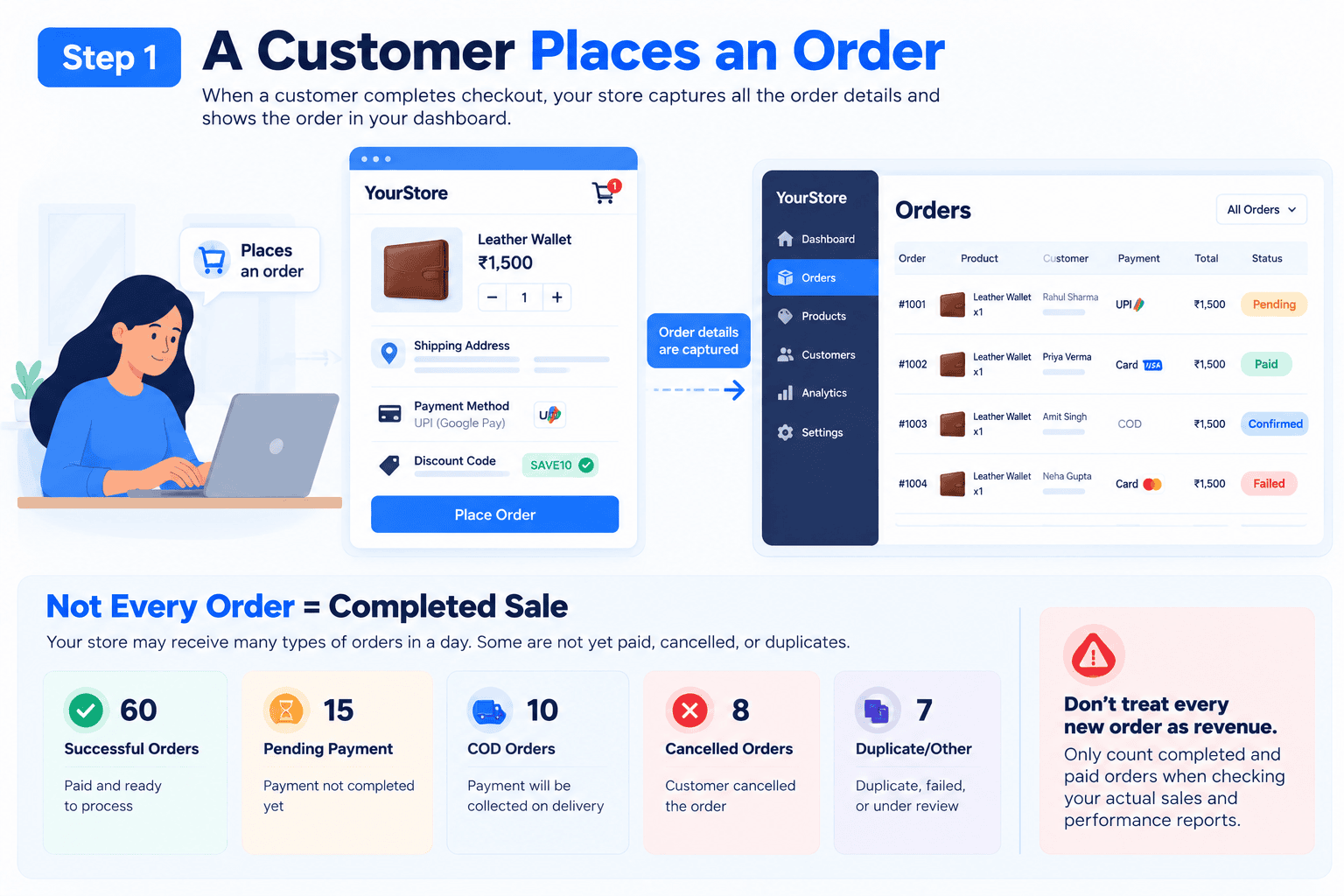
Imagine someone buys a leather wallet on your site.
As soon as they hit submit, your store dashboard grabs all their info. You will see the wallet they picked, the quantity, and the final price. You get their shipping address and payment method, along with any discount codes they used.
This order then pops up in your store’s dashboard.
But at this stage, an order being created does not mean the sale is totally complete. A prepaid transaction might still be pending or failed. A cash-on-delivery (COD) order has not generated any money yet.
This distinction is super important when you are looking at your revenue or deciding which orders to pack up.
For example, your store might get 100 orders in a single day. Some of those might be duplicates, cancelled, unpaid, or waiting for confirmation. If you treat every new order as a finished sale, your performance reports will look completely wrong.
Step 2: Check Inventory and Confirm the Order
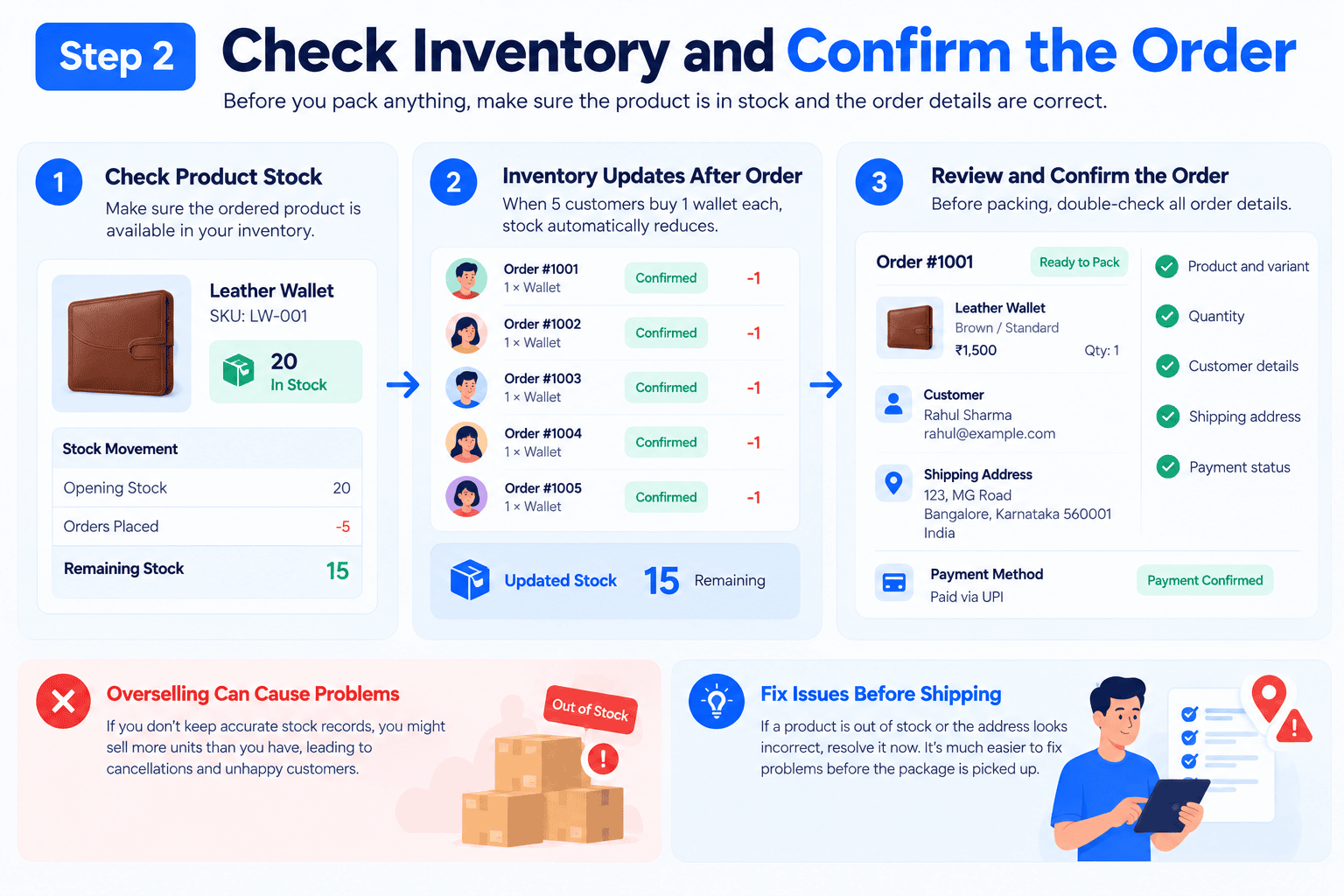
Before you pack anything, you need to know if the product is actually sitting on your shelf.
Inventory management is just tracking what you have in stock, what you have sold, and what is left for future orders.
Imagine your store has 20 wallets left. If five customers buy one each, your available stock should drop to 15.
If you don’t keep accurate records, you will end up selling more units than you can actually ship. This is called overselling, and it is a headache to deal with.
For a small business, a well-organized spreadsheet works fine at the start. As you get more orders, dedicated inventory software will save you a lot of manual work.
Before you ship, double-check the order details. Confirm that the product, variant, quantity, and delivery address are correct.
If a product is out of stock or an address looks weird, fix the issue before sending the package. It is way easier to correct a mistake now than after a courier has picked up the box.
Step 3: Confirm Payment and Record the Transaction
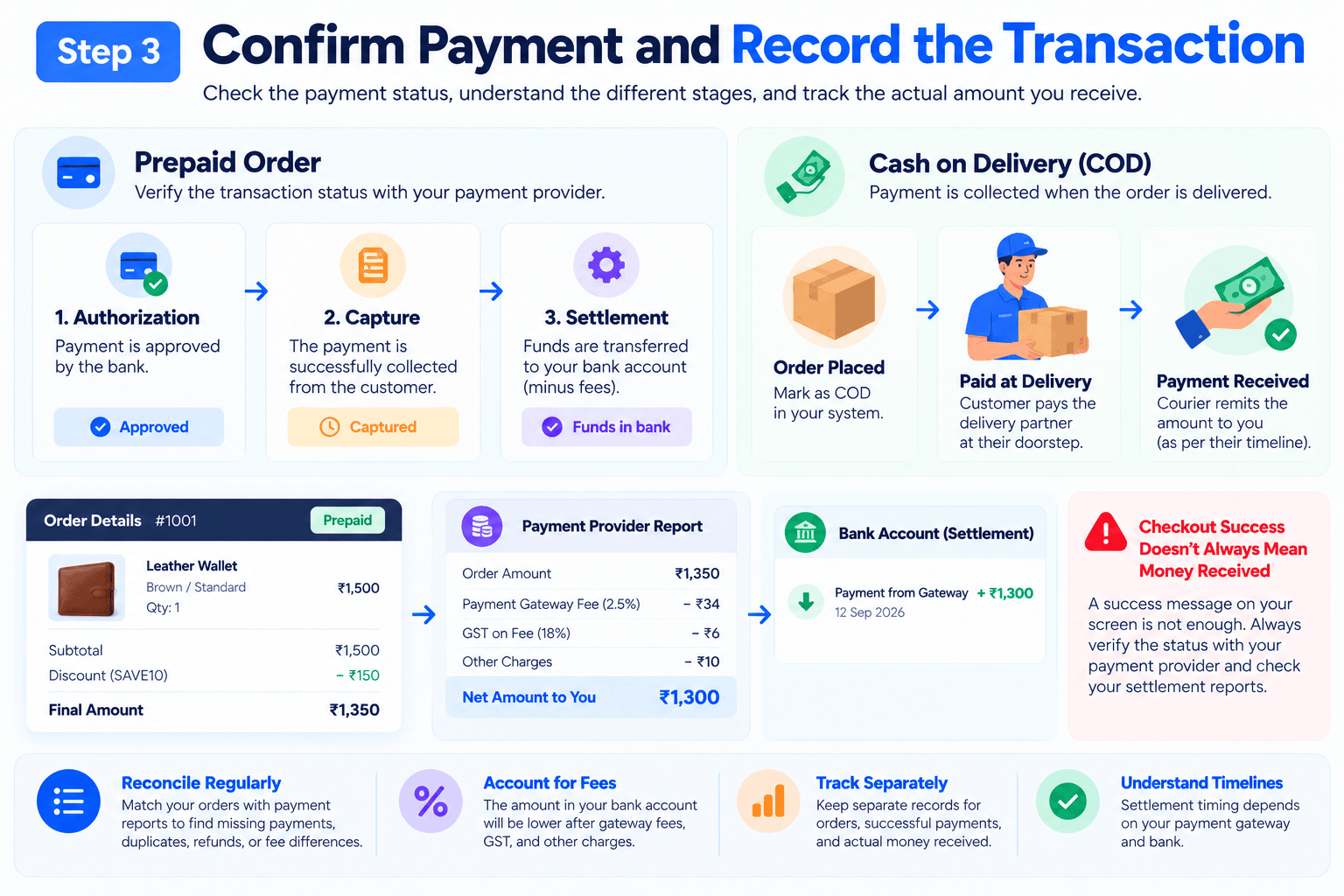
The next move depends on how your customer paid.
For a prepaid order, you need to verify the transaction status through your payment provider. A checkout success message on your screen is not enough proof that the money actually moved.
Payment authorization, capture, and settlement are all different stages. The timeline depends on your payment gateway.
Settlement is when the collected funds actually hit your bank account, minus the provider’s fees.
For a COD order, you just record that payment is due at delivery. Do not assume the money is yours yet.
You also need to match your order records against your payment settlement reports. This helps you spot missing payments, duplicate entries, platform fees, refunds, or random differences between your store dashboard and your bank account.
For example, your store might show a prepaid order for ₹1,500. But your payment provider’s report will show a smaller net amount after they take their cut. You need to account for that difference.
The takeaway: Track your orders, successful payments, and actual money received as separate but connected records.
Step 4: Pick, Pack, and Prepare the Product
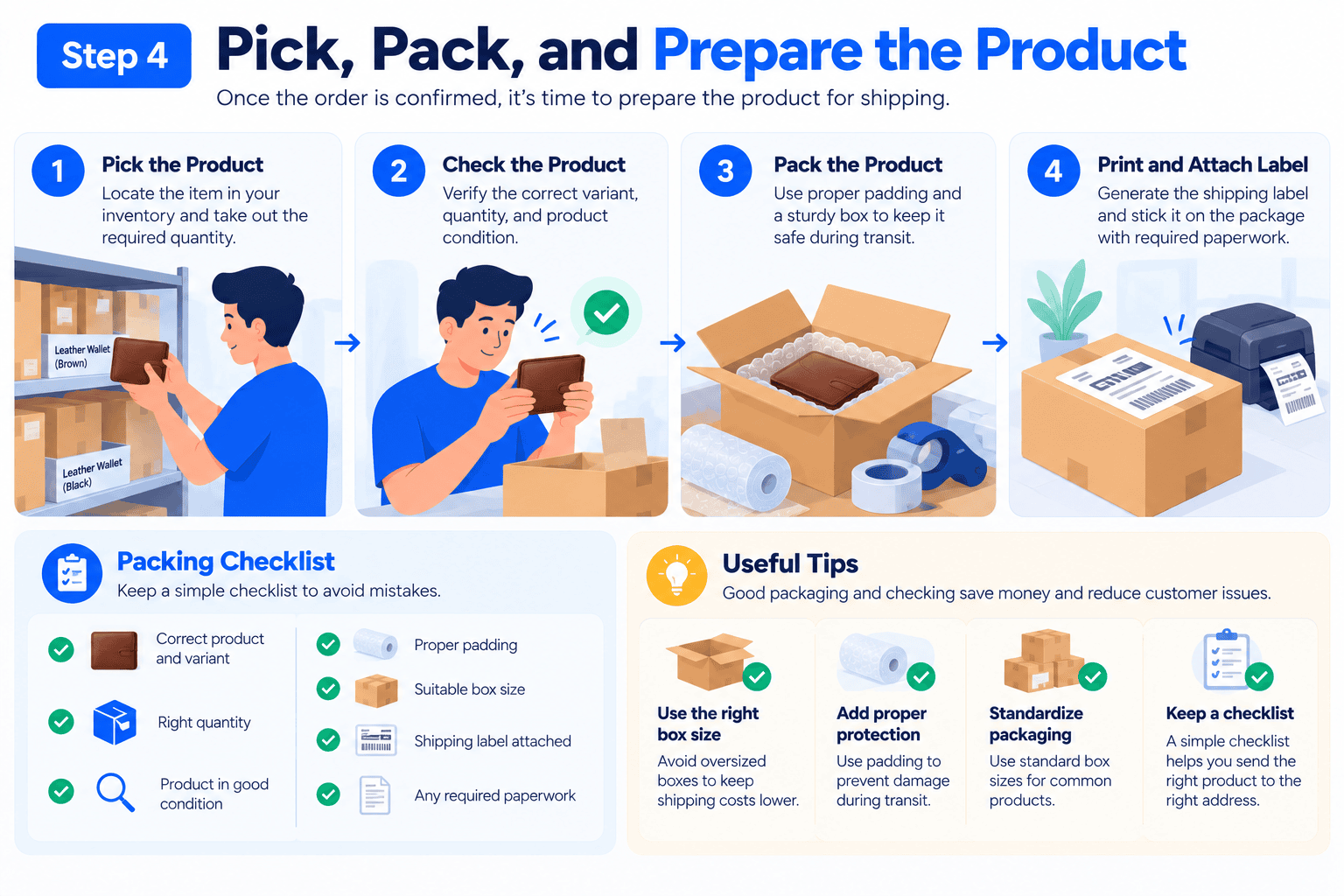
After confirming an order, your attention shifts to the physical package.
The industry term for this work is picking and packing.
- Picking: Locate the item in storage and take out the required amount.
- Checking: Verify that you pulled the right variant and that the product looks spotless.
- Packing: Wrap the item with sufficient padding inside a solid outer box.
- Labelling: Print the shipping tag along with relevant paperwork and stick it on top.
If you run your business from home, this means grabbing products off a shelf, printing labels at your desk, packing boxes on your kitchen table, and calling a courier for pickup.
A bigger business will use a warehouse or a third-party fulfillment center.
The goal is always the same. You want to send the right product, in perfect condition, to the right address.
Keep an eye on packaging costs. Boxes that are too big will drive up your shipping rates. Flimsy packaging will lead to broken products and angry customers.
A great way to start is to standardize your packaging sizes and tape a simple packing checklist to your desk.
Step 5: Arrange Shipping and Track the Order
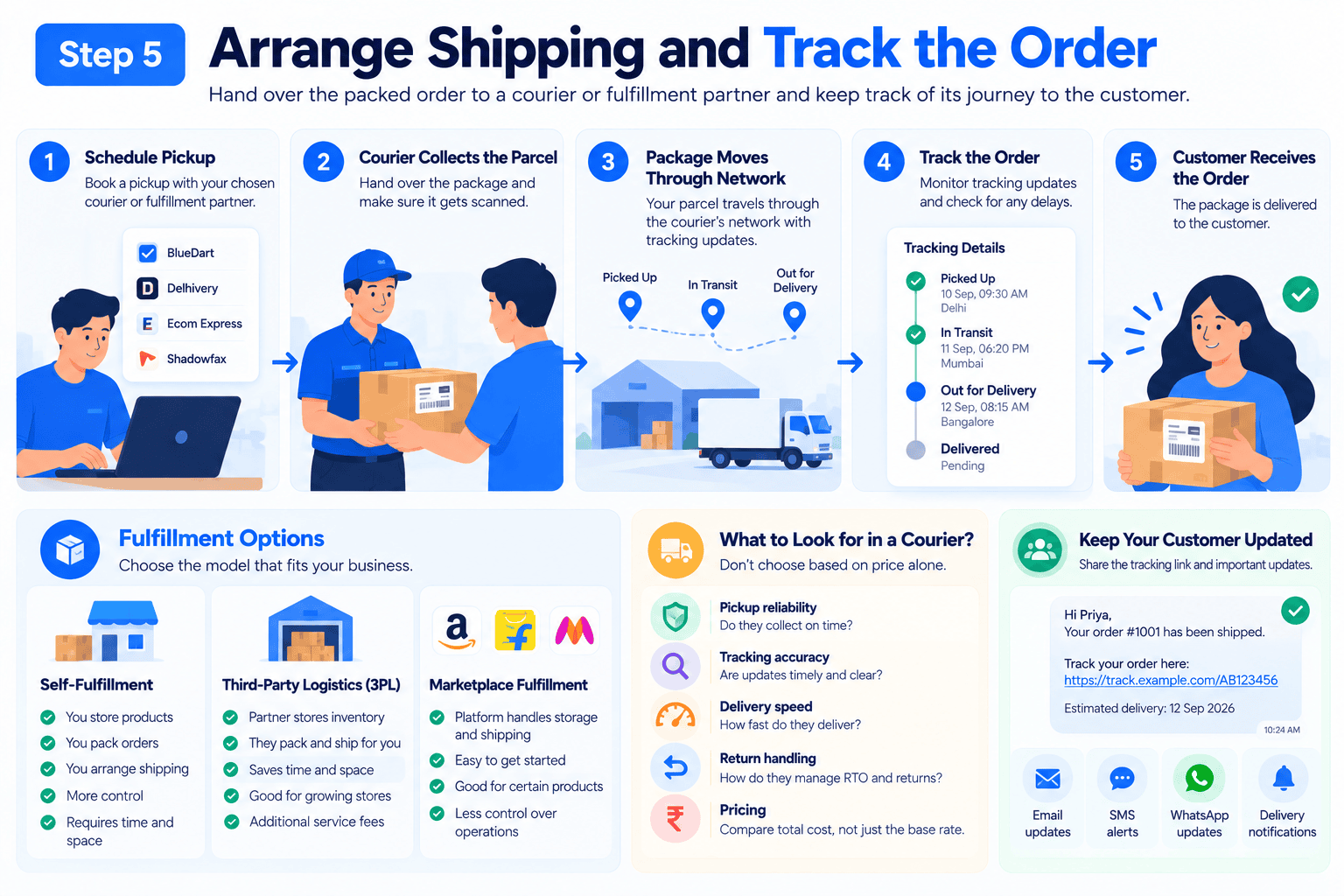
After packing the box, you hand it off to a courier or fulfillment partner.
The shipping provider moves the package through their network and gives you tracking updates.
Your job here involves arranging the pickup, making sure the parcel gets scanned, watching out for delayed shipments, and keeping your customer updated.
You have a few different ways to handle fulfillment:
- Self-fulfillment: You store the products, pack the boxes, and arrange the shipping yourself. It gives you total control but eats up your time and space.
- Third-party logistics (3PL): An outside company stores your inventory, packs the boxes, and ships them for you.
- Marketplace fulfillment: If you sell on big platforms, they might handle the storage and shipping for you.
The right choice depends on your order volume, product size, budget, and where your customers live.
Do not pick a courier based on price alone. You also need to look at pickup reliability, tracking accuracy, delivery speed, and how they handle return packages.
Once the package leaves your hands, make sure the customer gets the tracking link. Good communication stops people from flooding your support inbox.
Step 6: Handle Delays, Cancellations, and Failed Deliveries
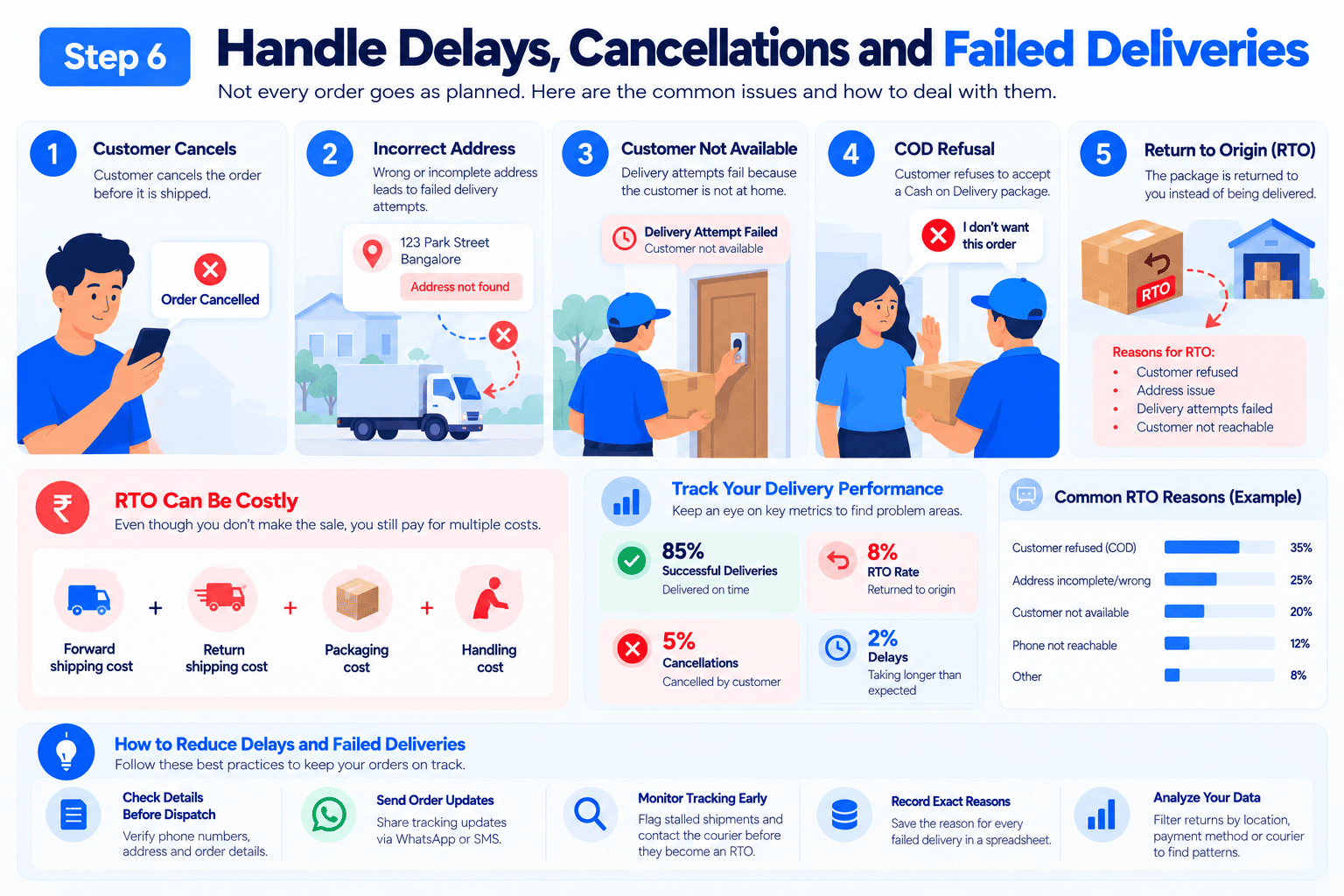
Things will go wrong. It is just part of selling physical products.
A customer might type their address wrong, not be home for delivery, cancel the order at the last minute, or refuse a COD package at their door. Couriers also mess up and delay packages.
If you sell in India, you need to know about Return to Origin (RTO).
RTO happens when a shipped package is returned to you instead of being delivered to the customer. This happens when customers refuse the package, couriers cannot find the address, or delivery attempts fail.
An RTO hurts your wallet. Even though you never made the sale, you still pay for forward shipping, return shipping, packaging, and handling.
Sellers often vent on Reddit about COD refusals and courier disputes. While those are personal stories, they prove why you need to track your own delivery success rates.
Here is how you keep these headaches under control:
- Catch missing phone numbers or broken addresses before handing boxes to the courier.
- Send instant order updates through WhatsApp so customers expect the delivery.
- Flag stalled tracking statuses early and contact the courier before they trigger an RTO.
- Save the exact reason for every failed delivery inside a master spreadsheet.
- Filter your return data by location, payment method, or courier to identify where money is leaking.
Do not just assume every failed delivery is the customer’s fault. Look at your own data and find the actual bottlenecks.
Step 7: Process Returns, Exchanges, and Refunds
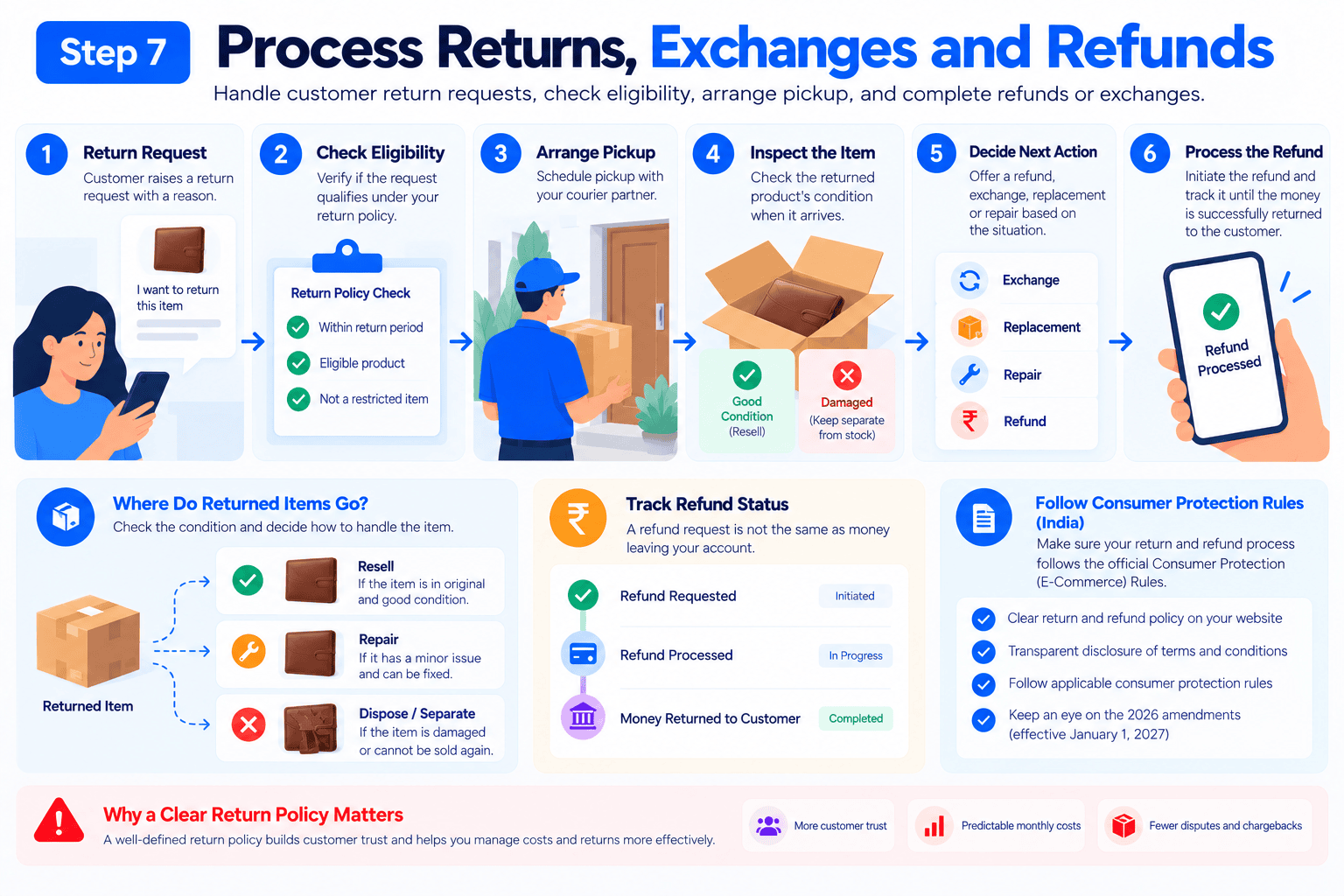
The job is not over just because the package arrived.
A customer might get the wrong item, find a defect, or just want to return it based on your store policies.
You need a solid process for accepting the request, checking if they are eligible, arranging the return pickup, inspecting the item when it gets back, and deciding what to do next.
Depending on the situation, you might offer an exchange, a replacement, a repair, or a full refund.
You also have to figure out what to do with the returned item. If it looks brand new, you can sell it again. If it is damaged, you need to keep it away from your good stock.
Track every refund until you see the money leave your account. A refund marked as “requested” in your dashboard is not the same as money actually sent back to the customer.
If you are an Indian business, make sure you read the official Consumer Protection (E-Commerce) Rules. These rules cover what you have to disclose and how you treat customers. Keep an eye on the upcoming 2026 amendments that start on January 1, 2027.
Having a clear return policy makes customers trust you more, and it helps you predict your monthly costs.
How Much Does an eCommerce Order Actually Cost?
Selling a product for ₹1,500 does not mean you made ₹1,500 in profit.
Let’s look at that leather wallet example again. These numbers are just to show how the math works.
| Item | Amount |
| Selling price | ₹1,500 |
| Product cost | −₹600 |
| Packaging | −₹50 |
| Outbound shipping | −₹100 |
| Payment/marketplace fees | −₹75 |
| Allocated marketing cost | −₹200 |
| Contribution before overheads | ₹475 |
In this scenario, you have ₹475 left over after paying the direct costs of that order.
But that is still not your final net profit. You still have to pay for taxes, software subscriptions, warehouse space, salaries, returns, and damaged inventory.
A failed COD order ruins this math entirely. You end up paying for shipping both ways without collecting a single rupee.
This is exactly why you have to track more than just your total daily orders.
Keep an eye on these metrics:
- Average order value: Your total revenue divided by your number of orders.
- Contribution per order: The revenue minus the direct costs for that specific order.
- Delivery success rate: The percentage of shipped boxes that actually make it to the customer.
- RTO rate: The percentage of shipments that bounce back to you.
- Return rate: The percentage of delivered orders that customers send back.
Make sure you calculate these numbers the exact same way every month so you can compare your progress accurately.
Which Tools Does an eCommerce Business Need?
You do not need a crazy, expensive software setup to run a small store.
The tools you pick should depend on how much you sell, how many products you carry, and what tasks you do yourself.
| Business Need | Possible Solution |
| Online storefront | eCommerce platform or website builder |
| Order tracking | Store dashboard or order management system |
| Stock management | Spreadsheet or inventory software |
| Payment records | Payment dashboard and reconciliation reports |
| Shipping | Courier portal, shipping aggregator, or fulfillment partner |
| Customer enquiries | Email, helpdesk, or an organized messaging app |
| Performance reporting | Store analytics and a simple financial spreadsheet |
If you are just starting out, keep it simple. Your main priority is keeping your data accurate and making sure orders don’t get lost.
When your sales grow, look for the boring, repetitive tasks that eat up your day. Automate those first. Don’t just buy expensive software because your competitors are using it.
Can Hostinger eCommerce Help You Set Up a Store?
If you want to sell through your own website, a website builder makes the storefront side of things much easier.
Hostinger eCommerce is a good option to look at if you want to launch a store without knowing how to code.
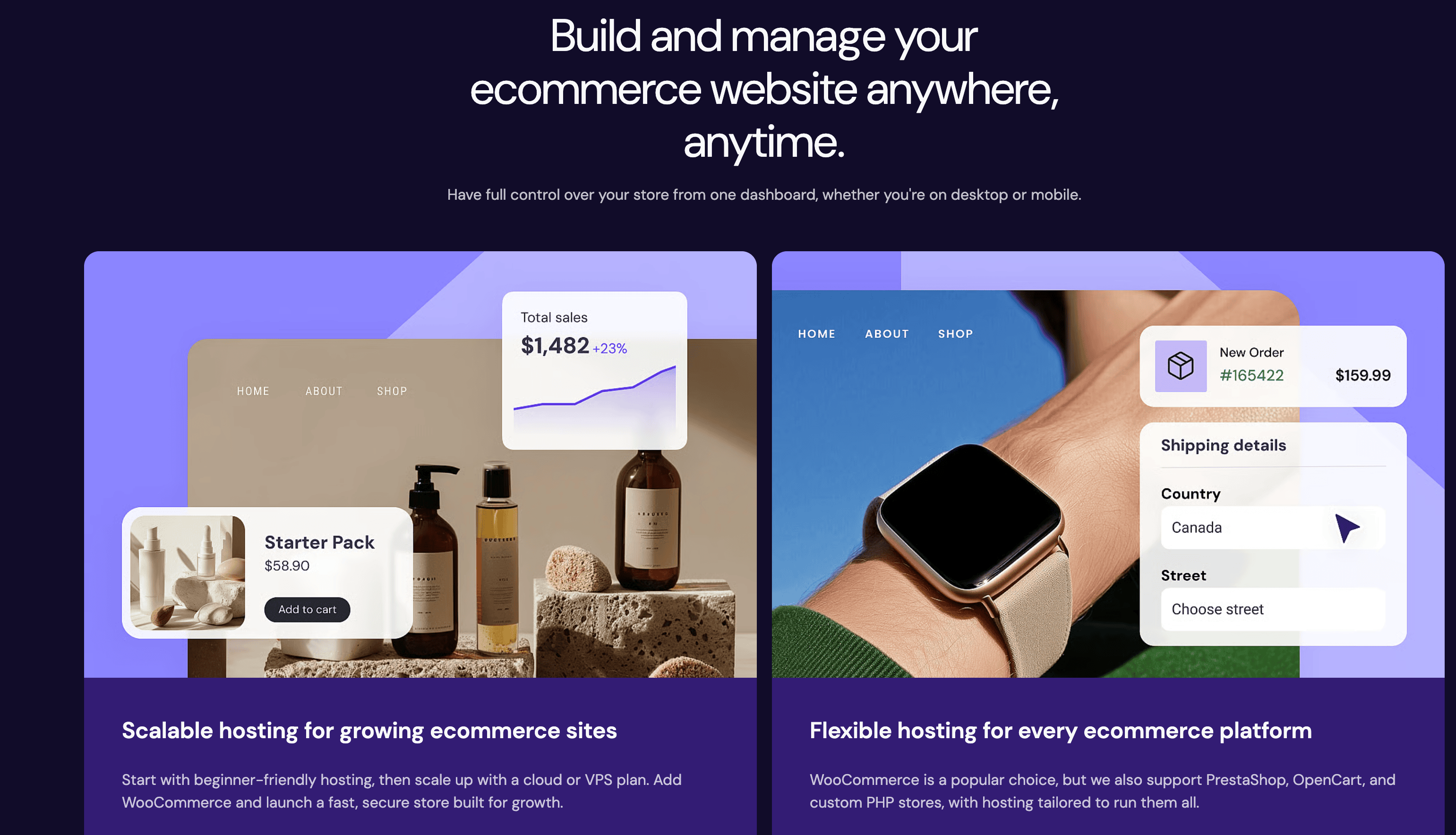
Just remember that buying a website builder does not magically fix your inventory tracking, courier problems, or return handling.
Before you swipe your card, check their current features, integrations, and pricing. Make sure the platform supports the way you want to run your daily operations. Write down the specific things you need the software to do, and find the tool that fits your workflow.
Frequently Asked Questions
What happens after a customer places an eCommerce order?
Your store records the order and you check to see if you have the item in stock. You verify the payment, pack the item in a box, and hand it to a courier. After that, you track the package and help the customer if anything goes wrong.
What is eCommerce order management?
It is just the process of tracking an order from the checkout cart to the customer’s front door. It keeps your inventory, order statuses, and tracking numbers organized in one place.
What is the difference between fulfillment and shipping?
People often use these terms interchangeably, but they mean two totally different things. Fulfillment happens entirely on your end. It is the physical work of walking to your storage shelf, grabbing the right item, and sealing it up securely in a box. Shipping begins the second that box leaves your hands. It covers the actual transit process as the courier moves the package across the country to the buyer’s front door.
Why do eCommerce orders get returned to origin (RTO)?
Packages bounce back because customers refuse to accept them, they aren’t home, or they typed their address wrong. Couriers also make mistakes. You should track your own RTO reasons to see where the problem actually is.
How can I calculate profit per eCommerce order?
Take the money you collected from the customer and subtract your direct costs. This includes the product cost, box, tape, shipping fees, payment gateway cuts, and marketing spend. You then have to factor in your monthly overheads and taxes to find your true profit.

Leave a Comment
Your email address will not be published. Required fields are marked *