

Most people think selling an ebook is the hard part.
It is NOT.
Yes, writing a decent ebook takes effort.
But the real challenge is getting people to take out their credit card and buy it. That’s where 90% of first-time authors get stuck.
Need proof? When we launched our first paid eBook on Keyword Research, we sold more than 60 copies in the first 24 hours. Within three weeks, we’d generated 250 sales.
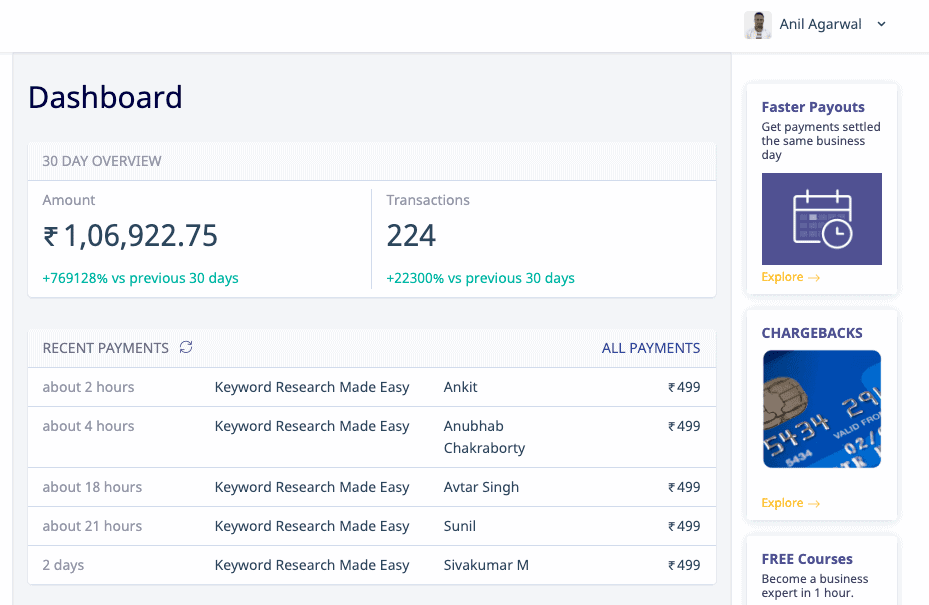
And no, we didn’t have a huge email list or a massive social media following. Most of those sales came from our blog audience.
In this guide, we’ll show you the exact 5-step process we used: getting your ebook ready, pricing it, picking where to sell, protecting it from piracy, and marketing it to the right audience.
Are you curious? Let’s dive in.
Do People Still Make Money Selling eBooks in 2026?
Short answer: yes. A lot of money.
The eBook market is projected to be worth $24.7 billion in 2026 and is expected to reach $39.9 billion by 2036.
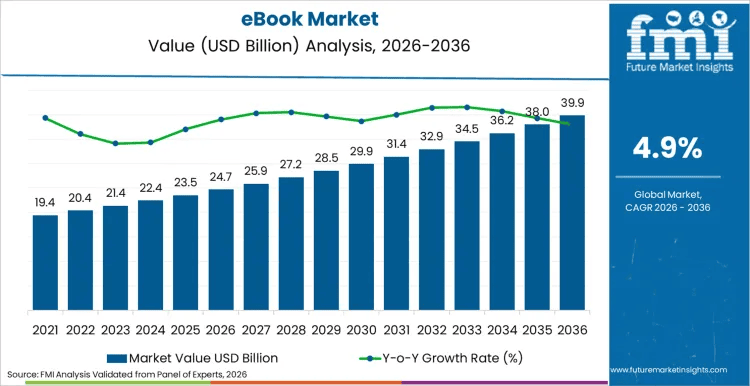
What does it mean? People aren’t buying fewer ebooks. They’re buying more!
Here’s why it matters: an eBook is one of the few products you create once and can sell over and over again. No printing costs, no shipping, no inventory needed.
You do the work once, then the same eBook sells on repeat while you sleep.
One honest truth: ebooks don’t sell themselves. “Upload to Amazon and wait” is the surefire way to make zero sales. Your eBook sales depend on how you price, position, and promote it. That’s exactly what this guide covers.
So if you’ve got useful knowledge people will pay for, the demand is there.
Let’s walk through all five steps, starting with getting your eBook sale-ready.

Step 1: Get Your eBook Ready to Sell
Before you can sell an eBook, it needs to look like something worth paying for.
If you haven’t written it yet, check out our guide on how to write an eBook first. If your draft is ready, focus on these three things:
1. Edit it properly
A few typos on your eBook can cause a lot of damage. Use Grammarly or another editing tool, then ask someone else to read it. Proofread twice if not thrice.
2. Create a professional cover
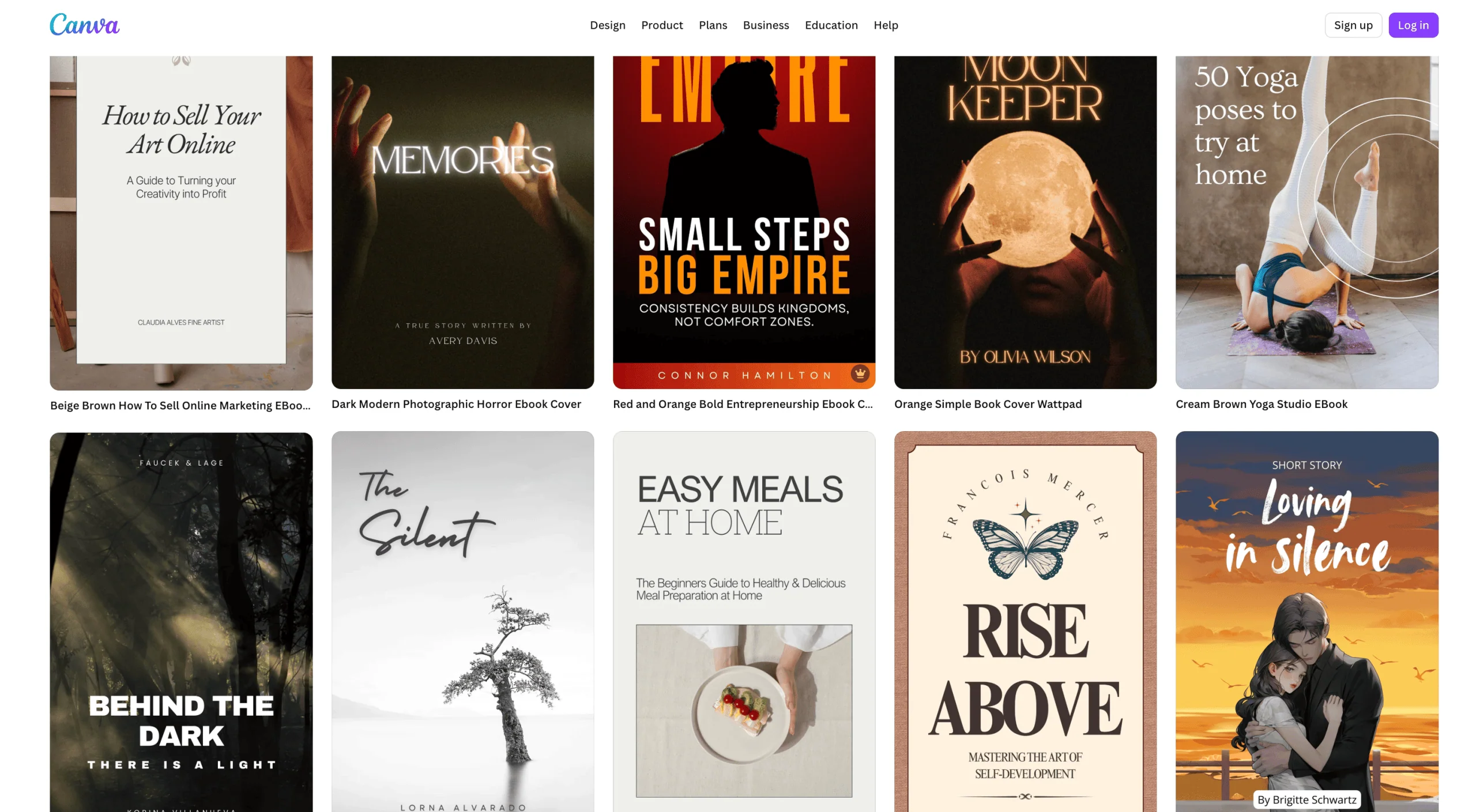
People absolutely judge ebooks by their cover. The good news? You don’t need a designer. Canva has a ton of free ebook cover templates you can customize in minutes.
3. Include a special bonus
A checklist, template, worksheet, or video can make your ebook feel more valuable. It also gives you a reason to charge a higher price.
Keep this stage simple. A well-edited ebook, a decent cover, an author page, and a simple bonus are enough to create a product people will happily pay for.
Step 2: Price Your eBook
This is where most people get stuck.
Price your ebook too low, and people assume it’s low quality. Price it too high, and they’ll hesitate to buy. The goal is to find the sweet spot.
Here’s the key: price based on the value you provide, not the number of pages. For example, a 30-page ebook that solves a real problem can be worth far more than a 200-page ebook filled with fluff.
Remember, people pay for results, not word count.
A good starting point is to look at similar ebooks in your niche. Many ebooks sell for $3 to $10, while ebooks in high-value niches like SEO, business, or finance often sell for $20 to $50 or more.
You can also use a launch discount. For example, if your regular price is $19, offer it for $9 during the first week. This creates urgency and helps generate your first sales.
Most importantly, focus on profit, not just volume. Selling 500 copies at $10 makes more money than selling 1000 copies at $3.
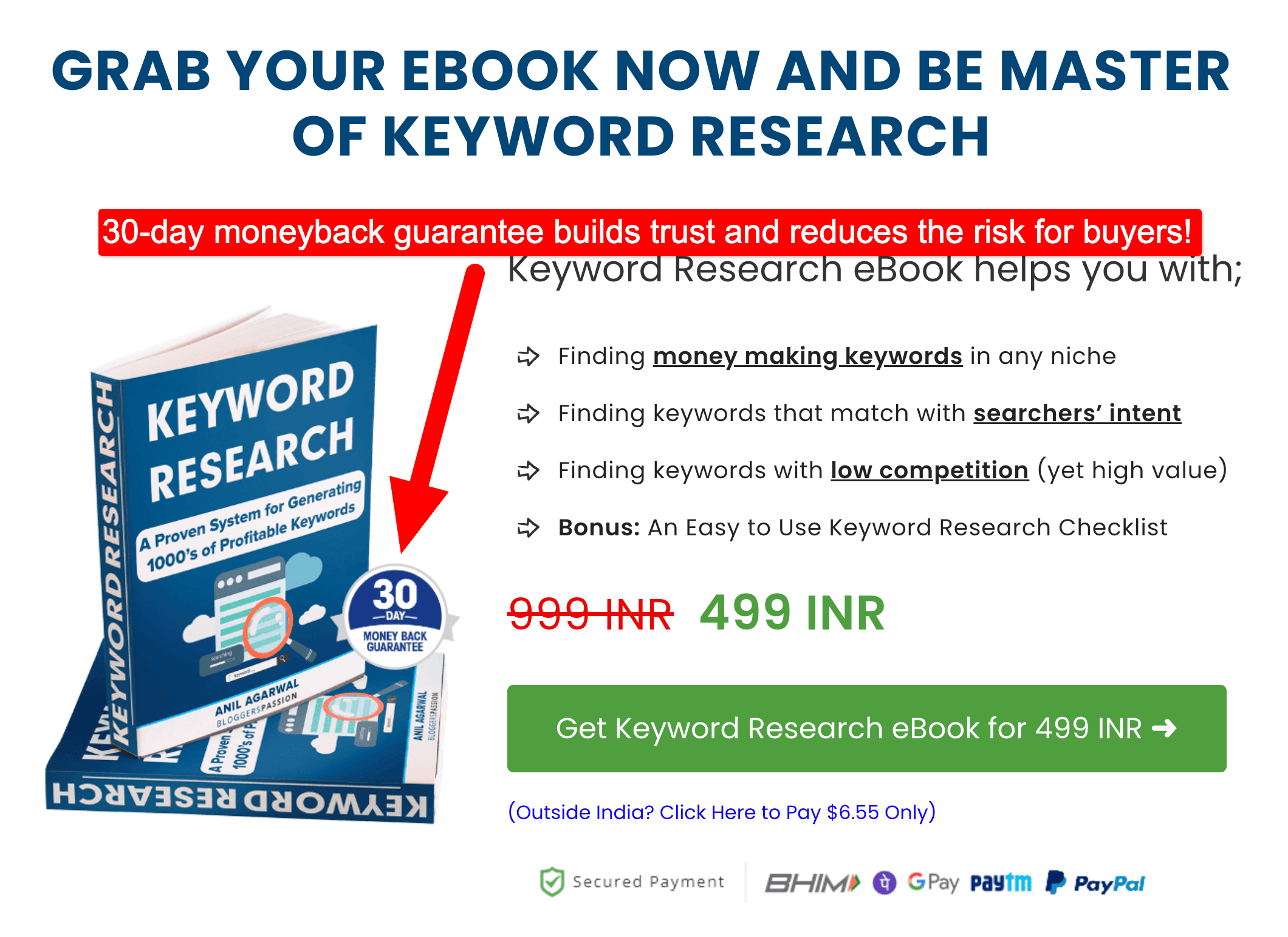
Tip: Make sure to include a 30-day money-back guarantee with your ebook. It reduces the risk for buyers, builds INSTANT trust, and can help increase conversions. Most people who get value from your ebook won’t ask for a refund anyway.
We still offer a 30-day money-back guarantee on ALL our eBooks for the same reason.
Step 3: Pick Where to Sell Your eBook
Now comes an important decision: where will people buy your ebook?
You have two main options;
- Sell it directly from your website or
- List it on a marketplace like Amazon
Many first-time authors automatically choose platforms like Amazon. But that’s not always the best move.
Why? Although Amazon gives you access to a huge audience, the downside is that it takes up to a 70% commission on every sale. Also, you don’t get the buyer’s email address, which makes it harder to sell future products.
Selling from your own website has more benefits. You keep 100% of the revenue, collect customer emails, and build a direct relationship with your audience.
The only downside is that you need your own traffic source, such as a blog, an email list, a YouTube channel, or a social media following.
As a simple rule:
- If people typically search for books on your topic, Amazon can work well.
- If people buy because they trust you or your content, selling directly on your website is the better option.
For most bloggers and creators, the best approach is to do both. Use your website as your main sales channel and list on Amazon as an extra way for new readers to discover your ebook.
The 3 best platforms to sell eBooks in 2026
Here are the 3 we’d actually recommend, depending on who you’re selling to.
1. Gumroad: Best for selling direct to a global audience
Gumroad is the simplest way to start. Sign up, upload your file, share the link, get paid. No website needed.
It charges 10% + $0.50 per sale on its free plan, plus standard card processing. We used Gumroad for our international buyers, and it just worked.
Best for: bloggers selling worldwide who want zero setup. Start with Gumroad here.
2. Payhip: Best low-fee option for your own store
Payhip does what Gumroad does, but more cheaply. The free plan takes 5% per sale, and if you’re selling steadily, the $29/month Plus plan drops that to 2%.
Its standout feature for authors is PDF stamping. It also handles EU and UK VAT automatically.
Best for: bloggers who want the lowest fees without upfront monthly costs. Check out Payhip here.
3. Amazon KDP: Best for discovery and reach
Amazon Kindle Direct Publishing puts your book in front of the biggest customer base. Kindle still owns roughly 72% of the e-reader market, so the audience is massive.
The downside? You earn 70% royalty if your book is priced $2.99–$9.99, but only 35% outside that range. And you don’t get the customer’s details.
Best for: fiction and general non-fiction where people search Amazon directly. Publish on Amazon KDP here.
Here’s a quick side-by-side comparison:
| Platform | Fee on free/standard plan | Best for | Owns customer email? |
|---|---|---|---|
| Gumroad | 10% + $0.50/sale | Global direct sales, zero setup | You do |
| Payhip | 5%/sale (free plan) | Lowest-fee own store | You do |
| Amazon KDP | 30–65% (you keep 35–70%) | Discovery & reach | Amazon does |
Step 4: Protect Your eBook from Piracy
One question almost every new author asks is: what stops someone from sharing my ebook after they buy it?
Here’s the truth: no digital product is completely free from piracy. If someone wants to share a file, they can. But there are two things you can do to reduce eBook piracy.
- PDF stamping: PDF stamping is similar to using a physical rubber stamp on a document. This adds the buyer’s name or email address to the eBook. Most people won’t want their details attached to an eBook.
- Download limits: Many ebook platforms let you set a limit on how many times a file can be downloaded. Setting a limit of two or three downloads is usually enough for legitimate buyers.
Step 5: Market Your eBook

Your eBook sales are directly proportional to the promotional tactics you use. People don’t buy just because you’re selling something.
An eBook nobody knows about sells nothing. Here are the five channels we used to sell hundreds of copies, in order of what worked best.

1. Use Blog
We used our blog extensively to promote our eBook. We displayed it everywhere, including above the fold (on the homepage), at the end of each post, and in the menu navigation section.
If you don’t have a blog, you can start your own blog by following this guide.
Your blog is the BEST promotional channel for your eBook. It doesn’t matter whether your blog is new or already gets a lot of traffic; you need to market your eBook through it.
Make sure to find a list of 5 to 10 highly relevant blog posts or pages on your blog that are relevant to your eBook’s topic. Then, start interlinking to your eBook from those pages.
Not only does it help you with better search rankings but more people will find your eBook. You can do the same by including your eBook from your top 10 traffic-generating blog posts.
Here are some of the proven ways to use your blog to sell your ebooks.
Include it in your homepage: Selling eBooks for the first time? Don’t forget to promote on your website.
Just have a look at our blog’s eBook home page (at the time of promotion).
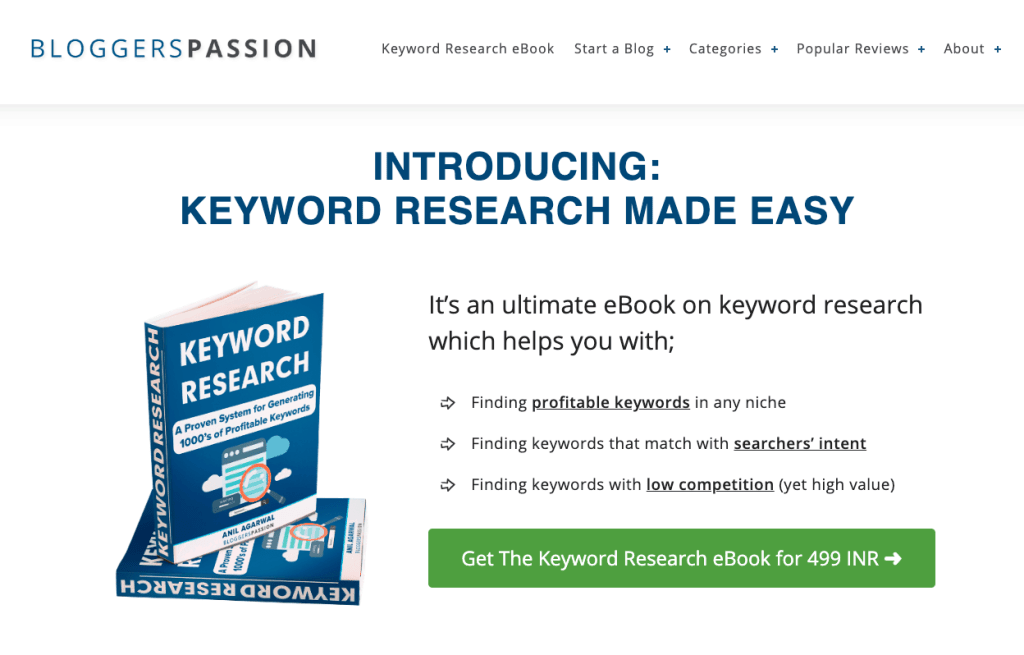
We are currently showing our latest premium eBook above the fold, which helps us increase exposure to it among our website visitors. So if you’re selling eBooks or any other products you own, it’s always better to show them on your home page, as it gives a ton of exposure.
Create a sidebar widget: Although we’re not using a sidebar on our blog, most people still use one. If you’re also one among them, it’s a good idea to create a widget for your eBook and display it in your sidebar.
Create a landing page: For our premium eBook on Keyword Research, we created a custom landing page.
Here’s what it looks like (eBook landing page is here).
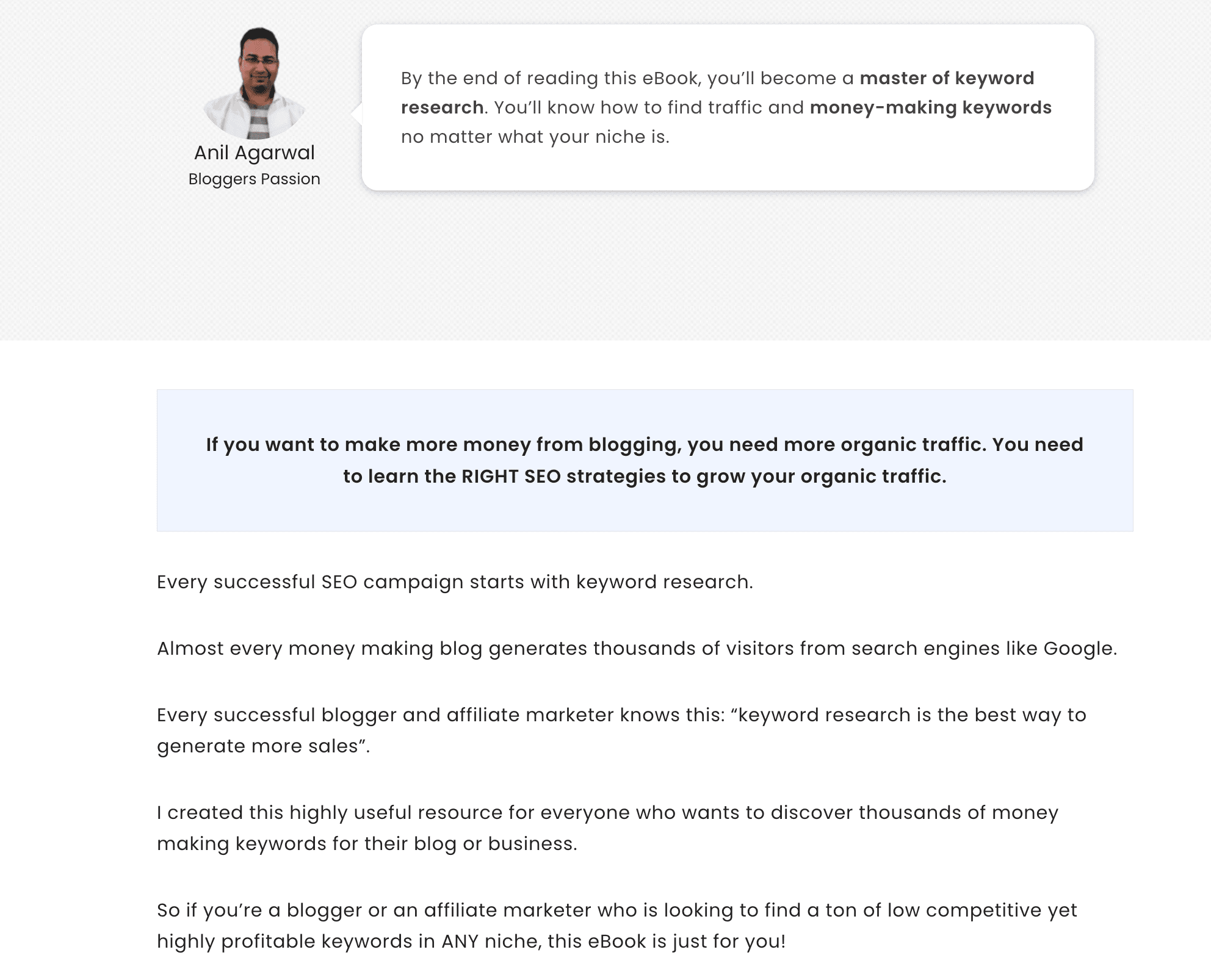
Landing pages create fewer distractions, and they work like a charm to boost your conversions.
You can also create such stunning landing pages for your eBook using the Elementor plugin.
Here are some of the benefits of using the Elementor WordPress plugin to design appealing landing pages for your eBooks.
- Gives access to the #1 drag & drop page builder
- It also offers you a free version, which is enough for most people
- You can customize anything from header to footer (and sidebar to layouts and so on)
2. Use Email List
If you’re not building an email list, you’re making a BIG mistake. An email list gives you the highest ROI. In fact, we realized the true potential of our email list only when we launched our first premium product, i.e., an eBook (as we generated a lot of sales from our list).
Our email list generated a decent amount of sales. We also offered special promotions exclusively to our email subscribers, which also resulted in some extra sales.
Here’s the thing: don’t use your email list to aggressively promote eBooks or any other products.
Email marketing is all about permission marketing. You shouldn’t spam others’ email inboxes with your sales pitches. In fact, you should do less selling and more helping.
Here are some quick tips to use your email list to grow your eBook sales.
- Educate your audience. Create an email series that is relevant to the eBook you promote. Your first few emails should only teach them something.
- Ask people questions. Most of them will reply. They will often talk about their problems. Listen to them. You’ll get a ton of ideas that can potentially help you make more sales by creating better products.
- Offer exclusive discounts to your email lists. As a side note, we offered a 50% EXCLUSIVE discount to our email list to drive more eBook sales, and guess what? It worked like a charm. Within 24 hours, we generated more than 20 sales from 1 email!

3. Use Social Media
One of the best ways to sell your digital products, such as eBooks, is to use social media. You can market to billions of people worldwide if you know how to use social media wisely.
The total number of social network users worldwide is 5.79 billion, as of 2026. There’s a HUGE market out there.
When it comes to using social media, make sure to focus on ONE platform at a time.
Also, make sure to know what works well for a particular social network. For instance, to get more out of Facebook, start using Facebook groups. You can join relevant groups and actively engage with others to build a name for yourself. Then, it becomes so much easier to promote your eBooks with others.
Similarly, for X, regular tweets and participating in X chats help you spread your name.
No matter what industry you are in, you should try YouTube. Why? It’s not only the biggest social media network but also the second-biggest search engine after Google.
In fact, we used our social media platforms (especially Facebook and YouTube) to promote and sell our eBook, thereby increasing sales. Both of these platforms worked really well for us.

4. Use Paid Ads
If you want to sell your eBooks to generate passive income, you must use paid ads. Unless you have a huge network, it’s almost impossible to get sales every single day. Here’s where creating a sales funnel with paid ads helps you generate sales every day!
So what paid options can you try to generate more sales for your eBooks?
You can try everything, including Facebook Ads, Google Ads, Pinterest Ads, etc., but we highly recommend you start with both FB ads and Google Ads.
Let’s briefly talk about both of them so you can understand more clearly.
Facebook Ads: We preferred Facebook Ads over other paid ad platforms because we know that most of our target audience spends the most time on Facebook. We spent around $25-$30 per day and generated a decent ROI.
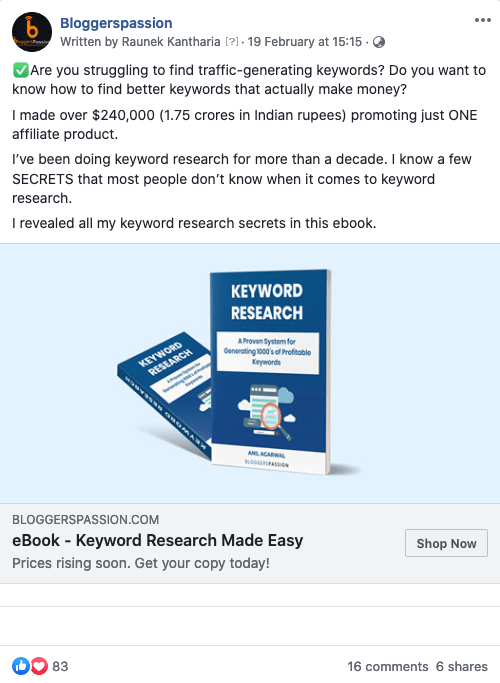
Google Ads: Although we haven’t tried Google Ads yet, it’s a great option to try, as Google Ads allows you to advertise to millions of people, but it’s a bit expensive when compared to Facebook Ads. But you’ll get unique clicks every time, and the money you spend on Google paid ads depends on the keywords you choose.
What’s the ROI in Ads?
We spent around $450 and generated around 106*7$ = $742. Not a bad ROI, right?
If done right, by using Meta Pixel (Facebook Meta Pixel is a small piece of code that you add to your website. It helps track visitor activity, so you can retarget those visitors with ads), you can target a relevant audience to boost your eBook sales.
5. Use Quora or Similar Sites
Quora is the #1 platform for bloggers. It’s a great place to write helpful answers that promote your blog and increase your brand exposure and authority.
We use Quora extensively, and so far we have generated over 8.5 million content views on our answers (as of this writing).
Here’s what my Quora profile looks like;
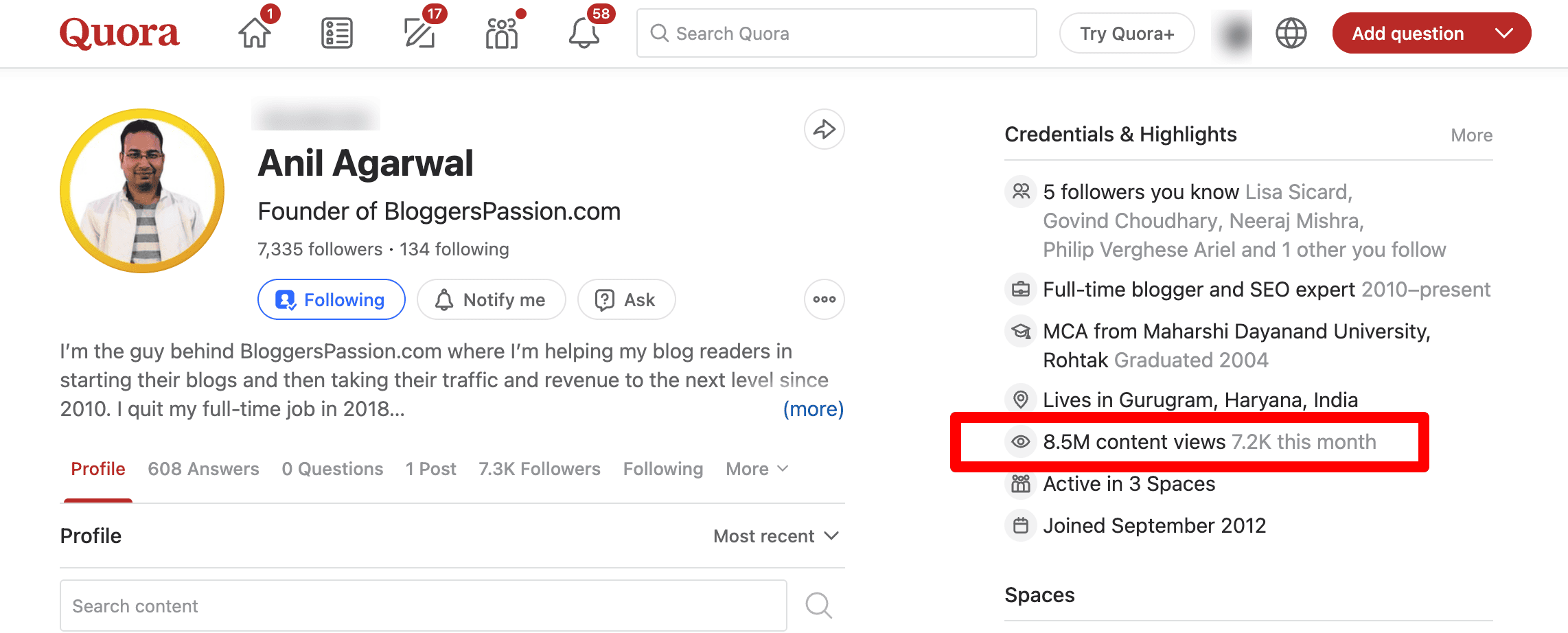
As you can see above, not only I included some of my popular contents in my Quora bio but I also wrote some helpful answers that are related to my eBook on Keyword Research.
Not only does it increase exposure to the eBook, but it also provides SEO benefits through linking, user interaction, and more.
Similarly, you can use other platforms such as Medium and Reddit to write helpful content and build an audience for your blog. They can also be useful for promoting and selling your eBooks.
Expert Tips From Bloggers Who’ve Sold eBooks

We asked a few bloggers who’ve made real money from ebooks for their single best tip. Here’s what they shared.
Fabrizio Van Marciano: Create something that actually solves a problem before you write a word. Then price it for the value it delivers and stand by that price — don’t cave and discount it the moment sales feel slow. And don’t settle for one platform; be everywhere your buyers are.
Ryan Biddulph: Keep your ebooks short, simple, and packed with practical tips people can use right away. Ryan has self-published 126 ebooks, most of which are between 6,000 and 15,000 words. His big secret to more sales: write the next ebook. Readers who love one will buy more.
Raunek Kantharia: You don’t need to be the world’s top expert — you need to be the best compiler. Pull together what genuinely helped you, back it with your own results, and never ship a mediocre product. Over-deliver, and you make customers for life.
Enstine Muki: Find a problem to solve, then promote your ebook only to the audience that has that problem. Promoting an SEO ebook to pilots is a waste of effort. Match the book to the right crowd, and selling gets easy.
Notice the common pattern: solve a real problem, sell to the right people, and keep writing more.
Final Thoughts: Start Selling Your First eBook
Selling ebooks isn’t about luck or a huge following. It’s a process you can repeat.
Create an ebook that solves a REAL problem. Price it fairly. And choose a platform that keeps your buyers (Gumroad or Payhip if you’re starting today).
Then promote it through your blog, email list, and the channels your audience already uses.
We did exactly that and turned a first-ever product into 250+ sales.
Here’s your one next step: write down the single topic your audience asks you about most. That’s your first ebook. Start there today.
So what are your thoughts on selling eBooks? Have any questions? Let us know in the comments.
FAQs On Selling eBooks Online
Here are some frequently asked questions about selling eBooks online.
To sell eBooks online, create and format your eBook, choose a platform like Amazon KDP, Gumroad, or Payhip, upload your files, add your book details, and set a price.
Price for the problem you solve, NOT page count. Most ebooks are priced between $3 and $10, but high-value niches like SEO or finance support $20–$50.
There’s no thumb rule on how long your eBook should be. But if you’re selling non-fiction eBooks such as business, motivational, or informative content, you can aim to publish 8,000 to 10,000-word eBooks.
Popular platforms for selling ebooks include:
1. Amazon Kindle Direct Publishing (KDP): Sell your ebooks directly on Amazon’s Kindle Store.
2. Apple Books: Publish and sell ebooks on Apple’s platform for Mac and iOS users.
3. Gumroad: Sell ebooks on Barnes & Noble’s Nook platform.
4. Google Play Books: Publish and sell ebooks on the Google Play Store.
5. Payhip: Sell digital products, including ebooks, directly to your audience.
Yes, and it’s often the smartest option. Tools like Payhip and Gumroad let you embed a buy button or share a link, handle the payment and file delivery automatically.
Yes. If you are looking for a platform with a massive audience and built-in traffic, Amazon KDP is worth considering.
No. If you’re selling from your own site or through platforms like Gumroad or Payhip, you don’t need an ISBN. You only need one if you go through a traditional publisher.




Turning it into an audio book is another great way to boost sales and awareness. Think of all the time you spend walking, commuting, doing household chores etc... all time that you could also be listening to an audiobook. Just like your potential readers!