


You don’t need to be a bestselling author or have perfect writing skills to write an eBook.
You just need a solid topic, a simple structure, and a process you can follow.
The best part? In 2026, AI tools will make writing easier and faster.
That being said, readers don’t pay for generic words. They pay for useful ideas and REAL experiences.
If you’re looking for a step-by-step tutorial on launching your first eBook (or the next one), this detailed guide is exclusively for you.
In this post, you’ll learn how to write an ebook from scratch in 6 easy steps.
Quick note: This guide is only about writing your ebook. For promoting and selling it, read our separate case study on how to sell ebooks.
Why Write an eBook: 4 Real Benefits
Writing an epic eBook takes time and money, right? So why should you write an eBook?
Here are some of the big reasons to write an eBook.
1. Expert Positioning: People don’t buy from strangers, especially online. You need to position yourself as an expert in your niche. That’s when your sales grow. eBooks are great for positioning yourself as a thought leader in your industry.
2. Offering Help: You’ll be able to help hundreds (if not thousands) of people with your eBooks. If you have knowledge on particular topics, you should teach others what you know. eBooks can be useful for helping your target audience.
3. Income generator: Many creators sell eBooks for $9 to $29 and earn from the same product for months or years. You create it once and keep selling it.
4. Building an Audience: Want to build a loyal audience around your blog? Create useful eBooks. Not only will you be able to offer eBooks as freebies to build and grow your email lists, but you can also offer them as giveaways to quickly grow your blog following.
Yes, there is an endless number of opportunities available when you create useful eBooks. Just make sure to create eBooks that actually add value to your target audience.
All in all, eBooks can help you improve your brand, boost your website sales, and build and grow an audience.
How to Write an eBook in 6 Steps: From Idea to Publish

Step 1: Pick one focused topic
The most common mistake beginners make is trying to cover too much. They try to cover five different topics in one eBook, and it ends up too broad.
Do the opposite. Pick one topic and go deep.
Not sure what to write about? Answer these three questions:
- Who do you want to help?
- What problem are they stuck on?
- How can you solve it for them?
Here’s how we used this for our keyword research ebook:
- Who do you want to help? People learning SEO.
- What problem are they struggling with? They can’t find good keywords.
- How can you solve it? Show them a practical step-by-step process.
Just answer the above three, and you’ll have an idea for your next eBook.
There’s also an easier shortcut: look at the content you’ve already created. If you have a blog, your best-performing posts can become the foundation of your eBook.
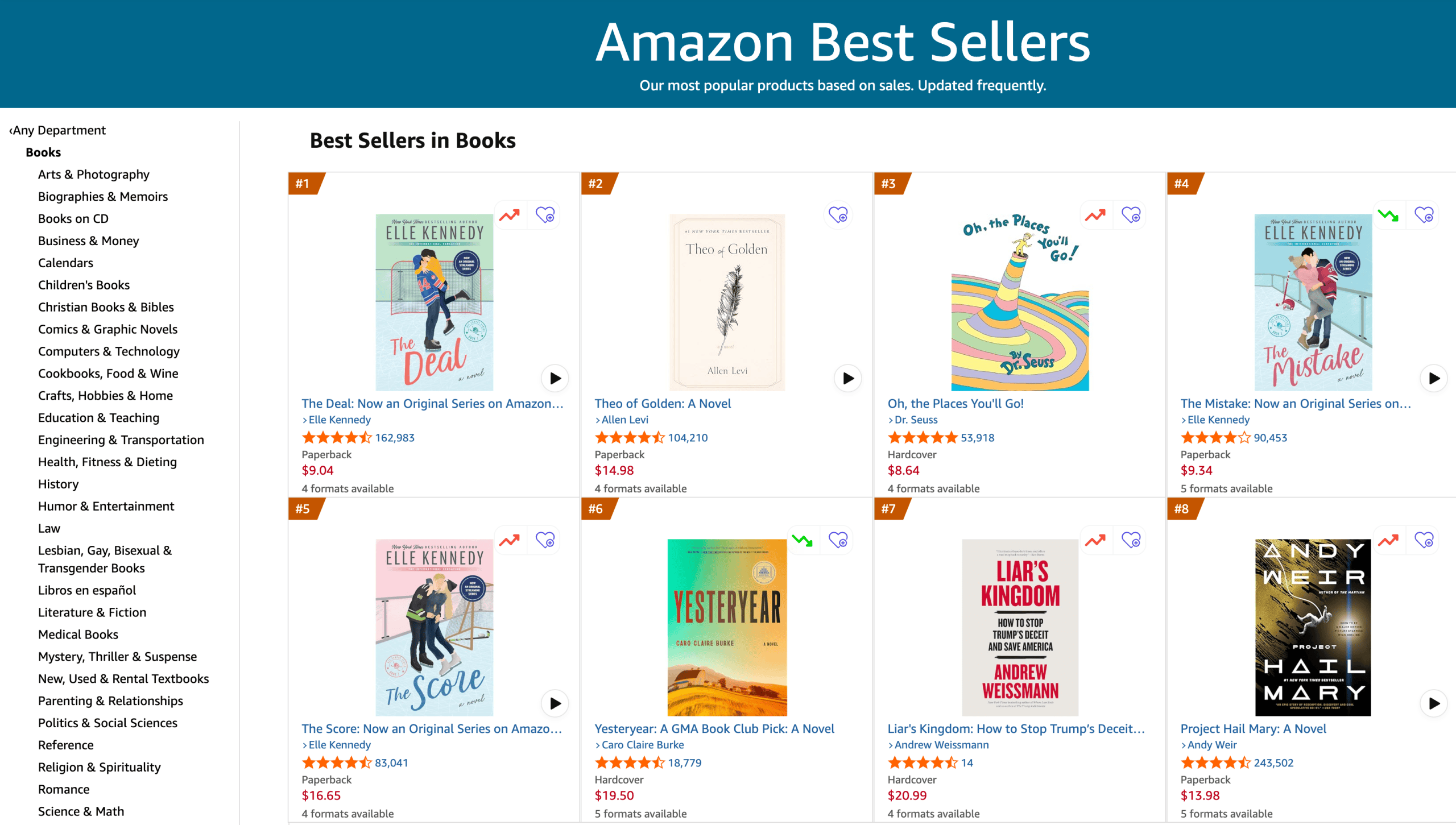
No blog yet? Browse the Amazon Best Selling book store. Pick your niche, sort by best sellers, and study the ebooks with the most reviews. You’ll find popular topics within minutes.
One last tip. Don’t pick a topic just because it sells. Pick one YOU can teach well. Your knowledge and skills are what make the ebook worth reading.
Step 2: Validate your idea before you write
Writing an ebook can take weeks (or even months). Before you spend that time, make sure people actually want what you’re planning to write.
Don’t skip this step.
Validation just means asking real people if your idea is useful. Here are three simple ways to do it.
- Ask your audience directly: Share your idea on social media, in your email newsletter, or in a Reddit, WhatsApp, or Telegram group you’re part of. Something as simple as “I’m thinking of writing a short guide on X, would that help you?” works well.
- Run a quick survey: Free tools like Google Forms or Typeform let you ask a few questions in minutes. Send the link to your audience and see how they react.
- Check for demand: Search for your topic on Google and Amazon. If people are already searching for it and buying ebooks about it, that’s a good sign.
You don’t need hundreds of replies. Even a couple of answers would do. If people show interest, go ahead. If nobody cares, tweak the topic before you write.
Step 3: Create a chapter-by-chapter outline
An outline is the most important thing to finish an eBook fast. Without one, you’ll get stuck and NEVER finish your ebook.
Start by breaking your topic into chapters. Each chapter should cover one MAIN idea. Think of a chapter like a single blog post.
Here’s what an outline for a keyword research ebook might look like:
- Introduction
- Chapter 1: What keyword research really means
- Chapter 2: Free tools to find keywords
- Chapter 3: How to pick the right keyword
- Chapter 4: Common mistakes to avoid
- Conclusion
Here’s the thing: 5 to 6 chapters is plenty for a beginner ebook. You don’t need twenty.
Need help with structure? Open the Amazon Kindle store and look at the table of contents of popular ebooks in your niche. You’ll quickly see how experienced authors categorize their chapters.
Write your outline in Google Docs. Also, install free tools like Grammarly to check and fix your grammar on the go.
Step 4: Write your eBook
We’ve written plenty of eBooks, and the fastest way to finish one is to pick one chapter at a time.
Why? Writing an ebook is NOT one big task. It’s a set of small ones.
You already have your outline. Now just write one chapter at a time. Treat each chapter like a blog post you’d publish on a blog.
The tip here is having a plan. Pick a time when you focus best, even if it’s only 30–60 minutes a day. Set deadlines for each chapter.
One rule while writing: Write your first draft first. You can always edit later.
A common question is how long an ebook should be. There’s no thumb rule, as a free ebook can be short, around 3 to 5K words. A paid ebook is usually longer (around 8-12K words).
Step 5: Use AI to write faster, not to write for you
AI tools like ChatGPT and Claude can speed up your ebook a lot. But don’t use them for text generation.
Use them to brainstorm chapter ideas, turn your notes into a better outline, suggest examples, and fix grammar.
Struggling to find words? Ask AI to write a rough draft of one section, then rework it in your own words with real examples.
For example, you can ask: “Give me 10 chapter ideas for a beginner’s ebook on email marketing.” In seconds, you’ll have a list to pick from.
Remember, the one thing that makes your ebook worth reading: your REAL experience.
So use AI as an assistant, not a replacement. Add your own stories, your own ideas, your own opinions, and what actually worked for you. That personal touch is what people pay for.
Step 6: Edit, design, and format your eBook
Once you’re done writing your eBook, it’s time to format it.
Editing: Read your ebook twice. Reading it out loud helps you catch so many mistakes. A free tool like Grammarly helps with spelling and grammar quickly.
Make sure to get feedback. Send your draft to 3 to 5 people before you publish. Ask them for honest feedback.
Design: Most people judge an ebook by its cover. You have two choices. Design it yourself in Canva, which is free and has ready-made ebook templates. Or hire a designer on Fiverr, where gigs cost around $5 to $50.
Formatting: Last, save your ebook in the right file type. The two types most creators use:
- PDF looks the same on every device. It’s best for free ebooks or selling on your own website.
- ePub adjusts to any screen size. It’s the SAME format used by ebook stores like Apple Books, Kobo, and Amazon Kindle.
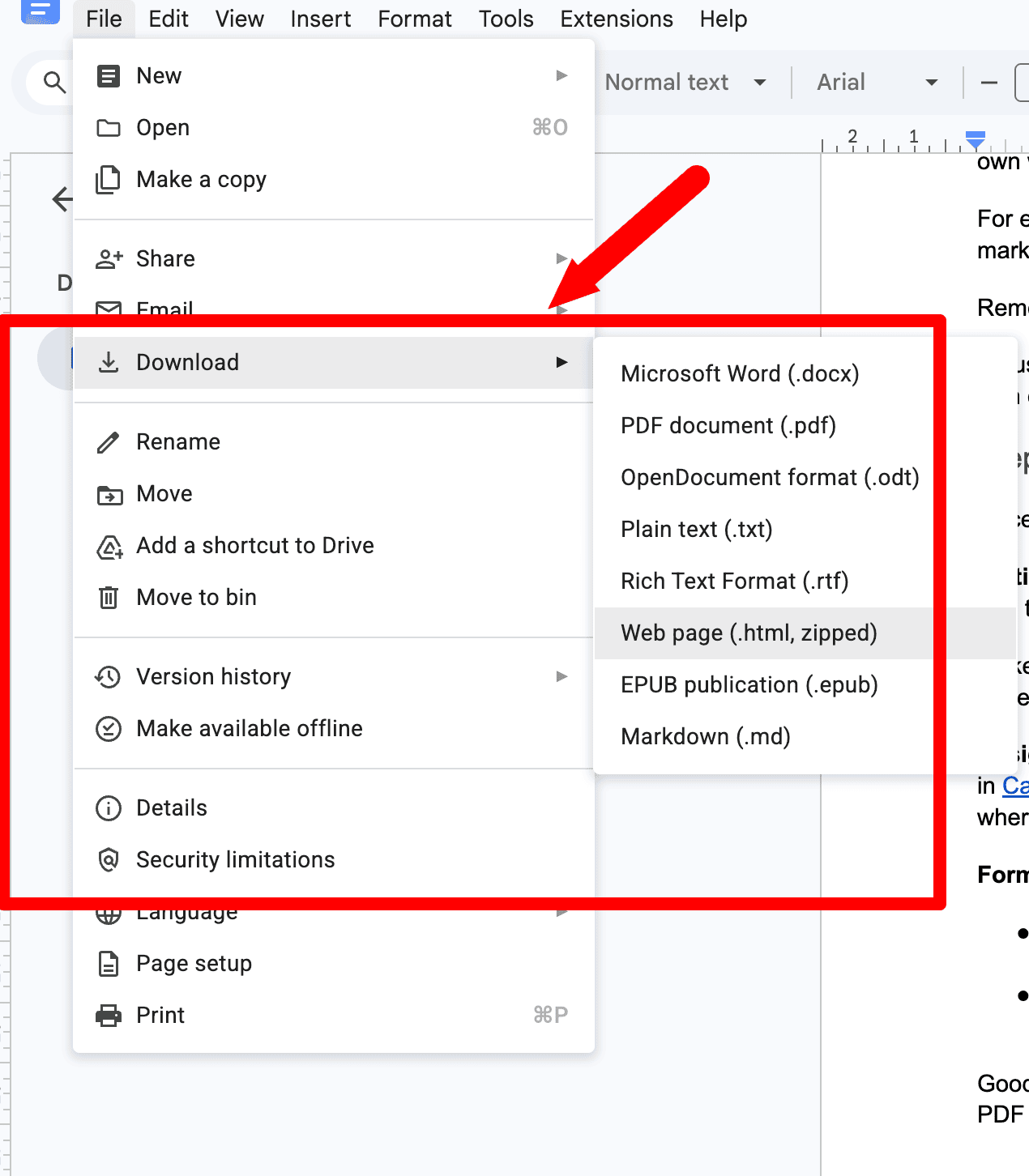
Good news for beginners: Google Docs exports both. Just go to File > Download and pick PDF or EPUB. Here’s what it looks like;
Bonus Tip: Promotion is the KEY
No matter how much money or time you spend on creating your eBook, if you don’t promote, you’ll fail to generate buzz or sales. It would be difficult for your target audience to find your eBook if you don’t promote it.
If you build it, they won’t come. You must work extremely hard to promote your e-books. Why? Simply because there’s too much competition out there.
That said, here are some innovative ways to promote your eBook.
- Create a landing page
- Smartly promote it on your website
- Reach out to other bloggers
Let’s briefly discuss them now.
Create a dedicated landing page
It doesn’t matter whether you’re offering your eBooks for free or selling them; you need to create landing pages.
Here’s what our keyword research eBook custom-made landing page looks like;
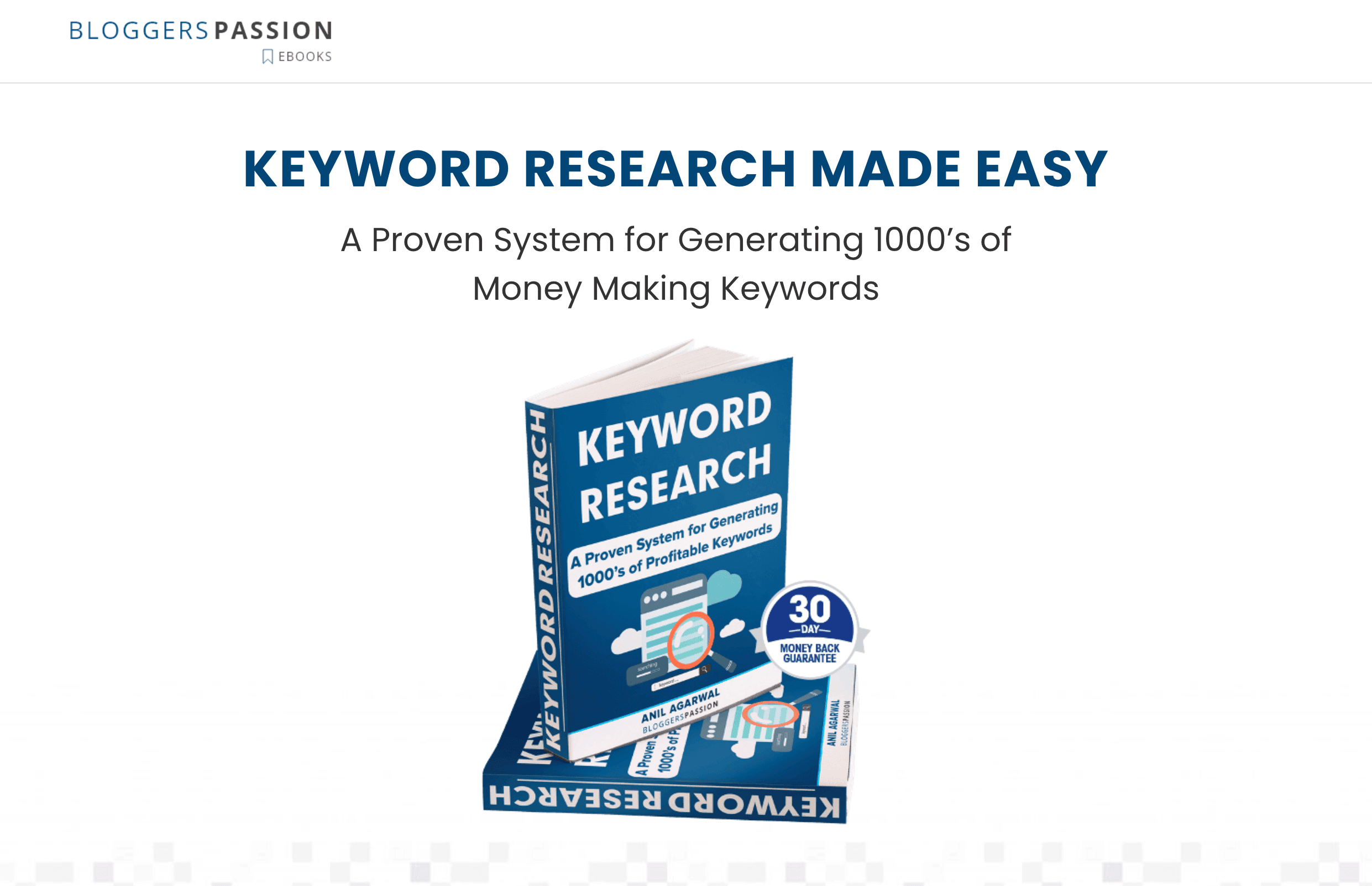
We deliberately made it minimalistic, and it looks really elegant.
So, how can you create landing pages? You can use page builders like;
- Elementor
- Thrive Architect
- Divi builder
Smartly promote it on your website
If you have a blog, you should definitely promote your eBook on it. Not only does it give your blog audience more exposure, but it also helps drive higher conversions.
Although we haven’t published an exclusive blog post about our eBook, we highly recommend it, as it provides great exposure (we’ll certainly do so in the future).
Here are some of the places where we included our eBook for promotion.
- At the end of the blog posts
- An exclusive section at the top navigation menu
- Above the fold (on the homepage)
Reach out to other bloggers
Blogger outreach is one of the most effective ways to promote your products, such as eBooks. Most people would love to share your eBook with their followers. So don’t hesitate to ask for help.
FAQs About Writing an eBook
Here are some interesting questions around creating an eBook from scratch.
An ebook is the digital version of a book. You can read it on a phone, tablet, laptop, or Kindle.
Google Docs is enough to write and export your ebook. Canva handles the cover and visuals. Grammarly can handle your grammar. ChatGPT or Gemini can help you build an outline and speed up writing.
Start with your audience. Then look where demand already exists. You can browse Amazon Kindle, check Udemy courses, study competitors’ ebooks, and review your top-performing blog posts.
There’s no fixed number. Some ebooks make a few dollars, while others generate thousands per month. It depends on the topic, your expertise, and how you market it.
How-to and problem-solving ebooks sell best. If you can fix a problem with your eBook, it has a much better chance of selling.
Final thoughts on writing an eBook from scratch
Writing an ebook comes down to three things: pick one clear topic, write it one chapter at a time, then edit and design it well.
The hardest part isn’t the writing. It’s starting. Most people wait for the perfect time and don’t write even a word.
So don’t wait. Open Google Docs today and write your outline.
Don’t wait. Take action today. If you have any more questions on creating your first eBook, ask them in the comments.





![How to Get Free Products for Review in 2026 [8 Legit Ways]](https://bloggerspassion.com/wp-content/uploads/2023/12/get-free-products-for-reviews-300x169.png)


Thanks Anil Sir for sharing this detailed guide for those who want to launch their own ebook and want to make a handsome amount of money.
Really, Ebook is one of the best product that converts the most if you have an audience that trusts you also the price of ebook is not often much so one doesn't feel risk buying this like high ticket products.