


Monthly bills and usage limits are a concern when you manage web apps on third-party cloud SaaS platforms.
Isn’t it?
Moving your AI application to a VPS (Virtual Private Server) solves these problems.
Running your AI tools on your own private server puts you back in control.
You also get dedicated resources.
But again, self-managing a VPS is a big hassle. You have to be a technical expert or hire one.
Not anymore.
Want to Learn how? Then continue reading.
Disclosure: We get a commission when you buy a product via our affiliate link at no additional cost.
Why Run an AI Application on a VPS?
1.) Continuous 24/7 Operation:
Desktop applications stop running the moment you lose internet connectivity.
A VPS operates continuously on dedicated infrastructure so that all your background tasks, such as web research, data monitoring, or automated reporting, are running.
2.) Predictable Monthly Expenses:
Pay-per-token API fees and per-task billing models means there will be unexpected prices.
In contrast, hosting on a VPS relies on a flat monthly rate starting between $5.99 and $6.49 per month. This approach allows you to replace multiple recurring software subscriptions with a single server expense.
3.) Data Privacy and Environment Isolation:
Running your applications on a private server keeps your internal business data, research, and content drafts in an isolated environment that remains entirely under your control. In other words, you get top-notch control over privacy.
4.) A Distraction-Free Digital Workflow Third-party platforms are often cluttered with upsells, and disruptive UI changes. A private server provides a clean workspace where your processes run exactly as you configure them.
What Types of AI Applications Can You Run on a VPS?
A Virtual Private Server allows you to run everything from simple chatbots to complex automation engines:
Some of the common ones fall into the following categories:
1.) Research Agents:
Research Agents are AI tools that can work for multiple working sessions. For example, engines like Hermes Agent can run tasks simultaneously without losing historical session memory: Web Research, Competitor data tracking, code execution, etc.
2.) Conversational Messaging Assistants: These assistants handle communication channels and incoming messages. Tools such as OpenClaw focus on real-time message prioritization and automated replies across platforms like Telegram, functioning as an always-on inbox manager.
3.) Workflow Automation Engines: Instead of relying on single prompts, workflow engines build connected pipelines across separate applications. Software like n8n uses visual, node-based workflows to transfer data across more than 1,900 app integrations without charging per-workflow fees.
4.) Local LLMs and Models: For complete offline control, open-source language models can be installed directly onto the server. Frameworks like Ollama on Ubuntu let you process prompts and run custom models locally on dedicated hardware.
Now comes the real part…
The Deployment of AI Applications on a VPS
Method 1: Hostinger Managed AI Automation Apps (Zero DevOps)
For users who want the benefits of a private server without spending hours configuring backend infrastructure, Hostinger offers a managed environment called AI Automation Apps.
This approach removes technical hurdles like manual server configuration, Docker container setup, or command-line management.
Hostinger maintains the underlying server infrastructure, applies security updates, and ensures system stability.
You manage your applications directly through hPanel—a visual control dashboard—allowing you to deploy, monitor, and switch between tools without writing code or managing terminal sessions.
The Included Application Suite:
Instead of requiring separate software licenses or servers, a single subscription grants access to three core automation tools:
- Hermes Agent
- OpenClaw
- N8n
Let me show you how you can set up an AI application on Hostinger VPS.
Once you log in, you see a pending setup pop-up…
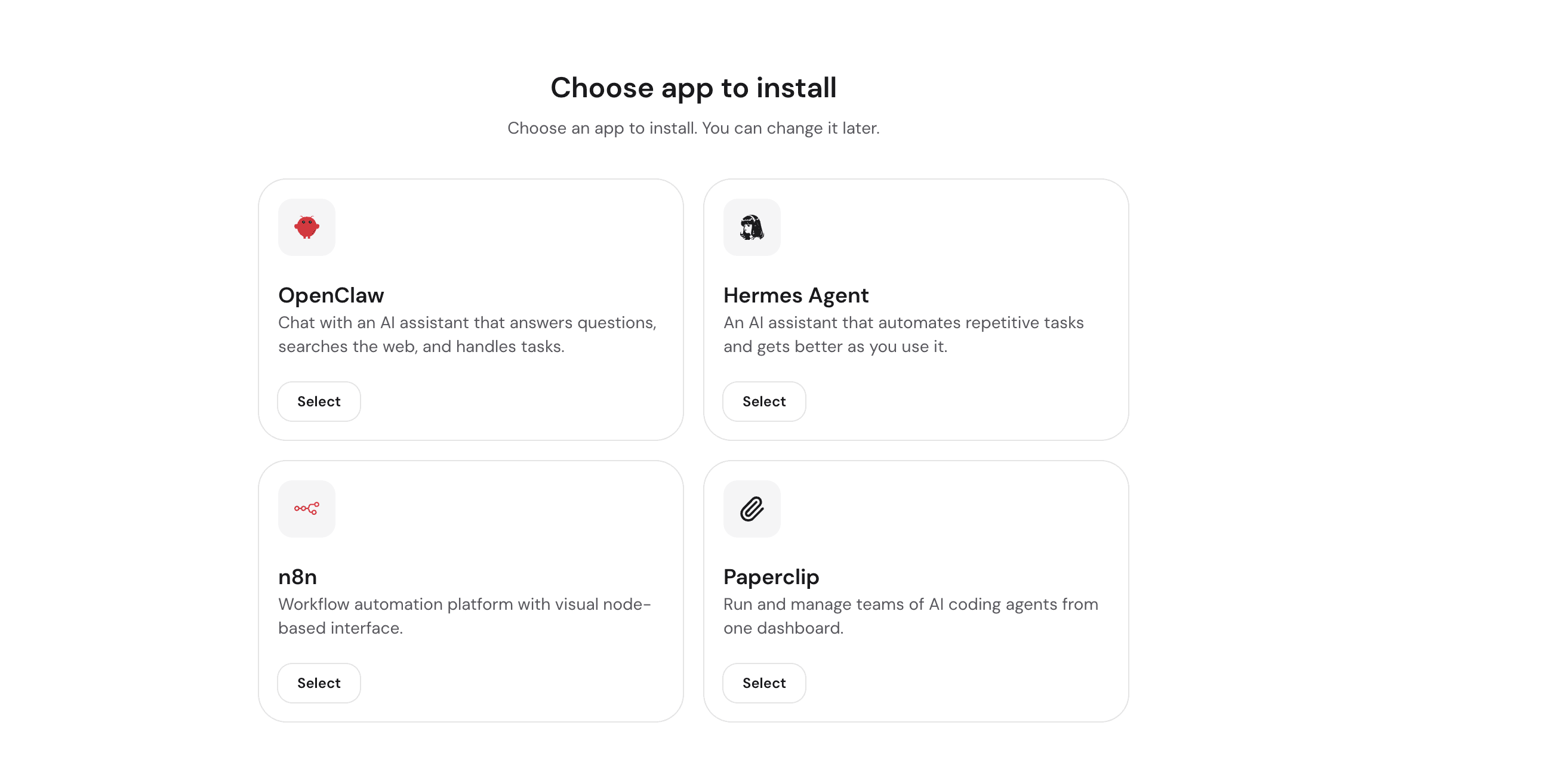
I am setting up the OpenClaw AI application for this quick tutorial.
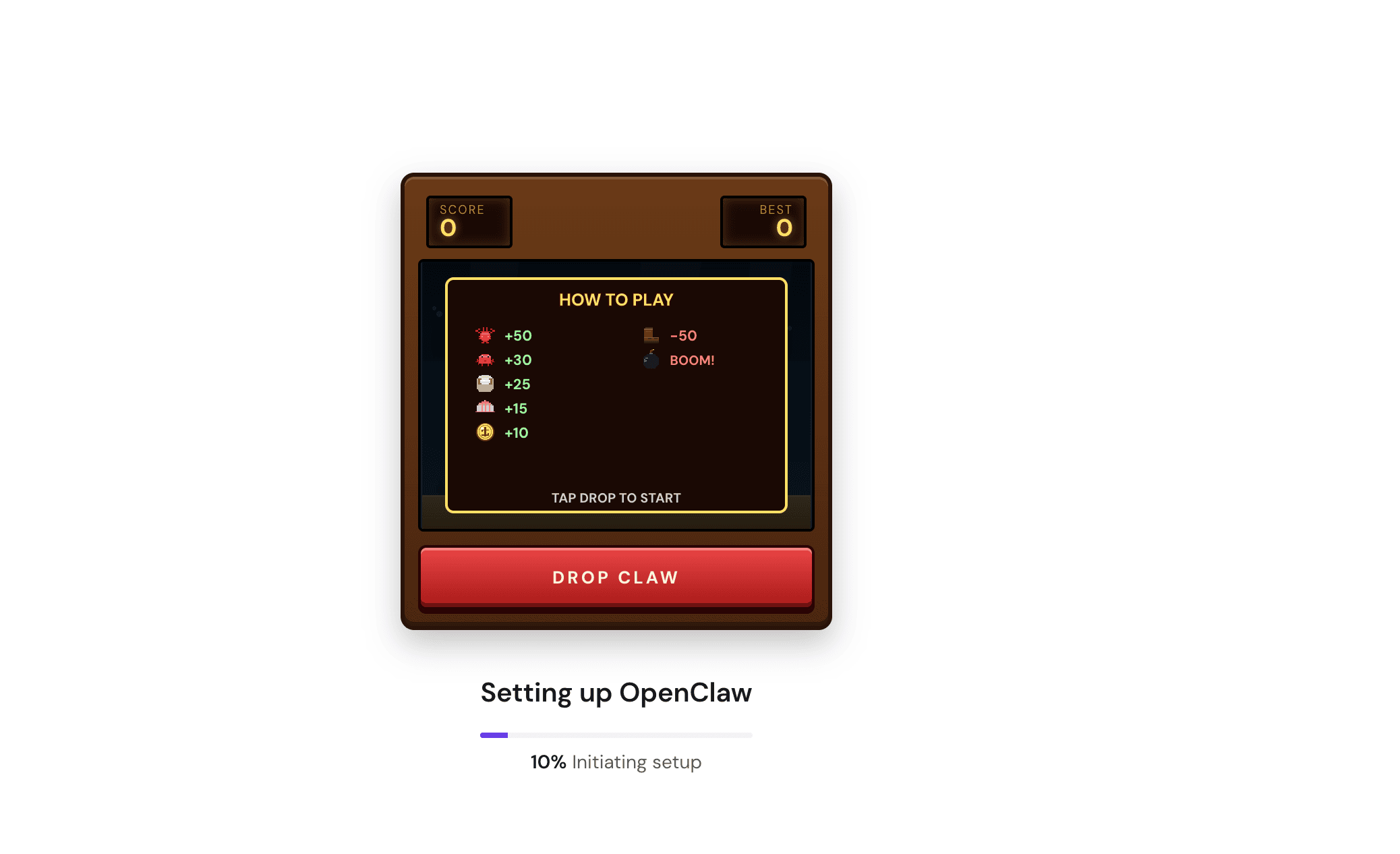
See, Hostinger is currently provisioning your secure environment in real time.
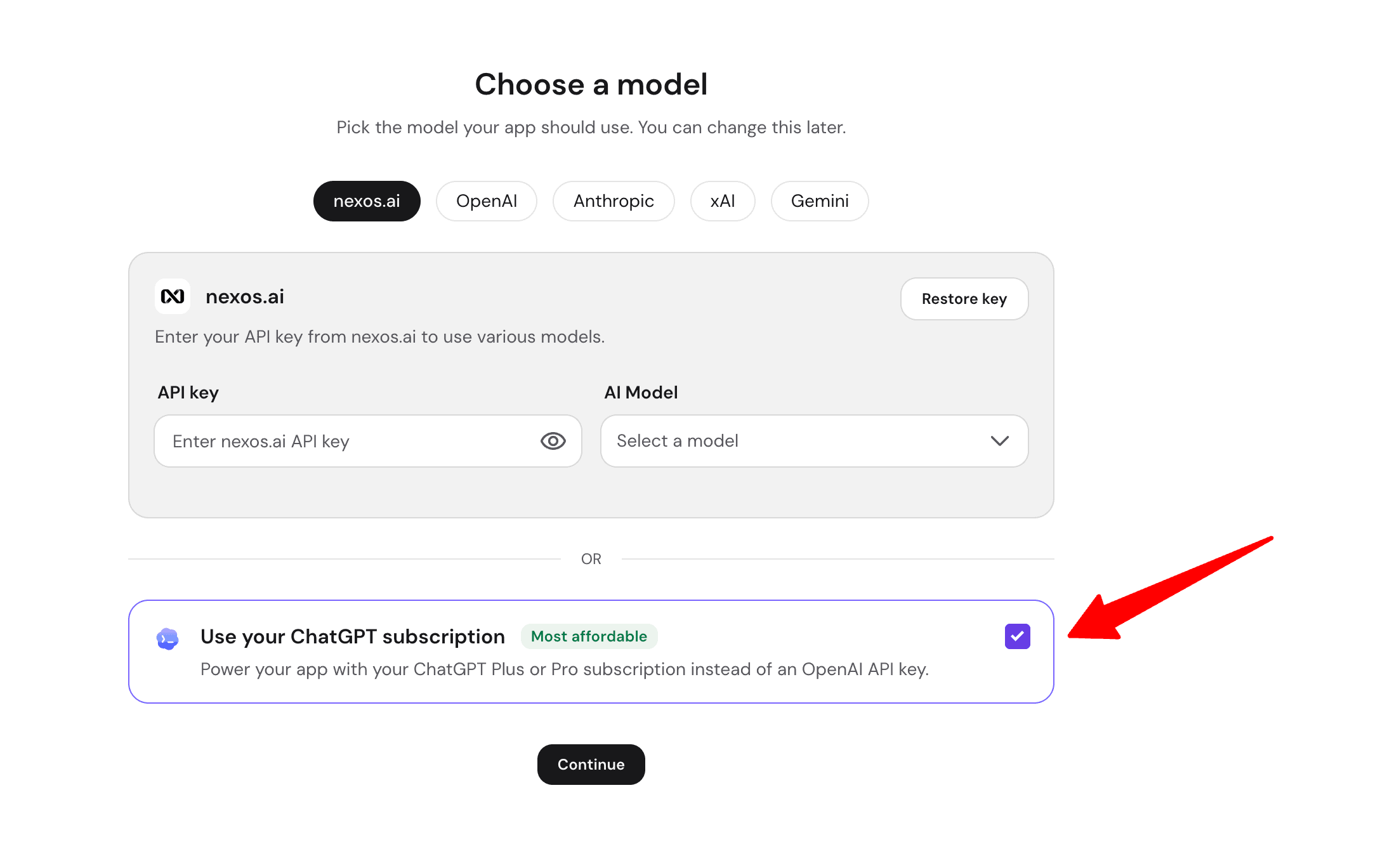
Now select “Use Your ChatGPT Subscription”. This ensures you bypass pay-per-token API fees.
Now you need to connect your VPS application “OpenClaw” with your ChatGPT account:
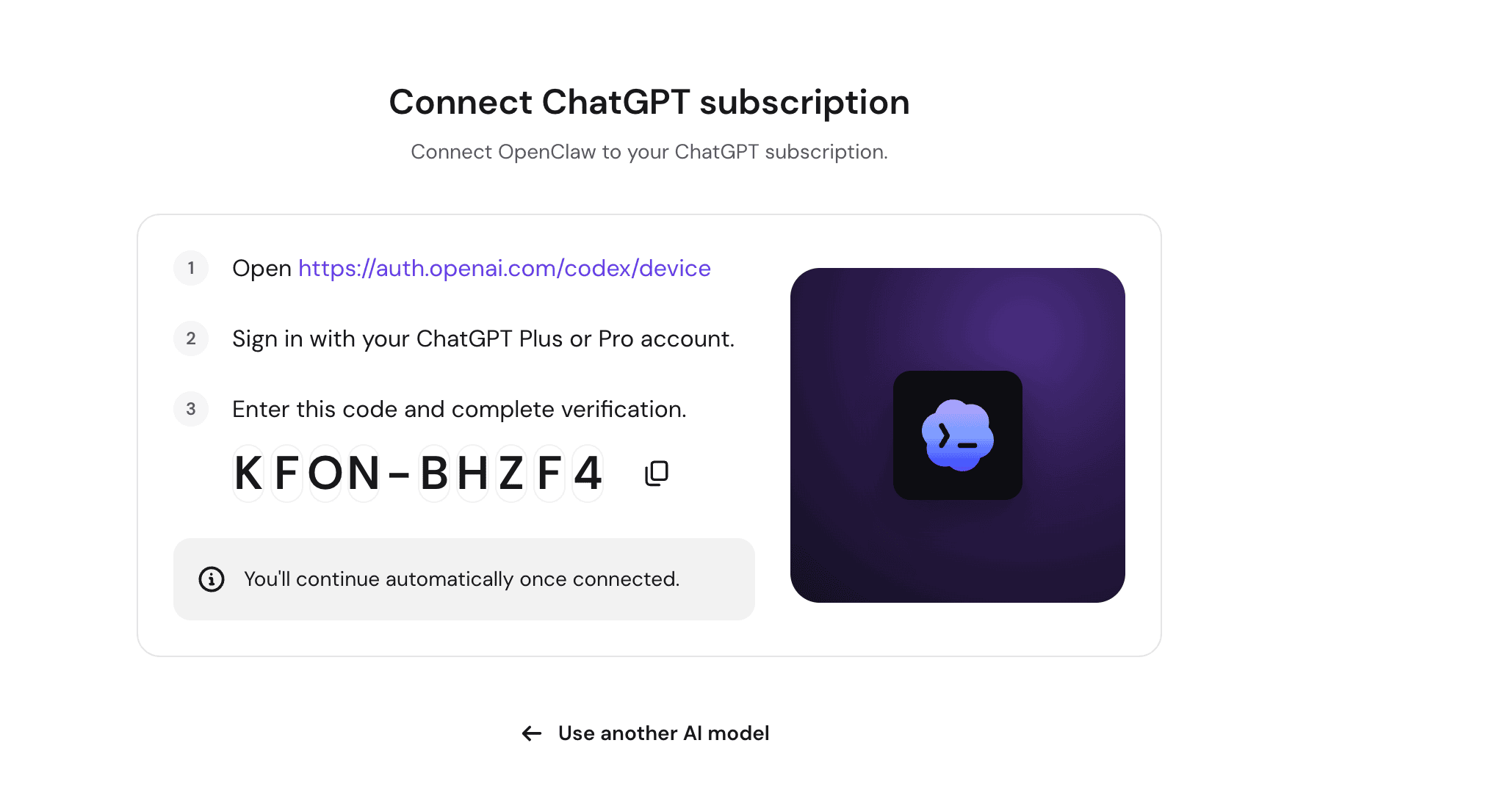
Next, pair your assistant with a messaging app.
Once the system authorizes your ChatGPT account, it automatically takes you to the final pairing screen. Because OpenClaw operates as a chat-first assistant, it requires a front-end interface where you can send tasks and receive automated reports.
Instead of forcing you to log into a server dashboard every time you want to use your AI, Hostinger prompts you to “Connect OpenClaw to a messaging app”.
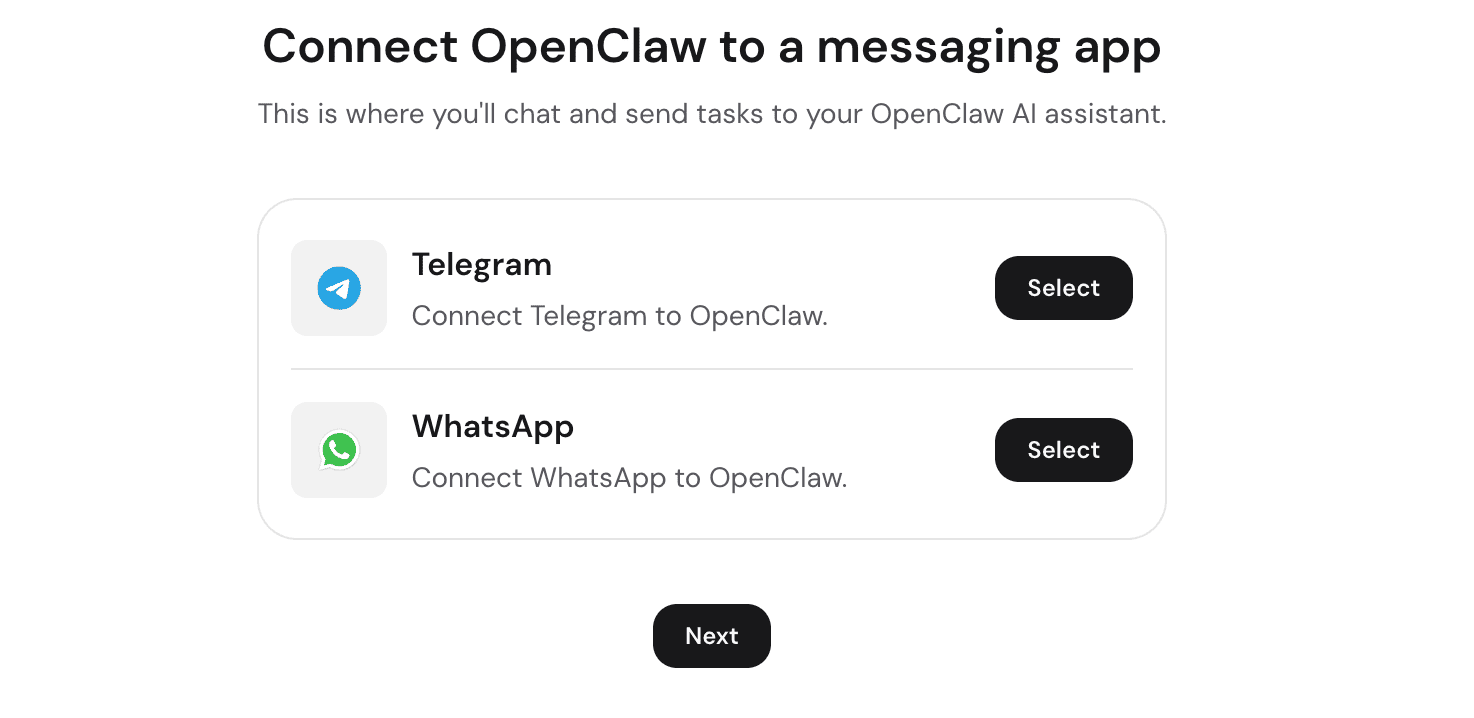
You can choose to link your assistant directly to Telegram or WhatsApp.
Once you complete this step, your deployment is finished.
You now have a private AI assistant running 24/7 on a dedicated Hostinger VPS. You do not need to open a laptop or log into a web portal to use it.
You can simply open WhatsApp or Telegram on your phone and type a command—such as asking it to draft an outreach email or check a website’s status and the server will process the task and reply directly in your chat app.
Cost Optimization via ChatGPT Account Integration:
One major financial advantage of this managed environment is how it handles model authentication. Typically, running autonomous agents requires an OpenAI API key, which charges you by token usage and can quickly lead to unpredictable bills.
Hostinger addresses this by allowing you to connect an existing ChatGPT Plus or Pro subscription directly via an OAuth login in hPanel.
The platform automatically handles background token refreshes and session authentication. This setup lets you run continuous background workflows using the flat-rate subscription you already pay for and eliminates separate pay-per-token API invoices.
Pricing:
All 3 applications are included under a single managed plan starting at $5.99 per month.
Users can test different agents and toggle between tools inside hPanel at any time without paying separate hosting or software fees.
Method 2: Hostinger Self-Hosted Docker VPS (Full Root Control)
For those who want highly customized, isolated environments, Hostinger offers a bare-metal approach through its Docker-ready Virtual Private Servers.
The Application Catalog Setup:
Traditionally, self-hosting complex AI applications requires writing and configuring Docker Compose files manually from GitHub repositories. Hostinger removes this friction with an Application Catalog featuring over 1,000 open-source, Docker-based applications ready to deploy in a few clicks.
This lets you quickly launch containerized environments while keeping the freedom to use standard Docker Compose workflows for advanced custom setups.
Infrastructure and Hardware:
Running AI models locally demands serious processing power.
Every application deployed through this method runs on Hostinger’s KVM (Kernel-based Virtual Machine) architecture. The infrastructure relies on AMD EPYC processors, high-speed NVMe SSD storage, and a 1 Gbps network connection to handle data-heavy automation without latency.
You are not restricted to a single application; you can run multiple isolated projects on one server, such as hosting an Ubuntu environment alongside local AI models like Ollama, OpenClaw, and Hermes Agent.
You manage all of these isolated containers visually through the integrated Docker Manager interface.
Server Maintenance:
Having full root access is powerful, but it also means you are responsible for the server environment. To protect the setup, the platform includes built-in security functions designed for technical users:
- Infrastructure Protection: Every VPS includes a managed firewall and DDoS protection to secure your exposed endpoints.
- Data Recovery: Free automatic weekly backups and a one-click snapshot restore function allow you to roll back the server instantly if a custom configuration breaks.
- AI Server Management: The dashboard includes an AI Web Terminal powered by Hostinger Agent. This tool translates natural-language prompts directly into real server commands, acting as a built-in assistant for terminal operations.
Pricing:
Unlike the managed suite, this self-hosted route uses standard VPS tiered pricing. Plans start at $6.49 per month (KVM 1) with 1 vCPU core and 4 GB RAM. The plans scale up to $25.99 per month (KVM 8), offering 8 cores and 32 GB RAM for demanding AI workloads.
How to Choose the Right Hostinger VPS Setup?
So the question is still the same… Which AI Application deployment method should you pick?
Choose the Managed AI Automation Route if:
1.) Speed to Deployment is Critical: You need a working AI assistant or data pipeline running today, without learning command-line operations.
See how I used this method to set up a VPS by chatting with the Hostinger Agent…
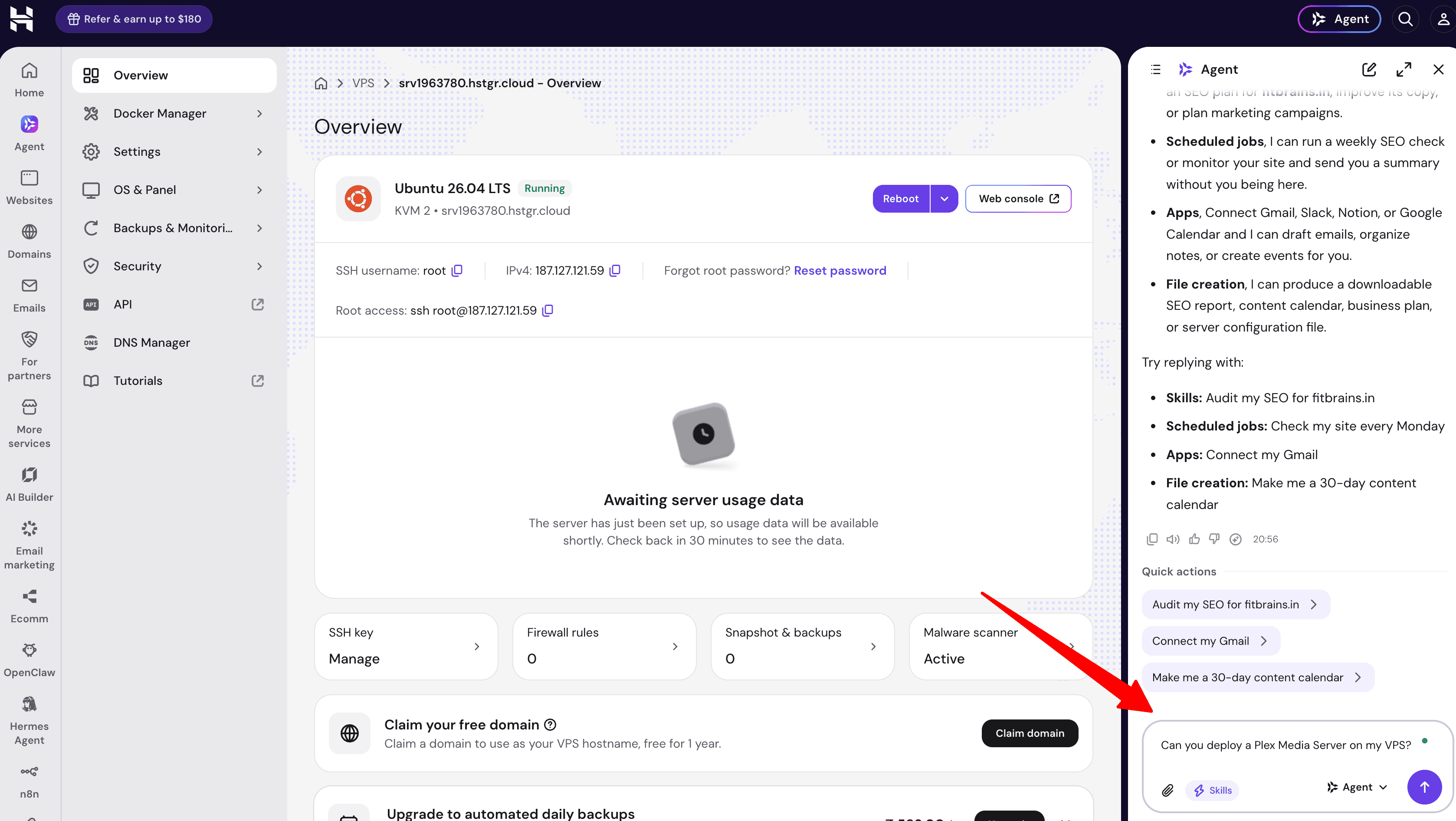
2.) You Want Zero API Costs: You already have a ChatGPT Plus or Pro subscription and want to bypass pay-per-token API invoices via the OAuth integration.
Choose the Self-Hosted Docker Route if:
1.) You Require Root Access: You are a developer or system architect who needs absolute control over the server environment, firewalls, and custom software installations.
2.) You Want to Run Local Models: You plan to deploy open-source LLMs like Ollama directly on your hardware to ensure zero data leaves your server.
3.) You Are Escaping SaaS Fees: You want to utilize the 1,000+ Docker Application Catalog to host open-source alternatives to various expensive monthly software subscriptions on a single KVM server.
FAQs:
Can I use a free ChatGPT account for Hostinger Managed AI setup?
No, the direct OAuth integration requires an active ChatGPT Plus or Pro subscription to bypass API billing. If you only have a free account, you aren’t locked out, but you will need to generate a standard pay-per-token API key (from providers like OpenAI, Anthropic, or Gemini) and plug that into the model selection screen instead.
Will I lose my custom AI workflows if a server update breaks my setup?
If you are on the Managed AI route, Hostinger handles the updates automatically, so configuration breaks are highly unlikely. If you take the Self-Hosted Docker route with full root access, you are protected by free automatic weekly backups and a one-click snapshot restore tool, so you can instantly roll back the server if a custom configuration goes wrong.
Do I need to keep my computer turned on for my automated workflows to run?
Not at all.
If I choose the managed AI plan, am I locked into just those specific apps forever?
The managed $5.99/month subscription currently supports the most popular workflow engines, but Hostinger is actively adding more tools to the suite under the exact same plan. However, if you want the freedom to install custom software or niche models immediately, you should skip the managed route. Go with the KVM VPS instead, which gives you root access and a catalog of over 1,000 Docker applications to build whatever app you want.
Explore More:
- Hostinger Hosting Review (5+ Years of Experience Shared)
- Black Friday Automation Using Hostinger [7 Important Workflows to Implement]

![VPS Hosting vs Cloud Hosting [Explanation, Benefits, Disadvantages, Comparison, and More]](https://bloggerspassion.com/wp-content/uploads/2025/05/vps-hosting-vs-cloud-hosting-300x162.jpg)
![VPS Hosting vs Shared Hosting [Benefits, Disadvantages, Which One Fits Your Website, and More]](https://bloggerspassion.com/wp-content/uploads/2025/05/vps-vs-shared-hosting-300x162.png)



Leave a Comment
Your email address will not be published. Required fields are marked *