


Note: This article is supported by funding from WordPress.com. The insights are based on our own research & not influenced by them.
Most “cheap” WordPress hosting offers are designed to be tempting at checkout, but they become a financial burden at renewal.
Did you know…Between hidden fees, mandatory add-ons, and “renewal traps,” the lowest introductory price rarely represents the best long-term value.
To find the true leaders in affordable hosting, I have spent months testing the performance. I checked the uptime and actual billing cycles of the industry’s top budget providers.
This guide consolidates that data to highlight which hosts offer genuine value across 12, 24, and 48-month tenures without compromising performance.
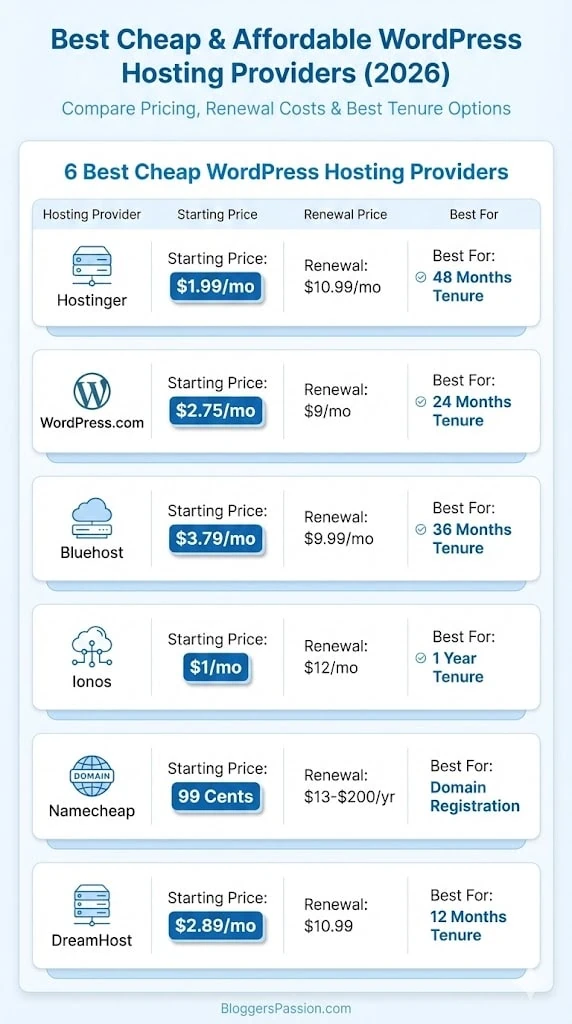
Table of Contents
- Low Cost WordPress Hosting Price Comparison at a Glance:
- 1. Hostinger – Best Affordable WordPress Hosting Overall for Long & Short Period
- 2. WordPress.com – Fully Managed Cheapest WordPress Hosting for 2 Years
- 3. Bluehost – Best Affordable WordPress Hosting for 3 Years
- 4. Ionos – Inexpensive WordPress Hosting for 1 Year ($1/month)
- 5. Namecheap – Cheap for WordPress Hosting Domain Registration
- 6. Dreamhost – Cheap Renewals
- My Recommendation & Final Thoughts:
- FAQs:
Low Cost WordPress Hosting Price Comparison at a Glance:
| Hosting Providers | Starting Price | Renewals | Cheap For |
|---|---|---|---|
| Hostinger | $1.99/mo | $10.99/mo | 48 Months Tenure |
| WordPress.com | $2.75/mo | $9/mo | 24 Months Tenure |
| Bluehost | $3.79/mo | $9.99/mo | 36 Months Tenure |
| Ionos | $1/mo | $12/mo | 1 Year Tenure |
| Namecheap | 99 Cents | $13-$200/yr | Domain Registration |
| DreamHost | $2.89/mo | $10.99 | 12 Months Tenure |
Don’t forget to explore their savings offer mentioned in their sections below…For quick answers, FAQs are worth exploring.
Now let’s explore all hosts one by one for more hidden cost related insights…
1. Hostinger – Best Affordable WordPress Hosting Overall for Long & Short Period
Hostinger is going to look like the most affordable and the best value for money WordPress host in today’s cheap WordPress hosting list. I have personally been using it for over 3 years. They mentioned in one of their report that Kodee (AI Assistant) allows them to save over $750,000 every month. Because of this, they are able to manage such low pricing plans.
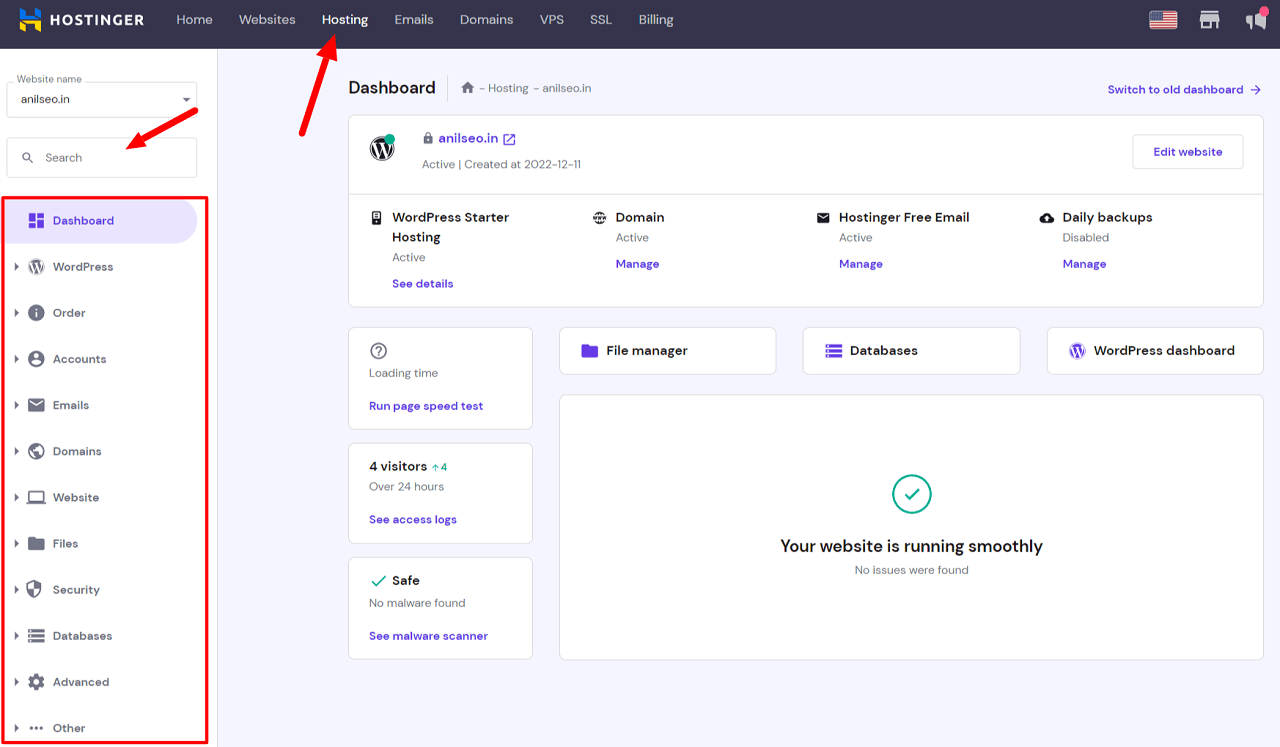
It is one of the most popular hosting providers, and whether you look at WordPress hosting or other types like VPS or Cloud, you will find more value for money here compared to others.
Performance is also above average despite the low pricing. I tested their base plan and got an average loading time of 1.78 seconds and an uptime of 99.998% over the last 11 months.

My reports also revealed that Hostinger offers the lowest plans whether you choose 48 months, 24 months, or 12 months.
So whether you are considering it for the short term or the long term, you can save money here.
The only drawbacks for me are that they do not offer phone support and you do not get a free CDN in all WordPress hosting plans.
Key Features:
- Multisite support (Up to 100 Sites)
- Free Pre-Built templates
- 25 GB – 100 GB SSD
- Unlimited SSL
- Daily on demand Backups
- WordPress Vulnerabilities Scanner
- WordPress Auto Updates
- AI Website Builder
- WordPress Staging
- Dedicated IP
- AI Assistant
- DDoS Protection & WAF
- 99.9% Uptime Guarantee
- 24*7 Live Chat Support
- 10 Global Data Centers
Hostinger gives the maximum discount on 48-month plans but renewals should not be ignored. Monthly plans are also available but they are the most expensive, so I would suggest avoiding them.
Here is how much Hostinger WordPress hosting will cost you depending on the tenure:
| Cost | Premium | Business | Cloud Startup |
|---|---|---|---|
| 48 Months Regular | $1.99/mo | $2.99/mo | $6.99/mo |
| 48 Months Renewal | $10.99/mo | $16.99/mo | $25.99/mo |
| 24 Months Regular | $2.99/mo | $3.99/mo | $8.99/mo |
| 24 Months Renewal | $10.99/mo | $16.99/mo | $25.99/mo |
| 12 Months Regular | $3.49/mo | $4.49/mo | $9.99/mo |
| 12 Months Renewal | $10.99/mo | $16.99/mo | $25.99/mo |
| 1 Month Regular | $12.99/mo | $13.99/mo | $27.99/mo |
| 1 Month Renewal | $11.99/mo | $18.99/mo | $27.99/mo |
Looking at the table, you can clearly understand why I call Hostinger affordable for both short and long-term hosting.
The renewal pricing tells the whole story. They are offering the same renewal rates whether you choose a short or long tenure.
With other low cost hosts, shorter plans usually mean higher renewal pricing.
You can still save the most on Hostinger with the 48-month plans which will cost you between $95.52 and $335.52 upfront.
Domain registration is free for the first year, but later renewals start from around $18 per year which should be added to your overall hosting budget.
I observed that there are hardly any hidden fees in Hostinger WordPress plans. You get a free domain, SSL, daily backups, and domain privacy included.
I did not find anything you would need to purchase separately as an add-on. They are transparent with their pricing and most features are already included in the plans except CDN which is missing in the Premium plan.
Overall, Hostinger WordPress hosting looks cheaper when you consider both the initial and renewal costs compared to other providers. Their transparency in pricing is a big plus and the resources offered in the plans are enough for different kinds of websites.
| Pros | Cons |
| Very cheap and valuable WordPress hosting plans | Cheapest plans are only available with long-term commitments |
| No hidden costs associated with add-ons or anything | No phone support |
| Renewal pricing remains the same for short or long tenures | CDN missing in the Premium plan |
| User-friendly interface | |
| No extra charges for migration | |
| 30 days refund policy is available | |
| Good performance with an average loading time of 1.78 seconds (based on my testing) | |
| Lots of freebies makes the final WordPress hosting cost really low | |
| 24/7 live chat agents respond in under one minute | |
| Doesn’t charge extra for WordPress staging | |
| Both blogs and eCommerce based sites can be easily setup here | |
| AI website builder makes website creation quick | |
| Included an AI agent “Kodee” for beginners that helps in maintaining your WordPress site via chat messages. It even performs tasks like publishing posts, updating homepage, changing product pricing, etc. |
Since Hostinger uses LiteSpeed, I recommend using their native LSCache plugin rather than third-party caching tools.
Try Hostinger WordPress Hosting [Discount Auto Applied]
Explore More:
- Hostinger Pricing Plans Compared [Which is Best Overall]
- Installing WordPress Hosting on a Hostinger [Step By Step]
2. WordPress.com – Fully Managed Cheapest WordPress Hosting for 2 Years
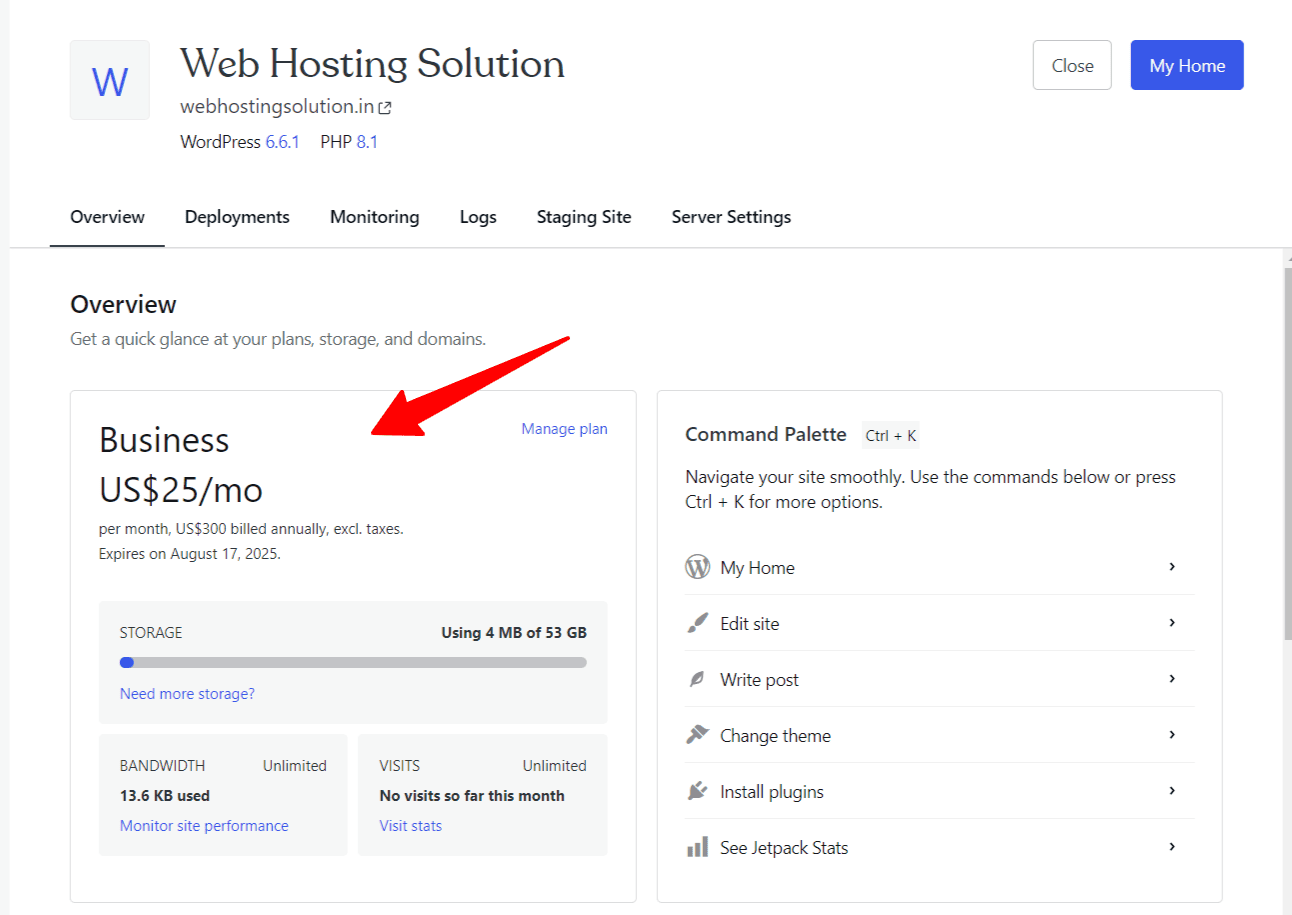
Do not get confused with WordPress.com. It is a hosting service offered by Automattic, the same company that contributed to the development of the WordPress.org CMS.
And if you are looking for true fully managed WordPress hosting that is 100% compatible with WordPress sites, then why not choose the hosting provider that contributed the most to the development of WordPress CMS.
Because they are fully managed, Newbies don’t have to do any technical tasks like managing their hosting, installing WordPress, and more.
Their security is excellent compared to other hosting providers. When it comes to pricing, you will find plans starting from 1 month up to 3 years. From my personal experience, I have mostly seen 100% uptime which clearly shows the reliability of their servers.

WordPress.com is also very transparent with customers. They do not hide anything. You get the same initial and renewal pricing for every plan, regardless of tenure. Obviously, the longer the plan you choose, the cheaper it gets.
Based on my analysis, if you are specifically looking for a 2-year WordPress hosting plan, WordPress.com is offering the cheapest rates in this segment.
However, you should be aware that you are only able to install one website in a single license. That won’t happen in other web hosts we see today.
Key Features:
- Built-in CDN
- Support Custom Plugins
- Built-in Generative AI assistant
- Free Migration
- Hundreds of Free themes are available
- Real time automated backups
- Built-in Premium plugins
- Advanced Security
- Automated Burst Scaling support
- Built-in Store Creation tools
- Built-in SEO & Marketing Features
WordPress.com may not be the absolute cheapest host, but its 24-month plans are quite affordable and the renewal prices remain the same. (At the start, you get unlimited bandwidth and page views. When your blog begins to grow beyond the traffic limits, you only pay a small additional fee. The best part is that they never force you to upgrade.)
As a first-time user, you will also save a lot through their promotional discounts.
Here is how the pricing works:
| Cost | Personal | Premium | Business | Commerce |
|---|---|---|---|---|
| 36 Months Regular | $2.75/mo | $5.50/mo | $17.50/mo | $31.50/mo |
| 36 Months Renewal | $9/mo | $18/mo | $40/mo | $70/mo |
| 24 Months Regular | $3.25/mo | $6.50/mo | $20/mo | $36/mo |
| 24 Months Renewal | $9/mo | $18/mo | $40/mo | $70/mo |
| 12 Months Regular | $4/mo | $8/mo | $25/mo | $45/mo |
| 12 Months Renewal | $9/mo | $18/mo | $40/mo | $70/mo |
| 1 Month Regular | $9/mo | $18/mo | $40/mo | $70/mo |
| 1 Month Renewal | $9/mo | $18/mo | $40/mo | $70/mo |
The 3-year plans will cost you anywhere between $99 and $1134. The 24-month plans are more cost-effective compared to others because very few hosting providers offer 2-year options. These plans will cost you between $78 and $864 initially.
Domain renewal fees will apply after the first year if you transfer your domain here.
Other than that, there are no mandatory add-ons that you need to purchase. WordPress.com is not using any hidden tricks to charge customers extra. They provide unlimited page views and bandwidth. In rare cases where your traffic suddenly spikes, they may add a small extra fee to the final bill. This is still cost-effective for high-traffic sites because most other hosts either force you to upgrade or add hundreds of dollars to your bill.
Just remember, their first two plans lack important features like real-time backups, and priority support.
Overall, you can definitely consider WordPress.com for a 24-month hosting tenure. They are the cheapest in this segment and they stand out in terms of goodwill, reliability, and security for WordPress hosting.
| Pros | Cons |
| Renewal and first-time subscription rates remain the same | Only USA based data centers are available |
| Known for enterprise-level security | No phone support |
| Cheapest option in the 24-month hosting segment | Limited features in entry-level plans |
| You get access to the same core features of WordPress.org within WordPress.com hosting. | |
| Free Migration is available. | |
| Hundreds of professional themes included | |
| 24/7 live chat support available | |
| Fully WordPress Managed features are built-in. | |
| 14 days refund policy is applicable |
Explore WordPress.com Hosting [Extra Discount Auto Applied at Checkout]
3. Bluehost – Best Affordable WordPress Hosting for 3 Years

Who doesn’t know Bluehost? They are one of the oldest WordPress hosting providers and are still going strong.
They offer support for 10 to 100 websites, 10 to 100 GB SSD storage, a free domain for the first year, and free CDN. Bluehost covers most essentials for anyone launching their first site.
For users who want to create an e-commerce site with payment features, they provide a special “Online Store” plan.
One of their biggest advantages is phone support.
In terms of affordability, their 36-month WordPress hosting plan is among the cheapest.
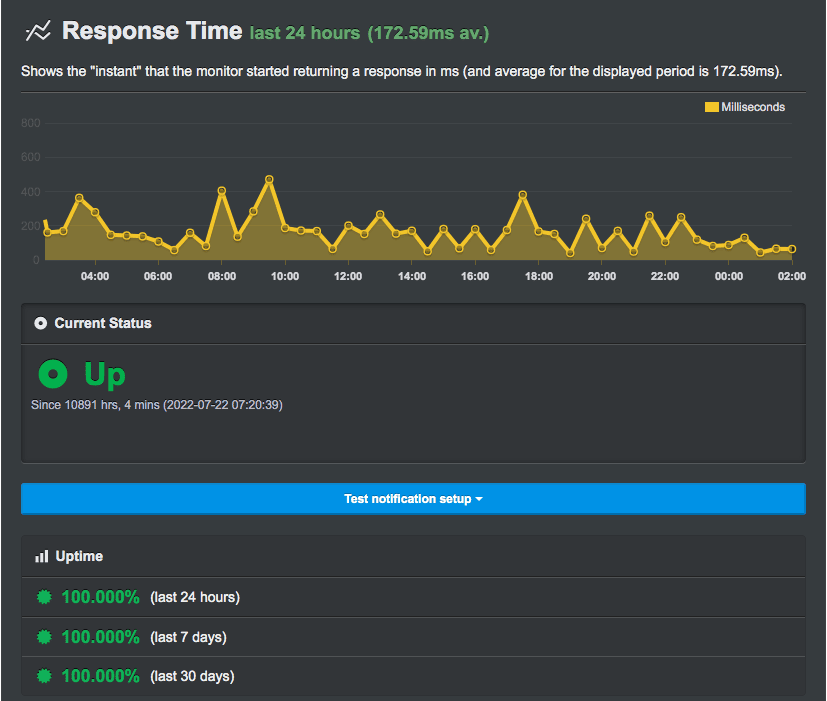
I would not say Bluehost’s performance is perfect for all websites. Their entry-level plans are weak on performance. If you run a high-traffic site, you will need caching plugins like WP Rocket to improve overall speed.
Although the uptime is good, as per my Bluehost performance results:
Bluehost also offers 12-month plans, they are not cost-effective and come with higher renewals, so it is better to avoid them.
Here’s how their affordable plans looks like:
| Cost | Starter | Business | eCommerce Essentials | Pro |
|---|---|---|---|---|
| 36 Months Regular | $3.79/mo | $6.79/mo | $14.79/mo | $9.79/mo |
| 36 Months Renewal | $9.99/mo | $13.99/mo | $21.99/mo | $16.99/mo |
| 12 Months Regular | $4.79/mo | $7.79/mo | $16.79/mo | $10.79/mo |
| 12 Months Renewal | $11.99/mo | $15.99/mo | $24.99/mo | $18.99/mo |
The 36-month plans look cost-effective, but the 12-month plans are not worth it because of the much higher renewal prices.
You should also be careful because Bluehost has some hidden costs. For example, if you migrate your site from another host, you may be charged up to $149 per site.
Domain renewals will also start after the first year. Features like domain privacy and email are free only for the first year, after which they add to the overall cost.
At checkout, Bluehost also pushes several add-ons, such as Premium SSL and eCommerce add-ons.
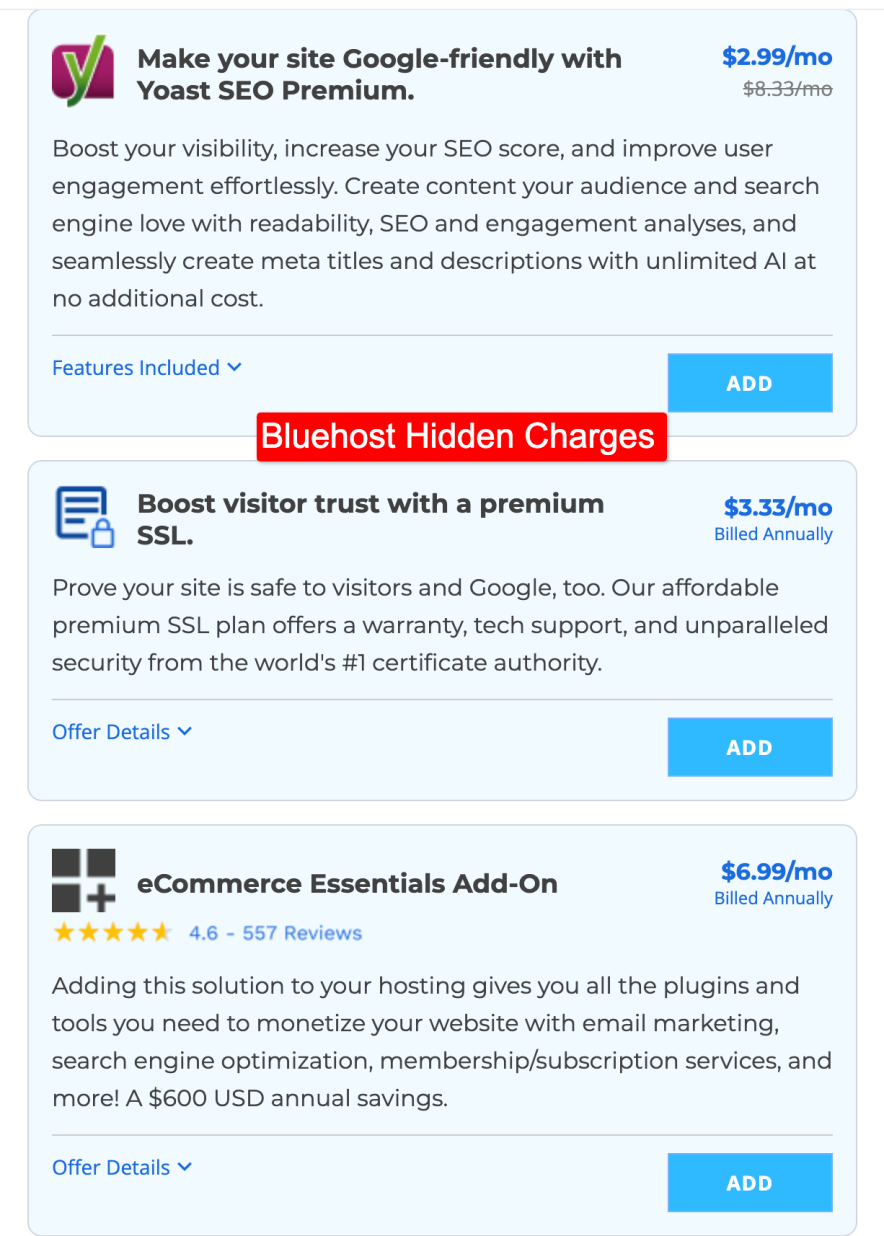
When I set up my site with Bluehost, I ignored all these extras because most of them can be enabled for free through WordPress plugins. Even Premium SSL can be obtained with this plugin without paying extra.
Overall, Bluehost 3-year plans look cheap, but they are well known for their upselling tricks. If you are not careful, the final cost can end up being much higher.
| Pros | Cons |
| Phone support is available | Renewal rates are high and not the same across all tenures |
| Dedicated online store plan helps beginners start eCommerce easily | Limited data centers |
| User friendly hosting panel | Migration cost may be applicable |
| Hidden fees and upselling tactics | |
| Plans are not suitable for high-traffic sites (100k+ visits per month) |
Explore Bluehost WordPress Hosting [Up to 83% OFF]
Explore More:
- Bluehost Review [Complete Analysis + My Experience]
- Bluehost Pricing Breakdown [Which Plan is Best]
- Hostinger vs Bluehost [Side By Side Comparison]
4. Ionos – Inexpensive WordPress Hosting for 1 Year ($1/month)
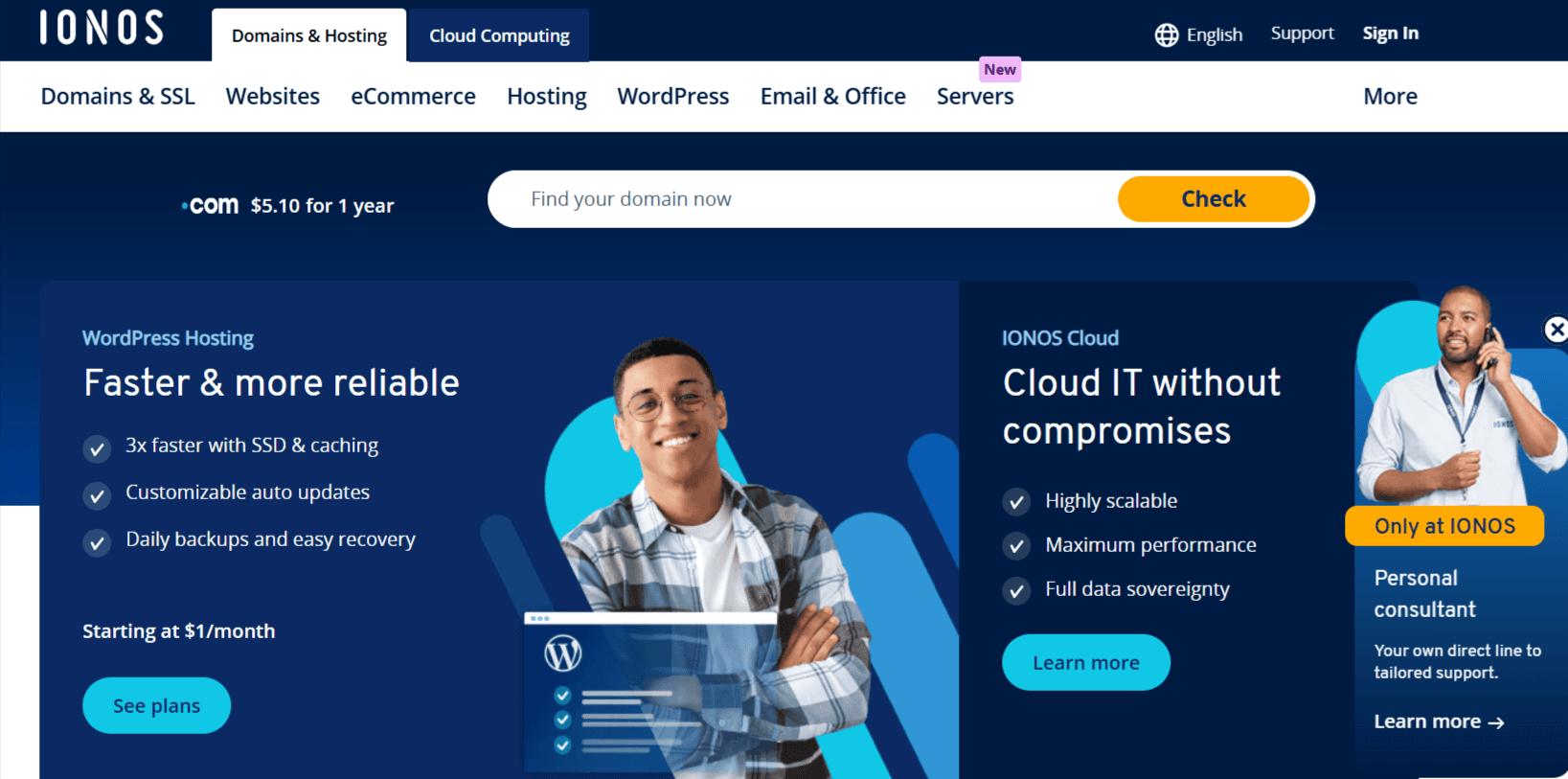
Ionos is another popular name in the hosting market. It has quickly gained attention by offering plans that start as low as $1 per month.
Right now, their most popular “Plus” plan is available for only $1/month when you choose the 1-year option.
This makes it an excellent choice if you want to test a new project and are unsure whether your website idea will succeed.
For just $12 a year, you can run a website and validate your idea.
Small business owners and new bloggers who want to start their online journey on a tight budget will find Ionos particularly attractive.
Key Features:
- Support for unlimited websites
- 10 GB to unlimited storage depending on plan
- Free domain for one year
- DDoS protection
- Daily backup and recovery options
- 99.99% uptime guarantee
- Free SSL certificate
- Expandable RAM (up to 19 GB with shared and WordPress plans)
- Easy scalability with one click
Ionos only deals in 1 year plans and this is how they are structured:
| Cost | Essential | Starter | Plus | Ultimate |
|---|---|---|---|---|
| 12 Months Regular | $4/mo | $6/mo | $1/mo | $10/mo |
| 12 Months Renewal | $6/mo | $8/mo | $12/mo | $16/mo |
Ionos plans begin at $1/month and go up to $10/month. Among these, the Plus plan provides the most value when compared to the two entry-level options.
One of the key advantages of Ionos is scalability. As your website grows, you can increase RAM and storage with a single click instead of upgrading to a new plan. This makes it highly flexible and cost-efficient.
Although I haven’t personally tested their servers, reports from Cybernews show that Ionos achieved a 99.99% uptime over 30 days, which is in line with their promise.
Overall, Ionos is a solid risk-free option for anyone who wants to start with a 1-year hosting plan.
With free domain registration, daily backups, AI-powered tools, and a beginner-friendly control panel, it has everything you need to get started without overspending.
| Pros | Cons |
| Zero hidden fees | Automated migration facility isn’t available. You have to DIY with any plugin like All-in-one WP Migration |
| Cheapest option for 12-month WordPress hosting | |
| Resources are enough in all the plans. Unlimited storage is a big benefit | |
| Performance is good, but not the best for high traffic sites |
Explore Ionos WordPress Hosting
5. Namecheap – Cheap for WordPress Hosting Domain Registration
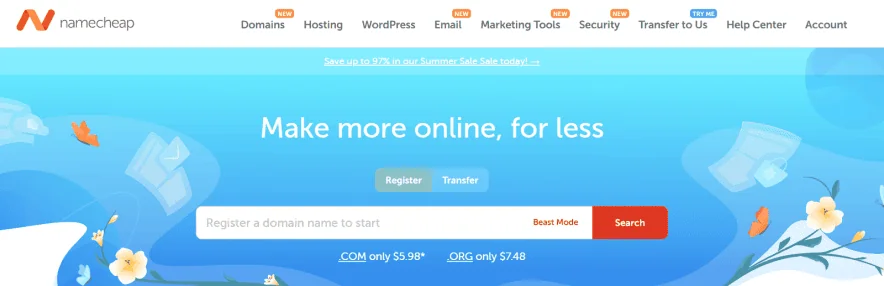
If you are looking for an affordable domain registrar for your WordPress site, Namecheap is one of the best options. I recommend it mainly for domain registration rather than hosting.
The platform is well known for offering lower domain rates than competitors like GoDaddy. In fact, you can often get up to 99% off, with domains starting as low as $0.99.
When it comes to web hosting, Namecheap plans begin at $1.48 per month, which may look attractive.
However, performance is not up to the mark.
Many reviews from users point out poor speed and uptime, which is why most people rely on Namecheap strictly for domains and not for hosting.
Key Features:
- Free domain transfer and one-year domain registration
- One-click WordPress installation
- Free SSL certificate
- Free CDN included
- Automated backups
- Basic website builder
- 24/7 live chat support
- Easy cPanel-based hosting interface
Here’s how their domain pricing is structured:
| Domain TLDs | Pricing |
| .Com | $6.49/yr |
| .Online | $0.98/yr |
| .Net | $12.98/yr |
| .ORG | $7.48/yr |
| .ai | $79.98/yr |
| .store | $0.98/yr |
Explore All TLDs pricing available for your WordPress Hosting
Technically, you can get a WordPress site live on Namecheap for just $1.43 per month.
Plans are available on monthly, yearly, and two-year terms. Renewals start at $4.48 per month, but as mentioned earlier, hosting performance is not reliable, so it is best to avoid them for hosting purposes.
| Pros | Cons |
| Domain privacy is included free for the first year | Hosting performance is below average |
| Domain rates are among the cheapest in the market |
6. Dreamhost – Cheap Renewals
Initially, I did not plan to include DreamHost in today’s list.
Earlier, when I reviewed them, I found that their entry-level plans lacked important features such as backups, a website builder, and a CDN.
But things have changed. It seems DreamHost has taken customer feedback seriously and added many of the missing features.
Now their starting plans include backups, an AI website builder, and several other tools that were not available before.
If Bluehost does not seem the right fit for you on a 36-month plan, DreamHost is worth exploring. They provide data centers in the US, UK, and Canada, which is a good option for users targeting those regions.
The only drawback is that a CDN is not included for free.
You need to purchase it as an add-on.
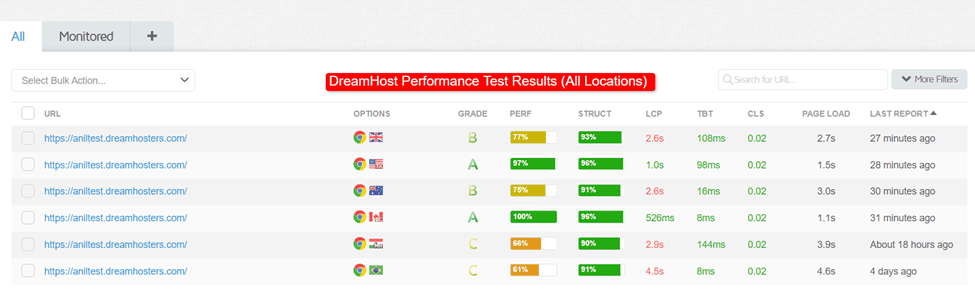
Without a CDN, performance may feel limited, but when I tested my WordPress site hosted on DreamHost, I installed a free caching plugin like W3 Total Cache.
With that, the performance improved, and I recorded an average loading time of 2.8 seconds, which is reasonable for a plan priced at $1.99 per month.
DreamHost offers monthly, annual, and three-year plans. The highlight is their renewal pricing, which remains among the lowest in this segment.
| Cost | Launch | Growth | Scale |
|---|---|---|---|
| 48 Months Regular | $1.99/mo | $3.49/mo | $7.99/mo |
| 48 Months Renewal | $7.99/mo | $8.99/mo | $19.99/mo |
| 24 Months Regular | $2.49/mo | $3.59/mo | $8.99/mo |
| 24 Months Renewal | $8.99/mo | $9.99/mo | $22.99/mo |
| 12 Months Regular | $2.89/mo | $3.99/mo | $9.99/mo |
| 12 Months Renewal | $10.99/mo | $12.99/mo | $25.99/mo |
Overall, DreamHost becomes a good choice if you want a three-year WordPress hosting plan with cheap renewals.
You will still need a caching plugin to optimize performance, but for the price point, it delivers decent value.
| Pros | Cons |
| High scalability with storage options up to 1920 GB | Free CDN and built-in caching are not included in entry-level plans |
| 100% uptime guarantee available | Only 3 data centers are available |
| AI website builder included for quick setup of blogs or stores | |
| Phone Support is there | |
| Customer support agents respond quickly and provide practical solutions |
Explore DreamHost WordPress Hosting [Up to 83% OFF]
My Recommendation & Final Thoughts:
After testing and comparing all the providers, here’s my take on which hosts truly deliver the best value in 2026:
Best overall balance: Hostinger: The strongest option in terms of money value and performance. Here, the pricing only gets reduced if you choose a longer term tenure.
Best first-year deal → Ionos: If you want to test an idea or start a small blog with the lowest risk, Ionos at $1/month for the first year should be considered.
Best long-term value → WordPress.com: For users planning to stick around for 2–3 years, WordPress.com comes out ahead with transparent pricing, no hidden tricks, and affordable 24-month plans.
At the end of the day, do remember these entry level hosting plans are only able to produce good performance, but not great performance like premium hosts do.
FAQs:
Which is the cheapest WordPress host for the long term?
From my testing, Hostinger is the cheapest option for long-term hosting. Their 48-month plans lock in the lowest upfront pricing, and the renewal rates remain the same whether you choose one year or four years.
Which is the cheapest for first-year pricing?
Ionos easily wins this spot. At $1 per month for their Plus plan, you can run a site for just $12 in the first year. For anyone who wants to test an idea with minimal risk, this is the lowest upfront cost in the market.
Which WordPress host has the cheapest renewals?
DreamHost clearly takes this one. Their renewal pricing stays very low compared to other hosts that almost double or triple the cost. If renewals are your main concern, DreamHost is the safest option.
Why do renewal hosting rates matter more than intro deals?
Intro offers last only once. Renewal rates are what you’ll pay year after year. A host may look cheap at first but become very expensive later. This is why I focus on both initial and renewal pricing in my reviews.
Can I migrate easily if my host gets too expensive?
Yes. Most providers support WordPress migrations. Some offer it for free, like WordPress.com, while others like Bluehost may charge up to $149. You can also use free plugins like All-in-One WP Migration to move your site yourself.
Should I buy hosting for three years to lock in the lowest price?
If you are serious about your site and plan to run it for the long term, buying three or four years upfront makes sense because you lock in the lowest rates. If you are just testing a new idea, start with a one-year plan like Ionos, then upgrade later if needed.
Explore More:
- Best First Month Free Hosting [No Credit Card Required]
- WordPress Hosting vs Web Hosting [Better Option for You?]
- Top WordPress Hosting for Agencies [Reviewed]


![6 Best WordPress Hosting in India for 2026 [Expert Picks]](https://bloggerspassion.com/wp-content/uploads/2022/10/best-wordpress-hosting-in-India.webp)
