Product Name: Cloudways
Summary
Cloudways is a managed cloud hosting platform that offers a unique balance between extreme performance and affordability. Unlike traditional hosting, it allows you to deploy your site on top-tier cloud providers like DigitalOcean, Vultr, and AWS.
It is best suited to almost every location except Australia, as it is a little bit slow here.
We have been testing Cloudways for over five years. This year, they have maintained their position as the fastest managed cloud host in our records because of the introduction of the Autonomous scaling feature.
Their TTFB and load handling consistently outperform standard shared and even most premium managed WordPress hosts. The interface has a slight learning curve for absolute beginners, the performance gains are undeniable for anyone serious about SEO and Core Web Vitals.
Pros
– Offered me hosting plans from 5 various cloud hosting platforms
– Gives me complete flexibility to add any number of sites i want
– You can pay for their hosting according to your usage as Cloudways charges you on a “pay as you go” basis
– 24/7 support, including live chat
– Free SSL with all plans
– Automated backups with all plans
– Offers a 1-click staging feature
– Provides you with 24/7 real-time monitoring
– The first website migration is free with Cloudways
Cons
– Cloudways doesn’t offer domain registration, so you have to buy your domain from domain registrars like NameCheap, GoDaddy, etc.
– Only 1 free migration service is available; for every subsequent migration, you have to pay $25 or do it yourself (which can be done easily with the help of Cloudways WordPress Migrator Plugin).
– If you want to create domain-based email addresses, you will have to pay some extra dollars. Cloudways email hosting add-on Rackspace price starts from $1.00/mailbox/month.
– Free CDN is not included.
Our Testing Methodology:
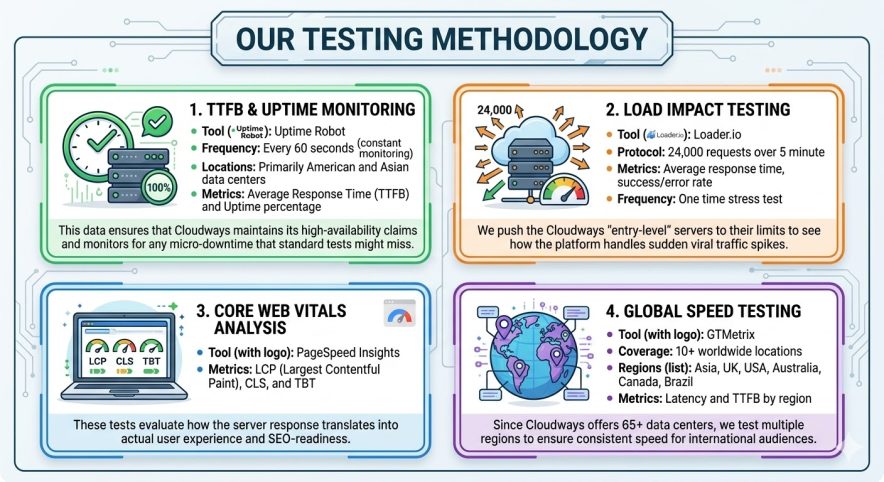
At BloggersPassion, we perform long-term, data-driven testing to measure the real-world performance of cloud hosting providers. We have monitored Cloudways Digital Ocean 1 GB Premium Plan using these six testing protocols:
Performance Data:
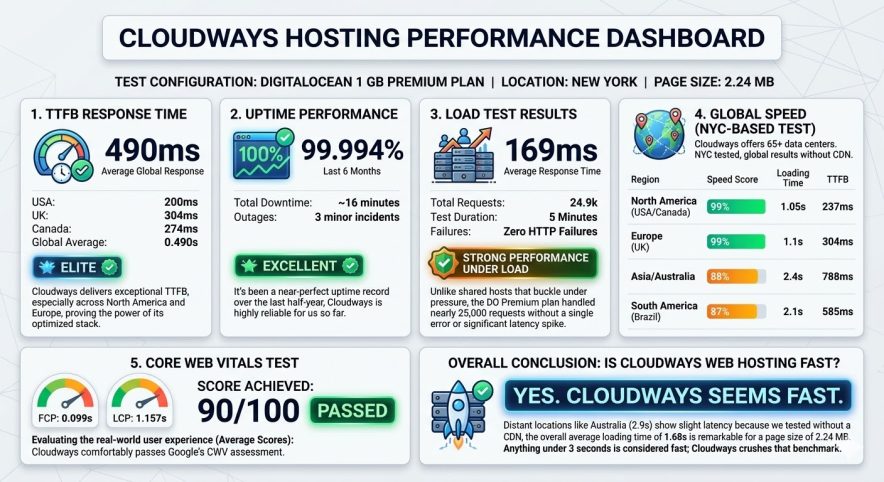
Test Configuration: DigitalOcean 1 GB Premium Plan | Location: New York | Page Size: 2.24 MB
1. TTFB Response Time
490ms (Average Global Response)
- USA: 200ms
- UK: 304ms
- Canada: 274ms
- Global Average: 0.490s
Rating: Elite — Cloudways delivers exceptional TTFB, especially across North America and Europe, proving the power of its optimized stack.
2. Uptime Performance
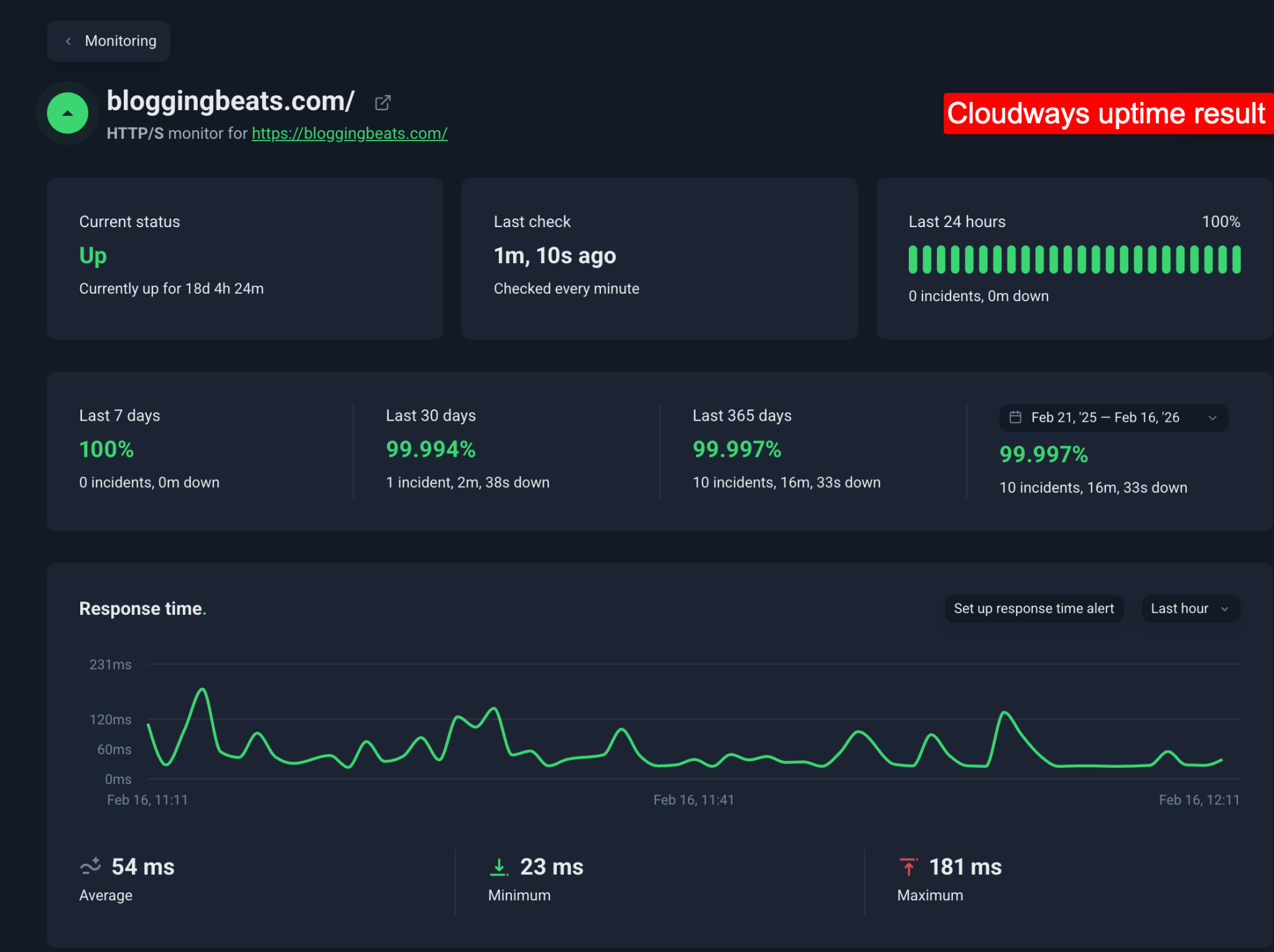
99.994% (Last 6 Months)
- Total Downtime: ~16 minutes
- Outages: 3 minor incidents
Rating: Excellent — It’s been a near-perfect uptime record over the last half-year, Cloudways is highly reliable for us so far.
3. Load Test Results
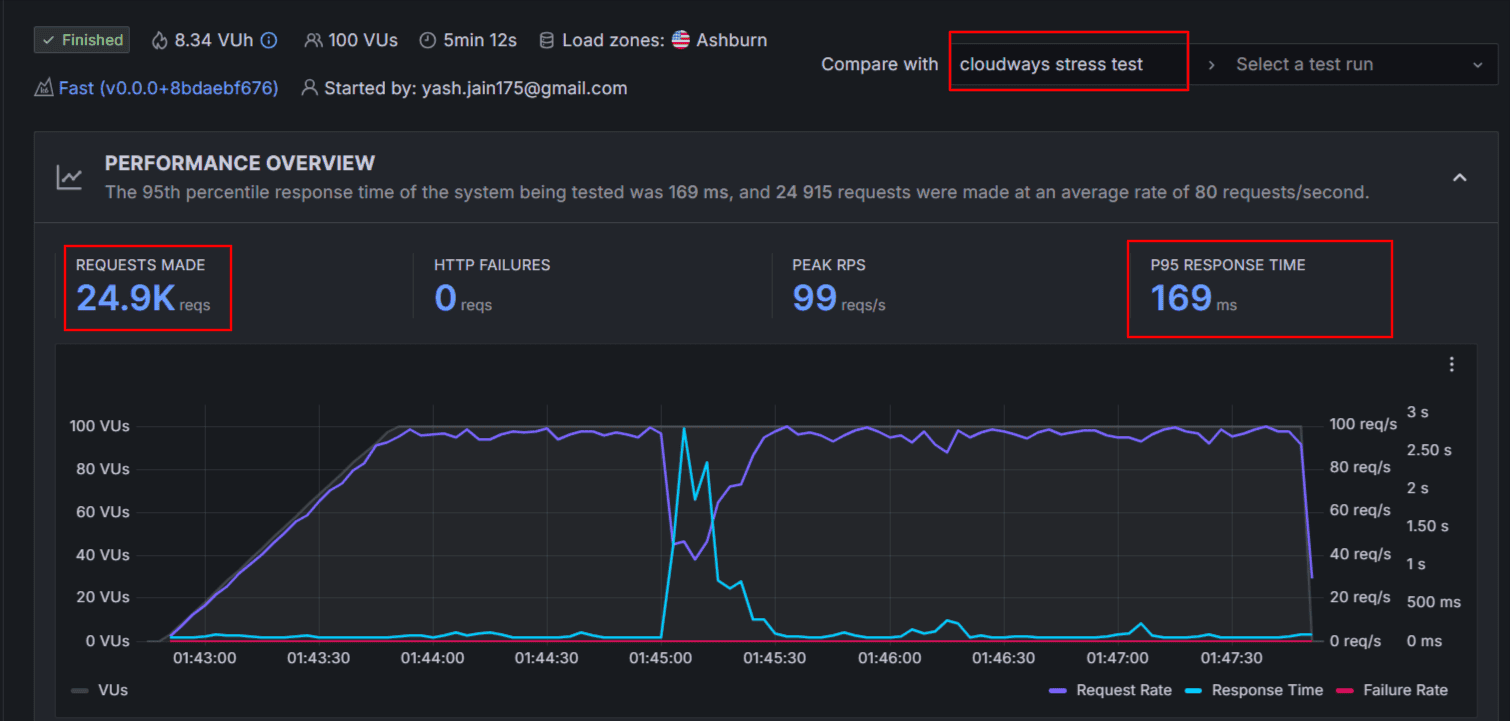
169ms (Average Response Time)
- Total Requests: 24.9k
- Test Duration: 5 Minutes
- Failures: Zero HTTP Failures
Rating: Strong Performance under Load — Unlike shared hosts that buckle under pressure, the DO Premium plan handled nearly 25,000 requests without a single error or significant latency spike.
4. Global Speed
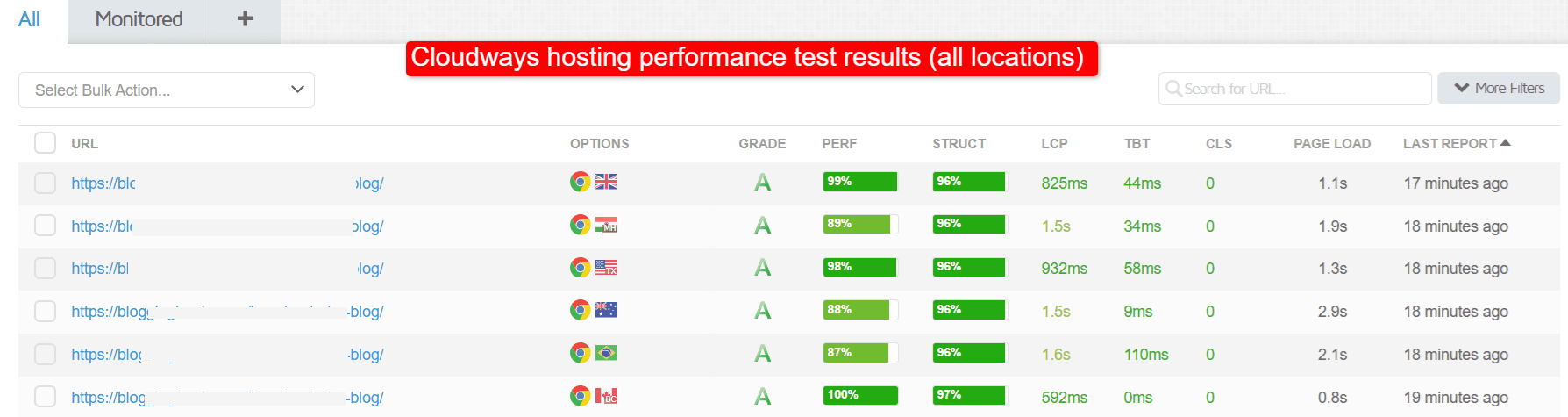
Cloudways offers 65+ data centers. We tested from New York. Here is how the speed holds up globally without a CDN:
| Region | Speed Score | Loading Time | TTFB |
|---|---|---|---|
| North America (USA/Canada) | 99% | 1.05s | 237ms |
| Europe (UK) | 99% | 1.1s | 304ms |
| Asia/Australia | 88% | 2.4s | 788ms |
| South America (Brazil) | 87% | 2.1s | 585ms |
5. Core Web Vitals Test
Evaluating the real-world user experience (Average Scores):
- FCP (First Contentful Paint): 0.099s
- LCP (Largest Contentful Paint): 1.157s
- Score Achieved: 90/100 (Passed)
Cloudways comfortably passes Google’s Core Web Vitals assessment.
Overall, Cloudways seems fast. Distant locations like Australia (2.9s) show slight latency because we tested without a CDN; the overall average loading time of 1.68s is remarkable for a page size of 2.24 MB.
Cloudways has ranked as a top fast cloud hosting service in our assessment.
Anything under 3 seconds is considered fast; Cloudways crushes that benchmark.
Support & Help:

Cloudways offers a tiered support system that balances “do-it-yourself” resources with expert human assistance. We have tested their support multiple times over the last two years, and even on the free tier, our queries were resolved almost instantly.
Below is the snapshot of our latest conversation with the Cloudways support team.

As you can see in the picture above, we asked a question early morning from India and received a quick reply.
The best part is that we are on the Standard support, which is a completely free service.
| Feature | Standard Support | Advanced Support | Premium Support |
|---|---|---|---|
| Price | Free (Included) | $100/mo* | $500/mo |
| Live Chat | 24/7/365 | Priority Access | Immediate Access |
| Ticketing | Standard SLA | Faster Response | Improved SLAs |
| Troubleshooting | Server-level only | Plugin & Theme help | Full Customization |
| Optimization | Knowledge Base | On-demand DB/Perf | Proactive Monitoring |
| Communication | Chat / Tickets | Chat / Tickets | Phone & Slack |
| Account Manager | No | No | Dedicated Manager |
Automated Backups Are Easier But Things Are Paid:
Cloudways offers me automated backups that help me automatically store and retrieve all my files easily with just one click.
But there is a catch…
Please be informed that they charge me $0.033 per GB for the total space consumed for backup data at their off-site location.
The off-site backup cost is a mandatory cost with each server and mostly it is charged at most $0.50 for the majority of customers (if the backup size is at most 15GB of data of the off-site backup consumption).
If the backup size is within 15-30GB it will be charged $1.00
If the backup size is within 30GB-45GB it will be charged $1.50
If the backup size is within 45GB-60GB it will be charged $2.00
& Vice versa.
To make backups of your website, log in to your Cloudways hosting account and click on the Backups option.
Then, you can select a backup frequency and make changes. You can also take backups manually whenever you want.
Here’s what it looks like;
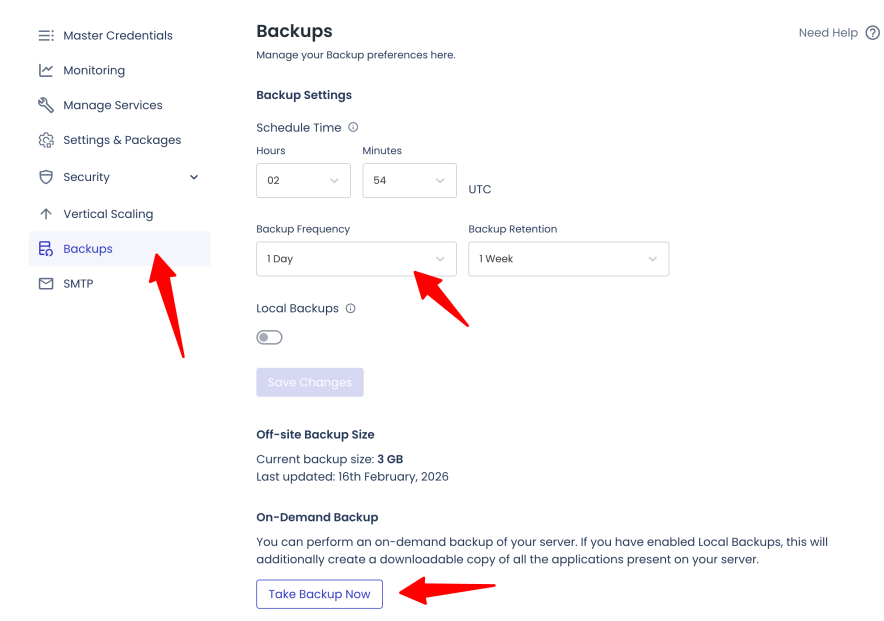
See that? It’s extremely easy to take backups of your site on Cloudways.
On-demand Backups
Moreover, I can take manual backups anytime I want with the help of the on-demand backup feature. This is very helpful when you make some major changes to your website. I use this feature whenever I make a change at the design level. It saves me from unwanted site crash and data loss situation.
Data Backup / Application / Server Restoration
You are also allowed to restore your backups (full or partial) with a single click.
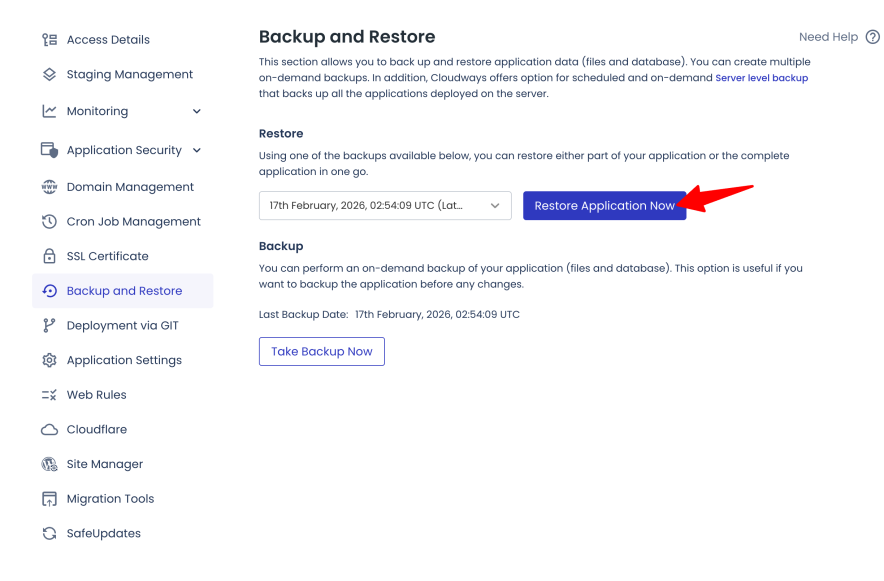

Even if you accidentally delete an application or server, you can recover the same within 14 days of deletion.


Real Time Billing Concept:
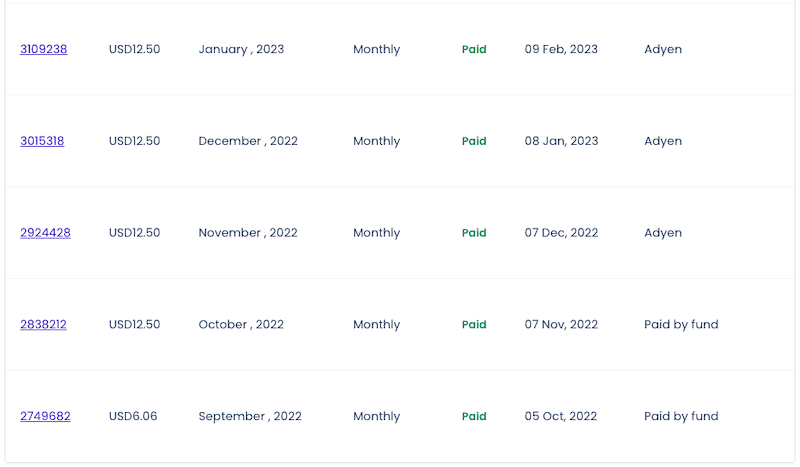
Cloudways charges me only for the resources my website uses. This is one of the main reasons I still stick with them.
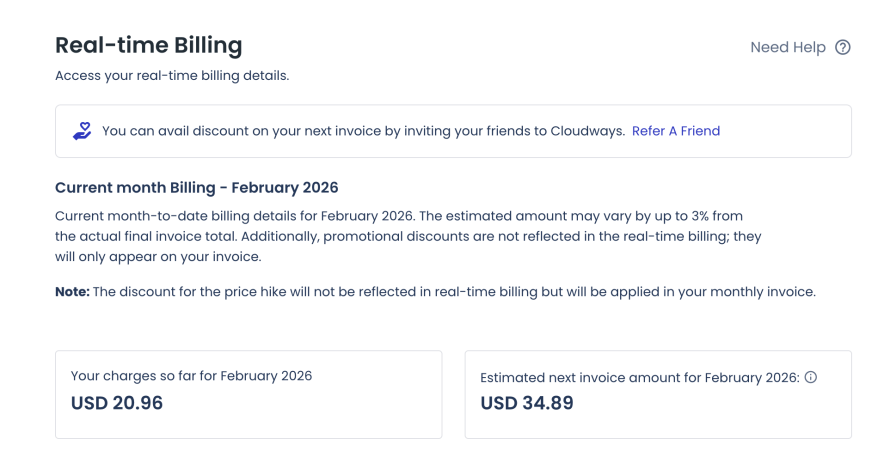
I opted for $11 per month but because of real time billing sometimes my bill goes beyond $11, and sometimes I am charged below my subscription rate. The savings are small, but you can’t neglect it.
User Interface:
Cloudways doesn’t give me a traditional cPanel where everything is buried under menus. Instead, it uses a visual easy-to-use unified interface where I can easily manage your servers and websites.
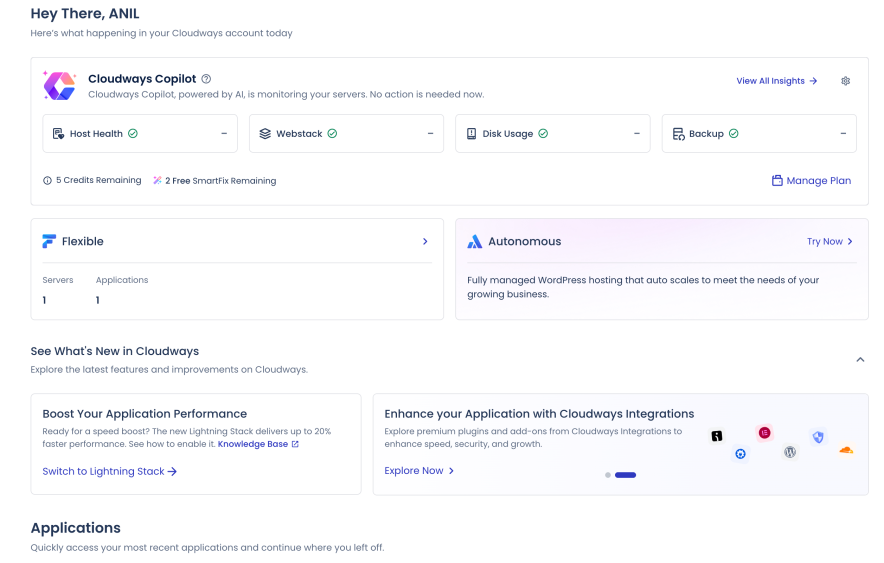


I can easily manage all the following things with the intuitive interface offered by Cloudways.
Installing SSL certificates: I can easily install a Let’s Encrypt SSL certificate, which is free, or upload a custom SSL certificate for my websites and applications.

Staging Management: I can create a copy of my site and do experiments without impacting the live website. Once I am ready to reflect those changes on the live website, I can do the same with a single click.

Cloning a server: I can create a copy of your current server that includes all your applications and the desired configurations. This feature is very helpful when you want to helpful if you want to change your cloud provider / server size / server region or want to perform load testing.


Adding Team Members: Onboarding team players like developers, designers is all easy. I gave access to the Cloudways dashboard to all my team members.

Words on Cloudways Pricing
Let me review the pricing aspect so you don’t make a mistake while selecting the plan.
Cloudways gives you access to 5 cloud providers, including;
- Digital Ocean
- Vultr
- Linode
- AWS (Amazon Web Services)
- Google Cloud
The pricing plans differ for each cloud provider, so let’s talk about the pricing packages offered by all the above cloud hosting providers.
| Features | Digital Ocean | Vultr | Linode | AWS | Google Cloud |
|---|---|---|---|---|---|
| Plans | DO1GB – DO192GB | Vultr1GB – Vultr64GB | Lin1GB – Lin192GB | AWS Small – AWS 24XL | GCE Small – GCE HC 16XL |
| RAM | 1GB – 192GB | 1GB – 64GB | 1GB – 192GB | 2GB – 384 GB | 1.75 GB – 64 GB |
| Processor | 1 Core – 32 Core | 1 Core – 16 Core | 1 Core – 32 Core | 2 Core – 96 Core | 1 Core – 64 Core |
| Storage | 25GB – 3840GB | 25GB – 1280GB | 25GB – 3840GB | 20GB | 20GB |
| Bandwidth | 1TB – 12TB | 1TB – 10TB | 1TB – 20TB | 2GB | 2GB |
| Price | $11/mo – $1056/mo | $14/mo – $400/mo | $14/mo – $1253/mo | $38.56 – $3569.98 | $37.45 – $1593.58 |
| Free Trial | 3 Days | 3 Days | 3 Days | ❌ | ❌ |
Few Pointers to be Notice:
- Digital Ocean offers various packages in the “Standard” as well as in the “Premium” category. Pricing for premium category plans is slightly on the higher side.
- In Vultr, the High Frequency category is also there and you have to pay a little more for this category plan.
- In Linode, Pricing is straightforward, there is no category as Standard, Premium, or High Frequency.
- In AWS & Google Cloud, Bandwidth is on a pay-as-you-go basis.
Cloudways pricing is flexible & transparent, and every plan is packed with incredible features.
If we compare it with its top competitors like WP Engine, Kinsta, and WPX, Cloudways pricing is certainly less expensive. Cloudways pricing starts at $11/mo while WP Engine starts at $24/mo, Kinsta starts at $35/mo, and WPX starts at $24.99/mo.
At Cloudways, it costs just $132 for a complete one year of service. If you pick any other alternative, you will end up paying a lot more dollars.
The best part? There is no limit on the number of applications you can host with Cloudways in any plan while other web hosts have certain limits which makes Cliudways pricing more fair.
All of this makes Cloudways hosting a great pick for bloggers, SMBs, and agencies.
Top 3 Cloudways Alternatives & Competitors
| Cloudways Alternatives | Starting Price | No. of Websites | Storage Space |
|---|---|---|---|
| WPX Hosting | $11.99/mo | 1 | 10GB |
| WPEngine | $27/mo | 1 | 10GB |
| Kinsta | $35/mo | 1 | 10GB |
| Hostinger | $6.99/mo | 100 | 100GB |
Looking for alternatives to Cloudways hosting? Here’s a handpicked list of best hosting alternatives for Cloudways you can try in 2026 and beyond.
1. WPX Hosting
WPX is the same web hosting provider we’ve been using on this blog since 2016.
Here, you get automated backups, XDN (their own custom CDN), unlimited migrations, and unlimited emails for free.
WPX offers 3 pricing plans, starting at $11.99/month.
Want to learn more about WPX? Read our honest review of WPX Hosting to find more details about its performance, features, and more.
2. WPEngine
WPEngine is the most trusted WordPress platform. You get fast & secure sites along with expert WordPress guidance and innovative tools.
You get Genesis blocks and 1-click staging and dev. environments for easy site creation, and EverCache® and Global CDN for better performance.
WPEngine offers 4 pricing plans, starting at $27 per month.
Want to learn more about WPEngine? Read our honest review of WPEngine Hosting to find more details about its performance, features, and more.
3. Kinsta
Kinsta is yet another trusted platform where you get fast, secure, and feature-rich WordPress hosting.
Your site will be hosted on Google Cloud’s fastest servers (C3D and C2 VMs) plus access to Kinsta HTTP/3-enabled CDN that results in lightning-fast load times from every corner of the world.
Kinsta offers 4 pricing plans, starting at $35 per month.
Want to learn more about Kinsta? Read our honest review of Kinsta Hosting to find more details about its performance, features, and more.
If you are interested in a cheaper solution then you may consider Hostinger hosting.
Hostinger is the leading name in shared hosting services. The great thing about Hostinger is that it offers affordable cloud hosting packages as well where you get a free domain, free CDN, a dedicated IP address, and a lot more. You can read our unbiased Hostinger review if you want to find more details about their hosting and features.
Our Overall Cloudways Experience with Limitations:
Here’s the honest truth after spending 1000+ days with Cloudways: It isn’t the most affordable choice for you, especially if you are looking for a free domain and emails.
But for a great performance, it’s been there for me. Now my site didn’t crash randomly. The uptime is good with minor issues. In the last year, my site went down a total of 16 minutes in an interval of 10 incidents.
I’ve been using a DigitalOcean 2GB Premium plan for over two years now. Most of the time, my billing remains less than the base plan.
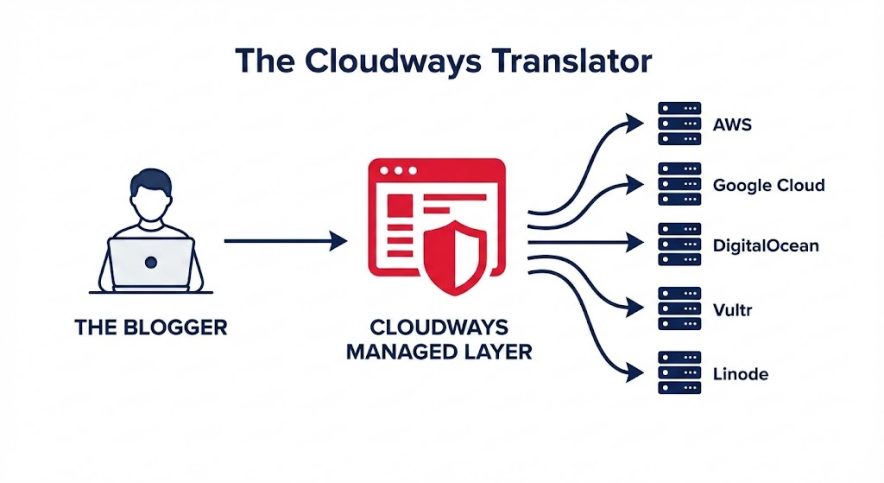
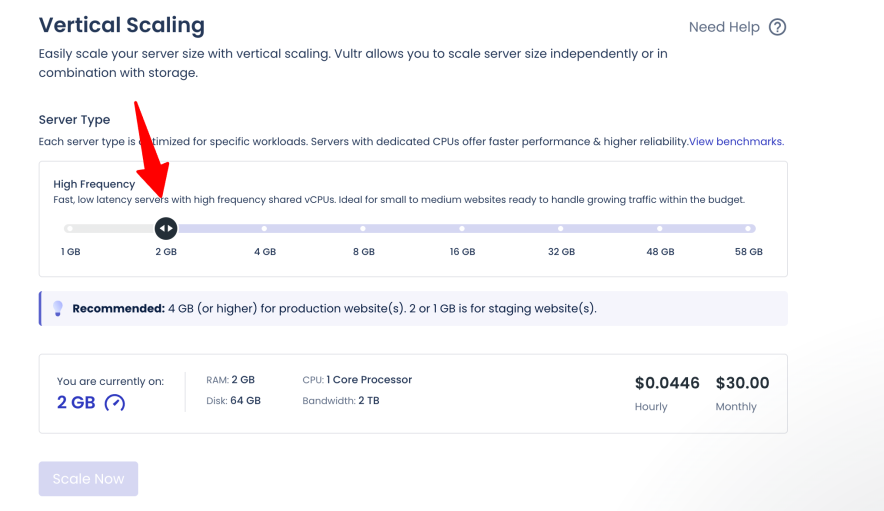
In a bulk traffic situation like Black Friday, I simply toggle the resources up and down without upgrading the server on a permanent basis.
Cloudways still charges me $1/month for email and $0.333/GB for offsite backups. There is no built-in CDN, hence I am using Cloudflare for such.
Yes, that additional amount disappoints me. But I will continue paying as long as I keep getting good performance from Cloudways.