

A slow website can hurt your search rankings, user experience, and conversions.
No matter how great your content is, visitors won’t stick around if your pages take too long to load. Even a small delay can increase bounce rates and lead to fewer sales, leads, and page views.
The good news? You don’t need to be a developer to improve your website speed.
From choosing the right hosting and using caching to optimizing images and improving Core Web Vitals, there are several proven ways to make your WordPress site load faster.
In this guide, you’ll learn the most effective WordPress speed optimization tips for 2026. Whether you’re running a blog, business website, or online store, these strategies will help you improve performance and provide a better experience for your visitors.
How to Check Your Website Speed And Performance
Google PageSpeed Insights is a free tool that helps you check your website’s speed and performance. It analyzes your pages and shows what improvements you can make to load them faster.
To use it, go to PageSpeed Insights, enter your website URL (or a specific page URL), and click the ‘Analyze Button‘.
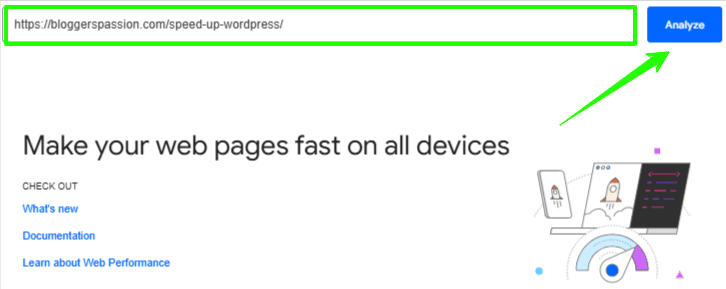
Here’s what it looks like:
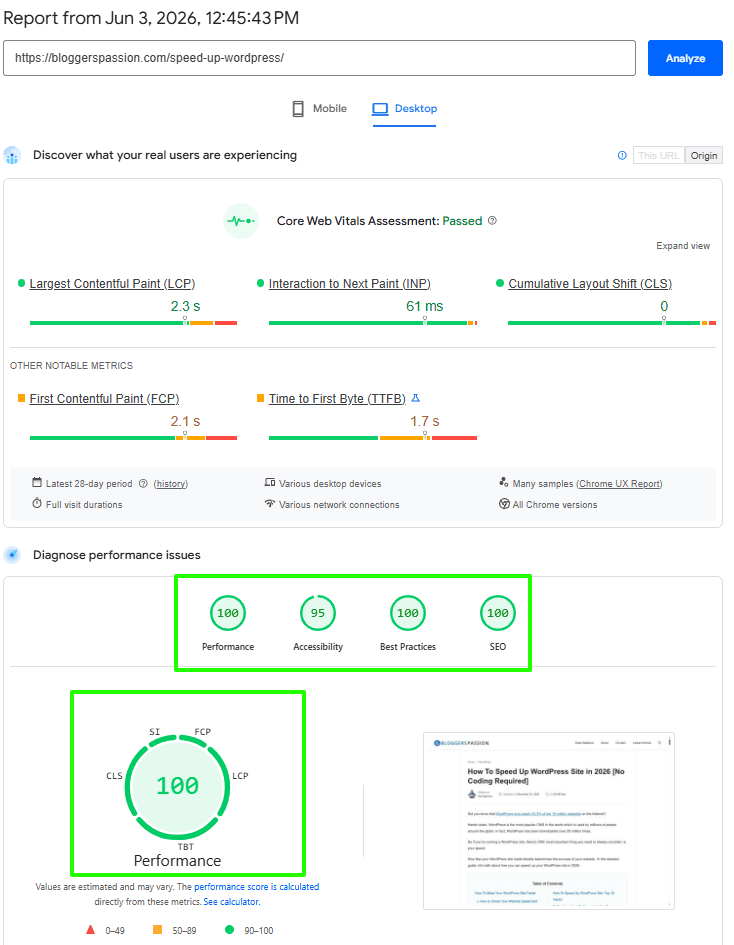
Once the test is complete, you’ll see reports for both mobile and desktop devices. Along with an overall Performance score, the tool also shows important metrics such as Core Web Vitals, Accessibility, Best Practices, and SEO.
As you can see in the example above, our page passed Google’s Core Web Vitals assessment and achieved a Performance score of 100 on desktop. The report also shows key metrics like Largest Contentful Paint (LCP), Interaction to Next Paint (INP), and Cumulative Layout Shift (CLS), which help you understand how fast and stable your page is for visitors.
Google uses the following color coding for Performance scores:
- 0 to 49 (Poor): Red
- 50 to 89 (Needs Improvement): Orange
- 90 to 100 (Good): Green
If your score is low, PageSpeed Insights will also suggest ways to improve your website speed. Following those recommendations can help you create a faster website and provide a better experience for your visitors.
How To Speed Up a WordPress Site in 2026?
Check out the following things to speed up your WordPress website:
1. Move to a faster web host
There’s a reason we’re putting this #1 on the list: we know how important a web host is in determining a site’s speed.
One of the biggest reasons most websites are fast (or slow) is due to their web host. Your web host plays a KEY role in determining your website speed. Literally no one would want to spend their time waiting for a website to load at its own pace, right?
Everyone loves faster websites, including Google. There are a couple of things that determine how fast your web host is, including;
- Type of hard drives it uses (SSD storage-enabled web hosts load faster)
- Cloud hosting web hosts load faster (such as WPX hosting, Kinsta hosting, etc)
- Dedicated resources (so you’re not going to share your resources with anyone; that’s also the reason why you should avoid shared hosting, although they are cheap, and prefer managed web hosting choices)
- HTTPS encryption (there are now many web hosts that offer SSL certificates for free to make your domain go from HTTP to HTTPS, and HTTPS versions of sites are safer and faster)
- The usage of CDN (there are hosts like Kinsta, WPX hosting, etc., that give you access to a global CDN for free to improve your website loading times no matter where they are being visited)
So what’s the best web host that you can use to have faster websites?
Over the last couple of years, we’ve used a ton of web hosts, and we know which ones actually deliver excellent website speeds. There are 2 recommendations we’ve for you.
- WPX hosting (the same web host we’re currently using)
- Hostinger (if you’re on a tight budget)
2. Install a caching plugin
Did you know that your website retrieves information from a lot of places before they are provided to your website visitors? Just have a look at the following illustration.

As you can see above, when someone visits your WordPress site, it retrieves information (such as blog posts, images, videos etc) from PHP files and MySQL databases and then puts the information all together in HTML content and finally serves it to your website visitors.
That’s a LONG process, right? You can skip that by using page caching.
If you’re wondering about what page caching is all about, it is the temporary storage of web documents such as HTML pages and images. Usually your web browser stores copies of web pages you’ve visited recently to reduce its bandwidth usage, server load and so on to provide faster speeds to the users.
Fortunately, you can easily enable page cache by installing any caching plugin such as W3 total cache.
Although there are a ton of caching plugins out there (and we’ve tried many of them over the last 5 years) but one caching plugin that stood out which is WPRocket.
Here’s what the dashboard looks like;

As you can see above, you’ll find everything from file optimization to cache to preload and CDN features to make your site load super fast.
Here’s a list of things you can easily perform with WP Rocket plugin.
- Remove all cache files from your website. You can remove all your website page cache files with one click
- Start cache preloading
- Purge OpCache content, which improves PHP performance by storing precompiled script bytecode in shared memory and thus removing the need for PHP to load for faster loading times
- Regenerate critical CSS
You can also read our detailed WP Rocket review to learn more about this powerful WordPress caching plugin. Looking to save money? Check out the latest WP Rocket Coupon Codes and get the best available deal.
3. Optimize images
Whether you know it or not, images consume a lot of space and create a burden on your website databases, which ultimately results in slow loading times.
It doesn’t matter what web host you use; if you’re using too many images, it affects your page loading times. So make sure to optimize image sizes if you really want to increase your website loading times.
There are basically 2 ways to shrink image sizes;
- Resize them in size before you even upload them to your WordPress library (use online image optimization tools)
- Use plugins (so you can optimize image sizes even after uploading to your site)
If you’re using WordPress, there’s an excellent image optimization plugin called ShortPixel Image Optimizer.
This plugin can optimize any image on your website, including those that aren’t listed in the Media Library, such as those in galleries like NextGEN or Modula, or those added directly via FTP. It also offers both lossy and lossless image compression for the most common image types such as JPG, PNG, GIF, and WebP.
The biggest benefit of using this plugin is that you can convert any JPEG, PNG, or GIF to WebP (which Google loves) for free.
Apart from that plugin, you can also try WP Smush or EWWW Image Optimization plugins, as both of them will compress any image you upload to your WordPress site.
Use Modern Image Formats Like WebP and AVIF
Images are often the largest files on a webpage. Converting traditional JPEG and PNG images into modern formats such as WebP and AVIF can significantly reduce file sizes without sacrificing quality.
Benefits of modern image formats include:
- Faster page loading times
- Lower bandwidth usage
- Better Core Web Vitals scores
- Improved mobile performance
Many image optimization plugins such as ShortPixel, Imagify, and EWWW Image Optimizer can automatically convert images into WebP and AVIF formats.
For best results, always upload properly sized images and avoid using oversized graphics.
4. Use A Content Delivery Network (CDN)
Are you serving an international audience? If you’re getting website visitors from all around the world, you must use a CDN.
A CDN (Content Delivery Network) is a system for delivering your website’s content to visitors more quickly based on their geographic location. A CDN provides both your desktop and mobile users with a faster website experience, no matter where they are browsing from.
When someone visits your website, the CDN closest to the user will deliver the static content such as images, JavaScript files, etc ensuring the shortest distance for the data to travel (also known as reduced latency).
Just have a look at the following illustration of how a CDN works.

As you can see above, CDNs enable your website visitors to view or download data from servers that are closest in geographical proximity. That’s how a CDN helps your website visitors get the fastest website experience.
If you’re using a web host like WPX hosting (which is already mentioned above), you’ll get free access to a global CDN, which ultimately improves your website speed.
If you’re looking for a free CDN, then you can opt for the Cloudflare CDN free plan, which gives you features like unmetered mitigation of DDoS attacks, access to a global Content Delivery Network (CDN), and shared SSL certificates.
5. Optimize databases
Whether you know it or not, your WordPress site databases store a lot of stuff, including unwanted data such as trashed/unapproved/spam comments, stale data, pingbacks, trackbacks, and so on.
All these unwanted things create more burden on your databases, which ultimately affects your website speed. So you should optimize your databases regularly if you want to clean up unwanted data.
There’s an incredible WordPress plugin called WP Optimize that you can use to optimize your databases, which easily cleans your database, compresses your images, and caches your site.
6. Check for updates related to plugins and themes
Most of the time, your WordPress site loads slowly because of the themes or plugins you use.
In fact, most free themes are infected with malicious code or heavy-loading scripts that slow down your site.
Not only themes, but the plugins you use on your site need to be regularly updated, and you should avoid using outdated and heavy-loading WordPress plugins, as they create a lot of burden on your databases, which slows down your site speed.
7. Try these 3 simple WordPress hacks
Here are a few quick and simple WordPress hacks you can use to speed up your WordPress site in 2026 and beyond.
- Disable image hotlinking: Image hotlinking is when someone embeds your images on their site by linking them directly from your website, which negatively impacts your site speed because those images are still loading from your server. You can either disable it through your hosting cPanel, or you can install the WP Security plugin, go to the Firewall settings, and select the “Prevent hotlinks” option to prevent image hotlinking.
- Limit post revisions: Whenever you make changes to your existing posts or pages, WordPress creates “post revisions,” which further burdens your databases. You can limit those revisions through your wp-config.php file or by activating a free WordPress plugin like WP Revisions Control
- Activate lazy loading: If you’re using a ton of images on your site, you can enable lazy loading, as there’s a plugin called Lazy Load by WP Rocket which displays images on a page only when they are visible to the user, and it ultimately reduces the number of HTTP requests and improves your page loading times.
8. Reduce server requests
A server request occurs every time your browser asks your hosting servers for a resource, such as an image or a JavaScript file. The more server requests it needs to complete loading your website, the longer it will take. The fewer server requests it requires, the faster it loads. It’s as simple as that.
So you need to reduce server requests to improve your site loading times. You can easily find out what server requests your website requires; you can use tools like Pingdom Tools, GT Metrix, etc which are already mentioned above.
That said, here are some quick tips to reduce server requests on your site.
- If any of your blog posts get a lot of comments, break them up into several pages from your WordPress dashboard Settings > Discussion (avoid closing the comment section after 30 or 60 days)
- Uninstall heavy-loading or outdated plugins
- Remove spam comments and spam pingbacks
- Enable lazy loading on images
- Stop using fonts from external sources like Google Fonts as it can negatively impact your loading times
- Show lesser number of posts on your homepage
- Only show post excerpts on your homepage or archives
Core Web Vitals: The Most Important Speed Metrics in 2026
While page loading speed remains important, Google now focuses heavily on Core Web Vitals when evaluating user experience.
Here are the three key metrics you should monitor:
- Largest Contentful Paint (LCP)
LCP measures how quickly the largest visible element on a page loads. Google recommends keeping your LCP below 2.5 seconds.
- Interaction to Next Paint (INP)
INP measures how responsive your website is when users interact with buttons, menus, or forms. A good INP score is under 200 milliseconds.
- Cumulative Layout Shift (CLS)
CLS measures visual stability. If elements move unexpectedly while a page loads, users may have a poor experience. Aim for a CLS score below 0.1.
You can measure all these metrics using Google PageSpeed Insights and Google Search Console.
Improving Core Web Vitals not only enhances user experience but can also contribute to better search visibility and higher engagement rates.
Top Benefits of WordPress Speed Optimization
There can be many issues slowing down your WordPress blogs. You need to speed up your WordPress blogs, and the reasons for doing so are mentioned below. These reasons will apply to all standard websites along with WordPress blogs.
Speed Is a Ranking Factor on Google
In 2010, Google included page speed as a ranking factor in its search algorithms. So if you have a faster-loading website, you will have an edge over your competitors who are not putting much effort into improving their website speed.
For Better User Experience
No one loves to visit a website that takes more than 2 to 3 seconds to load. People will immediately leave your website if it is slow to load. You have a few seconds to convert a visitor into your potential customer or subscriber.
If you are unable to deliver your website content in less than 10 seconds or even less, you are losing lots of money-making opportunities. Since many of your website readers will leave immediately, this will negatively impact your website engagement metrics.
By improving your website speed, you are making your website readers and Google happy and which will result in more traffic and business for you.
If you’re still wondering why you need to increase web page loading speed, here are some of the biggest benefits of faster loading websites.
- Higher search rankings as search engines like Google takes website speed into consideration while ranking a page
- Better conversions as most people will abandon a site if it is taking more than 2 to 3 seconds of time to load
- Overall improved user experience
- Your website page loading times affect a huge percentage of your website’s success
- And the list goes on and on
Enough talk about the benefits of WordPress speed optimization. Let’s now talk about how you can actually speed up your WordPress websites in 2026.
Final thoughts
Website speed is no longer just a performance metric; it’s an important part of SEO and user experience.
It doesn’t matter which niche you are in; having a faster website improves your bottom line. From improved search rankings to better user experience to higher conversions, your website speed plays a key role.
Hopefully, this guide helped you learn how to optimize your site loading times to provide a faster experience to your website users. If you’ve any more questions, let us know in the comments.
FAQs
Here’s a list of a few interesting questions around improving your website page loading times and speeding up your WordPress sites in 2026 and beyond.
1. Does site speed affect Google ranking?
Yes, since the beginning of 2010, Google has been taking site speed as a ranking factor. So faster websites are getting better search results when compared to slow loading times.
2. Why do faster websites matter in 2026?
Not only that, a 2-second increase in page load time increases the bounce rate of your website by 32%, and a 5-second increase in page loading times doubles the number of abandoned visitors on your site. That’s why faster websites matter so much in 2026, as they help you with better speed, user experience, traffic, and conversions.
3. What is page speed optimization?
Page speed optimization involves identifying all factors affecting an individual page’s loading time and optimizing them to improve speed and performance. You can use tools like Pingdom Tools, GT Metrix, Google PageSpeed Insights, etc to easily perform speed optimization for individual pages by entering those URLs.
4. What slows down your WordPress website?
Finding out what is slowing down your WordPress site is extremely important if you want to improve its page load times. Here are some factors that could most possibly slow down a WordPress site.
1. Web hosting (it plays a key role)
2. External scripts (such as ads, pop-ups, extra fonts loaded from other sites)
3. Page caching (installing a cache plugin like WP Rocket helps a lot)
4. The size of your page (optimize image sizes)
And the list goes on
5. How fast should your website load?
That’s a great question. There’s actually no rule of thumb in general on how fast a website should load, but aiming to make it load within 2 seconds should be your primary goal. In fact, if you can achieve super-fast page loading times where the page loads under 1 second, you can assume that your website loads faster than 90% of other websites.
6. are Core Web Vitals?
Core Web Vitals are Google’s user experience metrics that measure loading performance, responsiveness, and visual stability. The three primary metrics are Largest Contentful Paint (LCP), Interaction to Next Paint (INP), and Cumulative Layout Shift (CLS). Improving these metrics can help create a better user experience and support SEO performance.
![WPX Hosting Review 2026 [8+ Years of Ownership Experience Shared With Worldwide Performance Test Benchmarks]](https://bloggerspassion.com/wp-content/uploads/2024/05/wpx-hosting-review-300x169.png)


Leave a Comment
Your email address will not be published. Required fields are marked *