Product Name: Semrush
Summary
Semrush is the SEO tool founded in 2008. It has been evolving continuously and shifted toward a ‘toolkit-based’ approach in 2026. We have been using it for a long time, but is it still essential in an era where SEO feels ‘dead’? Let’s find out.”
In this Semrush Review, I will be reviewing the Semrush SEO toolkit and AI Visibility features, which most marketing experts use.
Yes, it’s more like a quick walkthrough, but I will also try to explain how I am using those Semrush features on my live project.
With over 9 years of hands-on experience using Semrush, I’m Anil Agarwal (a blogger and SEO expert) — here to share everything you need to know about this SEO tool.
Finally, I will share my thoughts on whether this SEO tool is still worth it today, or if it’s just internet hype.

Table of Contents
- The Quick Summary:
- The Semrush Introduction in 2026
- My Experience With Semrush Core Features: A Comprehensive Review
- 1. Position Tracking (Daily Monitoring)
- 2. Domain Overview: Comprehensive Analysis of Competitors
- 3. Keyword Research (Planning Content)
- 4. AI Visibility Tracking (Meaningful Update)
- 5. Organic Rankings [Reverse Engineering]
- 6. Link Building Tools (Opportunity Discovery)
- 7. Site Audit: Comprehensive Website Audits
- 8. Sensor
- 9. SEO Writing Assistant
- 10. Topic Research Tool
- 11. SEO Content Template Feature
- How Accurate Is Semrush Compared to Real Search Data?
- What Using Semrush Feels Like in Practice
- Customer Support: How to Get Help?
- Pricing in 2026: A Reality Check
- Are There Good Alternatives?
- Conclusion: Is Semrush Still Essential?
- FAQs:
The Quick Summary:
Here is my quick take on Semrush: If you’re looking for a single tool that offers SEO features, plus extra toolkits like AI visibility, advertising, content marketing, and agency features, then Semrush is definitely worth considering.
Semrush has now become a complete AI-powered digital marketing tool.
The key points to be noticed here are its extensive set of features (55+), rich & accurate database, and detailed competitive analysis.
They recently released their AI visibility toolkit, which helps websites or brands track their presence on the LLM models like ChatGPT, Gemini, and more.
For SEOs, it offers advanced tools like keyword research, traffic analytics, site audit, position tracking, and more.
I use all these tools daily to improve my website rankings.
My only complaint with Semrush is about the cost. First of all, their Pro plan is not really fair in terms of resources. It does not provide access to historical data, which is a big problem. Because of this, you have to opt for higher plans.
Additionally, in any plan, you are only allowed to add one team member. To onboard extra team members, you need to pay extra.
Some useful features for competitor research, like Daily Trends, are also available in separate toolkits, which increases the overall monthly cost.
The best way to use Semrush is by exploring one feature at a time based on your actual needs.
If you rush, you might get overwhelmed by the complex data and cluttered user interface.
Pros and Cons:
| Pros | Cons |
|---|---|
| The biggest one is competitor insight. Semrush helps me understand why a competitor is ranking. It does not just show numbers. It shows patterns. That context saves a lot of guesswork. | Semrush is not beginner-friendly. The interface is dense. Some users often feel lost without a clear plan. |
| Another strong point is data depth. I do not expect perfect accuracy from any SEO tool. What I care about is consistency. Semrush is reliable enough to spot trends, drops, and growth early. | Pricing can also be confusing. You get lost between plans, limits, and extra toolkits. If you are not careful, you end up paying for features you barely use. |
| Workflow is another reason I still use it. Keyword research, rank tracking, audits, and competitor analysis tools are available in one place. This matters when you manage many pages or sites. | Some reports feel heavy because Semrush gives a lot of data, but not direct answers. You still need experience to turn reports into actions. |
| Semrush keeps evolving. Tools like MCP Connector and AI Overview visibility show they are responding to real changes in search. | Extra fees for adding team members are unnecessary. Semrush should allow more than one user per account without additional cost. |
| The pricing plans are not fair; historical data should be included in the Pro plan. | |
| Currently, Semrush doesn’t show the number of backlinks required for all keywords. This needs improvement. |
The Semrush Introduction in 2026
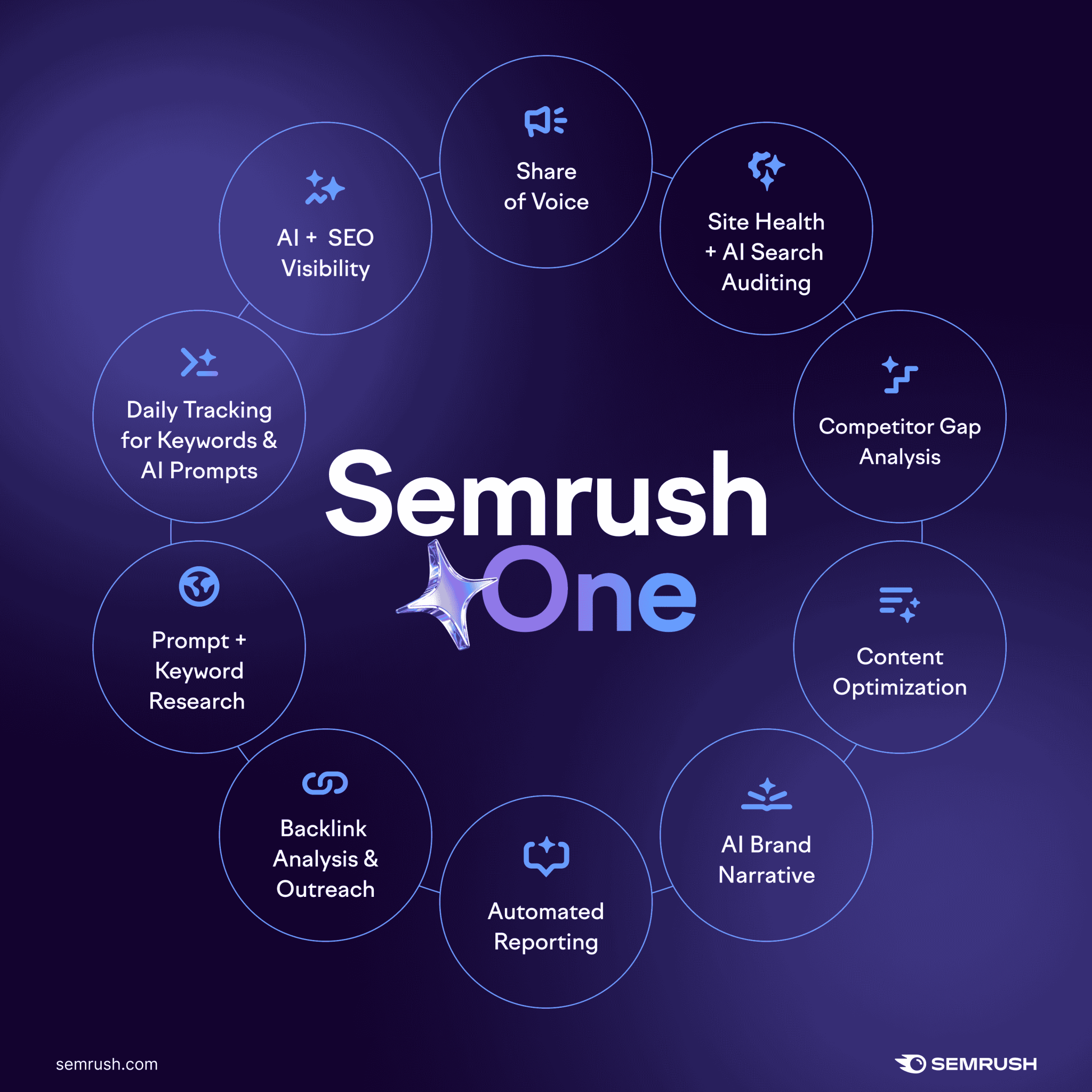
Oleg Schegolov and Dmitry Melnikov brought Semrush in action back in 2008 as a SaaS digital marketing toolkit. It is still evolving and is now usually considered a full-fledged digital marketing tool for all kinds of users and businesses.4
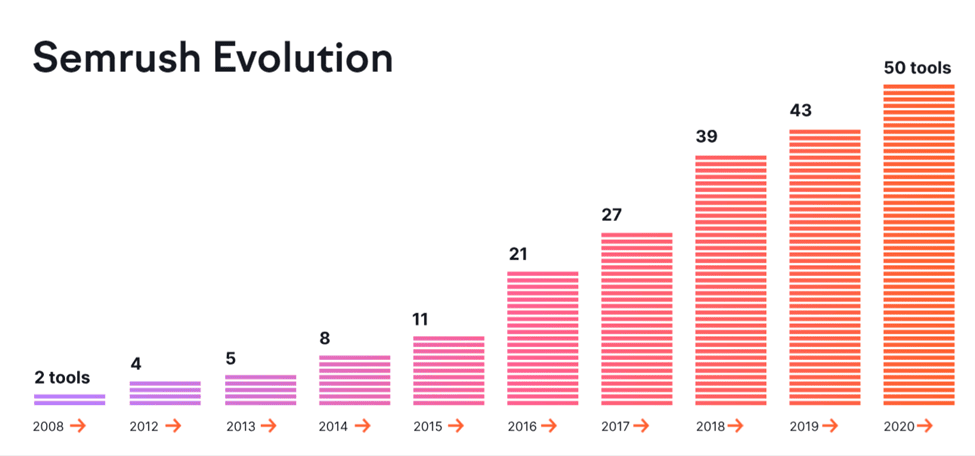
In real life, it can give data on which businesses can make a decision and revamp their marketing strategy.
- It can track your competitors’ top traffic sources, top pages, and ranking keywords that one can use for their own site.
- It can help in making a content strategy, give you content ideas, topic clusters, and more.
- It helps in optimizing the on-page SEO.
- Helps you to find relevant backlink opportunities that you’ve missed completely.
- Audit and scan the website for technical SEO issues like slow pages, broken links, and more.
- Helps in optimizing Local SEO for offline businesses.
- Helps in tracking daily shifts in keyword rankings in top search engines, including Google.
In 2026, for users, they have divided their largest set of features into multiple toolkits so that users have the choice to invest only on the features they are looking for.
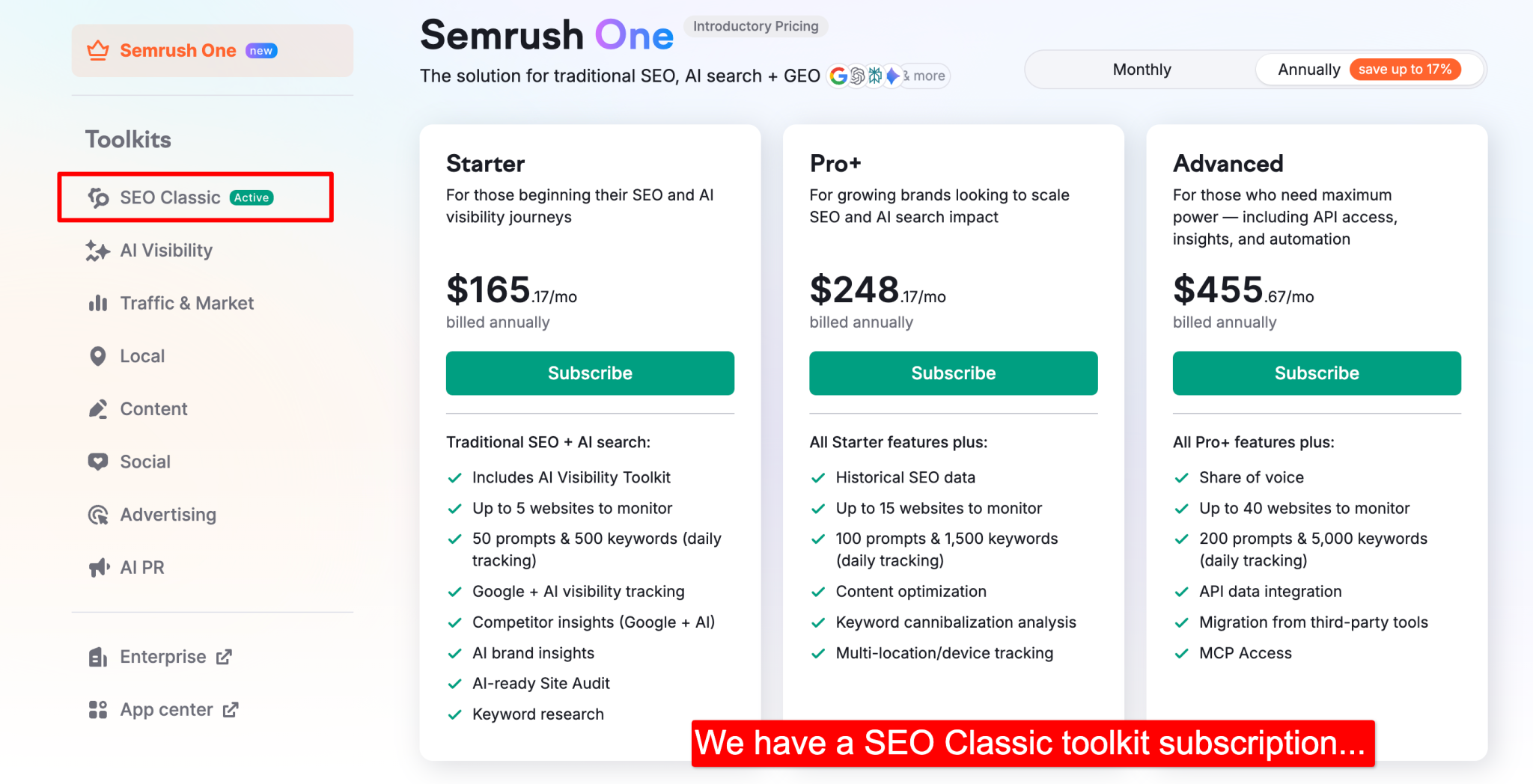
- Semrush One – The new toolkit combining the traditional SEO features + AI visibility into a single kit.
- AI Visibility – Brand visibility tracking across AI-powered search platforms
- SEO Classic – Core SEO research, rank tracking, site audits, and backlinks
- Traffic & Market – Competitor traffic insights and market-level data
- Content – Topic research, optimization, and AI-assisted content tools
- Local – Local SEO and Google Business Profile management
- Advertising & Social Toolkits – PPC research and social media management
My Experience With Semrush Core Features: A Comprehensive Review
We, as a team, have been using SEO features for most of the time. Now showing you how Semrush handles these tasks on my live website.
1. Position Tracking (Daily Monitoring)
Supported search engines: Google, Bing, & Baidu.
The first thing I start my office hours with is the Position Tracking module.
My blog has over 600 posts, and updating or publishing new content is a daily task.
In such a situation, my team cannot manually search for each keyword in the SERP one by one to determine if the rankings have improved or not.

That’s why we have added over 1300 keywords to the Semrush rank tracking module. It tracks our keywords on a daily basis.
The Semrush position tracking report is comprehensive, but most of the time, you get what you need from its “Overview” summarized report.

From this report, I got to know about keywords that have improved/declined in the top 100 in the last 24 hours.
Yes, it also shows for which keywords your pages have started appearing in SERP features.

The rank tracking module is simple yet comprehensive and offers deep insights. You can enable tracking for different countries or devices as well.
Plus, if you want to track the ranking positions of your competitors for the same keywords, that is also possible.
You can compare the rank tracking information of keywords for up to 5 domains at any time.
To get the most out of this module, try to dedicate at least 10-20 minutes at the start of your day. This way, you can take action on the keywords whose positions have dropped.
I have also enabled email alerts, so Semrush sends me a daily “Ranking Summary,” which I can forward to my team with a single click.
Such alerts can be helpful if you have a large team.
2. Domain Overview: Comprehensive Analysis of Competitors
Domain overview is the first tool you will find under the “Competitive Research” section of the Semrush dashboard.
“It’s like getting a Bigger Picture of Competitors’ SEO strengths and weaknesses in one click”.
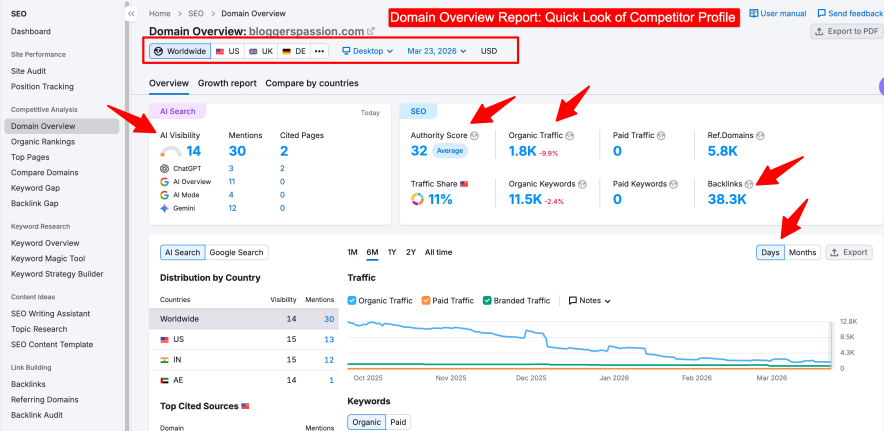
This overview report itself is a good starting point to quickly glance at competitors’ profiles.
Obviously, you can expand the tabs and see the bigger picture in detail.
In the past, I used to analyze competitor backlink profiles, keywords, and traffic sources one by one, which was quite overwhelming.
Now whenever I come across any competitor, I simply put here, take my notepad, and note down the important metrics:
- Authority Score
- Organic Search Traffic (2012 – Present)
- Number of Backlinks
- Traffic by Location
- Main competitors
- Top keywords
- Ad Copies
- More
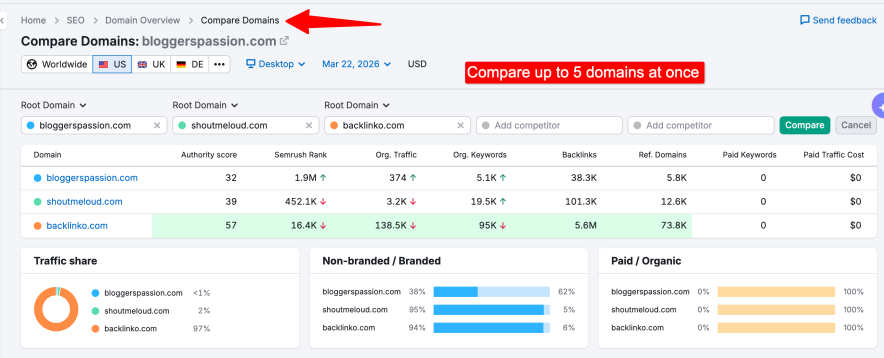
This domain overview report becomes more interesting when you compare multiple domains (up to 5) at once.
I generally use this tool to compare the performance of my site with other rivals in terms of traffic, backlinks, gained or lost keywords, etc.
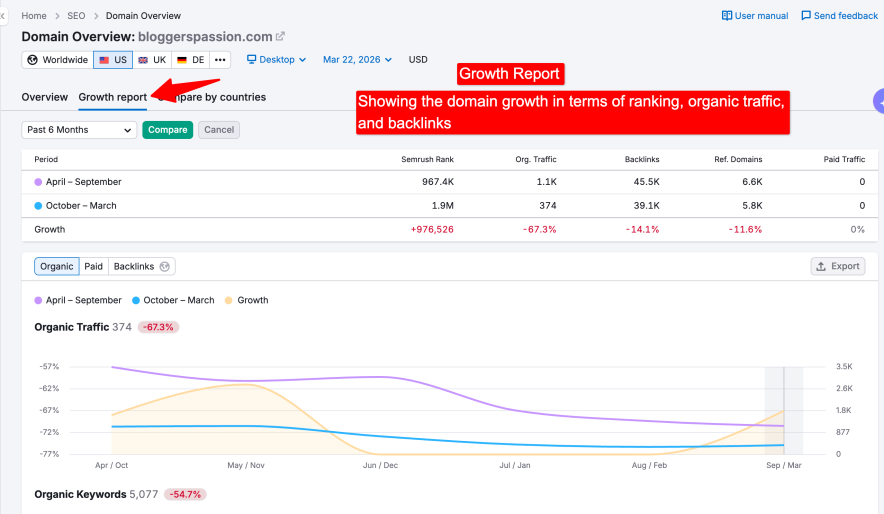
I also use the “Growth Report” tool to track my site’s and competitors’ performance in traffic, backlinks, and more over time.
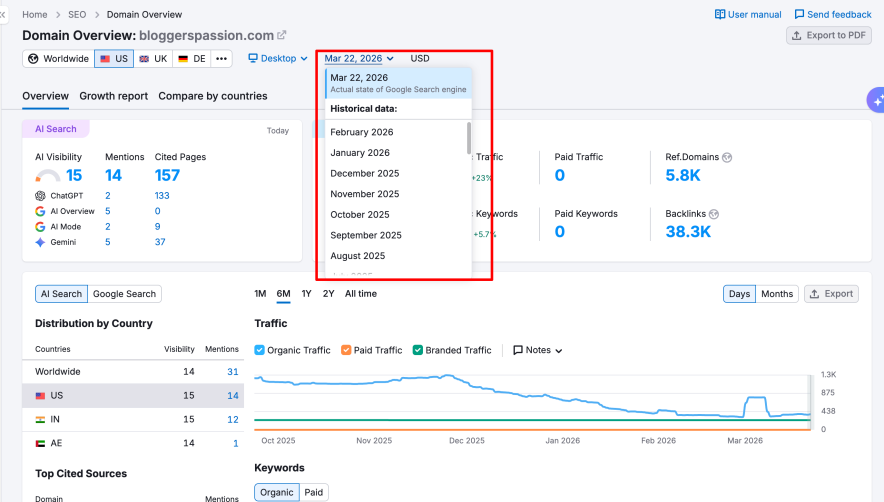
The Domain Overview tool is essential to explore. You can export this report to share with your team or clients.
I usually use this report in planning SEO strategies and work plans for my domain and client projects to reach competitor levels.
Remember, the information available in this competitor analysis report depends on your plan.
For example, the Pro plan doesn’t include historical data from 2012 to present, but the Guru plan does. – I know this is a big limitation.
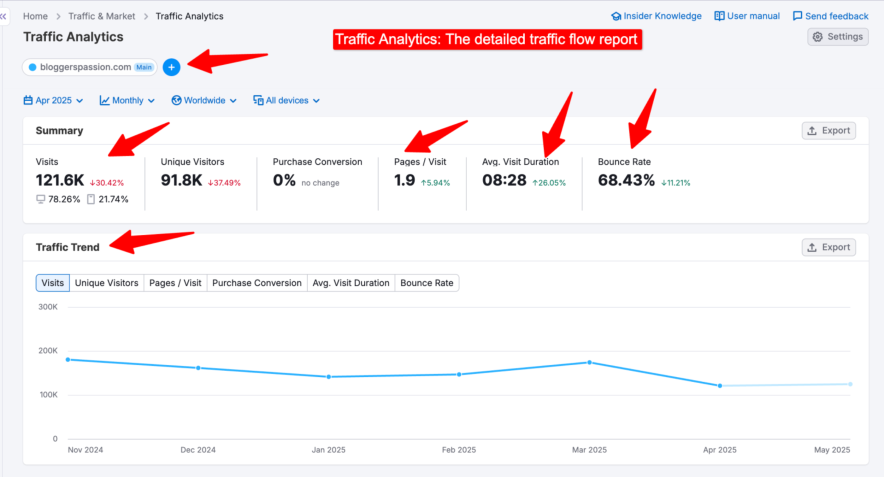
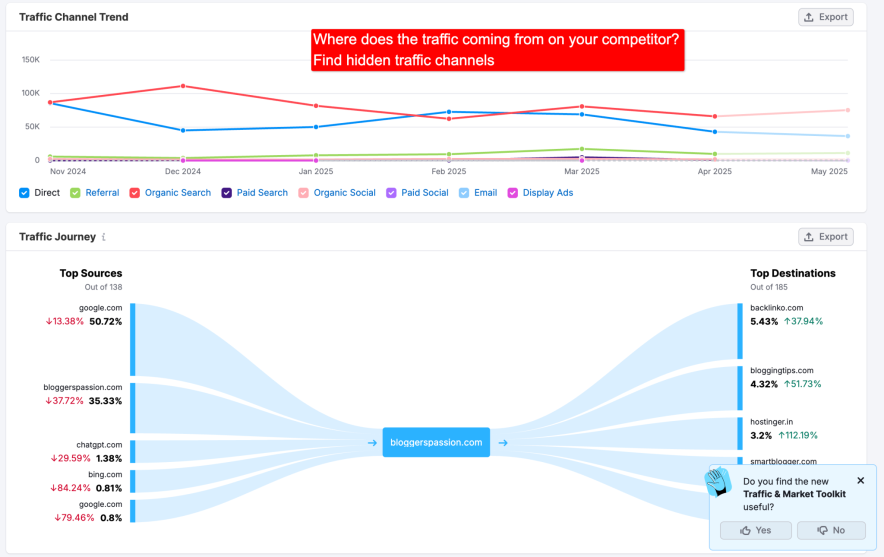
Just below the Domain Overview report, you will find Semrush Traffic Analytics. (now moved to “Traffic & Market kit”)
Semrush Traffic Analytics tool is a replica of SimilarWeb.
Its main job is to provide domain traffic source data. You will get a complete breakdown of how traffic flows through a given competitor’s site.
3. Keyword Research (Planning Content)
When we first subscribed to Semrush, our main reason was Keyword Research.
Since then, many keyword research related tools have been added to Semrush, the ones we rely on most are:
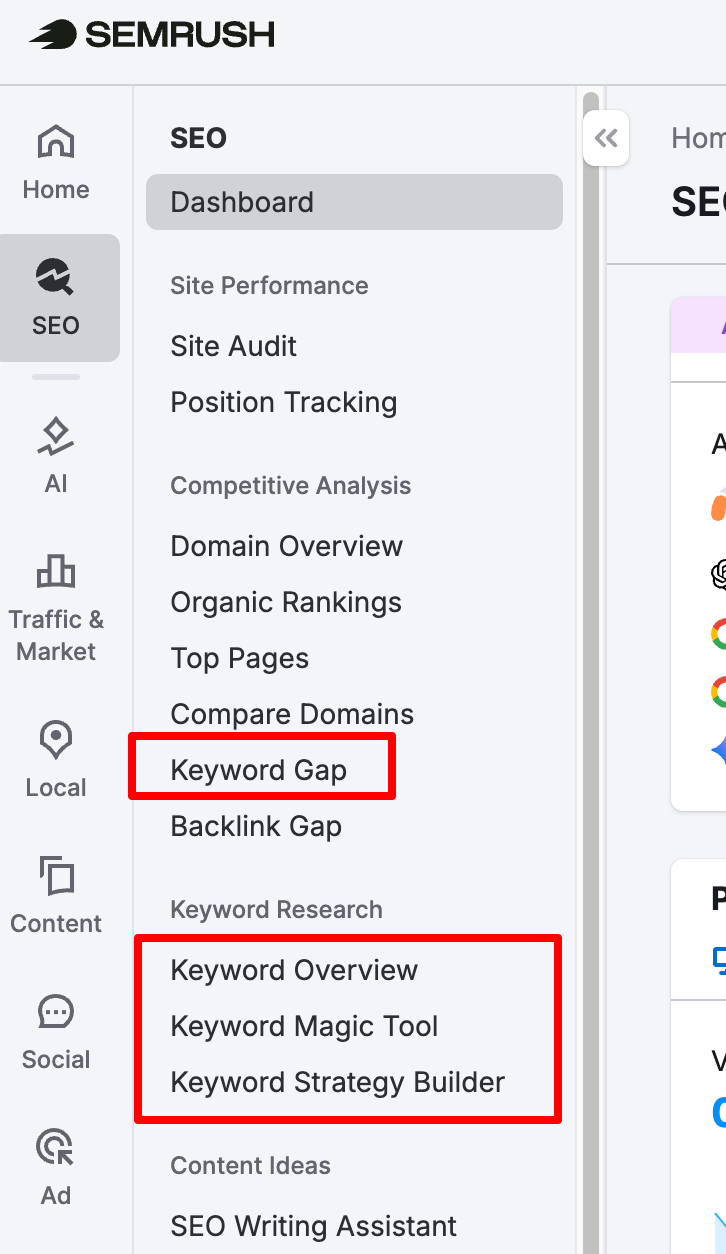
They got:
- Keyword overview tool (Gives you insights for one keyword)
- Keyword magic tool (For detailed suggestions)
- Keyword strategy builder (newly released)
- Keyword gap tool (Discover missing opportunities)
Whenever we plan content, we first use the Keyword Magic tool.
Most of the time, we get dozens of keyword and topic ideas from this tool alone.
Why?
Semrush has a huge database of keywords (27 billion).
Because of this, you can find the keywords related to any niche and in any location.
I sometimes use the Keyword Overview tool, especially when I already have a seed keyword and need information about it.
It is a good tool to get quick metrics of your seed keyword right in front of your screen – Keyword volume, Keyword difficulty, Intent, CPC, SERP analysis, and more.
Keyword clusters are also included in the same report. I usually target them along with the primary keyword which increases the ranking potential of my blog posts.
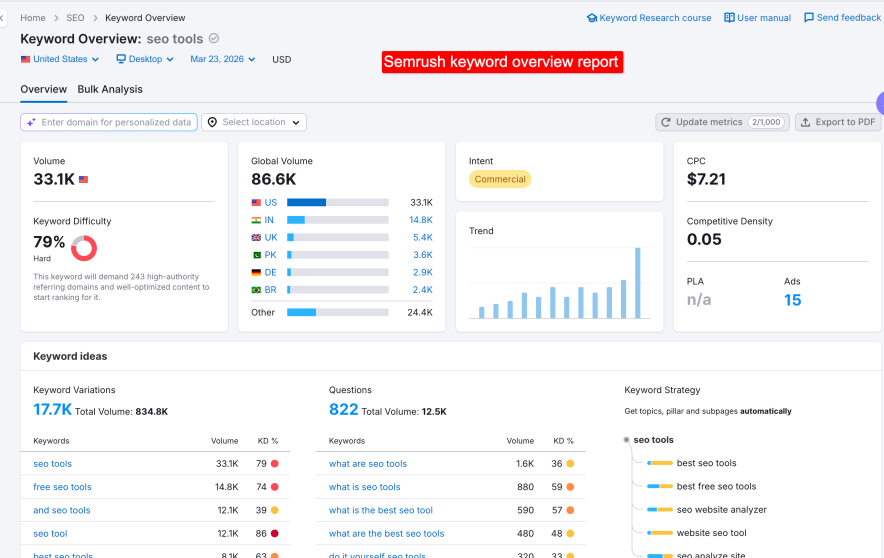
The SERP analysis, which displays the competitors metrics ranking for the keyword, seems basic to me.
Here, you can see the total organic traffic coming to the URLs, instead of showing how much traffic your searched keyword is getting at different positions.
Previously, Semrush showed Keyword Difficulty based on overall search results metrics.
But now, with AI integrated into Semrush in 2026, we can simply add our domain to determine personalized keyword difficulty and ranking potential.
Based on this information, we can decide which keywords to target.
Targeting the right keywords strengthens our SEO strategy, something that was impossible without Semrush.

There’s one important thing missing from this personalized keyword overview report: it doesn’t show the traffic potential for the top position.
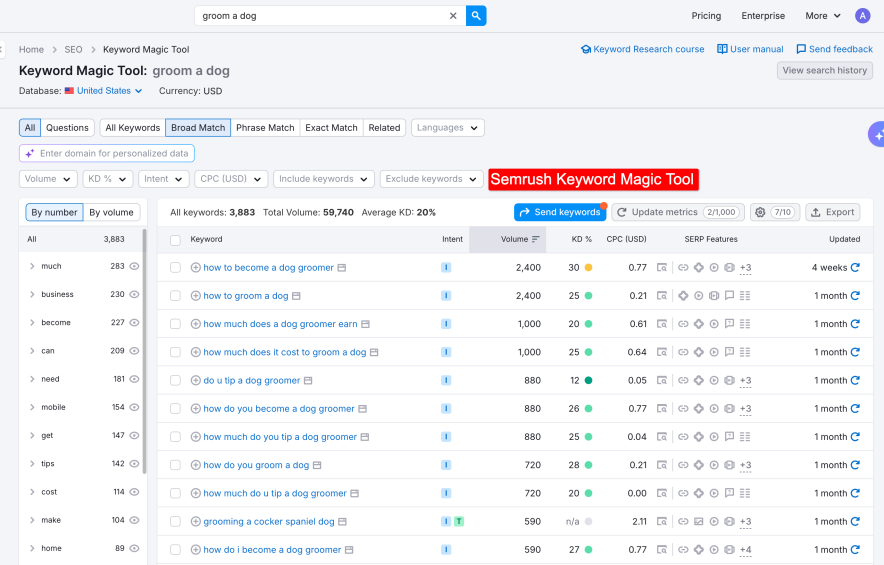
This is a place where you collect keyword suggestions (related, long tail, question, exact match, more) based on your seed keyword.
I generally use the filters (Volume, KD, word count etc) to quickly extract those long tail keywords which have low competition.
And to save time, I just select the potential keywords and export them to the custom lists. This way the important keywords remain stored and accessible at any time.
The info whether the keyword is eligible for a SERP feature is accessible too.
Overall finding keywords for the content from this Keyword research tool is easy. Plus the data is mostly fresh, you can manually update the metrics and get the most recent keyword data as well.
Regardless of everything great, I am a bit disappointed because Semrush doesn’t have a filter for extracting “Search engine auto suggestion keywords”.
I hope they bring this feature because these types of keywords are generally the most searched.

When we try to optimize our existing posts, the Keyword Gap tool is very useful.
For updating existing posts, the Keyword Gap tool has been especially useful. We compare our pages against competitors often highlights terms we simply didn’t include earlier. When we add them to our content, the overall impressions increase.
It compares up to 5 URLs and identifies keywords that you might have missed but your competitors are targeting.
Including these keywords in an on-page SEO strategy always brings extra traffic for me.
4. AI Visibility Tracking (Meaningful Update)
The Google AI Overview has started taking over the SERP. On May 14, Google confirmed it.

It started in the USA, but it won’t be long before you’ll see Google AI Overview feature snippets all over the world.
GSC doesn’t provide specific optimization guidelines for content to appear in AI overviews.
But how can you know if your page content is showing up as a Google AI Overview summary in the SERP?
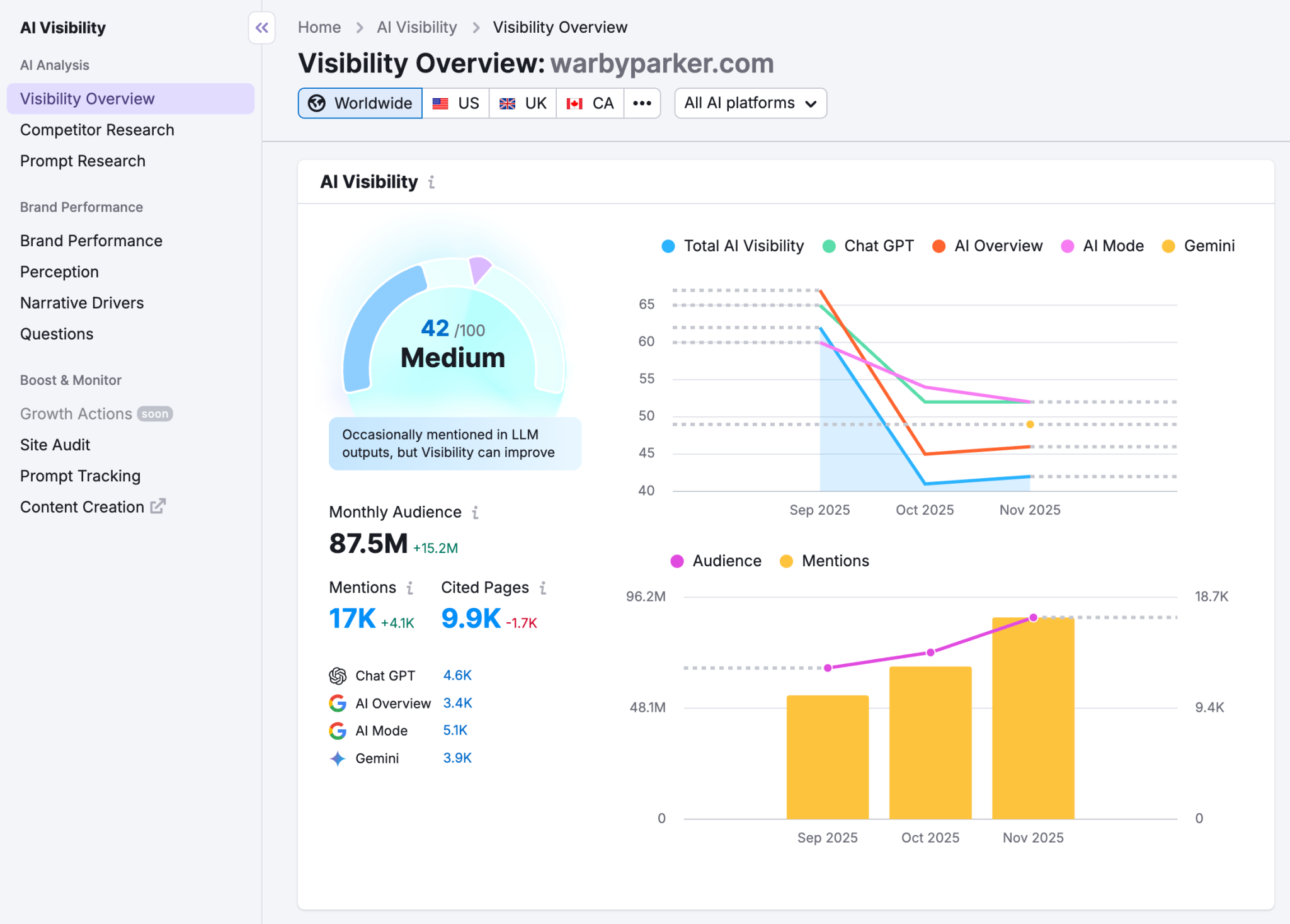
Well, Semrush’s position tracking now includes an AI Overview option. This gives me information about my site keywords on which my site pages are appearing in Google AI Overviews snippets.

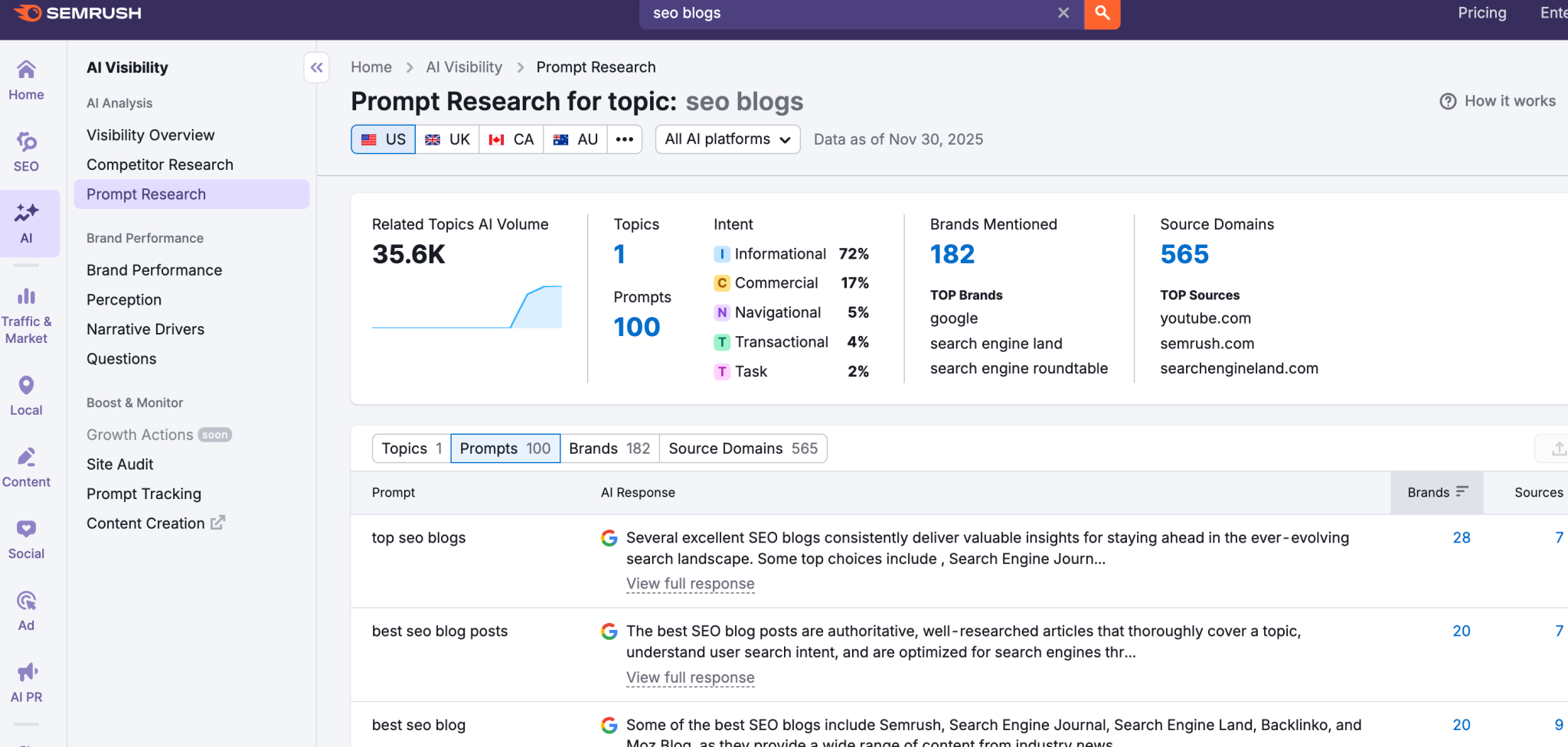
I also use the AI Visibility overview option to know on which prompts my competitors are getting AI brand mentions on different platforms like ChatGPT, Gemini, and Perplexity. Once I know those prompts, I can try to either create content on them or adjust somewhere in the existing content.
5. Organic Rankings [Reverse Engineering]
The Keyword Magic tool definitely provides good keyword suggestions that can help you gain traffic to your site.
But there is a challenge.
If you don’t have much SEO experience, you might end up targeting the wrong keywords, wasting effort and money.
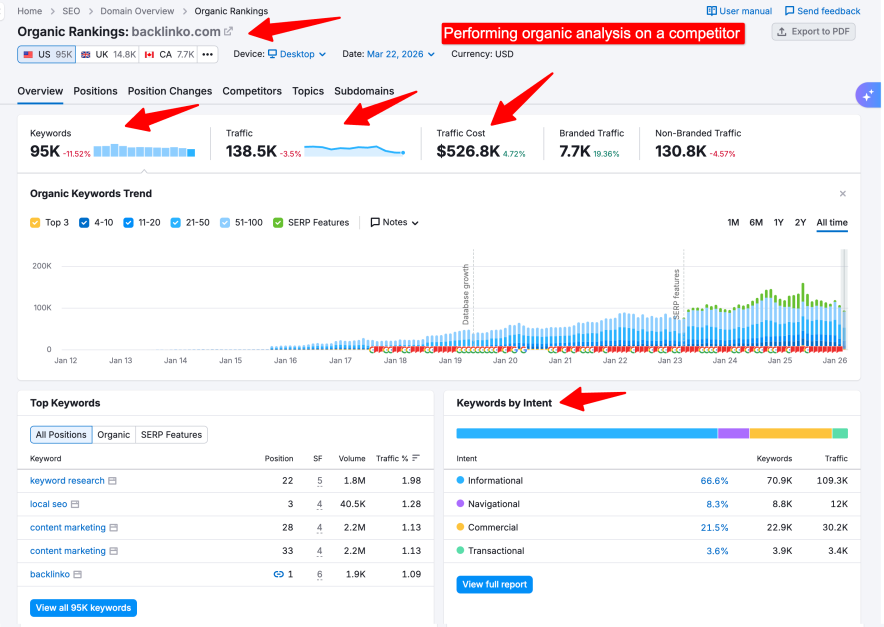
To avoid such situations, I am taking a advantage of the “Organic Rankings” tool.
It works like reverse engineering and directly shows me the keywords that are driving traffic to my competitors.
This SEO strategy also reveals competitor topics that I forget to cover.
Not just traffic, you can analyze how your competitors pages/keywords ranking position fluctuates in SERP.
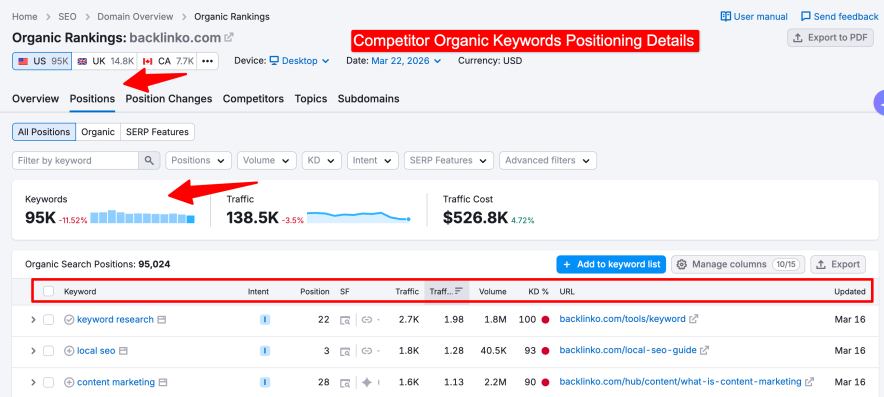
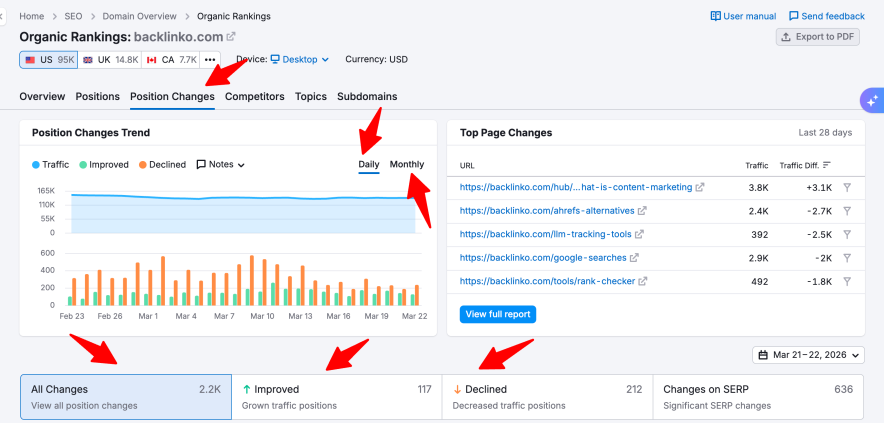
For me, the best way to use this tool is to navigate to the Pages tab.
There, you can enter the URL of the competitor for which you are looking for keywords.
As soon as you do this, you will see the keywords that are currently driving traffic to your competitor.
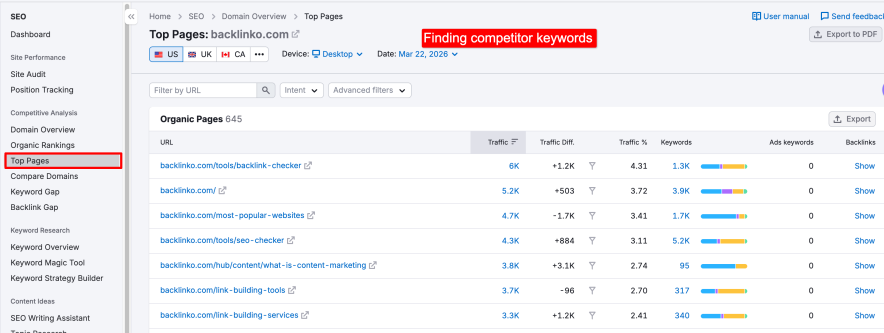
Creating better content by targeting these keywords has worked well for us.
6. Link Building Tools (Opportunity Discovery)
You won’t get the full value of your investment in Semrush if you don’t use the link-building tools available. I find the Semrush Link Building toolkit quite useful.
They have 4 link building tools:
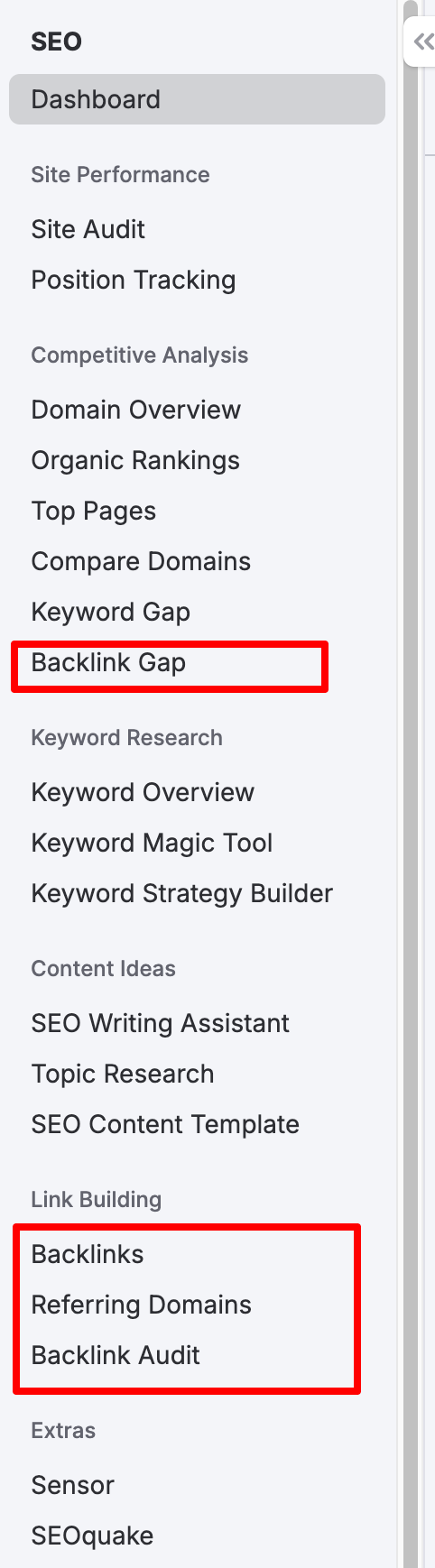
For my blog, most of the time I used this Backlink Research tool to spy on my competitor page/website backlink profile.
This tool simply gives me a complete link profile of a website. The report is comprehensive yet easy to understand.
This is how it looks:
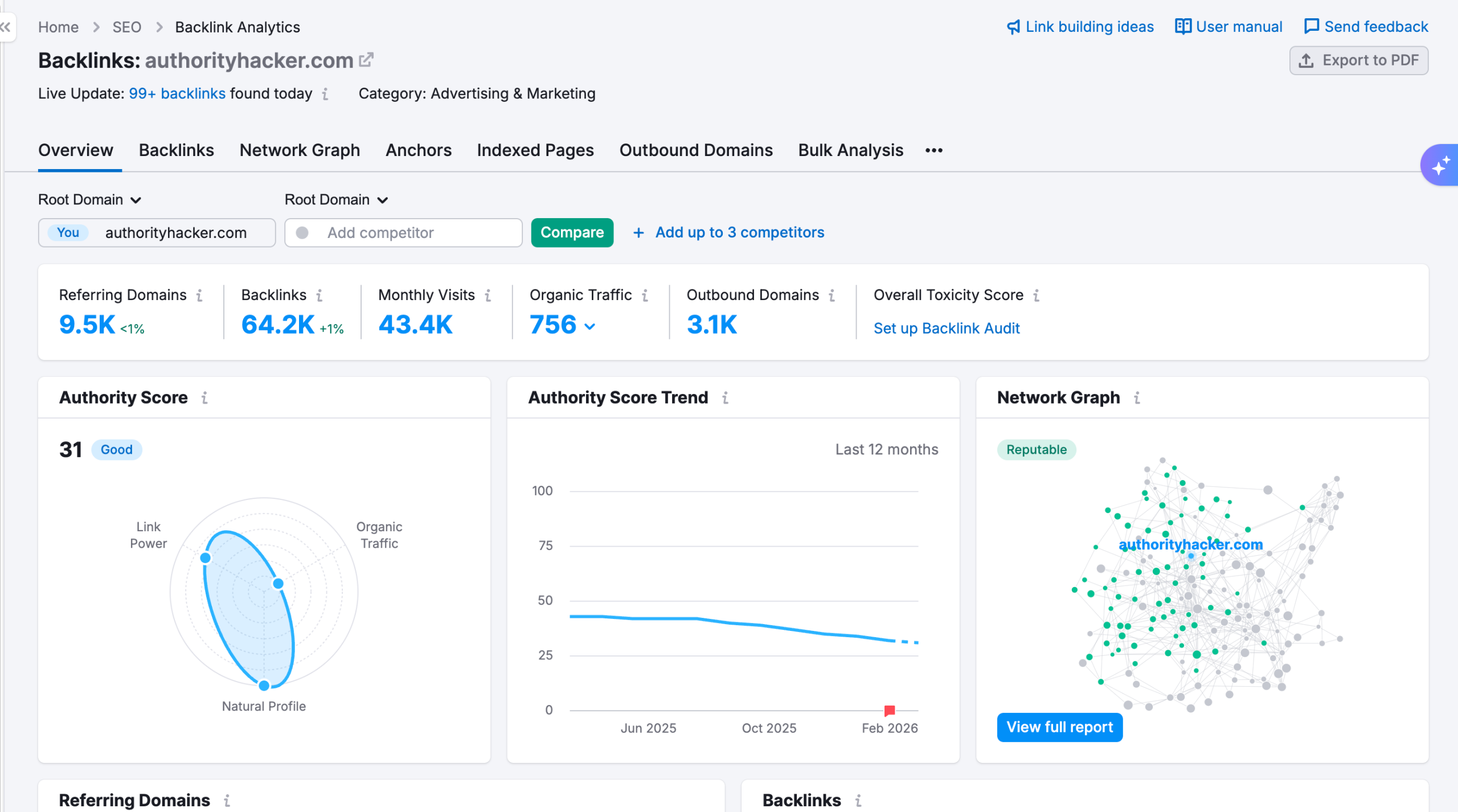
Couple of useful information I got from this tool is:
- The competitors backlinks source
- Details of referring domains
- Recently lost & new backlinks
- Broken links
- Anchor texts
- Backlinks types (nofollow, dofollow, sponsored, etc)
- More
The information I need is the names of the websites/domains where my competitors have already obtained links.
Once I have this information, I reach out to the owners of these domains for link building to try to gain backlinks for my own site.
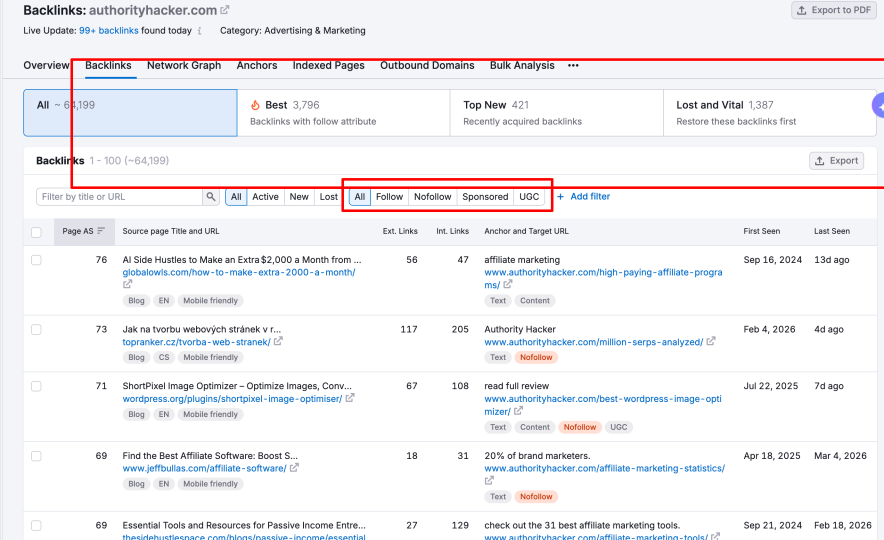
Using the “lost” filter, Semrush also shows broken links of competitors, which provides an opportunity for me.
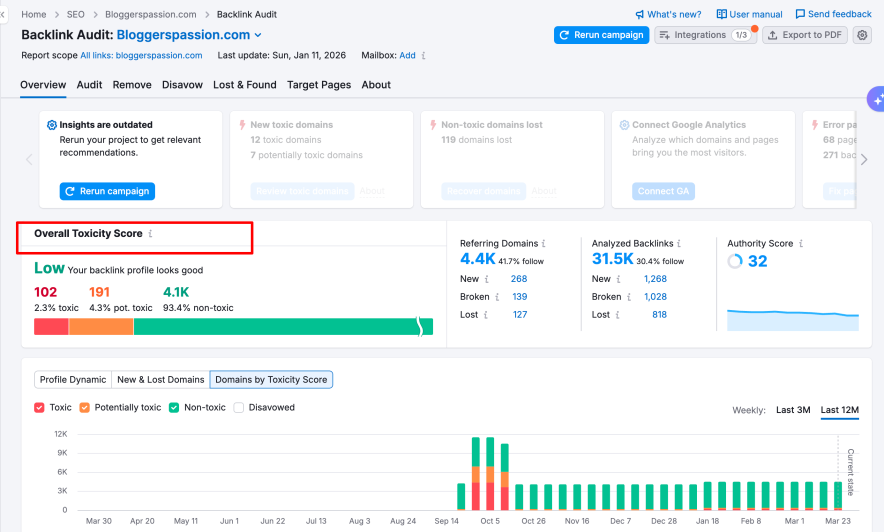
You wouldn’t even know if your hard-earned high-quality links disappeared any day.
But not anymore.
Well, I use this Backlink Audit tool to track my site backlinks. Plus it also shows the toxicity of links.
You can easily discover the toxic domains that are linking to your website. You can simply use Google’s Disavow Tool to remove all the bad backlinks.
I really find this the best backlinks-building strategy so far.

To find hidden backlink opportunities that your competitors utilized and you haven’t yet, you can use this amazing tool.
All you have to do is enter your domain and your competitors’ domain URLs (up to 5) and hit the “find prospects ” button.
Then Semrush starts its magic and presents you with all those WEBSITES (prospects) that are already linking to your competitors but not you.
After using both Backlink Checker and Backlinks Gap tools, I found the Backlinks Gap Finder tool a more powerful and quicker approach to revealing untapped website prospects.

To be honest, I don’t use this tool often.
Well, this tool automatically fetches the link building prospects based on your website niche.
You can get the contact information of prospects inside this tool.
Ultimately, you can contact, manage, and create a link-building campaign inside this tool.

Personally, I sometimes pick a prospect from here and contact them manually via email. You can use this tool for your link building campaigns. It’s just a matter of user preference.
7. Site Audit: Comprehensive Website Audits
Content quality alone doesn’t mean much if the site has technical issues. Semrush audit reports is way larger than Google Search Console recommendations.
Technical SEO (OFF-Page) Audit:
Earlier, I was using Google Search Console’s built-in site audit tool, but its capability of finding technical SEO issues is limited.
You cannot go beyond core web vitals and mobile usability audits.
After switching to the site audit tool, I started uncovering issues I wasn’t even aware of.
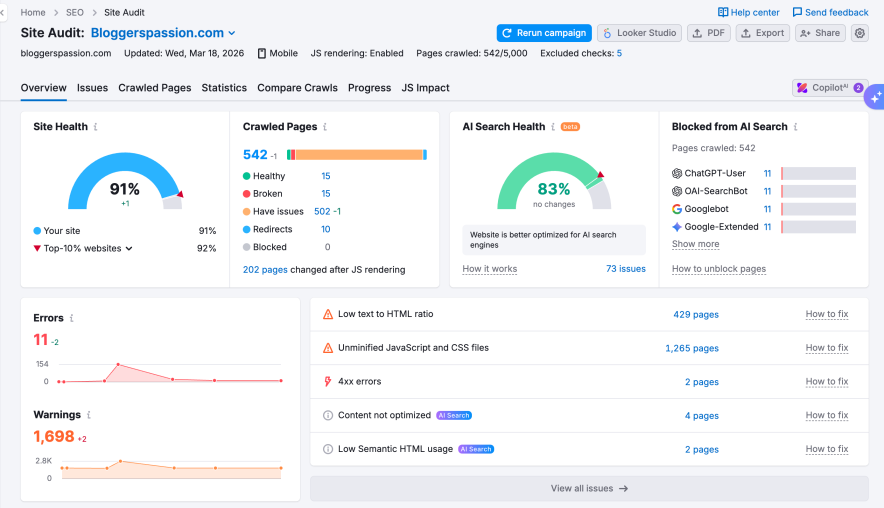
As you can see above, you’ll find everything from;
- Site health
- Crawlability issues
- Internal linking issues
- Schema markup issues
- Core Web Vitals score
- SSL Problems
- Robot.txt issues
- Broken Outbound links
Here, you will not just learn the reason for the issues, but also be introduced to the solutions.
The solutions the Semrush audit system advises are beginner friendly.
If you would like to hear from me, 8 out of 10 times, I was successfully able to implement Semrush Semrush-advised solutions for my site’s technical SEO errors.
On-Page Checker:
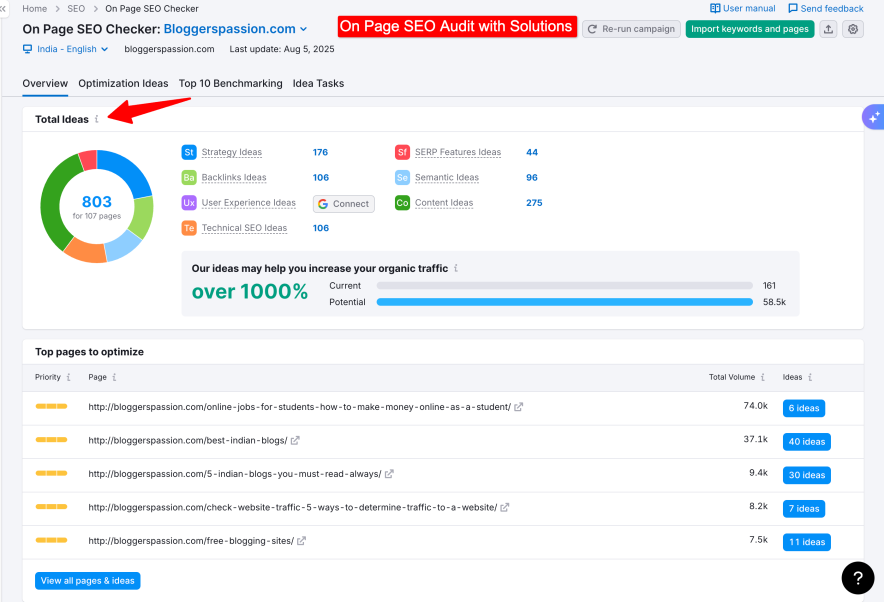
For on-page optimization, suggestions are grouped clearly. The ones I’ve found most useful include:
- Missing keywords in the content as well as meta tags
- Semrush suggestion to make my site pages optimized for a featured snippet
- Missing internal link opportunities
- Words on content length
- Ideas for reducing keyword cannibalization
- Ideas for Backlinks
- Suggestions to reduce keyword stuffing from every possible area
- LSI keywords opportunities
Semrush audit system works on all CMS and website builders, and hence it is accessible to all kinds of websites.
Finally, if I had to rate the Semrush Site Audit tool from my previous experience, I would give it 7/10.
I am using it to resolve technical SEO issues and some On-Page SEO problems I mentioned above.
However, I was never able to resolve all the errors Semrush advised.
There are literally so many suggestions, and especially if you have a bigger site like mine, you would be on the same page.
Resolving SEO errors might not always produce good results in Rankings, but it is always better to be on the safe side.
That’s why addressing Semrush site audit issues might be a great help for traffic & ranking boost.
8. Sensor
Semrush Sensor is another tool I am using on a regular basis.

Over the past year, Google has been releasing algorithm updates more frequently.
Recently, it was announced that Google has merged the Helpful Update into the Core Update.
It can be difficult for SEO professionals to detect ongoing algorithm updates in the backend.
Semrush Sensor helps by detecting these changes in the SERP and shows how much our tracked keywords’ positions are fluctuating.
Using this information, we can avoid taking frequent actions on our site to address ranking fluctuations caused by algorithmic changes.
Not just for your website, you can analyze how Sensor is reacting to other niches at a global level.

9. SEO Writing Assistant
SEO writing assistant is one of the oldest feature existed in Semrush till now.
I tested it a lot of times and I found suggestions for improving readability.
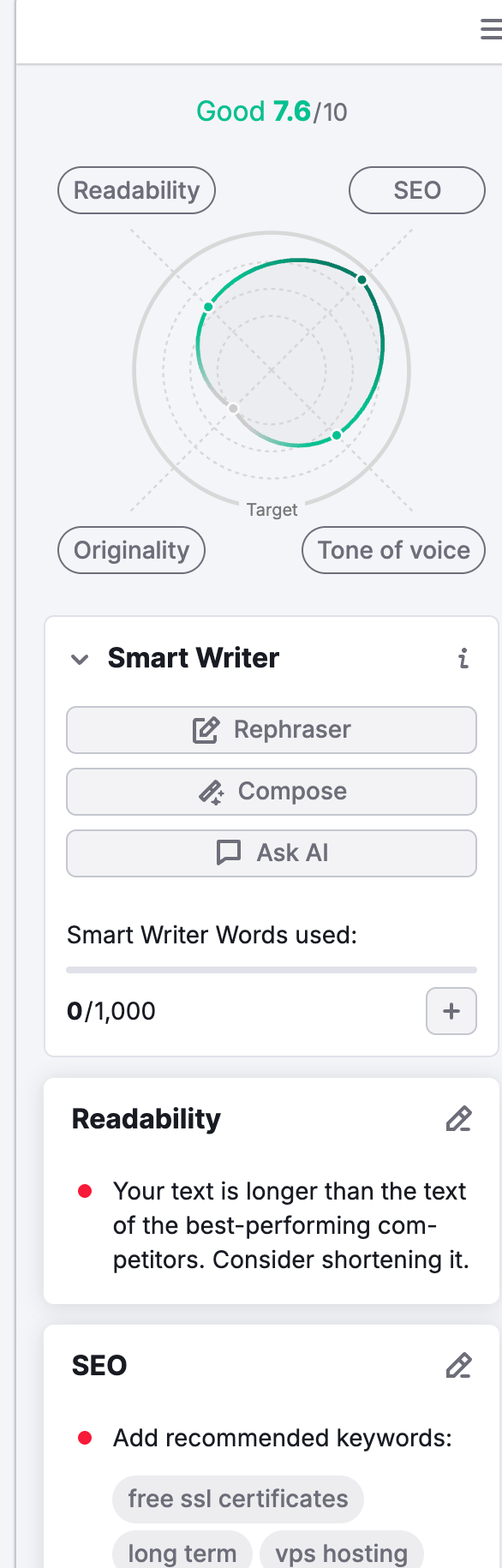
It works more like Grammarly. It helps you to optimize your content based on the keywords you give. If there is room for improvement in the content tone, then you’ll get suggestions for sure. And yes, it also checks for plagiarism.
By importing the content into the editor feels weird; it is best to use its extension inside Google docx and improve the content in your writing flow.
I do have a Grammarly subscription, but if you don’t have then using Semrush Writing assistant for the editing job works too. But I guess it is not that powerful as compared to dedicated writing or proofreading tools.
10. Topic Research Tool
As a blogger, I was stuck a lot of times in brainstorming new content ideas for my website.
Yes, I have used various popular topic idea generator tools (including AnswerThePublic), but the Semrush Topic Research tool is pretty solid and extracts additional metrics.

The reason behind this is that it not only generates “related topic ideas” but also scraps a list of top-performing content pieces.
You have to subscribe to tools like Buzzsumo for this crucial information, but not anymore.
Semrush saved you a lot of additional bucks by providing the same information without charging extra pennies.
So, a lot of times, I also used the Topic Research tool as an inspiration to understand what type of content (topics) users are already enjoying in my niche space.
Not all content ideas you find through this Semrush tool are useful.
But if you ignore some weird suggestions, you’ll still have some potential ideas left for content creation.
Hence, in this review, I am rating “Topic Research tool” 7 out of 10.
11. SEO Content Template Feature
It asks you for a “Seed keyword” and it will give various SEO recommendations for your upcoming content by scanning the top 10 results of SERP.
Specifically, it gives me recommendations about:
- LSI keywords (I mainly use this tool for finding semantic-related keywords)
- Backlinks
- Readability
- Recommended Text Length (My another reason for using this Semrush feature)

It also provides more recommendations about Page Title, Meta Description, and H1. To be honest, I am not really a fan of these Semrush recommendations.
This is how Semrush workflow looks like when you’re working on the real project.
How Accurate Is Semrush Compared to Real Search Data?
No SEO tool is 100% accurate when you check and compare their data with the Google Search Console or Google Analytics data…
What actually matters is directional accuracy:
- Does the tool correctly identify traffic trends?
- Does it produce the right pages and keywords?
- Is the data reliable enough so that you can make decisions?
Traffic Estimates: Semrush vs Search Console
Over a recent 3-month period:
- Google Search Console recorded ~71.6K organic clicks
- Semrush estimated ~50.9K visits
- Ahrefs estimated ~82.4K visits
- SE Ranking estimated ~41.3K visits
Semrush was not the closest numerically, but it was the most consistent when tracking trend direction. The rises, drops, and recovery periods aligned closely with Search Console. That consistency is more useful for SEO decision-making than chasing exact numbers.
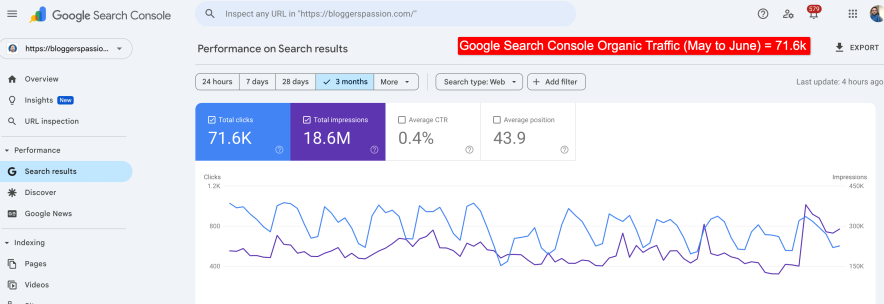
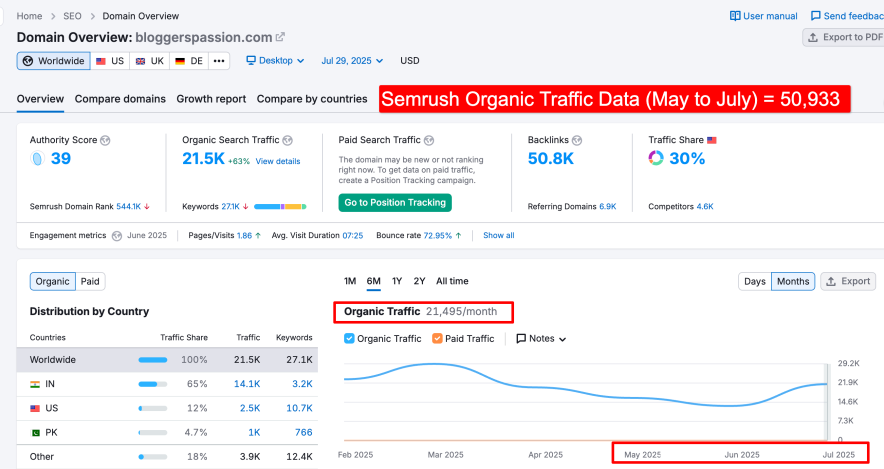
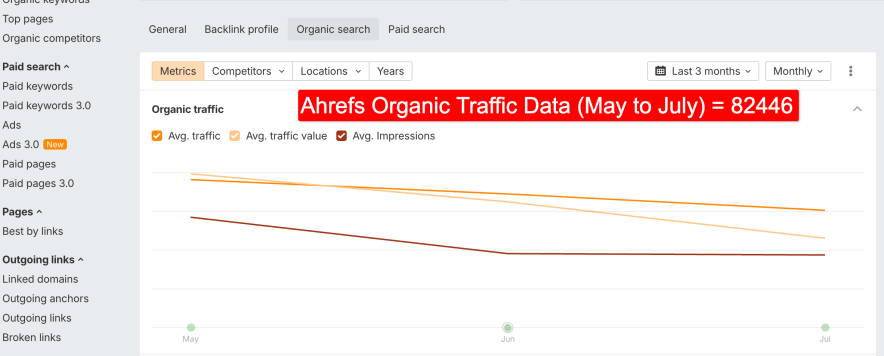
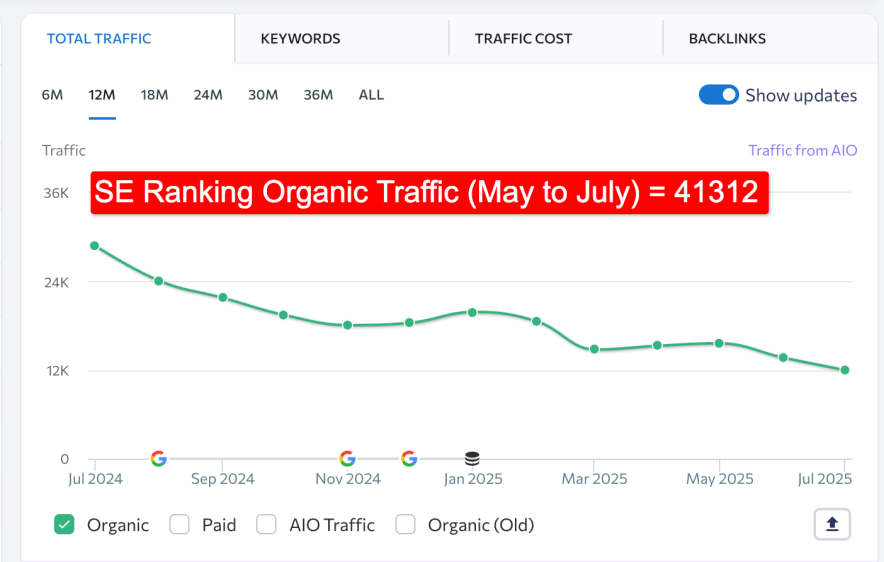
In addition, Semrush showed traffic for our top page (Hostinger Coupon) over the last 3 months that was quite close to Search Console data.
Semrush reported 11,105 visits, compared to 13,246 in Google Search Console.
Apart from traffic, Semrush also showed the highest backlink count for our site. The reason behind this is that Semrush has the largest backlink database in the market (43+ trillion links).
So, if you’re doing backlink analysis on competitors, chances are high that Semrush will reveal more opportunities than other tools.
Overall, I don’t use Semrush because it’s “perfectly accurate.” But because its data is consistent.
For validation, I still rely on Google Search Console.
For planning and competitive analysis, Semrush data fills the gap effectively.
What Using Semrush Feels Like in Practice
Semrush’s UI is not the best from a beginner’s perspective, but they have done a great job organizing numerous features.
1.) I like how they categorized all the tools in the left sidebar.
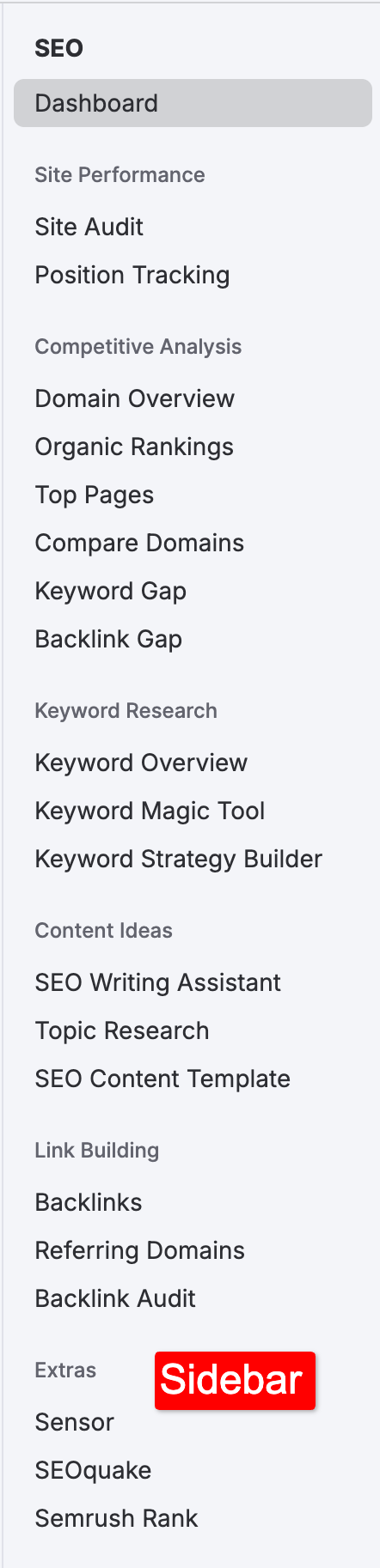
If you want to explore the core features of SEO, you just need to keep the SEO tab open. Similarly, you can do the same with the local and advertising tabs, etc.
2.) Attached Tooltips everywhere will not let your mind go blank.

3.) In Semrush, you’ll find tools divided into categories rather than by their functionalities.
Although I didn’t have much trouble remembering where each tool was, I initially had problems finding the Keyword Gap and Backlink Gap tools.
These are listed under the Competitive Research category rather than Keyword Research and Link Building.
So, remember the positions of these tools are going to be the only hack.
4.) Despite offering comprehensive data, Semrush has done one thing amazingly well.
Guess what?
Regardless of the tool (Domain Overview, Keyword Research, Traffic Analytics, Site Audit), Semrush always provides an overview report for easy user understanding, displaying all data in a summarized visual form.
Because of the data in a visualized form, I developed an interest in using Semrush quickly. Otherwise, it’s just a matter of numbers.
And you can share these visualized reports with your clients. Even someone who has never used an SEO tool before will find these reports very helpful.
Overall, the Semrush UI takes a little time to make a lasting impression on the user’s mind. Initially, you only need to remember the features that are essential for you.
If you try to explore all the categories at once, you will definitely get confused.
Customer Support: How to Get Help?
In day-to-day use, I’ve rarely needed urgent help from Semrush support. It’s not because it’s unnecessary, but because most issues are resolved through documentation.
Semrush provides seamless customer support to ensure you get the help you need.
They offer 3 main channels to provide support to their customers.
- Phone: +1 (800) 815 – 9959
- Email: [email protected] (24*7)
- Live Chat widget (Mon to Fri EST 10:00 am to 6:00 pm)
Moreover, in addition to these customer help channels, Semrush also has provided self-help guides and resources.
You may also take help of their active community forum, where you can connect with other Semrush users and get expert advice.
The live chat support facility isn’t available 24*7. Hence counted as a con of Semrush.
Pricing in 2026: A Reality Check
The pricing structure of Semrush has changed noticeably over the last year.
Instead of paying for one large bundle, Semrush now works on a toolkit-based model. You subscribe to the Semrush One or SEO Classic toolkit first, then add other toolkits only if you need them.
This approach is more flexible than before, but it also means pricing depends heavily on how disciplined you are with feature usage.
Semrush One Toolkit:
Since AI snippets started appearing in SERPs, SEO experts have been focused on figuring out how to optimize content so that brand visibility improves not only in search results but also across AI platforms like ChatGPT and Perplexity.
Keeping this shift in mind, Semrush has combined its traditional SEO toolkit with AI visibility tools into a single solution. However, it’s important to note that the pricing has increased.
So if your goal is to build your brand presence across AI-driven platforms, this toolkit can be a good option to work with.
| Plan | Monthly | Annual (per month) |
| Starter | $199/mo | $165.17/mo |
| Pro+ | $299/mo | $248.17/mo |
| Advanced | $549/mo | $455.67/mo |
SEO Classic Toolkit Pricing (Most Users Start Here)
SEO Classic Toolkit is picked by most site owners and SEO experts.
| Plan | Monthly | Annual (per month) |
| Pro | $139.95/mo | $117.33/mo |
| Guru | $249.95/mo | $208.33/mo |
| Business | $499.95/mo | $416.66/mo |
Annual billing lowers the monthly cost, but I don’t recommend committing immediately unless you already know how Semrush fits into your workflow.
Free Plan vs Free Trial (Important Difference)
Semrush does offer a free plan, but it’s mainly useful for exploring the interface, not doing real SEO work. The daily limits are restrictive, and you’ll quickly hit usage caps.
The free trial is far more valuable. It gives temporary access to full features, which allows you to test Semrush against your actual SEO tasks, not just sample reports.
Where Pricing Can Escalate
The part many users underestimate is add-ons.
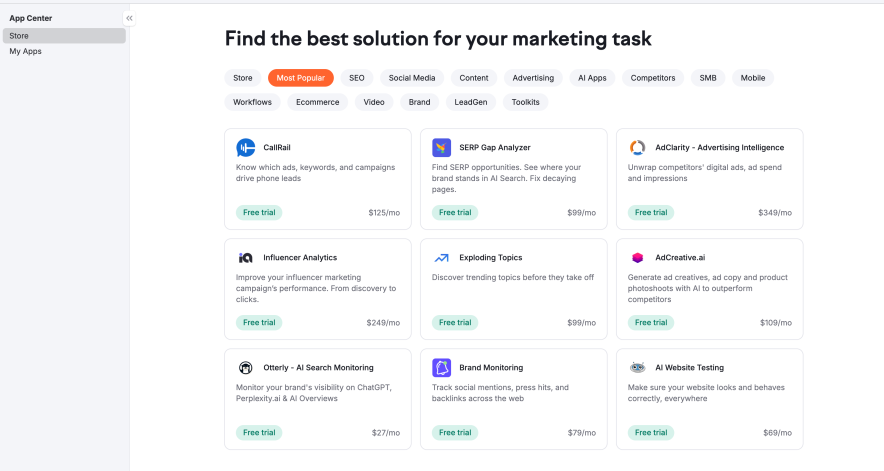
Some advanced features, such as traffic analytics, market-level data, and certain AI tools, live outside the core SEO Classic Toolkit. Adding these can push the monthly cost much higher than expected.
This pricing model works best if you’re replacing multiple tools with Semrush. If you’re only using a few reports occasionally, the value drops quickly.
Overall, I wouldn’t call Semrush cheap. It could be cost-efficient if we use it intentionally.
Pricing seems justified when you need SEO competitor research functionality for multiple sites. For single sites, the pricing sounds overpay.
Are There Good Alternatives?
Semrush vs Ahrefs
Ahrefs is often preferred by users who value simplicity and clarity. The interface is easier to navigate, and the learning curve is lighter. For backlink analysis and basic keyword research, Ahrefs is found to be extra powerful. This comes after reviewing it.
Semrush vs SE Ranking
SE Ranking stands out for value for money. It offers most core SEO features at a much lower price point. For budget concerns, this is a plus point. In my experience, SE Ranking’s rank tracking is solid. Its interface is also easier for beginners compared to Semrush.
Semrush vs Moz
Moz has been around for a long time and remains a stable option. Its interface is friendly, and it allows more users on higher plans without heavy extra fees. However, Moz’s keyword and competitor databases feel limited.
Read: Moz Free Trial [7 Days Full Access]
Conclusion: Is Semrush Still Essential?
The tool, which is popular in the industry, has created its hype automatically.
And that’s why it is becoming expensive year after year.
But the question is the same.
Should you subscribe to it?
After using Semrush consistently for nearly a decade, my view in 2026 is simple:
Semrush is still one of the most capable SEO platforms available, but only if you know exactly why you need it.
It is ahead when SEO decisions depend on competitor data, keyword gaps, ranking trends, and site-level analysis at scale. Semrush can replace multiple tools and bring everything into one workflow.
At the same time, it’s no longer the default recommendation for everyone.
The shift to toolkit-based pricing means value depends on usage discipline. If you only need basic keyword checks or rely mostly on Google Search Console, Semrush can feel expensive and overwhelming. In those cases, simpler or cheaper alternatives often make more sense.
Personally, I still use Semrush almost every day, but only a focused set of features. That’s the key takeaway.
Semrush works best when you know what you want to track and why. If you have a clear goal, it’s a powerful tool. If you don’t, it’s easy to pay for features you won’t really use. That matters more than long feature lists in 2026.
With the release of the MCP connector linking AI tools directly to Semrush live data, we’re seeing a much-needed reduction in the learning curve for new SEOs. The real value here isn’t just the technology itself, but how it translates complex metrics into a simplified format.
FAQs:
What is the difference between Semrush One and the SEO Classic toolkits?
In Semrush One, you will find all the traditional SEO features with the AI visibility features. In a classic toolkit, all the native features of Semrush are available to use, including Keyword research, Rank Tracking, Link Building, and more.
Can I cancel Semrush if I don’t like it?
Yes. Semrush offers a 7-day refund window on new subscriptions. To avoid charges, it’s best to cancel before the trial or billing period ends.
Does Semrush ensure SEO ranking?
No software can guarantee a specific position on Google because search algorithms are proprietary and constantly changing. Semrush helps in making strategies and diagnosing the failed strategy you are working on.
More Helpful Reads: