


Disclosure: We get a commission when you buy a product via our affiliate link at no additional cost.
1. Semrush One Trial (Best for AI + SEO)
Trial Type: Semrush One
Duration: 14 Days
Highlights: SEO + AI Search, AI Visibility Tracking, AI Prompts Tracking, Competitor Insights, AI Brand Insights, MCP Access, AI Site Audit, and more.
Semrush One is your good to go option if you want to see how your website or brand shows up not just on Google, but also on AI tools like ChatGPT and Perplexity.
For example, If someone asks ChatGPT, “Best SEO tools for small businesses,” then Semrush One helps you check whether your website is mentioned or ignored in that answer.
With this trial, you can:
- Check if AI tools mention your brand or competitors
- See which questions (prompts) lead to AI citations
- Track Google rankings and AI visibility in one dashboard
It is best for businesses that want visibility wherever users search.
2. Semrush Guru Trial (SEO Only)
Trial Type: Semrush Guru
Duration: 14 Days
Tookit: SEO
Highlights: Everything in Pro Plus, Content Marketing tool, Historical Data Access (2012-Present), and More.
The Semrush Guru is best if your focus is only on Google search results. It would be most suitable for advanced Bloggers and SEO Professionals. For example, If you run a blog and want to rank higher for keywords like “best web hosting” or “SEO tools comparison.” You don’t care how AI tools answer questions — you only care about Google rankings.
With Guru trial, you can:
- Find keywords with good traffic potential
- Analyze competitors ranking above you
- Fix technical SEO issues on your website
It is best for businesses that want visibility wherever users search.
3. Semrush Pro Trial (SEO Only)
Trial Type: Semrush Pro
Duration: 14 Days
Tookit: SEO
Highlights: Free access to the Keyword research, Competitor research, Position Tracking, Backlink Analysis, and more.
This trial is the simplest option and works well if you’re new to SEO.
For Example: If you’ve just started a website and want to:
- Check which keywords your site ranks for
- Run a basic SEO audit
- Understand what competitors are doing
Then the Pro trial gives you enough features to learn without feeling overwhelmed.
Best for:
- Beginners learning SEO
- Solo bloggers and freelancers
- Users trying Semrush for the first time
It is best for businesses that want visibility wherever users search.
How to Start the Semrush Free Trial? (and Avoid Charges)
Step 1: Choose a Trial Type
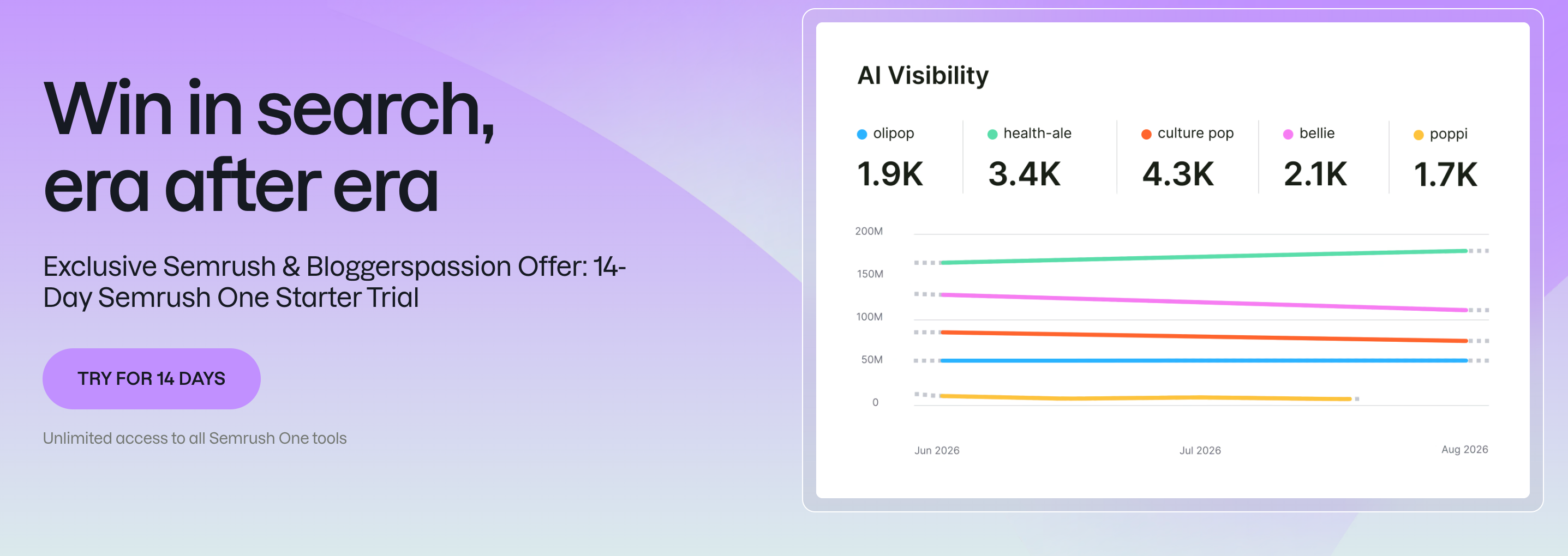
As you know, Semrush offers trials on various tools including One, Guru, and Pro.
The first thing is you have to make a decision and navigate to the trial’s official page.
We are choosing a “One trial” as it allows us to explore all SEO and AI features present in Semrush.
Click on “Try for 14 Days” to proceed.
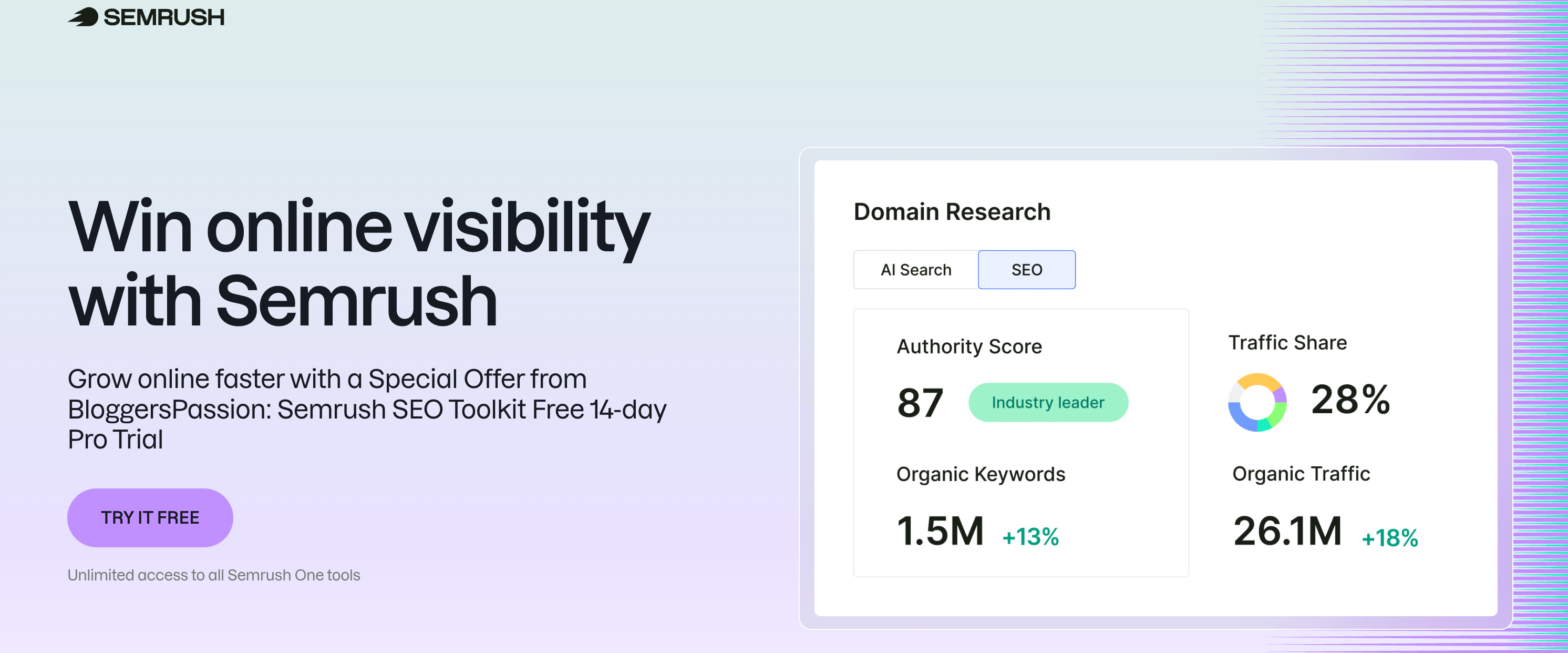
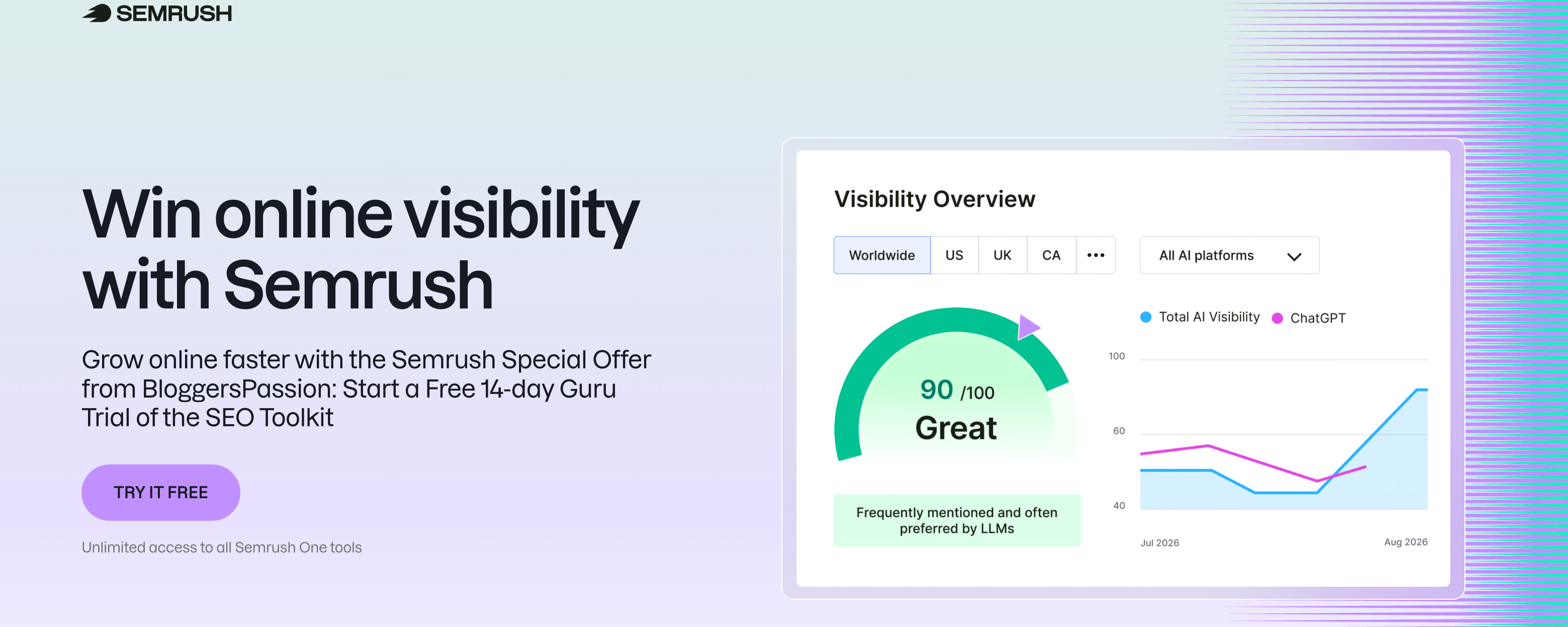
If you choose to go with Pro or Guru, this is what their landing pages look like:
Step 2: Create a Semrush account:
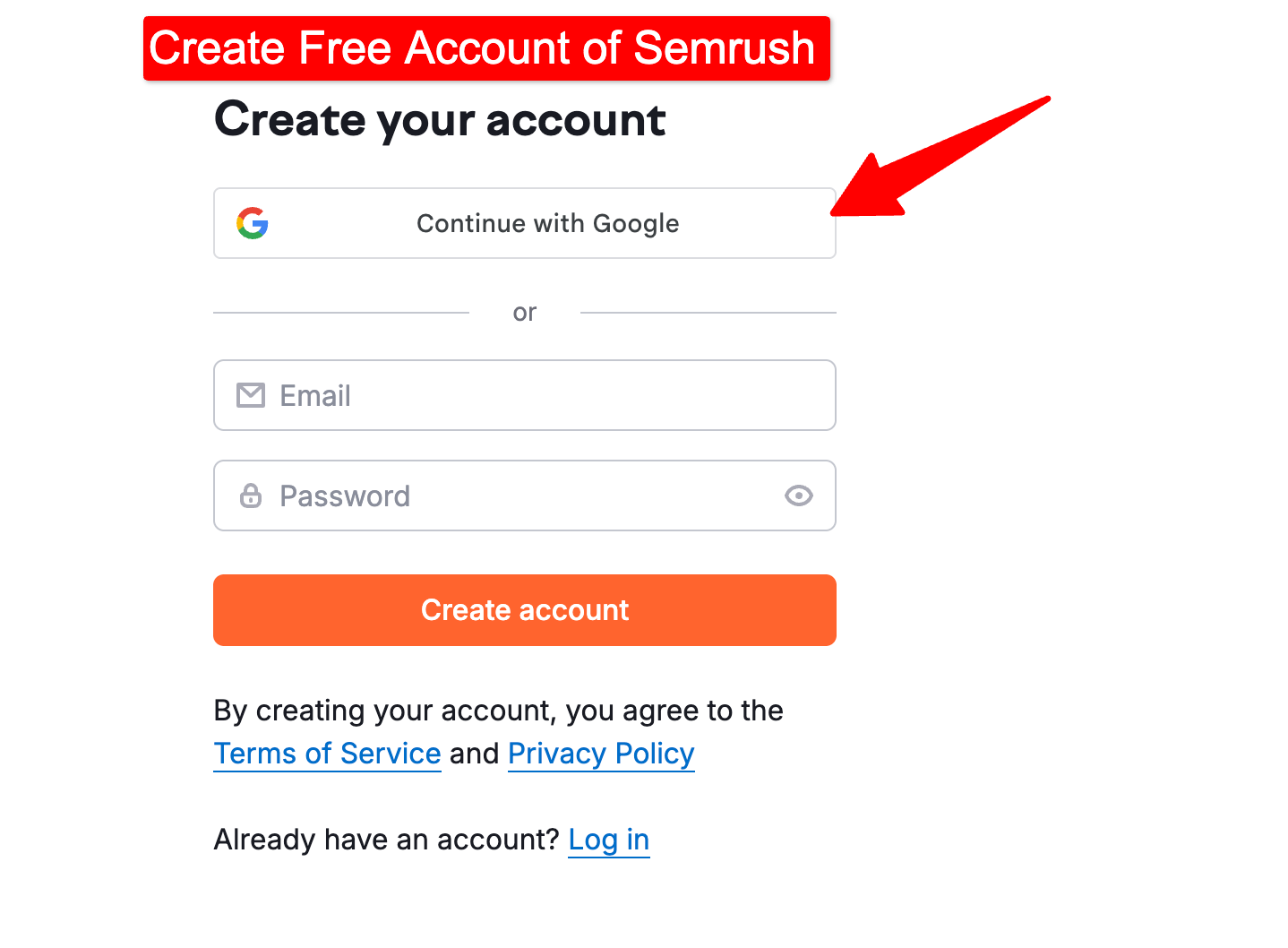
A new Semrush account is mandatory for this offer to work. Enter a new email ID, assign a password to your account, click “Create an account” and check your inbox for a confirmation login code.
Copy that code and enter it on the Semrush website to confirm your new Semrush account.
Step 3: Checkout with your free trial
At this stage, Semrush will ask you for your payment details. Don’t worry, you won’t be charged right away. Semrush just saves the details in case you want to renew your plan after the free trial ends.
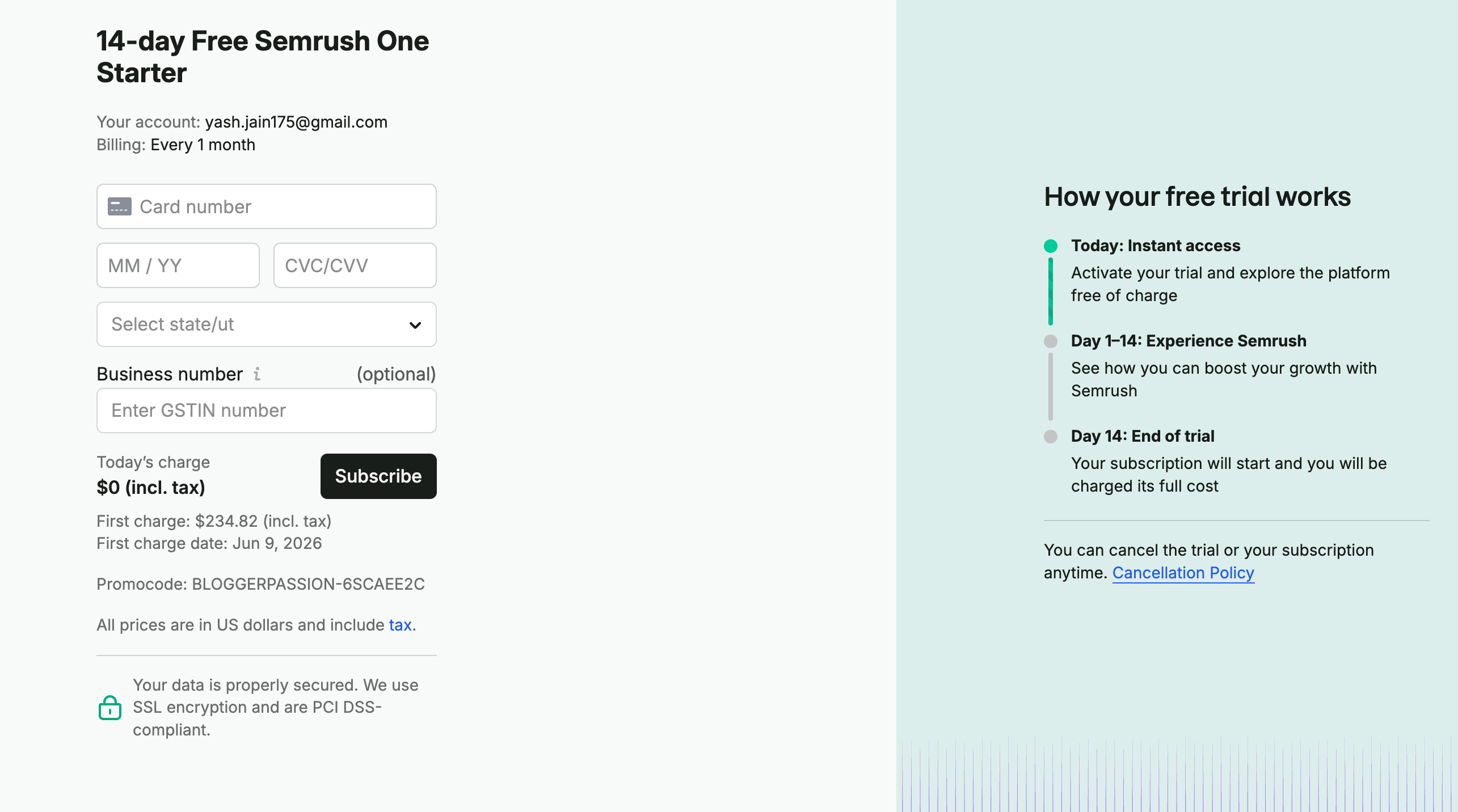
You will be able to see all the details related to your free trial on the right-hand side of the screen.
Once you fill in the payment details, click on “Try it Now” and you will be able to start using Semrush without any issues.
How to Avoid Getting Charged After the Trial? [Cancellation Process]
You have the complete freedom to cancel your free trial anytime during the 14 days. Here is how you can do it.
- Make sure you are logged into Semrush.
- Click here to get redirected to the cancellation page.
- Find the link titled “Active”, click on it, and later click on “Contact Us” from the drop-down box to move to the next step.
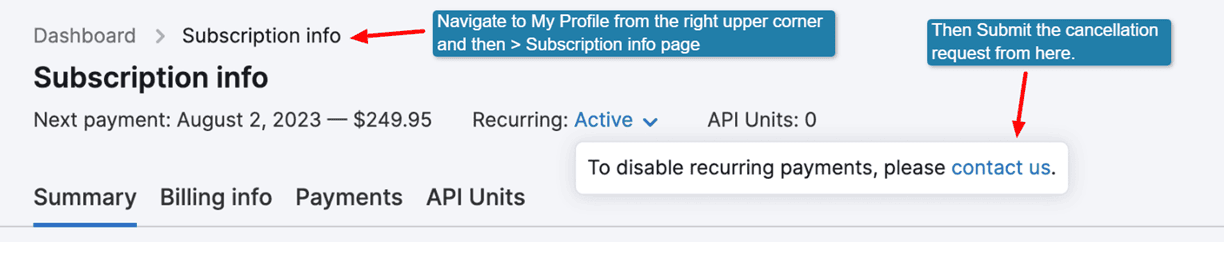
- Now, fill out the account cancellation form and submit it.
- The Semrush customer support team will contact you, simply ask them to end the free trial.
Important Note: Even after canceling, you’ll still have access until the 14-day trial ends.
So the safest approach is:
- Set a reminder for Day 12 or 13
- Cancel if you decide not to continue
Important Note: In case you have been charged after 7 days and you still want to cancel the subscription, then you only have 7 days refund policy. When you cancel the trial, your subscription will reset to the “free” one with a very limited functionality.
Which Trial Kit Should You Take? [Semrush One or Pro or Guru]
Semrush has now introduced a new plan called Semrush One, which bundles traditional SEO tools with AI search visibility features in a single package.
At the same time, Semrush continues to offer its older Pro and Guru plans, along with multiple standalone toolkits that come with their own trial periods. So the real problem bothering users is about choosing the right trial without wasting time or accidentally testing the wrong plan.
If this is your first time using Semrush and you’re unsure, then we recommend that you start with the Semrush One.
This toolkit gives you all the SEO features (Traditional & AI) free for 14 days. Just explore everything for 14 days. Then you have the option to cancel or downgrade later if you don’t need the AI features.
In simple terms, Semrush One combines two separate toolkits under a single subscription:
| What’s Inside Semrush One Trial | What It Does |
| SEO Toolkit | Keyword research, site audits, rank tracking, competitor analysis |
| AI Visibility Toolkit | Tracks how your brand appears in AI answers (ChatGPT, Gemini, Perplexity, Google AI) |
If you want access to both toolkits in a single trial, then testing the One plan makes sense.
If you’re only interested in traditional SEO features, you can choose either the Pro or Guru option from the SEO toolkit.
How the Two Approaches Differ (SEO vs One Trial)
| Area | SEO (Pro / Guru) | Semrush One |
|---|---|---|
| Focus | Google & classic SERPs | Google + AI search platforms |
| Keyword research | Search volume & difficulty | Keywords + AI prompts |
| Brand visibility | Google rankings only | Google + AI mentions |
| Competitor tracking | SERP-based | SERPs + AI answers |
| Workflow | SEO-only | SEO + AI visibility in one dashboard |
Which Semrush Trial is Most Suited in the SEO Toolkit? (Pro or Guru)
Semrush offers free trials on two plans inside its SEO toolkit — Pro and Guru.
Knowing which one better suits your needs will help you choose between the two and avoid overpaying.
Let me compare both plans side by side to clear the picture for you:
| Parameter | Pro Plan | Guru Plan |
|---|---|---|
| Trial Access | 14 Days Free | 14 Days Free |
| Project Tracking | Up to 5 projects | Up to 15 projects |
| Keyword Tracking | Up to 500 | Up to 1500 |
| Results per report | 10k | 30k |
| Keyword metrics updates | 250 | 1000 |
| Pages to crawl per month | 100k | 300k |
| Other Toolkit Access | No | No |
The Pro plan trial is ideal for the ones who are just starting and don’t have a vast website. Secondly it is ideal for website owners who need extra crawling ability and have thousands and thousands of pages.
If you are someone who can’t distinguish between the two, it is better to go for Guru as you pay 2 times more but get 3 times more features compared to the pro plan.
For beginners, the best way is to start with pro and upgrade to guru whenever required. But if you need to test Semrush on a considerably bigger project, consider the Guru free trial.
Other Available Trials:
In addition to the main plans, Semrush also offers short trials for individual toolkits, usually lasting 7 days.
Here is the list:
| Trial Name | Duration | Key Features |
|---|---|---|
| AI Visibility Toolkit | 7 Days | AI brand visibility analysis, SearchGPT, ChatGPT, Gemini insights, AI-based strategy recommendations |
| Traffic & Market Toolkit | 7 Days | Traffic overview, daily trends, market overview, competitor monitoring |
| Local Toolkit | 7 Days | Google Business Profile optimization, listing management, map rank tracking |
| Content Toolkit | 7 Days | AI Content Generation, Optimize Existing Content, and more. |
| Social Toolkit | 7 Days | Manage up to 10 profiles, unlimited content generation, unlimited post scheduling |
| Advertising Toolkit | 7 Days | Unlimited ad spend tracking, ad copy generation, competitor keyword tracking |
What Should You Test During Your Semrush Free Trial?
I have been using Semrush for more than 10 years. And my main reason is data accuracy. I tested a lot of SEO tools in my journey, but somehow Semrush always produces the most accurate data closest to Google Search Console.
For beginners, the learning curve is the biggest issue I want to share. You can check the full list of cons along with a detailed accuracy test in my Semrush review.
Anyway, let’s see how can you utilize your trial in a best possible way.
1. Check Your AI Search Visibility
This is available with Semrush One or the AI Visibility Toolkit trial.
Start by checking how your brand appears in AI-generated answers across platforms such as ChatGPT, Google AI, Gemini, and Perplexity.
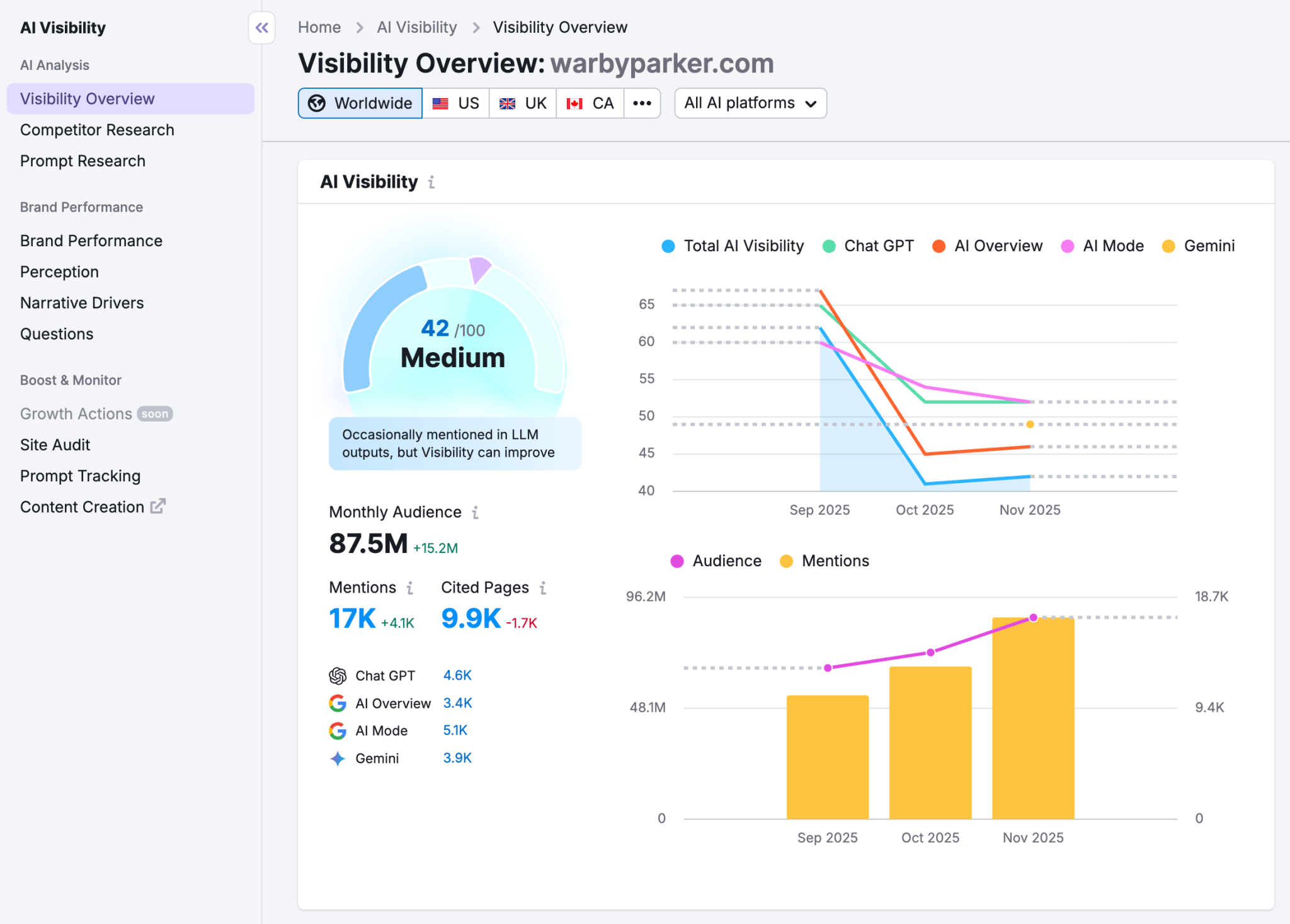
You can use Semrush to:
- See how often your brand is mentioned in AI answers
- Compare your AI visibility with competitors
- Find topics and prompts where competitors appear but your brand doesn’t
- Look for opportunities to improve your visibility in AI search
This gives you a view of search visibility beyond traditional Google rankings. Semrush’s current AI Visibility tools include visibility tracking, competitor research, and prompt research.
2. Explore the AI Prompts and Topics That Matter to Your Business
Use Semrush’s Prompt Research and related AI visibility reports to discover the questions and topics that trigger AI-generated answers in your niche.
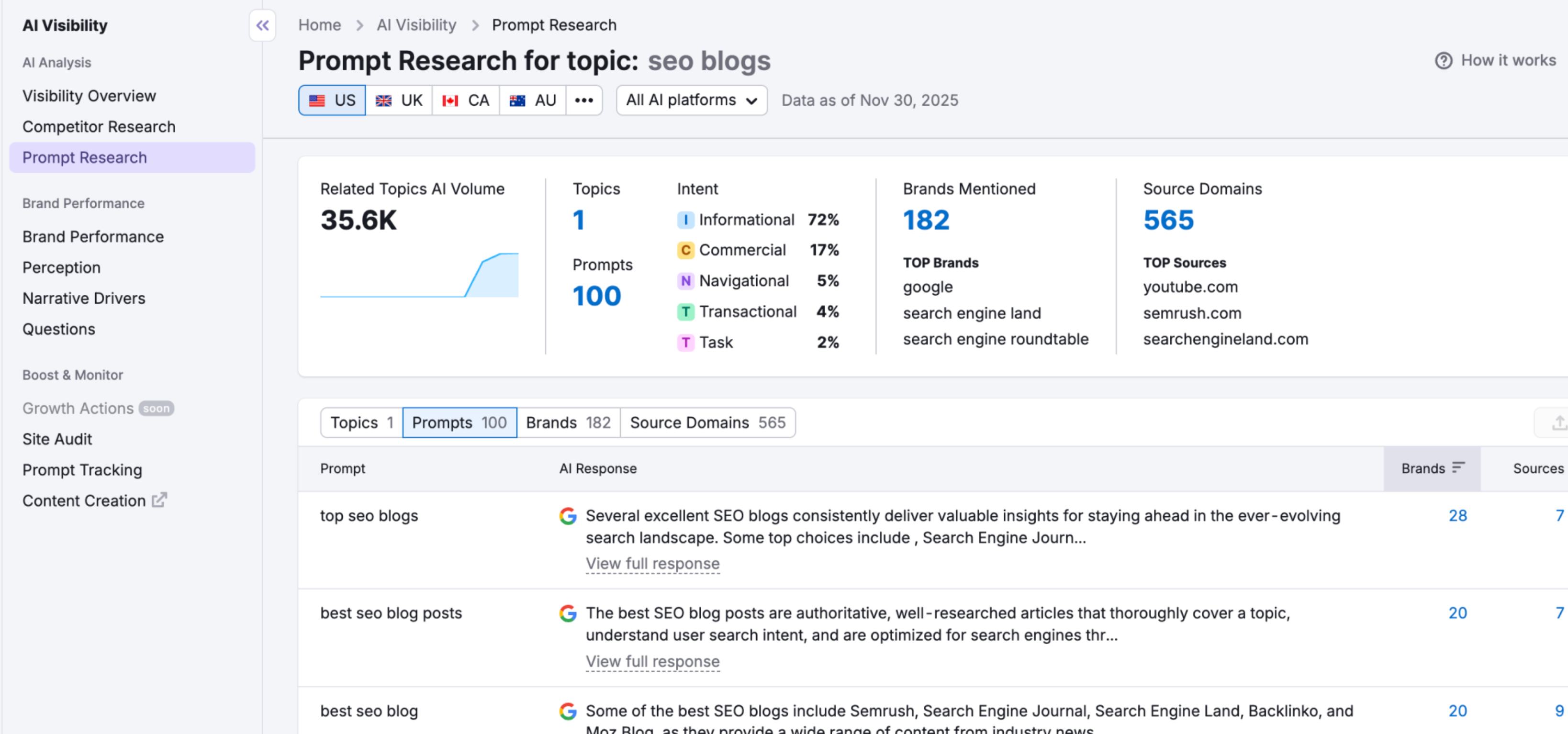
Instead of randomly testing prompts, look for:
- Questions your potential customers are asking
- Prompts where competitors are being mentioned
- Topics where your brand has little or no visibility
- AI answers that cite competing websites
Think of this as a way to discover AI-search opportunities. Don’t just check whether your brand appears. Semrush’s Prompt Research is designed to uncover relevant prompts and topics so that you can figure out the competitive gaps. Don’t miss it in your trial journey…
3. Compare Your AI Visibility With Competitors
If you’re looking to improve your visibility, enter your domain and a few direct competitors into Semrush’s AI Competitor Research.
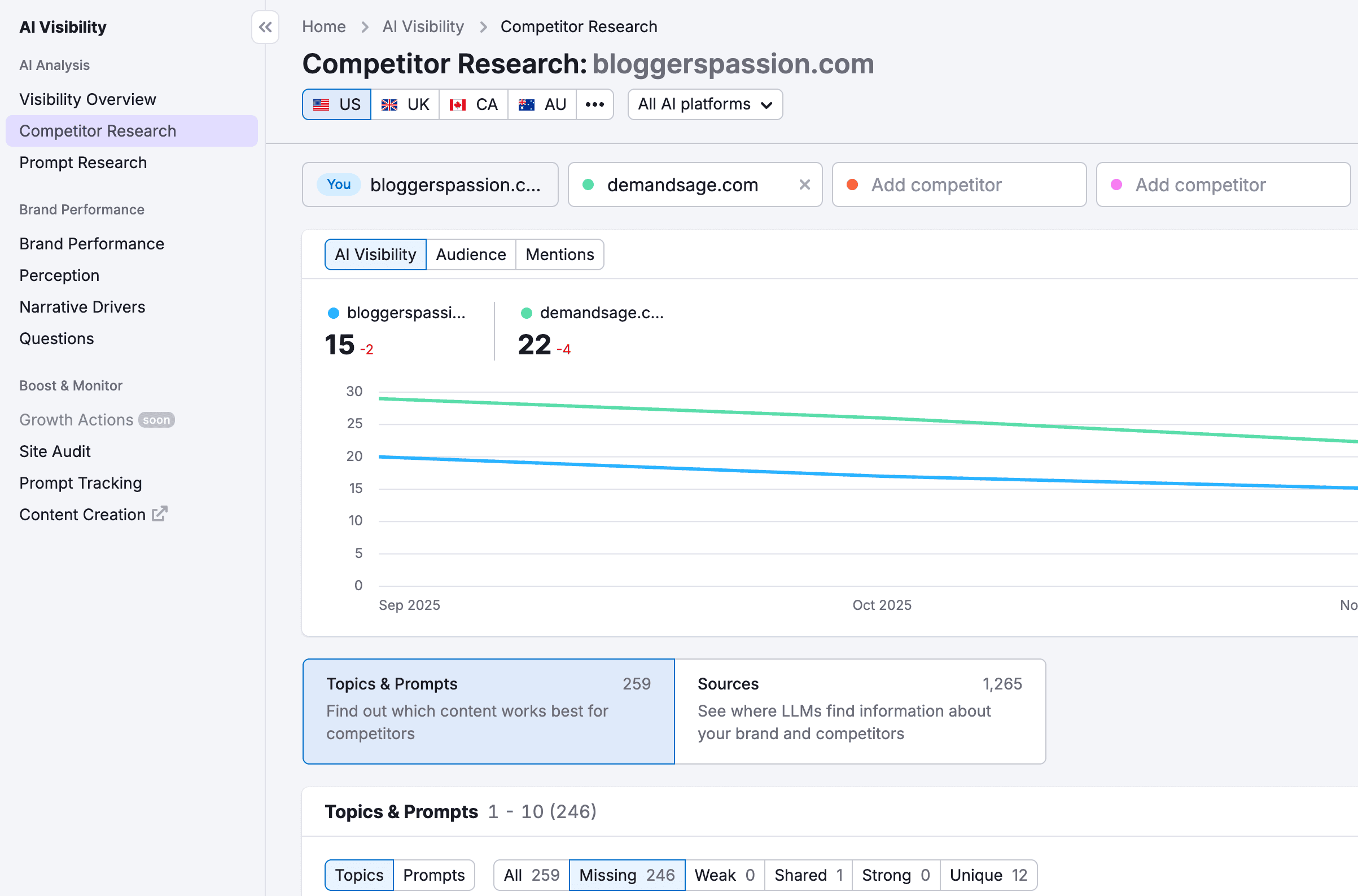
You can compare:
- Brand mentions
- AI visibility
- Topics where competitors are winning
- Prompts where competitors appear but your brand doesn’t
- Sources being cited for competing brands
This can reveal opportunities that traditional competitor research may miss. Semrush currently allows competitor comparisons within its AI Visibility tools and highlights missing prompts and competitive visibility gaps.
4. Analyze Your Own Website With Domain Overview
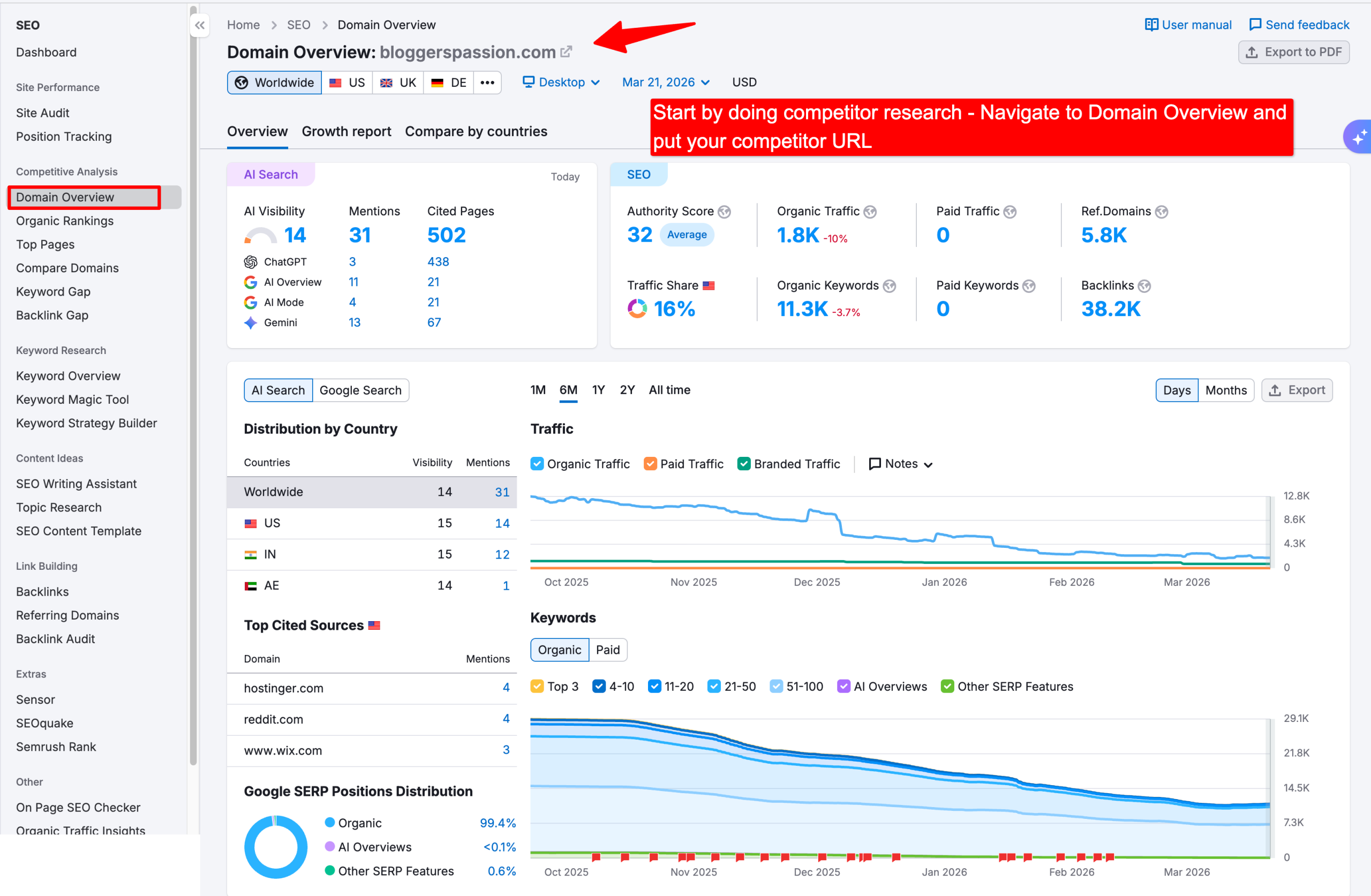
Next, enter your website into Semrush and get a quick overview of its organic search performance.
Look at things such as:
- Organic keywords
- Estimated organic traffic
- Top-performing pages
- Main competitors
- Keyword trends
- Backlink data
Don’t just look at the numbers. Use the report to identify what is working and where your biggest opportunities are.
For example, you might discover that a page that previously generated significant organic traffic has started losing rankings. That gives you a specific page to investigate instead of making changes across your entire website.
5. Analyze Your Backlink Profile
Use Semrush’s Backlink Analytics to understand your site’s backlink profile and compare it with competitors.
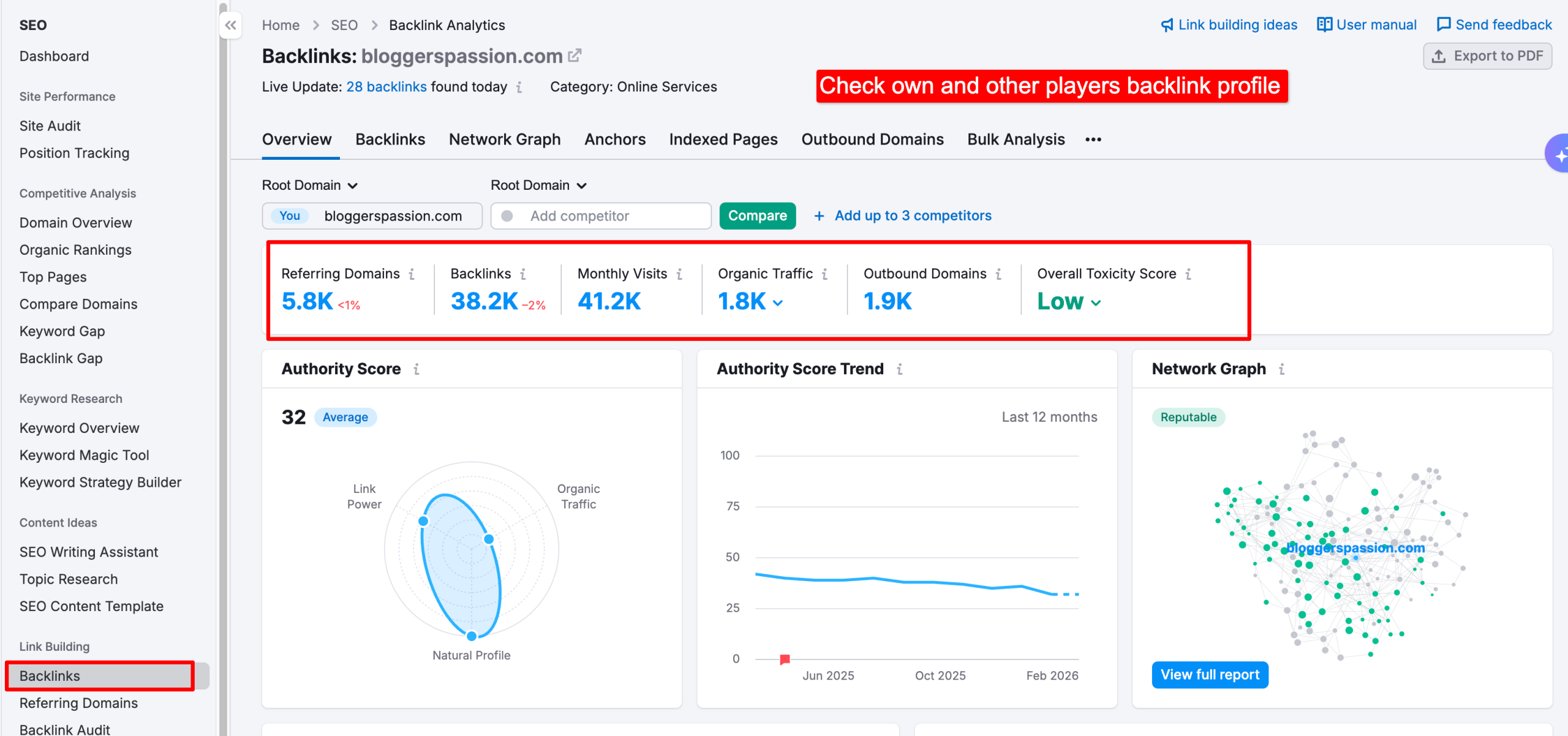
Pay particular attention to:
- Referring domains
- Backlink growth over time
- Link attributes
- Authority Score
- Competitor backlink profiles
- Potential link-building opportunities
One important clarification: Authority Score is a Semrush proprietary metric, not a Google ranking factor. Semrush describes it as a measure of the quality and influence of a domain’s backlink profile, incorporating factors such as backlinks, organic search traffic, and profile authenticity.
So don’t treat a low Authority Score as evidence that Google is directly suppressing your rankings. Use it as a comparative SEO metric instead.
6. Research Your Actual Search Competitors
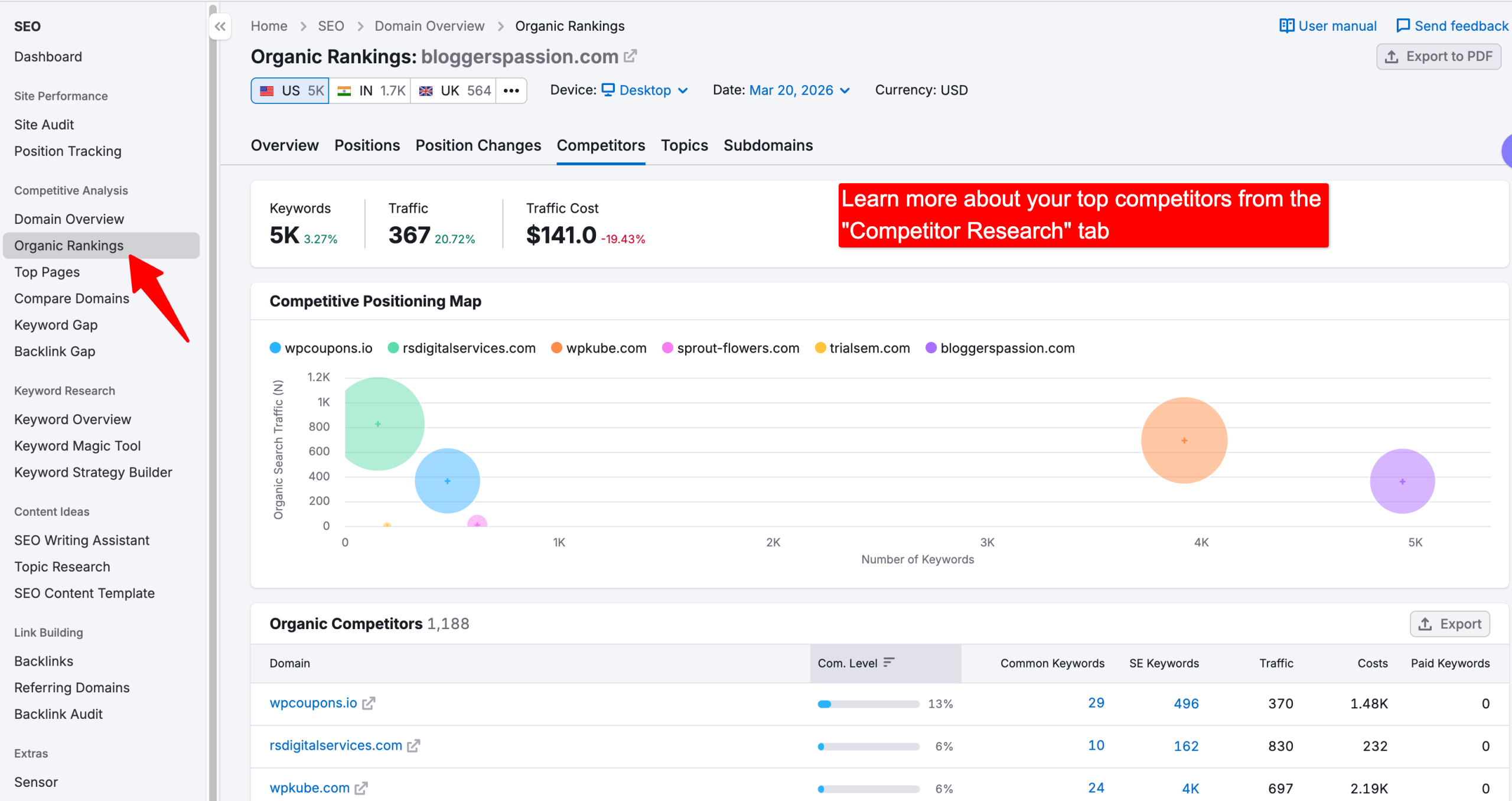
Don’t limit your competitor research to businesses you already know.
Enter your website into Semrush’s competitive research tools and identify the sites competing with you for the same search queries.
Then look for:
- Keywords they rank for that you don’t
- Pages generating their organic traffic
- Topics they cover better than you
- Content gaps
- Backlinks that point to competing pages
The goal isn’t to copy competitors. It’s to understand why Google may be choosing their pages over yours and where you have a realistic opportunity to compete.
7. Find New Keyword Opportunities
Use the Keyword Magic Tool in your trial to find relevant keywords and topics that could support your content strategy.
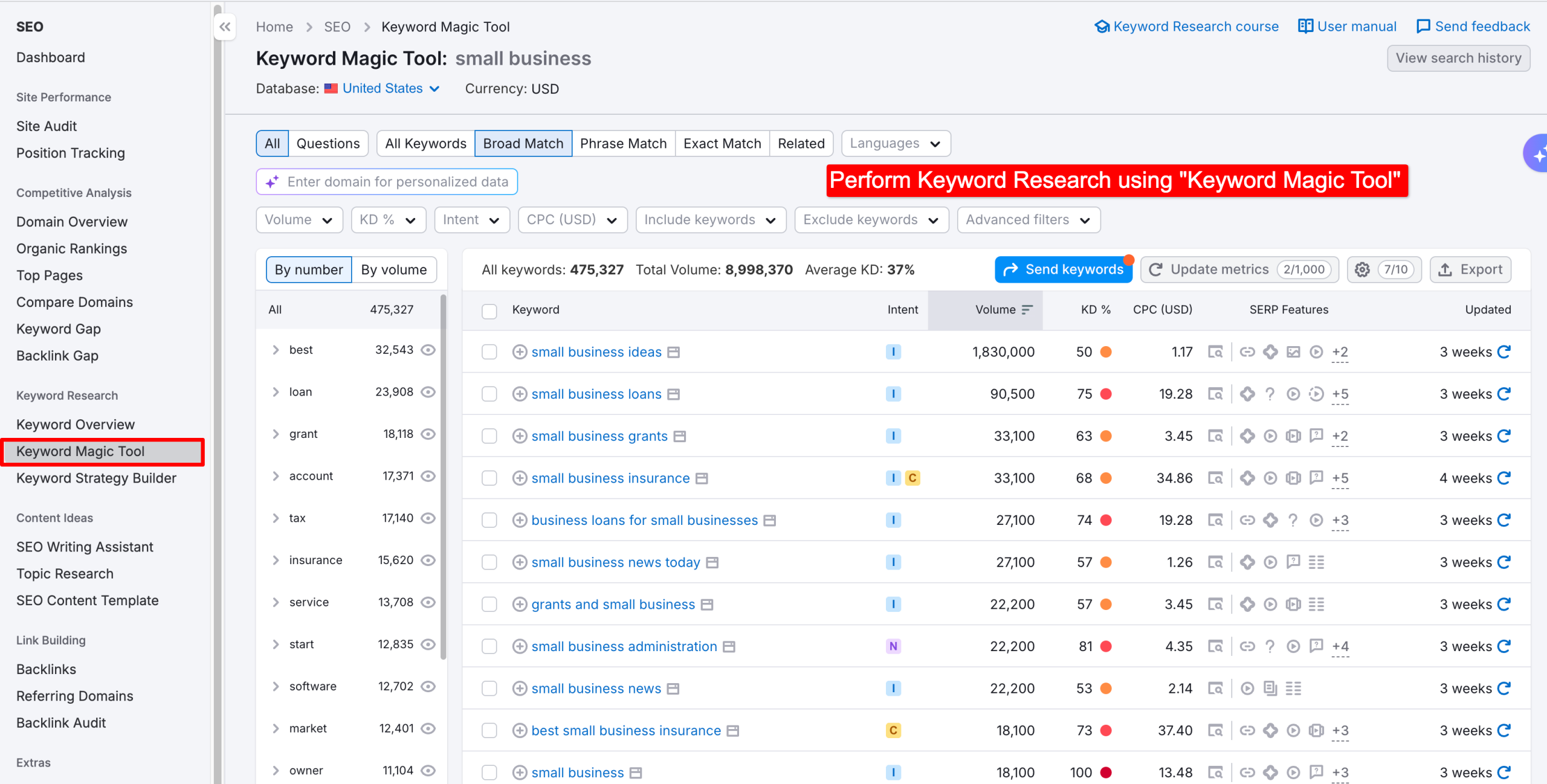
Start with a broad topic related to your business, then narrow the results by factors such as:
- Search intent
- Keyword difficulty
- Search volume
- Related terms
- Competitive landscape
Don’t simply chase keywords with the highest search volume. During a limited trial, focus on finding realistic opportunities that fit your website and audience.
8. Test Semrush Content Tools
If your trial includes the Content Toolkit, spend some time testing its content research, optimization, and AI-assisted writing features.

Depending on the current toolkit and plan, you can explore features such as:
- Content ideas
- Topic research
- SEO content briefs
- Content optimization
- AI-assisted content creation
- Brand voice features
The current Content Toolkit includes content ideas, SEO briefs, content optimization, AI writing features, and brand voice capabilities. Semrush currently lists the Content Toolkit at $60/month and offers a 7-day free trial.
Don’t use the trial simply to generate dozens of AI articles. A better approach is to take one of your existing pages and see whether Semrush can identify meaningful opportunities to improve its topic coverage, search intent, and optimization.
Make the Most of Your Semrush Trial
You don’t need to test every Semrush feature to get value from your trial.
A practical approach is to start with your own website, identify your biggest SEO and AI-search opportunities, investigate your competitors, and then use Semrush’s keyword, backlink, and content tools to decide what you should work on next.
That way, when the trial ends, you’ll have more than a list of features you’ve tried—you’ll have a clearer picture of what is actually worth improving on your website
Who Should Not Grab the Trial?
I am a fan of Semrush. It is valuable for my site. But not for all.
For example, if you aren’t at the right stage, then you might find this tool overwhelming.
I feel that if you are in this stage of your business, then it would be a waste of 14 days…
– If you have 0-5 posts and no data in the search console, then Semrush won’t have much to crawl. I guess once your site traffic grows, then you can start your Semrush journey.
– Semrush provides thousands of data points. It is very easy to spend 6 hours looking at your competitor’s backlinks and 0 hours writing the post that will actually beat them. If you don’t have a disciplined content schedule yet, this tool will just become a high-tech distraction.
– If your only goal is to find sites to spam for backlinks, don’t bother. Semrush is great at analyzing backlinks, but it doesn’t “get” them for you. Link building is still manual, high-effort work.
Semrush Recent Updates & Changelog:
- As of May 2026, the AI Database has expanded to 261 million LLM prompts
- As of April 28, 2026, Semrush has become part of the Adobe company.
- In March, Semrush added an LLM Gap analyzer feature which can track your brand mentions in multiple LLMs platforms including ChatGPT, Perplexity, and Google AI Overviews
- In Jan 2026, Semrush made a major change in the interface. Now offering features in different toolkits rather than the classic two plans, Pro & Guru. The addition of the AI toolkit is the major change.
Final Words:
I started using Semrush back in 2015, at a time when there was no extended trial option available. If you’re new to the platform today, the current trial period is honestly the best way to get started without risk.
By this point, you don’t need more feature lists or comparisons — you just need a clear starting direction.
If you want to explore everything Semrush offers in one go, starting with the One plan makes the most sense.
It gives you a complete picture of both traditional SEO and how discovery is evolving through AI-powered platforms. You can always downgrade later if you find that you don’t need certain features.
Just keep two things in mind:
- A credit card is required to activate the trial
- If you don’t plan to continue, cancel before the trial period ends to avoid charges
Once canceled, your access will still remain active until the last day, so there’s no downside to testing things properly.
Explore More:
- Semrush vs Moz [Which is Good?]
- Semrush Ahrefs [Based on 2026 AI SEO Features]
- Moz Free Trial [7 Days Full Access]
FAQs:
What is Semrush One?
Semrush One is a newer toolkit designed for the AI-driven search era. It includes all traditional SEO features along with AI-related capabilities such as brand visibility tracking and AI-driven insights.
If you want to explore everything Semrush offers in one place, this option gives the most complete experience during the trial period.
Which trial option is best for beginners?
For beginners:
1. Pro → simplest and least overwhelming
2. One → better if you want to explore everything and decide later
If you’re unsure, starting with Semrush One and downgrading later is a safe option.
Is a 30-day trial still available?
No. Semrush discontinued the 30-day trial in May 2023. Currently, the longest trial period available through official offers is 14 days.
Can I try it without adding a credit card?
No. A credit card method is required to activate the trial. You’re not charged when the trial starts. Billing only happens if you keep the plan after the trial ends.
Is there a Semrush lifetime free version?
There’s no lifetime free version of the full platform. However, Semrush does provide:
– A limited free account
– Several free tools with usage restrictions. These are useful for quick checks, but they don’t replace a full trial.
Can Semrush be used for free at all?
Yes, in two ways:
– By using the limited free tools and a Semrush free account
– By starting a time-limited trial that unlocks premium features
For serious testing, the trial option is far more useful.
What happens if I forget to cancel the trial?
If you forget to cancel:
– Your account is upgraded automatically
– You’re charged for the selected plan
That said, Semrush offers a 7-day refund window after billing for new subscriptions.


Leave a Comment
Your email address will not be published. Required fields are marked *