


Orphan pages are pages on your site with no internal links pointing to them. That means Google’s crawlers can’t find them. Neither can your blog readers.
In this guide, you’ll learn what orphan pages are, why they hurt your rankings, and how to find and fix them.
What Is An Orphan Page?
An orphan page is a page without any links. That means these pages are not linked to from another section of your website. It is just like a home without an address, a city without a pin code.
Orphan page, as the name itself defines it, is “a page without a parent link, i.e, an orphan”.
These pages are completely cut off from your site’s structure.

Some orphan pages happen by mistake. For instance, you published a blog post or redesigned your site, and forgot to link to it.
Others are intentional. For example, landing pages, ad-specific pages, or private content shared only through email. These are intentionally orphaned so that regular visitors don’t find them through navigation.
The accidental ones are the problem. They happen because of site migrations, deleted category pages, or simply forgetting to interlink a new post.
And if you’re running a blog with hundreds of posts, chances are you have a few orphan pages right now without even knowing it.

How Orphan Pages Hurt Your SEO?
Orphan pages cause three problems.
1. Google can’t find them: Google finds new pages by following links. If there are no links to a page, Google won’t know it exists. Simple as that.
2. They won’t rank: Every internal link passes some ranking power to the page it points to. Your orphan pages won’t get that link juice. So even if the content is amazing, Google has no reason to rank it.
3. They waste Google’s crawl budget: Google can only crawl so many pages on your site each day. If it spends time on orphan pages, that’s less time for the pages you actually care about.

These pages are bad for SEO for so many reasons, including:
- They prevent you from getting more traffic from Google
- Low conversion rates
When we mentioned the links, they include every link, such as;
- Links from other sites
- Links from sitemap
- Links from your own articles that are relevant (internal links)
- Home page links
- Category links and so on
So what’s the bottom line?
If an article or a page on your website is essential to you, you should definitely add links to that page from other relevant pages on your site to make Google index that page first and rank it afterwards.
Read: Silo Structure for SEO: The #1 Way to Outrank Even Authority Sites In 2026
Orphan Pages vs Dead-End Pages
These two sound similar, but they’re opposite problems.
An orphan page has no incoming links. Other pages don’t link to it.
A dead-end page has no outgoing links. People land on it but have nowhere to go next. They just leave.
Both are bad for SEO and user experience. But orphan pages are worse because Google might never index them in the first place.
| Feature | Orphan Page | Dead-End Page |
| Problem | No links pointing TO it | No links going OUT from it |
| Result | Google and readers can’t find it | Readers get stuck and leave |
| Example | A blog post you never interlinked | A 404 page with no navigation |
| How to fix | Add internal links to the page | Add internal links from the page |
Here are a few examples of dead-end pages on a website.
- 404 pages, which are also treated as broken links
- Author pages (make sure to include links to either the about us page or other important pages on your site instead of just putting some information about the author in author pages, so that you can avoid dead-end pages)
- eCommerce checkout pages (what are you doing when someone makes a purchase from your eCommerce store? If you’re not giving them any further options, either to check out related products or something, they will just exit your site.)
Read: How to Start a Blog in 2026 and Make Over $10,000 Every Month from it [Step By Step Process]
How to Find Orphan Pages (3 Methods)
You can’t fix orphan pages if you don’t know they exist. Here are three tools that make it easy to find them.
Method 1: Using Rank Math PRO
If you use WordPress, use Rank Math PRO, as it has a built-in orphan content detector.
Here’s how to use it:
- Install and activate Rank Math PRO
- Go to Rank Math SEO > Links in your WordPress dashboard
- Navigate to the Posts section
- Click the Orphan Posts tab
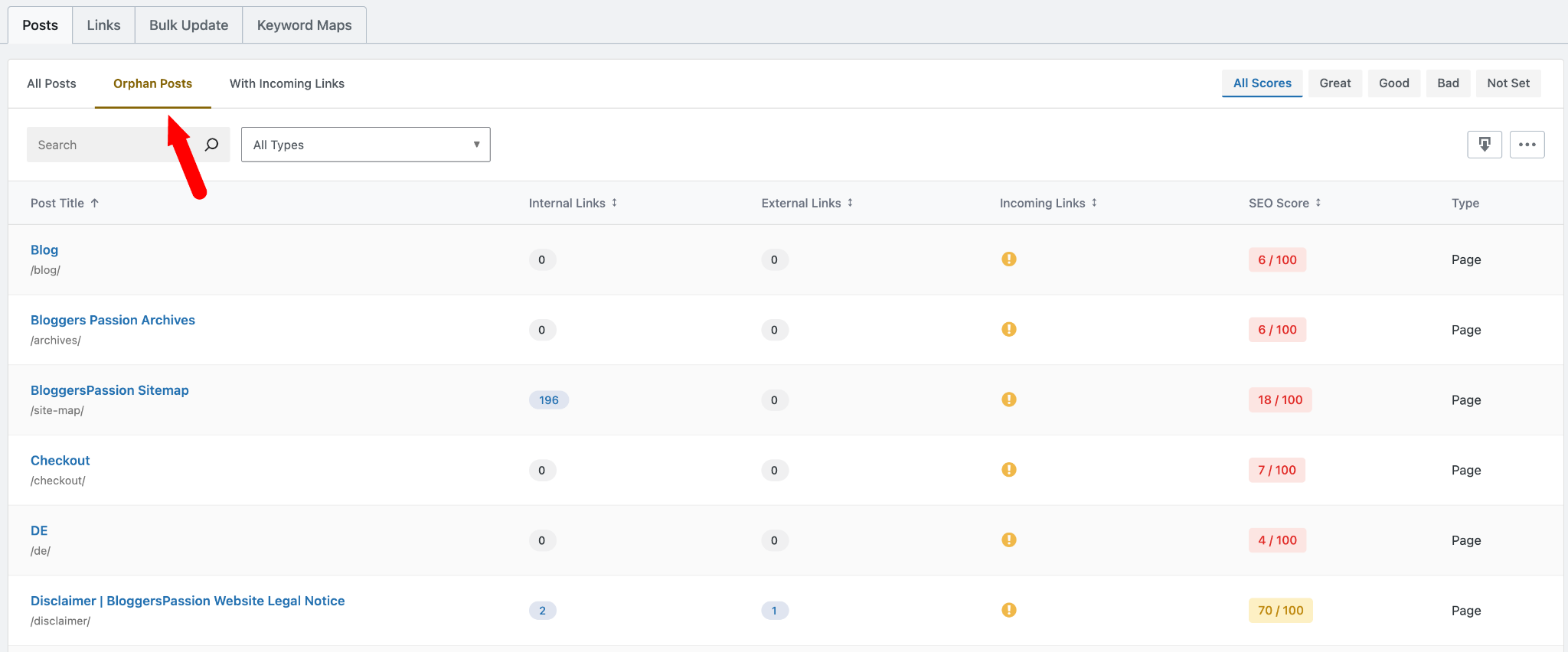
Rank Math will instantly show every post with zero incoming internal links. Each orphan post gets a clear warning indicator so you can spot them right away.
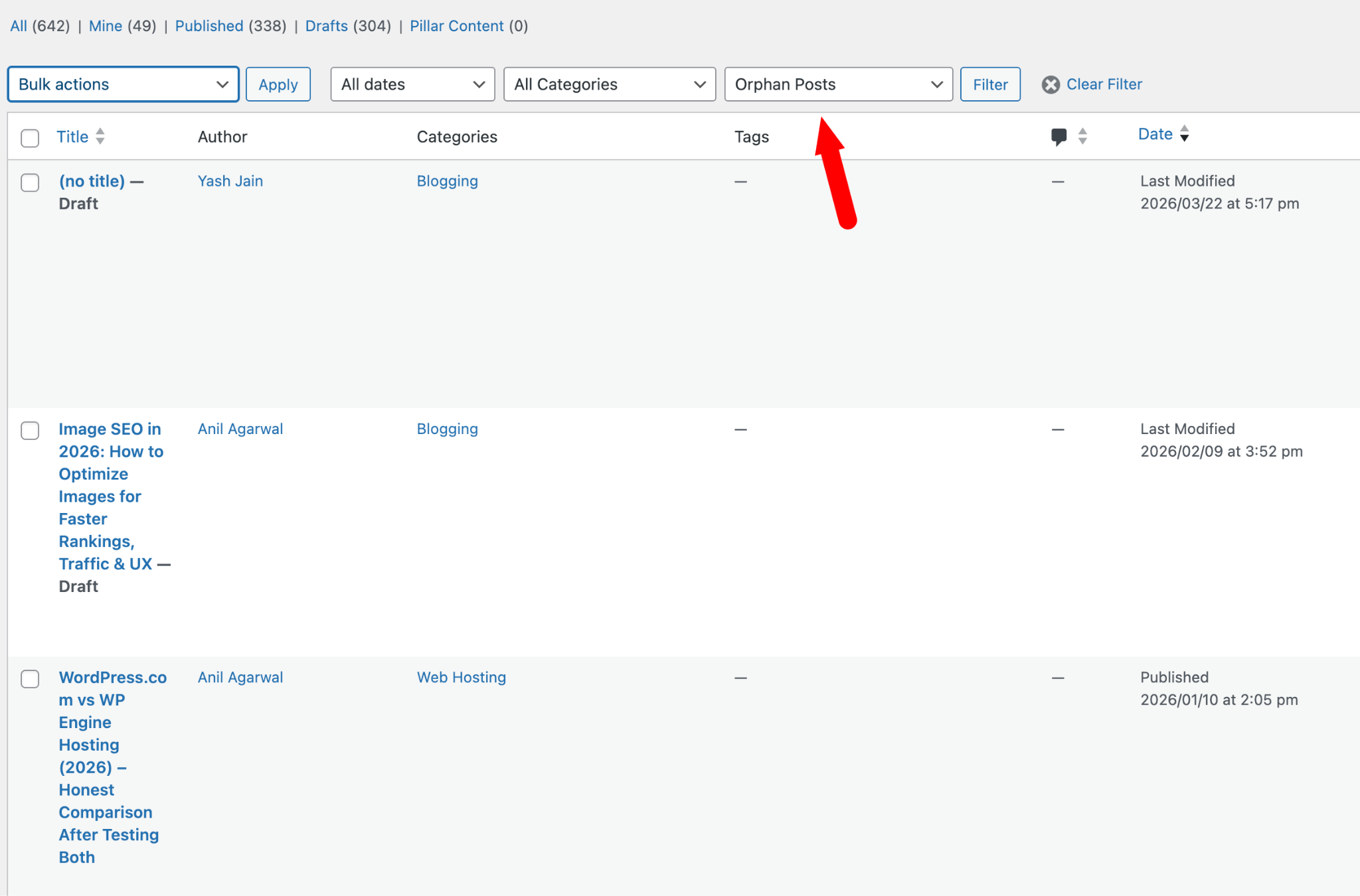
You can also find orphan pages from Posts > All Posts. Select Orphan Posts from the dropdown menu and click Filter. Rank Math will display all orphan posts, pages, and custom post types on your screen.
Method 2: Using Semrush Site Audit
Semrush is the tool we use at BloggersPassion. Its Site Audit feature can find orphan pages in minutes.
Here’s how:
- Log in to Semrush and go to Site Audit under “On Page & Tech SEO”
- Enter your domain and click Start Audit
- Wait for the crawl to finish
- Click the Issues tab
- Type “orphan” in the search bar
- Semrush will show all orphan pages found in your sitemap
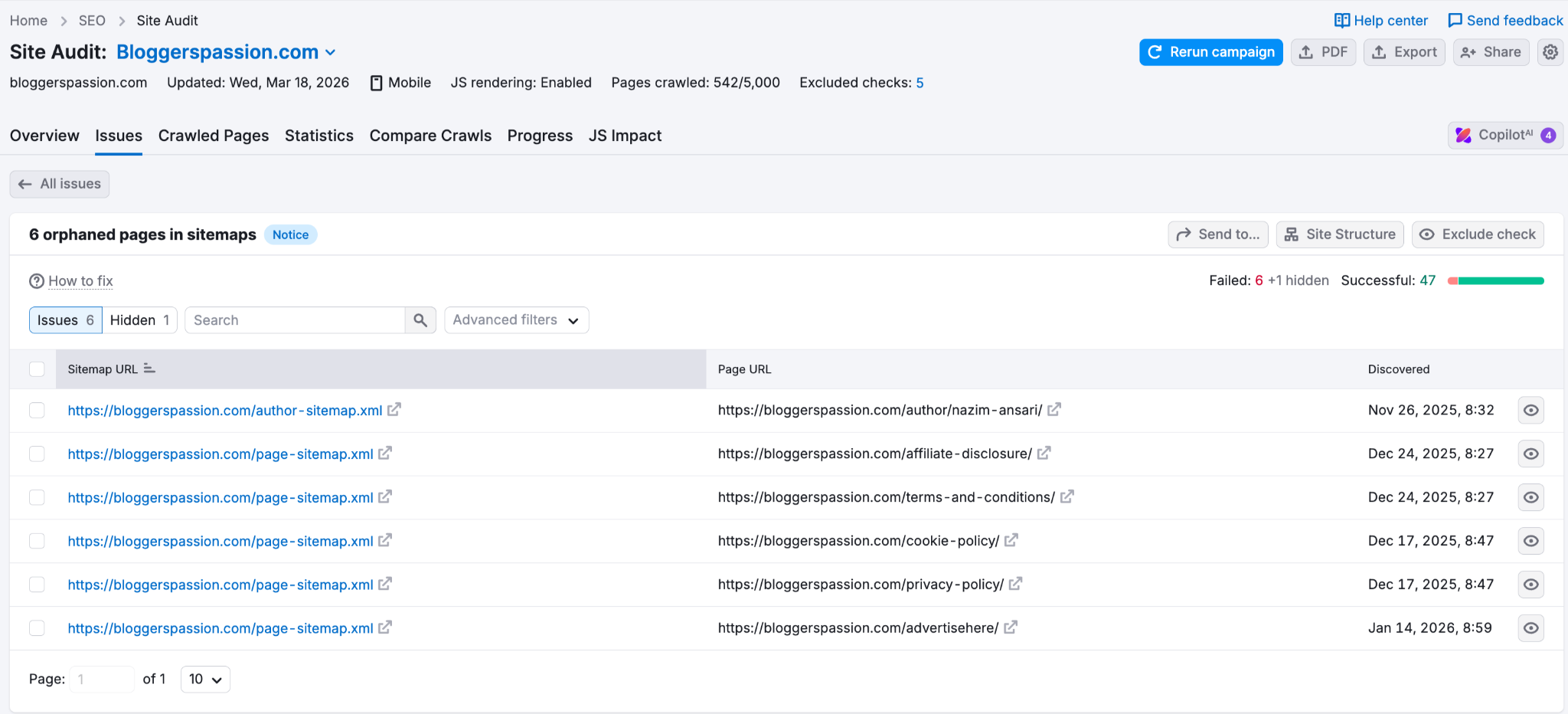
For even better results, connect your Google Analytics account. Semrush will then compare your sitemap URLs with pages that received traffic. Any page that exists but gets no traffic and has no internal links gets flagged as orphaned.
Method 3: Using Screaming Frog
Screaming Frog is a desktop crawler that SEO pros use for technical audits. It’s free for up to 500 URLs.
Here’s the process:
- Open Screaming Frog and enter your website URL
- Let it crawl your entire site in Spider mode
- Go to Configuration > API Access > Google Search Console and connect your GSC account
- Also, upload your XML sitemap under Configuration > Sitemaps
- Run the crawl and wait for it to finish
- Click Crawl Analysis at the top
- Check the Sitemaps and Search Console tabs for the “Orphan URLs” filter
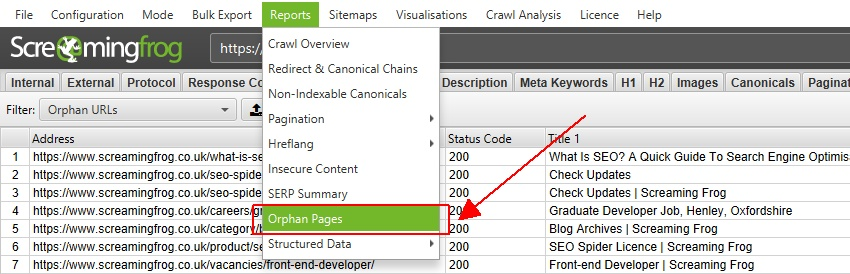
Screaming Frog compares the URLs it found during its crawl of your internal links with the URLs in your sitemap and Search Console. Any URL that appears in your sitemap or GSC but wasn’t found through internal links is an orphan page.Here’s a detailed tutorial from Screaming Frog on how to find and fix them easily.
How to Fix Orphan Pages?
Once you’ve found your orphan pages, you need to decide what to do with each one. Here’s a simple framework.
Option 1: Add internal links
This is the simplest fix.
If the page is useful, find 2 to 3 related posts on your site and add links to the orphan page. That’s it.
For example, if you have an orphan post about “long-tail keywords,” link to it from your posts on “keyword research” and “SEO for beginners.”
You just need to know how to do interlinking to other posts that are relevant, and your orphan pages problem is solved instantly.
Make sure to fetch as Google once you start updating all your blog posts and pages with relevant internal links.
Option 2: 301 redirect it
If the page is outdated and you have a better version covering the same topic, redirect the old URL to the new one.
This will also pass link juice from the old page to the new page. For example, you wrote a “best SEO tools 2023” post. You now have a 2026 version with better search intent. Redirect the old URL to the new one.
Option 3: Noindex it
Some pages are orphaned on purpose. Ad landing pages, private-only content, email-only offers. You don’t want Google indexing these. Add a noindex tag to tell Google to skip them.
Option 4: Delete it
If the page has no traffic, no backlinks, and no value, just delete it. No point keeping such thin content on your site. But check Google Search Console first. If the page has any backlinks, use a 301 redirect rather than deleting it.
Not sure which option to pick? Ask yourself:
- Is it completely worthless? Then, delete
- Is this page still useful? Then, add internal links
- Is there a newer version? Then, use a 301 redirect
- Is it intentionally hidden? Then, Noindex
FAQs
Here are a few interesting questions about orphan pages that you might find useful for dealing with them better in 2026 and beyond.
An orphan page is one with no incoming links from any other page on the same website.
Orphan pages happen for a bunch of reasons, such as old pages get unlinked, site structure breaks, or you simply forget to add internal links. Just make sure to add internal links to every post and page you create.
Yes, having too many orphan pages is bad for SEO. A few won’t hurt. But when they add up, problems start: users can’t find those pages, Google struggles to index them, and your site structure gets messy.
Find them using a tool like Semrush, Screaming Frog, or Rank Math. Then add internal links from related posts on your site. If the page is outdated, 301 redirect it. If it’s useless, delete it.
Orphan pages have no internal links pointing to them, so users can’t find them, and search engines can’t index them. Broken links, on the other hand, lead nowhere; click on them and you’ll land on a 404 page (“page not found”).
Yes, every website should include an XML sitemap as it makes it easier for Google to discover the pages on your site. That means whenever you publish an article on your site, it gets added to your sitemap so search engine crawlers can easily find and index your newly published content faster.
Run a site audit using Semrush or Screaming Frog. These tools help you easily find the orphan pages without any links pointing to them.
Go to Site Audit > Issues tab > type “orphan” in the search bar. Semrush will show all orphan pages found in your sitemap.
Final Thoughts
Every page on your site must have at least one internal link. Without it, Google can’t find it, and your readers won’t either.
Pick one tool, such as Semrush or RankMath. Run a site audit today. Find your orphan pages and fix them. Start with the pages with the most potential to drive traffic.
That one small fix can make a real difference in your rankings.
Did you like this guide on finding orphan pages? Do you have any more questions? Do let us know in the comments.


![How to Level Up Your Blogging Skills [2026 Complete Guide]](https://bloggerspassion.com/wp-content/uploads/2019/12/blogging-skills-300x157.jpg.webp)




Hi Anil Sir,
This is a very comprehensive guide on Orphan Pages. I love to find orphan pages using SEMrush and Screaming Frog tool.
I think that Orphan pages are common on sites that are publishing content on high Quantity.