


You’re publishing a lot of content. Building a ton of backlinks. You’re doing everything right.
But… your search rankings keep going down.
The problem might be toxic backlinks.
Bad backlinks come from spammy, irrelevant, or low-quality sites linking to you. And they can hurt your rankings without you realizing it.
The good news? You can fix it.
In this guide, you’ll learn exactly how to identify toxic backlinks on your site, when you actually need to worry about them (hint: not always), and how to remove them step by step using free and paid tools.
Maintaining a good backlink profile can really:
- Improve your site’s overall traffic
- Grow your website’s search rankings
- Boost your site’s organic visibility and so on
So let’s get into the details of how to remove toxic backlinks from your site.
How to Remove Bad Backlinks: A QUICK Guide for Newbies

What Are Toxic Backlinks?
Toxic backlinks are links from spammy or low-quality websites pointing to your site.
You can consider a backlink as a bad or toxic link when it is coming from any of the following sources;
- Sites that are penalized by Google
- Adult content sites
- Illegal content sites
- High spam blog directories
- Automatic link-generating sites
Think of backlinks as votes.
- A link from a trusted site tells Google your content is valuable
- A link from a spammy site sends the opposite signal
Not sure about the difference? Check out our guide to the types of backlinks to understand which ones help and which hurt.
For example, one link from a trusted site like Microsoft or HubSpot can help your rankings.
Not every low-quality link is dangerous. Google has gotten VERY good at ignoring spammy links on its own.
But when your backlink profile is full of toxic patterns, like paid links, PBN links, or exact-match anchor text from irrelevant sites, that’s when problems start.
Here are a few reasons to remove bad backlinks:
- They can hurt your search rankings.
- They can trigger Google penalties.
- They increase your site’s spam score.
- They can impact your traffic, leads, and sales.
In short, toxic backlinks can damage your SEO performance and site authority if you ignore them.
Tools like Semrush can help you easily detect these toxic links.
Common Sources of Bad Backlinks
Not all bad backlinks look the same. Some you create by mistake. Others show up without you doing anything.
Here are the most common sources of toxic links:
| Source | Why It’s Harmful | What to Do |
| Paid links | Violates Google’s spam policies. Sites selling links often get penalized. | Don’t buy dofollow links. Use rel=”sponsored” or nofollow for sponsored content. |
| Link exchanges | Excessive reciprocal links look unnatural, and it’s a black hat SEO tactic. | Avoid “you link to me, I’ll link to you” deals. |
| Private blog networks (PBNs) | High risk. Google actively penalizes them. | Avoid them completely. |
| Low-quality directories | Built only for link manipulation. | Submit only to trusted directories like Google Business Profile or Yelp. |
| Blog comment and forum spam | Automated or forced links get flagged as spam. | Share links only when they add real value. |
| Link building bots | Creates toxic backlink patterns quickly. | Avoid any service that promises hundreds of backlinks overnight. |
| Negative SEO attacks | Competitors may build spammy links to your site to hurt your rankings. | Monitor your backlink profile every month. John Mueller says these rarely cause serious problems. |
If you want to avoid these toxic links entirely, check out our list of link building mistakes every beginner should know about.
Most of the time, you won’t even know these links exist until you run a backlink audit. Which brings us to the next section.
When Should You Actually Worry About Toxic Backlinks?
Here’s something most guides won’t tell you: Google automatically ignores the majority of bad backlinks.
So if you see a few low-quality links in your backlink profile, don’t panic. It’s totally fine.
In a Reddit thread about negative SEO, Google’s John Mueller said that if your competitors are building spammy links to your site, those links probably won’t have ANY effect.

So when SHOULD you take action?
You need to worry when you see one or more of these signs:
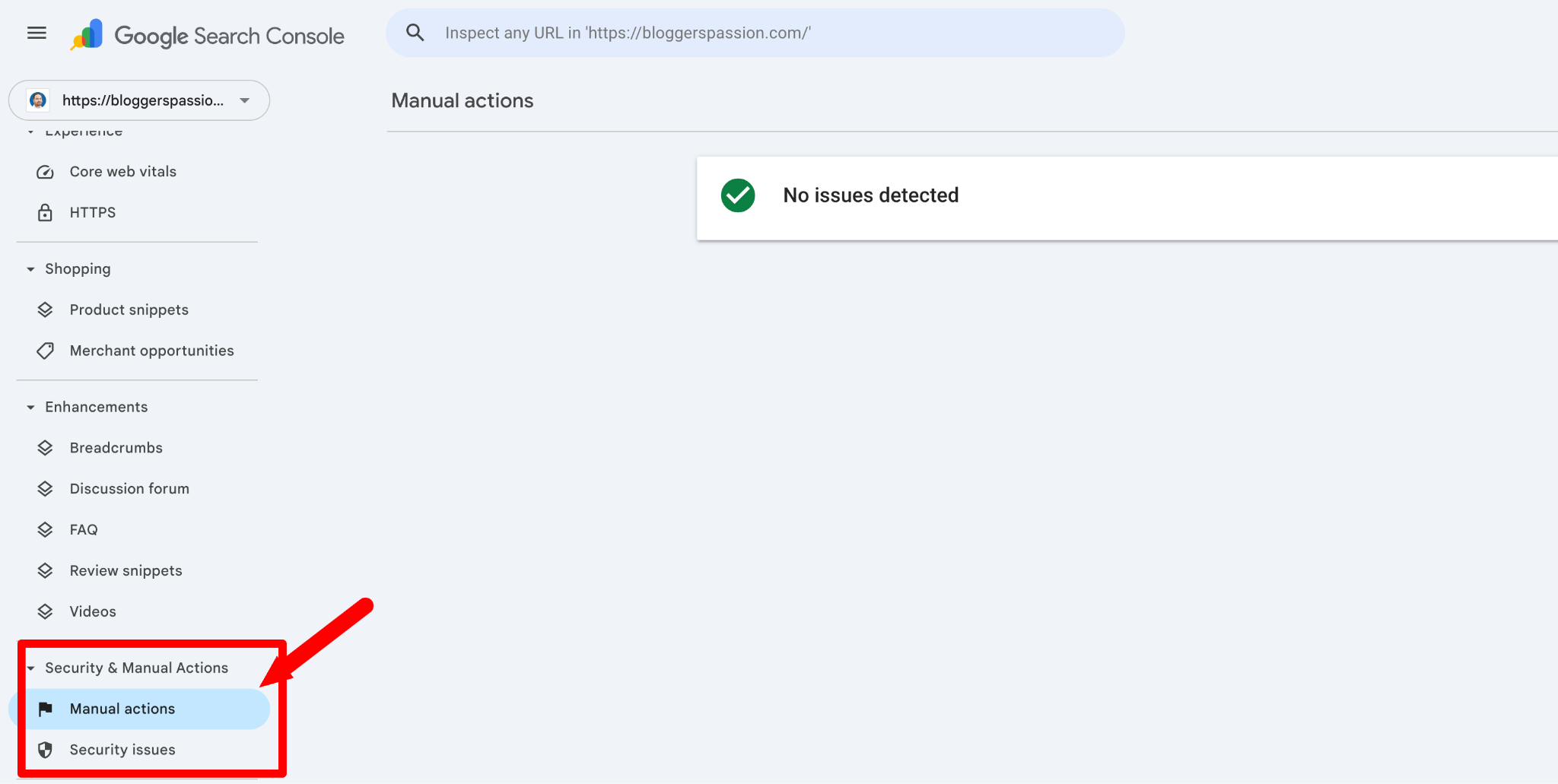
Google has issued a manual action against your site (check this in Google Search Console under Security & Manual Actions > Manual Actions).
You’ve bought links before or used shady link building tactics in the past.
If none of these apply to you, you’re probably fine. Focus on creating great content and building high-quality links, rather than worrying about every spammy link pointing to your site.
But if any of those warning signs sound familiar, it’s time to audit your backlinks. Here’s how.
How to Find Toxic Backlinks on Your Site?
There are two ways to find bad backlinks. One is free. The other gives you way more data.
Method 1: Check Google Search Console (Free)
Google Search Console shows you every site that links to yours. Although it’s limited, it does the job.
Here’s how to do it:
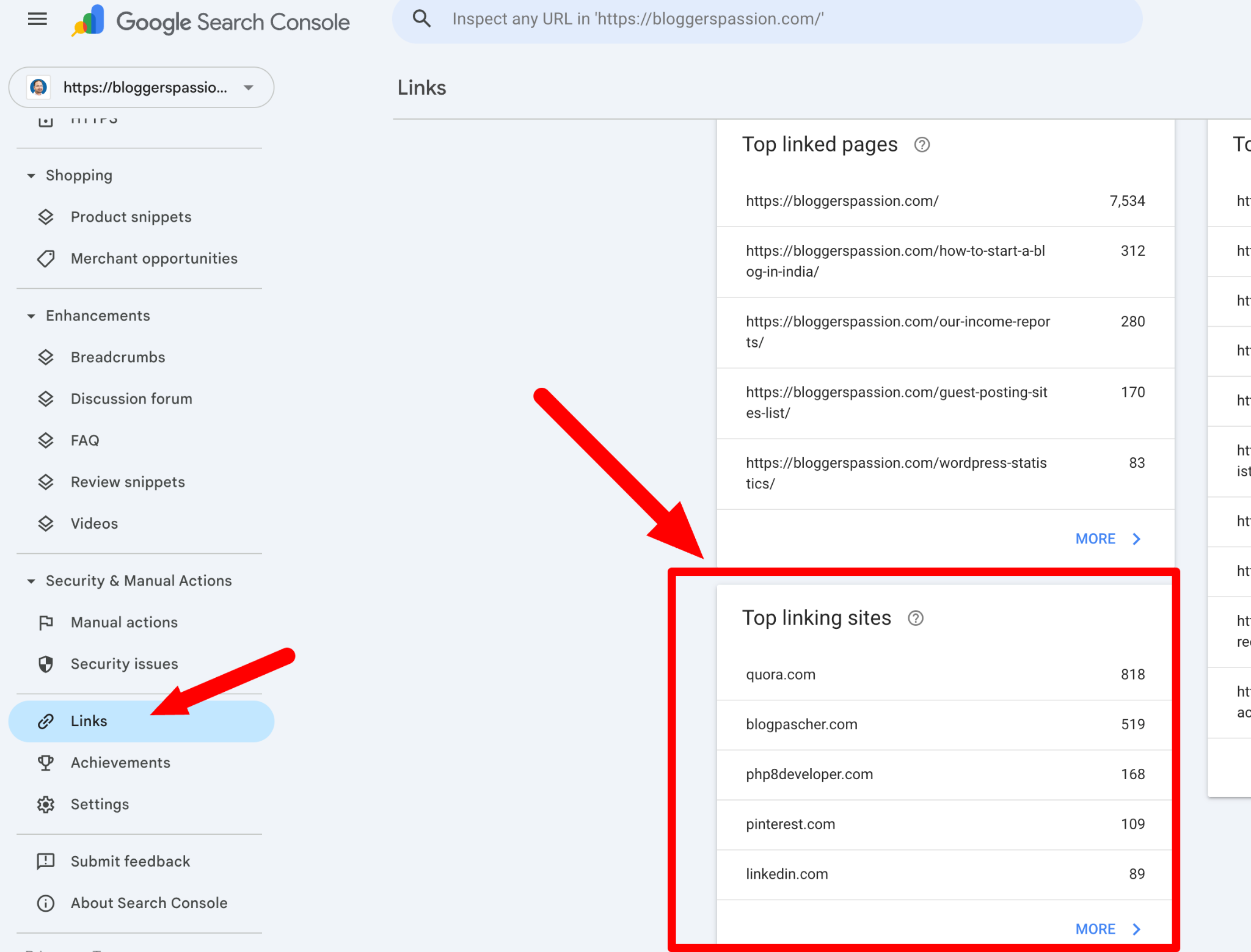
- Log in to Google Search Console
- Click “Links” in the left sidebar
- Under “Top linking sites,” click “More”
- You’ll see a full list of domains linking to your site
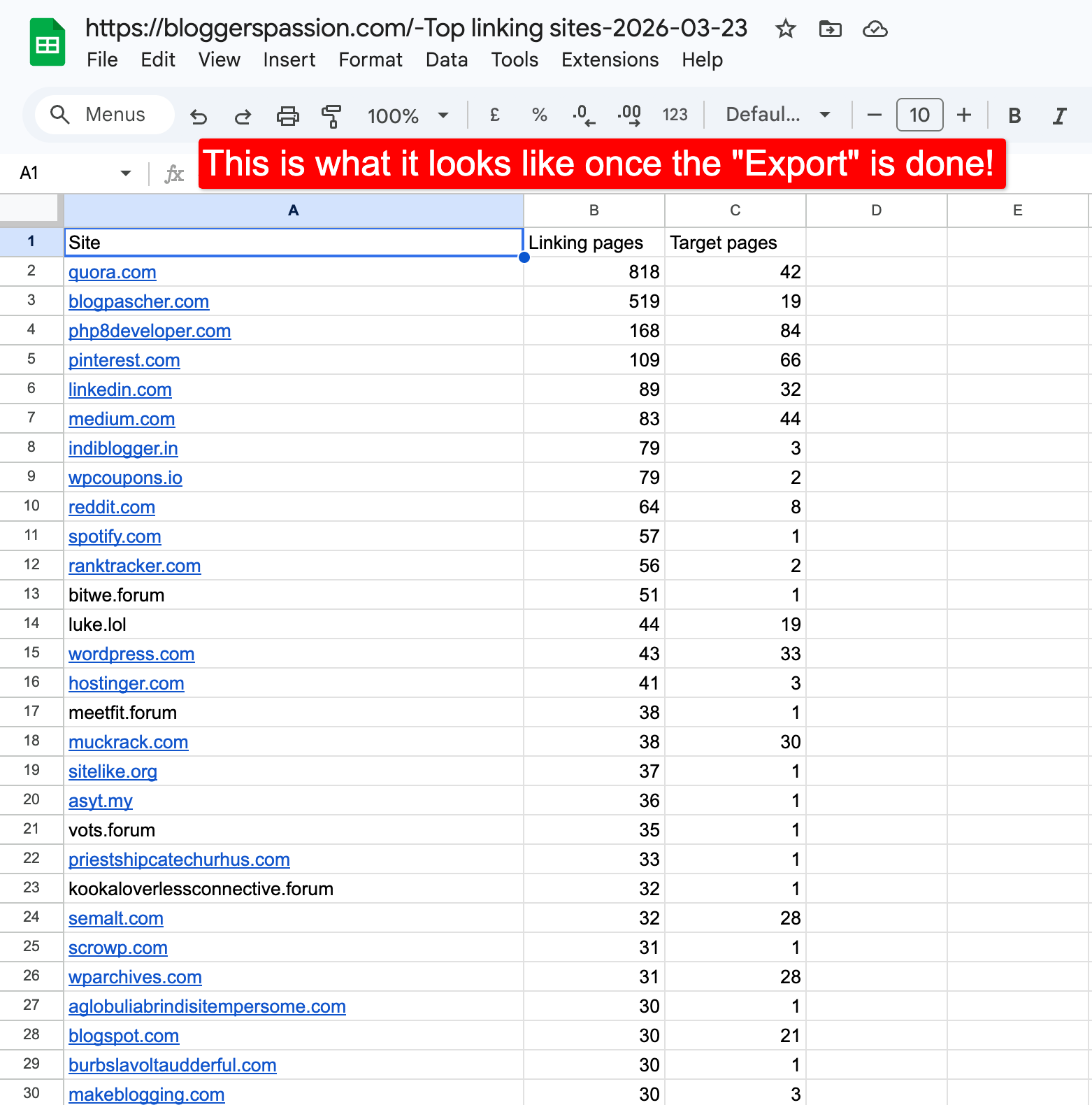
- Click “Export” to download the list as a CSV file
Now open that file and review each domain. Look for red flags like:
- Sites with no real content (just ads or gibberish)
- Foreign-language sites completely unrelated to your niche
- Domains with spammy names
- Sites your browser marks as unsafe
This method works, but it’s slow. You have to check each domain manually. That’s where having access to a dedicated tool like Semrush helps.
Method 2: Use Semrush Backlink Audit
Semrush’s Backlink Audit tool scans your entire backlink profile and gives every link a Toxicity Score from 0 to 100. The higher the score, the more likely the link is harmful.
Here’s how to run it:
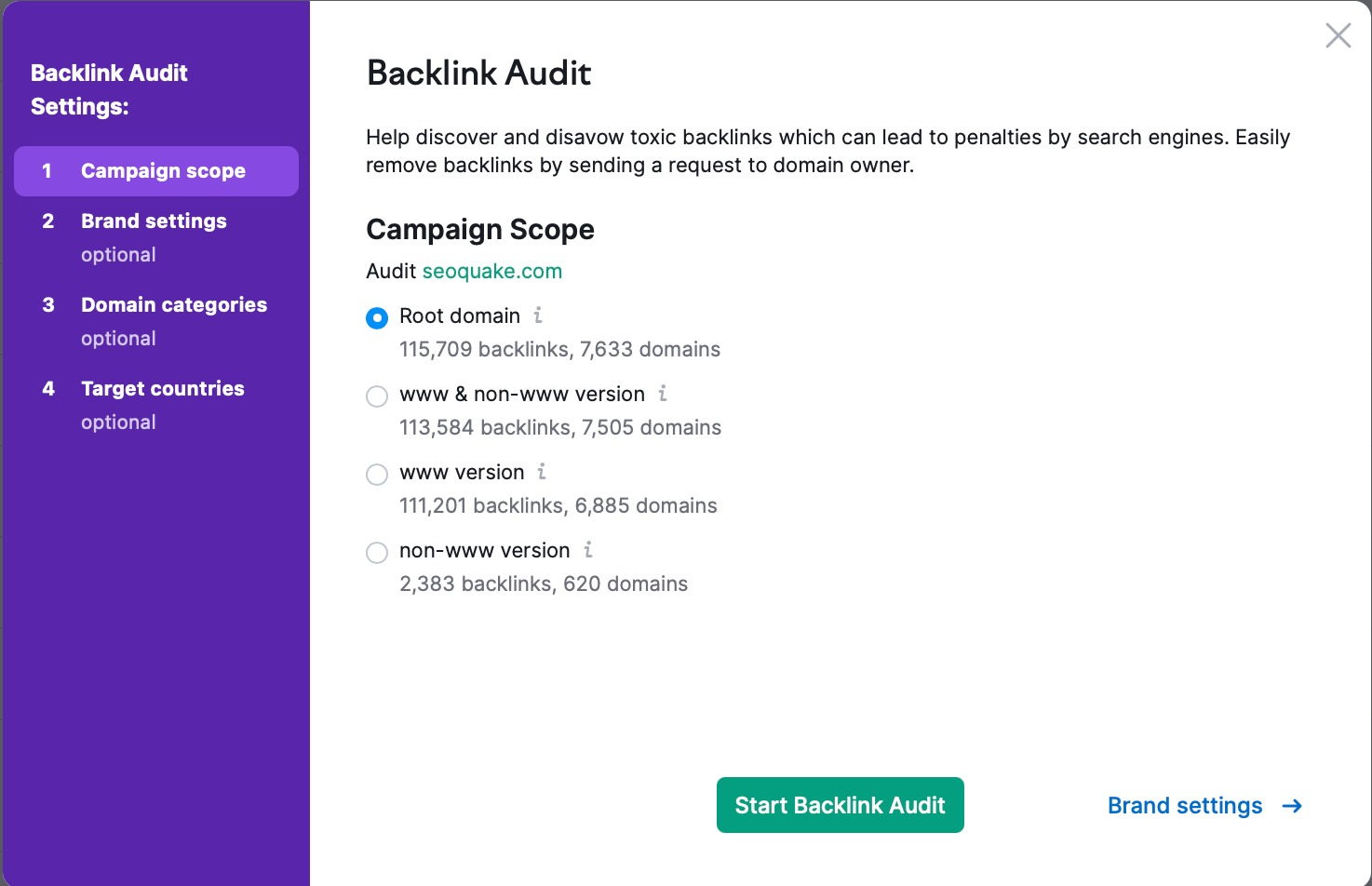
- Log in to Semrush.com and go to Backlink Audit under the Link Building section
- Enter your domain and click “Start Backlink Audit”
- Follow the setup steps (connect Google Search Console and Google Analytics for more accurate results)
- Wait a few minutes for the audit to finish
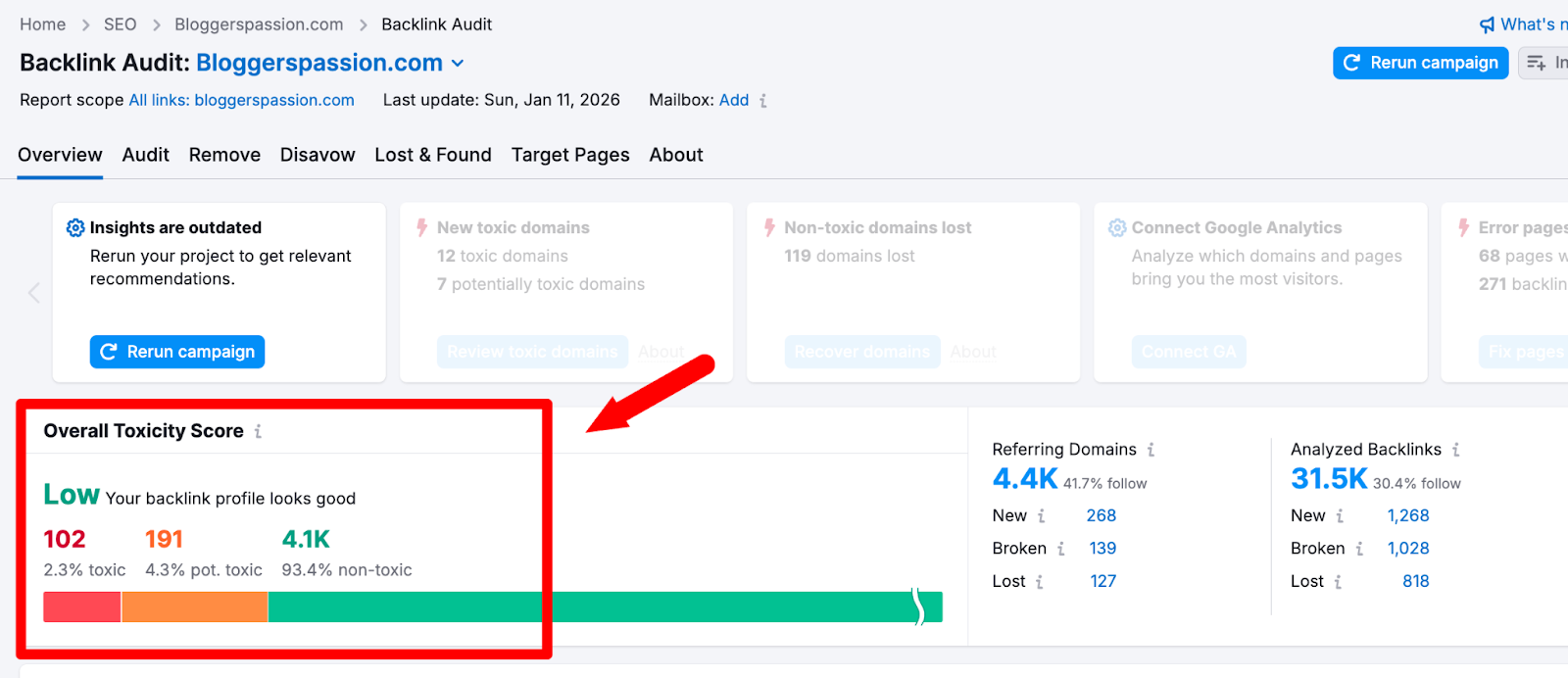
Once the audit is complete, you’ll see an Overall Toxicity Score with three categories:
- Toxic (60-100): Red. These are the links you need to deal with first.
- Potentially toxic (45-59): Orange. Keep an eye on these. Act only if you see ranking drops.
- Non-toxic (0-44): Green. These are healthy links. Keep them.
Here’s the Semrush Backlink Audit overview showing the three toxicity categories;
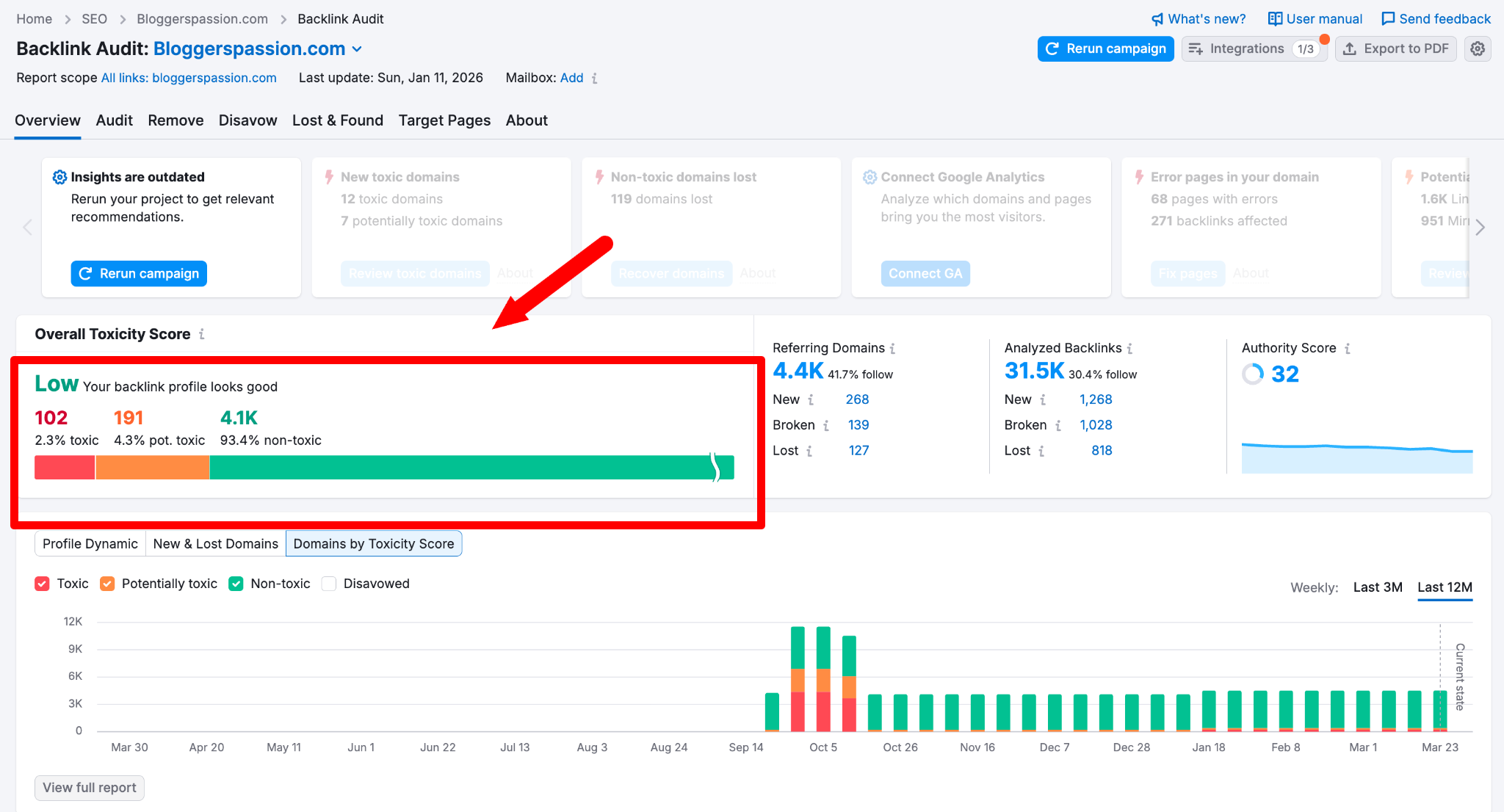
Click on the red number to see your most toxic backlinks sorted from worst to least. For each link, Semrush shows you the source URL, anchor text, and the specific toxic markers it detected.
This is the list you’ll work from in the next section.
How to Remove Bad Backlinks (3-Step Process)
You’ve found the toxic links. Now it’s time to get rid of them.
Follow these three steps in order.
Step 1: Check for Manual Actions in GSC
Before doing anything else, check if Google has already flagged your site.
- Log in to Google Search Console
- Go to “Security & Manual Actions” in the left sidebar
- Click “Manual actions”
If you see “No issues detected,” you’re in the clear. No manual penalty exists.
But if there IS a manual action for “unnatural links pointing to your site,” you need to clean up your backlinks immediately and submit a reconsideration request after.
Step 2: Request Link Removal via Email
This is the cleanest way to remove a bad backlink. You contact the site owner and ask them to take the link down.
Will every site owner respond? No. Most won’t. But Google wants to see that you made the effort before you use the disavow tool.
Here’s a simple outreach template you can copy:
Subject: Link Removal Request
Hi [NAME],
My name is [YOUR NAME] and I run [YOUR WEBSITE].
I noticed a link on your page [URL OF THEIR PAGE] that points to my site [YOUR URL].
I’m currently cleaning up my backlink profile and would appreciate it if you could remove this link.
Thanks for your time.
[YOUR NAME]
Keep it short. Keep it simple. Don’t over-explain.
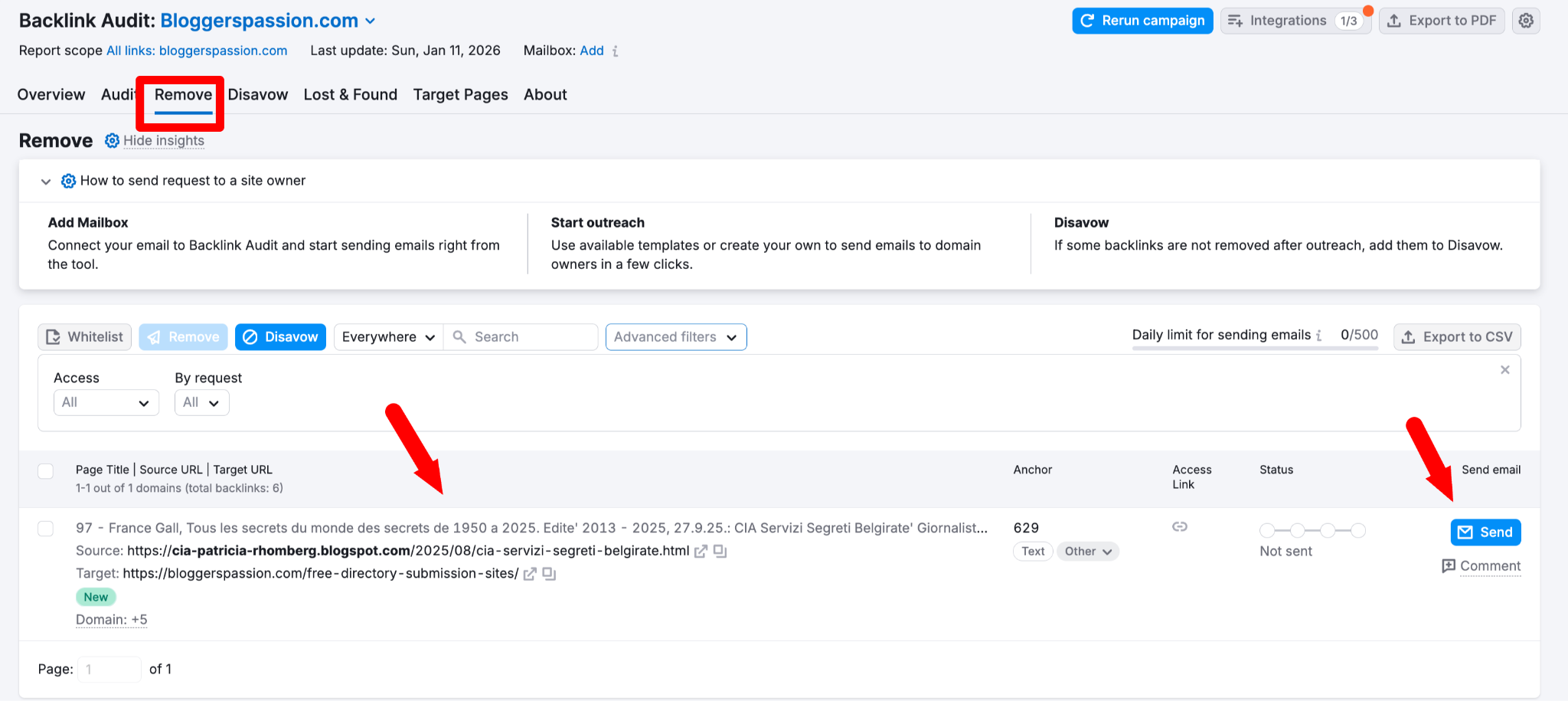
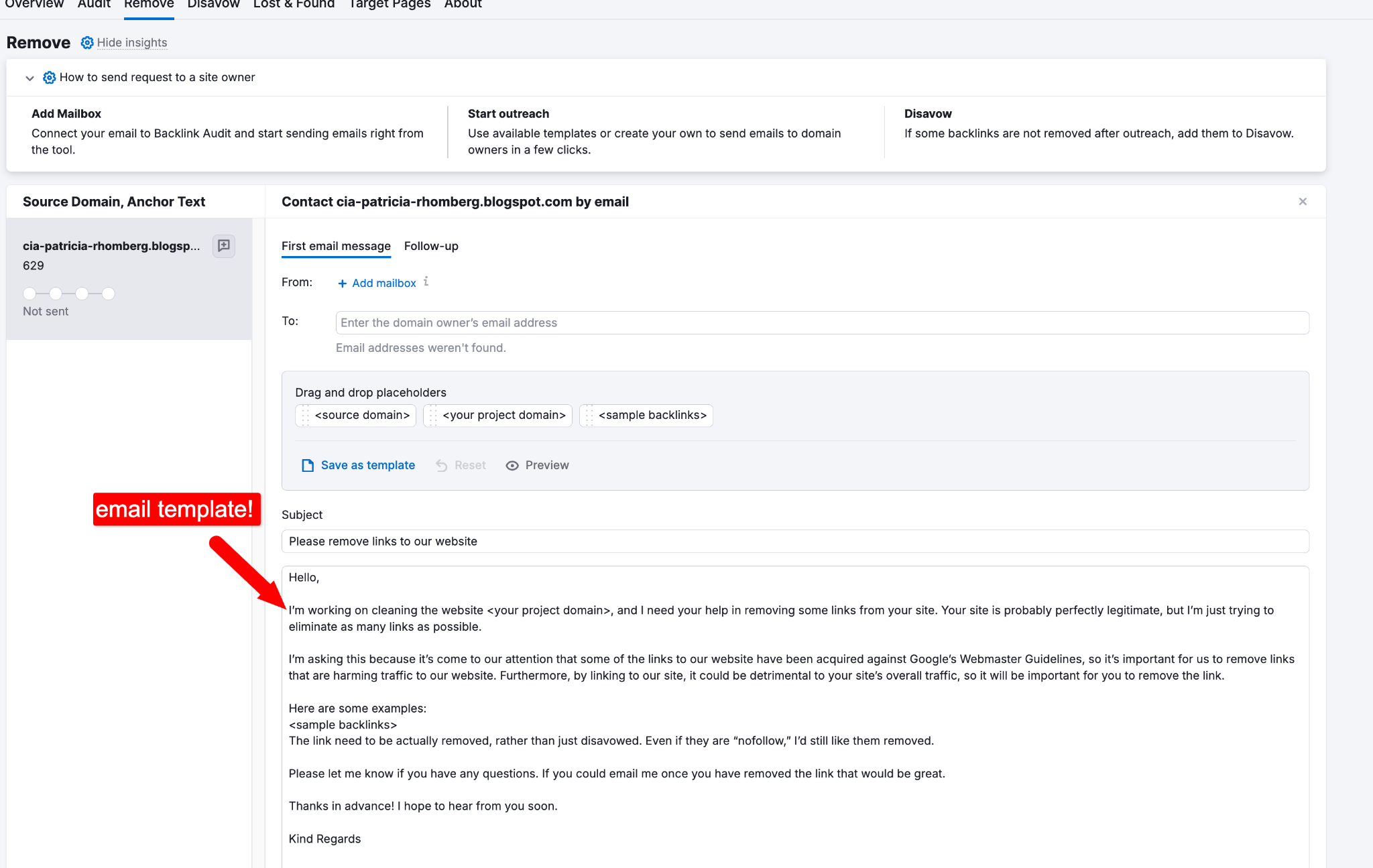
Pro tip: If you’re using Semrush’s Backlink Audit, you can send removal emails directly from the tool. Go to the “Remove” tab, connect your email, and Semrush gives you a pre-written template with all the link details already filled in. It also tracks whether your email was delivered, opened, or replied to.
Here’s what the pre-made email template looks like;
If you don’t hear back within 7 to 10 days, send one follow-up email. After that, move to Step 3.
Step 3: Disavow What You Can’t Remove
Disavowing tells Google to ignore specific links when evaluating your site. Think of it as saying, “I don’t endorse these links. Please don’t count them.”
Important: Use the disavow tool only as a last resort. Google’s Gary Illyes has warned that disavowing links incorrectly can hurt your site more than the bad links themselves.
Here’s how to do it:
Create your disavow file:
In Semrush Backlink Audit, go to the “Audit” tab. Select the toxic links you want to disavow. Click the “Disavow” button and choose “Domain” (disavowing the entire domain is safer than individual URLs because it catches all toxic links from that site, including duplicates).
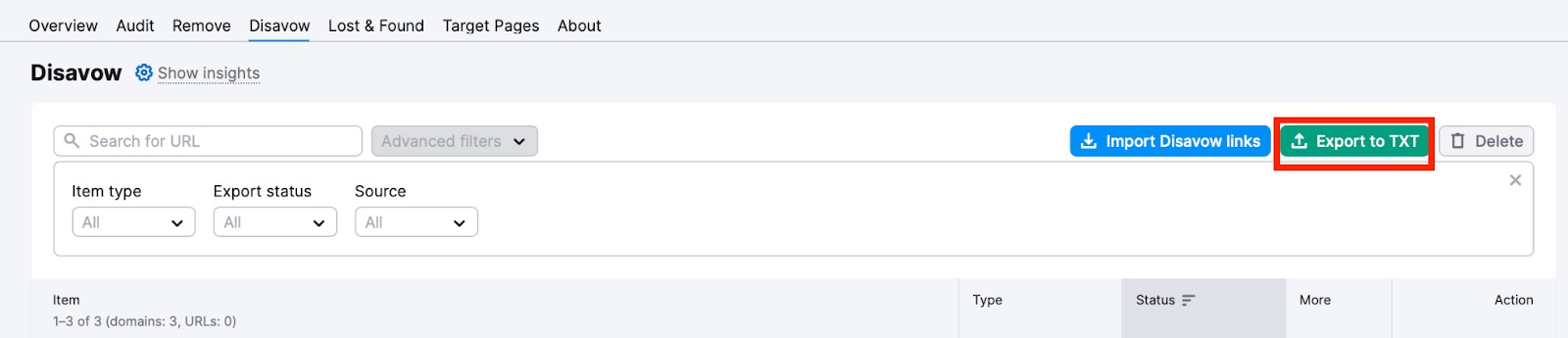
Once you’ve added all the toxic links, go to the “Disavow” tab and click “Export to TXT.” Semrush will generate a properly formatted .txt file for you.
Upload to Google:
- Go to Google’s Disavow Links tool
- Select your website property
- Click “Upload disavow list” and upload the .txt file from Semrush.

That’s it. Google will process your file over the next few weeks as it recrawls the web.
Here’s a detailed tutorial on disavowing your backlinks using the Semrush tool.
How long until you see results? Be patient. It takes 4 to 6 weeks for Google to process your disavow file. Full ranking recovery can take several months, depending on how badly your site was affected.
In case you’re curious, how the whole process works in a nutshell;
- You’ll first add toxic backlinks to the Disavow tab on Semrush. Semrush’s Backlink Audit tool lets you easily find all the toxic backlinks and export them to the disavow list.
- Then you can choose whether to blacklist the specific URLs or the entire domain before exporting it to a .txt file
- The final step is to upload your file to Google’s disavow tool to remove them. It will now show as “Disavowed” once they’re successfully removed!
FAQs on how to get rid of bad backlinks
Here are a few important questions you might want to know about removing spammy links from your site in 2026.
A toxic score is a number (0 to 100) that tools like Semrush give to each backlink based on spam signals. 100 being the most toxic.
There are two ways. The free method is Google Search Console. Go to Links > Top linking sites and manually review each domain. The faster method is Semrush’s Backlink Audit tool, which scans your entire profile and identifies toxic links automatically with a toxicity score.
Semrush has the most reliable backlink checkers, as it checks over 45 toxic markers per link and integrates directly with Google Search Console.
Yes, but it’s rare in 2026. Google usually ignores spammy links automatically. Penalties mostly happen when there’s a clear link manipulation (like buying links or using PBNs).
Audit your backlinks every 2 to 3 months for most sites. If you’re in a competitive niche where negative SEO is common, check monthly.
Conclusion
Bad backlinks don’t have to hurt your rankings.
Most of the time, Google handles spammy links on its own. But if you’ve got a manual action, or a sudden ranking drop that doesn’t make sense, a backlink cleanup can make a HUGE difference.
Start with a Semrush Backlink Audit. Identify your most toxic links. Try to get them removed. Disavow the rest.
Your next step? Run your first backlink audit today. Even if your site looks healthy, you might be surprised by what you find. Let me know if you have any questions in the comments.







Hi Deny,
The Disavow Links tool by Google has certainly been a helpful tool for removing those unwanted links. In fact, when I used the tool, I didn’t even know I had that many backlinks, and from sites I don’t even know or did not place backlinks to. Thanks to the disavow tool, websites who gets plagued with linkfarm backlinks without their consent can easily be denied.