


This is Anil Agarwal. I’m back to this post after a long time, so I thought I’d update the list as of October 2026.
Over the years, my team and I have tested more than 100 web hosts using our own money. However, I’ve been personally monitoring the performance of some web hosts for several years. Today, I’ve shortlisted a few of them from that list that are particularly suitable for beginners.
My team and I have been testing the performance data of all the web hosts mentioned below, including uptime and performance scores, for years. You can rely on this data to help you make your final decision.
The web hosts I’m covering are specifically suited to beginners, and you can also read their individual reviews for more detailed insights. I’m also sharing a list that you won’t typically find in other articles. I’ll even point out a few web hosts whose performance is particularly poor.
OK, so let’s begin.
| Best Web Hosting For Beginners | Average Uptime | Average Speed Loading Time | Pricing | Renewals |
|---|---|---|---|---|
| Hostinger | 99.962% | 3.1 seconds | Starts at $2.49/month | Starts at $10.99/month |
| WordPress.com: | 99.999% | 3.66 seconds | Starts at $2.75/month | Starts at $2.75/month |
| WPX: | 99.999% | 1.01 seconds | Starts at $11.99/month | Starts at $11.99/month |
| Cloudways: | 99.997% | 1.68 seconds | Starts at $11/month | Pay as you go |
| HostPapa: | 100% | 2.5 seconds | Starts at $2.95/month | Starts at $8.99/month |
| Namecheap: | 99.832% | 3.2 seconds | Starts at $1.88/month | Starts at $5.88/month |
1. Hostinger: Best for Money Value
Uptime: 99.962% (last 5 years) | Average Speed: 3.1 seconds |
I have been running test sites and live projects on Hostinger since 2021, so it has now outlasted two laptops and a rather embarrassing number of my other hosting experiments, and it is still on my server list.
Over those five-plus years, I put its Premium Shared plan through speed, server response, uptime and stress tests, and the results were better than I expected.
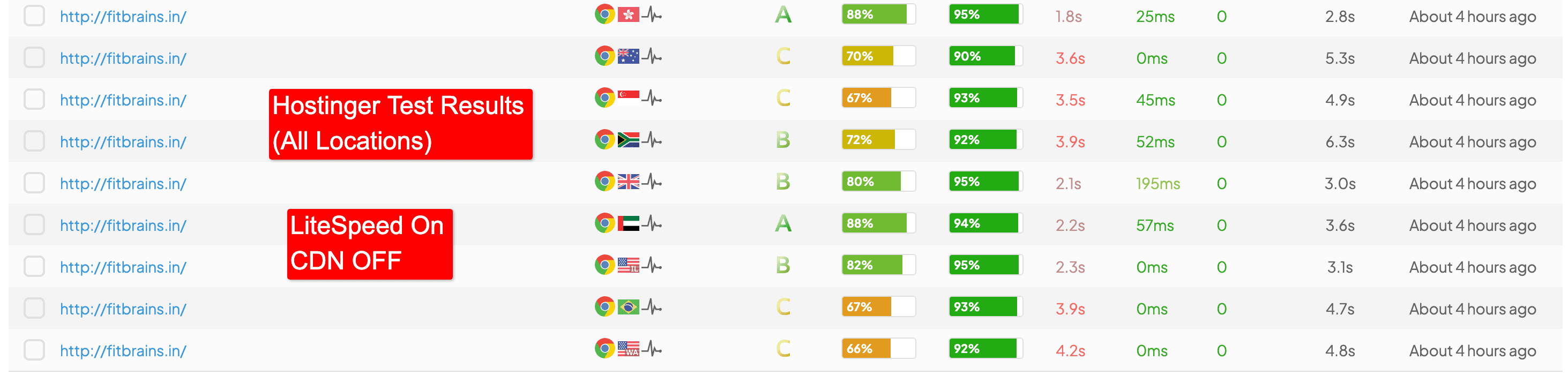
With LiteSpeed enabled, pages loaded in 3.1 seconds on average (1.8 seconds at best, from Hong Kong). Uptime across five years sits at 99.980%, though the last 12 months logged 23 small incidents, roughly three hours of downtime in all.
For a beginner, the features that count are the free domain, SSL, migration and backups, plus one-click WordPress installation.
The free LiteSpeed Cache plugin also means you can skip a paid caching plugin, and I have seen too many newcomers spend $50 on one before their first post is even published.
The hPanel dashboard was a pleasant surprise: no flashing upgrade banners, just a calm place where you can manage backups without ever asking for help.
There is one point where you have to manage a bit, and that is support. Support is English-only with no phone line, and the team will point you to a KnowledgeBase article rather than fix your problem by themselves.
The pricing is affordable in the segment but has a catch too: $2.49/month needs a 48-month commitment, and renewal then jumps to $10.99/month.
If you are launching a new site with a tight budget and under 10,000 monthly visits, Hostinger gives you more value per cent than any entry-level rival I have tested. Just start with the Premium plan, switch LiteSpeed on, and read the renewal price before you pay.
[Visit Hostinger – Use Code BLOGWITHBP to get extra 10% OFF]
2. WordPress.com: Best for Hassle-Free Managed WordPress Hosting
Uptime: 99.999% (last 24 months) | Average Speed: 3.66 seconds (caching and CDN switched off) |
I have been running a site on WordPress.com for more than two years, and I tested it on the Business plan with server-side caching and the Jetpack CDN switched off, so the numbers below are raw.
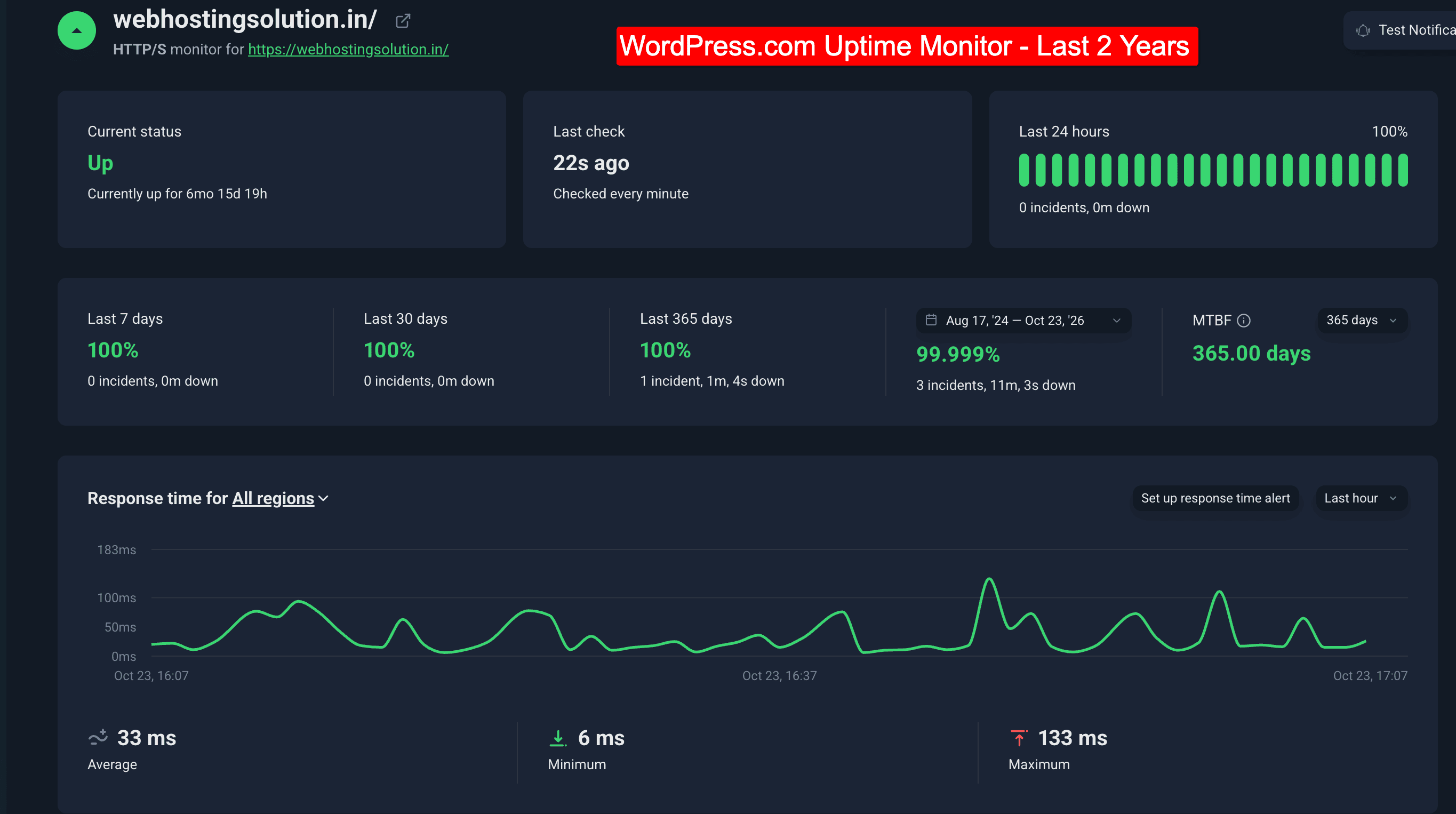
GTmetrix pages loaded in 3.66 seconds on average, ranging from 2.8 seconds in the USA to 5.1 seconds from India. Server response was 245 ms on average (69 ms in the USA). UptimeRobot recorded 99.999% over 24 months, with only a few brief outages.
What impressed me most is how much the platform does for you: daily backups, a web application firewall, DDoS protection, malware removal, automatic WordPress updates and a free staging site.
Plugin installation is open to all four paid plans, with more than 60,000 plugins available, and Jetpack and Akismet come bundled, which would otherwise cost extra. For a beginner, that means no security plugin hunting and no 2 a.m. update panic.
I asked their team to migrate my old site, and they did it free of charge. There is no cPanel, and the built-in AI Support Assistant answered most of my questions on CDN and data centres faster than a human could have.
The irritations are real, though. There is no phone support, only one website per paid plan, and your data centre is chosen automatically by where you sign up and cannot be changed a second time.
All data centres are in the USA, so my Asian visitors faced a TTFB of over 300 ms, and speed there only improves with a CDN. Pricing starts at $2.75 a month on a three-year term, $4 a month if billed annually.
Business, which adds SSH access and real-time backups, costs $17.50 a month. I recommend WordPress.com to beginners who would rather write than maintain a server, particularly if most of their readers are in the USA. Treat it as an excellent, fully managed home for your first serious site, not the cheapest one.
Visit WordPress.com [30% Off via BloggersPassion Coupon]
3. WPX Hosting: High Performance
Uptime: 99.999% (last 365 days) | Average Fully Loaded Time: 1.01 seconds |
I started BloggersPassion on an entry-level host and moved to WPX once both traffic and income justified it, and I have stayed with them for well over 10 years.
WPX is not a host for day-one beginners, but it is where a beginner growing site should end up. I host this very blog on it, so my tests come from a live, plugin-heavy site rather than a tidy demo.
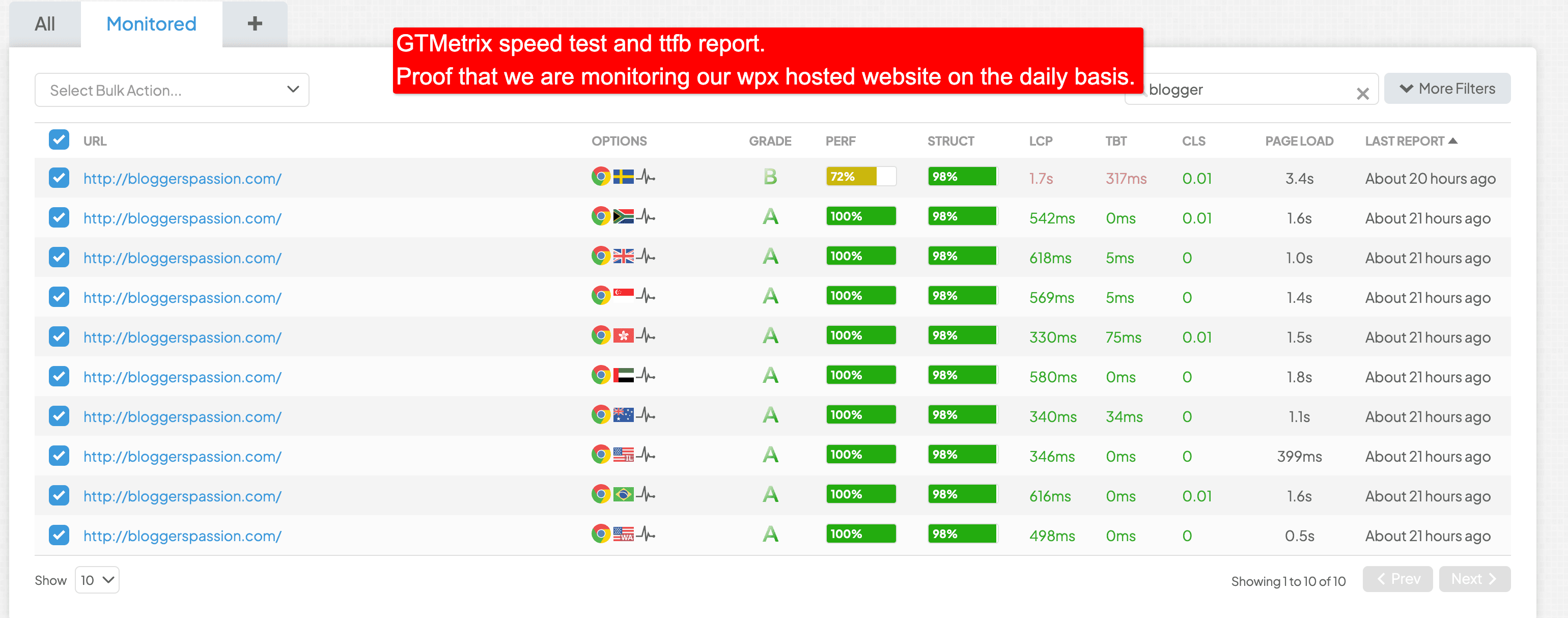
Across 530 GTmetrix reports from ten global locations (August to October 2026), pages averaged a 98.4% grade, 136 ms TTFB and a fully loaded time of 1.01 seconds. Uptime over the last 365 days stands at 99.999%.
The features that matter most to ordinary site owners are the “Fixed for You” malware removal, and the free speed optimisation, in which their engineers tune your site by hand.
The built-in 41-point XDN CDN replaces a paid add-on, and daily backups are kept for 28 days. Migration is free, and renewals cost the same as the first bill, which is rare in this industry.
The dashboard scores a respectable 4.7/5 for simplicity, but it has no search bar, so I occasionally hunt for a setting like a man looking for his glasses while wearing them.
There is no free domain, the staging area eats into your storage, and the strict PHP worker limits can make the WordPress admin crawl when several people edit at once. The Starter plan is weak for its price, so I would skip it.
If your site is brand new and gets fewer than 1,000 visits a month, stay with an entry-level host and save your money. Move to WPX once your traffic is growing at a fast rate, because that is when its speed, security and support start paying for themselves.
Visit WPX [Code BLOGGERSPASSION: 80% Off First Month]
4. Cloudways: Best for Real-Time Billing & Scalability
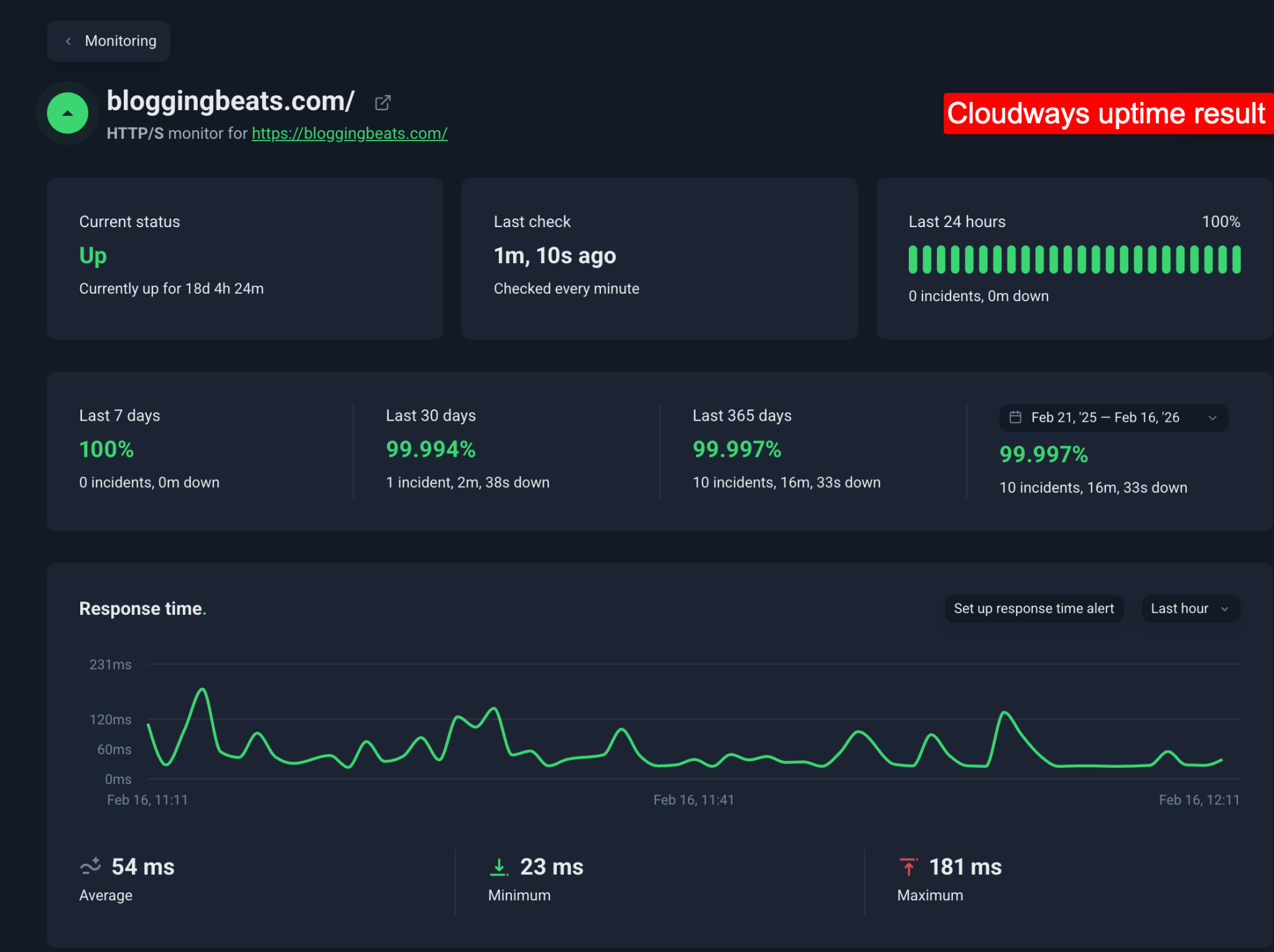
Uptime: 99.997% (last 365 days) | Average Speed: 1.68 seconds |
I have been using Cloudways for over 1,000 days and have tested it for more than five years, and I still run my own site on a DigitalOcean 2GB Premium plan.
Instead of a flat fee, you are billed hourly for what you use, so my invoice usually lands below the base price, though it occasionally creeps above it.
It is not the cheapest host, but its dashboard is far friendlier than a typical cloud console. In my tests on the DigitalOcean 1GB Premium plan, global TTFB averaged 490 ms (just 200 ms in the USA), and pages loaded in 1.68 seconds on average despite a heavy 2.24 MB test page.
The features that help ordinary site owners most are the unlimited websites on one server, free SSL, free staging, one-click cloning and the first migration done for you. It does have a slight learning curve for absolute beginners, though.
The most useful moment came during Black Friday, when I raised my server resources for the rush and dropped them back afterwards without upgrading the plan for good. It reminded me of renting an umbrella only for the rain. The irritations are all small bills.
There is no built-in CDN (I use Cloudflare), offsite backups cost $0.033 per GB, email is a paid Rackspace add-on, and the second migration onwards costs $25.
I recommend Cloudways to beginners who are serious about growth, because it lets you start small at $11 a month and scale to heavy traffic without changing hosts. If you want everything bundled with a free domain, choose a shared host; if you want room to grow, this is the one.
Visit Cloudways [30% OFF – First 3 Months]
5. HostPapa: Best for US, UK & Canada Traffic

Uptime: 100% (last 30 days) | Average Speed: 2.5 seconds | Money-Back Guarantee: 30 days
I have been reviewing HostPapa since 2019 and have returned to it several times since, most recently with a test site monitored through UptimeRobot, Pingdom and GTmetrix. The results were good: 100% uptime across the last 30 days, and a GTmetrix load time of 2.5s with a B grade and an 88% performance score.
This Canadian, privately owned host (not part of the EIG group that owns Bluehost and HostGator) packs in plenty of freebies: a free domain for the first year, free SSL, Cloudflare’s free CDN and a free migration. A beginner saves roughly the cost of three separate add-ons before even publishing a first post.
When I handed over my old hosting details, the team simply took care of the migration, which saved me an afternoon of FTP task. You also get cPanel with more than 400 one-click apps, so WordPress is up in minutes.
The catches are worth knowing: the Essentials plan allows only 1 website, free backups and SiteLock arrive only with the Elite plan, and the data centres are limited to the US, Canada and Europe. Prices of $2.95 to $9.95 a month need a three-year commitment, and renewals climb to roughly $8.99 to $27.99 a month, so read the fine print.
That is why I see HostPapa as best for visitors in the US, UK and Canada. I recommend HostPapa to beginners who want a friendly human on the other end of the line and a familiar cPanel, and who will not mind the dated design. Start with the Premium plan if you plan to run several sites.
Visit HostPapa [Up to 77% Off]
6. Namecheap: Best for Domain Registration

Uptime: 99.832% | Average Speed: 3.2 seconds |
I have used Namecheap for years, mainly to register and manage domains, and I have also spent a good deal of time testing its hosting.
The domain side is excellent: prices are low, WhoisGuard privacy is free for the first year, and the dashboard is clean without the pop-up clutter I see elsewhere. Their hosting is a different story.
My tests recorded 99.832% uptime and an average load time of 3.2 seconds, which is the slowest in this list. That is why I recommend Namecheap for domains rather than hosting.
In its favour, plans start at around $1.98 a month, and even the Stellar plan lets you host three websites with 20 GB of space, which is rare at this price. You get a free SSL, a free CDN, one-click WordPress installation, a free migration team that handles cPanel and non-cPanel sites alike, and standard cPanel, which most tutorials assume you are using.
Renewals also rose in May 2026; Stellar now renews at $55.88 a year, about $4.66 a month.
There are only US, UK and EU data centres, and the UK location costs an extra $1 a month. For beginners, I recommend registering your domain here and buying hosting elsewhere. If you do want its cheap plans, treat them as a stepping stone and plan to move once your traffic grows.
Visit Namecheap [Domain Deals]
Explore More:
Bottom Line:
As we said earlier in the post, picking the right web hosting is a hard choice.
Our simple tip is to focus on your website needs. Find out how much traffic you might get in the long run, then decide on the most useful hosting choice that serves your needs. Also, focus on the pricing option if you are under a low budget.
The hosts mentioned in today’s beginners list can easily handle traffic ranging from 5k to 50k per month.
If you have budget concerns but still want the best performance, Hostinger should be your first preference. Finally, if you have a good budget, you can choose between WPX or Cloudways for the best performance and security.
FAQs:
Which web hosting is best for beginners?
Shared hosting is typically the best choice for beginners. It’s affordable, easy to set up, and suitable for small websites. As you gain experience, you can consider more advanced hosting options like VPS or dedicated hosting. The best option in this segment is Hostinger.
What is the minimum cost to host a website?
You need at least $30 in your first year to host a single website. Hostinger costs $2.49/month. Additionally, from the second year onwards, you might have to pay domain registration fees ($10-$15/year) since most beginner web hosting plans offer free domain registration for the first year.
Is it worth self hosting a website?
Creating and maintaining a self-hosted website isn’t free and can be quite costly. Additionally, the process of setting up and managing a self-hosted site can be quite complex.
Which web hosts do you not recommend for beginners, and why?
We would advice beginners away from Bluehost, HostGator, FastComet, ChemiCloud, HostArmada and GoDaddy, not because any of them is a scam, but because each asks a newcomer to carry a burden they cannot yet see. Bluehost and HostGator, both owned by Newfold Digital, tempt with low first-term prices, then renew at roughly three times the rate or more. FastComet has well-regarded support, but online reviews mention renewal jumps and occasional downtime. ChemiCloud’s negative reviews cite repeated outages and vague answers while sites were offline, and HostArmada’s admirers still point to steep renewals and, in a minority of cases, recurring downtime. GoDaddy is so well known that people assume it is safe, yet it draws repeated complaints about upselling and confusing add-ons.
![15 Best Web Hosting Deals & Offers of Oct 2026 for All Kinds of Budgets [Up to 90% OFF]](https://bloggerspassion.com/wp-content/uploads/2021/10/best-web-hosting-deals-300x157.jpg)

![List of 9 Best First Month Free Hosting Providers [No Credit Card Required] – Reviewed](https://bloggerspassion.com/wp-content/uploads/2019/10/Free-Hosting-300x157.jpg.webp)

![6 Best WordPress Hosting in India for 2026 [Expert Picks]](https://bloggerspassion.com/wp-content/uploads/2022/10/best-wordpress-hosting-in-India-300x157.jpg)
![Honest Hostinger Review India [After 5+ Years of Hands-On Use 2026]](https://bloggerspassion.com/wp-content/uploads/2021/01/Hostinger-review-300x157.jpg.webp)


Leave a Comment
Your email address will not be published. Required fields are marked *