Google does not crawl every site at the same speed.
Crawl frequency can range from about 1 day to 4 weeks, depending on various factors, such as;
- How active your website is
- How important or popular your site is
- Your crawl budget, and more
Websites with high domain authority and that actively publish more content get crawled multiple times a day, whereas it may take several weeks for new sites to get updated in Google search results.
- TL;DR: Google Crawl Frequency: Daily to once every 3 to 4 weeks, depending on the site.
Table of Contents
What is Googlebot and How Does It Work?
Googlebot is a web crawler developed by Google. This is primarily a search bot that is responsible for discovering, crawling, and indexing web pages for Google.
This bot has mobile and desktop crawlers, which make sure the websites are indexed for multiple devices.
Googlebot scans the content, links, metadata, and technical aspects of a website’s pages to understand what the page is about. It collects information from billions of web pages. Then, Google uses different search algorithms to display more relevant results to users.

How Googlebot Crawls Websites?
Here’s a step-by-step breakdown of the crawling process.
1. Crawling: Googlebot visits your web pages to see the content.
For example, when you publish a new blog post, Googlebot finds the URL through links or sitemaps and loads the page to check the text, media (such as images and videos), and links it contains.
2. Rendering: Google bots load the page like a browser to understand the layout and content.
For example, if your page uses JavaScript to display a product gallery, Googlebot loads the page fully so it can view the same layout and content that a user would.
3. Indexing: Once the page is rendered, Googlebot saves and organizes the complete content in Google’s index database.
For example, Google stores the text, images, and metadata from your blog post so it can match them to relevant searches later.
4. Ranking: Once the indexing is also done, Google decides where your pages should appear in Google search results.
The ranking depends on over 200 ranking factors, including backlinks, website authority, content quality, user experience, relevance, and more.
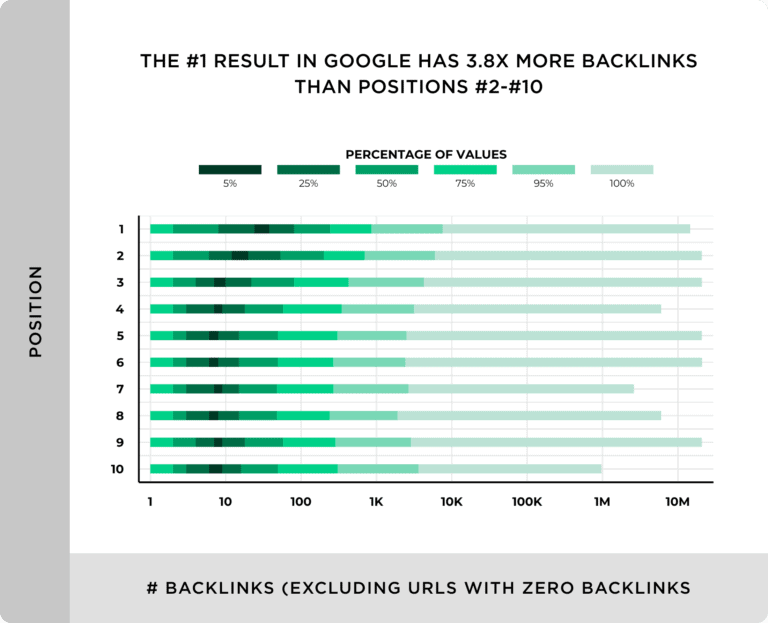
In fact, the top result on Google typically has about 4x more backlinks than the pages ranked in positions 2–10.
What is Website Crawling and How Does It Work?
Website crawling is the process by which search engine bots browse and download content from website pages, primarily for indexing web pages.
Website crawling helps search engines find new or updated information online.
How do web crawlers work?
Web crawlers are bots that start with a list of known URLs (called seeds), visit each page, scan the content for text, metadata, and links. Then, these bots add new hyperlinks to their queue and repeat the process.
Some of the popular search engine bot crawlers include;
- Googlebot – Google’s search engine crawler
- Amazonbot – Amazon’s web crawler
- Bingbot – Microsoft Bing’s search engine crawler
- Yahoo Slurp – Yahoo’s search engine crawler
- DuckDuckBot – Crawler for the DuckDuckGo search engine
If you’re a beginner or running a new site, here’s a simple guide on how to index blog posts in Google.
Difference Between Crawling and Indexing
Crawling is the process of finding new information online, whereas indexing is all about storing that information in the search engine’s database.
Without crawling, indexing cannot happen, and without indexing, pages cannot appear in search results.
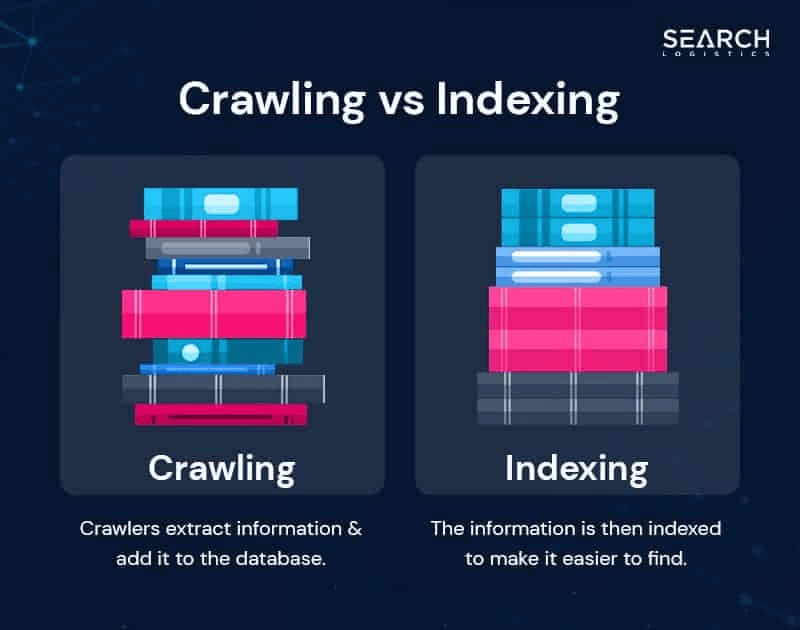
Image source: Search Logistics
Several types of crawls search engines use, including;
- Broad crawls: Explore the entire web to find new URLs, done less often.
- Deep crawls: Thoroughly check known sites for new or updated content, done more often.
- Fresh crawls: Continuously scan recently updated pages to quickly identify new content.
Why Crawling Frequency Matters for SEO?
Frequent crawling is extremely important because the more often search bots crawl and index your website pages, the more you can benefit from visibility.
Here are some significant benefits of frequent crawling of your website;
- New or updated content gets indexed quickly in Google
- Keeps search results up-to-date with recent changes on your site
- Improves your website’s ranking potential
- Attracts more organic traffic
How Often Does Google Crawl a Website?
Google’s crawl rate varies for every site and depends on factors such as the frequency of content updates, server health, website authority, and more.
Average Crawl Frequency in 2026
There’s no fixed timeline for how often Google crawls websites, as the crawling frequency varies.
Generally, most active websites get crawled every 3-7 days, while less active websites are crawled every three to four weeks. However, this crawling frequency depends on several factors, including content freshness, site authority, and crawl budget.
Factors Influencing Crawl Frequency
Here are some of the key factors influencing crawl frequency.
1. Site size and authority
Bigger websites with high domain authority and a large number of quality backlinks tend to be crawled more frequently than smaller websites. This is because search engines like Google often value high-authority websites with more backlinks.
Your site’s domain authority also plays a key role in getting Google to index and crawl your site more often. So, try to build high-quality backlinks and consistently publish helpful content.
2. Content freshness
If your website gets updated frequently by adding new content or updating existing content, it encourages Google to crawl your site more often, as Google wants to index fresh content quickly.
In fact, content freshness is a ranking factor, as Google prioritizes websites that update their pages regularly with up-to-date information.
Here’s an example of why content freshness is essential for better SEO.
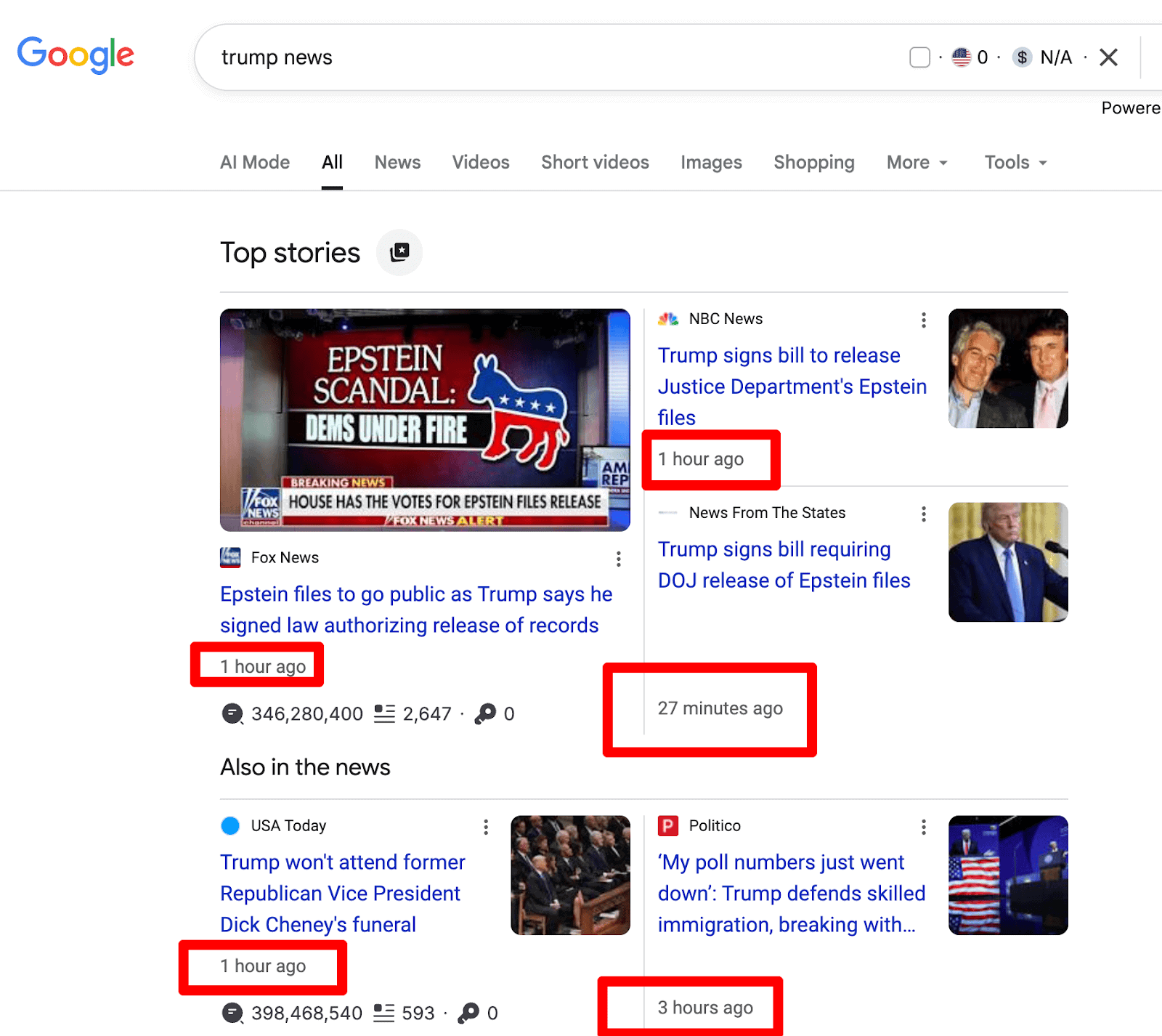
The above example shows how news stories with keywords like “Trump news” appear at the top of Google within minutes or hours of publication.
3. Crawl budget
The crawl budget refers to the number of pages that a Googlebot will crawl and index from your website within a specified time frame. It depends on two factors: server capacity and the demand your site has for crawling.
A higher crawl budget means Google can discover and index more of your pages more frequently. Some ways to improve your site’s crawl budget include;
- Fix technical issues
- Optimize for speed
- Improve your server performance
- Fix broken links
- Reduce unnecessary URLs
4. Technical SEO health
Your website’s site structure and overall technical SEO health play a key role in how often Google bots crawl your site.
A simple, well-structured site is easier for search engine bots to crawl. Try to fix broken links and use clear website navigation so that every important page is easy for bots to crawl.
5. Server performance
Websites with faster servers are crawled more often by Google. In fact, better server performance usually helps Google search bots to crawl more pages without overloading your site.
Monitor your website’s server health regularly. You can check your Crawl Stats report in Google Search Console to spot and fix any issues quickly.
How to Check When Google Last Crawled Your Site?
Do you want to know how often Googlebot crawls and visits your site? You can get this information from Google Search Console (GSC).
Using the URL Inspection Tool
Here’s a quick step-by-step guide on using the URL inspection tool.
Open Google Search Console and select your website.
In the top search bar where it says “Inspect the URL”, simply paste the URL you want to check.
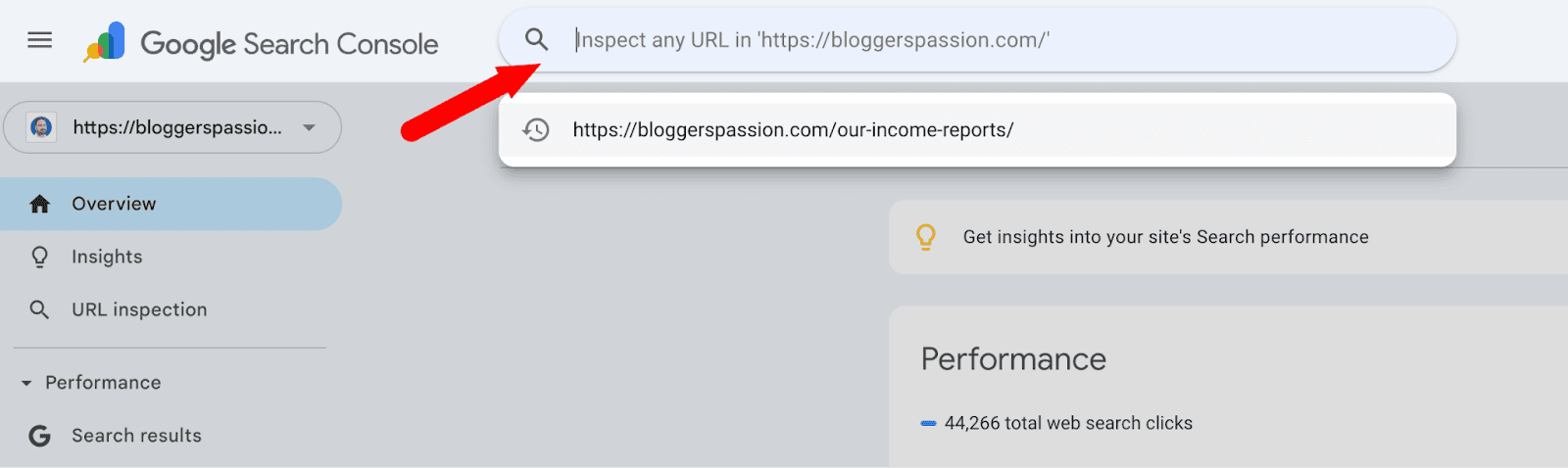
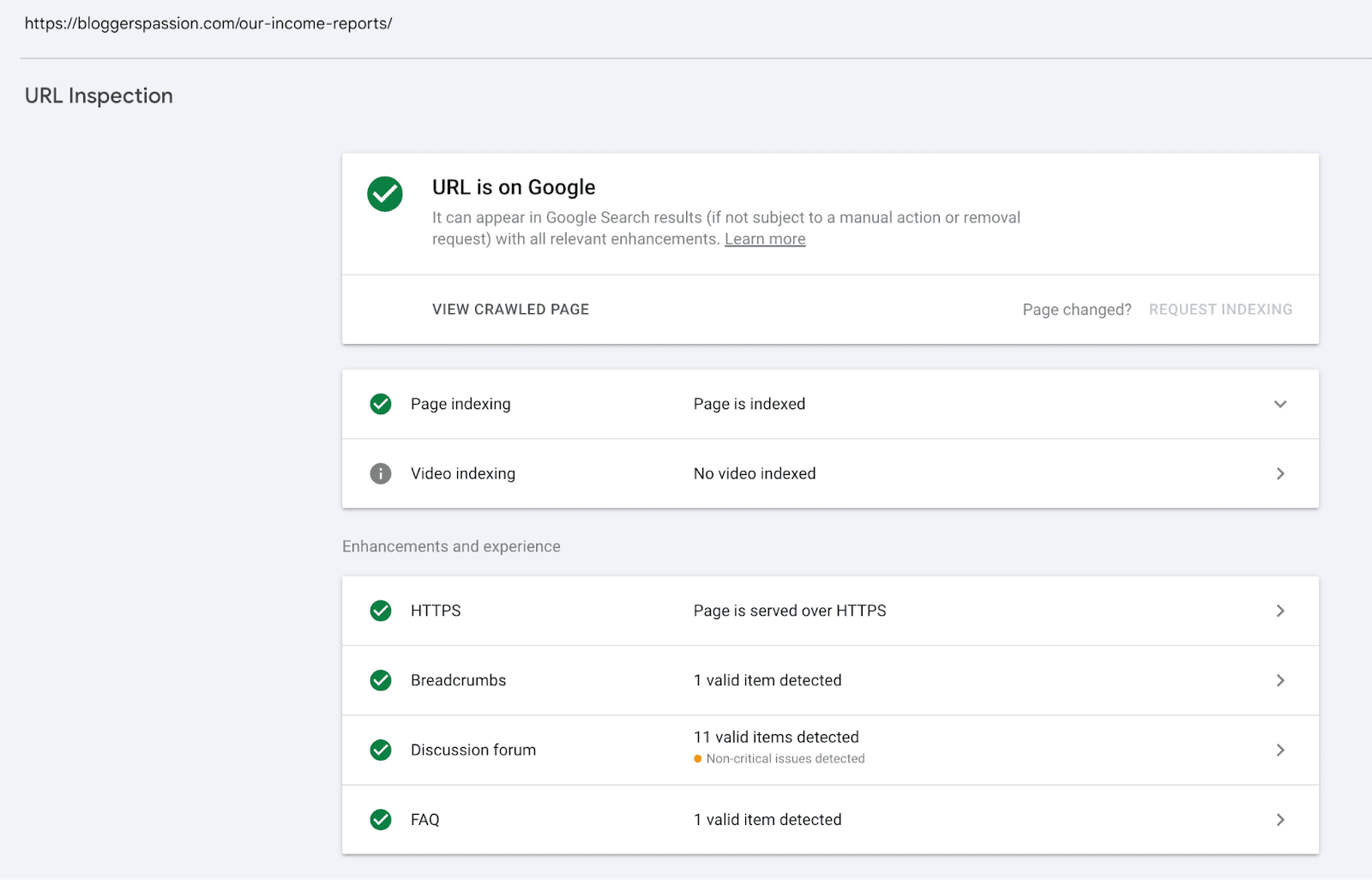
Once you hit enter, you’ll see a detailed URL Inspection report showing;
- Whether the page is indexed
- How Google last crawled it and
- All enhancements detected (like HTTPS, breadcrumbs, FAQ, and more).
If you click on “Page is indexed”, you’ll see a full breakdown of how Google discovered, crawled, and indexed your page, where you’ll see;
- Sitemap sources
- Referring pages
- Last crawl date and time
- Crawl type (e.g., Googlebot smartphone)
- Crawl allowed or not
- Indexing allowed or not
- Page fetch status and more
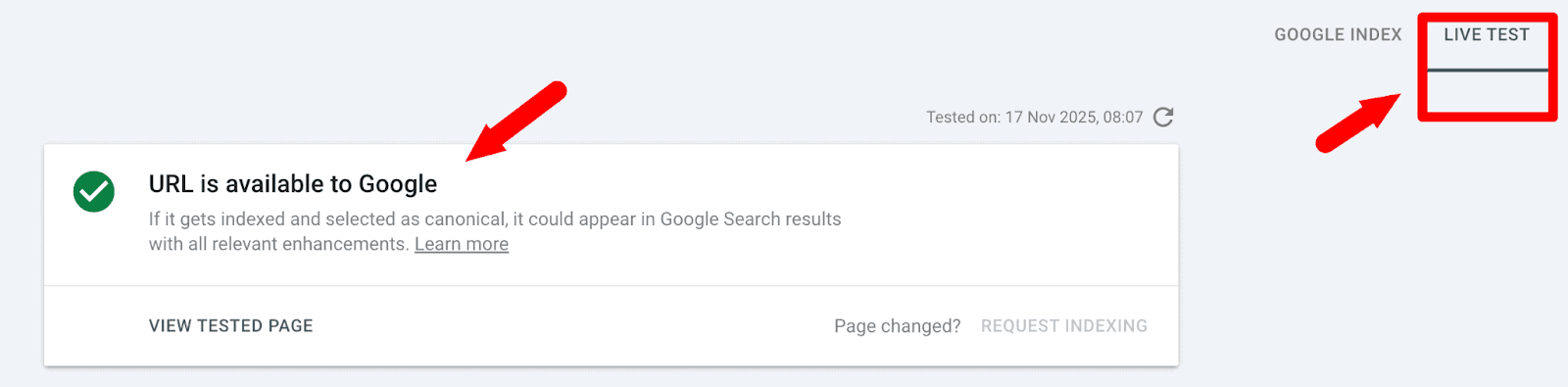
Here’s another quick tip: You can click “Test Live URL” to see if Google can currently access it.
Using Google Search Console Crawl Stats Report
The Crawl Stats Report shows how frequently Googlebot crawls your entire website.
Here’s how to find your Crawl Stats report from Google Search Console.
In Google Search Console, go to Settings → Crawl Stats → Open Report.
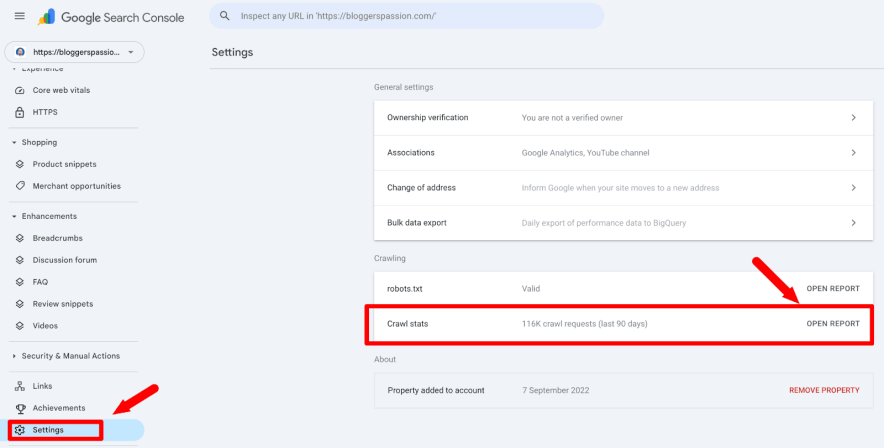
Once you open the report, you’ll find all the crawl stats details, including:
- Total crawl requests (per day)
- Average response time
- Crawl purpose (discovery vs. refresh)
- Host status (any server errors)
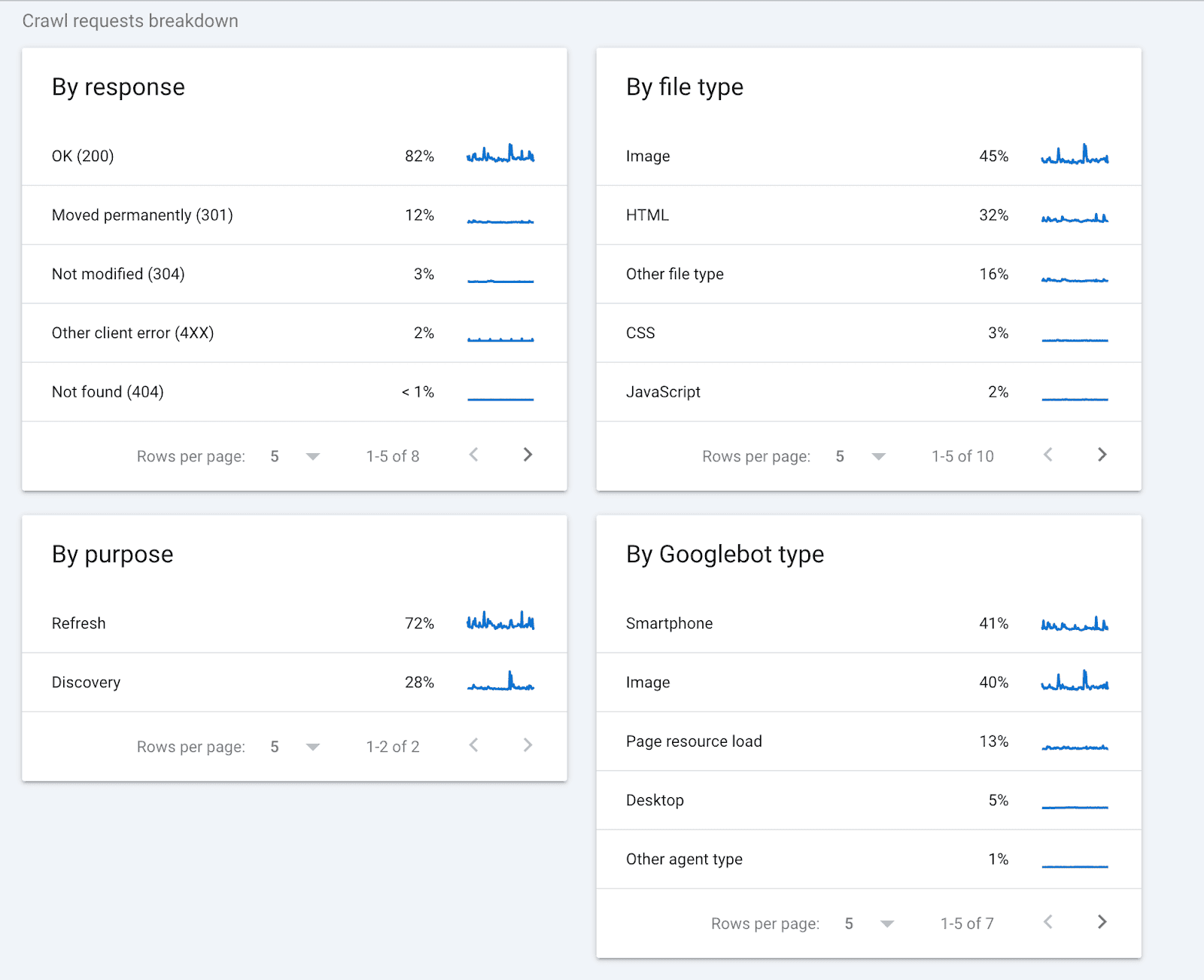
When you scroll down, you’ll also see Crawl Requests Breakdown, which shows how Googlebot interacts with your site. You’ll find;
- Response types (200 OK, 301 redirects, 304 not modified, 4XX errors, 404s)
- File types crawled (images, HTML, CSS, JavaScript, etc.)
- Crawl purpose (refresh vs. discovery)
- Googlebot types used (smartphone, image bot, desktop, and other agents)
Did you know that Google receives 14 billion searches each day? Here are some more interesting Google search statistics for marketers.
How to Get Google to Crawl Your Website More Frequently?
If you want your website pages to show up faster in search results, you need to make sure Google crawls your site more frequently. Here’s a simple tutorial on how to do that.
1. Ensure a Technically Healthy Website
To get Google to crawl your website more frequently, focus on making your site technically healthy.
Fix crawl errors, such as broken links and 404 pages, so that Google search crawlers can crawl your pages effortlessly.
Optimize your site speed by reducing load times, as faster sites get crawled more frequently. You can install a CDN, move to a faster web host, and enable page caching for better speeds.
Google uses mobile-first indexing, so ensure your site is optimized for all devices, including desktops, mobile devices, and tablets. Also, use a robots.txt file to block unimportant pages and avoid crawl load.
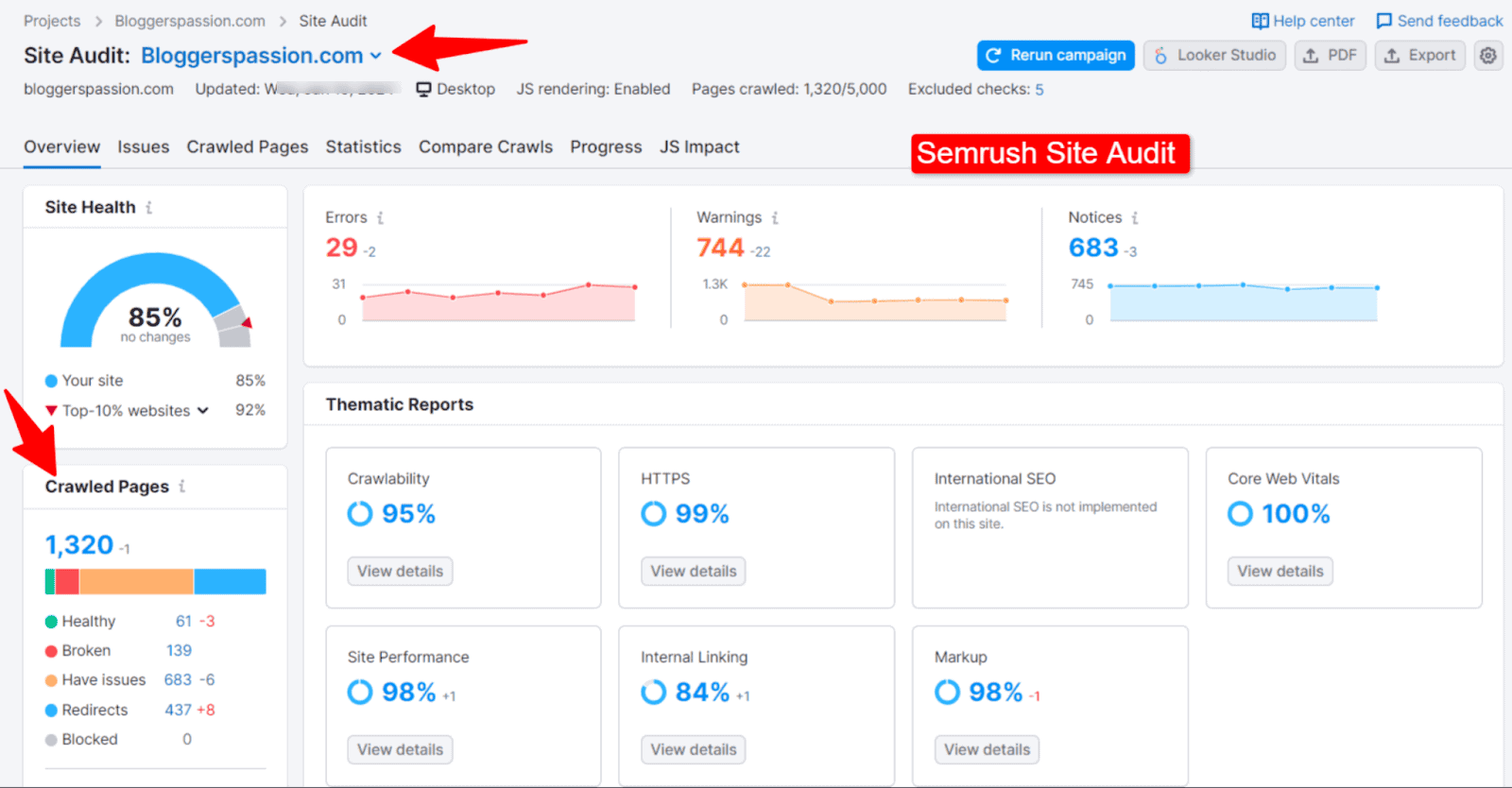
Quick tip: We often use Semrush’s site audit tool to find and fix technical issues on our site. The tool scans your website for over 140 technical issues.
2. Update Content Regularly
Google values freshness. It aims to provide search users with up-to-date information on any topic. When you update your blog posts, add new pages, or refresh old content, it signals that your website is active. It ultimately helps with frequent crawling of your website.
Some of the best ways to update your content for better SEO include;
- Satisfy searchers’ intent with each page
- Check your competitors’ pages that are ranking for the same terms
- Tweak headlines and SEO values
3. Build High-Quality Backlinks
Backlinks are considered “positive votes” by Google. The more authoritative links your site has, the more Google values it.
The number of high-quality backlinks your site earns is directly proportional to how often Google crawls your site to check linked content. Use different methods like guest posting, niche edits, blogger outreach, etc to build quality links.
4. Submit URLs via Google Search Console
If you’ve added new pages or made major updates, don’t wait for Google to find them on its own.
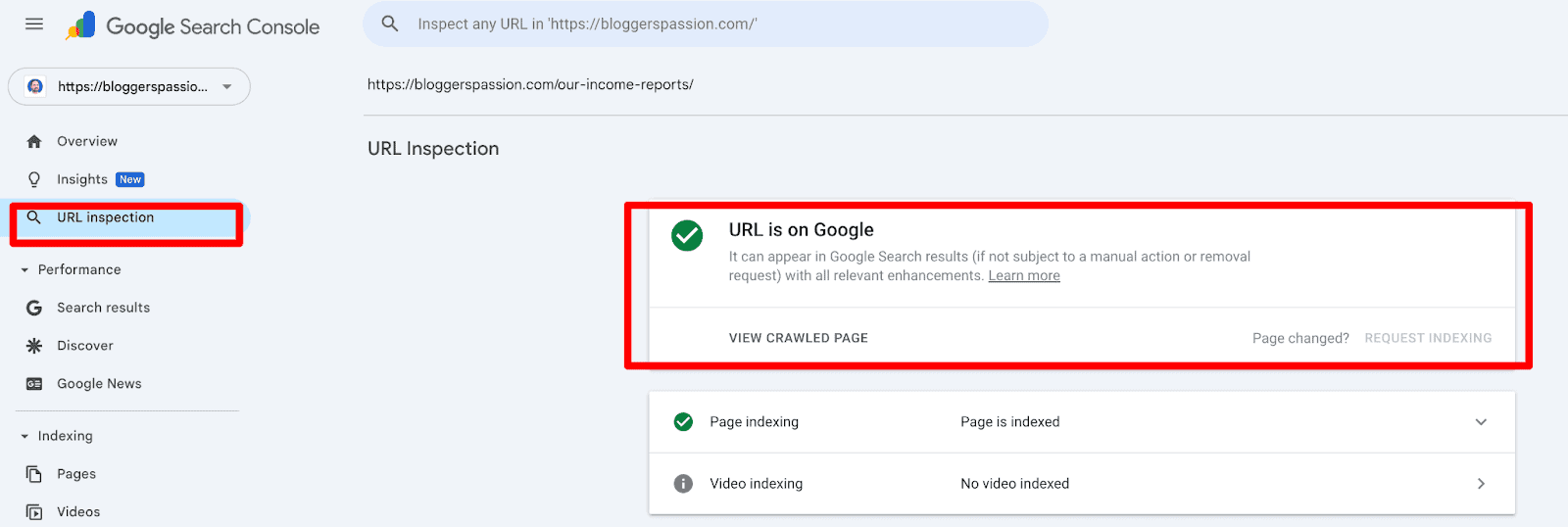
You can manually request indexing through Google Search Console. Just paste the URL and click “Request Indexing.”
To request a crawl of individual URLs, use the URL Inspection tool.
5. Maintain a Clear XML Sitemap
An XML sitemap tells Google what pages exist on your website and which are updated.
It also helps Google quickly understand your site’s structure and find all essential pages.
Keep your sitemaps clean and updated by avoiding duplicate URLs or irrelevant pages on your website. That’s how you can optimize crawl budget efficiency to prevent crawlers from wasting time on them.
Related Reads:
Conclusion
Google doesn’t crawl all the sites on the web equally. Established sites with more authority and backlinks often get crawled and indexed quickly compared to new websites.
In fact, authority sites get crawled multiple times a day, whereas new sites may take days or even weeks.
Improving your site’s overall structure, page speed, offering fresh content, etc can help Google visit your site more often.
So, what are your thoughts on Google crawling your site? Do you have any more questions? Let us know in the comments.
FAQs
Here are some frequently asked questions on Google crawling.
Google uses search bots to crawl the entire web to find new pages and information online. When it crawls your site, it scans your pages, follows links, and checks for updates, so it can index them in Google.
No, Google doesn’t crawl every site at the same time, as its crawling frequency depends on your site’s authority and technical health.
No, Google does not have a fixed crawl schedule.
Yes, you can. Having up-to-date sitemaps with better content and a strong internal linking structure can help you influence Google to crawl your site more often.
New sites often have zero backlinks, indexing issues, and low topical authority, leading to slower crawling times from Google.
Yes, your website speed directly impacts the overall crawl rate. Faster websites often load quickly, allowing Googlebot to crawl more pages in less time.
Yes, sitemaps help with better navigation and overall crawl discovery, helping Google search bots to find new or updated information on your site quickly.
Yes, Google allocates more crawling resources to authority websites with higher crawl budgets. That’s why sites with more backlinks and topical authority often get indexed in Google almost instantly.
Yes, Googlebot also checks the performance of your mobile site. Having a responsive website often helps with better SEO.