


Disclosure: We get a commission when you buy a product via our affiliate link at no additional cost.
Quick verdict:
Base44 is still one of the easiest ways to turn a simple text prompt into an app. It’s great for beginners who want to build real apps with zero coding skills. But if you’re running out of credits too quickly, want to own your code, or need more advanced features, there are plenty of good alternatives like Lovable, Replit, and Cursor.
Here’s the quick breakdown of Base44’s alternatives for 2026;
| If you want this | Try this |
|---|---|
| Fast app building with full code control | Lovable |
| A powerful AI coding agent | Devin Desktop |
| To learn as you build (real apps + database) | Replit |
| Create apps fast in your browser | Bolt.new |
| Beautiful UI and frontend design | v0 by Vercel |
| Write your own code with AI support | Cursor |
Still not sure if Base44 is right for you? Read our full Base44 review and Base44 pricing breakdown first.
Base44 quickly became popular. You type what you want, and it builds the whole app for you.
The best part? You don’t need tech skills, as Base44 takes care of everything for you, including the screens, the database, the login, all of it.
Wix liked it so much that they bought it for $80 million in 2025.
So why are people looking for Base44 alternatives?
Three reasons;
- Credits can run out faster than you expect
- Moving your app away from Base44 later isn’t always easy (as all your data and coding stay inside Base44’s servers)
- It works great for simple apps, but it’s extremely difficult to build complex apps
If any of that sounds familiar, you’re in the right place. Let’s look at some of the best alternatives to Base44 you can try today.
To compile this list, I’ve tried and tested a ton of different AI app builders, comparing their features, pricing, ease of use, and overall experience.
Some are better than Base44 for certain jobs. A few are NOT, and I’ll tell you that too.
Disclosure: Some links in this post are affiliate links. If you buy through them, we earn a commission at no extra cost to you.
Base44 Alternatives at a Glance
Short on time? Here are all the tools side by side.
| Tool | Best for | Free plan | Paid starts at | Code ownership |
|---|---|---|---|---|
| Lovable | Building complete apps | Yes (5 credits daily) | $5/mo | GitHub sync, so you own it |
| Bolt.new | Quick app prototypes | Yes (1M tokens/mo) | $25/mo | Full export anywhere |
| Replit | Learning + full apps | Yes (daily credits) | $25/mo | Full coding control with built-in hosting |
| v0 by Vercel | Creating beautiful app designs | Yes ($5 credits/mo) | $30/user/mo | Standard React code |
| Cursor | Writing code with AI help | Yes (limited) | $20/mo | You write it, you own it |
| Devin Desktop | Powerful AI coding agent | Yes (light quota) | $20/mo | Full ownership of your code |
One quick thing before we dive in: Lovable, Bolt, and Replit can build complete apps, just like Base44. The other three (v0, Cursor, Devin Desktop) work best if you’re comfortable with a bit of coding.
Don’t worry, I’ll also explain who each tool is best suited for, so you can pick the right one without wasting time.
6 Best Base44 Alternatives for AI App Building
Here are SIX of the best competitors to Base44, whether you’re launching a side project, testing an idea, or creating a full business application.
1. Lovable: Best for Building Complete Apps
Who it’s for: Beginners who want a full app fast and want to keep their code.
Lovable is probably the closest alternative to Base44, and for most people, it’s the BEST choice.
Just describe your app, and Lovable builds it for you, including the frontend, database, user logins, and more.
The biggest advantage? Your project syncs directly to GitHub. That means you own the code and can move it anywhere you want later.
So even if you decide to stop using Lovable, your code stays with you. You can host it elsewhere, modify it, or continue building your app elsewhere. It runs on Supabase for the backend, which is a popular platform for handling ALL your app’s databases, authentication, and data.
Here’s the official video tutorial on how to build a CRM using Lovable in a few minutes.
The downside? Lovable can struggle with very complex projects. You can easily manage small and medium apps, but the more advanced your app gets, the more likely you’ll run into debugging headaches.
Like Base44, Lovable uses a credit system. Each text prompt uses a credit. The free plan gives you only 5 daily credits to try it out, while paid plans start at $5/month.
Pricing:
- Free: $0/month. This plan includes 5 credits. Good for testing Lovable and building small projects.
- Pro: Starts at $5/month. This plan includes 20 credits per month. Best for solo builders working on real apps.
- Business: Starts at $50/month and offers 50 credits per month. This plan adds SSO, restricted projects, and a data-training opt-out. Ideal for small teams.
- Enterprise: Custom pricing. This plan includes advanced security, dedicated support, and extra team controls.
2. Bolt.new: Best for Quick App Prototypes
Who it’s for: People who want to turn ideas into working apps fast and are a bit familiar with coding.
Bolt.new runs right in your browser. Just describe your app, and it builds a working version that you can test and edit instantly.
Here’s what the Bolt’s interface looks like;
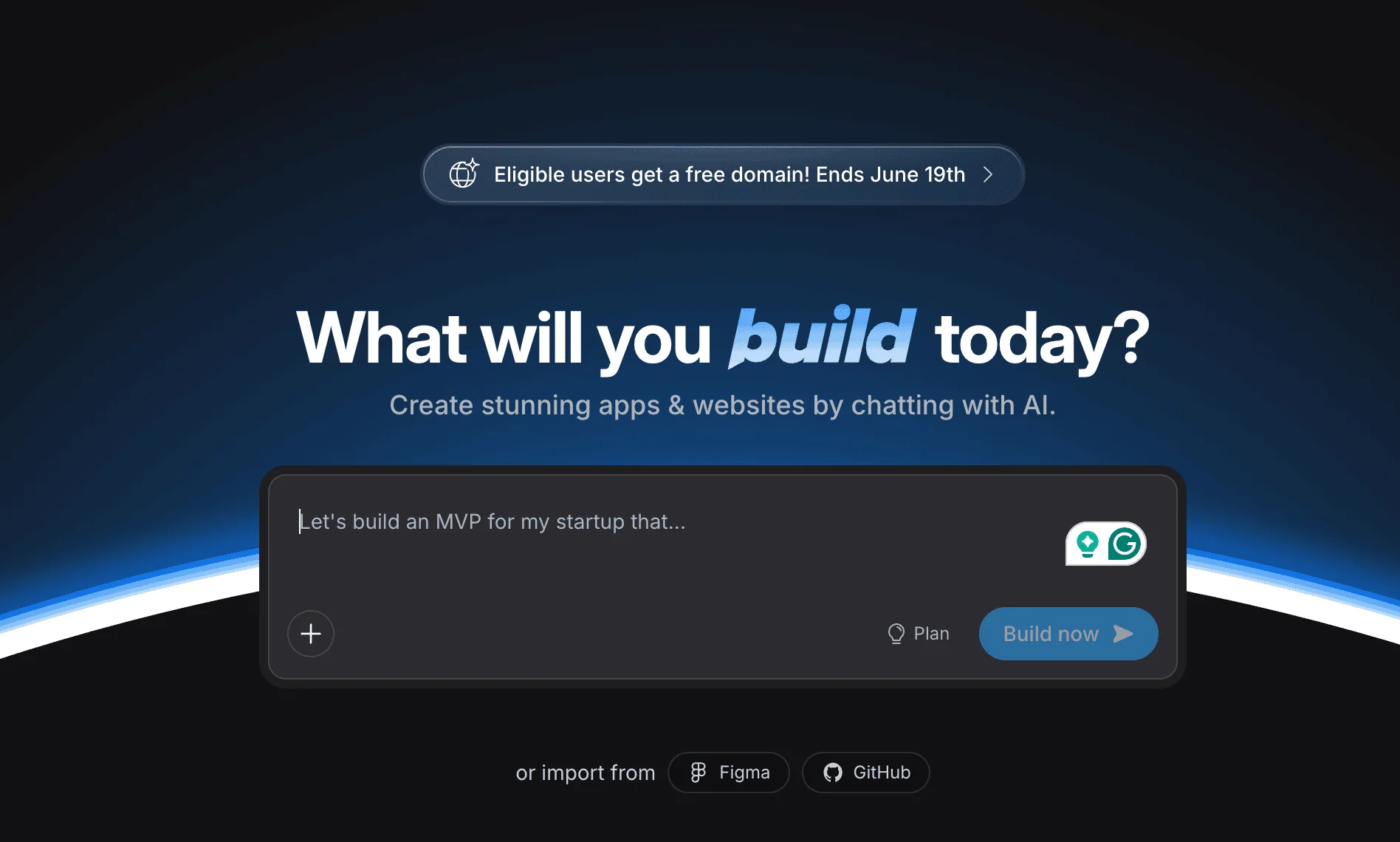
The biggest advantage? You get full access to the code. Unlike Base44, which keeps the code behind the scenes, Bolt shows everything. You can export it to GitHub, edit it yourself, or move it wherever you want. That means you have 100% control over your code.
It works with popular frameworks like React and Next.js, so you’re building on tools developers already use. That makes it easier to customize your app later or move it to another platform if needed.
The downside? Bolt uses tokens instead of credits, and they can burn really quickly when you’re debugging or making lots of changes. So, building larger projects costs more money. Also, Bolt requires some coding knowledge and some basics. If you’ve never built an app before, you might find it difficult to use their platform.
The free plan gives you 1 million tokens per month. Paid plans start at $25/month.
Pricing:
- Free: $0/month. Good for testing Bolt and building small projects.
- Pro: $25/month. This plan includes 10 million tokens per month, no Bolt branding, and custom domains. Best for solo builders.
- Teams: $30/month per member. This plan adds shared billing, member access controls, and admin tools. Ideal for small teams.
- Enterprise: Custom pricing. This plan includes SSO, audit logs, compliance support, and SLAs.
3. Replit: Best for Learning + Full Apps
Who it’s for: People who want to build real apps and learn some basic coding skills along the way.
Replit is an online coding workspace with a built-in AI assistant. Just describe what you want, and the AI can build the app, set up the database, and even put it online for you.
One thing I like is that you can see all the code. You can edit it, experiment with it, and learn how everything works as you build.
As your app grows, Replit makes it easy to manage your data. Its AI Agent can also test your app and fix some bugs on its own, saving a lot of time.
If you’re new to Replit, here’s a full playlist of video tutorials from the official Replit YouTube channel to help you use it like a pro.
The downside? It can get expensive if you’re building larger apps or making lots of changes. It’s also more technical than Base44, so beginners may find it a little harder to build apps at first.
The free plan includes daily AI credits and one live app. Paid starts at $25/month.
Pricing:
- Starter: $0/month. This plan includes free daily Agent credits, a built-in database, and 1 published app. Good for exploring Replit and building one small project.
- Core: $25/month ($20/month billed yearly). This plan includes $25 of monthly credits, up to 5 collaborators, and unlimited workspaces. Best for personal projects and simple apps.
- Pro: $100/month ($95/month billed yearly). This plan includes $100 monthly credits, up to 15 collaborators, the most powerful models, and premium support. Best for commercial and professional builds.
- Enterprise: Custom pricing. This plan includes SSO/SAML, advanced privacy controls, single-tenant environments, and dedicated support.
4. v0 by Vercel: Best for Frontend / UI Only
Who it’s for: People who want appealing designs for their apps or already handle their own backend.
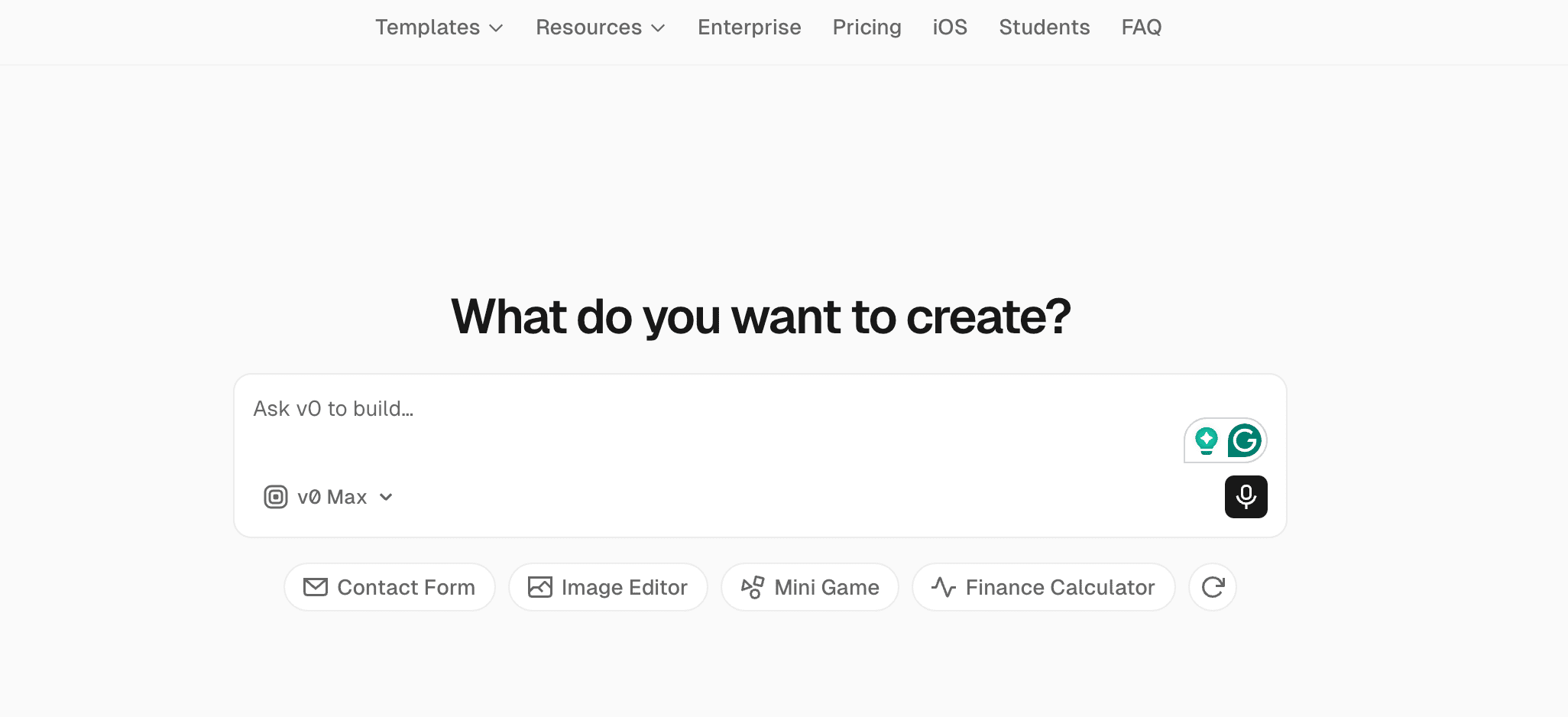
v0 is a little different from the other AI app builders mentioned on this list. Instead of building a complete app, it focuses on the part users see and interact with.
Just describe a page or screen, and v0 creates appealing designs with buttons, forms, and layouts that are ready to use.
The downside? It only handles the front end. Basically, it’s a front-end generator. Backend components like databases, login systems, and app logic need to be built elsewhere.
So if you’re a beginner looking for an all-in-one tool, Base44 is a better fit. But if you want beautiful app designs fast, v0 is a great option.
The free plan gives you $5 in credits a month. Paid starts at $30/user a month.
Pricing:
- Free: $0/month. This plan includes $5 in monthly credits, GitHub sync, and a 7-message-per-day limit. Good for testing v0 and building small UI pieces.
- Team: $30/user/month. This plan includes $30 of monthly credits per user, $2 of free daily credits, and team sharing. Best for solo builders and small teams.
- Business: $100/user/month. This plan adds a training opt-out by default and includes everything in Team. Ideal for teams that want their data kept private.
- Enterprise: Custom pricing. This plan includes SAML SSO, role-based access, priority performance, and support SLAs.
5. Cursor: Best for Coding With AI Help
Who it’s for: People who want to write code themselves, but with an AI assistant helping along the way.
Cursor is a coding tool with built-in AI. Instead of building the app for you, it helps you write code faster by suggesting code, fixing errors, and answering questions.
Think of it as an AI coding assistant, not an AI app builder.
The best part? Its Agent Mode (Composer) lets you describe a feature in plain English. Cursor then figures out ALL the steps, writes the code, updates multiple files, and tests everything automatically.
Here’s a video showing Cursor’s new visual editor, which lets you design and edit interfaces directly inside your codebase.
The downside? Cursor is designed for developers, not non-technical users. You’ll need coding knowledge to build apps effectively. It also doesn’t include built-in hosting or deployment.
The free plan is limited. Paid starts at $20 per user per month.
Pricing:
- Hobby: $0/month. This plan includes limited Agent requests and limited Tab completions, with no credit card needed. Good for trying Cursor out.
- Individual (Pro): $20/month. This plan includes extended Agent limits, access to top AI models, and cloud agents. Best for solo builders coding daily. Higher Pro+ and Ultra levels are available for heavier users.
- Teams: $40/user/month. This plan adds shared team billing, code reviews, usage analytics, and SSO. Ideal for small teams.
- Enterprise: Custom pricing. This plan includes pooled usage, invoice billing, access controls, and audit logs.
6. Devin Desktop (formerly Windsurf): Best for a Powerful AI Coding Agent
Who it’s for: People who know a little coding and want AI to do most of the work.
Quick note: Windsurf is now Devin Desktop (recently acquired by Cognition)
Like Cursor, Devin is an AI coding tool, not a no-code app builder. You still work with code, but Devin can do bigger tasks on its own.
For example, you can ask it to “add user login to my app,” and it can write the code, update the necessary files, and test the feature for you.
It’s great for developers who want AI to handle more of the coding work.
Here’s a quick tutorial on how Devin Desktop works;
The downside? You still need some coding knowledge to use it like a pro. If you’re a complete beginner, it may feel overwhelming. Pricing is also based on usage, so costs can increase for large projects.
There’s a free plan to test, and paid plans start at $20/month.
Pricing:
- Free: $0/month. This plan includes a limited quota for using AI agents, plus unlimited inline edits and Tab completions. Good for trying Devin Desktop out.
- Pro: $20/month. This plan includes bigger quotas, access to top models from OpenAI, Claude, and Gemini, and cloud agents. Best for solo builders coding regularly.
- Max: $200/month. This plan offers much higher usage limits. Perfect for heavy power users.
- Teams: $80/month for the team plan, plus $40/month per developer seat. This plan adds unlimited members, sharing, and an admin dashboard. Ideal for teams.
- Enterprise: Custom pricing. This plan includes SSO, VPC deployment, and dedicated support.
Is Base44 Still Worth It?
Yes, especially if you’re a beginner.
If you want the easiest and fastest way to turn an idea into a working app, go with Base44.
You don’t need coding skills, and it needs zero setup. Just describe what you want, and it builds it for you.
The alternatives are better for specific needs. Want full access to your code? Try Lovable or Bolt. Want to build functional apps and learn coding skills at the same time? Replit is a good choice.
But if you’re just getting started, Base44 is what most beginners need.
Right now, Base44 is also running 20% off annual plans.
Try Base44 and save 20% on yearly plans
Before you buy, grab our live Base44 promo code to save even more.
How to Pick the Right One?
Still not sure which tool to choose? Use this quick guide.
| Your situation | Best pick |
|---|---|
| New to app building and want the easiest option | Base44 or Lovable |
| Want to own your code from day one | Lovable or Bolt.new |
| Want to learn while building | Replit |
| Only need beautiful UI and screens | v0 by Vercel |
| Already know some coding | Cursor or Devin Desktop |
| Want a powerful AI agent | Devin Desktop |
Quick tip: Start with the free plan that fits your needs and build something small. Then, you’ll quickly know which tool is right for you.
Frequently Asked Questions
Here are some FAQs about Base44 competitors.
Yes. Lovable, Bolt.new, Replit, v0, Cursor, etc all have free plans. They offer limited credits, but enough to test the tool and build something small before you pay.
It depends on your goals. If you want to build full-fledged apps and complete control over the code, Lovable is probably the best choice. If you want to learn coding while building, Replit is a great option.
For some people, yes. Lovable can build full apps just like Base44, but it also syncs everything to GitHub. That means you own the code and can move it anywhere later. Base44 is basically an excellent choice for beginners who don’t want to deal with code.
Only the frontend, not the backend or data. Also, code export is only available on paid plans. If code ownership matters, Lovable and Bolt.new are better options.
Final Thoughts
Base44 is NOT the only AI app builder anymore, as there are plenty of good options.
Pick the one tool that matches your skills and goals, grab its free plan, and build one small app. That’s the fastest way to know what works for you.
Have any questions? Let us know in the comments.


![Base44 Promo Codes 2026 October [Get 30% OFF Live]](https://bloggerspassion.com/wp-content/uploads/2026/05/base44-promo-codes-1-1-884x471-1-300x160.webp)


Leave a Comment
Your email address will not be published. Required fields are marked *