


Quick verdict
Best for: Beginners and founders who want a working app from text in minutes with zero coding.
Not ideal for: Anyone looking to build a serious app with complex logic or heavy traffic.
Bottom line: Base44 is excellent for building simple apps, tools, and MVPs (Minimum Viable Products). But if you need complex workflows or full control over your app, it’s NOT for you.
My rating: 4/5, as it’s a brilliant prototyping tool with one big drawback: credits run out fast.
Over the past couple of weeks, I’ve been testing Base44 to see if it can really build useful apps without code.
I created multiple apps, tested its AI app builder, and spent plenty of credits along the way.
In this review, I’ll share my HONEST experience with Base44, its pros and cons, pricing, and what other users are saying about it.
If you’re wondering whether Base44 is worth paying for, this review is just for you.
Disclosure: We get a commission when you buy a product via our affiliate link at no additional cost.
What Is Base44?
Base44 is an AI app builder (also known as a vibe coding tool).
You describe the app you want in plain English, and it builds the whole thing for you, even if you don’t know how to code.
Here’s a real example I typed: “Build me an app to track my blog post ideas with a title, target keyword, and a status field.”
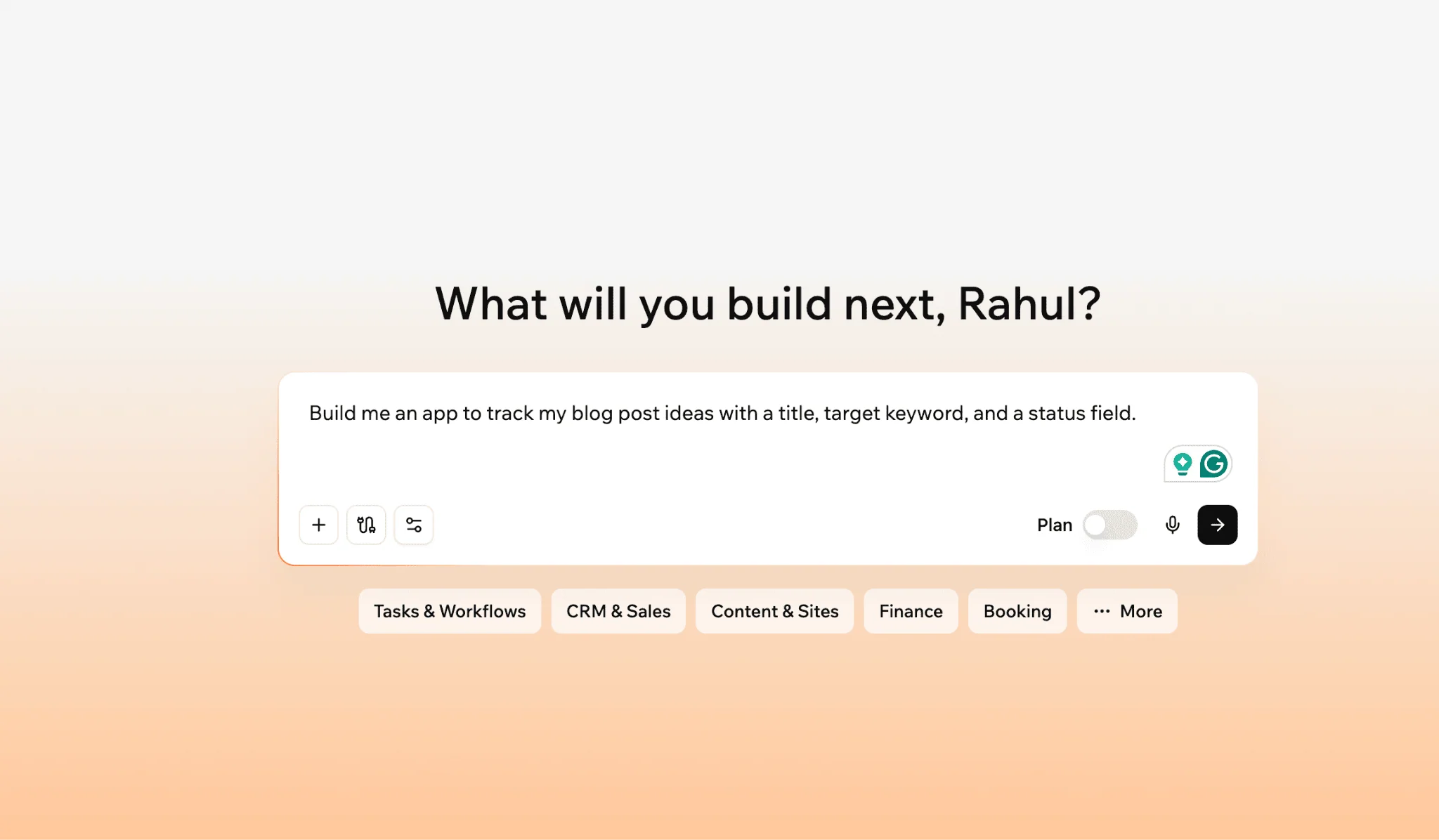
Within a few minutes, it created a functional app with a form and a list.
Have a look at the blog idea tracker below, generated by Base44 from a simple text prompt.
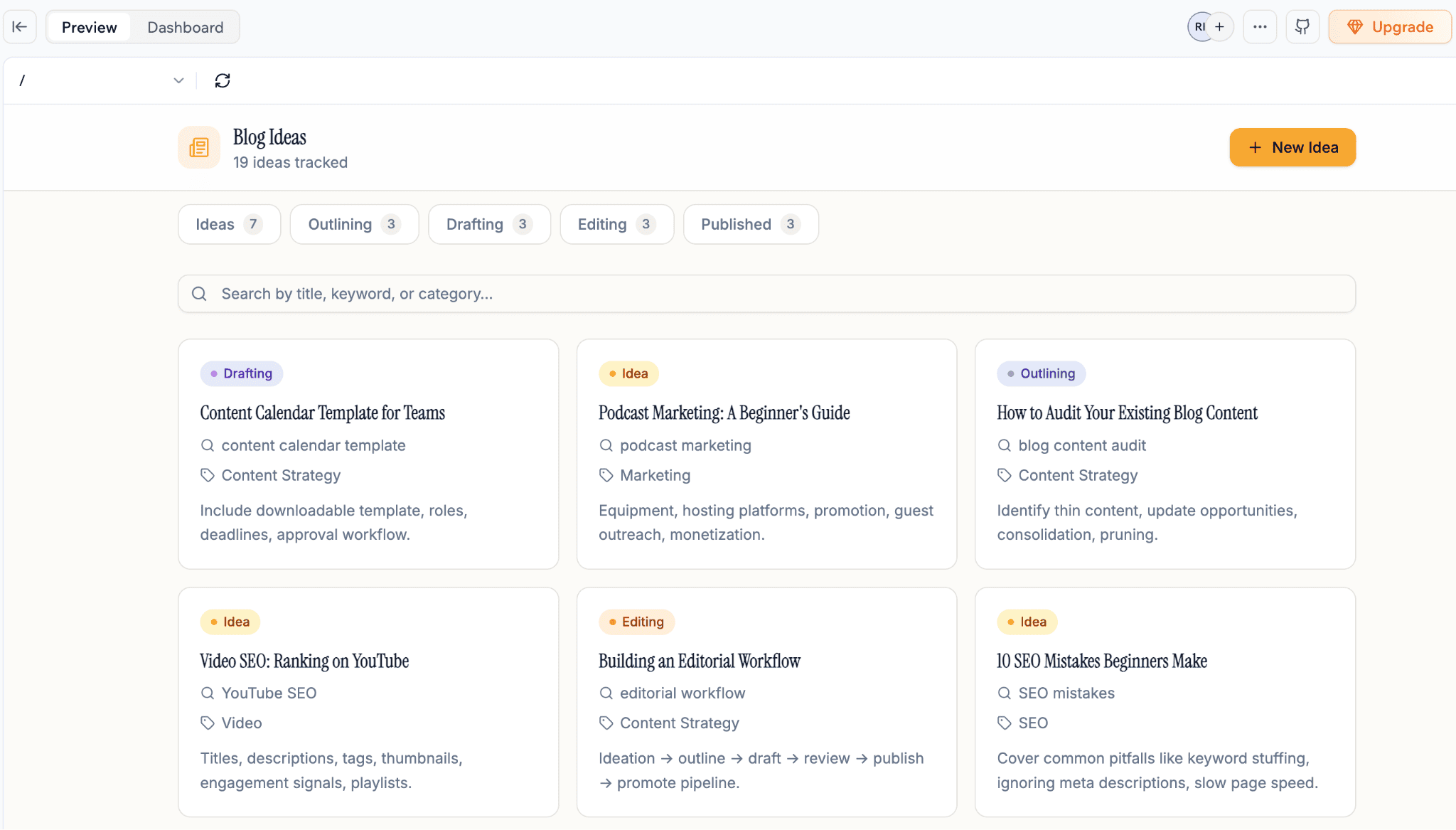
As you can see above, it has everything from content planning and status tracking to categorization and search.
Tasks that would normally take hours, such as building apps or websites, were completed in minutes. That’s why vibe coding tools like Base44 have become so popular.
Looking to save more on Base44? Check out Base44’s working coupons here.
How Does Base44 Work?
Here’s how Base44 works;
- Give a text prompt
- The AI will design what you want
- Then you refine it according to your needs
That’s it.
The best part? There’s no setup, no install, no database to configure. You simply open the app, describe what you want, and it will design an app, tool, or website for you.
Here’s how I built my keyword research tracker using Base44.
Step 1: I gave a prompt
Here’s the input I gave to Base44;
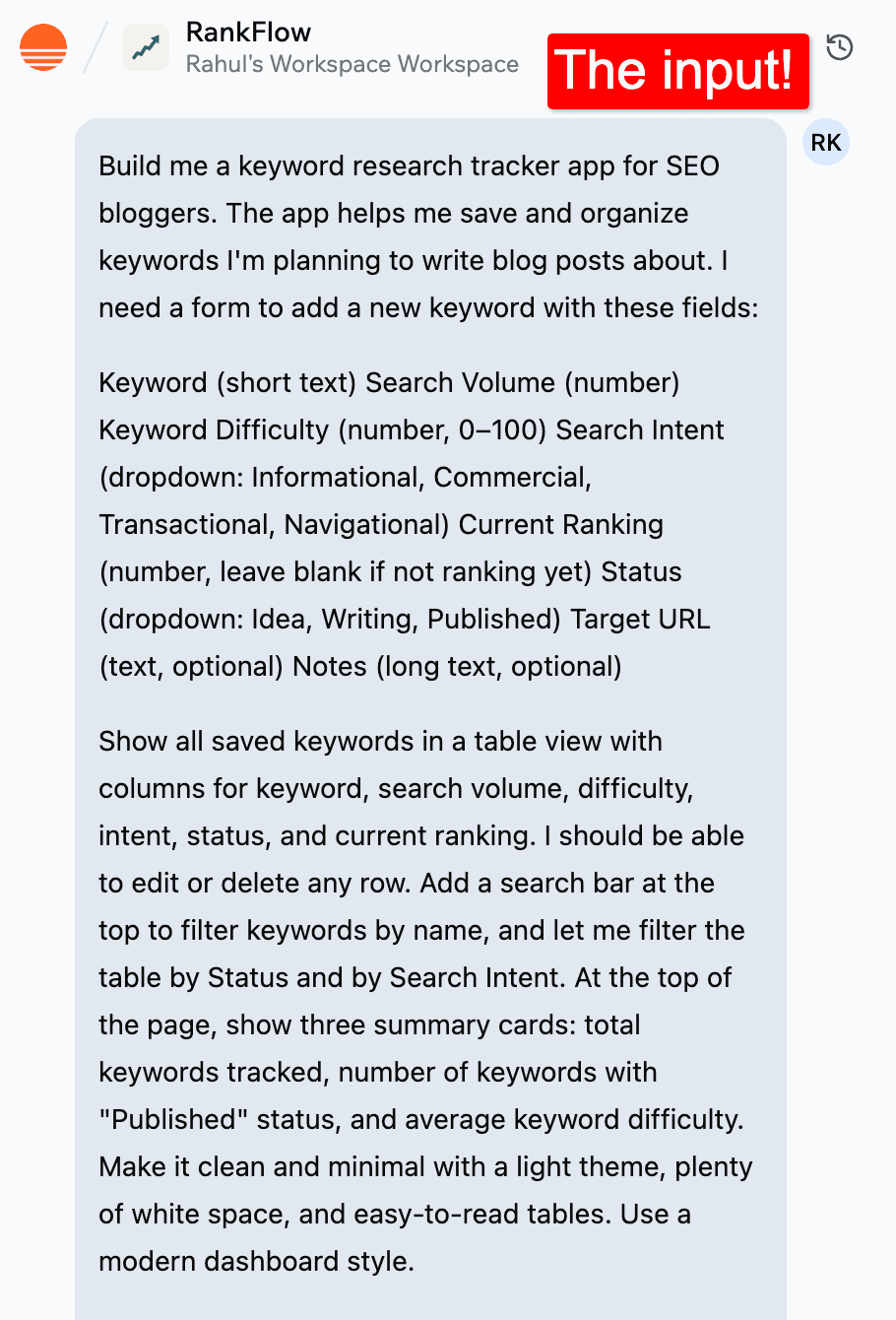
Remember, the more detailed your input is, the better the results will be. Base44’s AI can only work with the information you give it.
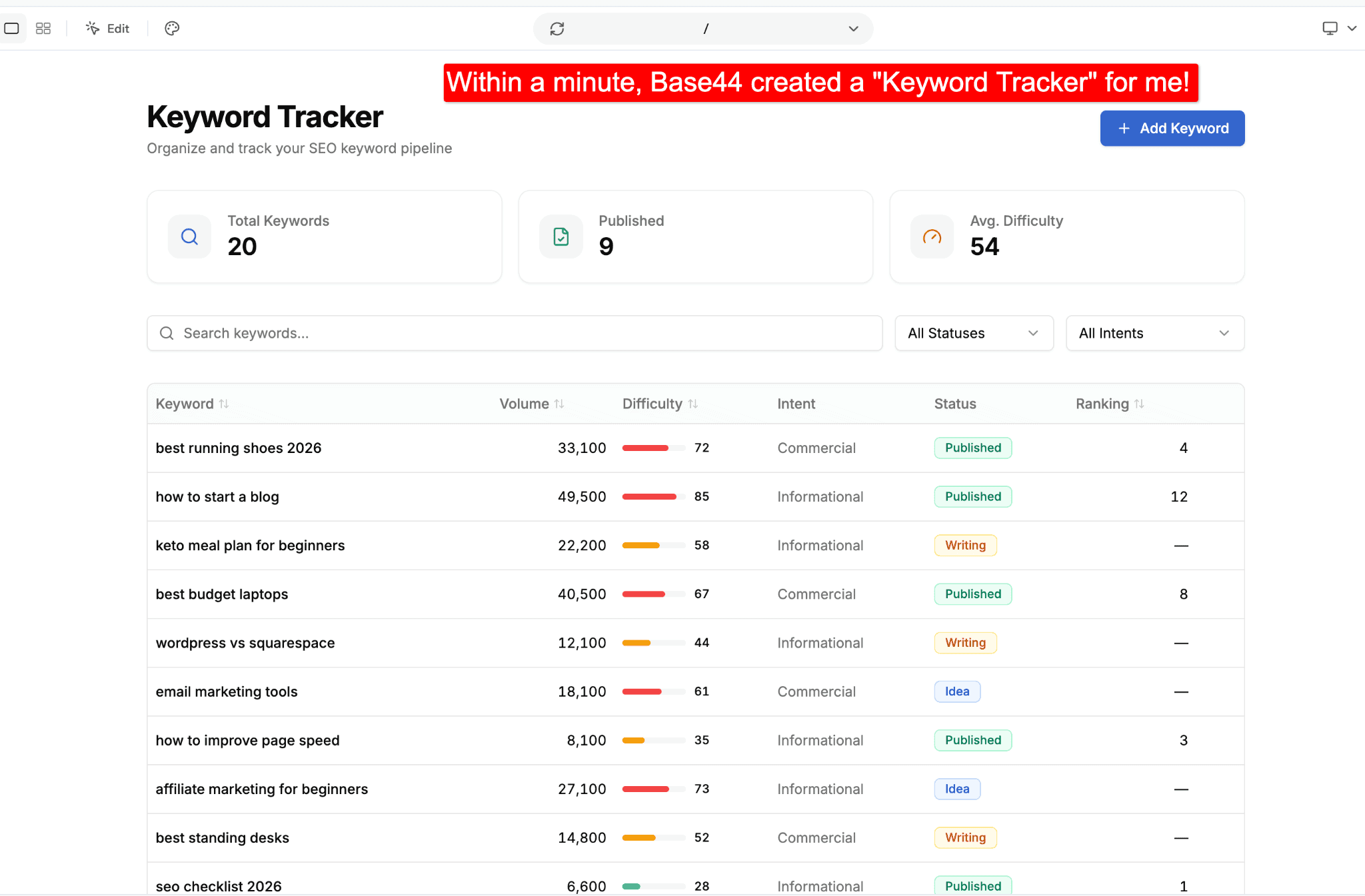
Step 2: It built the whole thing
In about 90 seconds, Base44 generated a working app including a form to add keywords, a table to view them, and the database behind it. All running live.
I didn’t write a single line of code.
Step 3: I improved it by chatting
If you want to improve the features of your app or tool further, you can simply chat with Base44’s AI.
The best part? Base44 can also suggest new features for your app.
So, instead of thinking of everything yourself, it gives you ideas like adding a chart or a CSV import tool. This can save time and help you build a better app faster.
Have a look;
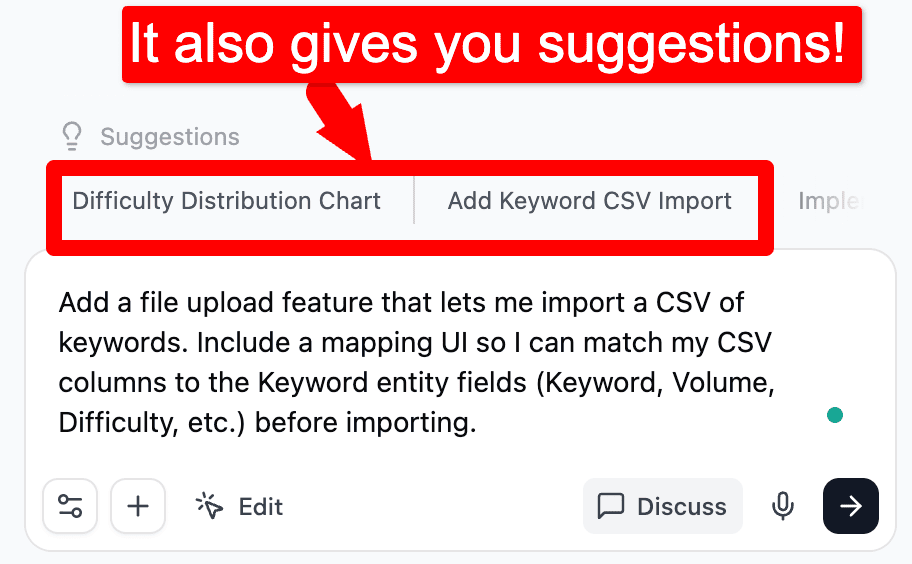
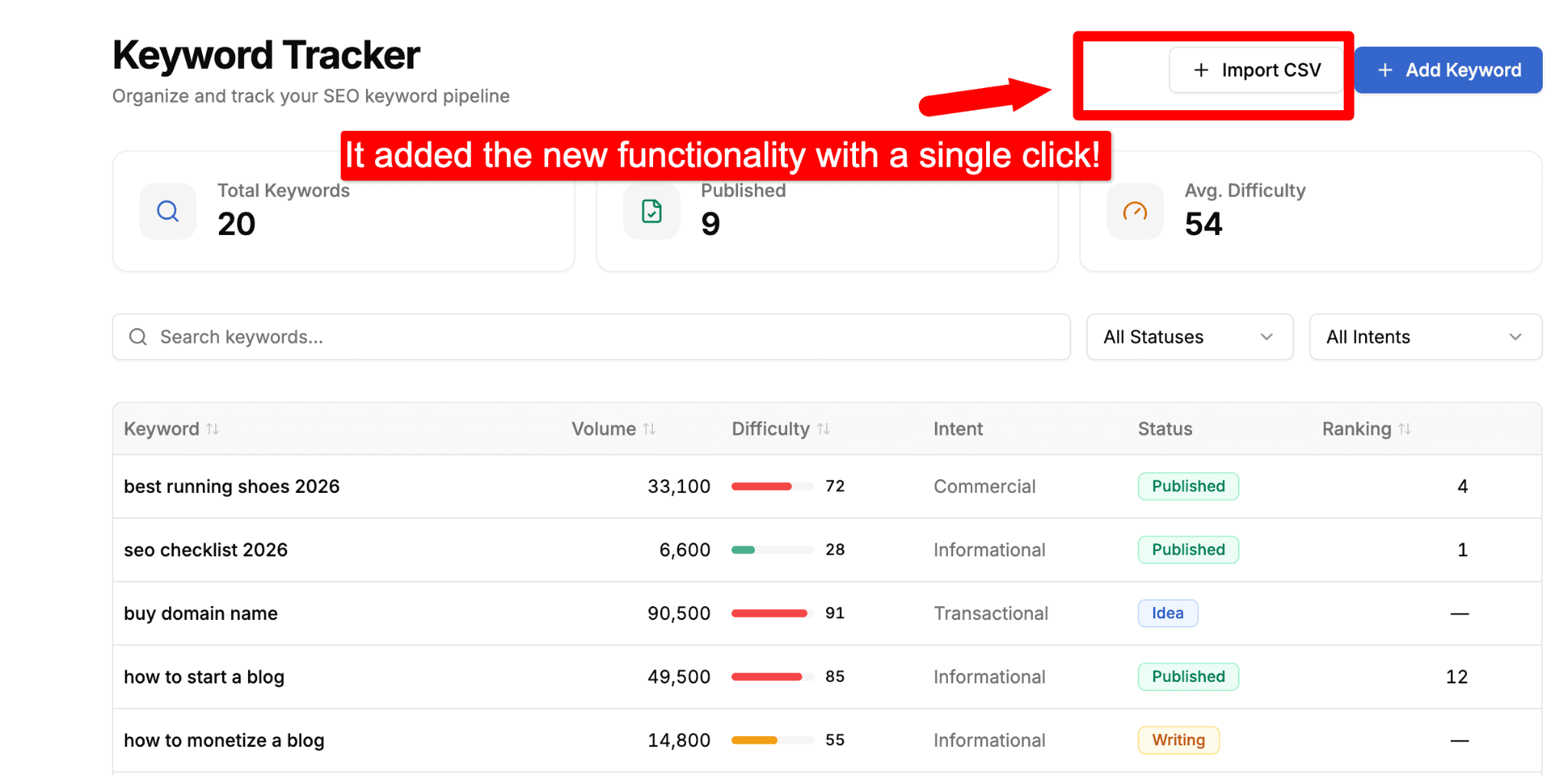
Once you hit the “Send” (→) button, it will add the new features for you.
Here are a few quick tips for giving better inputs to Base44:
- Explain exactly what you want the app to do
- Explain who will use it, and why
- Explain what happens when a user clicks, submits, or signs up
- Mention design preferences (such as modern, minimal, dark mode, etc)
- Give reference apps or websites with similar functionality
- You can also use AI tools like ChatGPT, Claude, Gemini, etc to generate detailed text prompts
Step 4: Publish
Once you’re done making changes to your app or tool, you can hit the Publish button to make it live.
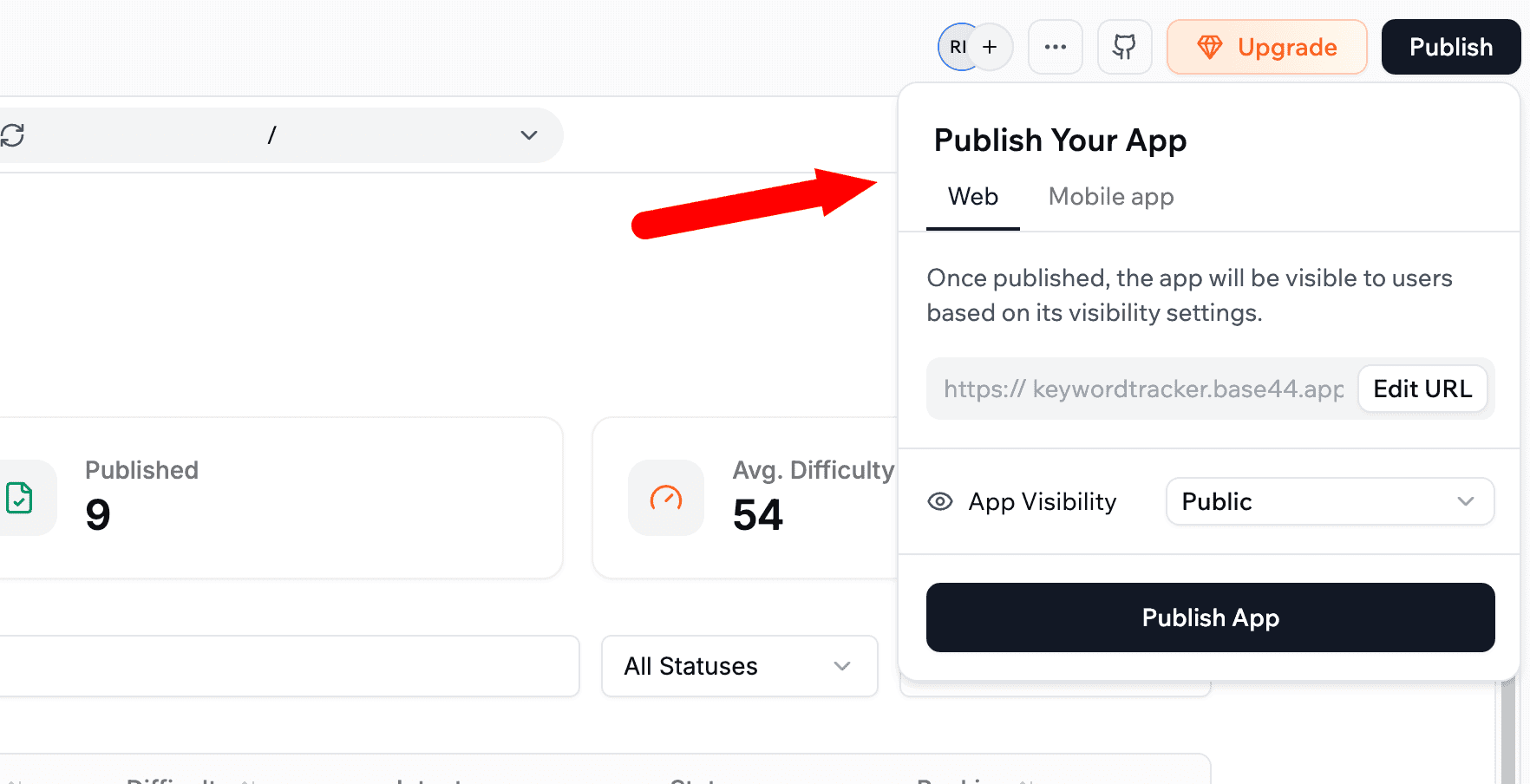
Base44 will handle the deployment for you, so you don’t need to worry about servers or technical setup.
Every build and edit on Base44 costs credits.
A tip that saved me credits: use Discuss mode while planning. It costs just 0.3 credits per message, so you can brainstorm ideas, refine features, etc.
Base44 Key Features
Base44 offers a ton of features. Here’s a quick look at what you get:
| Feature | What it does |
| AI app builder | Describe your app in text. Base44 builds for you. |
| Built-in database | A NoSQL database is created automatically based on your prompt. No SQL needed. |
| Authentication | User sign-up, login, and role-based permissions work out of the box |
| One-click integrations | Pre-built integrations to Stripe, email, SMS, Google Sheets, Slack, and more |
| Hosting + custom domains | Built-in hosting with automatic HTTPS. Connect your own domain (free for 1st year) |
| Mobile app publishing | The ability to publish apps to the Apple App Store and Google Play |
| Code export | Export your app’s code on paid plans. You can also sync with GitHub. |
| Analytics dashboard | Access to user growth and app activity |
| Multiple AI models | Base44 picks the best model for your build, or you choose one yourself |
5 Core Features of Base44 That Make App Building Easy
Now let’s look at the 5 major features of Base44 that matter most for beginners.
1. AI App Builder
This is the main feature of Base44. You type a prompt like, “Build a keyword research tracker where I can save keywords, search volume, and difficulty scores.”
Base44 reads your text prompt and creates a working app in a minute or two.
You don’t need any technical skills or coding knowledge. You simply describe what you want, then improve it by chatting with the AI. Need a new column? Ask. Want a search filter? Ask.
Here’s what its app builder looks like;
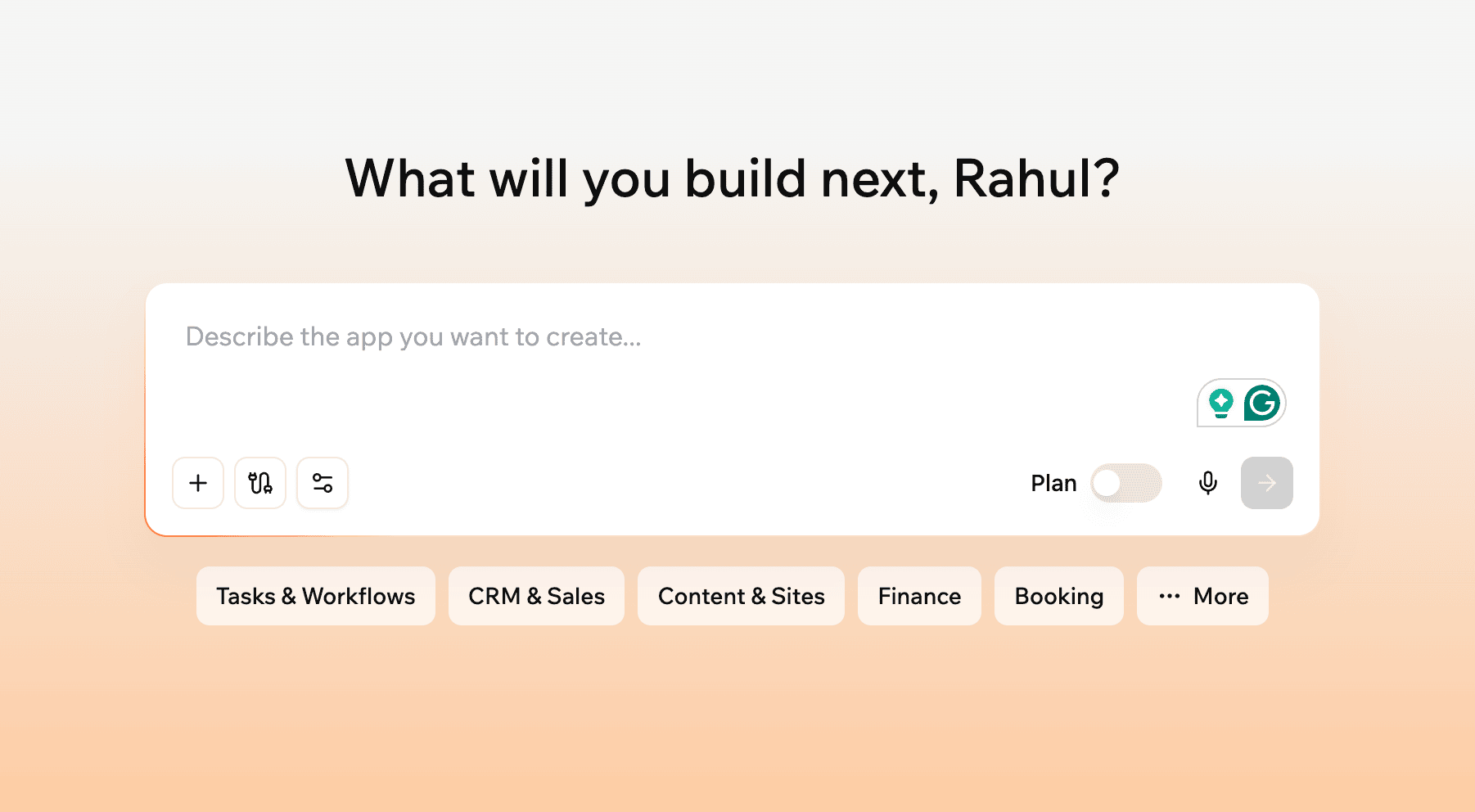
The interface also includes options to attach files, add integrations, and switch on Plan mode, which helps you discuss and refine ideas before spending credits.
2. Built-In Database
Most app builders, such as Bubble and WeWeb, require you to connect to a separate database, such as Supabase or Airtable.
Here’s where Base44 excels: it offers a fully integrated NoSQL database.
When you describe your app, it automatically creates the database for you.
For example, when I built a keyword tracker, Base44 automatically created fields for the keyword, search volume, difficulty, and notes. Instead of spending time on creating and configuring the database, I could focus on building and testing the app. That’s a HUGE time-saver, especially for beginners and non-technical users.
As your app grows, you can view and edit your data directly inside Base44. You can add new fields, update records, and make changes without touching any code. Isn’t it amazing?
3. Manage login and registration
If your app needs user accounts, Base44 takes care of that for you. Features like sign-up, login, password resets, and user roles are built in.
You can offer multiple ways for people to sign up, such as email, Google, etc.

Also, all new Base44 apps come with built-in authentication. You get access to ready-made login, signup, forgot password, and password reset pages.
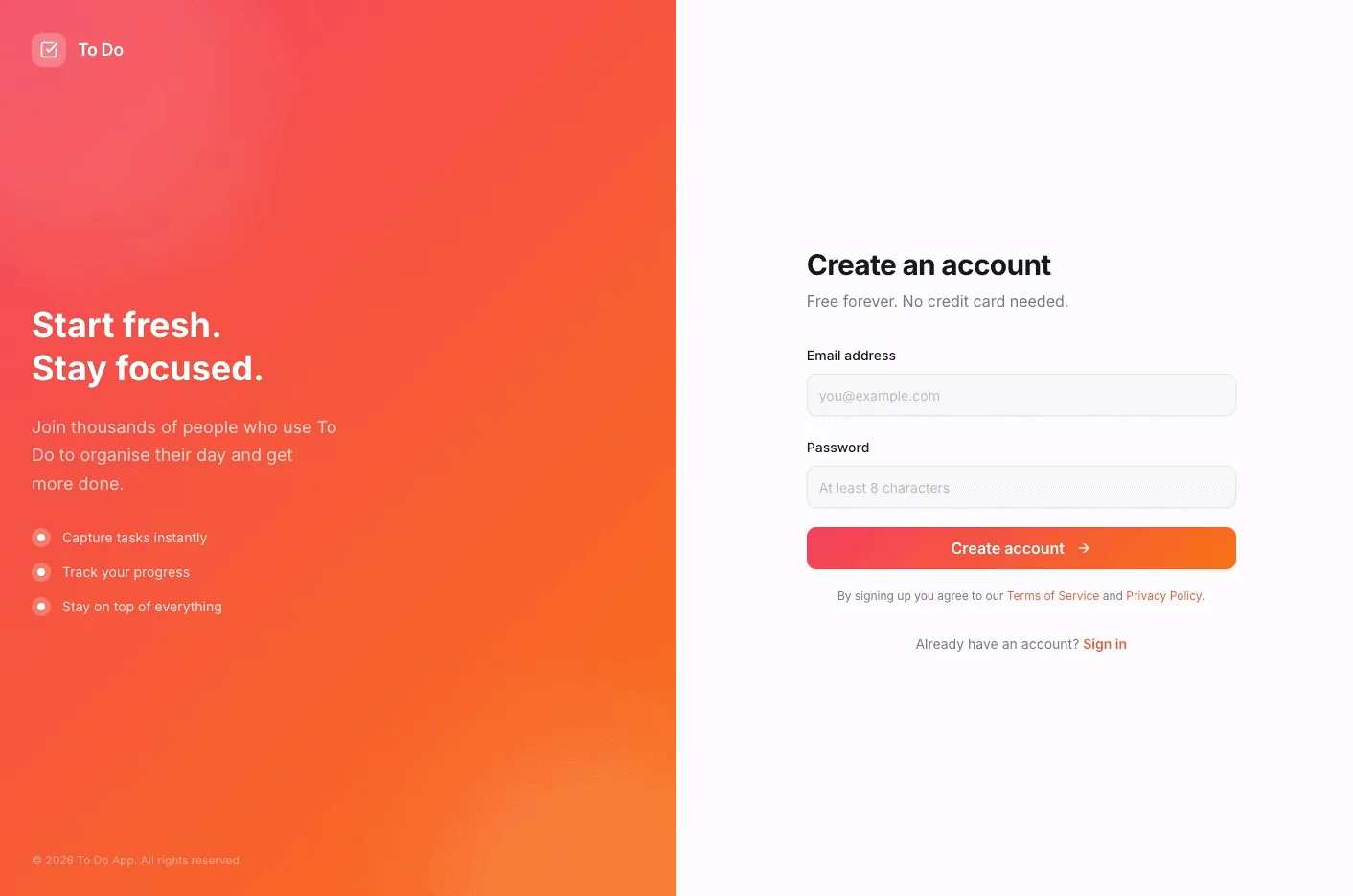
You can also customize them to match your app’s design and branding.
4. Access to the Code
One feature I liked is that Base44 lets you see the files used to build your app.
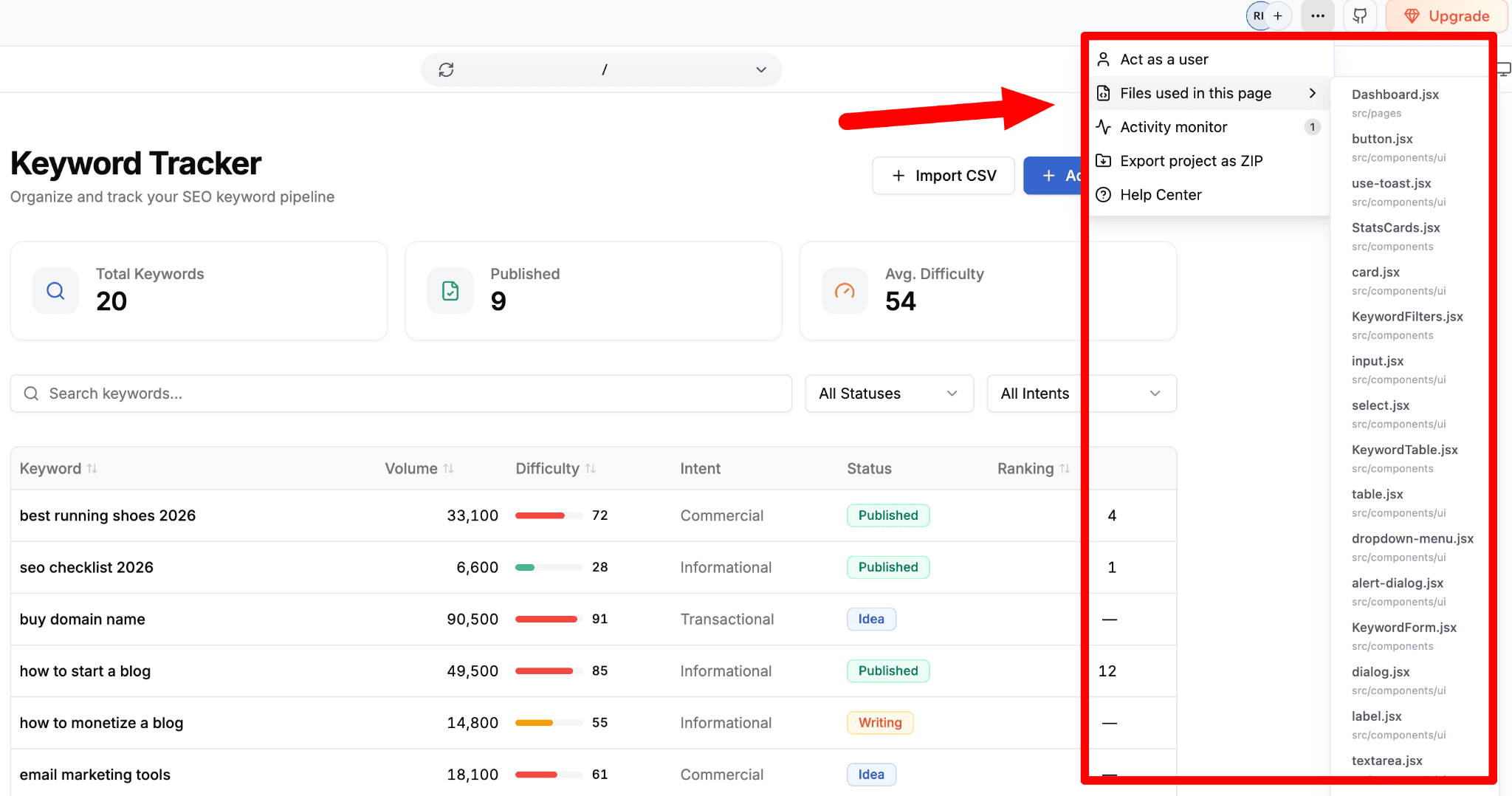
As shown above, you can open the file list, inspect the code behind each page, and even export the entire project as a ZIP. That gives you more control if you want to customize things later.
Having access to the code has another major benefit: it makes debugging easier. When something doesn’t work as expected, you can inspect the relevant files and fix those issues.
This is particularly helpful for developers who want to understand how something works behind the scenes.
Want to build apps and learn coding at the same time? See how Base44 compares to Replit.
5. One-Click Integrations
Base44 comes with pre-built connectors without the need for separate accounts and API keys.
For example, you can send emails automatically, generate PDFs, connect to Google Sheets, or pull data from external APIs without spending hours setting everything up yourself.
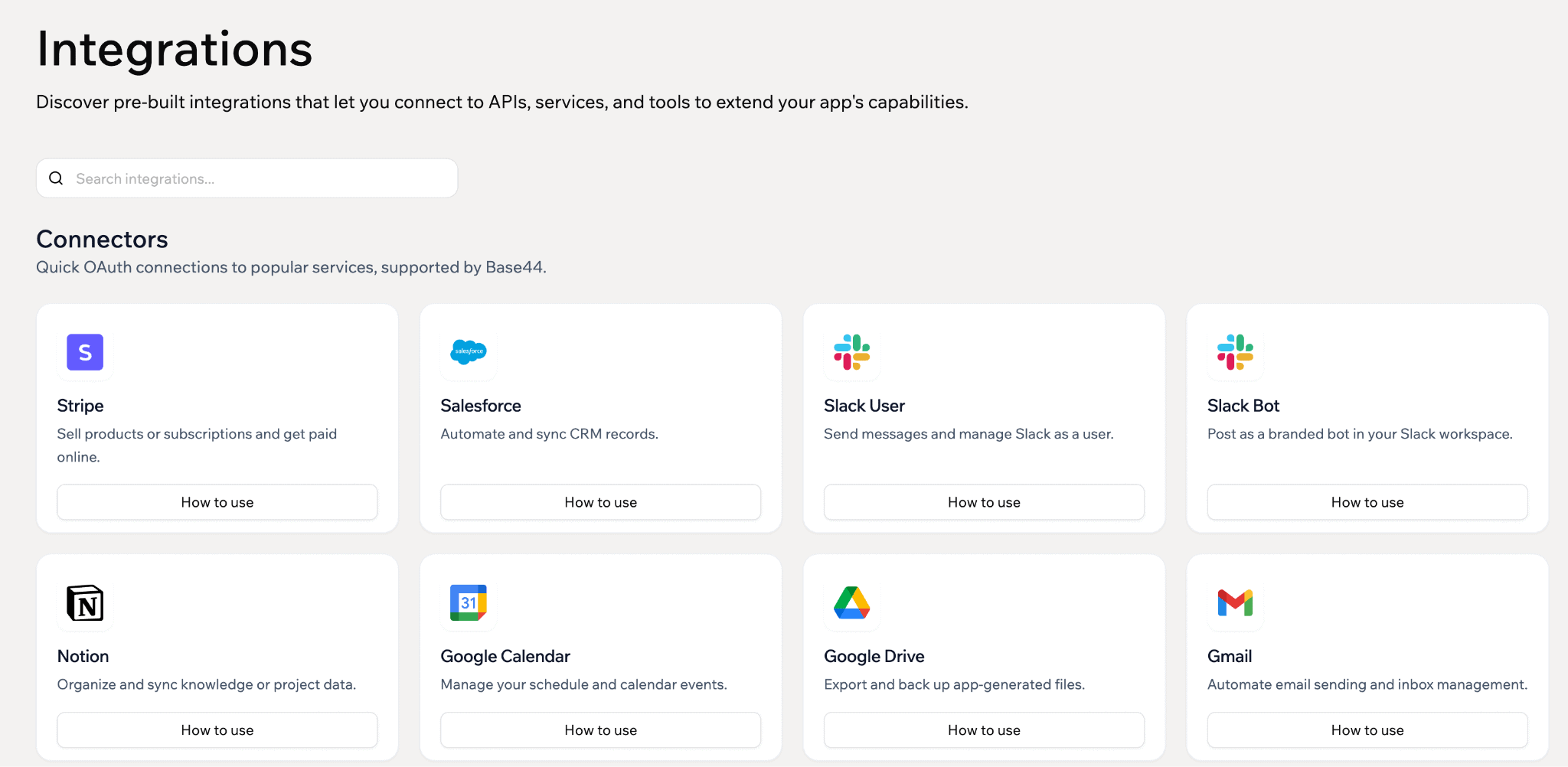
Also, Base44 offers hosting and custom domains. Once your app is ready, you hit publish.
Base44 hosts it for you with automatic HTTPS. You can connect a custom domain (the first year is free).
You can now publish apps directly to the Apple App Store and Google Play.
Base44 Pricing: How Much Does It Cost?
Base44 uses a freemium model. That means it offers a free plan, and you can upgrade when you need more limits or features.
But here’s the thing to remember: Base44 doesn’t charge a flat fee for unlimited use, as it runs on credits. The more you build, the more credits you consume.
Base44 Pricing Plans
Base44 has a free plan plus four paid tiers. Here’s what each costs and what you get:
| Plan | Price (annual) | Price (monthly) | Credits | Best for |
|---|---|---|---|---|
| Free | $0 | $0 | 25/month | Testing the platform |
| Starter | $16/mo | $20/mo | 100/month | Personal projects |
| Builder | $40/mo | $50/mo | 250/month | Solo founders & freelancers |
| Pro | $80/mo | $100/mo | 500/month | Apps with traffic |
| Elite | $160/mo | $200/mo | 1200/month | Heavy users & agencies |
You save 20% by paying yearly instead of monthly. And you can start for free, with no credit card required.
One tip to keep in mind: students and teachers can get up to 50% off the Starter plan by verifying their credentials.
Check Out Base44’s Pricing Plans
A Few Credit Limits to Keep in Mind
Here are a few things that surprised me when I started using Base44.
- First, credits don’t roll over. If you don’t use them by the end of the month, they’re lost.
- Second, you can’t buy extra credits separately. If you run out of credits, you’ll need to upgrade to a higher plan.
- Third, the free plan credits disappear REALLY fast. You get 25 message credits per month, which sounds decent until you start making changes and testing different versions of your app.
My Honest Take on Base44 Pricing
I built my keyword research tracker on the free plan. Yes, you heard it right, and it was enough to get a real feel for the tool. For testing an idea, the free plan works.
The free plan is fine for testing things out, but it’s NOT enough if you’re serious about building an app.
The Starter plan ($16/month) is great for personal projects and smaller apps. But if you want to connect a custom domain or launch your app for real users, you’ll need the Builder plan.
My honest take: Base44 looks affordable at first. But the real cost depends on how much you build and how often you use it.
Base44 Pros and Cons
No AI app builder is perfect. Here are a few things I love about Base44, along with some limitations to keep in mind before using it.
What I Liked About Base44?
It’s REALLY fast: You can go from an idea to a working app in minutes. I described my keyword tracker, and Base44 generated a usable first version almost immediately.
Everything is built in: Database, authentication, hosting, and integrations all come out of the box. You don’t need to connect a ton of different tools just to get an app working, which makes things much easier for beginners.
No coding needed: You create tools or apps simply by chatting in plain English. “Add a column for keyword difficulty.” You’re done. It also has an easy-to-use interface.
The free plan is excellent: I love it, as you can actually build a working app even with the free version. I tested the whole flow without spending a penny.
It handles ALL the technical stuff: Technical features like authentication, databases, hosting, and user permissions can be hard to set up properly. Base44 takes care of them automatically, so you can focus on building your app instead of worrying about the technical stuff.
You can also check out our post on Base44 vs Lovable if you want a better alternative.
What Could Be Better?
You can’t top up credits: This is probably my biggest complaint. If you run out of credits before the end of the month, you simply can’t buy a few more. Your only option is to upgrade to a higher plan and pay for the whole month. Base44 should fix this!
Credits run out quickly: The free plan includes only 25 message credits, which are good enough for small tasks. Even with a paid plan, credits can run out fast if you make lots of changes or build multiple apps.
Limitations: Code export is limited, and moving your app elsewhere later is NOT easy at all.
Here are some of the best Base44 alternatives you can try in 2026.
Frequently Asked Questions
Here are some of the most common questions people have about Base44’s pricing, credits, and plans.
Base44 has a free plan, with paid plans starting from $16/month (Starter) to $160/month (Elite) when billed annually.
No, Base44 credits do not roll over. If your plan’s credits are not used by the end of the month, they expire and are reset at the start of your next billing cycle.
Whenever you create, update, or fix your app (such as changing a color, adding a database, or fixing code), you consume credits.
Base44 uses roughly 0.3 credits per Discussion Mode message, 1 credit for actions like emails and file uploads, and 3 to 15 credits for LLM Calls (Automatic/Gemini/GPT).
Base44 offers a free plan that lets you use up to 5 credits per day, for a total of 25 credits per month.
No, you can NOT buy extra credits if your current monthly credits run out. You’ll need to wait until the next billing cycle or upgrade to a higher plan to get more credits.
Wix acquired Base44 for approximately $80 million in 2025 from Maor Shlomo, who’s an Israeli entrepreneur and developer.
Final Thoughts
Here’s my take on Base44 after using it: it makes building apps REALLY faster, even if you don’t know how to code.
It’s easy to use, offers a free plan, and is extremely useful for non-coders who want to build prototypes or simple apps. But it’s NOT helpful if you’re looking for a feature-heavy app or SaaS product with lots of custom workflows.
Just keep an eye on your credit usage, as they run out quickly. Start with the free plan to see how things work out. If you’d rather write your own code, take a look at our Base44 vs Cursor comparison.
Have any questions? Let us know in the comments.


![Base44 Promo Codes 2026 October [Get 30% OFF Live]](https://bloggerspassion.com/wp-content/uploads/2026/05/base44-promo-codes-1-1-884x471-1-300x160.webp)


Leave a Comment
Your email address will not be published. Required fields are marked *