


Disclosure: We get a commission when you buy a product via our affiliate link at no additional cost.
Quick Verdict
Here’s the thing most comparisons won’t tell you: Base44 and Cursor are NOT direct competitors to each other. Why? They solve different problems.
Base44 is a vibe coding tool that builds the whole app for you. You type a text prompt, and it builds the app for you, along with the database, login, hosting, etc. No coding is needed.
Cursor is an AI coding agent tool for people who already write code. It helps them code faster. It does NOT build a functional app for you, and if you can’t code, it won’t help much.
Our pick for beginners and bloggers: Base44. It lets you build real apps faster without coding.
Disclosure: Some links in this post are affiliate links. If you buy through them, we earn a commission at no extra cost to you.
Base44 vs Cursor: Quick Comparison Table
Are you in a hurry? Here’s a quick comparison table before we get into the details.
| Situation | Base44 | Cursor |
|---|---|---|
| Best for | Non-coders, bloggers, founders | People who already code |
| Coding needed? | None at all | Yes, a lot |
| What it is | An app builder | A code editor with AI |
| What you get | A live app | Code you still have to finish |
| Setup | Zero | Download and install first |
| Hosting included? | Yes | No (you set it up elsewhere) |
| Database & login | Built in | You build it yourself |
| Pricing starts at | $16/mo (yearly) | $16/mo (yearly) |
| Learning curve | Very easy | Difficult if you’re new |
The bottom line: Base44 is for building apps without code. Cursor is for developers who want to code faster with AI.
The Big Difference (Read This First)
Base44 and Cursor are not the same type of tool.
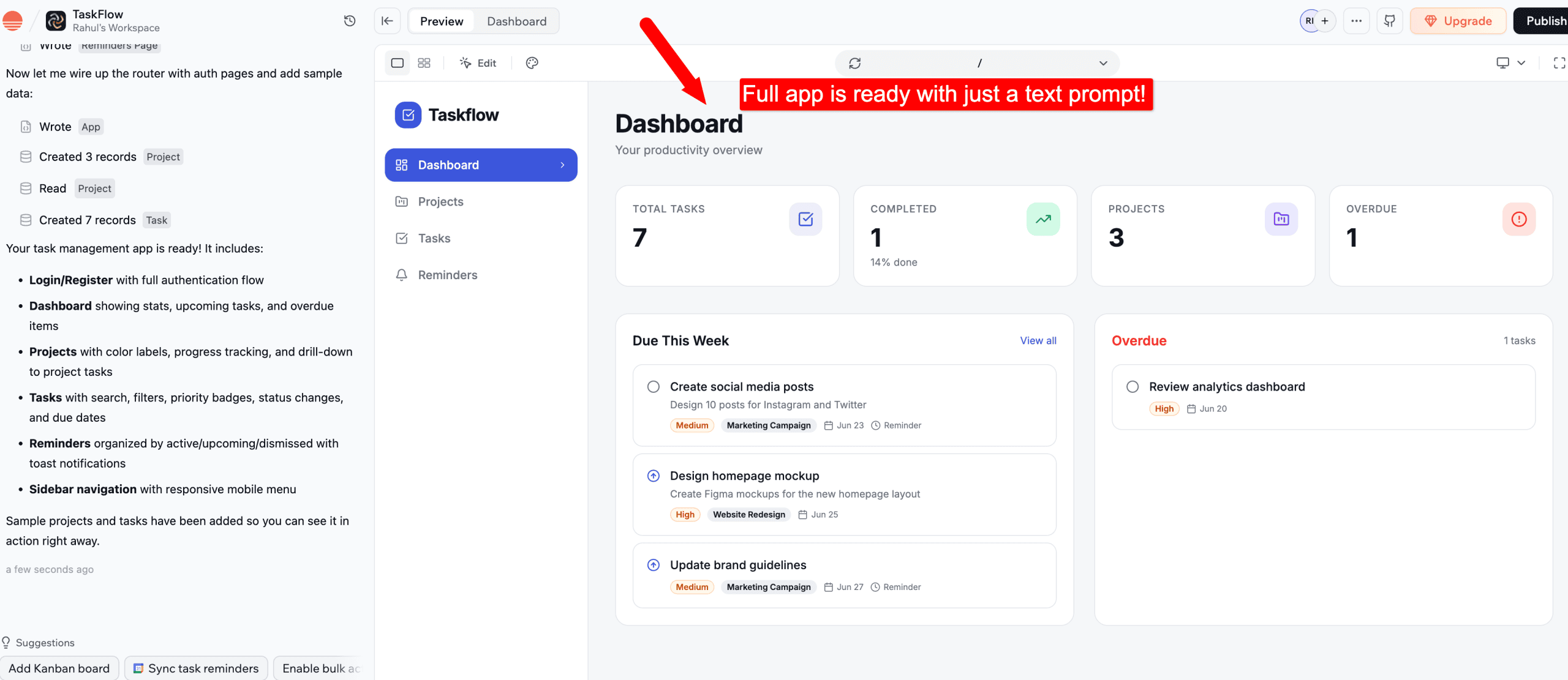
Base44 builds the entire app for you. You describe your idea in plain English, and it creates the app, database, and hosting.
Example: You type, “Build me a task management app with login, projects, and reminders.” Base44 builds the whole app for you.
Have a look;
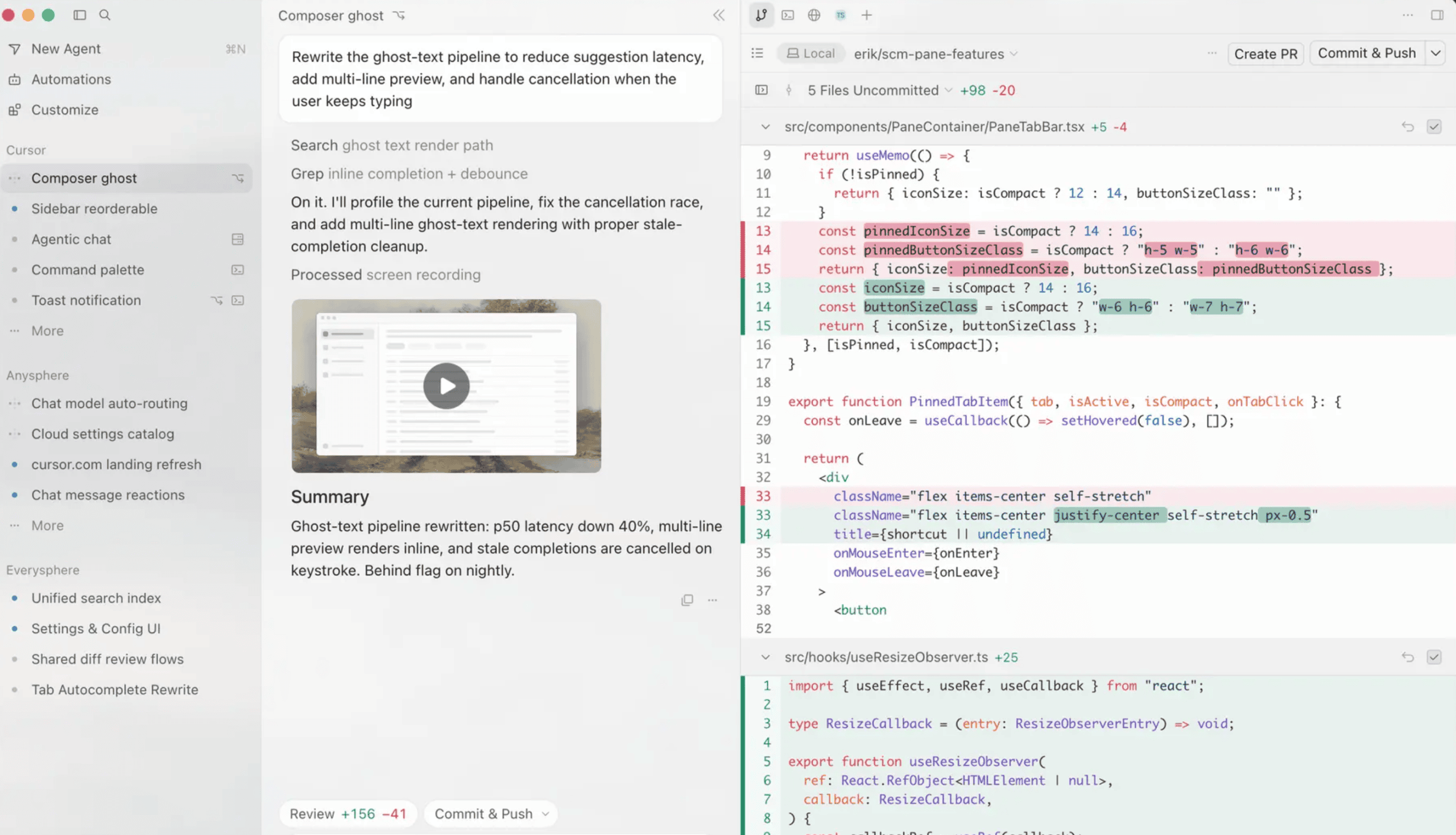
Cursor is an AI coding editor. It helps developers write code faster, but you still need programming knowledge.
Example: You tell Cursor, “Create a login system using React and Supabase.” Cursor writes the code, but you still need to understand, edit, and run it.
Here’s what the Cursor’s interface looks like;
In short:
- Base44 builds the app for you
- Cursor uses AI to help developers write code quicker, fix bugs, and work with the tools you already use
If you don’t know how to code, Base44 is the BEST choice.
Base44 vs Cursor: Head to Head
It’s time for a side-by-side comparison. Let’s compare the two tools across six categories.
1. Do You Need to Know Code?
This is the most important question to ask yourself before choosing between Base44 and Cursor: can you code?
With Base44, you don’t write any code. You type what you want, like “build me a booking app for my restaurant,” and it builds it. If you can write a text message, you can use Base44.
Cursor is the opposite. The AI helps you write code, but YOU are still the one coding. When you open it, you’re looking at a code editor, files, folders, commands, and more.
You can use the browser visual editor, but coding is still involved.
Here’s what the Cursor’s browser editor looks like;

Winner: Base44 for anyone who doesn’t code.
2. Speed: How fast do you need an app?
If you REALLY want to build an app faster, go with Base44.
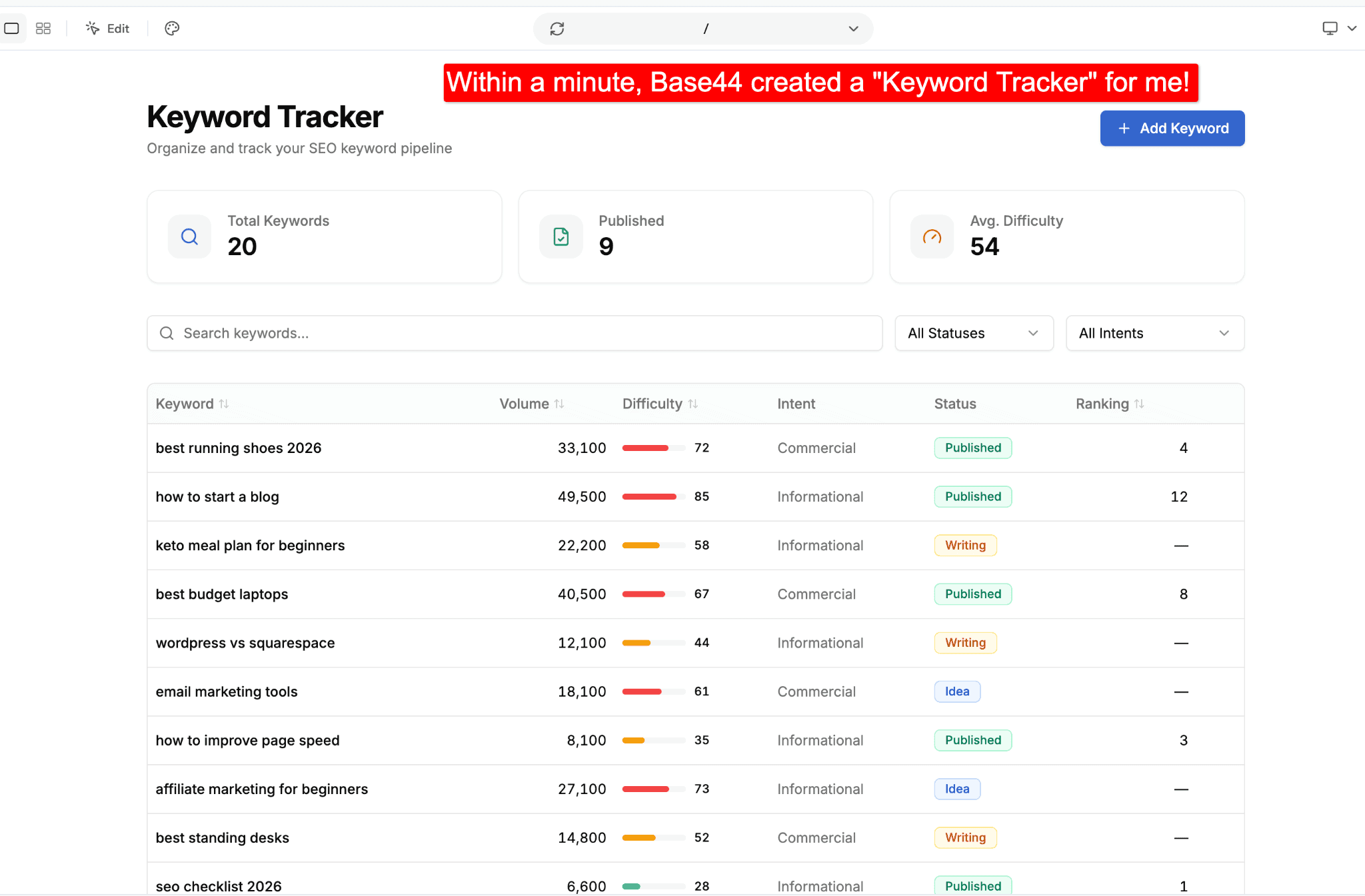
You can literally build an app from start to finish within a few minutes. You can also use detailed text prompts to add new features and make any changes you need with Base44.
You can see how it works in our in-depth Base44 review with real-world examples. Here’s one of the example apps (keyword tracker) we built with Base44;
With Cursor, you’ll still build apps FASTER, but only if you know coding.
It’s designed to help developers write code faster, not to build a ready-to-use app. So you might generate code quickly, but you still have to host it, connect a database, and build the screens yourself, which can take a lot of time.
Winner: Base44
3. What You Actually Get at the End?
With Base44, you’ll have access to a REAL app anybody can open in their browser. You can publish it online and share the live app link with anyone. That’s it. It’s live, it works, people can use it.
With Cursor, you end up with code. You still have to turn that into a working app, find a place to host it, set up the database, and put it online yourself.
Winner: Base44 if you want a ready-to-use product. Choose Cursor if you want full control over the code.
4. Setup and Hosting
“Hosting” is where you store your app’s data.
Base44 offers hosting for you automatically. You build an app and click publish, and your app is live on the web.
Cursor doesn’t host anything. It only gives you access to the editor where you write code. To get your app online, you sign up for separate hosting services and merge them together yourself.
Winner: Base44. Everything’s handled in one place.
5. Control and Flexibility
Here’s where Cursor AI wins.
Base44 is best for beginners who don’t want to deal with technical stuff. But if you want to customize your app or build complex apps, the options are limited.
Cursor gives you total control from the start. You can change every single line of code. You can build almost anything, and however you want it.
One newer thing worth knowing: Cursor now has a built-in visual editor in its browser.
Yes, you heard it right. You can drag elements around your page, change colors with a slider, or click a button and type “make this bigger.” Then you tell the AI to apply it, and it rewrites the real code for you.
Here’s a quick video showing Cursor’s visual editor that helps you design directly in your codebase.
One thing to remember: Cursor still works with real code. You’re editing actual code, with AI helping you along the way. Base44 hides the code completely, while Cursor makes coding easier and faster.
Winner: Cursor. If you know code and want full control, go with Cursor.
6. Pricing and Hidden Costs
Both offer free plans with limited usage limits. Their pricing plans start at $16 per month (billed annually). But there are a few hidden costs you need to keep an eye on.
Base44’s price includes everything: building, hosting, database, login. But its credits run out faster, and you can’t roll over your current month’s credits to next month.
Cursor’s $16 only covers the editor. You still pay separately for app hosting, database management, and other services. Those add-ons can easily cost you more than $100 a month.
Winner: Base44 if you want MORE value for your money, because it includes everything.
Base44 vs Cursor: Pricing Compared
Let’s look at what each one really costs in 2026.
Base44 Pricing
| Plan | Price (yearly) | Good for |
|---|---|---|
| Free | $0 | Testing it out |
| Starter | $16/mo | Smaller functional apps |
| Builder | $40/mo | Real-world apps and tools |
| Pro | $80/mo | Bigger apps |
| Elite | $160/mo | Heavy users who need more credits |
The free plan gives you 25 credits a month, which is good enough for most beginners to build simple apps.
Cursor Pricing
| Plan | Price (yearly) | Good for |
|---|---|---|
| Hobby | $0 | Trying it out |
| Individual | Starts at $16/mo | Solo developers |
| Teams | Starts at $32/user/mo | Heavy daily coders and teams |
| Enterprise | Custom | Developer teams |
Cursor’s $16 Pro plan offers the best value for money if you’re a developer. But that price only covers the editor. The cost of actually running your app (hosting, database, and so on) is extra.
So Which Is Cheaper?
For most people building simple apps, Base44 costs less in the long run. You pay a single price and get everything you need (hosting, databases, etc.).
Cursor also offers similar pricing plans starting at $16/mo, but once you add the other tools your app needs, the overall cost can be much higher.
Save 20% on Base44
Base44 offers a flat 20% off when you pay yearly instead of monthly.
Start with Base44 for free (no credit card needed)
Want every plan and credit broken down? Read our full Base44 pricing guide.
Use our Base44 promo code to save even more on yearly plans.
Where Base44 Wins?
Base44 is best for people who don’t know how to code. Here are a few reasons to pick Base44 over Cursor.
- No coding needed, as you simply describe your app, and Base44 builds it for you
- You can have a working app in minutes
- Everything is included, including hosting, database, and logins
- Made for beginners, as bloggers, founders, and small business owners can use it easily
If you want a no-code alternative that lets you own your code, see our Base44 vs Lovable comparison.
Where Cursor Wins?
Cursor is a better choice if you know how to code or want to learn. Here’s where it’s better than Base44.
- Gives you full control, as you can see and edit every line of code
- Build anything, including complex apps and tools
- Code faster, as its AI helps with repetitive coding tasks
- Your code is yours and can be moved anywhere
- Great for developers, as it can serve as an AI coding assistant when fixing issues
Want more comparisons? See our Base44 vs Replit guide and our roundup of the best vibe coding tools for 2026.
Which One Should You Choose?
It comes down to one question: do you want to build an app or write code?
Base44 is for people with an idea who want to quickly turn it into an app. You describe what you want, and it builds it for you. Zero setup and technical skills needed. It’s as simple as that.
Cursor is for people who code or want to learn coding. It helps developers write code faster, but you still need to understand how coding works.
If you want to launch an app without touching code, choose Base44. If you want full control and enjoy coding, choose Cursor.
| If this is you… | Go with |
|---|---|
| “I have an idea, not a codebase” | Base44 |
| “I want an app working tonight” | Base44 |
| “I write code (or want to learn)” | Cursor |
| “I need control over every file” | Cursor |
Can’t code? Go with Base44.
Frequently Asked Questions
Got questions? Here are quick answers to the things people ask most often about Cursor and Base44.
No. Base44 is better for non-coders, whereas Cursor is an excellent choice for coders.
No. Without coding knowledge, it’s NOT possible for anyone to build fully functional apps with Cursor AI.
Cursor offers a free plan, which is good enough for testing things. Paid plans start at $16/month for Pro, which unlocks all the essential features.
Base44 is an app builder that builds the whole app for you, with no coding. Cursor is a code editor that helps developers write code faster and provides the flexibility to build complex apps.
Base44, as its cost includes everything from app builder to database to hosting. Cursor’s subscription only covers the editor. Once you add hosting, a database, and more, the total cost can easily go beyond $100.
Hands down, Base44. You’ll go from idea to live app in minutes.
Cursor wins on control and complexity. It’s built for developers writing and maintaining real codebases, so you can build ANY type of app or tool you want.
Final Verdict: Cursor vs Base44
These two platforms get compared a lot, but they’re built for different people.
Choose Base44 if you want a finished app without writing code.
Choose Cursor if you already write code and want to write it faster, with full control over every function of your app.
So, which one are you going to pick for building apps in 2026? Have any more questions? Let us know in the comments below.

![Base44 Promo Codes 2026 October [Get 30% OFF Live]](https://bloggerspassion.com/wp-content/uploads/2026/05/base44-promo-codes-1-1-884x471-1-300x160.webp)


Leave a Comment
Your email address will not be published. Required fields are marked *