![wordpress.com vs wp engine [compared for performance]](https://bloggerspassion.com/wp-content/uploads/2026/01/wordpress.com-vs-wp-engine-compared-for-performance-300x160.png)
Note: This article is supported by funding from WordPress.com. The insights are based on our own research & not influenced by them.
Table of Contents
Why You Can Trust This Comparison
I’m Anil Agarwal. Over the years, I’ve compared WordPress.com with hosting providers like Hostinger, Bluehost, SiteGround, WPX, and others.
For this article:
- WordPress.com insights come from long-term usage and repeated testing
- WP Engine data is taken strictly from extended hands-on testing and documented performance results
Both hosts look similar on paper, but once you actually use them, the differences become obvious.
Ready? Let’s dive into the real comparison.
![wordpress.com vs wp engine [compared for performance]](https://bloggerspassion.com/wp-content/uploads/2026/01/wordpress.com-vs-wp-engine-compared-for-performance.webp)
Which Hosting Performs Better: WordPress.com or WP Engine?
When it comes to managed WordPress hosting, performance is not just about raw speed. It also includes uptime consistency, traffic handling, and real-world reliability.
After analyzing real test data, here’s the short answer:
WP Engine is faster in the US, while WordPress.com is more reliable and stable under traffic pressure.
Let’s break it down properly.
Overall Performance Benchmarks:
| Performance Metric | WordPress.com | WP Engine |
| Average Uptime | 99.999% (Last 30 Days) | 99.92% (Last 30 Days) |
| Avg Page Loading (US) | 1.2 Second | 1.4 Second |
| Avg Page Loading (India) | 3.6–5.1s | 4.3s |
| Load Handling | Excellent (burst scaling) | Weak (request failures) |
| CDN | Built-in + Cloudflare (optional) | Cloudflare-powered CDN |
| Overall Performance Score | 4.5 | 3.5 |
Speed Test Results (Real World):
WP Engine Speed Performance
WP Engine is hosted on Google Cloud infrastructure, and its speed performance is impressive only in US-based regions.
- USA (New York): ~1.4 seconds
- India (Bangalore): ~4.3 seconds
Even with Cloudflare-powered CDN enabled, WP Engine struggled to deliver consistent performance outside the US. This makes it less ideal for sites with Asian or global audiences.
WordPress.com Speed Performance
WordPress.com performs extremely well in the USA, UK, and Canada, even without CDN enabled.
Once Cloudflare CDN is enabled, global performance improves further.
| Location | Speed Score | Page Load Time |
| USA | 100% | 2.8s |
| UK | 100% | 3.4s |
| Asia | 95% | 5.1s |
| Canada | 100% | 3.0s |
| Australia | 95% | 4.0s |
WordPress.com may not win pure speed battles, its performance remains stable and predictable, especially under load.
Load Handling & Traffic Spikes (Big Difference)
This is where WordPress.com clearly pulls ahead.
WordPress.com Load Handling
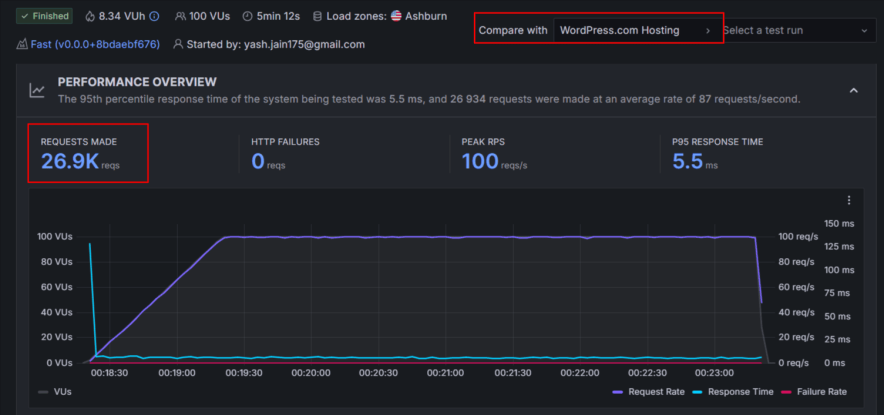
- Supports automatic burst scaling
- Handles sudden traffic spikes smoothly
- No crashes or downtime during stress tests
- Ideal for viral content, news sites, and growing blogs
WP Engine Load Test Results
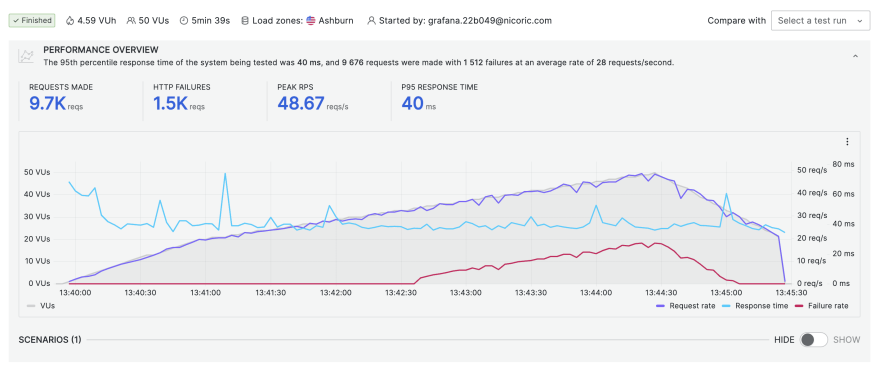
- 50 virtual users sent
- 9,677 requests total
- 1,517 requests failed
- Multiple response time spikes
- Weak load management for a premium host
This is disappointing considering WP Engine’s pricing.
Comparing Hosting Features Side by Side: WordPress.com vs WP Engine
Features often decide long-term satisfaction more than speed alone. Below is a clean, side-by-side comparison of WordPress.com and WP Engine.
| Feature | WordPress.com | WP Engine |
| Fully Managed WordPress | ✅ Yes | ✅ Yes |
| Free Domain | ✅ Yes | ❌ No |
| Number of Websites | 1 per plan | 1–30 (plan-based) |
| Storage | 6 GB – 350 GB | 10 GB – 50 GB |
| Bandwidth | Unlimited | 50 GB – 500 GB |
| Traffic Handling | High burst scaling | Weak under load |
| Built-in CDN | ✅ Yes | ✅ Cloudflare-powered |
| CDN Global Performance | Strong (with CF) | Inconsistent outside US |
| Free SSL | ✅ Yes | ✅ Yes |
| Daily Backups | Higher plans | ✅ Yes (60 days) |
| On-Demand Backups | Higher plans | Limited checkpoints |
| Staging Environment | ✅ Yes | ✅ Yes (3 environments) |
| Website Builder | ✅ AI Website Builder | ❌ Not available |
| AI Assistant | ✅ Included | ❌ Not available |
| Email Hosting | ❌ Paid add-on | ❌ Not included |
| Premium Themes | ✅ Free themes | ✅ StudioPress + Genesis |
| Plugin Restrictions | ❌ No | ⚠️ 60+ plugins banned |
| Developer Tools | Basic | Advanced (Git, SSH, APIs) |
| Data Centers | USA-focused | Global (Google Cloud) |
| Security Features | Strong (built-in) | Advanced + enterprise |
| Migration | ✅ Free | ✅ Plugin-based |
| Phone Support | ❌ No | ❌ Starter plan |
| 24/7 Live Chat | ✅ Yes | ✅ Yes (inconsistent) |
| Money-Back Guarantee | 7–14 days | 60 days |
How This Feels in Real Use
WordPress.com feels calm. Most things are already configured. You don’t spend time worrying about caching, backups, or security conflicts. The AI tools help beginners get started faster, but they stay out of the way once your site is running.
WP Engine feels powerful, but controlled. You get staging environments, developer access, premium themes, and strong security. At the same time, plugin restrictions, paid add-ons, and weaker load handling can feel limiting.
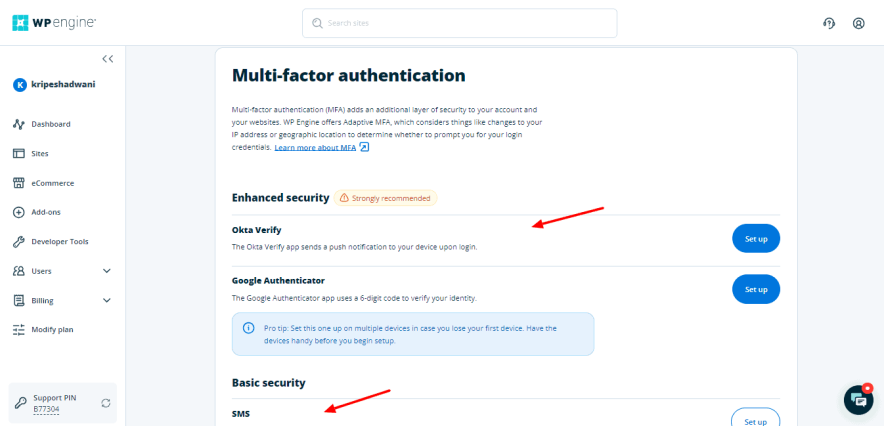
Neither approach is wrong. They’re just built for different people.
Ease of Use:
WordPress.com Ease of Use
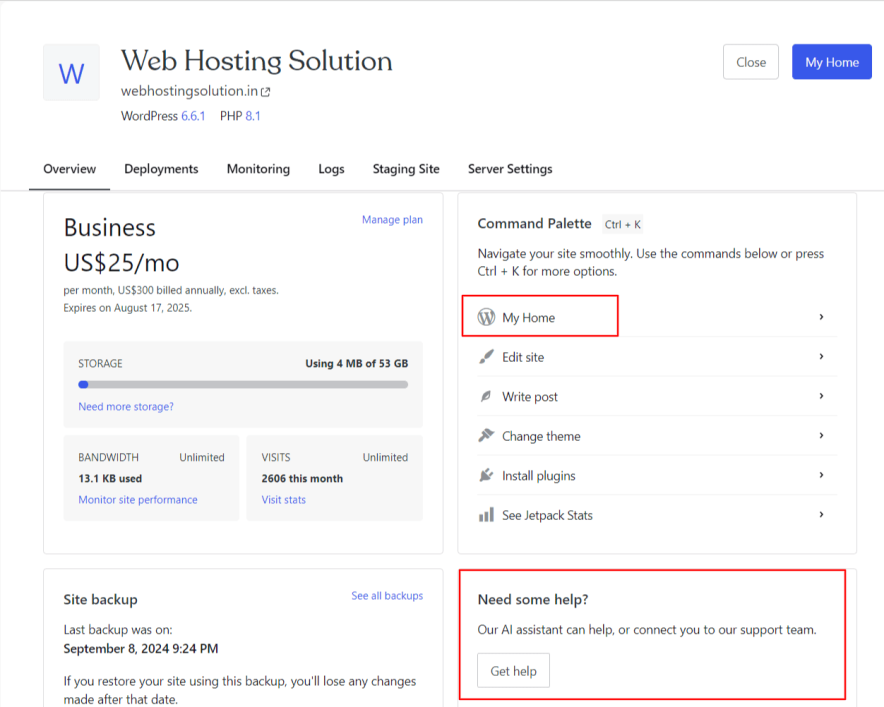
WordPress.com offers a clean, minimal, and beginner-friendly dashboard. All essential features like backups, security, domains, performance settings, and access to WordPress admin are neatly organized and easy to find.
The interface avoids technical clutter, which reduces confusion for non-technical users.
The platform intentionally limits advanced server-level controls, which helps prevent accidental misconfigurations.
Combined with its built-in AI assistant, WordPress.com feels more like a guided website management system than a traditional hosting panel. This makes it ideal for bloggers, content creators, and business owners who want to focus on content and growth rather than technical maintenance.
WP Engine Ease of Use
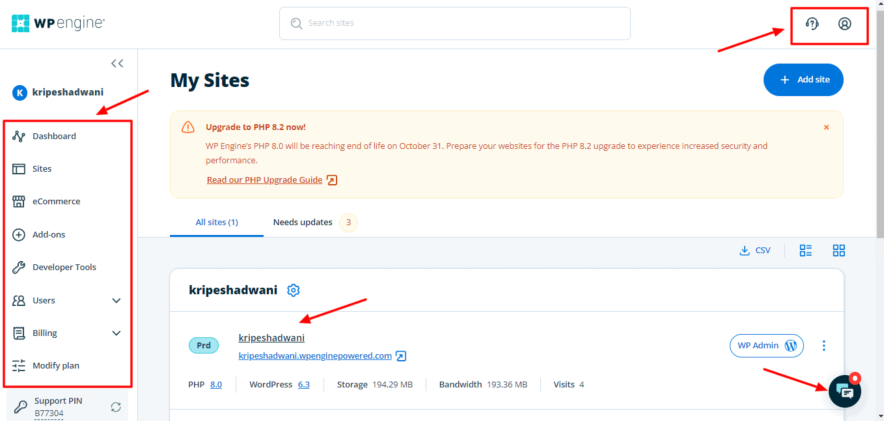
WP Engine dashboard looks modern and powerful, but it comes with a steeper learning curve. The interface includes multiple environments, developer tools, add-ons, and advanced configurations, which can feel overwhelming for beginners.
While everything is well-organized, WP Engine expects users to understand staging workflows, environment management, and deployment processes.
This makes it better suited for developers and agencies rather than solo site owners. It’s not difficult to use, but it is not beginner-friendly.
Customer Support:
Both WordPress.com and WP Engine offer 24/7 assistance, but the quality and consistency of support are very different.
WordPress.com Customer Support
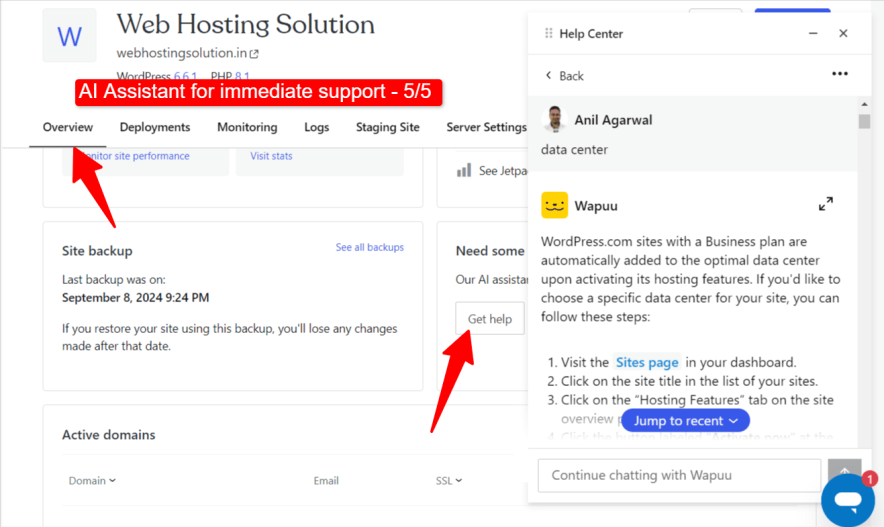
WordPress.com primarily offers 24/7 live chat support, supported by a highly capable AI assistant.
In real-world usage, the AI assistant often resolves common technical issues without needing human intervention, which saves time. When human support is required, response times usually average around 10 minutes, with faster replies available on higher-tier plans.
While phone support is not available, the overall experience feels reliable and professional.
The support team focuses on resolving issues directly rather than redirecting users repeatedly. For most bloggers and business owners, WordPress.com support is consistent, predictable, and stress-free.
WP Engine Customer Support
WP Engine provides support via live chat, email, and tickets, with phone support limited to higher-tier plans. On paper, this looks strong. However, real testing shows inconsistent response times.
Sometimes chat replies arrive within minutes, while at other times users may wait 10–20 minutes or experience session timeouts.
Another drawback is that WP Engine support often responds by sharing knowledge-base articles instead of offering hands-on troubleshooting.
For critical issues like CDN or performance problems, this can be frustrating—especially considering WP Engine’s premium pricing.
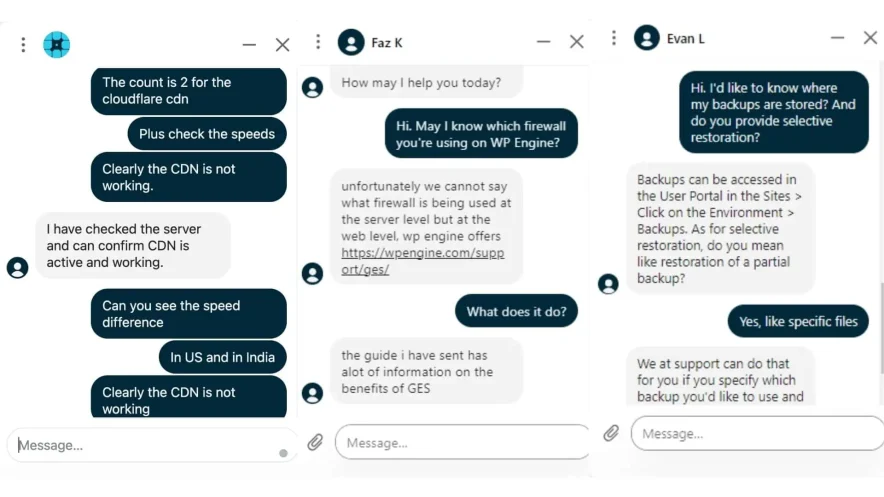
Overall, support quality depends heavily on timing and plan level, which makes the experience unreliable for urgent issues.
Pricing:
Pricing is where the difference between WordPress.com and WP Engine becomes very clear. Both are premium managed hosts, but they follow completely different pricing philosophies.
WordPress.com Pricing Experience
WordPress.com offers monthly, yearly, and multi-year plans, making it flexible for both beginners and long-term users. Entry-level plans start at a much lower monthly cost ($1.93/month), and the biggest advantage is pricing transparency.

What you pay today is almost the same as what you pay during renewals, which is rare in the hosting industry.
Because WordPress.com allows unlimited bandwidth, predictable billing, and strong built-in features, it becomes cost-effective over time, especially for users running a single website. There are no hidden upsells for basic performance, security, or scaling, which makes budgeting easier for bloggers and businesses.
WP Engine Pricing Experience
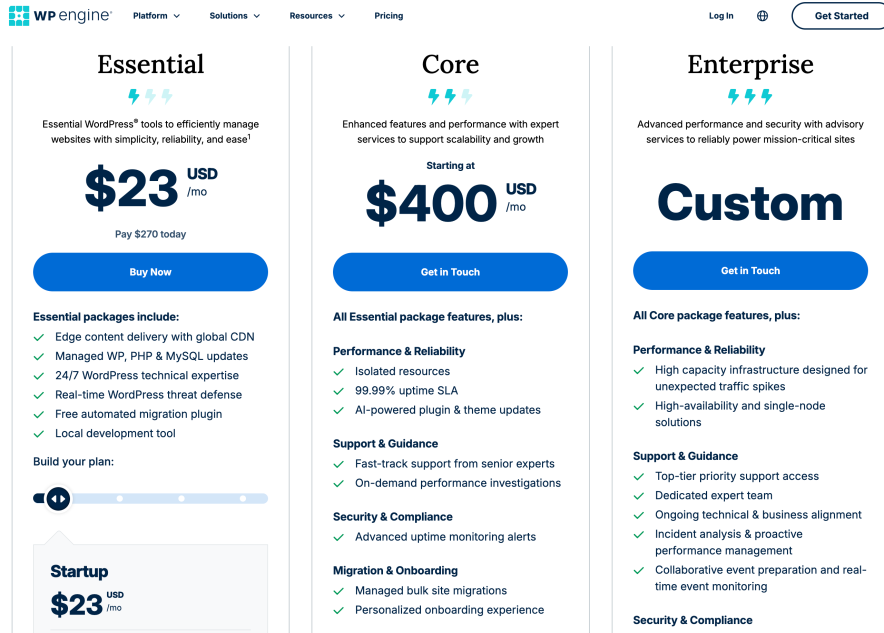
WP Engine’s managed WordPress hosting starts at around $23/month on annual billing for just one website with limited storage, bandwidth, and visitor caps.
While the infrastructure is premium, the pricing feels restrictive, especially when you consider traffic limits and add-ons.
As your site grows, costs can increase quickly. Extra sites, advanced security, performance add-ons, and higher traffic limits often require paid upgrades.
Although WP Engine offers a generous 60-day money-back guarantee, the long-term expense can be difficult to justify for small to mid-sized websites.
WP Engine pricing makes more sense for agencies or businesses where hosting cost is a small fraction of overall revenue.
Pricing Verdict (Long-Term Value)
From a long-term value perspective, WordPress.com is clearly more budget-friendly. Its stable renewals, flexible plans, and inclusive features make it a better choice for users who want predictable costs over the years.
WP Engine, while powerful, is expensive for what it offers unless you specifically need Google Cloud infrastructure, advanced developer tools, and enterprise-level security. For most single-site owners, the pricing feels hard to justify.
<< Explore WordPress.com Hosting Plans [Discount Included]
<< Explore WPEngine Hosting
FAQs:
Which hosting is faster: WordPress.com or WP Engine?
WP Engine generally delivers faster loading speeds in the USA because it runs on Google Cloud infrastructure. However, WordPress.com offers more consistent performance globally, especially when traffic spikes occur. For reliability and stability, WordPress.com performs better overall.
Is WordPress.com more reliable than WP Engine?
Yes. WordPress.com shows stronger uptime consistency and better traffic handling. WP Engine’s uptime has been slightly lower over long-term monitoring, and it struggles with load handling during peak traffic situations.
Can I host multiple websites on WordPress.com or WP Engine?
WordPress.com allows you to host only one website per plan, which is ideal for solo site owners. WP Engine supports multiple websites, depending on the plan, making it more suitable for agencies and developers managing client sites.
Which hosting is better for beginners?
WordPress.com is clearly better for beginners. It offers a simpler dashboard, AI tools, and minimal technical complexity. WP Engine has a steeper learning curve and is more suitable for users with technical or development experience.
Does WP Engine offer better security than WordPress.com?
WP Engine provides enterprise-grade security features, including advanced firewalls, adaptive MFA, and Google Cloud infrastructure. WordPress.com also offers strong built-in security, but WP Engine is better suited for security-first or enterprise-level projects.
Which is more cost-effective in the long run?
WordPress.com is more affordable long-term due to predictable pricing and stable renewals. WP Engine is significantly more expensive and often requires paid add-ons as your site grows.
Explore More:
- WordPress.com vs SiteGround [Side By Side Compared]
- WordPress.com vs Bluehost [Which is More Worth it in 2026
- WordPress Hosting vs Hostinger Compared for Money Value
- WordPress vs WPX: Two Managed Hosts
- WordPress vs Kinsta: Two Secure Hosting Platforms Compared
- WPEngine vs Kinsta Hosting: The Ultimate Battle