



Sponsored: WordPress.com paid for editorial coverage in this article. All editorial decisions are at BloggersPassion’ sole discretion.
WordPress.com is a popular hosting service known for advanced security and performance. SiteGround is discussed on Reddit as the best for customer support.
But are there any hidden differences?
Which offers better money value in the long run?
That’s why we’ve updated our WordPress.com vs SiteGround comparison with the most recent results, pricing details, and an honest look at their pros and cons.
My team personally tested both platforms by purchasing their hosting plans. Here’s the proof:
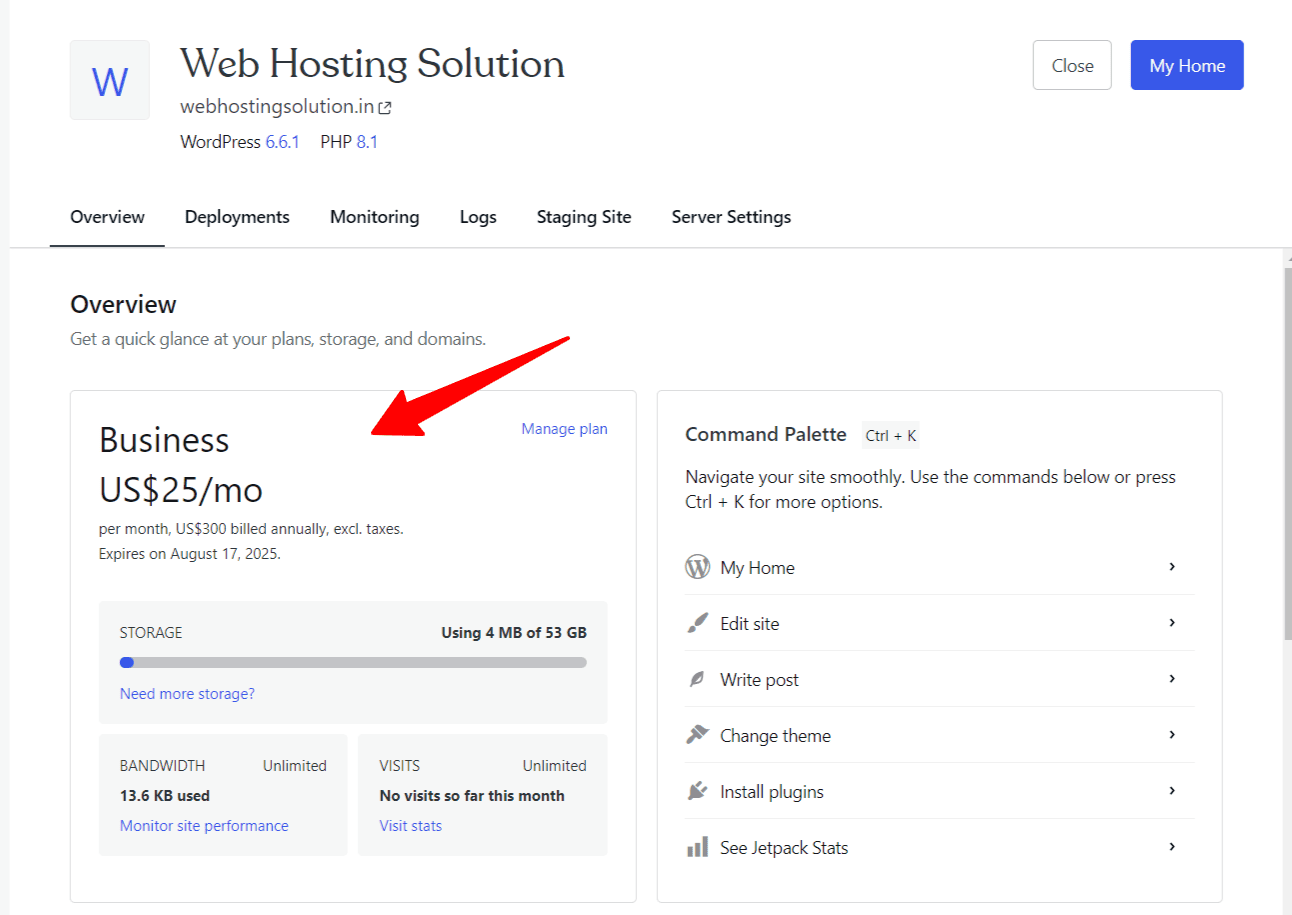
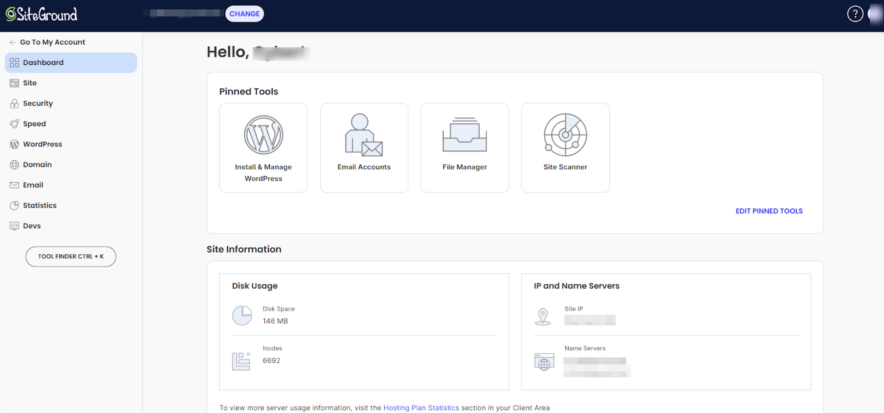
The Comparison Summary
WordPress.com and SiteGround have proven their services and do equally well in terms of performance, hosting features, and customer support. Their primary difference lies in the pricing and money value. If you are looking to host a single site, then WordPress.com works better. Otherwise, for multiple sites, SiteGround saves more.
Choose WordPress.com If:
- You have a single site, and you aim for the best performance without putting too much pressure on your pocket.
- You have a site where bulk traffic is a common thing, as WordPress.com supports burst scaling, which often produces a responsive uptime.
- You are a beginner, and you are looking for maintenance-free fully managed WordPress hosting
- You have an eCommerce site, and you prefer a dedicated eCommerce plan to a normal hosting plan.
Choose SiteGround If:
- You want to host several websites under one license at a budget-friendly price.
- You need high performance with a top-rated customer support service
- You need phone support
<< Visit WordPress.com
<< Visit SiteGround.com
Comparing Main Factors Side By Side
Hosting Features Comparison: WordPress.com offers Burst Scaling for High Traffic Sites, and SiteGround Supports Multisite
Winner: WordPress.com
To be honest, I found a lot of similarities in both hosting services. But there are a few pointers that make a difference in a decision.
First, have a look at this detailed hosting features comparison table:
| Features | WordPress.com | SiteGround |
|---|---|---|
| Types of Hosting | Fully Managed WordPress & WordPress Hosting | Shared, WordPress, WooCommerce, Cloud, and Reseller |
| Free Domain | Yes | Yes |
| Fully Managed | Yes | No |
| Free SSL | Yes | Yes |
| AI Website Builder | More Advanced | Basic |
| Number of Sites | 1 per licence | 1 – Unlimited |
| AI Assistant | Included | Included |
| Storage | 6 GB – 350 GB | 10 GB – 40 GB |
| Bandwidth | Unlimited | Unmetered |
| cPanel | Not available | Not available |
| Free CDN | Yes | Yes |
| Email Accounts | Paid | Free |
| Money Back Guarantee | 7-14 Days | 30 Days |
| Free Weekly Backups | Yes | Yes |
| Free Daily Backups | Free in Higher Plans | Free in all Plans |
| Staging Tool | Available | Available |
| 1 Click WordPress Installation | Supported | Supported |
| eCommerce Store Features | Supported | Supported |
| 99.9% uptime guarantee | N/A | Provided |
| Global Data Centers | Only Available in USA | USA, Spain, UK, France,Netherland, Singapore, Australia |
| High Burst Capacity | Supported | Not Supported |
| Free Themes & Plugins | Yes | Not Provided |
| Migration | Free | Free |
| Domain Privacy | Paid | Paid |
| Malware Detection | Supported | Supported |
| DDoS Protection | Supported | Supported |
| Spam Protection | Available | Available |
| WAF | Supported | Supported |
| Proactive Plugins Monitoring | Supported | Not Available |
| Multi Site Management | Not Supported | Supported |
| Phone Support | Not Available | Supported |
| 24*7 Chat Support | Available | Supported |
| Domain Registration | Supported | Supported |
Similarities in Hosting Features:
- Free Hosting Features: Dozens of hosting features are available as freebies in both hosting including a Free domain, SSL, CDN, Weekly Backups, and Migration.
- Support Channels: They both share a few common customer support channels, including AI Assistant, 24*7 Support, and a knowledge base.
- Bandwidth: The bandwidth is unlimited in both hosting.
- Backup Options: Weekly Backups are granted in both WordPress hosts.
- Developer Tools: In both hosts, the Staging tool is available in higher plans.
- eCommerce Options: eCommerce hosting features (via WooCommerce) can be integrated easily.
- Security Options: Security Plenty of security related hosting features are available in both WordPress hosting, including Malware Detection, DDoS Protection, Spam Protection, and WAF.
- Domain Privacy: Unfortunately, both hosts charges for the domain privacy
- Domain Registration: Both offer a separate service for Domain Registration.
- cPanel: Both web hosts don’t offer a traditional cPanel dashboard.
Key Differences & Drawbacks:
WordPress.com:
- Technical Assistance: This hosting is a fully managed site where you get complete technical assistance. However, in SiteGround, most of the things you have to manage on your own because it’s not a fully managed host.
- AI Website Builder: WordPress.com offers a powerful AI website builder that designs and even generates content for your site. I tried it myself and would rate it 4.7/5.
- Storage Flexibility: Storage is a concern in SiteGround, as it only allows up to 40 GB of Storage. But WordPress.com offers great scalability for media-rich sites, as you can scale up to 350 GB storage for your site.
- Burst Scaling: To handle bulk traffic sites, WordPress.com offers a unique feature called burst scaling. SiteGround hosting servers lack it.
- Premium Themes & Plugins: WordPress offers a huge selection of free themes for everything from blogs to online stores. Plus, key plugins come included at no charge. Tools like WooCommerce, JetPack, and Akismet were part of my setup. That full package of essential, free items was simply missing from SiteGround.
- Advanced Security: WordPress.com offers more than basic security. They offer proactive plugin monitoring in their hosting plans, which monitors the vulnerabilities in all the plugins you install on your site. Plugins are the most vulnerable source that hackers try to dominate.
SiteGround Hosting:
- Multi-Site Installations: This host allows unlimited site installations in a single licence. This is a great flexibility and money value WordPress.com lacks.
- Unlimited Email Accounts: One major benefit this host offers is free email accounts. You can create unlimited email accounts here for free, while WordPress.com charges for the same.
- Daily Backups: SiteGround offers an advantage of free daily backups in all the plans, while WordPress.com only offers it in their high-end plans. This should be marked as a major setback for WordPress.com hosting.
- Uptime Guarantee: 99.9% Uptime guarantee is a must these days, and gladly, SiteGround doesn’t disappoint.
- Extra Data Centers: Both hosts offer global CDN points, but when we talk about the number of data centers, SiteGround is ahead.
- Phone Support: SiteGround offers an extra layer of support, and that is phone-based.
Based on hosting feature analysis, my instincts are telling me that WordPress.com offers the most comprehensive value package for the high-traffic sites.
Its fully managed environment, large storage capacity, and unique features like the AI builder and burst scaling minimize user workload and guarantee better performance under load.
SiteGround delivers value to users running multiple small-to-midsize websites who benefit significantly from unlimited site installations, free daily backups, and free unlimited email accounts.
Performance Tests Comparison:
Winner: Tie
I have tested a lot of WordPress hosts in my life so far. Trust me, their performance tests reveal a lot of fake promises that web host companies claim on their website page.
| Pointers | WordPress.com | SiteGround |
|---|---|---|
| Uptime Guarantee | Not available | 99.9% |
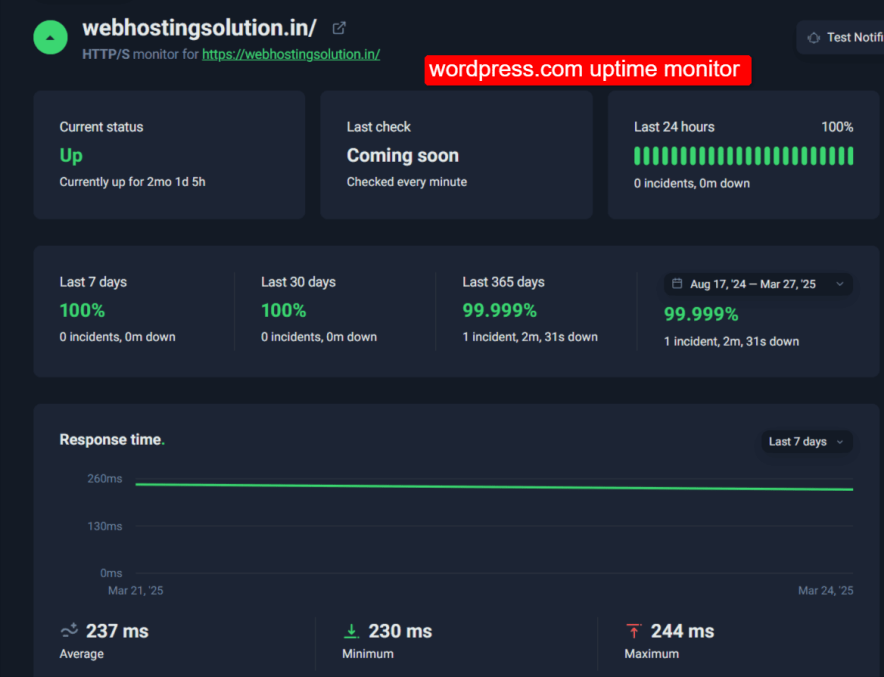
| Recorded Uptime | 99.999% | 99.988% |
| Storage Type | NVMe | NVMe |
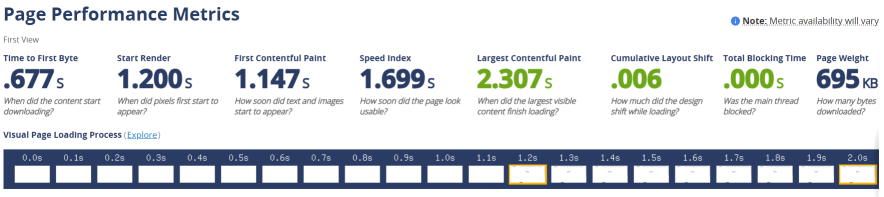
| Average Response Time | 0.245s | 0.677s |
| Fully Loaded Time | 3.66s | 1.699s |
| Data Centers | US only | 11 Locations (US, UK, NL, Germany, Spain, France, Singapore, AU) |
| CDN | Yes, with 28+ locations worldwide | Available |
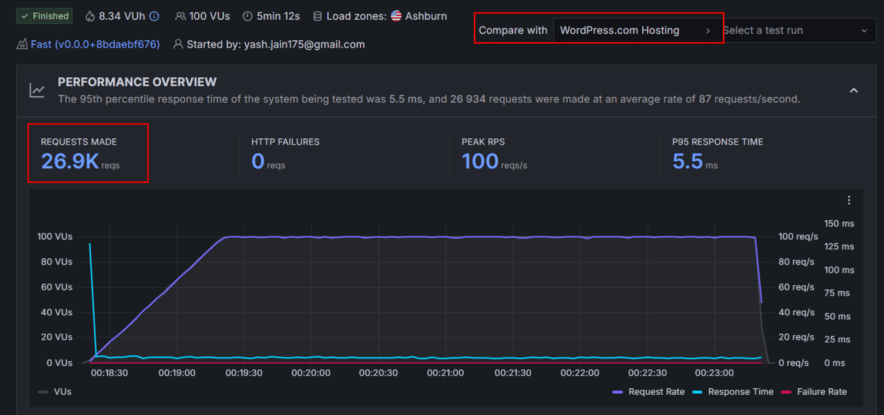
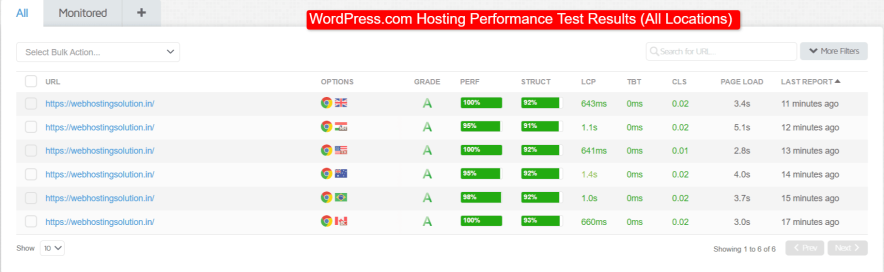
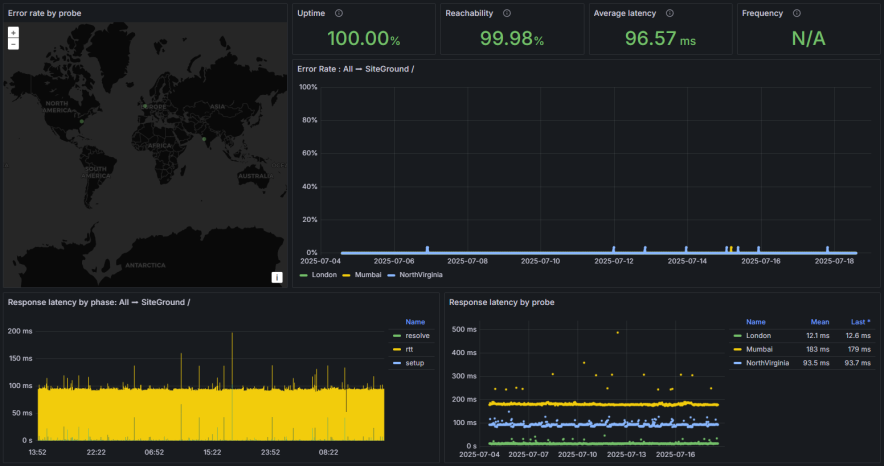
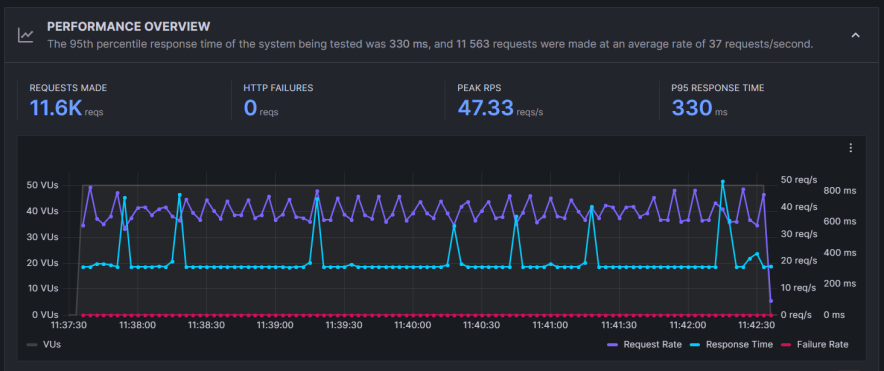
WordPress.com ranked at the best in my traffic handling capacity test, especially when the page size is heavy. On the other hand, SiteGround loads faster when the page size is average. Both web hosts show similar high performance in terms of uptime, average loading time, and response time. Hence, it is a tie.
Here are the screenshots of my performance tests:
Ease of Use:
It’s a tie in the user interface department, but for different reasons.
When you first dive into a WordPress hosting account, you’ll immediately notice that it offers a different modern hosting user interface.
The main dashboard is highly functional, giving me at a glance the essentials: your subscription status, backup details, and a quick-access button to jump straight into the familiar WordPress site editor.
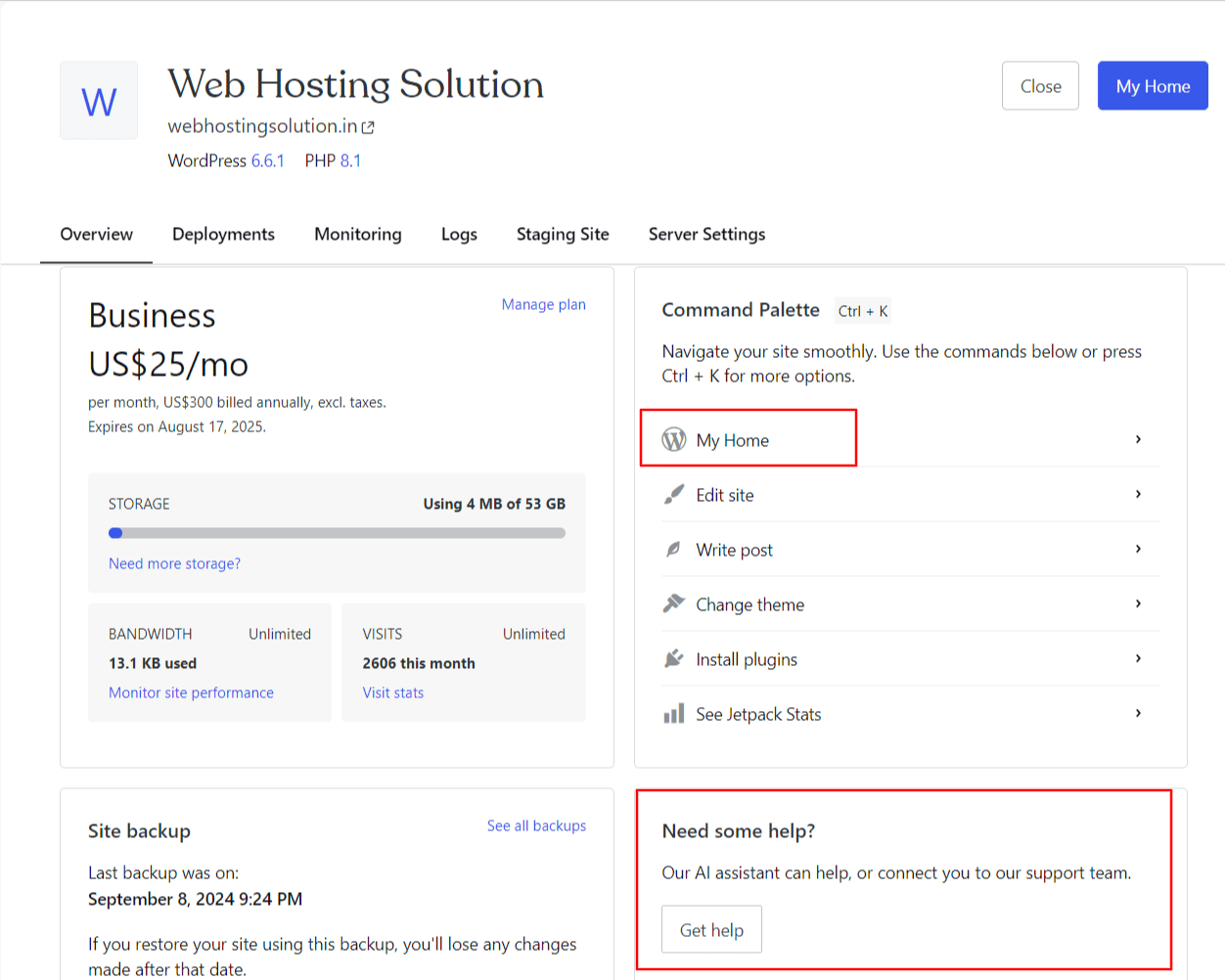
These features are truly helpful, making site management very fast.
SiteGround may not rank first on every hosting list, but it does an excellent job when it comes to usability. Its custom-built control panel, Site Tools, replaces the old cPanel system with something cleaner, faster, and more intuitive.
In 2020, SiteGround replaced cPanel with its own platform, Site Tools.
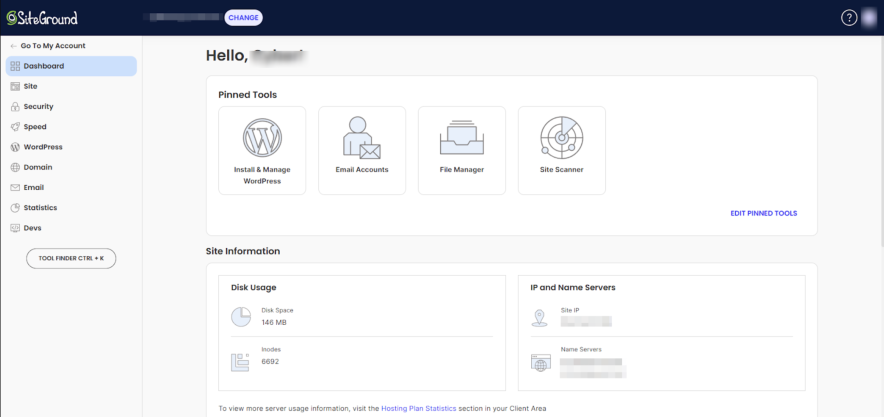
It’s a thoughtfully designed dashboard built in-house, offering an easy, modern way to manage your hosting. You’ll find everything you need, like files, databases, emails, and security settings, organized on a clear left-hand menu.
I found Site Tools easy to use. Each feature has a short explanation, and you can pin your favorite tools to the main screen for quicker access. It even includes a direct login button to your WordPress admin dashboard.
The panel also displays your storage usage, visitor count, and overall site performance in one place.
Overall, both hosting management systems are friendlier and more modern than traditional cPanel.
Customer Support: SiteGround Offers Phone Support
Winner: SiteGround
Customer Support is another major segment you cannot ignore.
Well, WordPress.com offers an AI Assistant and quality customer support through 24*7 live chat. SiteGround offers an extra layer among these options, and that is 24*7 phone support.
The noticeable thing with SiteGround is that it offers a phone in all the plans. This is a very rare thing because, based on my experience with dozens of hosting companies, I don’t find any other entry-level hosting that offers phone support in the entry-level plans.
WordPress.com
Being a large and well-known platform, WordPress.com naturally sets high expectations for its customer support.
I started by using their AI Support Assistant, which is available right inside the dashboard. It is good and actually responds like a real human by understanding things clearly.
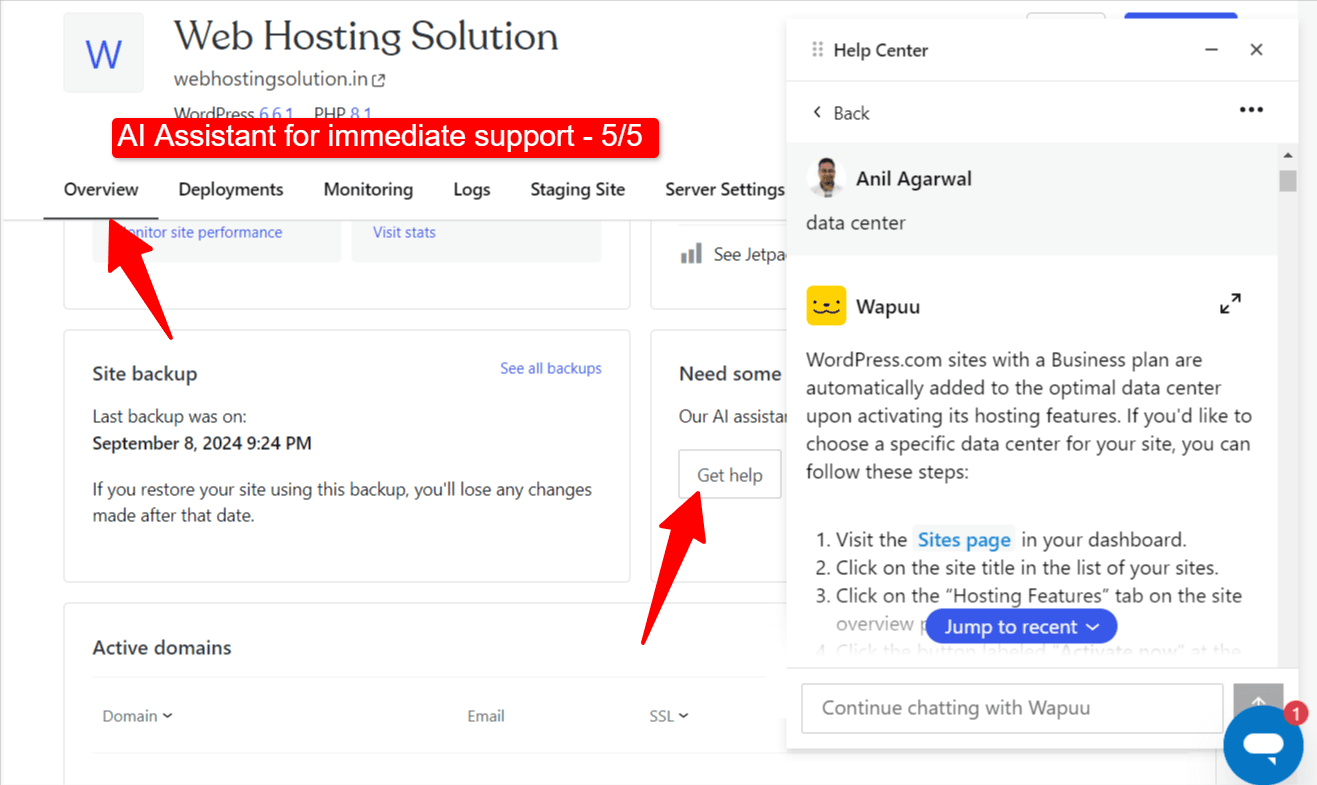
For issues that required more personalized help, I used the live chat option.
It took about ten minutes to get connected with a representative, which felt reasonable. The agent I spoke with was knowledgeable and resolved my concerns directly instead of simply sharing links or basic instructions.
SiteGround:
According to SiteGround, live chat and phone requests receive instant attention. But I got a reply in 15 minutes, which is not bad.
Their AI bot is ChatGPT-powered, and hence, some replies are biased and unprofessional.
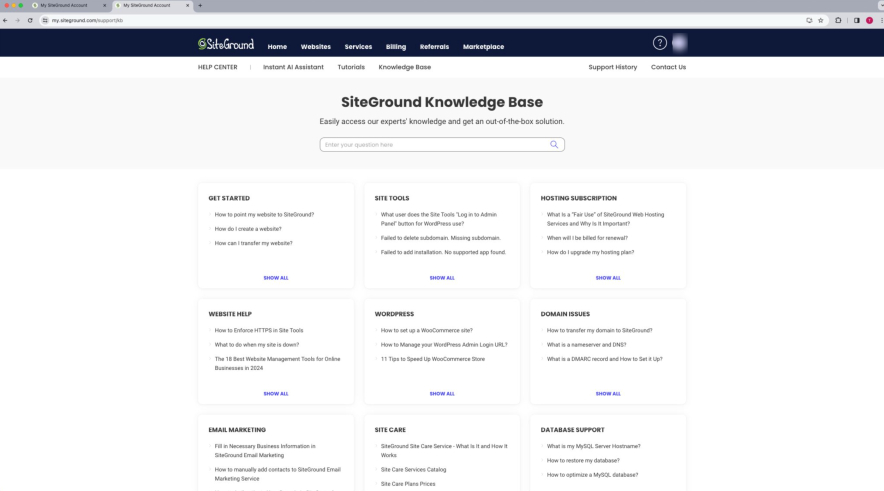
But the responses from live chat are prompt and professional. The agents understood the issues immediately and provided clear answers instead of generic responses.
Overall, WordPress.com offers better technical assistance as they are fully managed. SiteGround’s customer support experience is good for me, and they have also won a few Stevie Awards for their support quality in the past. Ultimately, if Phone support is a priority, then SiteGround suits you more.
Pricing: SiteGround Renewals Will Drain Your Pocket, But WordPress.com Saves More
Winner: WordPress.com
WordPress.com offers flexible tenures to choose from. Here you have an option to grab hosting for a 12-month to 36-month tenure, starting from just $2.75/month.
SiteGround renewals disappoint you the most. Their plans start from just $3.99/month, but when you renew it, the pricing starts from $17.99/month.
Pricing Similarities:
- Both hosts share these common freebies in their hosting plans: Free domain, SSL, CDN, Weekly Backups, and Migration.
- The CDN is attached to all the plans.
- Priority support is available in all the plans.
Pricing Differences:
- WordPress.com offers more affordable options to host a single website as compared to SiteGround.
- WordPress.com offers a lot more storage expansion than SiteGround.
- WordPress.com offers flexibility in tenures unlike SiteGround.
- SiteGround is going to be more affordable to host multiple websites in a single licence.
- WordPress.com has a dedicated eCommerce plan, but SiteGround lacks it.
| Pricing | WordPress.com | SiteGround |
|---|---|---|
| Staring Price | $2.75/month | $3.99/month |
| Websites Allowed | 1 per licence | 1 – Unlimited |
| Storage | 6 GB – 350 GB | 10 GB – 100 GB |
| Bandwidth | Unlimited | Unmetered |
| Free Domain | Yes | Yes |
| Free SSL | Yes | Yes |
| Daily Backups | Free in Higher Plans | Free in all Plans |
| Money Back Policy | 7-14 Days | 30 Days |
| AI Website Builder | Advanced | Basic |
| Free CDN | Yes | Yes |
| eCommerce Plan | Commerce ($31.50/month) | Not available |
| Migration | Free | Free |
| Hidden Charges | Yes (Domain Privacy, Email, etc) | Yes (Domain Privacy) |
| Best Value Plan | Premium ($5.50/month) | GrowBig ($6.69/month) |
Opinion & Verdict:
WordPress.com offers better affordability for a single site in the long run. If you want to host a blog or e-commerce site, then WordPress.com plans sound much better. And if you have a lot of sites to host, then SiteGround is going to save more in the long run.
Pros & Cons:
| WordPress.com Pros | WordPress.com Cons |
| Affordable pricing to host a single website. | The e-Commerce plan is expensive. |
| Better performance and advanced security features. | You can only host a single site in a single licence. |
| Support burst scaling, which helps big traffic sites to handle big traffic with ease. | |
| Fully managed high-quality technical support. | |
| Renewals are fewer. |
| SiteGround Pros | SiteGround Cons |
| Offers daily backups in all plans | Renewals are costly |
| Allows you to host unlimited sites in a single licence | Storage seems less |
| Offers daily backups in all the plans |
FAQs:
Which web host offers the cheapest hosting plans?
WordPress.com offers the cheapest starting price at $2.75/month, compared to SiteGround’s starting price of $3.99/month. The verdict states that WordPress.com offers better affordability for a single site in the long run.
Is WordPress.com fast?
Yes. The article states that WordPress.com has high performance and supports “burst scaling,” which produces a responsive uptime and helps handle bulk traffic.
In performance tests, it recorded an Average Response Time of 0.245s and was ranked best in traffic handling capacity for heavy pages. The comparison concluded that performance is a Tie between the two hosts.
How much does WordPress.com cost?
The starting price for a WordPress.com plan is $2.75/month. The E-commerce (Commerce) plan is $31.50/month, and its Best Value Plan (Premium) is $5.50/month.
How much does SiteGround cost?
The starting price for a SiteGround plan is $3.99/month. The Best Value Plan (GrowBig) is $6.99/month.
What’s the money-back guarantee of WordPress.com?
The money-back guarantee policy for WordPress.com is 7-14 Days.
What’s the money-back guarantee of SiteGround?
The money-back guarantee policy for SiteGround is 30 Days.
What are the alternatives to WordPress.com and SiteGround?
If neither WordPress.com nor SiteGround feels like the right fit, you can consider Hostinger. It is known for affordability and the overall best money value WordPress host in the market.
Explore More:
- Web Hosting Statistics [Updated for 2026]
- Hostinger vs WordPress.com Comparison [Tested]
- SiteGround Alternatives [For Every Situation]


![WordPress.com vs Hostinger 2026 Comparison [Which Offers More Money Value]](https://bloggerspassion.com/wp-content/uploads/2025/09/wordpress-vs-hostinger-300x162.png)

![WordPress.com Coupon Code 2026 Oct [Up to 69% OFF + Additional 30% OFF]](https://bloggerspassion.com/wp-content/uploads/2024/04/wordpress-coupon-code-300x169.jpg)


Leave a Comment
Your email address will not be published. Required fields are marked *