


SEO (Search Engine Optimization) is the process of optimizing your website and its contents for search engines to increase your organic traffic without paying for ads.
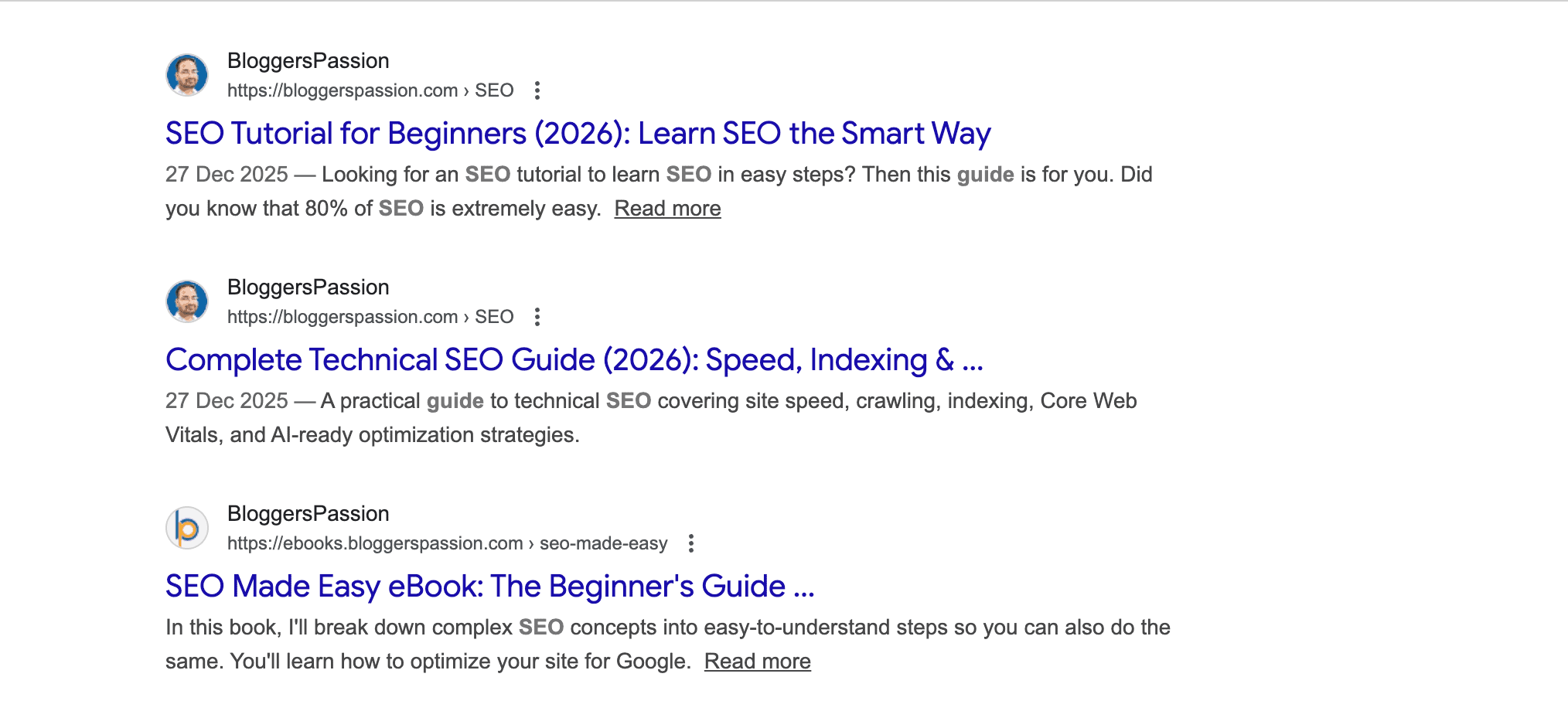
Here’s what those organic rankings look like:
But remember, SEO isn’t about tricking Google or stuffing keywords everywhere.
In 2026, SEO is all about making your website useful, fast, and easy for both users and search engines to understand.
Basically, SEO helps you:
- Generate free traffic to your site
- Build trust and authority
- Get more leads and sales, without paying for every click
That’s why SEO is one of the most powerful ways to grow any website or online business.
In this guide, you’ll learn exactly what SEO is, how it works, and how to use it to get free traffic.
Table of Contents
What Is SEO?
SEO stands for Search Engine Optimization.
Search engine optimization is the process of optimizing your website and its content to rank higher in search engine results for a specific keyword phrase.

SEO is the process of improving a website’s rankings in the organic (unpaid) listings of search engines such as Google, Bing, Yahoo, etc. Proper SEO will enhance your website’s organic visibility in search results, helping you attract qualified visitors (for free).
Why is SEO still important in 2026?
As ads become more costly and competition grows, SEO is one of the best ways to drive long-term traffic for free.
Did you know that the #1 result in organic search gets around 22% of all clicks, nearly 10x more than a page ranking in 10th place?
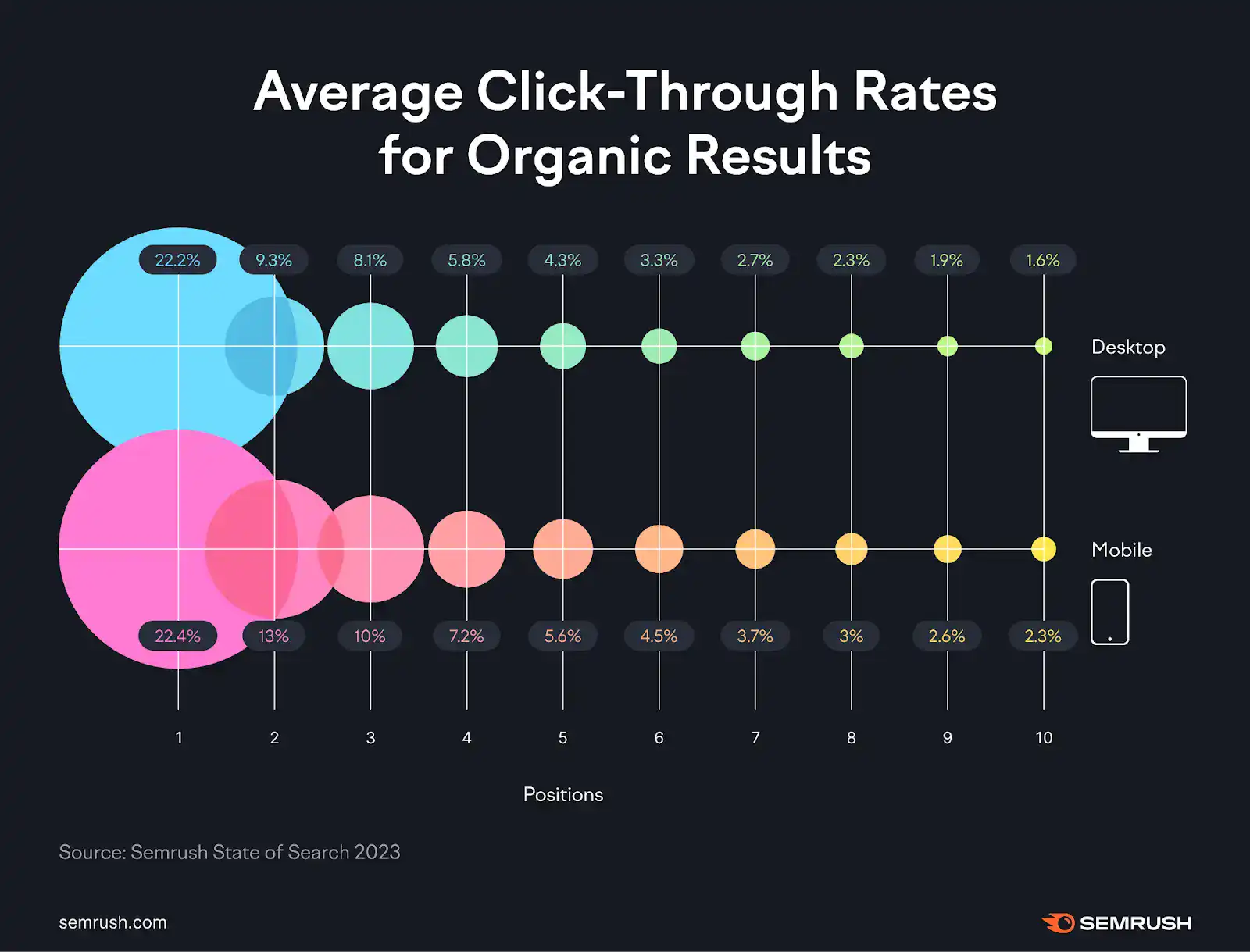
Here’s another interesting thing: the top THREE organic search results get more than 40% of all the clicks.
This is the reason why your business needs SEO.
Imagine ranking in the top three search results for competitive and relevant keywords in your industry. You’ll generate HUGE amounts of traffic and sales for FREE.
You need SEO to rank your web pages in the top search results. Simply put, if you’re ignoring SEO, you’re leaving all the traffic, leads, and profits to your competitors who are already doing it.
Here’s a quick overview of the benefits of using SEO for your business;
- More traffic: Rank for the right keywords and get free organic visitors
- Better conversions: SEO brings high-intent users who are already searching to buy
- Brand trust: Showing up on Google builds credibility and brand awareness
- More sales: Targeted traffic = qualified leads = higher revenue
- Best long-term ROI: SEO keeps working 24/7, and it keeps paying back for years (if you keep putting efforts on making your site helpful)
Curious how SEO helps your business in 2026? Check out these amazing benefits of SEO.
How does SEO work?
SEO keeps evolving. What worked years ago doesn’t work today, and what works today might change next year.
But the basics stay the same.
Search engines like Google follow three main steps to rank your pages:
- Crawling – finding your pages
- Indexing – storing and understanding your content
- Serving (Ranking) – showing the best pages in search results

Let’s briefly discuss each one so you can better understand those steps.
1. Crawling: Search engines like Google use bots (which are also known as spiders or crawlers) that crawl websites and all the web pages on the web.
Example: You publish a new blog post → Google bots visit your site → find that new page.
2. Indexing: In this step, after crawling, Google reads your content, understands it, and stores it in its database (index).
Example: Google analyzes your post (keywords, headings, images) and indexes it so it can appear in search results.
Quick Note: If you have updated a blog post or page on your website and indexing hasn’t finished, Google will show the old version of that page in search results.
3. Serving: After Crawling and Indexing is done, Google shows the most relevant pages to users based on their search.
Example: Someone searches “best protein powder for fat loss” → Google pulls your indexed page and ranks it in the results (if it’s the most helpful to users).
How is SEO different from SEM and PPC?
When learning SEO, you’ll often hear two terms: SEM and PPC.
They’re related, but not the same.
- SEM (Search Engine Marketing): Includes both organic (SEO) and paid strategies
- PPC (Pay-Per-Click): Only paid ads where you pay for every click
Let’s discuss them with examples so you can understand better.
SEM vs SEO
SEM (Search Engine Marketing) is the practice of increasing your visibility on search engines using both paid ads and organic strategies.
It’s the fastest way to get your website in front of people who are already searching for what you offer.
For example, when you search for “best email marketing software” on Google, you’ll usually see a few paid ads appearing at the top of the results page.
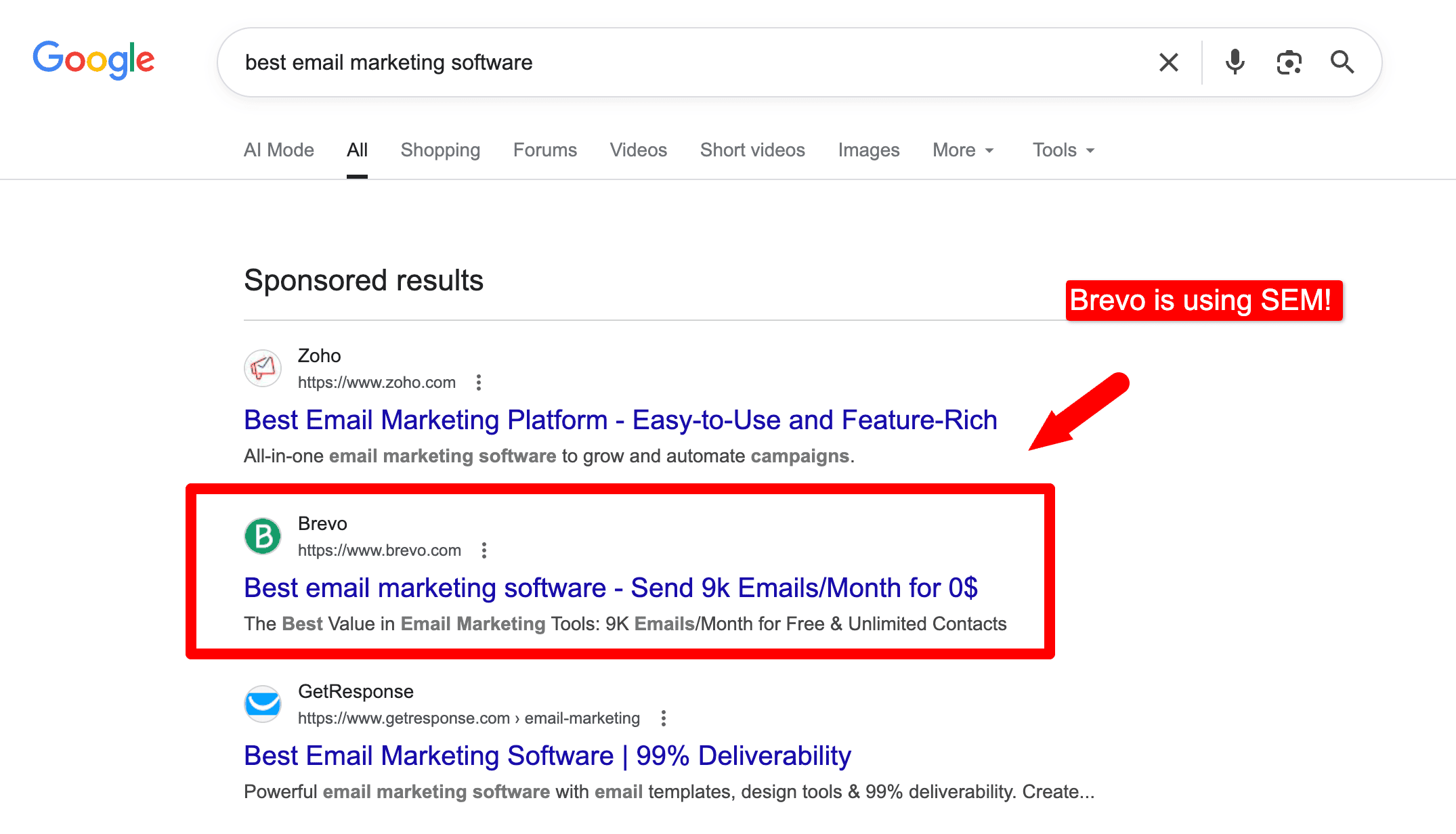
Similarly, advertisers who run paid ads also create blog posts to generate free organic traffic.
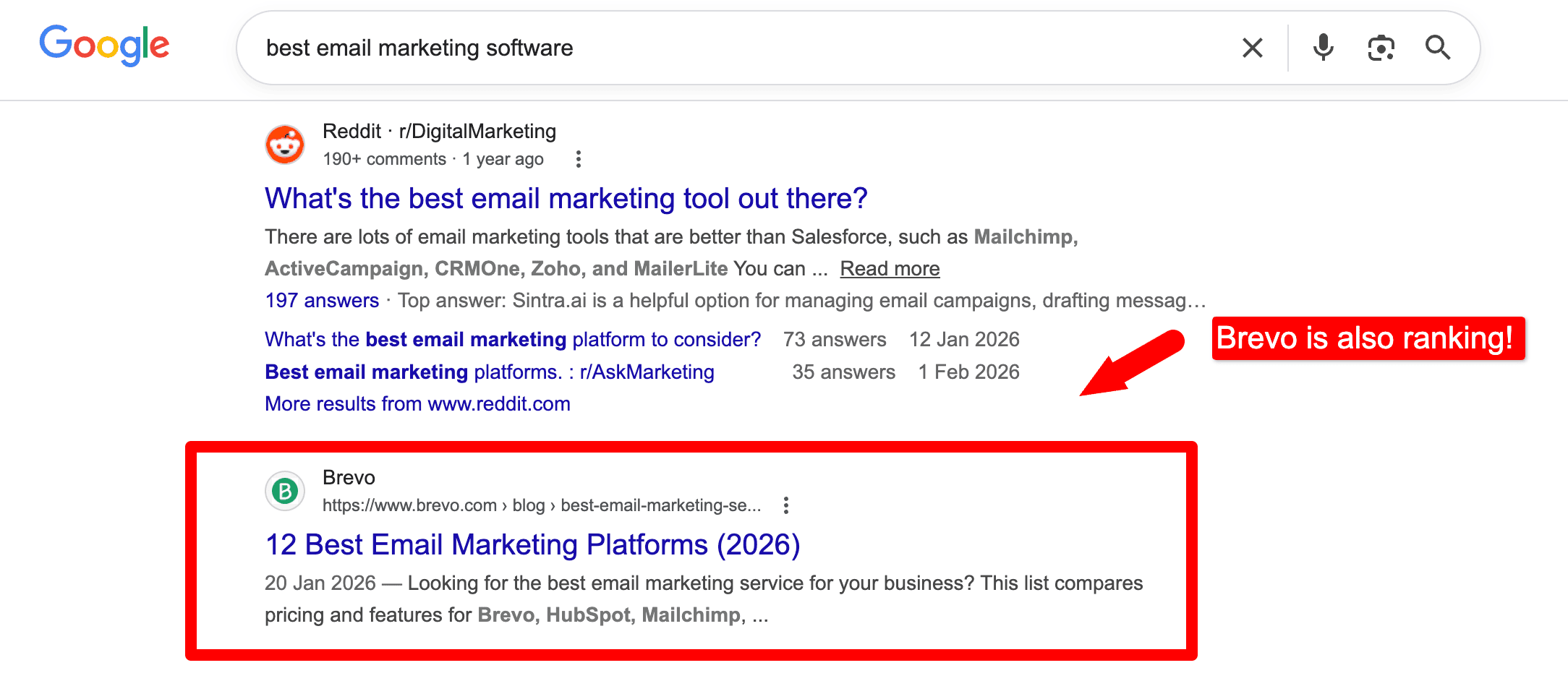
For example, Brevo ranks organically for the same email marketing keyword alongside its ads.
Have a look.
What can you learn from this?
Brevo uses both SEO and paid ads (SEM), helping it dominate the first page and capture more clicks from both free and paid results.
SEM Pros:
- SEM is a good option if you want to see results quickly. You can start getting traffic to your website once your ads are approved.
- You can use both SEO and SEM channels together. For example, you could use SEM to drive traffic to your website while you work on improving your SEO. Once your SEO starts to improve, you can reduce your SEM investment.
- Easy to track and optimize, as you can monitor the performance and adjust your ads anytime.
- SEM offers long-term benefits, as you’ll also be putting SEO efforts that can lead to long-term SEO benefits, such as improving your website’s ranking, credibility, and authority
SEM Cons:
- Can get expensive, especially when targeting competitive keywords with high CPC.
PPC vs SEO
PPC (Pay-Per-Click) is a form of paid search marketing in which advertisers pay only when someone clicks their ad. It’s the most common type of SEM, but not the only one.
Let’s use the same keyword, “best email marketing software,” as an example.
Here’s what PPC ads look like:

As you can see, businesses pay Google to show their ads in these top positions because they know people searching for this keyword are ready to buy email marketing software.
In simple terms, SEM is a broad strategy that includes both paid and organic search marketing, while PPC is just one part of SEM that focuses only on paid ads.
SEO, on the other hand, is completely organic; you earn traffic for free by ranking higher in search results.
PPC Pros:
- You’ll get quick results, and you can set ANY budget you want, depending on the keywords you want to target.
- You can set daily or monthly ad spend depending on the PPC ad performance
- PPC offers highly targeted options, including demographics, interests, keywords, and location. This means you can reach a highly specific audience.
- With PPC ads, you can find out what’s exactly working, as you’ll get detailed analytics and conversion tracking
- More flexibility as you can change ad creatives or pause campaigns whenever you want
- It can help you increase your brand’s overall organic visibility and build awareness, even if users don’t click your ads.
PPC Cons:
- It can be expensive because it relies on paid clicks. This means you’ll have to pay for every single click coming from search engines like Google.
Different types of SEO
SEO isn’t just one thing. It’s a big ocean. There are many ways to optimize your website and improve your search rankings.
Here are the main types of SEO you should learn and implement:
On-page SEO: It involves optimizing elements of your website that are under your control, such as content, title tags, meta descriptions, images, page speed, and user experience. The key to on-page optimization is to write high-quality content that is relevant to your target audience.
Off-page SEO: Optimizing the elements of your website that are outside of your control, such as backlinks, social signals like Facebook shares, tweets, etc. Try to build high-quality backlinks from other websites and promote your content on social media.
Technical SEO: Optimizing the technical aspects of your website, such as the site structure, website crawling, mobile-friendliness, improving core web vitals score, etc. It is all about creating an easy-to-use website structure, optimizing page load times, and designing a mobile-friendly site.
Local SEO: The practice of optimizing a website for local search results. It involves creating a Google My Business profile, optimizing your website for local keywords, and getting reviews from local customers.
eCommerce SEO: It is the process of optimizing eCommerce websites for search results. This includes optimizing the product pages, category pages, and checkout process.
In addition, there are specialized areas such as enterprise SEO, app SEO, video SEO, and more.
So, which type should you focus on? It depends on your goals, your industry, and the kind of traffic you want to attract.
Must Read: 11 Types of SEO: What They Are & How to Use Them Like A Pro
How to Get Started With SEO in 2026?
The best way to learn SEO is by doing. Here’s how you can get started.
Step 1: Do Keyword Research Before Writing
Before publishing anything, know what people are searching for.
Keyword research means finding the exact words people type into Google.
If you’re a beginner, focus on long-tail keywords (4+ words).
They are:
- Easier to rank for
- Less competitive
- More targeted
- Better for conversions
Example:
- “SEO” (too broad)
- “SEO checklist for beginners 2026”
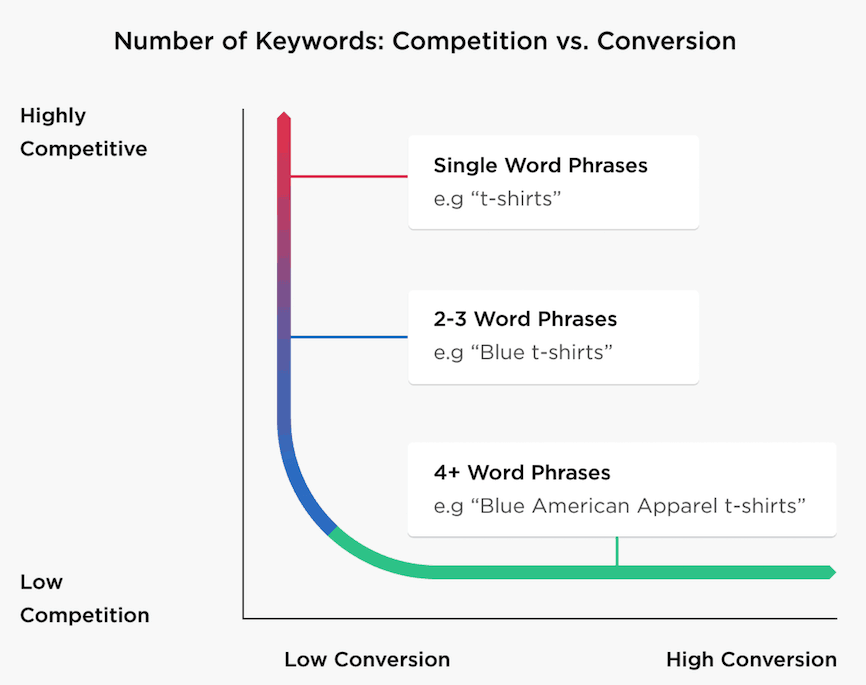
As you can see above, 4+ word phrases (which are long tail keywords) have low competition but they produce higher conversions.
Step 2: Create Extremely Useful Content
You won’t rank in 2026 without HELPFUL content. Period.
Good content solves a real problem. It answers questions clearly, keeps people reading, and helps them take action.
Google now rewards content that is:
- Helpful
- Well-researched
- Easy to understand
- Written for humans (not bots)
Long-tail keywords have less competition and higher conversion rates than short-tail keywords.
Step 3: Optimize Your Content
Once content is ready, optimize it properly:
- Use your main keyword in the title and URL
- Add it naturally in headings
- Write a clickworthy meta description
- Improve the overall readability
Tools for on-page SEO: If you’re using WordPress, there are a ton of tools that can help you with on-page optimization, but the following two plugins are highly recommended.
- Rank Math SEO: Rank Math lets you optimize your posts for unlimited focus keywords. Features include keyword placement suggestions, on-page SEO checks, schema markup, and built-in analytics.
- WordPress SEO by Yoast: Yoast SEO is one of the most popular SEO plugins, with millions of downloads worldwide. Features include on-page SEO optimization, XML sitemaps, readability analysis, and breadcrumb support.
In 2026, your website’s navigation affects both user experience and SEO.
Simple rule: Any important page on your site should be reachable within 3 clicks.
That includes:
- Contact page
- Key articles
- Product or service pages
- Email signup
If it takes more than 3 clicks, fix the structure.
Here are some useful tips to make your website navigation structure simple to both your website users and search engine crawlers.
Keep your menu clean (don’t add 20 links): If you look at our blog’s home page, you’ll notice a simple navigation menu. Have a look;
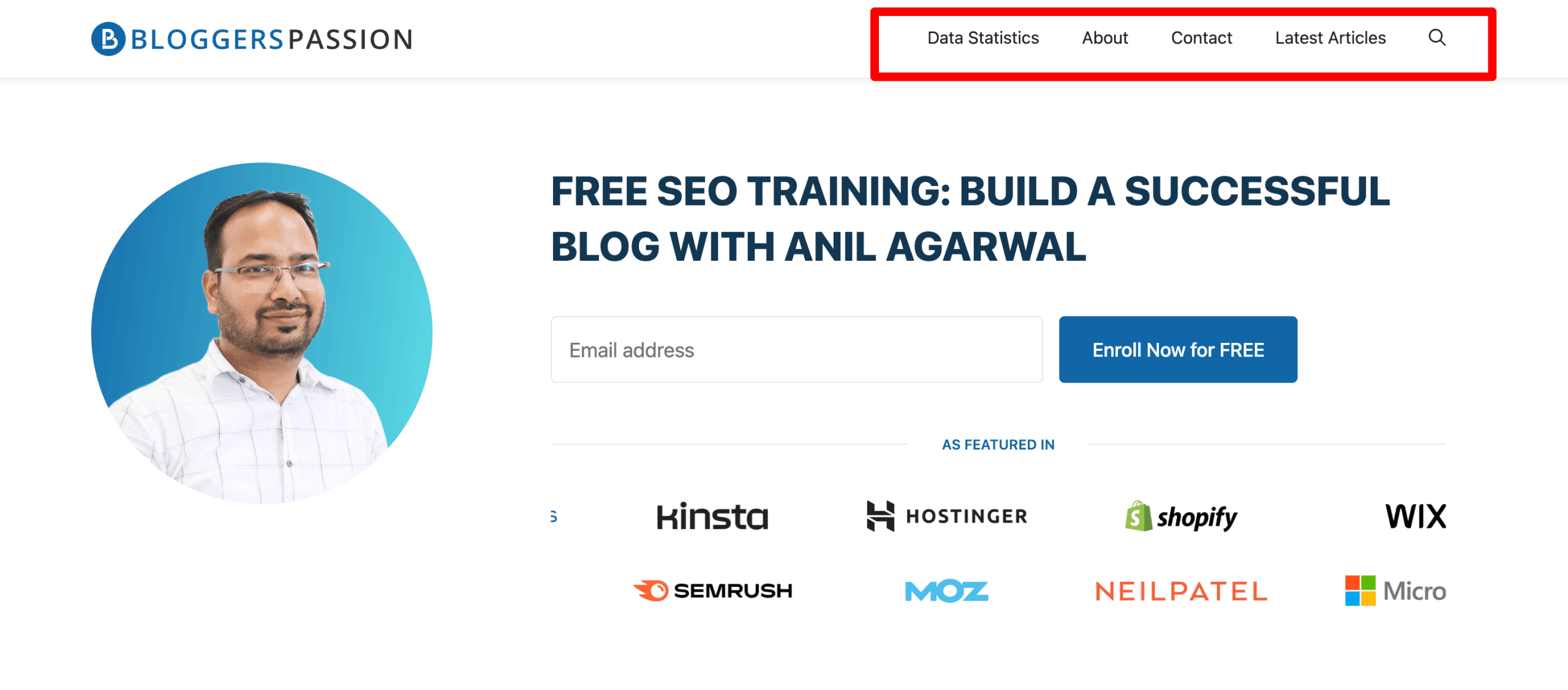
From the latest blog posts to the About and Contact page information, everything can be found in our navigation menu.
Too many links confuse people and crawlers. That’s why you need to keep it clear and simple.
Use simple names on the homepage: Use words people actually search for.
Example:
- Use → “SEO Tools”
- Not → “Growth Resources Hub”
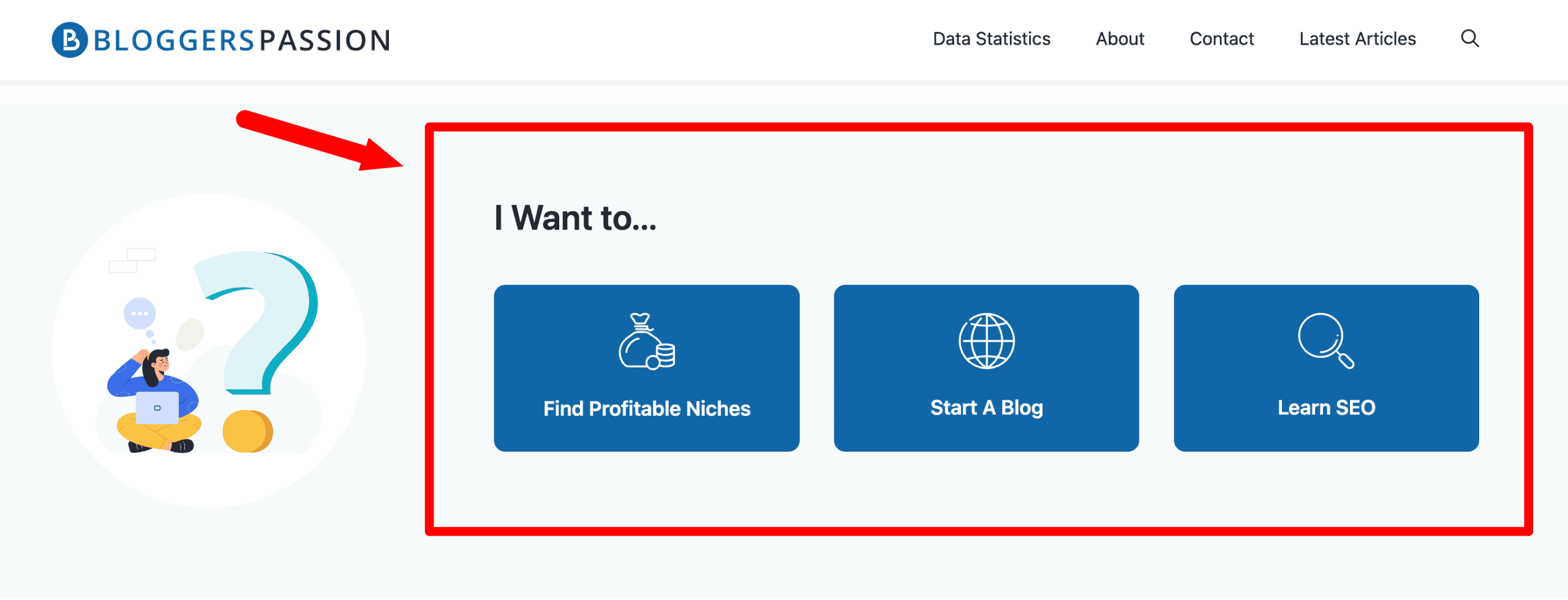
For example, on our blog, we guide users with simple options like Find Profitable Niches, Start A Blog, and Learn SEO, which makes it easier for readers to take action.
Use your footer wisely: Your footer is just as important as your header. Many visitors scroll to the bottom to find quick links and search engines crawl it too.
Keep it simple and useful.
Add in your footer:
- Important pages (About, Contact, Start Here)
- Top categories
- Popular guides
- Social links
- Search or sitemap
Step 5: Build Highly Relevant Backlinks
Backlinks are one of the strongest ranking factors in SEO. If you want higher rankings, you need quality links from relevant websites; it’s that simple.
Many people avoid link building because it sounds complicated. But it’s not. Focus on a few proven strategies, and you’ll see results.
Here are 3 evergreen ways to build top-quality backlinks in any niche.
1. Write Guest Posts
Guest posting is one of the easiest ways to get relevant links. Write helpful guest posts in your niche and link back to your site naturally.
You can find guest posting opportunities using searches like:
- [your topic] “write for us”
- [your topic] “guest post”
- [your topic] “become an author”
Alternatively, check out this post, which lists over 350 guest blogging sites across multiple niches.
2. Analyze Competitor Backlinks
Your competitors already have the links you want. Study them.
Use tools like Semrush to check where their backlinks come from. Then reach out to the same websites using guest posts, outreach, or content collaborations.
3. Build relationships
Most people underestimate the power of relationship building. If done right, building strong relationships with other bloggers can go a long way. The key here is to network with everyone, including;
- Influencers in your industry
- A list of bloggers
- New bloggers
- Micro-influential bloggers
Make sure to compile a list of 20 to 30 (or more) sites in your industry, and start doing the following to build relationships.
- Frequently send emails (to praise their work or suggest something useful to their audience)
- Buy their products (and give a shout-out on social media)
- Subscribe to their email lists
- Leave thoughtful comments on their blogs
- Write guest posts for them
Do everything you can to build strong relationships with other bloggers (including linking to their blog posts). Sooner or later, they’ll also reciprocate the same thing – not everyone, though, but at least a few bloggers will do the same thing for you.
FAQs on SEO Definition
Here are the answers to some common questions about SEO.
Yes, you can do SEO yourself. Just focus on what Google values: helpful content, a good user experience, quality backlinks, and trust.
The best way to learn SEO is to start your own website and practice the basics, such as keyword research, on-page SEO, and backlinks. Apply what you learn, test things yourself, and you’ll improve fast.
You can use SEO tools to supplement your own SEO efforts. But don’t expect them to do all the work for you. Focus on creating great content and building backlinks first. There are many free tools, such as Ubersuggest, for beginners.
Mobile SEO involves optimizing websites for mobile devices and tablets. It also involves making your web pages load quickly and being responsive on mobile devices.
The basics include keyword research to find what people search for, on-page SEO to optimize your content and pages, and off-page SEO to build quality backlinks from other trusted websites
Final thoughts on SEO basics
Learning SEO helps you attract the RIGHT people find your website. More visibility means more visitors, and more visitors mean more leads, conversions, and sales.
Think of SEO as building a strong foundation for your website. Without it, your content (and website) doesn’t rank, no matter how hard you try.
SEO isn’t about tricks, as it’s about helping users get what they need quickly.
Start with the basics, apply them consistently, and the results will grow over time. If you have any questions, feel free to ask.



Hi
Thank you for sharing the guide about SEO and its benefits. This is the best technique to increase website visibility and drive high traffic.
This will help me alot
This is really helpful to the person who want to learn term about SEO. Each and every topic regarding SEO is explained in very simply & perfectly. Our team will definitely take care to follow all the steps you mention in this artical.
Hi Anil,
Gone thru’ your contents, Awesome post. You can catch me on linkedin. Let’s get in touch.
Regards
I am just over two months into blogging and have achieved some of the early milestones. You are doing amazing work.
Excellent article!
Thanks for sharing the complete guide about SEO and its benefits. This is the best technique to increase a website visibility and drive high traffic.
Amazing guide, can’t wait to start my blog.
Is there something known as the sandbox period while indexing the website on Google?
Great job. You know what?
I read a lot of blog posts but your blog really unique and standout. Very interesting.
I am just over two months into blogging and have achieved some of the early milestones.
Thank!
Hi Anil,
This was a very thorough post. You hit all the necessary components of SEO for sure.
I’d just like to add a thought on word count. Longform useful content is still important for sure but still not always necessary for ranking (sigh of relief). I generally check the word count of the top 3 results on Google.
On my niche site, I still come across word counts of 750 even today. So a 1,500-word blog post for those keywords will be more than enough to help that content rank.
Again awesome post!
Take care,
Steve
Excellent Writing Anil, I have gone through Moz, Search engine Land Basics of SEO but the way you explained basics terms is outstanding. it was difficult for me to understand basics when I started learning SEO but I can sure if anyone going through this article will understand very quickly as I use to be :-).
can you please recommend What’s working in SEO these days, there are lots of knowledge but no too much precious or relating to what works best in SEO when it comes to Link building?
I really Like your Article… i have a question How do I conduct keyword research and Which SEO software is best.