


![xspeed cache review [is it worth it]](https://bloggerspassion.com/wp-content/uploads/2026/10/xspeed-cache-review-is-it-worth-it-300x160.png)
When I tested the new xSpeed Cache plugin installed on my live site, the biggest takeaway was its static-first caching approach. It handles requests directly at the server level without unnecessarily increasing PHP overhead every time.
Plus, it’s more affordable than market veterans like WP Rocket, and it sets up quickly.
But is it really as powerful as its marketing claims?
We will find out by taking a deep dive into this review.
As a blogger, my WordPress performance optimization plugin reviews follow before-and-after PageSpeed score verification. Today, we do the same.
This detailed review aims not just to list features, but to analyze how effective this AI-driven WordPress performance optimization plugin is and whether it can beat WP Rocket.
![xspeed cache review [is it worth it]](https://bloggerspassion.com/wp-content/uploads/2026/10/xspeed-cache-review-is-it-worth-it.webp)
What is xSpeed Cache?
xSpeed Cache is a WordPress caching and performance optimization plugin designed for modern web standards.
Unlike other plugins, it doesn’t just depend on basic browser caching. It uses an advanced static-first page cache mechanism that rewrites HTTP requests to bypass PHP execution and deliver a fast Time to First Byte (TTFB).
This plugin has been developed by the team at WPDeveloper, known for providing Essential Addons and other core plugins like Elementor for over 6 million active users in the global WordPress plugin repository.
The technical capabilities of the plugin include Static-First Page Cache, intelligent CSS/JS minification with a safe-minify fallback (so that scripts don’t break), automated compression, browser caching, and clean database optimization.
It executes seamlessly across all major web servers—Apache, Nginx, LiteSpeed, and Microsoft IIS.
xSpeed Cache free version is available on WordPress.org; the paid version offers advanced features like AI recommendations & one-click fixes, Critical CSS & Remove Unused CSS, and more.
My xSpeed Cache Test Results
We deployed the xSpeed Cache Pro plugin on our site named makeblogging.com. The plugins installed on our site include Elementor Page Builder, GeneratePress Pro, Akismet, Advanced Custom Fields, RankMath, Updraft, and more.
Before installing the plugin, our initial Google PageSpeed mobile score was 76.
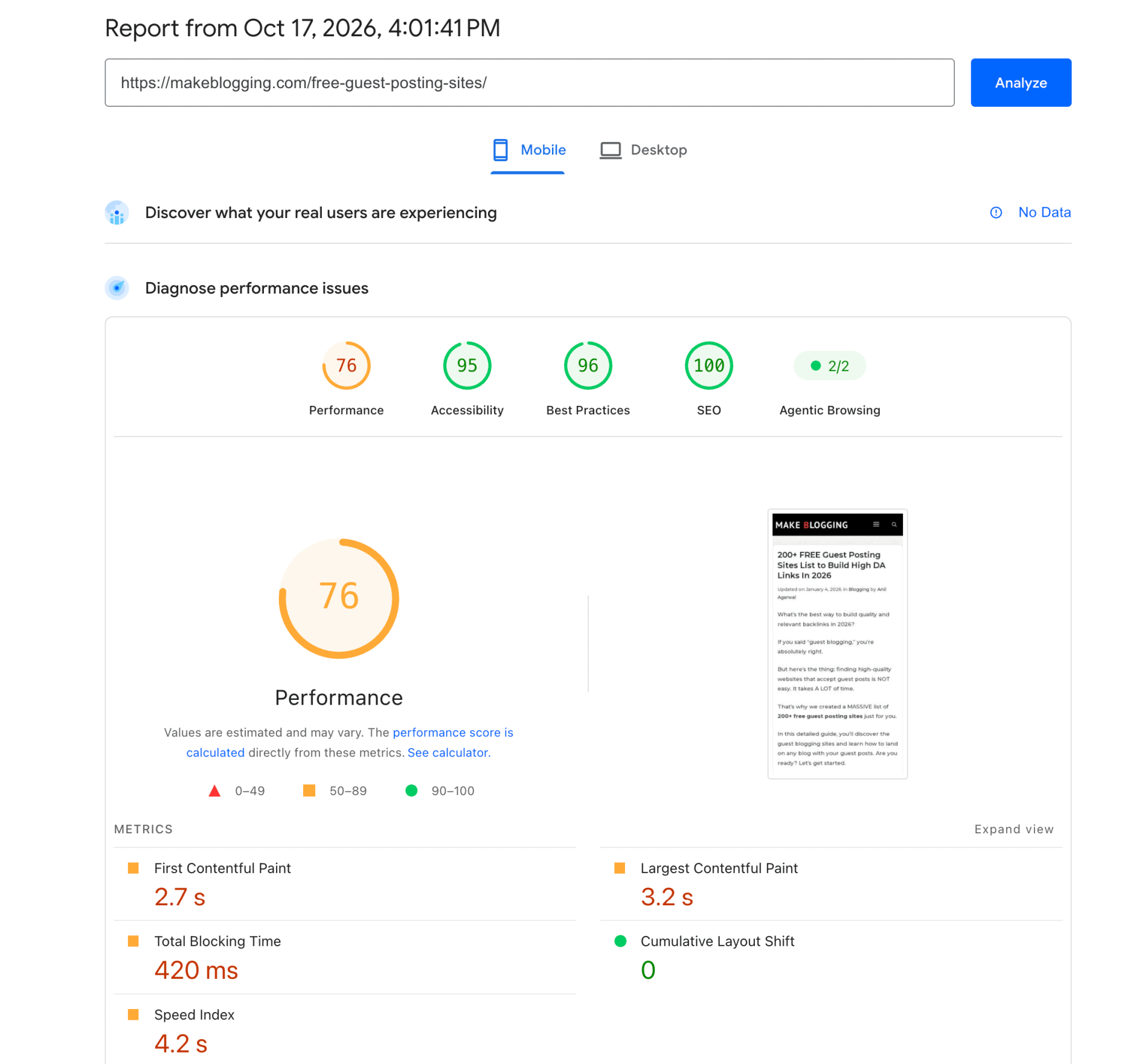
xSpeed Cache Performance: After installing the plugin and applying the standard configuration, the final report recorded a performance score of 75.
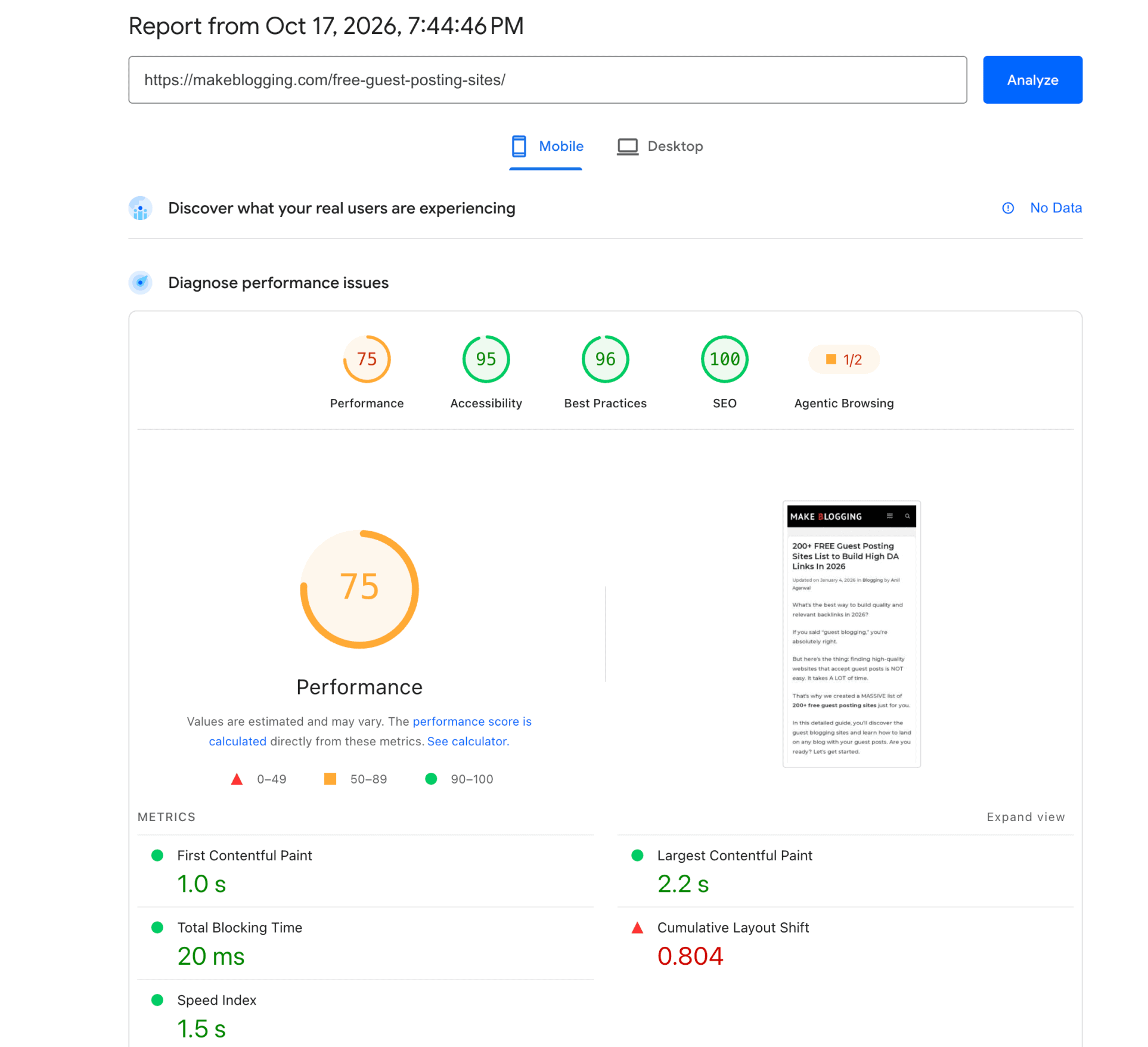
| Metrics | Before xSpeed | Final xSpeed | Change |
| Performance score | 76 | 75 | Down 1 point |
| First Contentful Paint (FCP) | 2.7 s | 1.0 s | 1.7 s faster (63%) |
| Largest Contentful Paint (LCP) | 3.2 s | 2.2 s | 1.0 s faster (31%) |
| Total Blocking Time (TBT) | 420 ms | 20 ms | 400 ms lower (95%) |
| Cumulative Layout Shift (CLS) | 0.000 | 0.804 | Worse by 0.804 |
| Speed Index | 4.2 s | 1.5 s | 2.7 s faster (64%) |
Bottom line: The final-page loading is faster, but layout shift has become the key user-experience and score risk. The final CLS value of 0.804 is worse than the previous value of 0.000.
Overall, the xSpeed Cache plugin has significantly improved page loading time. Reducing the loading time from 4.2s to 1.2s is a great achievement. Important Core Web Vitals metrics like FCP, LCP, and TBT have turned green.
However, CLS worsened due to xSpeed Cache’s optimizations. Some unused CSS still remains.
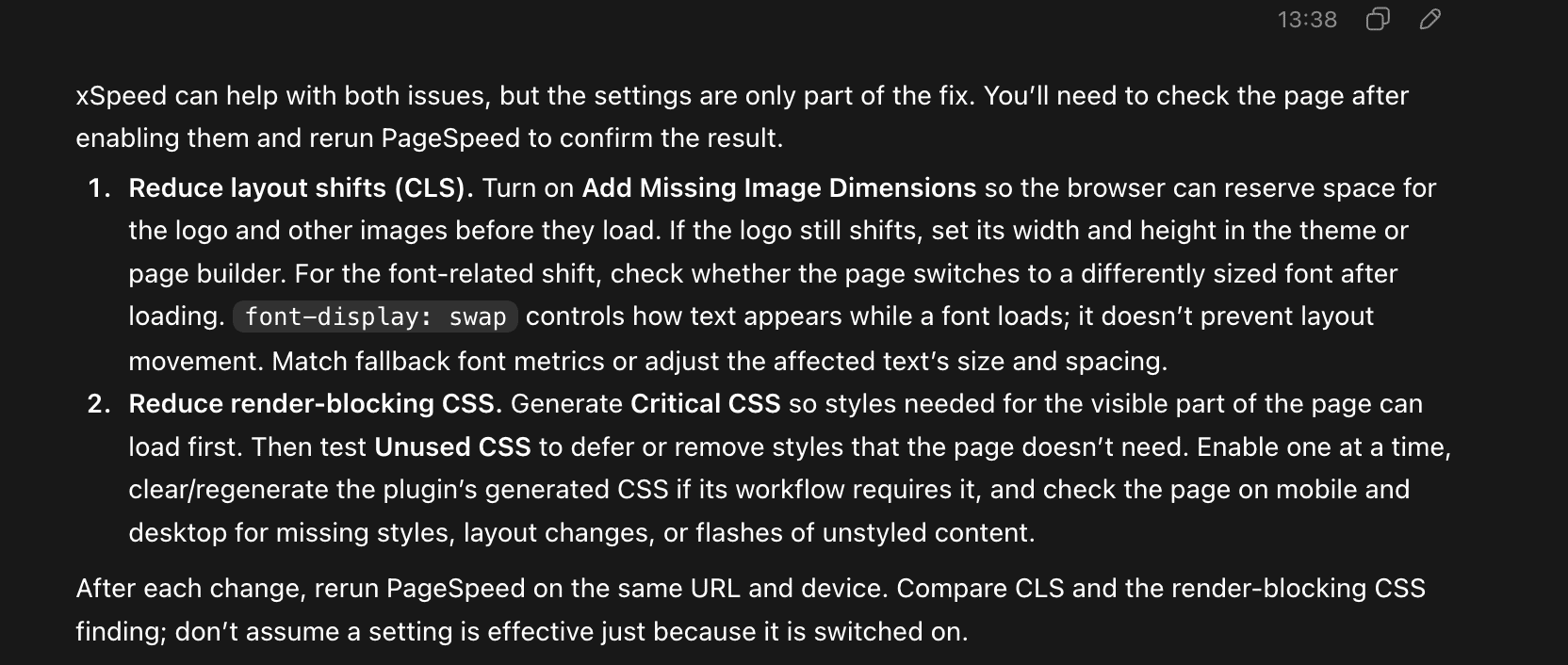
Also, if we look closely, fixing these errors requires a few manual adjustments that the xSpeed Cache plugin AI assistant couldn’t handle automatically.
- Add Missing Image Dimensions: Can easily fix by adding dimensions to the culprit image through the WordPress editor.
- Reduce Unused CSS: Can easily fix by mentioning the culprit CSS into the xSpeed Unused CSS tab.
And if we expand the Google PageSpeed reports, then the following errors are resolved by xPageSpeed:
| Finding | Before xSpeed | Final xSpeed | Assessment |
| Render-blocking requests | Estimated savings 1,940 ms | Not listed in final capture | Potentially improved; verify with a fresh detailed run |
| Unused CSS | Estimated savings 10 KiB | Estimated savings 25 KiB | Still present; estimate is higher in final run |
| Image delivery | Estimated savings 16 KiB | Not listed; image dimensions still flagged | Compression may have improved; layout sizing remains |
| Cache lifetime | Estimated savings 10 KiB | Estimated savings 1 KiB | Small opportunity |
| Font display | Estimated savings 20 ms | Not listed | Not a major remaining opportunity in final capture |
| Layout shift and reflow | No shift shown; CLS 0.000 | Layout shift culprits and Forced reflow; CLS 0.804 | Largest regression; investigate exact element/script |
| JavaScript / main thread | JS execution 1.7 s; main-thread work 2.3 s; 11 long tasks; unused JS est. 686 KiB | Two long tasks; one non-composited animation; TBT 20 ms | Main-thread blocking improved; some work remains |
| Image dimensions | Flagged | Still flagged | Explicit dimensions are still missing on some images |
| Other findings | Network dependency tree; DOM size; LCP breakdown; third parties | DOM size; LCP breakdown; third parties; browser errors logged | DOM/third-party analysis remains useful |
xSpeed final report shows faster initial rendering and much less blocking than the site had originally, but CLS deteriorated sharply, and unused CSS remains.
xSpeed Cache vs WP Rocket Performance:
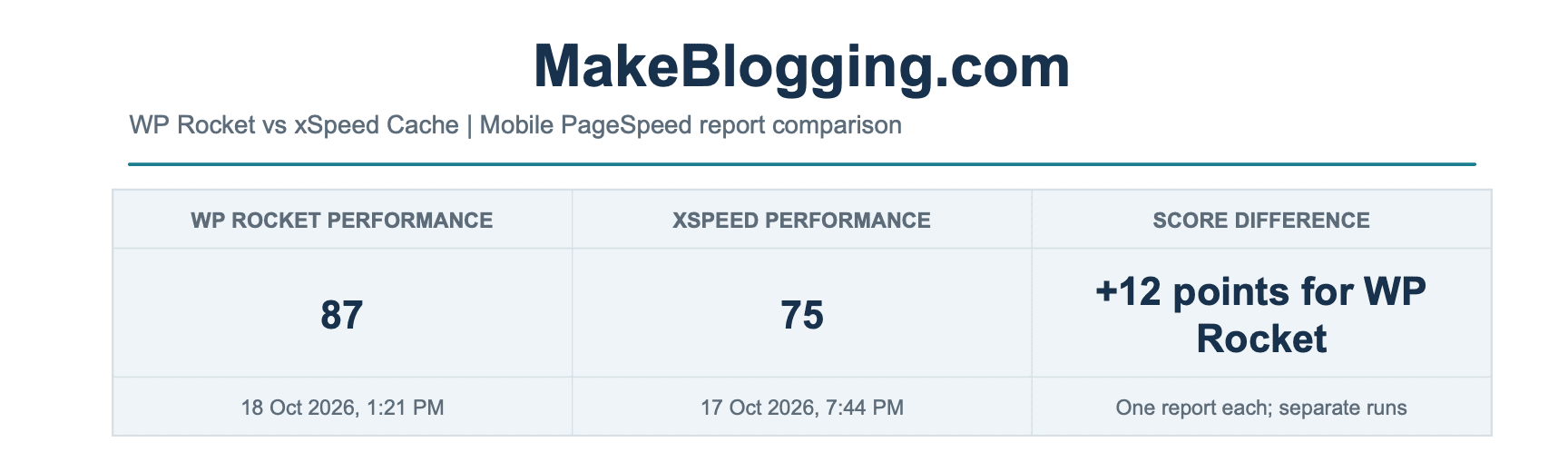
In these two plugin benchmarks, WP Rocket has the higher Performance score (87 vs 75) and better LCP, CLS, and TBT. xSpeed is faster on FCP and Speed Index.
| Metric | WP Rocket | xSpeed | Measured leader | Difference |
| Performance score | 87 | 75 | WP Rocket | 12 points |
| First Contentful Paint (FCP) | 1.2 s | 1.0 s | xSpeed | xSpeed 0.2 s faster |
| Largest Contentful Paint (LCP) | 1.5 s | 2.2 s | WP Rocket | WP Rocket 0.7 s faster |
| Total Blocking Time (TBT) | 0 ms | 20 ms | WP Rocket | 20 ms lower |
| Cumulative Layout Shift (CLS) | 0.247 | 0.804 | WP Rocket | xSpeed higher by 0.557 |
| Speed Index | 2.7 s | 1.5 s | xSpeed | xSpeed 1.2 s faster |
| Audit finding | WP Rocket report | xSpeed report |
| Layout movement | Layout shift culprits; CLS 0.247 | Layout shift culprits and Forced reflow; CLS 0.804 |
| Render-blocking requests | Estimated savings 630 ms | Not listed in final capture |
| Unused CSS | Estimated savings 10 KiB | Estimated savings 25 KiB |
| Image delivery/sizing | Improve image delivery; estimated savings 16 KiB | Image elements missing explicit width and height |
| Cache lifetimes | Not listed | Estimated savings 1 KiB |
| JavaScript / main thread | One long main-thread task; TBT 0 ms | Forced reflow; two long tasks; TBT 20 ms |
| DOM / request analysis | Network dependency tree and DOM size | DOM size, LCP breakdown, and third parties |
| Other visible differences | No major browser error noted; Best Practices 100 | One non-composited animation; Best Practices 96, browser errors logged |
WP Rocket report still flags render-blocking requests and image delivery.
Its 87 score does not mean every performance opportunity is resolved. xSpeed report still flags 25 KiB of unused CSS and missing image dimensions. The report doesn’t list render-blocking requests, but can’t prove every blocking resource is fixed.
xSpeed Cache lower CLS, TBT, and LCP are more consequential than its small FCP and Speed Index advantages in this comparison. LCP is 2.2 s, while WP Rocket records 1.5 s.
The findings differ in the level of detail shown, and each report reflects a single run. A changed page state, cache state, third-party response, or run-to-run variation can affect the results.
Based on the performance reports, WP Rocket leads the overall score by 12 points and is better on LCP, CLS, TBT, and Best Practices.
xSpeed leads on FCP and Speed Index. Both still show layout-shift findings, so the best next step is to diagnose CLS.
If we turn on the CDN, the overall Speed Index will improve. WP Rocket still produces good results overall.
WP Rocket provides a true “plug-and-play” experience. You activate the plugin, and 80% of the optimizations apply automatically.
On the other hand, xSpeed Cache is quite beginner-friendly with AI assistant optimization automations, but results require some manual tweaking.
In terms of cost, xSpeed Cache offers affordable pricing (especially with launch lifetime deals), while WP Rocket uses an annual subscription model that can get costly over time.
xSpeed Cache Installation & AI Assistants:
Although you can toggle the xSpeed Cache plugin configurations manually, automated settings can also be applied simply through the setup wizard.
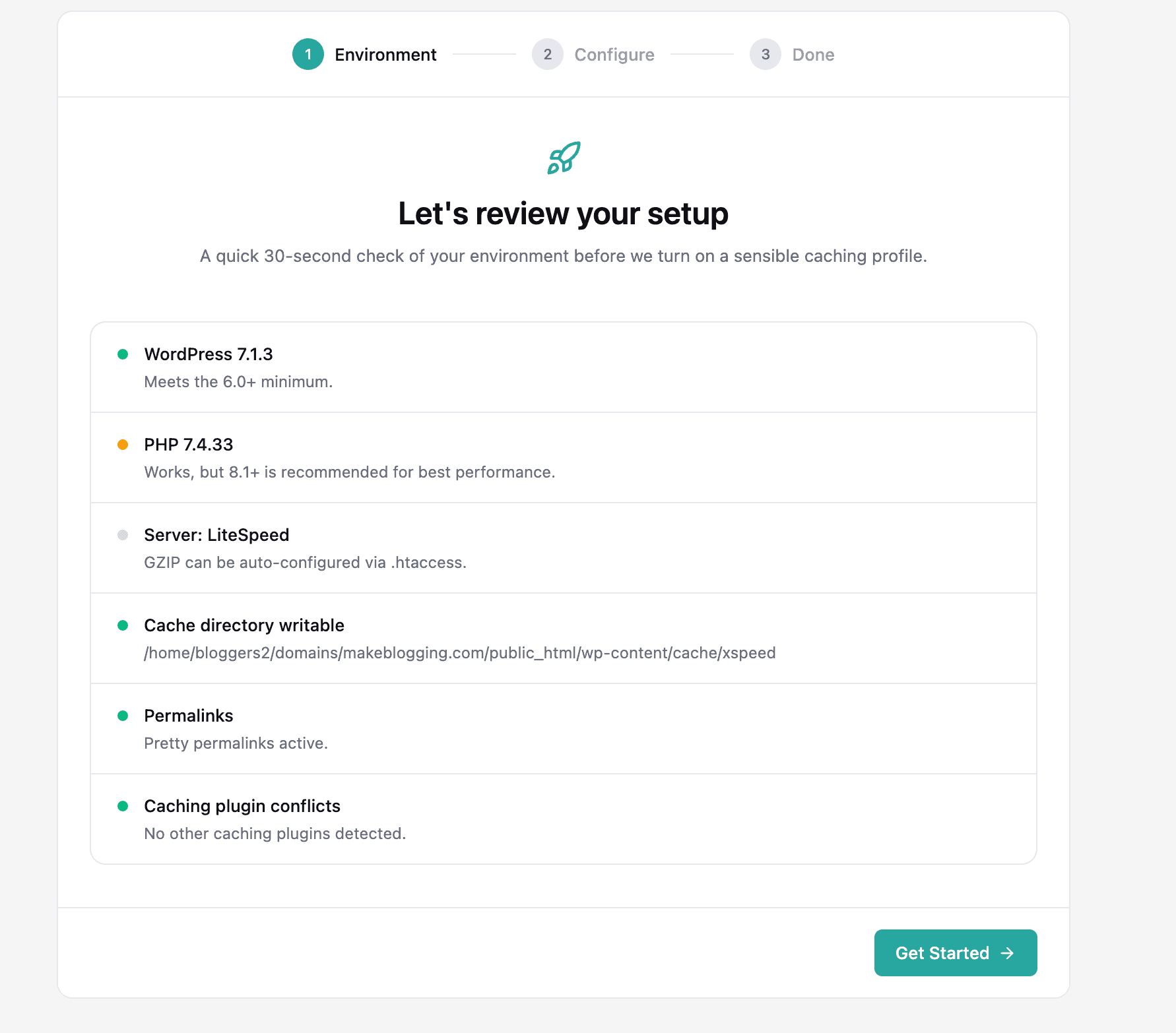
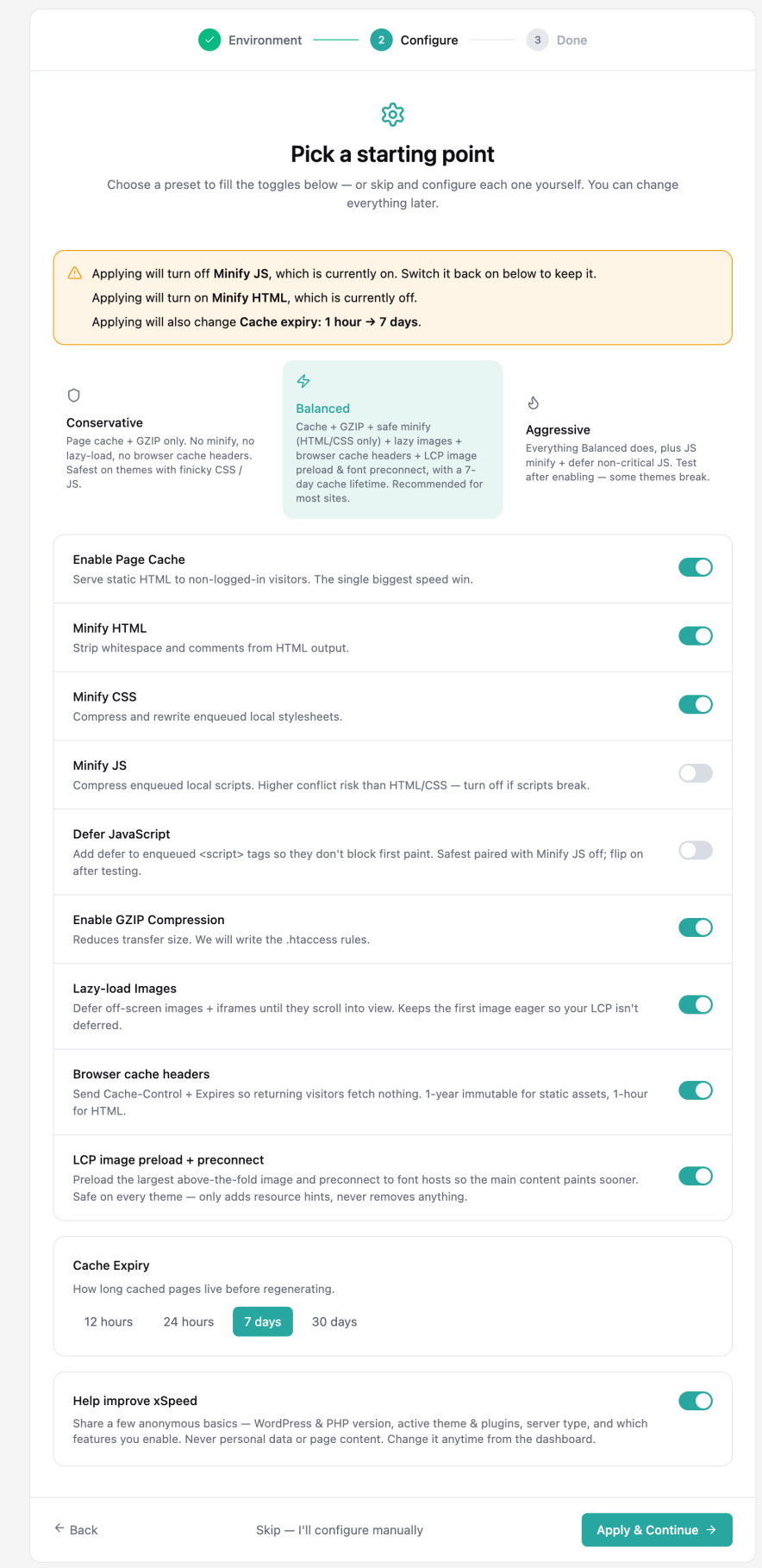
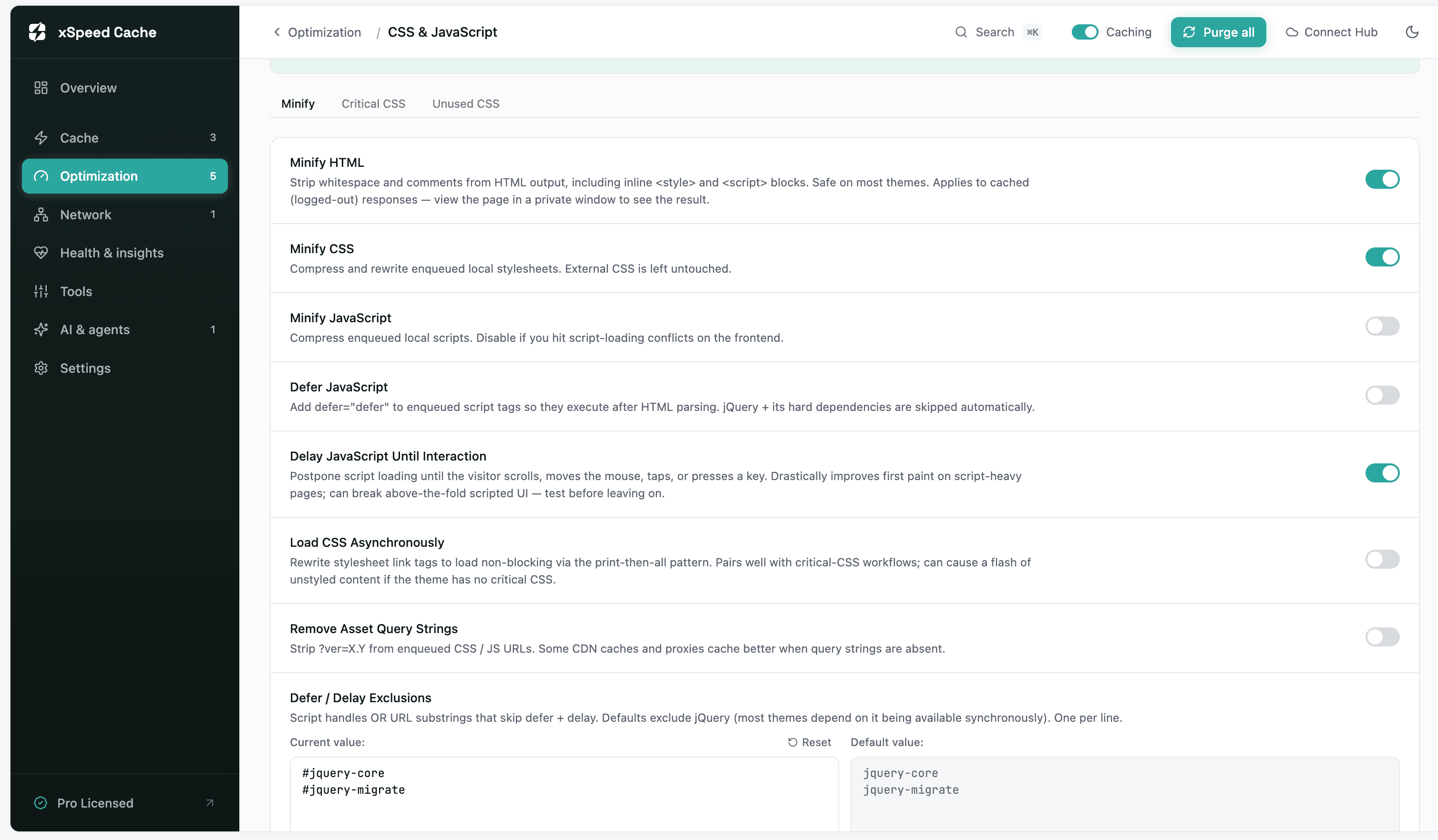
However, the process becomes much easier when you connect xSpeed Cache to any AI platform like Claude, ChatGPT, or Gemini via MCP (Model Context Protocol).
This is a new approach to optimizing a WordPress website via an xSpeed Cache plugin. It’s like having an AI engineer by your side without paying extra.
As soon as I activated the xSpeed license, I went to this site and connected xSpeed Cache to ChatGPT.
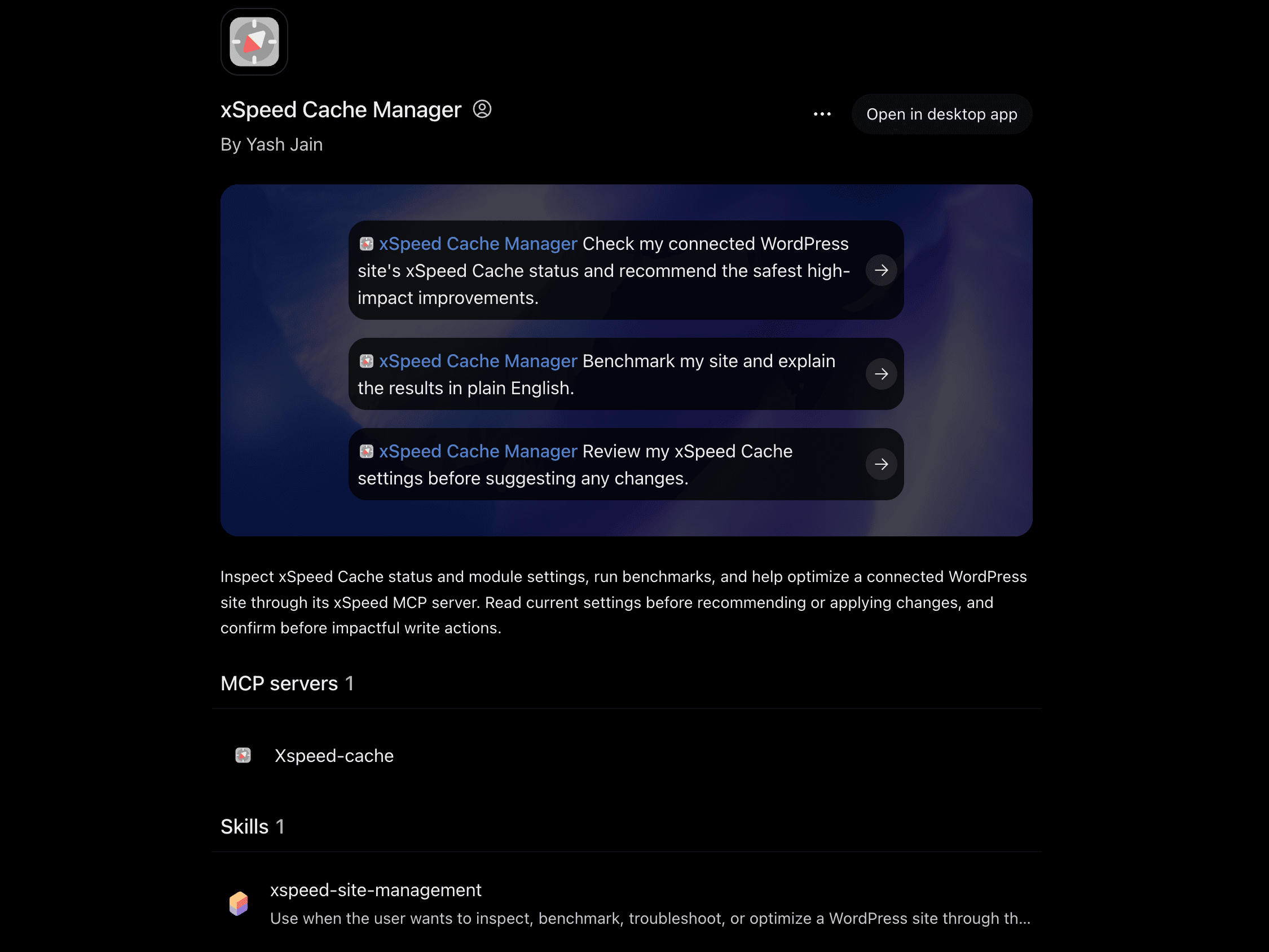
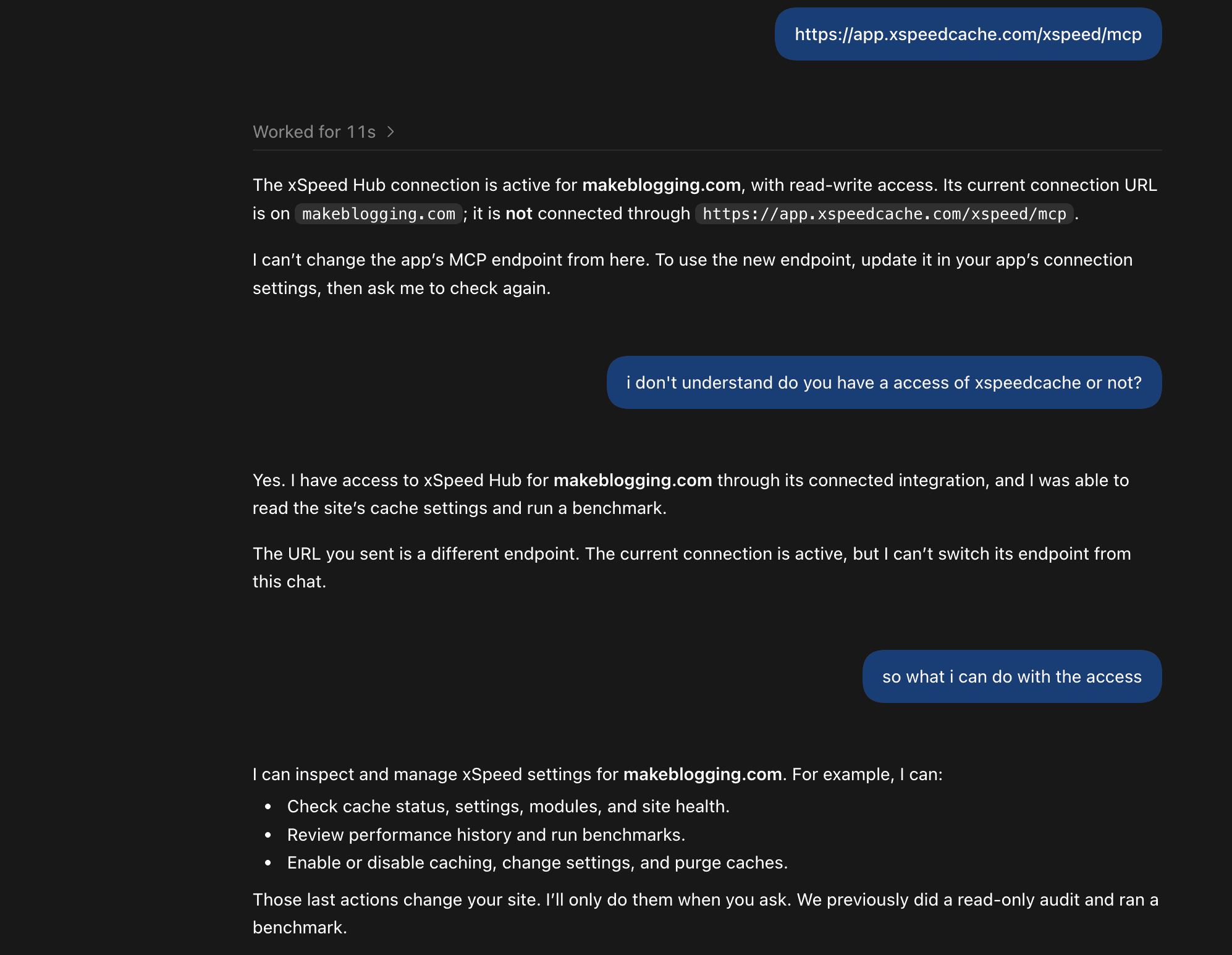
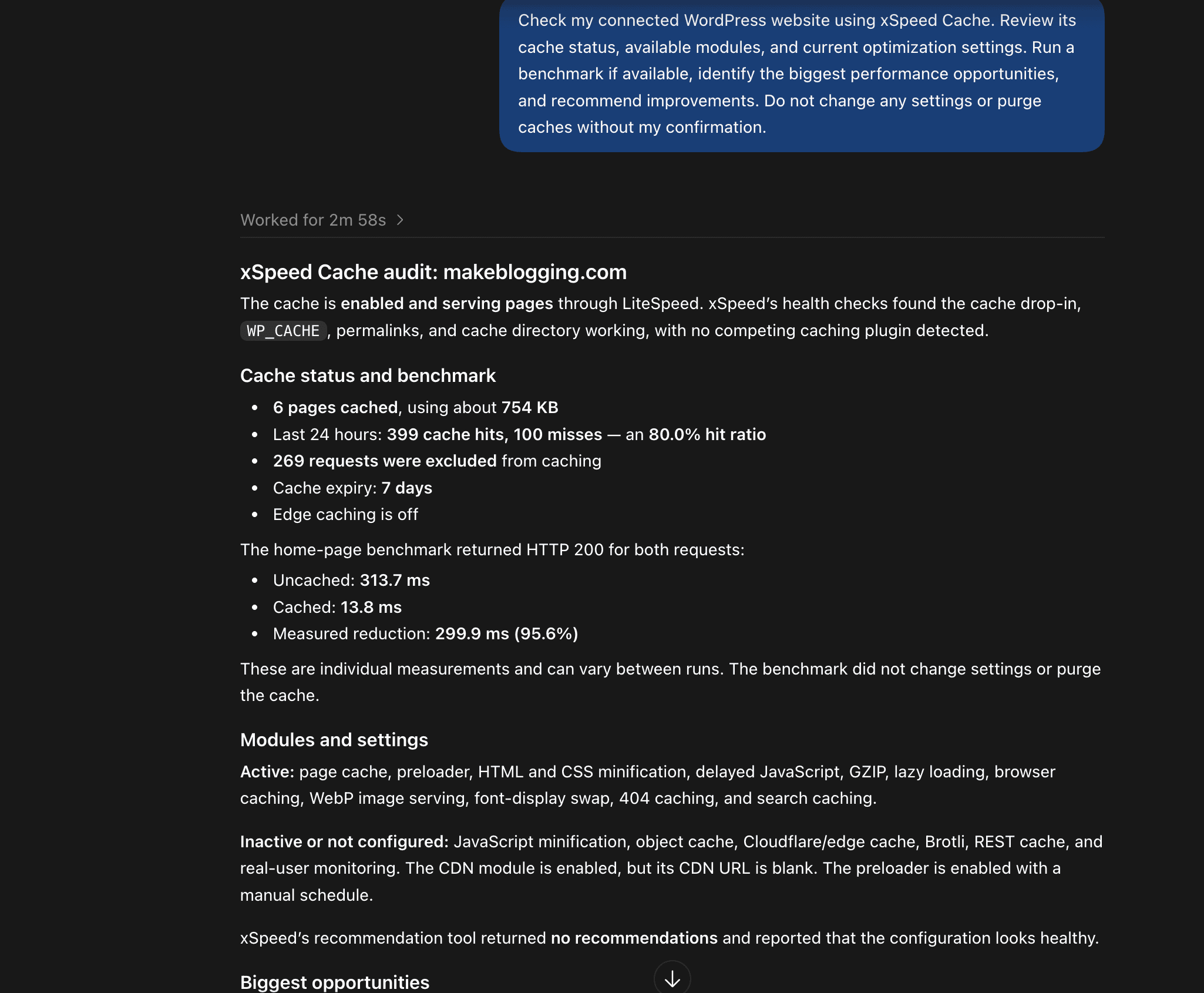
Overall, I liked the approach of using AI to optimize my WordPress site. I am not saying it is 100% effective. But if you provide the right prompts and have it check first, xSpeed Cache measures your site’s overall performance and then applies configurations directly, which reflect on your site in real time.
However, as you saw in the performance tests, you will still need to fix certain issues like CLS and unused CSS manually by going into the plugin’s dashboard.
Overall, applying performance optimization with the xSpeed Cache AI assistant approach is beginner-friendly rather than involving manual technical configurations.
xSpeed Cache Pricing
The pricing of xSpeed Cache plugin is best compared to the other alternatives as it offers lifetime plans advantage.
- Personal Plan: For a single website, available under launch pricing at around $29/year or $79 lifetime access.
- Business Plan: For up to 5 websites, available at launch for $49/year or $149 lifetime.
- Agency Plan: For 25 websites, available at launch for $99/year or $249 lifetime (includes white-label branding support).
If you are an independent blogger, content creator, or small business owner, the Personal Lifetime Plan ($79) will be the highest-value investment.
xSpeed Cache Final Thoughts
Using the xSpeed Cache plugin on a live production site offers a mixed but promising experience. On one hand, it improves First Contentful Paint (FCP) down to 1.0 s and Speed Index to 1.5 s, while keeping Total Blocking Time (TBT) low at 20 ms.
Integrating AI assistants via MCP (Model Context Protocol) makes configuring the plugin feel futuristic and beginner-friendly, eliminating complex technical barriers.
When should you choose xSpeed Cache?
You should choose xSpeed Cache if you are on a budget and need an AI-powered performance plugin, especially during its launch lifetime deal phases (such as the $79 Personal Lifetime Plan). It is ideal if you want fast initial rendering and are willing to perform minor manual tweaks to fix layout shifts and unused CSS.
Read: 10 Essential WordPress Plugins for Your Blog
Read: Yoast SEO Premium vs Free: Detailed Review
FAQs:
What are the best alternatives to the xSpeed Cache WordPress plugin?
Some of the top alternatives in the market include WP Rocket (for a premium, zero-hassle plug-and-play experience), LiteSpeed Cache (ideal for LiteSpeed servers with advanced server-level caching), W3 Total Cache (for highly customizable, granular controls), and FlyingPress (a modern performance plugin focused on Core Web Vitals).
Does xSpeed Cache work with all web server types?
Yes, xSpeed Cache executes seamlessly across all major web servers, including Apache, Nginx, LiteSpeed, and Microsoft IIS.
Is the AI assistant and MCP integration available in the free version of xSpeed Cache?
No, advanced features like AI recommendations tools require upgrading to the Pro version.
What is MCP (Model Context Protocol) integration in xSpeed Cache?
MCP integration allows you to connect the xSpeed Cache plugin directly to AI platforms like Claude, ChatGPT, or Gemini, enabling you to manage and configure your site’s performance optimization through AI prompts.
Will installing xSpeed Cache automatically fix all layout shifts (CLS)?
No. CLS are often caused by media elements lacking explicit width/height dimensions or dynamic third-party scripts. It usually require manual adjustments in your WordPress editor or plugin settings.





Leave a Comment
Your email address will not be published. Required fields are marked *