


Over the years, I’ve tested and worked with various hosting providers for different types of websites.
I understand no single host can be everything for everyone.
Maybe you’re after better support, more modern cloud infrastructure, or just a simpler user experience.
If you are receiving good performance with Hosting.com, then I don’t think you should switch.
I’ve rounded up some of the best Hosting.com alternatives available in 2026, each with its own strengths and ideal use cases.

How I Chose These Hosting.com Alternatives?
When I started shortlisting, I took a closer look at the parameters that actually matter in a web host.
Here’s what I focused on:
- Pricing & Value for Money
- Ease of Use & Dashboard Experience
- Speed & Server Performance
- Global Data Center Locations
- Uptime & Overall Reliability
- Security Standards
- Backup Options
- Customer Support Responsiveness
I have personally used the hosting companies mentioned in this post on my own websites and tested them thoroughly across several factors, including uptime, loading speed, customer support, and more.
So everything shared below is based entirely on my real experience.
| Hosting.com Alternatives: | Best For: |
| Hostinger | Maximum money value alternative |
| Bluehost | 12 months tenure |
| WPX Hosting | High end performance |
| Cloudways | Cloud based servers |
| Namecheap | Domain Purchase |
1. Hostinger – Top Pick for Money Value

Hostinger comes at the top when someone is looking for performance, affordability, and ease of use.
For starters, speed is never an issue. Hostinger runs on LiteSpeed servers. So it will automatically deliver fast loading times (even on their most basic shared plans.)
I’ve consistently seen load times around 2.014 seconds. It is good in their price range.

Now let’s talk about the price tag. Hosting.com is decent, but it’s definitely not what I’d call budget-friendly. On the other hand, Hostinger starts at just $1.99/month and after renewal, it’s still way more affordable than Hosting.com.
Another big plus? Hostinger’s custom-built hPanel. It’s more user-friendly than traditional cPanel and is available in 12 different languages. So managing sites here feels intuitive and streamlined.
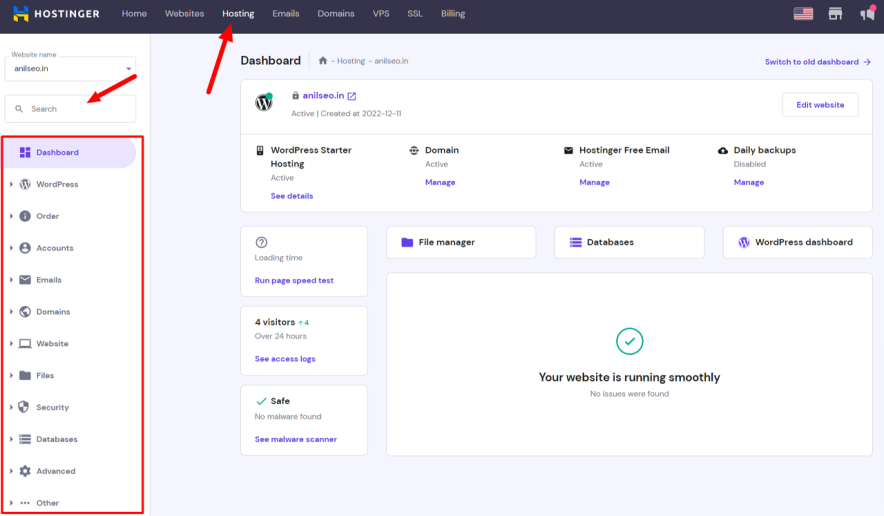
And they also offer free site migration services. It doesn’t matter if you’re moving from cPanel, Plesk, or something custom. You just request a migration through the dashboard and their team handles it for you.
So if you’re looking to switch from Hosting.com and you want these 3 things: Speed and ease of Use with affordable plans then I guess you should pick Hostinger.
Hostinger vs Hosting.com – Side By Side Compared:
| Feature | Hostinger | Hosting.com |
|---|---|---|
| Starting Price | $1.99/month | $3.99/month |
| Renewal Price | Starts from $10.99/mo | Starts from $11.99/mo |
| Free Domain (1st Year) | Yes (All plans) | Yes (All plans) |
| Website Limit | 3-100 Sites | 1-100 Sites |
| Storage | 20-100 NVMe Storage | 15-100 SSD |
| Free Backups | Weekly (base), Daily (higher plans) | Not available |
| Free Site Migration | Unlimited (expert-handled) | Yes |
| Control Panel | Custom hPanel (intuitive, multilingual) | Traditional cPanel supported |
| Email Accounts | 2-10 Free Mailboxes | 5-40 Email Accounts |
| Data Centers | 11 | 4 |
| Customer Support | Live Chat, Email | Email, Phone, Live chat |
| Phone Support | Not Available | Available |
Pros & Cons:
Pros:
- Both first time and renewals rates are affordable
- Great performance thanks to LiteSpeed servers
- Super easy to use — hPanel is clean and beginner-friendly
- Lets you host multiple websites even on the basic plan
- Free domain, SSL, backups, and site migration
- Global data center coverage — helps with lower latency
Cons:
- There is no phone support (live chat works only)
- The base plan offers limited email accounts
- It may not be the best fit for large-scale eCommerce or agency work
A Quick Look at Hostinger Pricing:
If you want to save maximum money on Hostinger, then you have to go with their 48-month plans. Yes, I know this is a drawback. But you can also consider its yearly plans.
| Plans | Intro Price | Benefits |
|---|---|---|
| Premium Shared | $1.99/month | 3 sites, 20 GB storage, free SSL, weekly backups |
| Business Shared | $2.99/month | 50 sites, 50 GB storage, Free CDN, Free daily backups |
| Cloud Startup | $6.99/month | 100 sites, 100 GB storage, Priority support, Dedicated IP |
Overall, If you’re on a budget and want a host that doesn’t feel like a compromise, Hostinger is hands down the best overall alternative in today’s list.
Explore More:
2. Bluehost – Top Hosting.com Alternative for 12 Months Requirement
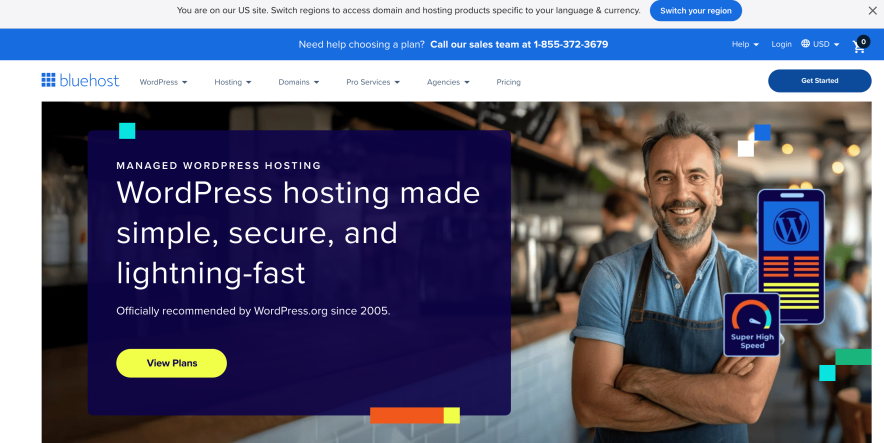
Bluehost is one of those names that’s been around forever and for good reason.
I’ve recommended Bluehost to friends who were starting personal blogs or portfolio sites, and they’ve all found it easy to use.
The setup is smooth, the dashboard is clean, and it doesn’t overwhelm you with too many options.
What makes it even more beginner-friendly is its tight WordPress integration — in fact, WordPress.org officially recommends Bluehost, which is a huge trust factor if you’re going down the WordPress route.
You’ll also get a bunch of perks like:
- A free domain name for the first year
- 1-click WordPress installs
- 24/7 live chat and phone support
- And even AI website builder tools to help you get online fast
Bluehost even includes eCommerce-ready plans, which come with built-in payment options, appointment tools, product search, wishlist, and more so it’s not just for bloggers.
I’ve got to be honest — it’s not all perfect.
Performance-wise, Bluehost is good, but not as fast as Hosting.com, especially on the basic plan. If your site starts growing past 5,000 monthly visitors, you’ll need to do some extra optimization (like adding WP Rocket or another caching plugin).
Also, site migration isn’t free — they’ll charge you $149 for up to 5 sites, which is kind of a bummer when other hosts do it at no cost.
Although their starting price is super low at $3.99/month, there are a few upsells during checkout, and renewals can get pricey.
Still, if you want a reliable host to set up an online store at ease and you’re not ready to commit to a high-performance (or high-price) host yet, Bluehost is a great one to consider.
Bluehost vs Hosting.com – Side By Side Compared:
| Feature | Bluehost | Hosting.com |
|---|---|---|
| Starting Price | $3.99/month | $3.99/month |
| Renewal Price | $9.99/month | Starts from $11.99/mo |
| Free Domain (1st Year) | Yes (All Plans) | Yes (All plans) |
| Website Limit | 10-100 Sites | 1-100 Sites |
| Storage | 10-100 GB NVMe | 15-100 GB SSD |
| Free Backups | Not available | Not available |
| Free Site Migration | Depends on eligibility | Yes |
| Control Panel | Traditional cPanel supported | Traditional cPanel supported |
| Email Accounts | Available in extra charges | 5-40 Email Accounts |
| Data Centers | 2 Locations (USA & India) | 4 |
| Customer Support | 24/7 Live Chat & Phone | Email, Phone, Live chat |
| Phone Support | Available | Available |
Pros & Cons:
Pros:
- One of the easiest hosts to use for beginners
- Officially recommended by WordPress.org
- Includes free domain on all plans
- Offers phone and live chat support 24/7
- Good eCommerce tools on higher-tier plans.
- Simple control panel that doesn’t feel overwhelming
Cons:
- Site migration isn’t free ($149 for up to 5 sites)
- Basic plan doesn’t perform well with high traffic
- Only 2 data center locations (USA & India)
- No guaranteed uptime on WordPress hosting plans
- Renewal prices can be noticeably higher
- Some upsell and hidden costs during the checkout
Pricing:
Bluehost offers three plans in its WordPress hosting. The Starter one ($3.99/mo) is for those who have a very tight budget. Their Business ($6.99/mo) plan offers the best performance in a mid-range. And they also have a dedicated eCommerce plan ($14.99/mo), which suits online store based sites.
Overall if you are looking for a Hosting.com competitor that has the best 12 months plans then you should explore Bluehost. Opting for this host for the long term might involve risk as renewals are really high.
Explore More:
3. WPX – Better Performance than Hosting.com

WPX Hosting isn’t built for beginners.
But if your site is starting to gain traction or you’ve outgrown monthly 10k plus traffic, then WPX should be preferred.
I’ve personally used WPX Hosting for over 8 years, and I only made the switch after realizing my earlier hosting just couldn’t keep up with growing traffic and higher performance demands.
If you’re in a similar phase — where you want better speed, tighter security, and ultra-responsive support — WPX is a fantastic upgrade.
I’ve seen page load times of around 0.6 seconds in WPX, which is way faster than what I got from Hosting.com, Hostinger, or Bluehost.
WPX also includes a custom-built CDN with 37 global points, which is something most hosts don’t offer at this level.
You also get premium features included for free — like manual site optimization, free malware removal, and even a WooCommerce-optimized hosting setup. Their daily backups, free SSL, DDoS protection, and fast-response support (40-second average reply) seal the deal.
But I’ll be upfront — WPX isn’t cheap.
Their plans start around $14.99/month, which is quite a jump if you’re used to budget hosting.
They also don’t offer a free domain, and there’s no AI site builder like some other hosts offer for beginners. So, if you’re just starting out and want a hand-holding experience, WPX might feel like too much too soon.
WPX vs Hosting.com – Side By Side Compared:
| Feature | WPX | Hosting.com |
|---|---|---|
| Starting Price | $14.99/month | $3.99/month |
| Renewal Price | $17.99/month | Starts from $11.99/mo |
| Free Domain (1st Year) | Not applicable | Yes (All plans) |
| Website Limit | 1-15 Sites | 1-100 Sites |
| Storage | 10-40 GB | 15-100 GB SSD |
| Free Backups | Automated backups | Not available |
| Free Site Migration | Yes | Yes |
| Control Panel | Custom panel | Traditional cPanel supported |
| Email Accounts | Unlimited | 5-40 Email Accounts |
| Data Centers | USA, UK, & AU | 4 |
| Customer Support | 24/7 Live Chat | Email, Phone, Live chat |
| Phone Support | Not Available | Available |
Pros & Cons:
Pros:
- Free manual site optimization & unlimited site migrations
- Built-in custom CDN for faster global delivery
- Free daily backups, SSL, malware removal
- Outstanding customer support with fast response times
- Dedicated WooCommerce-ready hosting plans
Cons:
- No free domain with hosting plans
- No beginner-friendly AI builder or onboarding features
- Higher starting prices may not suit small hobby sites
Pricing Overview:
WPX offers 3 plans in both the WordPress & WooCommerce categories. The starting plan (Starter $11.99/mo) would be enough for most of the sites.
Overall, you can prefer WPX instead of Hosting.com if you’re looking for the best performance. And if you want to settle with one host for the long term, WPX is a great option in that case too. We’ve been using it ourselves for the past 8 years.
Explore More:
4. Cloudways – Top Cloud Hosting Based Alternative

Unlike Hosting.com, which follows the traditional hosting model, Cloudways gives you the power of top-tier cloud infrastructure like DigitalOcean, AWS, and Google Cloud but without the complexity of managing everything yourself.
And that’s what makes it a game-changer.
I’ve hosted multiple sites on Cloudways (including one on a $15/month plan), and I love the performance and flexibility it gives me.
Even during traffic spikes, the average server response time stayed around 31ms.
You also get real-time billing, so you’re only paying for what you actually use — which is a breath of fresh air compared to fixed-price shared hosting.
That said, Cloudways isn’t for everyone.
If you’re coming from a budget host or you’re used to all-inclusive features, you’ll notice that some things (like email hosting, daily backups, or premium support) may cost extra.
There’s also no money-back guarantee — instead, they offer a 3-day free trial to test things out.
But if you want maximum reliability (100% uptime always) then Cloud solution-based Cloudways hosting is hands down one of the most future-ready alternatives out there.
Cloudways vs Hosting.com – Side By Side Compared:
| Feature | Cloudways | Hosting.com |
|---|---|---|
| Starting Price | $11/momth | $3.99/month |
| Renewal Price | Same | Starts from $11.99/mo |
| Free Domain (1st Year) | Not available | Yes (All plans) |
| Website Limit | Unlimited | 1-100 Sites |
| Storage | More than 1 TB | 15-100 GB SSD |
| Free Backups | Daily Backups | Not available |
| Free Site Migration | One site only | Yes |
| Control Panel | Not supported | Traditional cPanel supported |
| Email Accounts | Paid | 5-40 Email Accounts |
| Data Centers | 50+ | 4 |
| Customer Support | Live chat & Ticket | Email, Phone, Live chat |
| Phone Support | Not Available | Available |
Pros & Cons:
Pros:
- Pay-as-you-go pricing model — only pay for what you use
- Incredible performance, even under stress
- Choice of top cloud providers (AWS, Google Cloud, etc.)
- Beginner-friendly dashboard with fast WordPress setup
- 24/7 live chat support + premium support options
- Great for developers, eCommerce stores, and agencies
Cons:
- Some essential features (like email & backups) come at an extra cost
- No money-back guarantee (but a free 3-day trial is offered)
- May be overwhelming for absolute beginners
Pricing:
Cloudways pricing usually starts from $11/month, and it will totally depend on the server you choose. They have really high plans to achieve maximum scalability (more than 1 TB plans are available).
If Hosting.com feels too rigid or too basic for your growing needs, Cloudways is the smarter and more scalable alternative.
5. Namecheap: Best Alternative for Domain Purchase

If Hosting.com feels expensive, especially in a domain purchase then you should look at Namecheap.
Namecheap may not be the best choice for hosting, but it’s widely preferred for domain purchases due to its unbeatable affordability. For instance, if a .COM domain costs $11.99/year on Hosting.com, you can get it for over 50% less on Namecheap.
The domains available in Namecheap start from just 99 cents. And domain privacy is absolutely free here, which you won’t find with Hosting.com.
Explore More: Namecheap Review
FAQs | Web Hosts Like Hosting.com
Here are some FAQs people ask about Hosting.com competitors.
Hosting.com is a good hosting choice for its price (starting at $1.99/mo), but its customer support is pathetic.
Hostinger and Kinsta are two better options out there. Go with Hostinger if you’re on a small budget (starts at $1.99/mo), and go with Kinsta if you’re looking for high performance and speed.
Bluehost is slightly better in terms of security and reliability. Both Hosting.com and Bluehost offer hosting plans at similar prices.
![Hostinger vs Bluehost 2026 [Which Hosting is Best?] – Revealing Hidden Differences](https://bloggerspassion.com/wp-content/uploads/2022/12/Hostinger-vs-Bluehost-300x153.png)

![Hostinger vs GoDaddy 2026 Comparison [Which Offers More Money Value]](https://bloggerspassion.com/wp-content/uploads/2021/11/hostinger-vs-godaddy-300x157.jpeg)

![Hostinger vs HostGator 2026 [Which Hosting is Best?] – Revealing Hidden Differences](https://bloggerspassion.com/wp-content/uploads/2021/07/hostinger-vs-hostgator-300x157.jpeg)


Leave a Comment
Your email address will not be published. Required fields are marked *