


Are you struggling to choose between GeneratePress free Vs premium theme?
I’ve personally used both versions of this lightweight WordPress theme to build my niche sites, affiliate blogs, and client websites. Here’s my viewpoint!
The free version is highly suitable for beginners who want the fastest WordPress theme.
If you want advanced customization, WooCommerce features, dynamic elements, premium templates, or a block-based website builder, GeneratePress Premium is where the real power unlocks.

In this detailed GeneratePress Free vs Pro comparison, you’ll learn:
- The exact feature differences
- What you miss in the free version
- Whether GP Premium is worth the money in 2026
- Which version is best for affiliate marketers, agencies, and WooCommerce stores
- Real pros and cons based on actual usage
By the end, you’ll know exactly which GeneratePress version fits your website’s needs and budget.
GeneratePress – A Quick Intro

GeneratePress is a well-known, weightless WordPress theme which is easy to use and customize. It’s the perfect WordPress theme for those who want to build a simple, SEO-friendly, and fast-loading website.
GeneratePress includes a ton of incredible features such as a responsive layout, multiple color schemes, and an extensive theme options panel.
The theme is compatible with WooCommerce, bbPress, and BuddyPress along with all the major website page builders like Elementor and Beaver Builder
GeneratePress Free vs Pro: Features Comparison
| Features | GeneratePress Free | GeneratePress Premium |
| Pricing | Free | Starts at $59/year |
| Website Usage | Unlimited | Up to 500 websites |
| Site Library Templates | No | Yes |
| Theme Builder | No | Yes |
| Elements Module | No | Yes |
| WooCommerce Support | Basic | Advanced WooCommerce controls |
| GenerateBlocks Integration | Limited | Full integration |
| Dynamic Elements | No | Yes |
| Typography Controls | Basic | Advanced |
| Colors & Spacing | Limited | Full customization |
| Performance Optimization | Excellent | Excellent |
| SEO Friendly | Yes | Yes |
| Core Web Vitals Optimization | Good | Better customization for optimization |
| Premium Support | No | Yes |
| Remove Copyright | No | Yes |
| Best For | Beginners & hobby blogs | Serious bloggers, affiliate marketers, agencies & eCommerce |
| Download | Free Version | Paid Version |
If you want a deeper hands-on analysis, check out my detailed GeneratePress review, where I have shared real performance tests, customization insights, pros and cons, and my personal experience using GeneratePress on multiple WordPress websites
Should You Pick the GeneratePress Free Or Premium Theme?
The most obvious question for many users is: Shall I use the free theme version or should i upgrade to its pro version. Here is my answer!
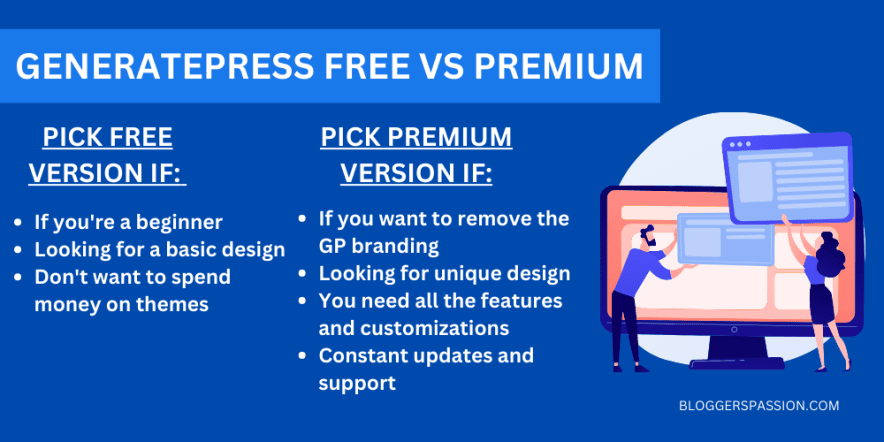
Use GeneratePress free theme
If you’re just getting started with blogging or building websites, the free version of GeneratePress is a great choice. It is lightweight, easy to use, and lets you create a clean, fast-loading website without spending money.
The free GeneratePress version is also ideal when you prefer a simple design and don’t need advanced customization features or premium templates right away.
My Experience Using GeneratePress Premium
I switched to GeneratePress Premium after testing several popular themes including Astra, OceanWP, and Kadence.
What impressed me most was the performance and clean code structure.
On a fresh installation, GeneratePress loaded in under one second and produced excellent Core Web Vitals scores without requiring heavy optimization plugins.
The Elements module became one of my favorite features because it allowed me to create:
- custom author boxes
- dynamic affiliate CTAs
- category-specific banners
- WooCommerce integration
- display rules for different pages
without editing PHP files.
If you care about website speed, SEO performance, and flexibility, GP Premium is one of the safest long-term investments for WordPress users.
GeneratePress Free vs Premium: Support
GeneratePress free support
GeneratePress offers free support in the WordPress forum, where you can ask questions and get replies from the developers or other users.

The free support is quite good as most of my queries got answered quickly.
You can visit this WordPress forum page to get FREE support from GeneratePress.
GeneratePress premium support

If you’re a premium user, you get access to premium support, where you can log in to your GP account to post your queries. The premium support is offered on the GeneratePress website through a forum (rather than a WordPress forum).
You will get faster responses in the premium support forum. Visit this page to get PRIORITY support from GeneratePress.
Top 3 Reasons to Upgrade to GeneratePress Premium
1. Site Library
One of the biggest advantages of GeneratePress Premium is the Site Library. Instead of designing your website from scratch, you have to choose a template, import it, and replace the demo content with your own. That’s it!
Here are some of the FREE templates you can find in the Site Library on GP Premium.

With the Site Library, you can quickly create:
- Blog websites
- Affiliate sites
- Business websites
- Portfolio websites
- Agency sites
- WooCommerce stores
- Health & fitness websites
My Experience
When I first tested GeneratePress Premium, the Site Library helped me launch a fully designed niche website much faster compared to using the free version alone.
2. Theme Builder
The Premium gives you access to powerful customization features through the Theme Builder and Elements module.
It works especially well with the WordPress block editor and the GenerateBlocks plugin which allows you to design and customize your website without relying heavily on page builders.
What You Can Customize?
Using the Theme Builder and Elements module, you can create and customize:
- Website headers & footers
- Author boxes
- Hero sections
- Single blog post layouts
- Archive pages
- 404 pages
- Hooks and dynamic content
- Custom display rules for different pages
Quick note: The GenerateBlocks plugin has two versions: free and premium. However, GenerateBlocks Pro offers greater flexibility and additional features.
Have a look at some of the elements we’re currently using on our blog.

My Experience Using It
One thing I personally liked about GP Premium is the flexibility of the Elements module. I’ve used it to create:
- custom affiliate banners
- responsive author boxes
- dynamic blog post sections
- category-specific CTAs
- without editing theme files or touching complex code.

Beginner-Friendly Advantage
Even if you’re not a developer, you can still create professional-looking layouts using the block editor along with GenerateBlocks.
This makes GeneratePress Premium a great option for users who want more design flexibility without using heavy page builders.
3. WooCommerce
If you run an online store, the GeneratePress Pro version gives you much better WooCommerce customization options. It will also help you achieve better Core Web Vitals scores, improved user experience, and higher conversion rates.
WooCommerce Features Include
- Product page customization
- Typography controls
- Layout settings
- Color customization
- Cart & checkout styling
- eCommerce starter templates
You can use these eCommerce templates from the site library!

My Experience
Compared to many multipurpose themes I tested, GeneratePress felt noticeably cleaner and faster, especially on mobile devices.
GeneratePress Performance Test (Why Bloggers Love It)?
One of the biggest reasons people switch to GeneratePress is performance. It is widely known as one of the fastest WordPress themes because of its:
- lightweight code structure
- minimal CSS and JavaScript
- schema-friendly framework
- clean Gutenberg integration
In my testing, a fresh GeneratePress installation loaded significantly faster than many multipurpose themes.
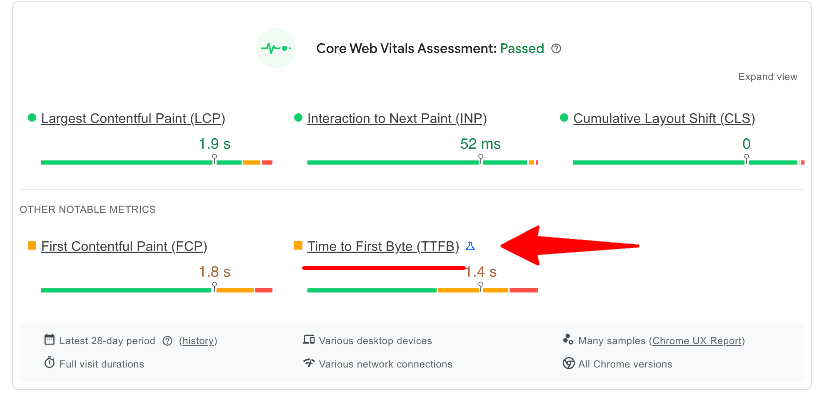
GeneratePress Free Theme Speed Score (TTFB – 1.4 s)
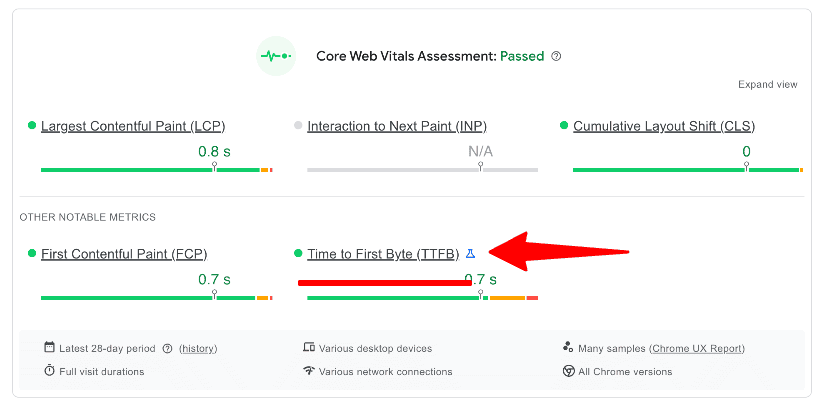
GeneratePress Pro Version Speed Score (TTFB – 0.7 s)
GeneratePress Free vs Premium: Pros & Cons
GeneratePress Free Pros
- Completely free to use on unlimited websites
- Lightweight and optimized for fast loading speeds
- SEO-friendly and responsive design
- Beginner-friendly and easy to set up
- Works well with Gutenberg and page builders
- Clean code structure helps improve website performance
- Compatible with most WordPress plugins
- Ideal for blogs, niche sites, and simple business websites
- Regular updates from the GeneratePress team
- Great option for users who want a minimal and distraction-free design
GeneratePress Free Cons
- Limited customization options compared to the Premium version
- Limited typography, spacing, and color controls
- No advanced WooCommerce customization features
- Cannot remove the GeneratePress footer copyright credit
GeneratePress Premium Pros
- Lightweight and extremely fast-loading WordPress theme
- Excellent for SEO and Core Web Vitals optimization
- Access to professionally designed Site Library templates
- Powerful Elements module for advanced customization
- Beginner-friendly and easy to customize without coding
- WooCommerce integration with additional design controls
- Can be used on up to 500 websites
- Compatible with all major page builders and plugins
- Premium support and detailed documentation
- Regular updates and active development
GeneratePress Premium Cons
- Some advanced features may take time to learn initially
- No live chat or phone support
- GenerateBlocks Pro requires a separate purchase unless you choose the “One” plan
- Design options can feel minimal compared to heavy multipurpose themes like Divi
- Lifetime pricing plans are no longer available
GeneratePress Pricing: How Much Does GeneratePress Premium Cost?
GeneratePress offers three annual subscription plans:
- GeneratePress Premium: Includes the theme only for $59/year.
- GeneratePress One: Provides access to all GP products for $149/year.
- GenerateBlocks Pro: Offers the GenerateBlocks plugin only for $99/year.
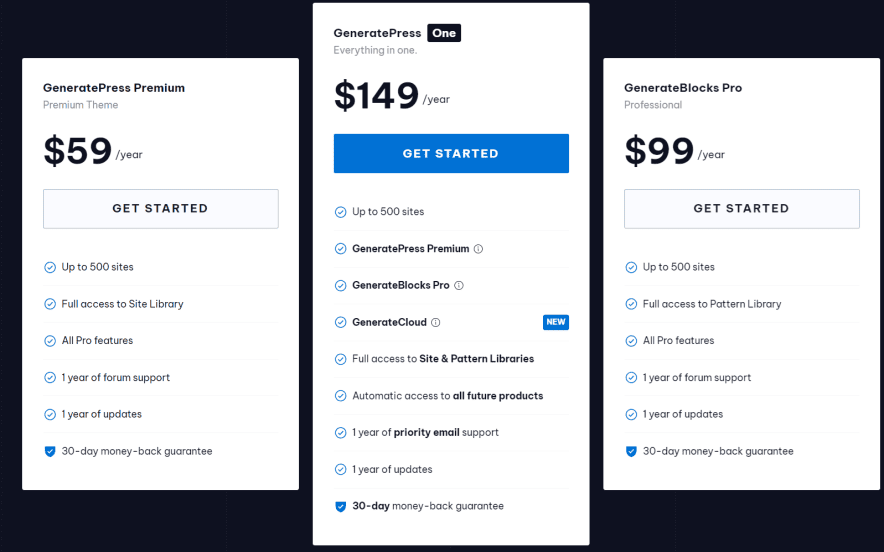
All premium plans allow you to use the theme on up to 500 websites and include access to the Site Library, premium support, one year of updates, and a 30-day money-back guarantee.
If you only want the GeneratePress theme with its premium customization features, the GP Premium plan is a great choice.
But if you also want access to GenerateBlocks Pro for more advanced block-based website design, the GeneratePress One plan gives you better value because it includes everything in one package. Buying GenerateBlocks Pro separately usually ends up costing more.
One thing I really like about GeneratePress pricing is that your website won’t stop working if you cancel your subscription. You can still continue using the theme, but you won’t receive future updates or premium support.
How to Quickly Install the GeneratePress Theme?
The best part about using GP is that it’s extremely easy to install on WordPress.
Here’s a quick tutorial on installing GeneratePress on your WordPress sites.
Once you’re logged in to your WordPress dashboard, go to “Appearance > Themes” in the menu on the left.
Then, click on the “Add New” button which you can see on the top.
Now, search for the “GeneratePress” theme in the search box and you’ll instantly find the free version of the theme.

Click “Install” and then activate. That’s it, you’re done.
Who Should Use GeneratePress Free vs Premium?
Choose GeneratePress Free if:
- You’re starting your first blog
- You need a lightweight WordPress theme
- You want a simple website without advanced customization
- You’re testing niche ideas on a budget
- You mainly use the default WordPress editor
Choose GeneratePress Premium if:
- You build affiliate websites
- You run WooCommerce stores
- You want full design control
- You care about Core Web Vitals and SEO
- You use GenerateBlocks
- You build websites for clients
- You want access to premium templates and dynamic elements
Final Thoughts
After blogging and working with WordPress since 2010, I’ve used many popular themes and GeneratePress remains one of my top recommendations for speed, SEO, and flexibility.
If you’re just starting out, the free version of GeneratePress is a solid choice for creating a clean and fast-loading website.
But if you want more customization, premium templates, WooCommerce features, advanced design controls, and better flexibility without slowing down your site, GeneratePress Premium is definitely worth the upgrade.
Personally, I use GP Premium on several websites because it’s lightweight, reliable, and works exceptionally well for SEO-focused blogs and affiliate sites.
If you’re serious about building a faster and more professional WordPress website, I’d highly recommend giving GeneratePress Pro a try.
So what are your thoughts on GeneratePress FREE versus the Premium version? Are you ready to get the pro version? Do you have any questions?
FAQs About GeneratePress Premium vs Free
Here are some frequently asked questions about the GP free Vs premium theme version.
Is GeneratePress easy to use?
GeneratePress is extremely easy to use as it offers a wide range of pre-built templates and layouts.
How do I remove the GeneratePress copyright?
If you want to remove the GeneratePress copyright from your WordPress website, open up the Customizer and navigate to the “Footer” section. From there, you can change the footer credit to whatever you want or even disable it entirely.
Is there a GeneratePress Premium free download available?
No, it is a paid WordPress theme plugin. Many websites offering “GeneratePress Premium free download” or “GP Premium free download” provide nulled versions that may contain malware, pose security risks, and lack official updates. The safest option is to purchase it from the official website and get lifetime updates and support.
Which is best Astra or GeneratePress?
To be honest, both themes are great. But Astra and GeneratePress offer free and paid versions. Both themes are fast and responsive, and they offer a wide range of customization options. GeneratePress is easy to use whereas the Astra theme requires some customization tweaks to make your site look better.
Is GeneratePress compatible with page builders?
Yes, GeneratePress is compatible with ALL the popular page builders including Elementor, Beaver Builder, and more.
Is GeneratePress Premium worth it in 2026?
Yes. GeneratePress Pro is worth it if you want better customization, faster website performance, WooCommerce controls, and access to the Elements module and Site Library.
Does GeneratePress work with Gutenberg?
Yes, GeneratePress is fully optimized for the Gutenberg block editor and works exceptionally well with GenerateBlocks.


![GeneratePress Review 2026 [Pros, Cons, Theme Features, Pricing & Verdict] – Why I Use it For My Site Design](https://bloggerspassion.com/wp-content/uploads/2022/05/generatepress-review-2022-300x157.jpg)

![GeneratePress vs Astra [Why I Migrated to Astra From GeneratePress] – Honest Opinion (2026)](https://bloggerspassion.com/wp-content/uploads/2022/05/generatepress-vs-astra-300x157.jpg)


![Divi Discount Code Oct 2026 [72% OFF | Up to $751 Savings Today – All Users]](https://bloggerspassion.com/wp-content/uploads/2024/06/divi-discount-300x153.png)

Hello Anil Bro,
GeneratePress premium comes with more features and functionality. I am also using its premium version on some of my blogs and really like it. The pre-build site templates are a good feature to install a readymade template on your site. Thanks for writing this detailed comparison.
Regards,
Vishwajeet Kumar