


Looking for the difference between Yoast SEO Free and Yoast SEO Premium? Wondering whether the premium version is actually worth paying for in 2026? You’re in the right place.
Yoast SEO is one of the most popular WordPress SEO plugins, used by millions of websites to improve on-page SEO, create XML sitemaps, optimize meta tags, and manage technical SEO settings easily.
But while the free version offers enough features for most beginners, Yoast SEO Premium unlocks extra tools like internal linking suggestions, redirect management, multiple focus keywords, social previews, and more.
We used Yoast SEO Premium for years before switching to Rank Math Pro, so in this guide, we’ll share an honest comparison of Yoast SEO Premium vs Free, including features, pros, cons, pricing, and whether upgrading is really worth the money.
Let’s get started.
Yoast SEO Premium vs Free plugin review (2026 Edition)
| Feature | Yoast SEO Free | Yoast SEO Premium |
|---|---|---|
| Price | Free | $118.80/year ($9.90/month billed annually) |
| Focus Keywords | 1 keyword | Multiple keywords & synonyms |
| Internal Linking Suggestions | ❌ | ✅ |
| Redirect Manager | ❌ | ✅ |
| Social Media Preview | Basic | Advanced preview |
| Orphaned Content Filter | ❌ | ✅ |
| Content Insights | ❌ | ✅ |
| Support | Community support | 24/7 premium support |
| XML Sitemaps | ✅ | ✅ |
| Readability Analysis | ✅ | ✅ |
| Schema Markup | Basic | Advanced |
| Best For | Beginners & small blogs | Growing sites & advanced users |
If you’re a beginner or run a small blog, Yoast SEO Free provides everything you need for basic SEO. However, if you regularly publish content and need features like internal linking suggestions, redirect management, and multiple focus keywords, Yoast SEO Premium is worth considering.
Yoast SEO Premium: Is IT Worth the Money?
Let’s first start with the Yoast SEO premium version so you will know whether it is worth paying for it or not. Later, we will also talk about the free Yoast SEO plugin in this Yoast SEO free vs premium plugin review. Let’s get started.
Here are some of the main benefits of using the Yoast SEO Premium plugin to improve your SEO.

1. You can use multiple focus keywords
With Yoast SEO Premium, you can set up to 5 focus keywords. Just have a look at the following image to understand this feature better.
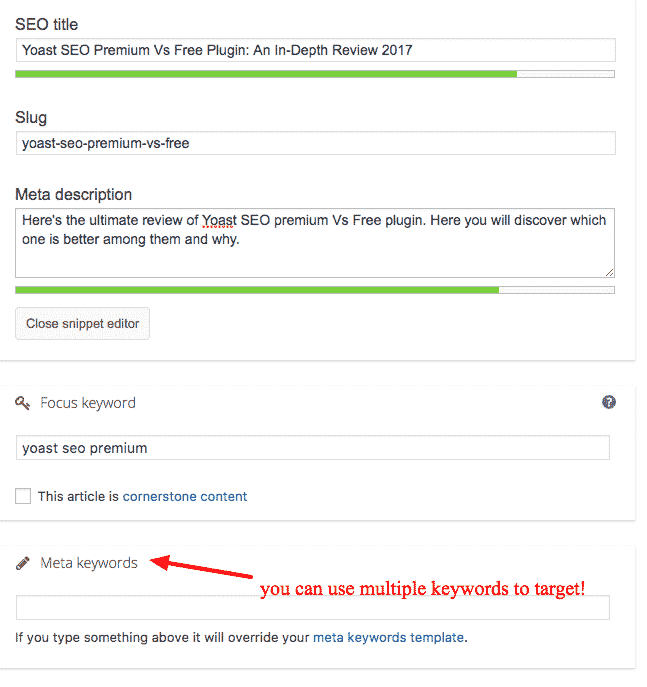
Focusing multiple keywords can help you a lot in bringing more search traffic from various keywords. But be careful when you’re using multiple keywords; otherwise, your overall content may look completely search-optimized and not so useful for your audience to consume your stuff.
Usually, you should expect to find the same information, which is called search intent, when you Google both keywords. So, while writing your article headline, include your primary keyword as an exact match while your secondary keyword as a partial match.
The trick is to sprinkle individual words from your secondary phrase throughout the content and snippet.
As you will only be using partial matches for your secondary keyword, and Yoast only detects exact keyword matches, many bullets will not be green in that content analysis tab.
So, the multiple focus keywords option in Yoast SEO Premium is only helpful for tracking secondary keywords, not for actually optimizing content.
Using Google Autocomplete, research both your primary and secondary keywords to confirm they are being searched, and using Mozbar, make sure they are not too competitive.
Here are some of the tips that will help you to target multiple focus keywords:
- Just like your primary, research secondary keywords too.
- Secondary keywords should have the same search intent as the primary keyword.
- Craft your headline, SEO title, and meta description to read well and include keywords.
- Partial matches for secondary keywords prevent keyword stuffing in the title.
- Since partial matches are used, ignore the content analysis for secondary keywords.
2. Orphaned content
Orphaned content, as the name says, is the content that is not linked from anywhere on your website and is not easily accessible to search engines and your website visitors since you’re not using any internal links (No links from actual content in this case).
To put it simply, if any of your blog posts don’t have any internal links included, it can be called orphaned content since the content is alone, i.e., an orphan without any internal links to your own site.
So “orphaned content” ultimately refers to blog posts that don’t get any links from other blog posts.
The #1 reason to use the Yoast Premium version is that it tells you which of your blog posts belong to “orphaned content” so you can immediately fix those issues in order to rank well in search engines.
3. Redirecting the old URLs to new ones
At some point, whether you are cleaning up pages on your site or moving pages or changing your site structure, you need to delete posts or pages. And it is very risky because when the old URL gets visitors, they will be served a 404 Not Found error.
So, especially for a frequently visited page, you need to redirect the old URL to a new one with the information you think that is most relevant to these visitors. Or else, you can tell your visitors that the content has been deleted or temporarily show another page. With the Yoast SEO Premium plugin, you can do all this directly from within your WordPress dashboard.
Their redirects module can help you fix those. Here are the Redirect types available in the redirects module in Yoast SEO Premium.
- 301 – Moved permanently
- 302 – Found
- 307 – Temporary redirect
- 410 – Content deleted
- 451 – Content unavailable for legal reasons
Yoast SEO Premium also enables you to create REGEX (Regular Expressions) redirects where you can redirect a group of URLs that contain a certain word or expression with one redirect.
4. Incredible internal linking
Did you know that the Yoast SEO Premium plugin offers incredible internal linking suggestions? Just have a look at the following screenshot, and you’ll understand what I’m talking about.

If you observe the above screenshot, you will notice that the Yoast SEO Premium plugin offers various link suggestions for the content you’re writing as internal link suggestions. This feature is so helpful because relevant internal linking boosts your SEO. This feature is not available in the free Yoast plugin.
Keeping internal links to related posts is not as easy as it seems. It is an important SEO strategy. If you want to get ranked, you have to create high-quality, relevant, and informative content for the keywords you want to be found for.
5. Social preview to boost your social media activity
When a post contains lots of images, you may end up picking the wrong image. If you want to gain the reader’s attention for your blog, then your post share should really look good.
With Yoast SEO Premium, you can check what your post will look like on Facebook or Twitter without even going to these channels. Just go to the Yoast SEO meta box, upload the image you would like to show, and make sure it will look fine.
Premium Yoast SEO plugin features
- You can change a post’s SEO title and meta description for category, tag, and author archive pages on a per-post basis.
- You can manage your permalink settings and edit some parameters like removing stop words from slugs, manage some redirects and canonical settings.
- You can have Google search result snippet previews.
- It has the ability to verify Google Webmaster Tools, and Bing Webmaster Tools.
- Yoast SEO Premium adds a powerful redirect manager that lets you quickly fix 404 errors in Google Search Console by setting up redirects and marking them as fixed.
- Sitemaps are the quickest and easiest way to get indexed and notify search engines about your content. WordPress SEO by Yoast makes it super easy to add XML sitemaps in WordPress.
- One of the greatest features of the plugin is that it integrates your site with Facebook, Twitter, and Google+ social platforms.
- With the feature of multiple focus keywords, you can optimize a post for more than one focus keyword.
Yoast SEO Free Plugin Review

1. Best for optimizing search-friendly content
Yoast SEO is one of the best of its kind when it comes to content analysis tools. You can find Yoast’s content analyzer in a meta box directly below the WordPress text editor. Make sure that it is enabled.
The Snippet Editor allows you to edit and preview how your content appears in the SERPs. It gives you the opportunity to customize your SEO title and rewrite your meta description, which plays a significant role in boosting CTR.
To use the Content Analysis tool, just input your focus keyword. In the free version of the plugin, you can only input one keyword.
Once you specify your keyword, Yoast SEO will analyze your content against 12 SEO ‘best practices’. For example, keyword density, readability, and number of outbound links. It also looks at whether your keyword is used in the SEO title, meta description, and first paragraph of your content.
Using a helpful ‘traffic light’ scoring system, it analyses everything to help you easily identify the areas you can improve. Yoast SEO also displays an overall content score using the same traffic light system, where obviously, the aim is green. This functionality guarantees your content won’t sink in the SERPs.
Read: Wondering how SEO tools compare across different platforms? See how Blogger and WordPress stack up in our comparison guide.
2. The ability to use XML Sitemaps
An XML sitemap makes it easier for Google to discover the pages on your site. If your content is not indexed by search engines, then whatever SEO strategies you use, it won’t help you.
Yoast SEO offers built-in XML Sitemap functionality. It enables users to generate a sitemap which is automatically updated any time a new post or page is published. You can enable XML Sitemaps by navigating to SEO and then clicking on “XML Sitemap”. Just tick the checkbox here.
Once the Sitemap functionality is activated, Yoast SEO notifies the search engines every time you publish new content. So that your content and your images also get indexed, which means you can show up in Google Image searches.
3. Yoast is built-in with social media
With Yoast SEO, you can tell Google the URLs of eight popular social networks by navigating to SEO and then click on “Social”.
You can find social media features in the content analysis meta box also. Under the “Social” tab, you can tailor the way your content appears on the social channels. You can edit the title, write a meta description, and also upload a custom image.
Yoast SEO Premium: Is Yoast Premium Worth It?
So is Yoast Premium worth it? Yes, Yoast SEO Premium for costs just $118.80 for 1 year, and you’ll get regular updates. That said, here are a few more ultimate features that make Yoast SEO Premium worth the price.
Yoast SEO vs All in One SEO Pack: Which Is Best for WordPress SEO
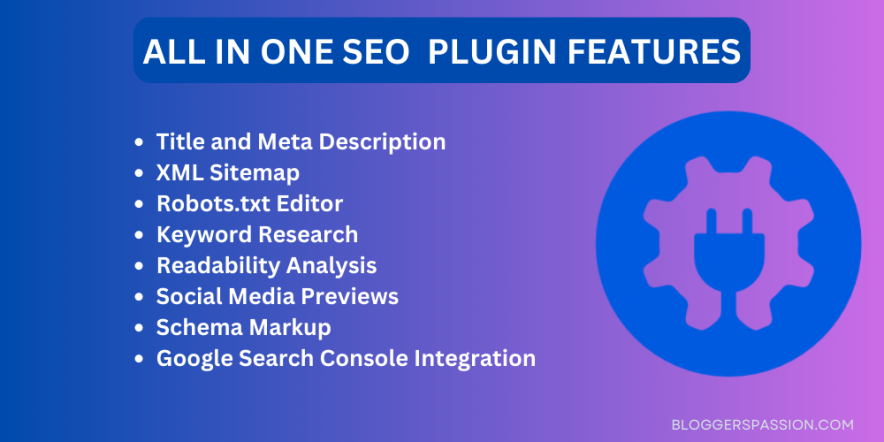
Yoast SEO is great for optimizing your blog posts and also helps you with technical customizations such as sitemaps, breadcrumbs, and so on, whereas All in One SEO Pack helps you with easy optimization of your content.
So far we’ve discussed Yoast SEO premium vs free, so let’s now talk about All in One SEO Pack features, pros and cons along with the pricing so you’ll know which is better among Yoast SEO vs All in One SEO Pack.
All in one SEO features
Let’s quickly have a look at all the All in one SEO features so you will know what you can get out of it.
- You can easily submit your sitemap to Google and Bing and improve your SEO
- Image XML Sitemap submitted to Google and Bing to improve your Image SEO
- Google AMP support (Accelerated Mobile Pages)
- Google Analytics support
- Advanced Canonical URLs
- Redirect attachment pages to parent post easily
Main differences between All in one SEO Vs Yoast SEO
Here are few major differences you can find with All in one SEO Vs Yoast SEO;
- All in One SEO Pack, has all the settings on a single page, so especially for beginners, you will find it easier and faster than the multi-page settings of the Yoast SEO plugin
- Yoast SEO comes with a powerful content analysis tool that helps you optimize every single post or page on your website, whereas All in One SEO comes with a similar kind of metabox that you find in Yoast SEO to edit SEO settings on a post-by-post basis.
- Yoast SEO provides you with content analysis and SEO scoring of your content, whereas the All in One SEO Pack meta box is very simple, where you can edit the title and description, but there is no content analysis or SEO scoring.
Here’s how the metabox looks like in All in one SEO pack;

As you can see from the above image, metabox of All in one SEO pack is so simple and sleek where you’ll only find title and description, so really helpful for beginners who are new to optimizing their blog posts.
All in one SEO Pricing
All in one SEO has two options just like Yoast SEO which comes in both free and premium versions. If you’re interested in its premium plans, here’s the All in one SEO pricing;
It comes in 3 pricing plans;
- Individual (costs you $68 which you can use for 1 site)
- Business (costs you $118 which you can use for up to 10 sites)
- Agency (costs you $559 which you can use for unlimited sites)
Here are the main features that you get with All in one SEO pack PRO version;
- Advanced support for WooCommerce
- SEO for categories, tags and custom taxonomies
- Video SEO module
- Access to video screencasts
- Access to premium support forums
- Access to the knowledge centre
To put it simply, the All in one SEO Pro version includes various other functionality and modules such as advanced WooCommerce support, a Video SEO module including Video XML sitemaps, SEO for categories, tags, and custom taxonomies etc.
Final thoughts
The Yoast SEO plugin is by far the most complete SEO solution available for WordPress. You will find a wide number of features that help you improve your site’s SEO in a single plugin.
If you’re just a beginner to SEO and looking for a free SEO tool, the free SEO version of Yoast is enough for you.
For most beginners, the free version is enough. Premium becomes valuable when managing larger websites, fixing redirects regularly, or improving internal linking. If you’re comparing value for money, it’s also worth exploring Rank Math and SEOPress before making a decision.
So what are your thoughts about Yoast SEO Premium vs. the free plugin? Did you like this review? Which is your favorite SEO plugin? Share your views in the comments below.
FAQs
Here’s a list of some of the important questions Yoast SEO Premium Vs Free you must know about to get a better idea.
Yoast SEO is one of the most popular SEO plugins for WordPress, but alternatives like Rank Math, SEOPress, and All in One SEO also offer excellent features depending on your needs.
Yoast SEO premium costs you only $118.80 for 1 site including 1 year free updates and support.
There are a ton of ways to optimize your WordPress site but if you’re a beginner, we highly recommend you to install any optimization plugin such as Yoast SEO to be able to easily optimize your blog posts for certain keywords.
oast SEO is a WordPress optimization plugin. Yoast SEO can be considered as the all in one optimization solution for your WordPress site as it handles all the technical optimization aspects of your site and helps with optimizing your content for search engines.
There’s no specific answer for how long does it take for Yoast SEO to work. It usually depends on the kind of keywords you target (along with their search volume, keyword difficulty, competition for the keyword and so on). That being said, it might take around 2 to 3 months to start seeing organic results and search traffic to your sites.
We’ve tried both Yoast SEO and All in One SEO pack, both are amazing optimization plugins for WordPress users.
Here are some of the benefits of using the Yoast SEO plugin for WordPress sites.
→ Create better content
→ Page Analysis
→ XML Sitemaps
→ Powerful in-built features
Surfer SEO, Answer the Public, PageSpeed Insights, Screaming Frog and Semrush are the best tools for beginners.





Yup, I am using the premium Yoast plugins from last few days, Overall good features like you can add more keywords and the best part is auto-suggestion of your post for the internal link.
But one thing I want to know does premium Yoast plugin also help me to get more traffic comparing to free version of Yoast?