


With over 10 years of hosting and blogging experience, I, Anil Agarwal, have tested numerous hosting servers specifically for their Indian data center performance.
In fact, I currently run my own WordPress sites: BloggersPassion, Truvora.ai, and WPCoupons on Indian data centers. Most of my traffic comes from India.
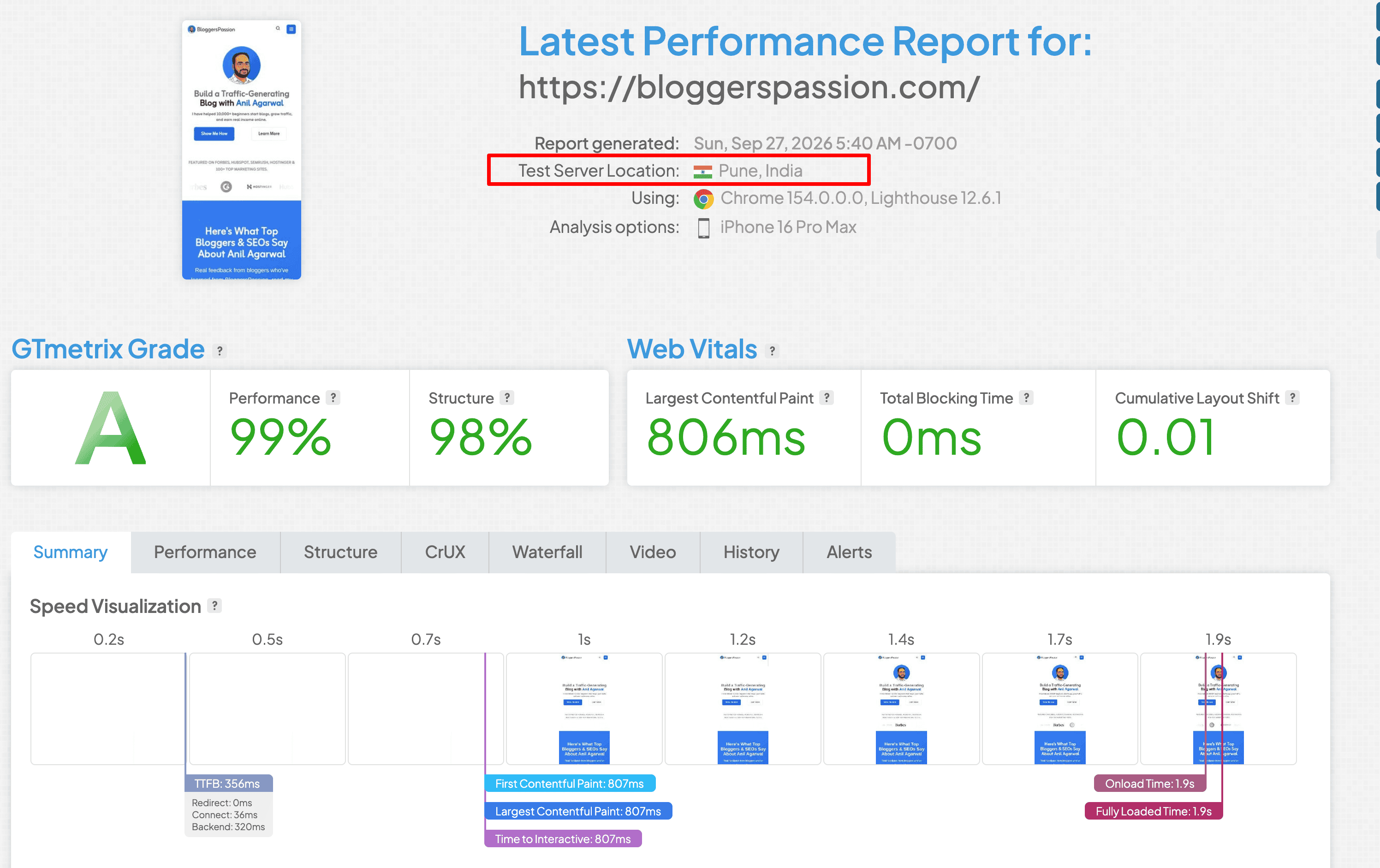
To meet the demands of my Indian readers, today I am covering the WordPress web hosts whose performance I have been actively monitoring for the past few years. Specifically, I am talking about uptime and other essential performance metrics.
My primary criteria for selecting these hosts match what most Indian users want: good performance on a minimum budget.
So, without further delay, let’s dive straight into the top providers.
I will share my detailed hands-on experience with each host and ultimately give my final verdict on which WordPress hosting is the right choice for India.
If you are short on time, you can skip straight to the conclusion to make your final decision.

List of WordPress Hosting in India
| WordPress Hosting for Indian Users | Best For | Pricing Starts At | Renewal | Data Center (CDN) | Uptime Guarantee |
|---|---|---|---|---|---|
| Hostinger | Money Value | ₹69/month | ₹289/month | Mumbai | 99.9% |
| WordPress.com | Sudden traffic load situations | ₹112/month | ₹420/month | USA, UK, Edge CDN | 99.999% |
| ChemiCloud | 99.99% uptime guarantee | $1.95/month | $11.95/month | Mumbai | 99.99% |
| Cloudways | Highly secured fully managed WordPress hosting | $11/month | $11/month | Bangalore, Chennai, Delhi, Hyderabad, Mumbai | 99.99% |
| WPX | Performance & Big WordPress Sites | $6.30/month | $17.99/month | USA, UK, AU, Inbuilt CDN | 99.95% |
| Bluehost India | Phone Support | ₹199/month | ₹349/month | Mumbai | 99.99% |
1. Hostinger India: Affordable & Value for Money
| Local India Servers | Mumbai |
| Local Indian Language Support | X |
| Offers a Free Domain | ✓ |
| Automatic WordPress Installation | ✓ |
| Uptime | 99.965% |
| Average Speed | 3.01 Seconds |
| Money Back Guarantee | 30 Days |
If you’re searching for the cheapest WordPress hosting provider in India, Hostinger is for you.
They offer data centers in Mumbai and many other locations worldwide.
We have been monitoring Hostinger India since 2021, and over the past 5 years, the average uptime comes out to 99.962%, which is decent at this price point.
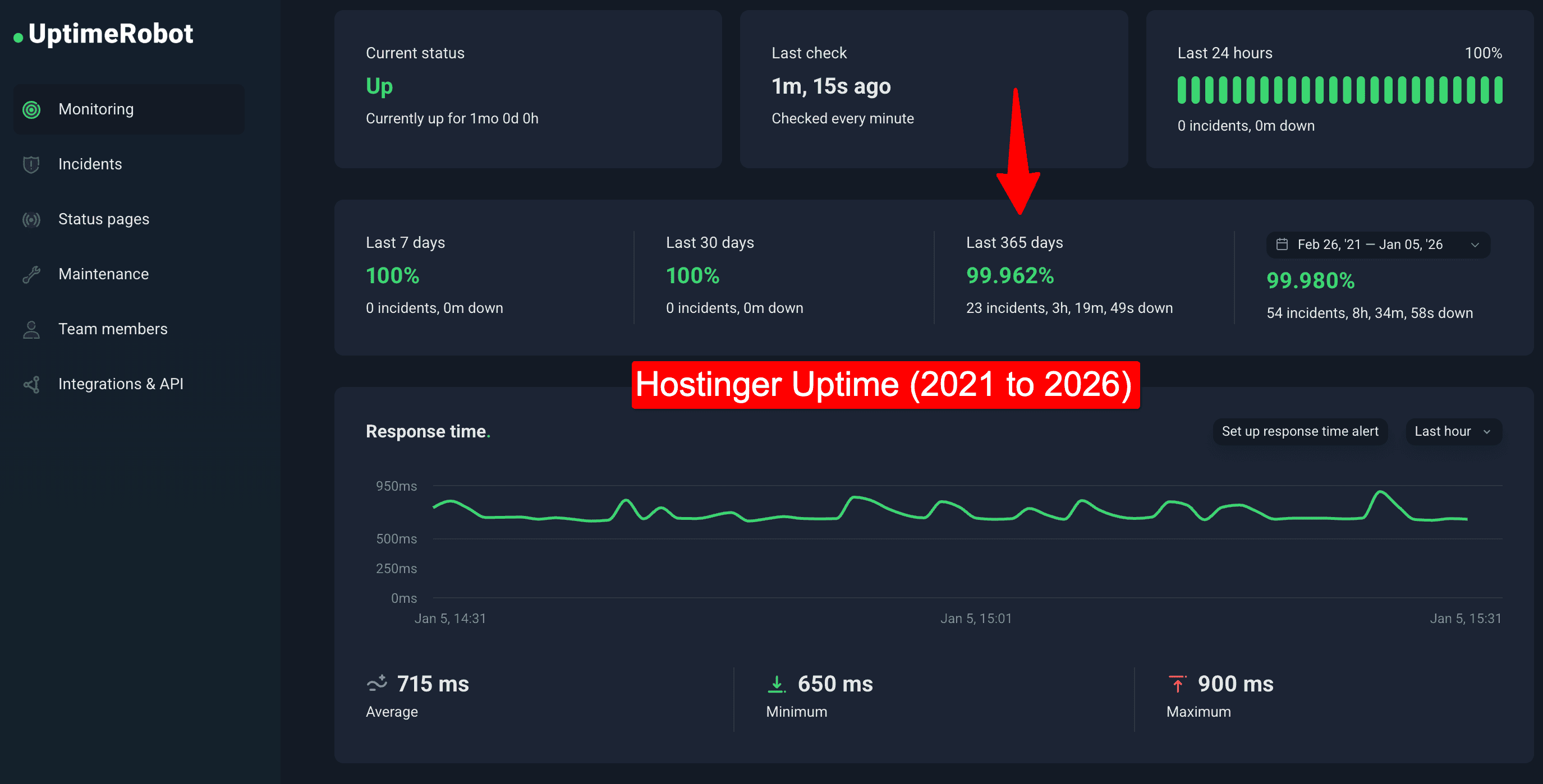
However, rather than looking at a 5-year span, we should rely more on the latest uptime data. Over the last year, the average uptime has been 99.965%.
| Month | Hostinger Uptime |
| Aug 2026 | 100% |
| July 2026 | 100% |
| June 2026 | 99.997% |
| May 2026 | 100% |
| April 2026 | 99.936% |
| March 2026 | 99.921% |
| Feb 2026 | 99.943% |
| Jan 2026 | 99.985% |
| Dec 2025 | 99.994% |
| Nov 2025 | 99.934% |
| Oct 2025 | 100% |
| Sept 2025 | 99.911% |
| Aug 2025 | 99.931% |
When it comes to loading speed, Hostinger India gave me an average of 3.1 seconds, which was made possible by enabling LiteSpeed. It is worth noting that after selecting the India data center, we saw good scores in nearby Asian locations like Mumbai and Hong Kong (1.8s).
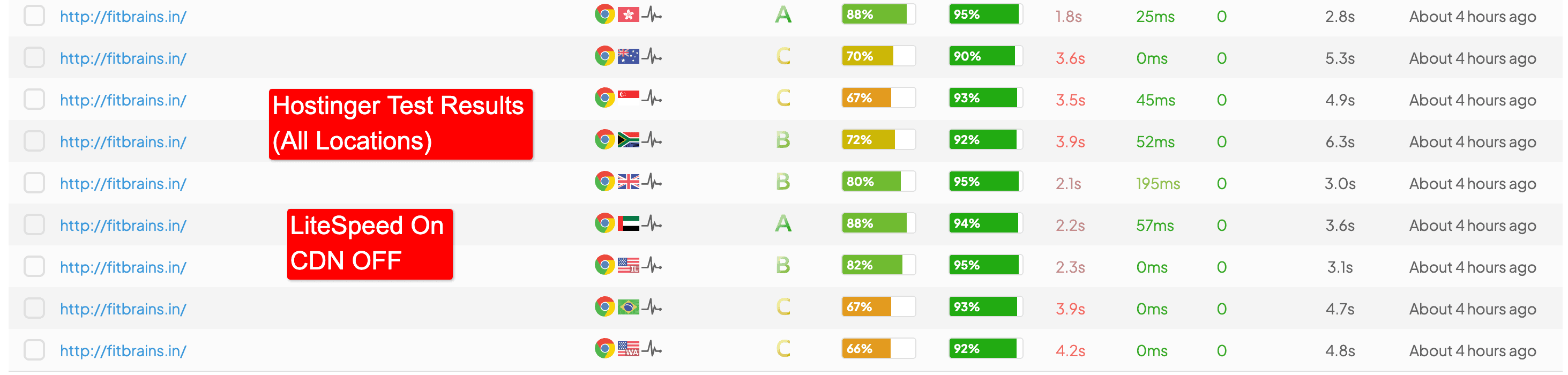
The same applies to TTFB; we saw good performance in Asian countries closer to India, such as Singapore (0.443s) and Japan (0.560s).
| Location | Hostinger TTFB |
| USA, New York | 0.831s |
| Canada | 1.454s |
| UK, London | 0.517s |
| France, Paris | 0.680s |
| Japan, Tokyo | 0.560s |
| NL, Amsterdam | 0.529s |
| Australia, Sydney | 0.757s |
| Brazil | 1.92s |
| Singapore | 0.443s |
| Average | 0.865s |
If you consider Hostinger, you must enable the LiteSpeed plugin, which is a simple one-click process through their hPanel user interface.
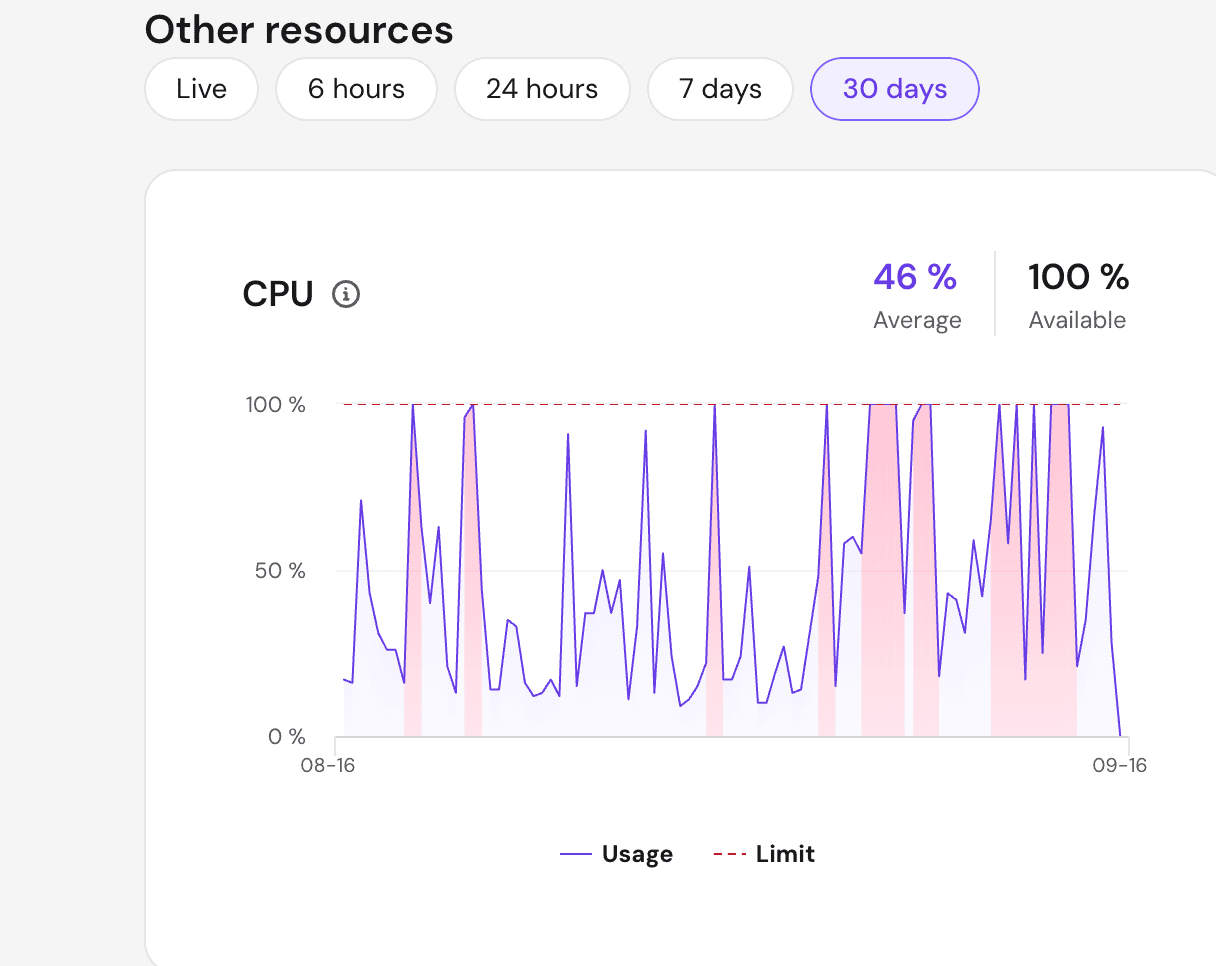
Apart from that, Hostinger is great for new sites, but if your traffic exceeds 5k–6k visitors, you might face issues because Hostinger’s CPU limits are consumed very quickly.
Here is proof from my live site. It gets around 5k monthly traffic from India, but the CPU usage hits its limit fast, which sometimes causes a noticeable lag when using the WordPress backend.
In terms of customer support, Hostinger is responsive on their 24/7 live chat, but keep in mind that you will have to implement most of the troubleshooting and technical fixes yourself.
A 4-year Hostinger plan looks cheap for Indian users, but you shouldn’t ignore the renewal costs. For example, if you consider Hostinger’s Premium plan, it will cost you ₹149 initially, but at the time of renewal, it jumps to ₹499.
Overall, Hostinger is a good starting point for new sites because you get the advantage of Indian data centers combined with affordability compared to other entry-level hosts.
Just remember that you will eventually need to upgrade from this host once your traffic grows.
Key Features:
- 99.9% uptime guarantee
- AI website builder for instant website setup
- Daily & on-demand backups
- Auto WordPress plugin updates
- Free CDN
- WordPress Staging Tool
- Dedicated IP
- Unlimited Bandwidth
- Security Features: Unlimited SSL, IP Blocking, Malware Scanner, Domain Privacy, WAF, DDoS protection, etc.
Pros & Cons:
| Pros | Cons |
| Offers an Indian-based data center | Phone storage is absent |
| Provides you with 24/7/365 customer support | |
| A 30-day money-back guarantee is provided with all plans | |
| A simplified version of cPanel called hPanel is available as a UI | |
| Free SSL certificates are included | |
| Cloudflare Protected Nameservers | |
| Free website backups with all plans | |
| Free domain registration | |
| Offers 99.09% Uptime Guarantee | |
| Offers managed WordPress which includes automatic updates | |
| Free website migration is offered |
You can also read our comprehensive Hostinger review for 2026 to learn more.
2. WordPress.com: Cheapest Renewals
| Local India Servers | X |
| Local Indian Language Support | X |
| Offers a Free Domain | ✓ |
| Automatic WordPress Installation | ✓ |
| Uptime | 100% |
| Average Speed | 3.6 Seconds |
| Money Back Guarantee | 7-14 Days |
WordPress.com hosting stands out for its seamless integration with WordPress themes and plugins, ensuring high compatibility and hassle-free customization.
Backed by Automattic, the company behind WordPress.org CMS, it offers a reliable hosting environment that prioritizes security and user experience.
The platform’s unique selling point lies in its real-time automated backups, excellent load-handling capacity, and built-in CDN that enhances site speed and performance.
As an Indian website owner, I’ve found the platform well-suited for audiences closer to the USA, where its data centers ensure faster loading speeds.
However, in Asian regions, including India, the performance may require additional optimization, such as activating Cloudflare’s enterprise CDN for better speed. Even so, WordPress.com consistently outperforms competitors like Hostinger and Bluehost in handling sudden traffic surges, making it an excellent choice for high-traffic websites.
That said, there are limitations to consider, particularly for Indian users.
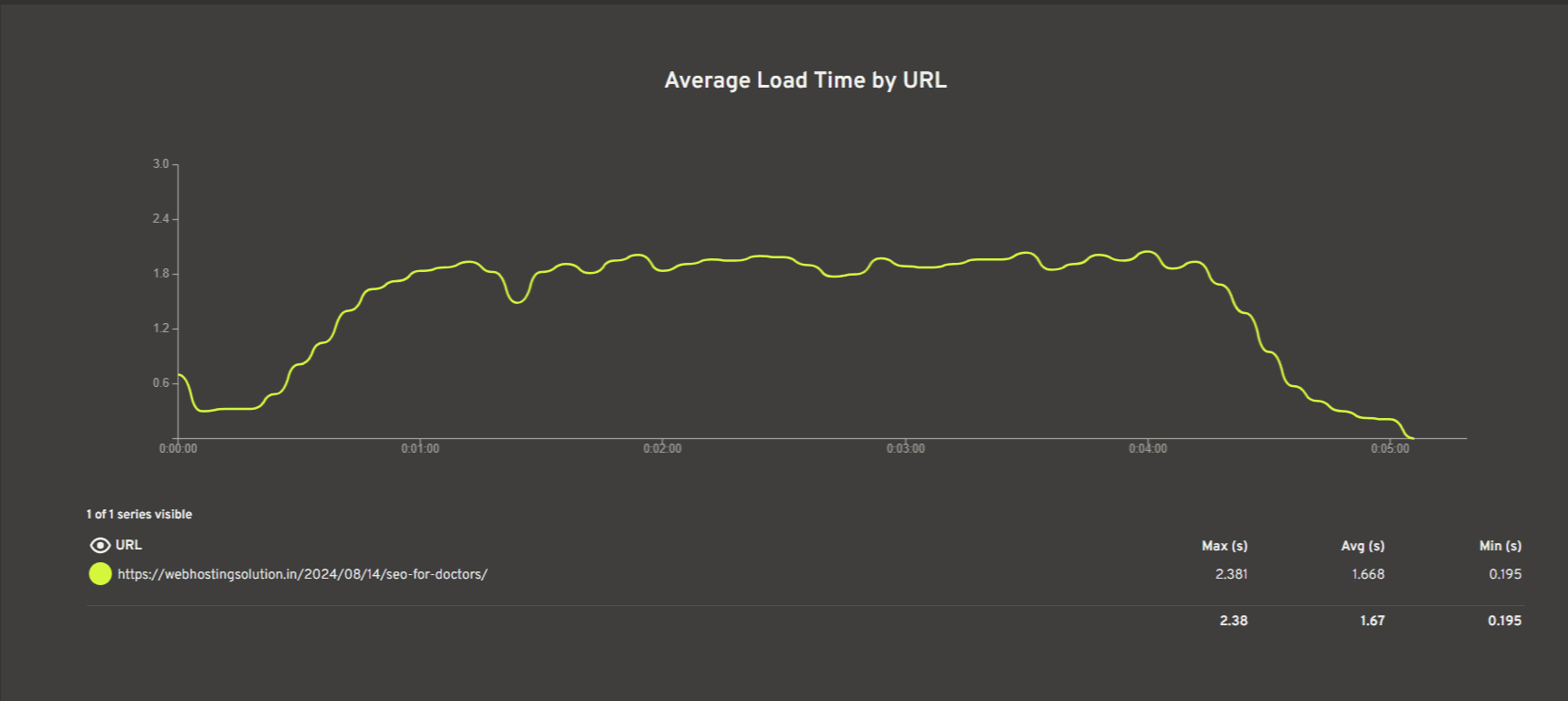
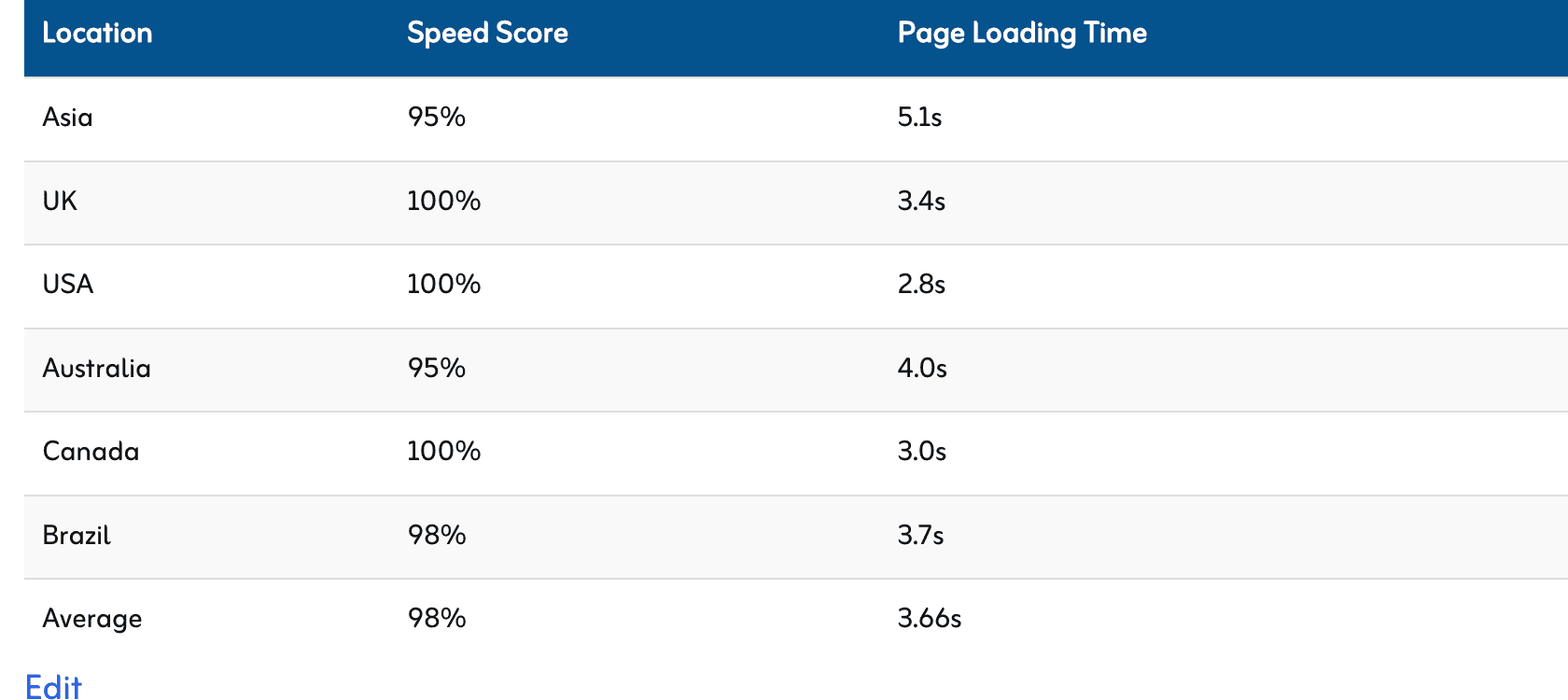
When it comes to traffic from Asian countries, WordPress.com’s page loading time is 5.1 seconds, which is not good at all.
However, if you are based in India and running a WordPress site where the traffic comes from the USA or UK, you can expect good performance. We have recorded 2.8s from the USA and 3.4s from the UK.
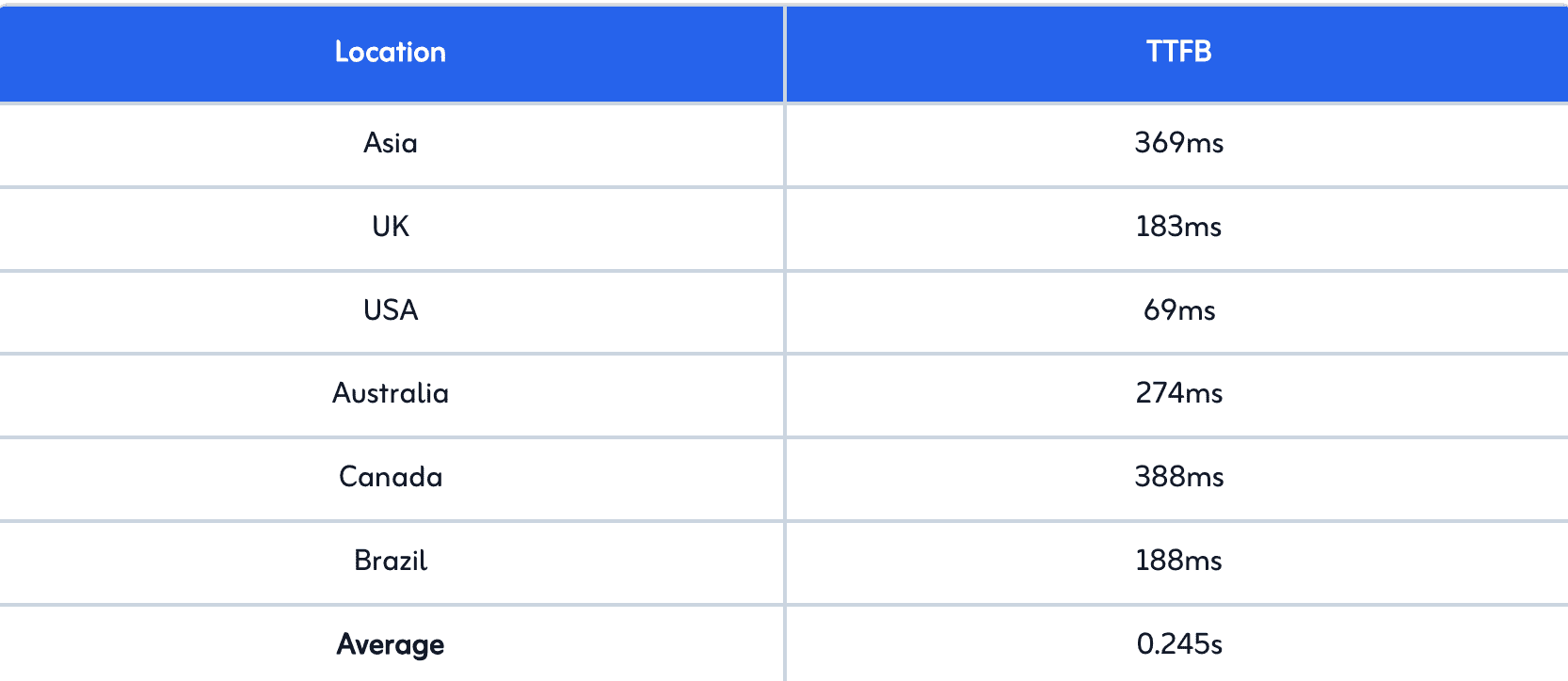
The TTFB results show a similar trend: slow in Asia and fast in the US and UK. You can see the results below.
You can see the results below.
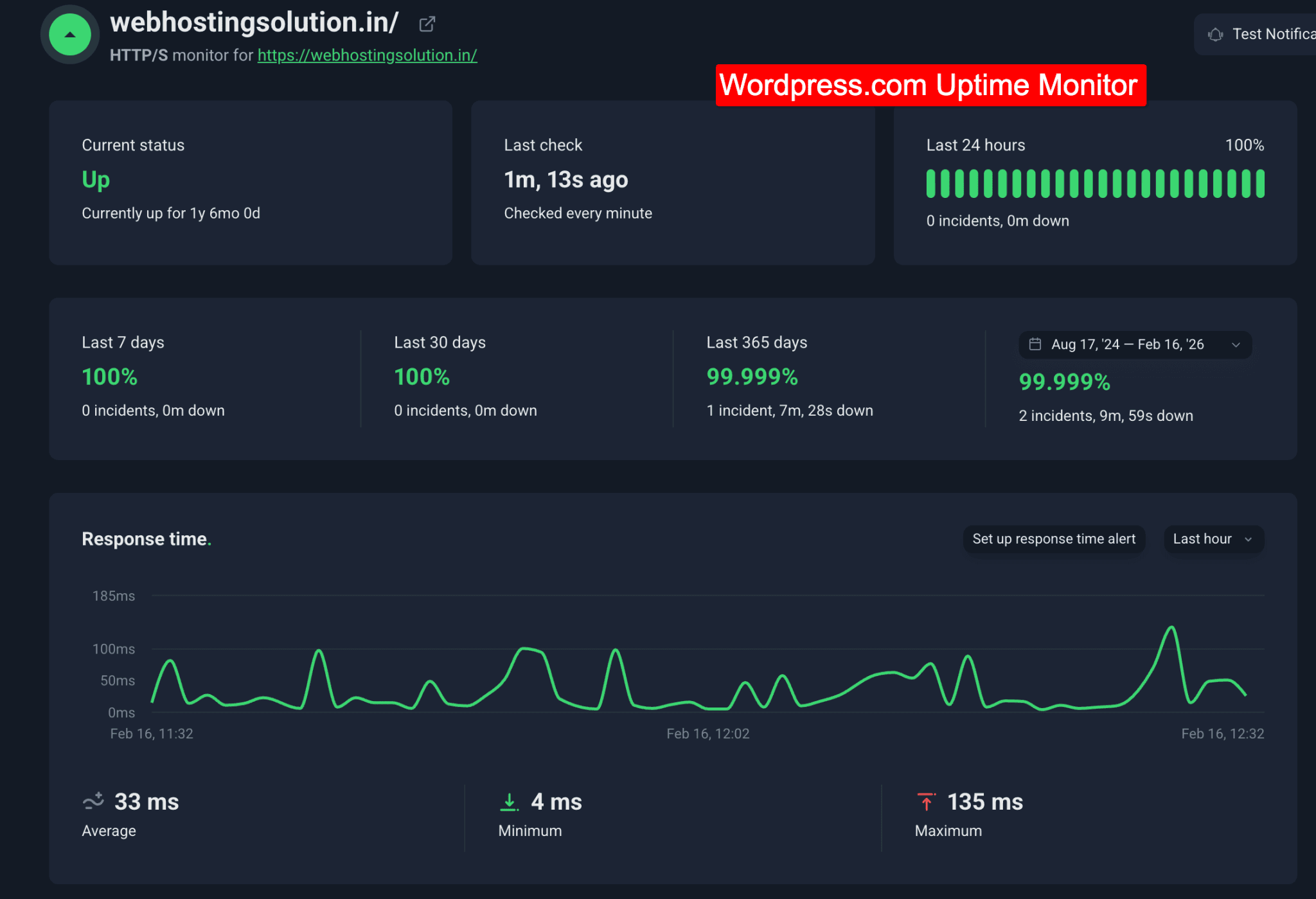
We have also monitored our WordPress.com hosted site for over 2 years, and the 2-year uptime came out to be 99.999%, which is a major plus point compared to other Indian WordPress hosting services.
The lack of data centers in India can affect performance, and plans like Personal and Premium restrict the amount of storage space.
Additionally, each paid plan allows hosting only one website, which might be restrictive for those managing multiple sites.
In a nutshell, you should opt for WordPress.com hosting if you want to avoid the hassle of technical maintenance and prefer hosting your site with WordPress’s own reliable service instead of relying on any less dependable third-party hosting providers.
Key Features:
- Free Built-in CDN
- Free domain is available
- Supported all WordPress premium themes & plugins
- DDoS Protection
- Malware Scanning and Removal
- Real time automated backups
- Plugin Maintenance
- Staging site
- Support automated burst scaling
WordPress.com Pricing:
WordPress.com offers four managed plans, starting from just ₹112/month. The lowest price applies only with a 3-year subscription; otherwise, annual plans start at ₹160/month.
All plans come with a free domain for a year and built-in CDN, making them a solid choice depending on your Indian site’s needs.
Pros & Cons:
| Pros | Cons |
| Zero restriction on bandwidth & traffic usage for WordPress sites | There is no dedicated data center available in India |
| Auto-optimize data centers | |
| Enabled CDN & Global edge caching by default | |
| Accepts local payments |
3. ChemiCloud: 45 Days Risk Free
| Local India Servers | Mumbai |
| Local Indian Language Support | X |
| Offers a Free Domain | X |
| Automatic WordPress Installation | ✓ |
| Uptime | 100% (Last 30 Days) |
| Average Speed | 2.5 Seconds |
| Money Back Guarantee | 45 Days |
ChemiCloud is one of those India based web hosts that not only makes the commitment but also offers compensation if they ever fall short in delivering the top-notch performance they promise.
That extra assurance sets them apart. They offer a single data center in Mumbai, and the closest is Tokyo.
In our review of ChemiCloud, we were impressed by how they include premium features like Daily Backups with every plan. It’s nice that users can choose a plan based on their budget without worrying too much about missing out on essential features compared to other WordPress hosting options.
However, we did find the storage policy a bit puzzling. Even with their high-end plans, there might be limitations on storage that could be a concern for users.
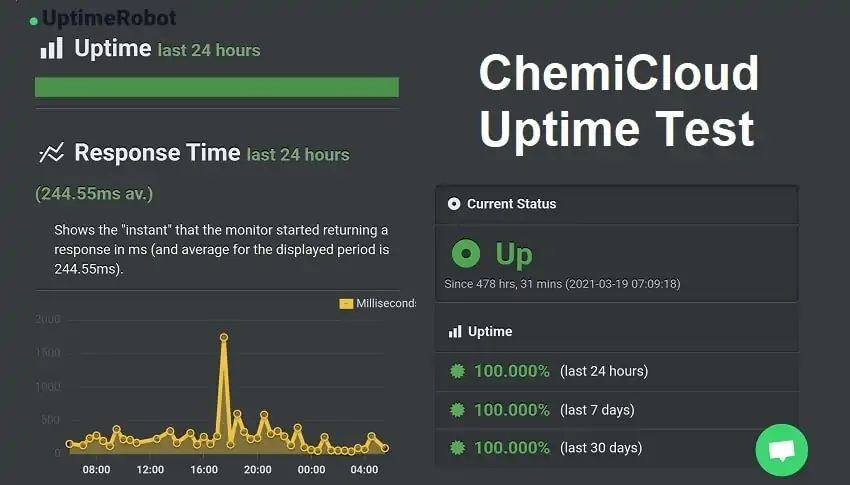
ChemiCloud could be your go to WordPress hosting if your website is small and growing. The 45 days return policy and 99.99% uptime guarantee would always have your back.
If Hostinger and Bluehost aren’t hitting the right notes for you, ChemiCloud’s plans are in the same range. Though it is not the best pick for setting up an eCommerce or WooCommerce based store, surely it could run your blog or business site smoothly.
Key Features:
- 20-40 GB NVMe Storage
- Free daily backups
- Free website migration
- Free domain
- WordPress staging
- One Click WordPress install
- LiteSpeed Cache Compatible
- Advanced Firewall Protection
- Free Cloudflare CDN
ChemiCloud Pricing:
ChemiCloud offers 3 WordPress hosting plans starting from $1.95/month. Here, you get unlimited bandwidth, and for storage, you are allowed up to 50 GB.
If you want to install just one site, the WordPress Starter plan would be the best option for you. Otherwise, you can opt for the Pro or Turbo plans, where there are no restrictions on the number of sites you can install.
Pros & Cons:
| Pros | Cons |
| Unlimited Bandwidth | Limited NVMe Storage is provided with all plans |
| Free Domain Is Included | |
| One-Click WordPress Installs | |
| Free Website Migration | |
| Free Website Backups | |
| Free SSL Certificates with all plans | |
| Offers NVMe storage for faster website performance | |
| One-Click Backup Restore | |
| Offers WordPress Staging Feature |
4. Cloudways: Maximum Data Centers in India
| Local India Servers | Bangalore, Chennai, Delhi, Hyderabad, Mumbai |
| Local Indian Language Support | X |
| Offers a Free Domain | X |
| Automatic WordPress Installation | ✓ |
| Uptime | 100% |
| Average Speed | 0.5 Seconds |
| Money Back Guarantee | Not Available (3 Days Trial Available) |
Cloudways is the sole hosting service provider offering a choice of 5 locations for a data center in India. This means that regardless of your location, you’ll experience a performance boost.
They believe in complete transparency and hence offer users a real time billing option. You’ll be charged for the resources you actually use.
It easily outperforms entry level WordPress hosts like Hostinger and Bluehost in terms of speed, loading time, and overall performance, thanks to its cloud-based servers located on companies like Digital Ocean, Google, and AWS. This ensures maximum reliability, and downtime issues on Cloudways are almost nonexistent.
However, the downside is that you won’t get a cPanel; Cloudways has its own user interface, which requires a learning curve.
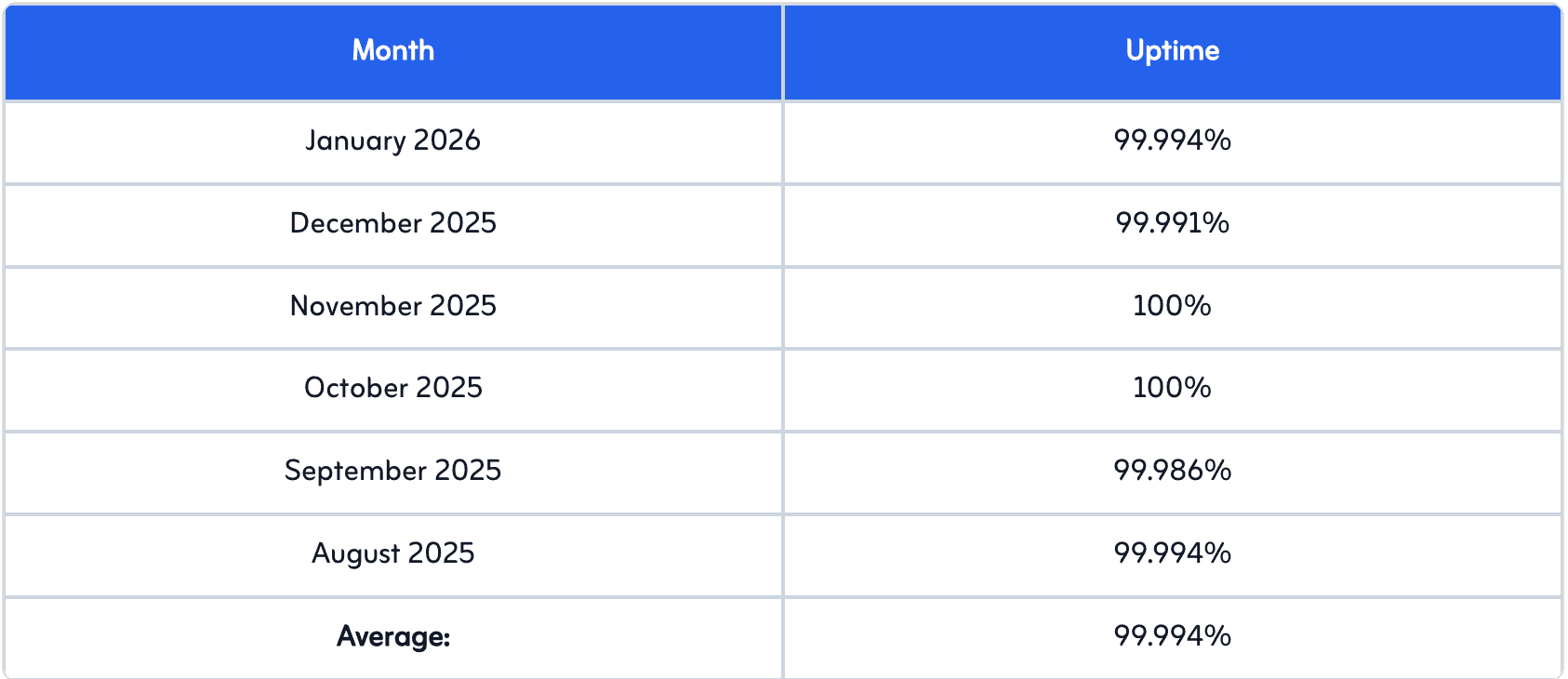
I have been monitoring Cloudways performance for India and other countries for more than 6 months. I get an average of 99.994% uptime.
Here’s the last 6 months data.
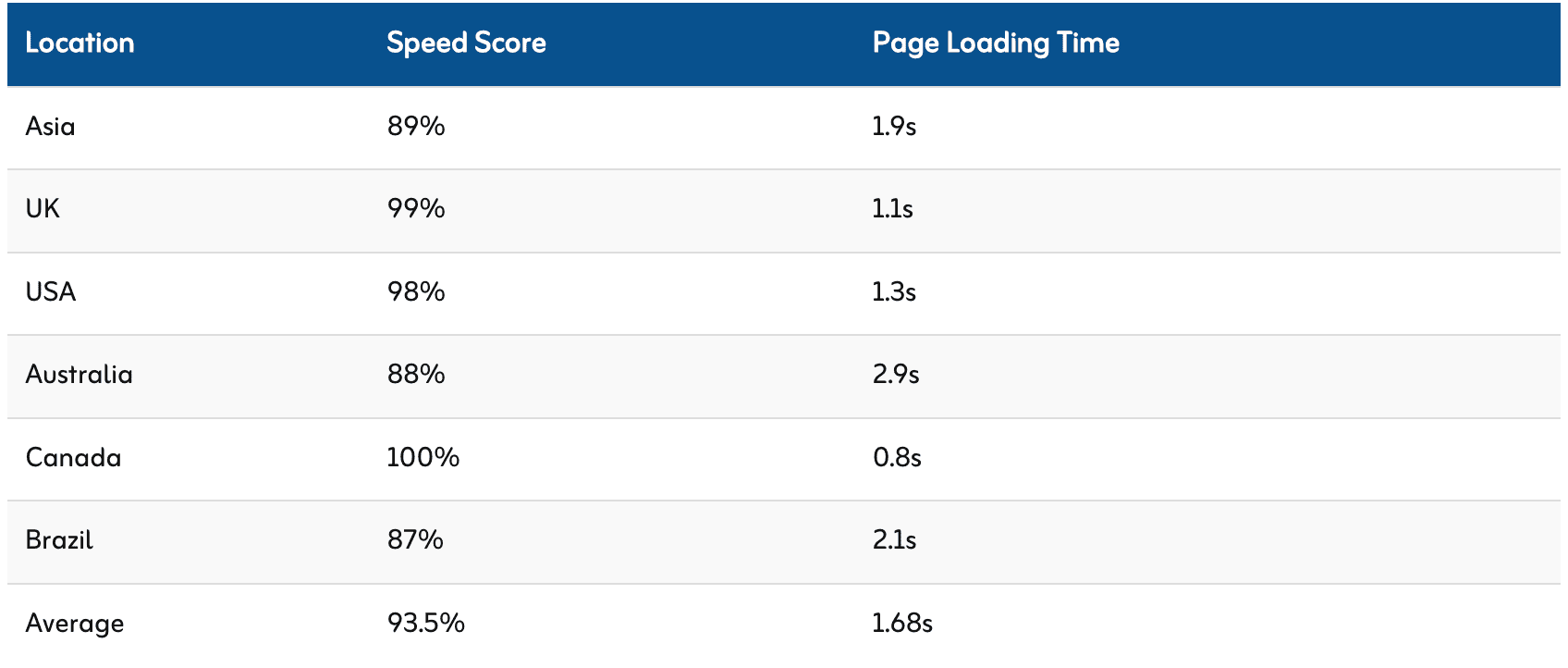
And here’s speed loading time & TTFB data. You can see Cloudways performs best in almost every region of the world. It scored 1.9s (Asia – India) in speed loading time which is perfect to clear core web vitals.
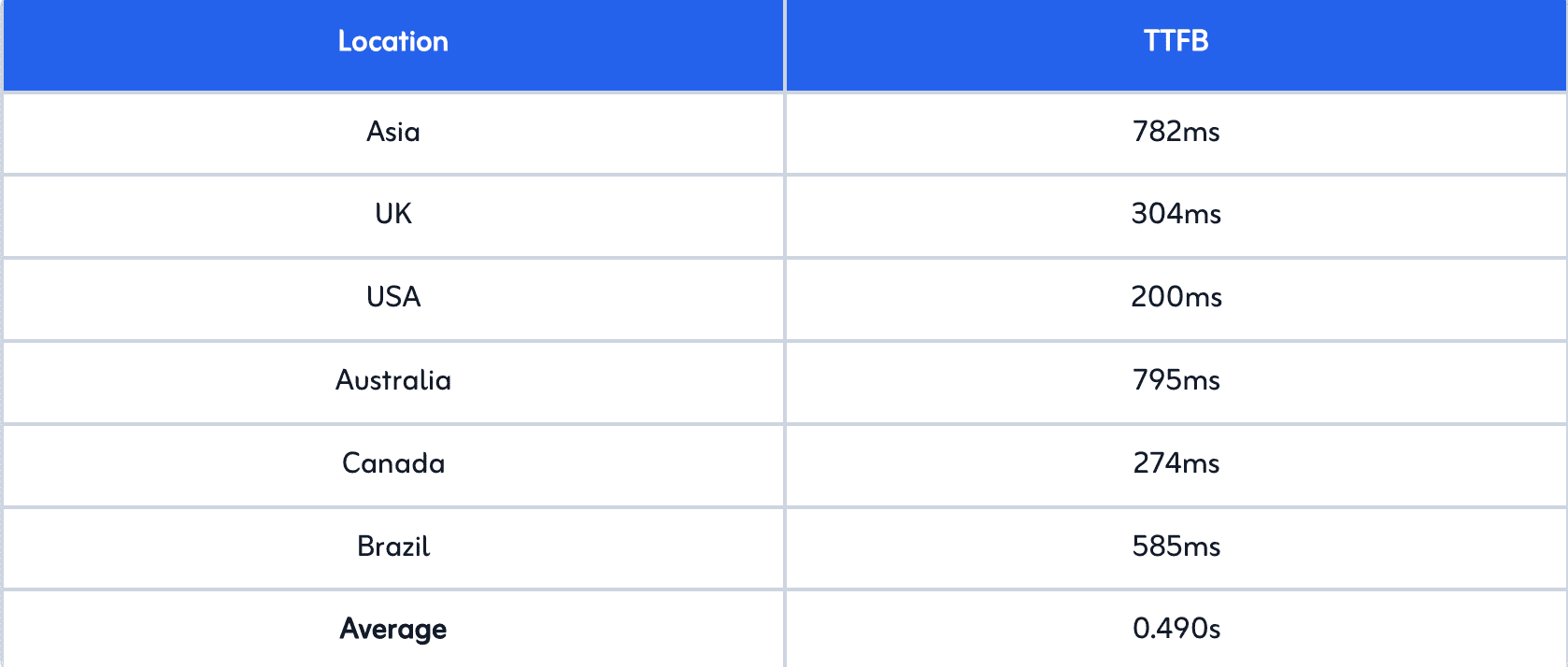
In short, Cloudways should be preferred only in situations where budget constraints are not an issue. Even their starting plans seem expensive.
Key Features:
- Unlimited sites installation
- Dedicated Firewalls
- Real-time monitoring
- Automated Backups
- Staging environment
- Auto-healing features
- 24/7 Real time monitoring
Cloudways Pricing:
Cloudways gives access to THREE different cloud providers including;
- Digital Ocean pricing plans start at $11 per month
- AWS (Amazon Web Services)
- Google Cloud
For detailed pricing list of each of the cloud hosting plans from Cloudways can be found in our Cloudways review.
Pros & Cons:
| Pros | Cons |
| Only WordPress host which offers 3 data centers in India | Backups are paid. |
| Real time billing saves money for sure | Money back policy is not there. |
| Free website migration is provided with all the Cloudways plans | Emails are paid. |
| Dedicated Firewalls for extra security of your website | |
| Unlimited Application Installation |
5. WPX Hosting – For High End Performance

| Local India Servers | X |
| Local Indian Language Support | X |
| Offers a Free Domain | X |
| Automatic WordPress Installation | ✓ |
| Uptime | 99.998% |
| Average Speed | 0.6 Seconds |
| Money Back Guarantee | 30 Days |
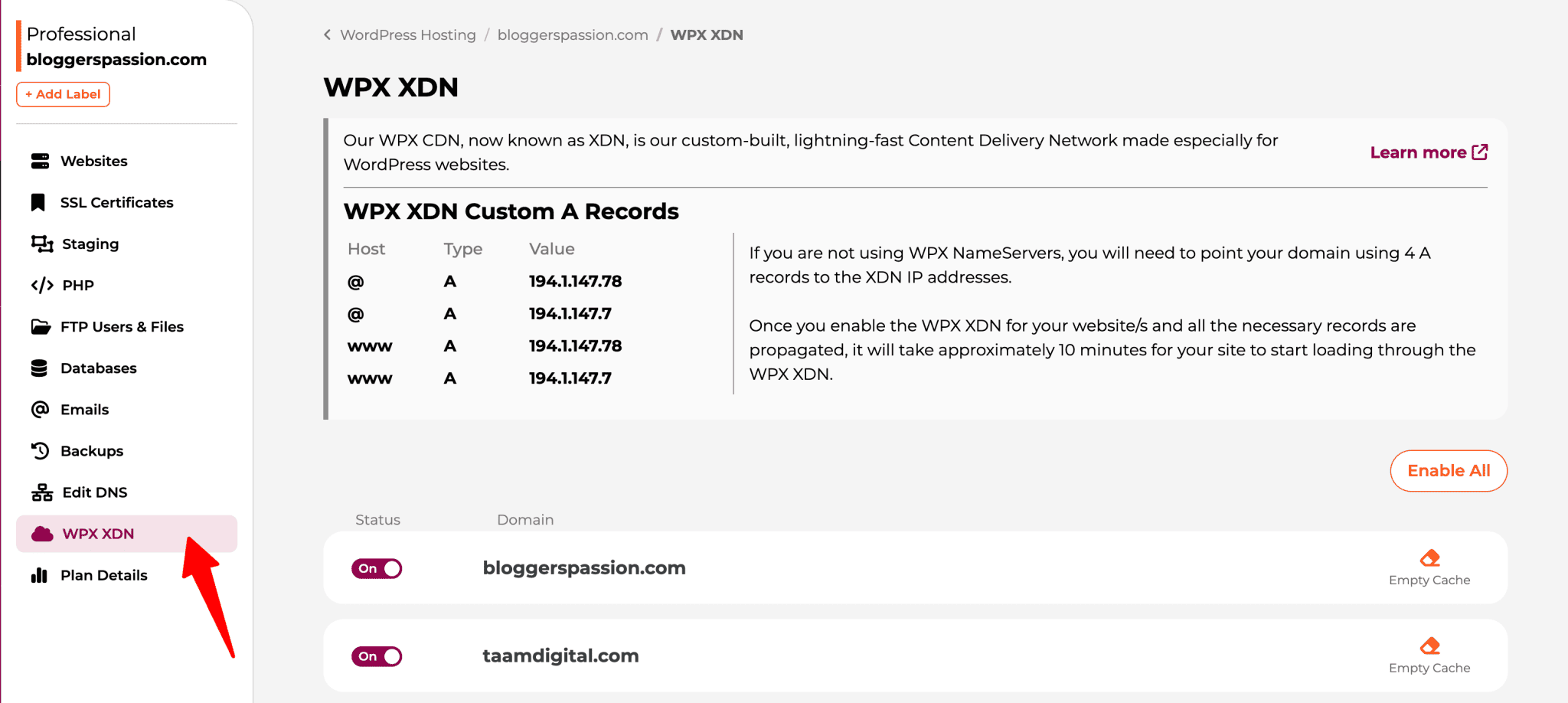
Is your website getting a lot of traffic? 50k-100k visitors per month or even more? Then WPX is the solution for you. They focus on high performance, which is why I have been running my site, BloggersPassion, on their servers for the past 8 years.
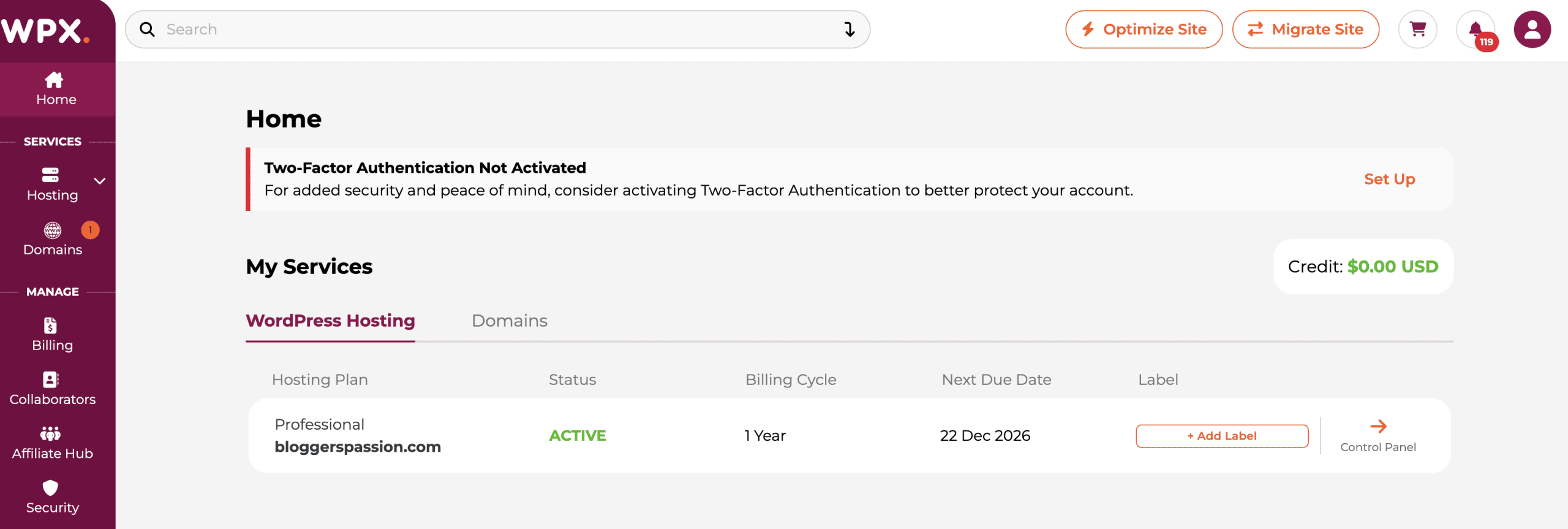
They don’t have a data center in India, but you won’t need it. They have a built-in CDN, which is active by default on all their plans. This ensures that, regardless of where your audience is located, they will experience fast loading speeds.
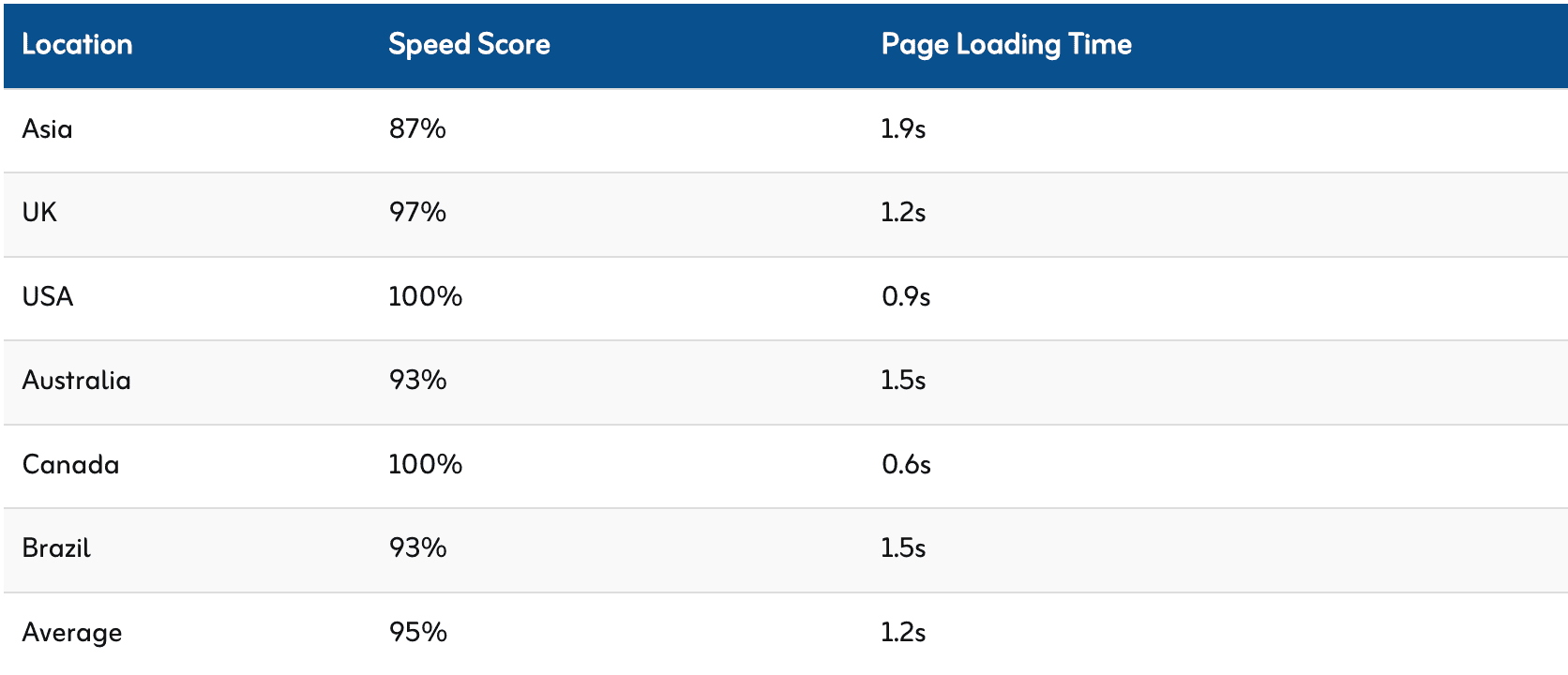
As I said in the introduction, my site receives traffic from all over the world, with most of it coming from India. Despite that, my site’s average loading speed is only 1.2 seconds.
You can see that my site speed score in Asia (India) is 1.9s and TTFB is also good with of 60 ms.
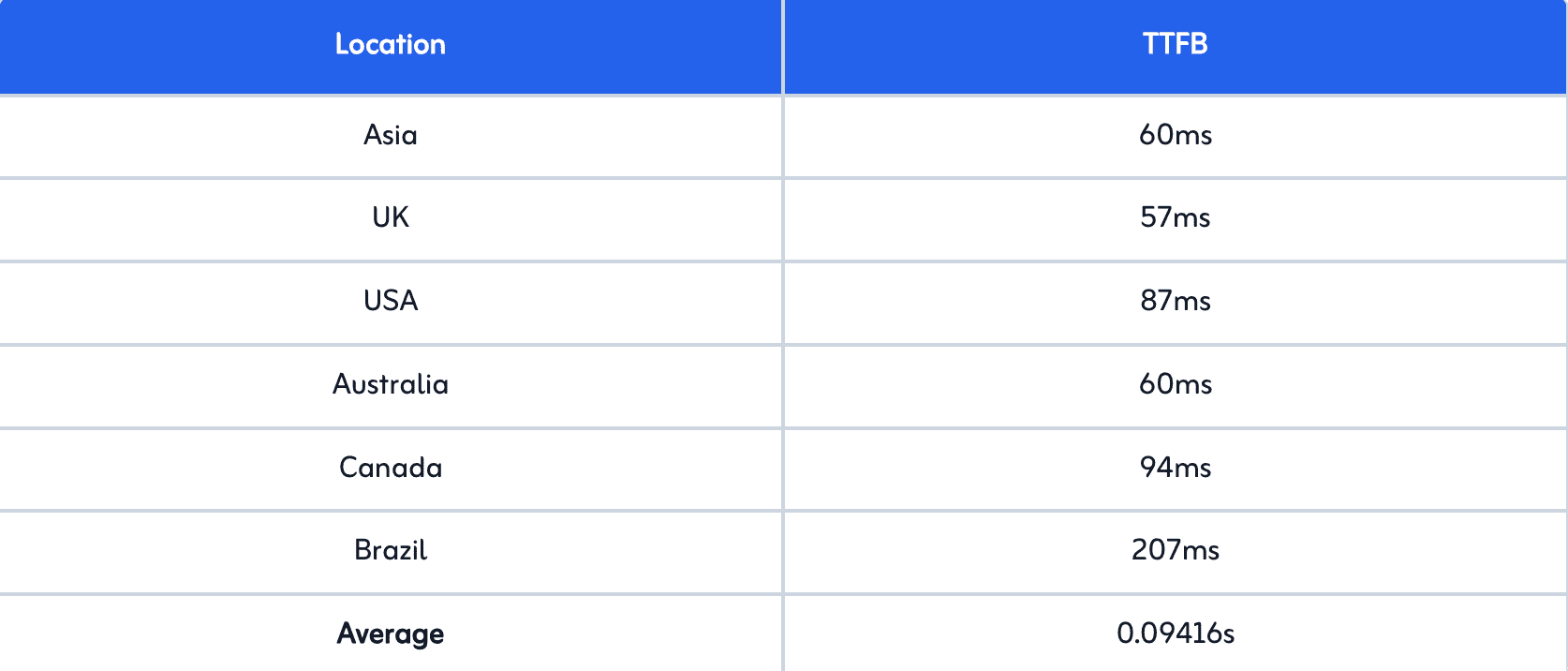
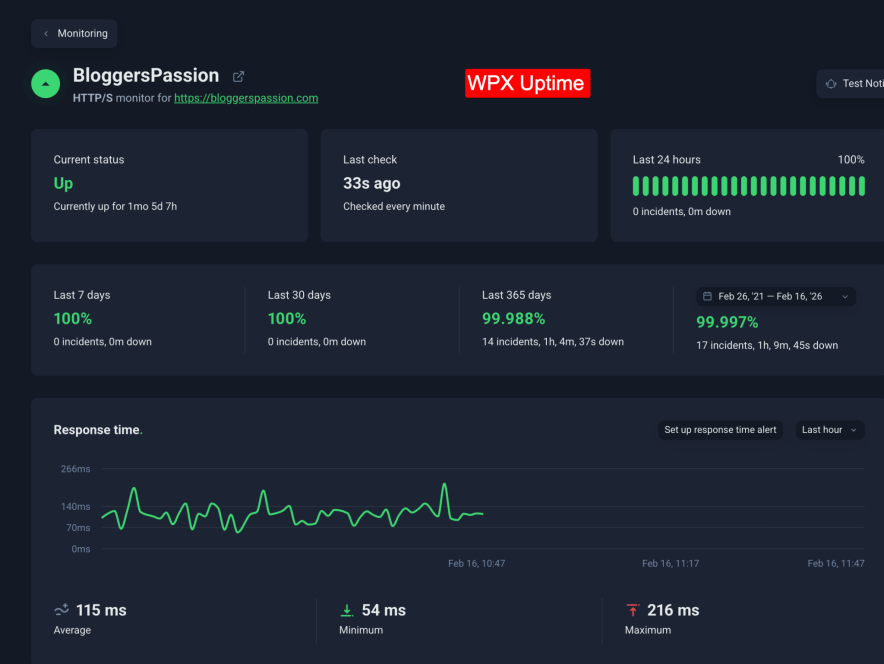
If we talk about uptime, WPX was down for 1 hour over a 5-year span. Last year’s data shows 99.988% uptime, which is a good and reliable number.
WPX also offers a “Fix for You Guarantee,” meaning if your site gets hacked or crashes, they will fix it for you. These kinds of perks are available only with fully managed WordPress hosting like WPX.
If you’re tired of cheap WordPress hosting with average performance and are looking for a reliable, secure, and high-performance fully managed WordPress host, WPX is a solid option. They even have dedicated high performance plans for big eCommerce sites.
Yes, the pricing is higher, but it’s fair considering the features and value they provide.
Key Features:
- Free Migrations
- 1 Click WP Install
- 3 Data centers to choose from (US, UK & AU)
- Inbuilt CDN
- On Demand Backups
- Staging Site
- Unlimited Email accounts
- Hybrid DDoS protection
- More
WPX Pricing:
WPX plans start from $6.30/month. You get 5-35 Websites, 15-60 SSD, and unlimited bandwidth. They offer extra power, CPU, PHP workers for eCommerce stores in their dedicated WooCommerce plans.
Pros & Cons:
| Pros | Cons |
| Proven high performance for high traffic sites | Free domain is not a thing here |
| Highly secure | |
| Unlimited number of sites can be migrate here for free |
Explore More:
6. Bluehost India: Phone Support in Local Indian Languages

| Local India Servers | Mumbai |
| Local Indian Language Support | ✓ |
| Offers a Free Domain | ✓ |
| Automatic WordPress Installation | ✓ |
| Uptime | 99.974% |
| Average Speed | 6.76 Seconds |
| Money Back Guarantee | 30 Days |
Bluehost has been recommended by WordPress.org itself since 2005.
But as of now, I have mixed feelings about Bluehost.
In the last couple of years, I have seen really bad reviews of Bluehost across forums and other places.
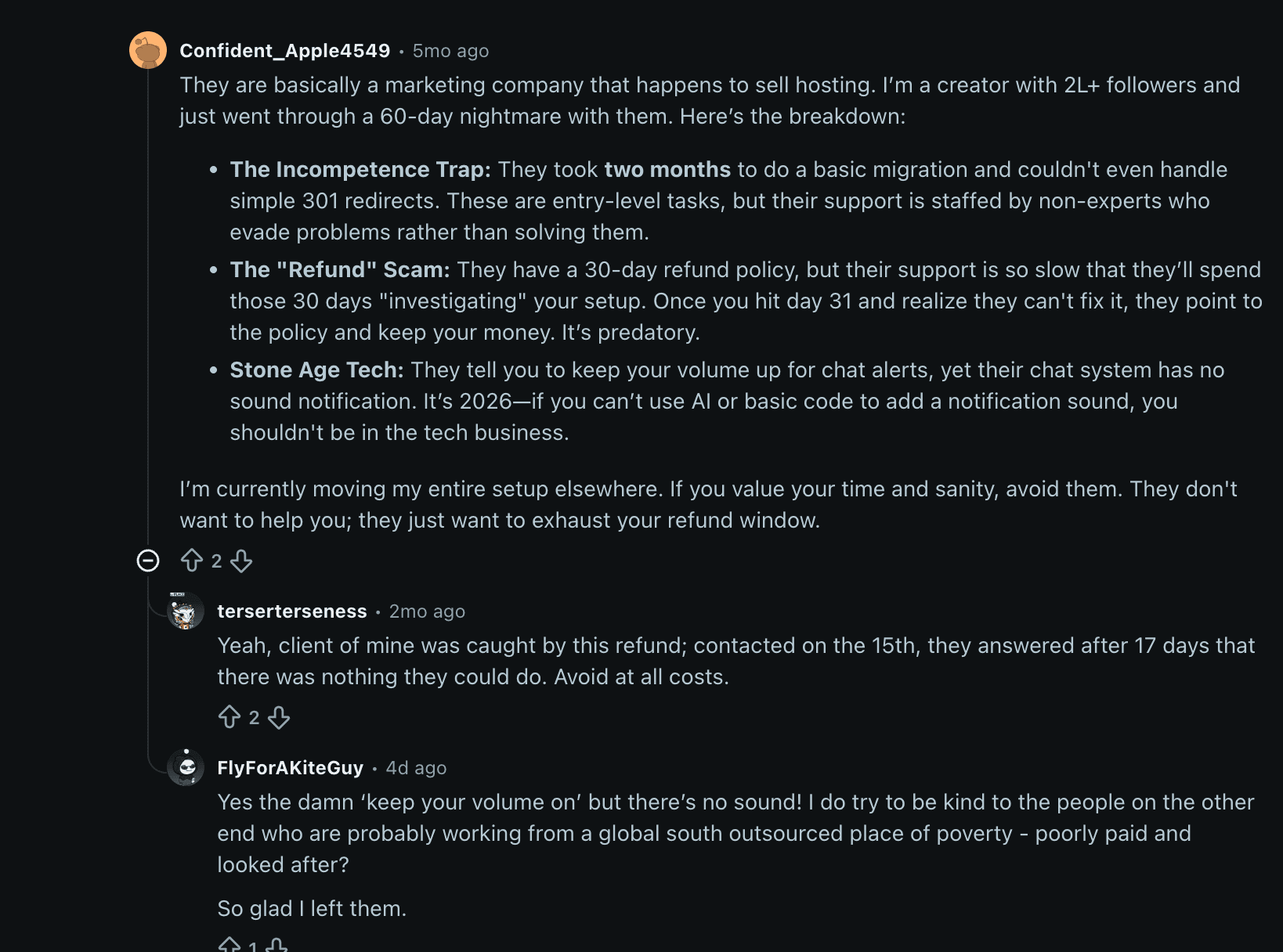
Even though it offers support in local languages like Hindi and Kannada, its overall performance keeps it at the bottom of WordPress hosting comparison lists in India.
The reason I list Bluehost here is to aware you about the quality of Bluehost as most of the reviewers posted fake benchmarks.
In our fastest web hosting assessment, we have found Bluehost to be the slowest in India and other regions. It records an average page loading time of 6.76s.
Even though Bluehost seems affordable, watch out for their pricing plans. Your final bill might be more due to the inclusion of essential features like Domain privacy and Daily Backups through add-ons.
The most common issue mentioned in negative reviews about Bluehost is their hidden pricing. Be cautious, as your final bill might be higher than the selected plan, so you need to decide carefully.
Key Features:
- Bandwidth and Storage for Indian users are unmetered.
- SSL, CDN, Automated Malware Scan are there for security.
- Domain Privacy can be hooked.
- Multi-Site Management is supported.
- Staging site is there.
- Daily website backup.
- Store features like Booking & Appointments, Gift Cards, Online Payments, Product Search, etc are there.
Bluehost Pricing:
Bluehost has four WordPress hosting plans, starting from 199 rupees per month (Starter plan). It gives you free domain, 10 website, 10 GB SSD storage, unmetered bandwidth, 100+ free WordPress themes, and a free staging environment.
Pros & Cons:
| Pros | Cons |
| They offer a Free domain name for the first year with all the plans | Bluehost doesn’t provide any uptime guarantee, which can be concerning for some users. |
| Access to 100+ free WordPress themes | Another drawback is the hidden costs. The final price might be higher than the initial plan you choose because Bluehost includes extra features like domain privacy, daily backups, and more. |
| Free website migration on all the WordPress hosting plans | The basic plan lacks automatic backups, which can be an inconvenience. |
| Bluehost also offers a AI website builder for quick setup | Renewal price is much higher |
| Free Staging environment that helps you test any changes to your website before making it visible to your visitors | |
| You can reach out to Bluehost through chat or phone 24/7 and 7 days a week |
What to Consider When Choosing WordPress Hosting in India
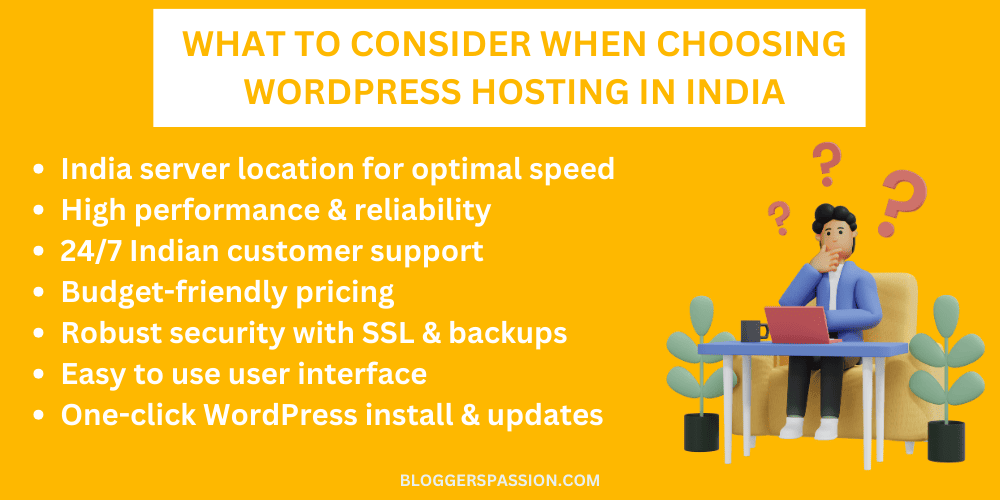
We’ve used the following criteria to assess and create our list of hosting services. If you have a different service in mind, you can also test it yourself:
1. Data Center Location (The TTFB Rule)
If your target audience is in India, your server must be in India (Mumbai, Delhi, or Bangalore). Hosting an Indian blog on a US server forces every visitor’s request to cross an ocean, adding an unavoidable 300–500ms delay to your Time to First Byte (TTFB). Sub-200ms TTFB is the baseline for passing Google’s Largest Contentful Paint (LCP) metric.
2. The Web Server: LiteSpeed vs. NGINX vs. Apache
The web server software defines how efficiently your site handles traffic.
- LiteSpeed: The current gold standard for WordPress. Its event-driven architecture and integrated server-level cache (LSCache) can handle 2-3x the throughput of Apache on dynamic PHP workloads.
- NGINX: Highly scalable and excellent for reverse-proxy setups (used primarily by premium managed hosts like Kinsta).
- Apache: The legacy process-driven standard. It creates a new thread for every connection, which often leads to resource exhaustion during traffic spikes. Avoid hosts still relying purely on basic Apache setups.
3. NVMe Storage vs. Standard SSD
Storage is not just about capacity; it is about input/output operations per second (IOPS). WordPress is a highly dynamic CMS that constantly reads and writes to a database. NVMe SSDs communicate directly with the server’s motherboard via the PCIe interface, making them up to 10x faster than older SATA SSDs. If you run WooCommerce, NVMe is non-negotiable.
4. Transparent Renewal Pricing
Promotional pricing often triples at renewal. A host offering ₹69/month for the first three years might renew at ₹249/month. Always calculate the 3-year or 4-year total cost of ownership before giving a shot.
Final Thoughts: Which is the Best WordPress Hosting in India for Beginners?
So the question is still the same…
Well if you read my article thoroughly, you already have your WordPress host finalized as per your need.
Let me clarify things again…
For beginners on a budget, Hostinger India is the best choice. Their UI (hPanel) and AI Assistance (Kodee) will sort your things easily even if you have zero skills. Their plans start as low as ₹69/mo, and they offer an automated setup wizard that installs WordPress and essential performance plugins with a single click.
Can I use US-based hosting for an Indian website?
You can, but it is not recommended for performance. Data traveling from a US server to a user in India has to cross oceanic cables, which naturally adds 300ms to 500ms of delay to your loading times.
Server location is important. If your traffic mainly comes from India then always choose a host with an Indian or at least a Singaporean data center. The alternate option is CDN but it gets expensive and i am not prefer to enable it on a entry level host.
The CDN better works with those hosts which offer it via the inbuilt CDN functionality. And in that case you can choose between Cloudways and WPX.
If your website generates income, yes. Managed WordPress hosts (like WPX or Cloudways) handle daily backups, malware removal, server-level caching, and core updates for you. It frees up your time to focus on creating content rather than managing hosting server troubles.
If you want to know my personal preferences, I would choose Hostinger if my site is new OR WPX would be my go-to choice because it is proven to produce 100% speed score even in the USA based data center.
Let me know if you have questions.

![My Honest Hostinger Hosting Review After Hands On Use 2026 [The Reality]](https://bloggerspassion.com/wp-content/uploads/2021/01/Hostinger-review-300x157.jpg.webp)

![How to Start a Blog in 2026 in India [Beginner Friendly Way] – My Example](https://bloggerspassion.com/wp-content/uploads/2012/01/how-to-start-a-blog-300x157.jpg)
![How to Make Money Online for Beginners [21 Risk Free Legit Ways for 2026]](https://bloggerspassion.com/wp-content/uploads/2023/10/how-to-make-money-online-for-beginners-300x153.png)


Hi, Anil
I Am New At Blogging And I Don’t Have Money to Invest in could hosting.
Can I Go With Shared Hosting For Now?
Is There Any SEO Ranking Factor Which Directly Impacts In My Website If A Go With Shared Hosting?