


Sponsored: WordPress.com paid for editorial coverage in this article. All editorial decisions are at BloggersPassion’ sole discretion.
Here’s the honest truth about WPX Hosting.
It is fully managed WordPress hosting that comes with high end performance, security, and great customer support.
But some users have issues with the pricing of their most chosen plan, called Professional. Although they have low-cost plans starting from just $11 but the CPU power is limited.
That’s why I came up with the top 5 WordPress hosts that seem genuinely the alternatives that are actually worth switching to.
Disclosure: We get a commission when you buy a product via our affiliate link at no additional cost.
Deep Dive Into the 5 Best WPX Hosting Alternatives
These aren’t random recommendations. My team has tested each host listed below, and the insights are based on real usage and performance observations:
| Hosts | Best For | Starting Price |
|---|---|---|
| Kinsta | High traffic sites where advanced security, performance, and hourly backups are required | $30/month |
| WordPress.com | Those seeking the cheapest alternative | $2.75/month |
| Cloudways | Real time billing, hosting, and maximum server scalability | $14/month |
| Elementor | Elementor page builder built sites | $14.99/month |
| WPEngine | Developers and high-end customization | $20/month |
1. Kinsta – A Strong Option When Performance Limits Start Showing

Kinsta is an enterprise level WordPress hosting that is primarily known for its secure servers and great performance. They offer reliable Google Cloud–based servers for both entry-level and high-traffic websites.
The developer-friendly environment, automated resource handling are the main highlights of Kinsta Hosting. WPX Hosting server lacks it.
The support of Server scaling is a big plus for higher sites where the sudden requirement of additional resources occurs at any time.
| Performance | Kinsta | WPX |
|---|---|---|
| Average Uptime | 100% | 99.999% |
| Average Page Loading Time | 3.5 s | 1.2 s |
| Overall Performance Score | 92% | 95% |
The Kinsta performance benchmarks are excellent.
Why?
We tested Kinsta on the heaviest page size in our fastest web hosting analysis test. And Kinsta performed really well.
Kinsta customer support included a premium feel, as their customer support agents are highly knowledgeable and responsive. I get an average response time of slightly higher than 2 seconds.
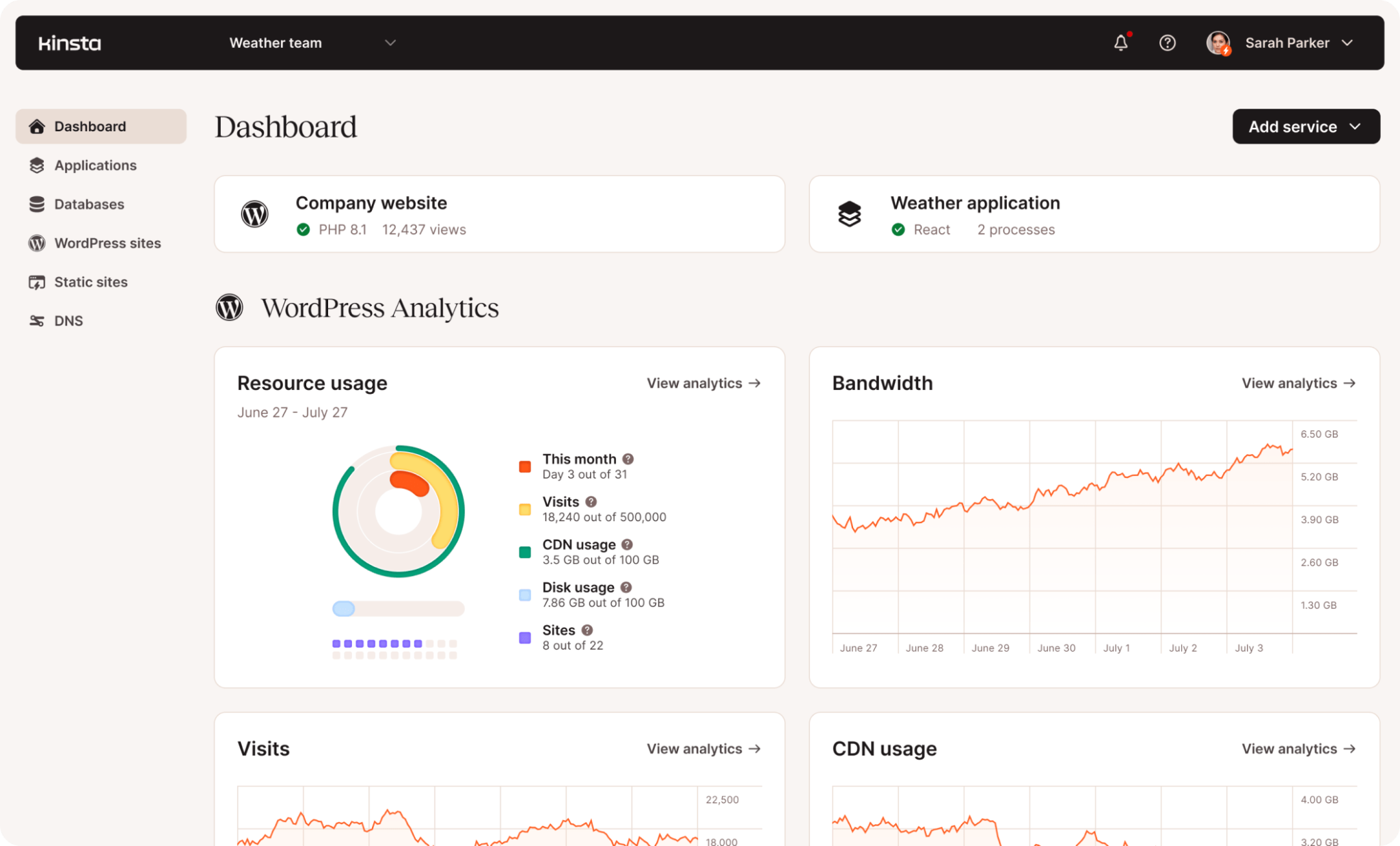
Kinsta doesn’t have a cPanel. Instead, they have their own modern looking hosting dashboard. It is straightforward and user friendly. The visual reports make it more engaging.
Kinsta Features:
| Features | Kinsta | WPX Hosting |
|---|---|---|
| Fully Managed Support | Yes | Yes |
| Free Domain | Not Available | Not Available |
| Number of Sites | 1-60 | 1-200 |
| Storage | 10 GB – 100 GB | 10 GB – 300 GB |
| Bandwidth | 20 GB – Unlimited | 100 GB – Unlimited |
| Backups | Daily Backups to Every Hour with 14-30 days retention | Daily Backups with 28 days retention |
| Staging Tool | Available | Available |
| Uptime Guarantee | 99.99% | 99.95% |
| Automated Resource Handling | Supported | Not Supported |
| DDoS Protection | Supported | Supported |
| Phone Support | Not Available | Not Available |
| 24*7 Chat Support | Available | Available |
| Malware Security Pledge | Supported | Not Supported |
| CDN | Free CDN with 260+ Pops | Inbuilt CDN with 41 XDN Points |
| Account Managers | Available | Not Available |
Pros and Cons:
| Pros | Cons |
| Hourly Backups is a rare advantage and can be very helpful to high traffic dynamic sites | A little bit expensive |
| High end security | |
| Automated Resource scaling keeps your site always up | |
| Transparent plans in terms of resources |
For More Details: Kinsta Review
Pricing:
Kinsta pricing starts from $30/month for a single site in which includes a 20 GB Server bandwidth, 125 GB CDN, and 10 GB Storage. You can scale up to 2500+ GB CDN, and Multiple site plans start from $59/month.
As of now, they are offering the first month free on both single and multi site plans.
2. WordPress.com – Budget Friendly Alternative

WordPress.com is usually considered when pricing transparency and long-term cost control become more important than squeezing out maximum performance numbers.
One of its biggest advantages is simple: what you pay initially is what you continue paying on renewal. For users who dislike pricing jumps after the first year, this alone makes WordPress.com worth evaluating.
Performance-wise, it holds up well for most real-world use cases. While it doesn’t try to compete on raw speed benchmarks, it remains stable even during sudden traffic spikes, which is often more important for growing sites.
| Performance | WordPress.com | WPX |
|---|---|---|
| Average Uptime | 99.999% | 99.999% |
| Average Page Loading Time | 3.66 s | 1.2 s |
| Bulk Traffic Score | 100% | 92% |
| Overall Performance Score | 98% | 95% |
In our usage tests, WordPress.com handled bulk traffic reliably without manual intervention. While page load times weren’t the fastest, stability under load was a clear strength.
WordPress.com’s dashboard is minimal and easy to navigate. Most day-to-day tasks—analytics, backups, staging, and site management are accessible from a single interface.
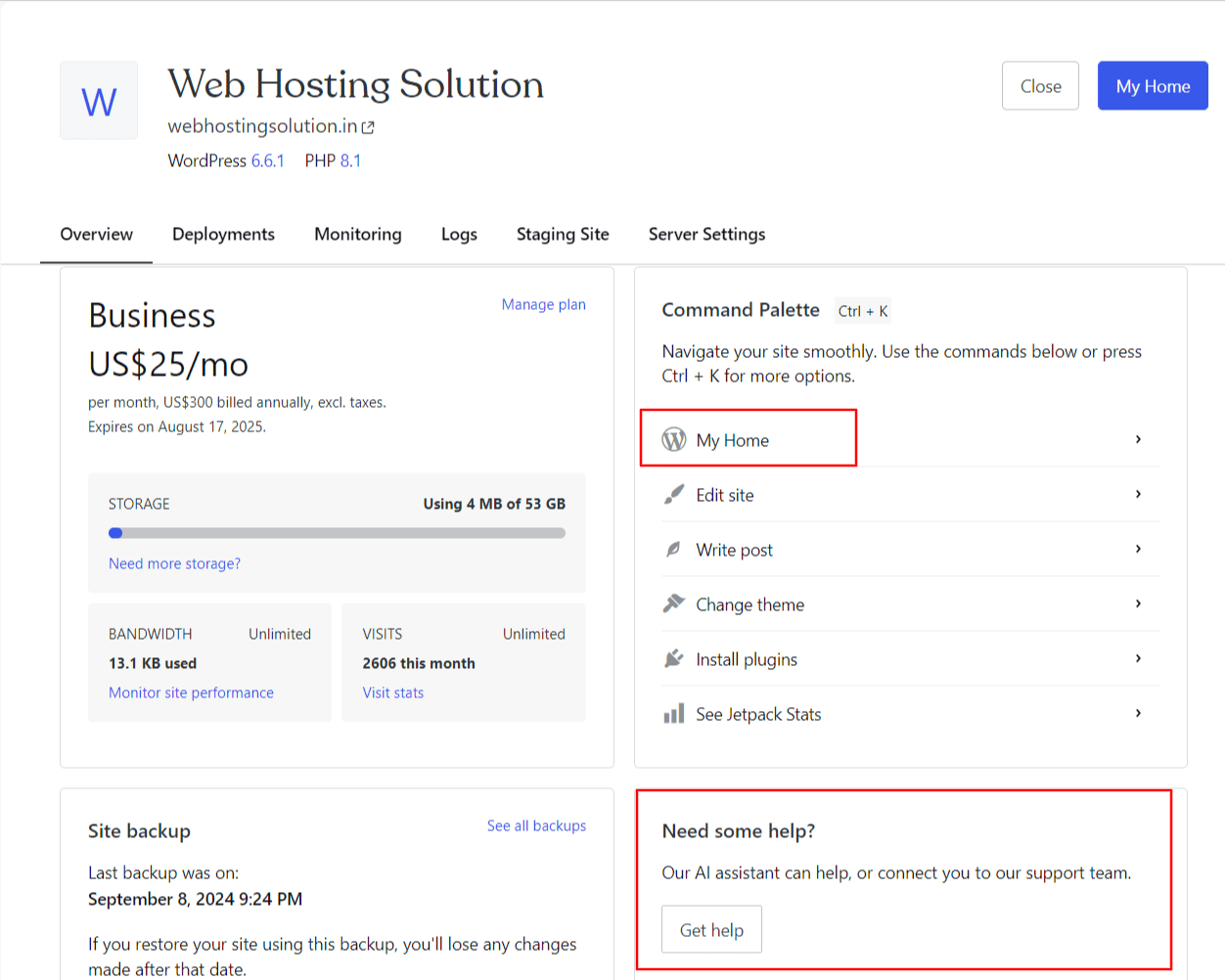
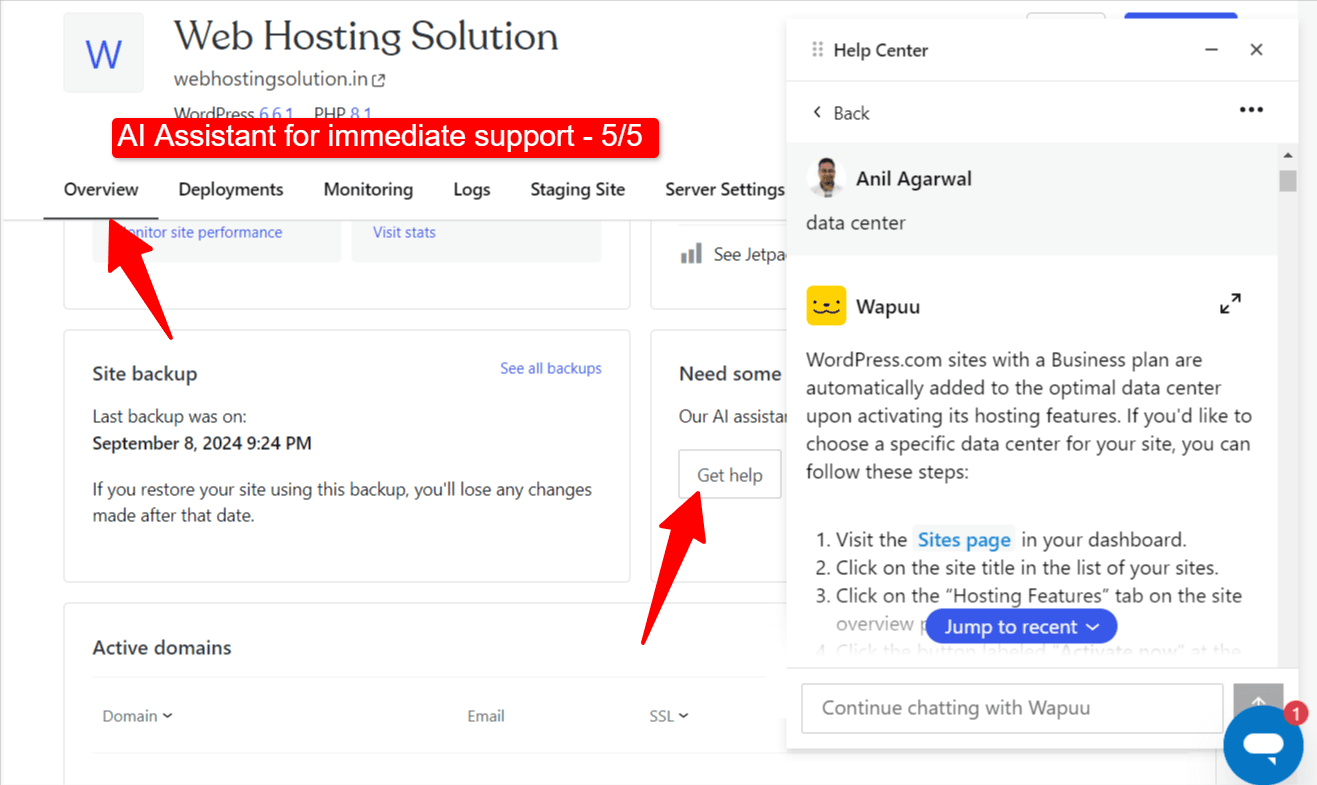
The most exciting thing you would feel here is the availability of Generative AI assistance, which not only helps you in solving queries but also performs a lot of WordPress site management tasks for you. You don’t find this kind of feature in any other hosts.
WordPress.com Features:
| Features | WordPress.com | WPX Hosting |
|---|---|---|
| Fully Managed Support | Yes | Yes |
| Free Domain | Available | Not Available |
| Number of Sites | 1 | 1-200 |
| Storage | 6 GB – 50 GB | 10 GB – 300 GB |
| Bandwidth | Unlimited | 100 GB – Unlimited |
| Backups | Daily Backups | Daily Backups with 28-day retention |
| Staging Tool | Available | Available |
| Uptime Guarantee | Not Available | 99.95% |
| Automated Burst Scaling | Supported | Not Supported |
| DDoS Protection | Supported | Supported |
| Phone Support | Not Available | Not Available |
| 24*7 Chat Support | Available | Available |
| Malware Security Pledge | Supported | Not Supported |
| CDN | Inbuilt CDN with 28+ Pops | Inbuilt CDN with 41 XDN Points |
| Generative AI tool | Supported | Not Available |
Pros and Cons:
| Pros | Cons |
| Highly reliable host known for its performance and secure servers | Storage seems less |
| 100% money saving transparency, as it is the only host that doesn’t fool you by charging double or triple the amount on renewals | Only one site per plan |
| As found in our testing, Bulk traffic handling capacity is great here |
For More Details: WordPress.com Review
Pricing:
WordPress.com offers four plans starting from $2.75/month. The Personal and Premium plans are good for small traffic blogs and those who need more than 6 GB of Storage, then they can consider the Business and Commerce Plans.
3. Cloudways – Best Flexibility and On-Demand Scaling

If WPX feels ‘too boxed-in’ for you, Cloudways is literally the opposite. I mean, Cloudways allows you to achieve insane scalability in terms of hosting resources.
You can get a plan which includes up to 384 GB RAM, 96vCPU power, and 3.5 TB Storage space. You can not only host a small website, but also a massive resource consumption web app here as well.
In terms of budget, they offer real time billing plans. It means you only need to pay for the resources your site will consume. In simple words, the final billing would cost you much less than you expected.
In a nutshell, Cloudways is for those who are looking for premium cloud hosting servers rather than shared plans.
| Performance | Cloudways | WPX |
|---|---|---|
| Average Uptime | 99.970% | 99.999% |
| Average Page Loading Time | 1.68 s | 1.2 s |
| Overall Performance Score | 93% | 95 |
Key Features:
- Scalable Hosting plans
- Automated Backups (Both daily & hourly)
- Free SSL
- 99.9% Uptime Guarantee
- Scalable servers
- 24*7 real time monitoring
- Staging environment
- DDoS protection (up to 4th layer)
Pros and Cons:
| Pros | Cons |
| Cloudways is the only reliable host that offers real time billing option | Enterprise CDN is not free |
| Unlimited sites can be hosted | Emails are not free |
| Free website migration |
For More Details: Cloudways Review
Pricing:
In Cloudways, the pricing depends on the server you choose. For example, DigitalOcean plans start from $14/month in which includes 1 GB RAM, 1v CPU, 25 GB NVMe storage, 1 TB bandwidth, and more.
<< Visit Cloudways [3 Days Free Trial]
4. Elementor WordPress Hosting –A Natural Fit for Elementor-Based Sites
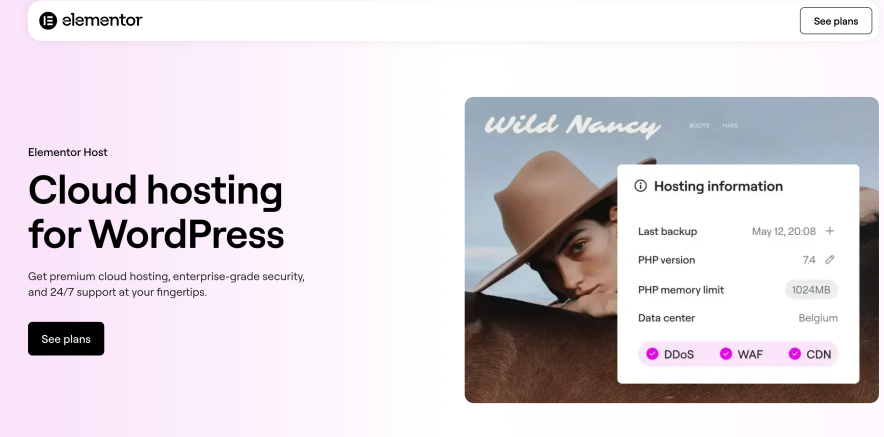
If you own a site where you are looking to plug a Page builder plugin like Elementor, then this web hosting is for you.
Elementor as you know the most popular WordPress page builder plugin, helping you to achieve any kind of possible design on the website. And combining it with the Elementor Hosting, you will achieve maximum performance and loading speed on the Elementor designed pages.
| Performance | Elementor Hosting | WPX |
|---|---|---|
| Average Uptime | 100% | 99.999% |
| Average Page Loading Time | 1.59 s | 1.2 s |
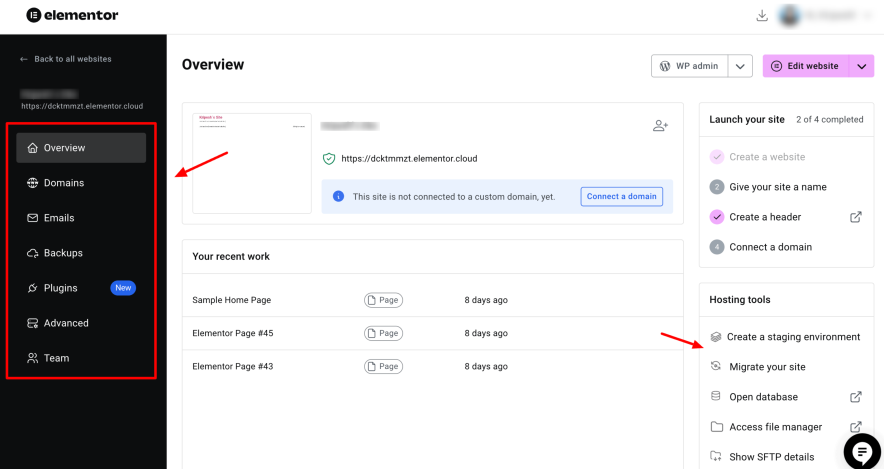
I used the Elementor page builder plugin a lot. When I tried their hosting dashboard, I felt it was designed by keeping total beginners in mind.
In just a single dashboard, you will get options like domains, emails, backups, recent pages you created, hosting information, and more.
Key Features:
- 1-10 Sites
- 10-40 GB Storage
- Daily backups are provided with 7-30 days of retention
- Free CDN is available
- Security features like DDoS & BotNet protection, 2FA, WFA, Geoblocking are included.
- Auto-scalable servers
- Supported 40+ addons to extend the website functionality
- 24*7 Customer support
- Highly optimized for Elementor page builder
Pros and Cons:
| Pros | Cons |
| Free domain for a year | Only 1 data center is available, which is located in Belgium, Europe |
| Uptime is 100% which is rare | Renewals seem costly |
| Team collaboration is possible | Ideal for the Elementor ecosystem only |
For More Details: Elementor Review
Pricing:
Elementor Hosting plans start from $14.99 in which includes 10 GB Storage, 10 GB Bandwidth, and an option to host a 1 auto scaling site.
5. WPEngine – Best for Developers & Agencies
WPEngine Hosting is another unique and highly popular host that works best for agencies and sites where the development part is crucial.
Where other WordPress hosts, including, are suitable to host static WordPress sites, WPEngine offers plugins like Advanced Custom Fields, WPMigrate, WPGraphQL, SSH Gateway, and more. All these plugins help developers to achieve custom functionality in WordPress websites.
Agencies where custom web development project requirements are always there can surely consider WPEngine.
| Performance | WPEngine | WPX |
|---|---|---|
| Average Uptime | 99.95% | 99.999% |
| Average Page Loading Time | 1.4 s | 1.2 s |
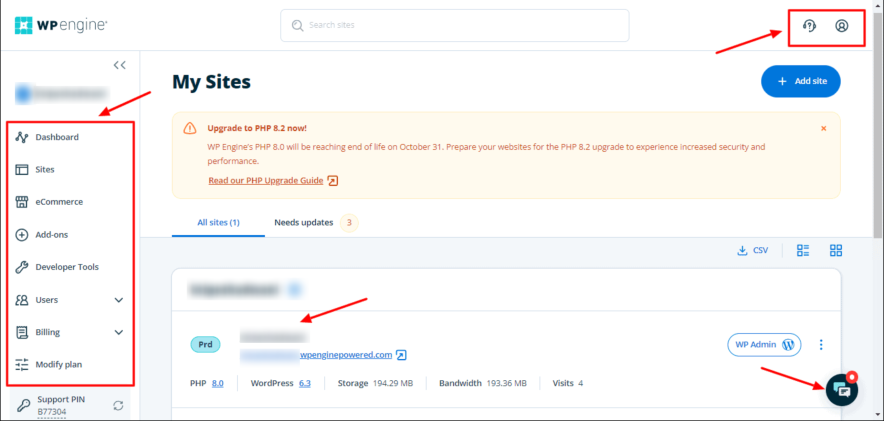
Unlike other web hosts, I face a little bit of a learning curve while using the WPEngine user interface. It has a huge list of features organized under a single dashboard, including the site dashboard, developer tools, add-ons, and more.
Key Features:
- Free SSL, DDoS protection, 2FA, Firewall, Outdated plugin notifications, Account activity, etc.
- 14 Data centers available in North America, Europe, Asia/Pacific, and the Middle East.
- Daily backups with up to 60 days of retention.
- 24*7 Customer Support
- Staging with 3 types of environment (Production, Staging, and Development)
- 10 Premium themes included including StudioPress, Genesis, are included
- 99.99% Uptime SLAs
- Proactive account monitoring for big agencies
Pros and Cons:
| Pros | Cons |
| The servers are Google based meaning high reliability | Email hosting is not available |
| Premium themes like StudioPress are available for free | The pricing is at the higher end |
| Developer Friendly | The load handling capacity is not that great |
| 60 Days Money Back policy |
For More Details: WP Engine Hosting Review
Pricing:
WPEngine annual plans start from just $20month. You can host 1 site with 10 GB storage and 50 GB Bandwidth. They also have agency plans starting from $400/month in which you get endless resources and advanced security features.
Explore More: Kinsta Alternatives [Affordable Options]
FAQs:
Why do users explore alternatives to WPX?
Some users look beyond WPX due to renewal pricing, limited server location options, or the lack of advanced developer tools. As websites grow, these factors often become more important.
Which WPX alternative works best overall?
There’s no single best option for everyone. WordPress.com is often preferred for predictable pricing, Cloudways for scalability, Elementor Hosting for builder-based sites, and WP Engine for development-heavy projects.
What are the bad competitors to WPX Hosting?
You should avoid hosting companies like Bluehost, Hostinger, Namecheap, as they are entry level hosts and don’t offer high end performance like WPX.
![I Picked 6 Best Siteground Alternatives 2026 [For Every Situation]](https://bloggerspassion.com/wp-content/uploads/2025/10/siteground-alternatives-1-300x162.png)





Leave a Comment
Your email address will not be published. Required fields are marked *