

Google search is one of the most widely used tools online.
People can’t live a day without using Google search. The frustrating thing is, even though millions of people actively use Google search, most of them don’t know how to use it effectively.
If you’re looking for the most popular Google search tips and tricks, this detailed post is for you, where you’ll discover 9 practical tips and tricks that can save you a lot of time.
This post is written keeping two kinds of people in mind.
- Those who are only looking for quick Google tips and tricks (to save time) and
- Those bloggers who want to increase their search traffic
So let’s begin with the first group. Then, we’ll talk about some of the best Google search tips and tricks that can be used by bloggers and marketers to grow their search traffic in 2026.
Are you ready? Let’s jump into the details.
Top 9 Google Search Tips and Tricks for 2026
Table of Contents
- Top 9 Google Search Tips and Tricks for 2026
- 1. Voice Search
- 2. Search Within a Particular Website
- 3. Find Related Websites Quickly
- 4. Advanced Image Search Can Be So Much Effective
- 5. Increase Your Search Traffic by Updating Your Blog Posts
- 6. Build An Audience That Links to You Naturally
- 7. Use Essential SEO Tools
- 8. Don’t Use Textual Format of Content
- Final Thoughts On Google Tips And Tricks 2026
- FAQs On Google Search Tips and Tricks 2026
1. Voice Search
So how do people usually search on Google?
By analyzing Google search data, we found that users open their browser, go to Google, and enter a keyword to search for a specific product or information.
That involves a lot of steps, right? Not only is it time-consuming, but it’s also not very effective.
To solve this issue, Google came up with a new idea called Google Voice Search (it’s becoming a trend these days, and more and more people are now using Google search by voice instead of typing on Google to find information on the web).
Voice search is simply a technology that is based on speech recognition. Voice search allows you to search by speaking instead of typing so you can save a lot of time while browsing the web through your smartphone or laptop.
Why is voice search becoming essential?
Did you know that voice queries (using Google Now) are likely to show almost 45% rich and highly valuable content to the users compared to 40% for text queries?
Just check out the following illustration to understand the importance of voice search:

How to use Voice Search by Google?
To search the web by speaking, tap the microphone button on the Google search box on your home screen, or press and hold the physical search button on your phone to activate the “Speak Now” screen. You’re done.
Google Voice Search, also known as Search by Voice, is one of Google’s innovative products that lets you use Google Search by speaking on a smartphone or computer.
2. Search Within a Particular Website
Do you want to search within a particular website (of your own site or your competitor’s sites)? This is one of the best Google search tricks to use if a site does NOT have a search form.
Here’s what you need to do to search within a site to find whatever you are looking for.
You can search within a website by typing “site:xyz.com/ keyword” followed by the URL of the site and your search terms. Here’s what it looks like;
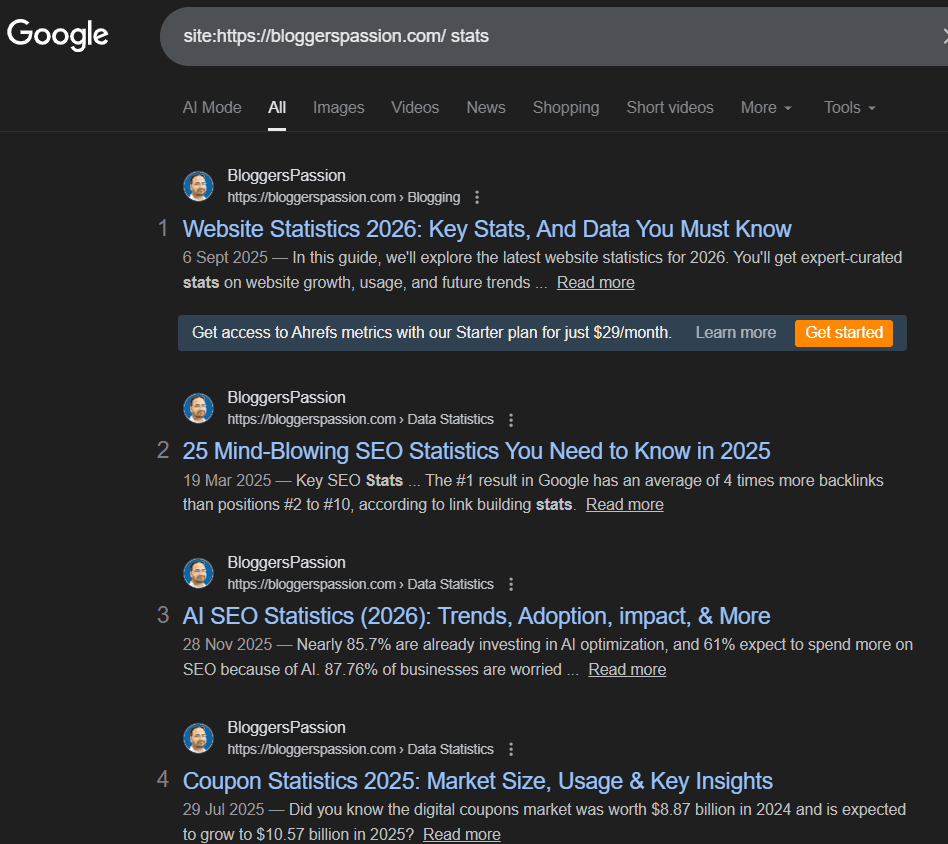
See that? You get all the SEO-related content (as in the example above) for the blog BloggersPassion. You can repeat the same thing for any other website in the world to get information.
Get the complete list of short and most used Google Search Operators List for Beginners.
Do you want to know the relevant and similar search results for a particular website? You can do so easily with the following command.
Just enter related: on Google search to look up the related results of a particular site.
For example, if you want to look up websites like Ahrefs.com, search related:ahrefs.com
Here’s what I found.

4. Advanced Image Search Can Be So Much Effective
Before talking about using free-to-use images on Google, let me tell you one thing. Most bloggers still use Google Images and place them on their sites without worrying about copyright issues.
Stop doing that practice if you’re doing it (when you’re writing blog posts). Make sure you’re using copyright-free images so you won’t get sued.
Here’s how you can find free-to-use images on Google’s advanced image search.
- Go to Advanced Image Search for images
- In the “all these words” box, type what you want to search
- In the “Usage rights” section, use the drop-down to choose what kind of license you want the content to have (pick the free-to-use option if you’re going to use copyright-free images within your site or elsewhere)
- Click on Advanced Search to continue. You’re done!
That being said, why use images within your blog posts?
Blog posts that use images get 96% more social shares. Social shares increase your traffic and search engine visibility.
If you want more search traffic and social shares, you must use appealing, relevant images for your blog topics. And make sure to only use those images that don’t have any copyrights; otherwise, you’ll regret it later.
5. Increase Your Search Traffic by Updating Your Blog Posts
How long has it been since you went through all the posts that you published? Is it a month? Several months? Or long back?
If you haven’t updated your old blog posts in a long time, now is the right time.
Seriously, why create new posts when your old content is not bringing you any traffic? If you’re still not convinced about updating your old posts, here are a few reasons to do it.
Why update your old blog posts?
Here are a few strong reasons to increase your search traffic by updating your old blog posts.
- Updating your old blog posts can help enhance your blog’s overall value. You can remove typos, outdated content, grammatical mistakes, and what NOT? Search engines value error-free content and put that content in the top search results almost always. So, undoubtedly, updating your old content is one of the best Google search tips you can use.
- You’ll get a chance to make your blog’s design more appealing. You can add more images, include videos or infographics to make your content even more attractive. Always remember that blog posts with images usually get more social shares. You can also add the ” tweet this button while updating your posts, so you can get more retweets.
- Come up with more relevant keywords and insert them while updating your old content. For me, this is the #1 reason to update my old content. Almost every single time, I do keyword research before updating my old blog posts. That way I bring in more search traffic for a variety of relevant keywords. Remember that search engines always give more value to old blog posts (because they are on the web for a long time), but make sure your old content is still relevant and highly informative.
- While updating your old blog posts, keep an eye on your comment section too. If any blog comments look spammy or don’t add any value to your existing blog posts, remove them ruthlessly.
- Once you’re done with updating your old content, make sure to use Google crawler (fetch as Google) from your Google Search Console account for quicker indexing.
How to update your old blog posts for better SEO?
Here are a few tips to use when updating your old content to boost search value and increase your overall website traffic from search engines.
- The first tip is to update your old posts frequently. If a post went live a year ago, make sure to update it as quickly as possible. Don’t neglect it.
- The most important thing to consider while updating your old posts is to use Google Analytics. Find out all the top 20 pages that are bringing you more visitors from search engines. Those are the posts you need to start working on immediately.
- While updating your blog posts, make sure to remove all the outdated information that no longer makes sense to the present day. Make sure to add relevant, fresh content to increase your content’s search value.
- Make sure to interlink to several other pages (recently published content) while updating your old posts. That way, search engine crawlers will crawl your site more efficiently and you’ll even get faster search rankings.
- Repurpose your old posts. If the content or topic is excellent, you can turn it into infographics, eBooks, videos, and whatever. Just spend more time to increase the visibility of your existing content by distributing it into various media such as infographics. Also, make sure to start building links from guest posts or skyscraper techniques to your old content to get higher search rankings.
6. Build An Audience That Links to You Naturally
If you’re a blogger, what’s the #1 thing that you want?
More traffic from search engines, right?
Yes, website traffic from Google is the currency for every blogger. But the hard part is getting traffic from Google is NOT easy unless you attract a lot of quality and relevant backlinks.
So, how do you get quality backlinks to your sites?
I’ve a simple tip for you that can help you get a ton of backlinks whenever you publish new content.
Build and grow an audience that will get you natural backlinks.
Don’t just focus on link building. That’s the BIGGEST mistake most bloggers make while building links to their sites.
Most popular bloggers like Neil Patel, Pat Flynn, and Ramit Sethi get backlinks without even trying. Do you know why? Do you know their secret?
The secret is simple: they attract backlinks naturally to their sites because they have a vast audience that links to them naturally whenever they publish new blog posts. Backlinks are one of the most effective Google search tips that you can use to attract more traffic.
That being said, if you’re looking for proven link-building tips, here are 3 of them that work like magic every single time.
- Create infographics: People are still not recognizing the importance of infographics, even though they attract a lot of quality links from other sources that help you improve both your SEO and search traffic. Use tools like Canva to easily create infographics.
- Guest posting: Although Matt Cutts said guest blogging is dead a long time back, it’s really not yet dead. Still, people are using guest posting effectively to build quality links to their sites. Just make sure NOT to write guest posts just to get links.
- Create case studies: Whether you know it or not, case studies are link magnets. They can easily attract more traffic, shares, and backlinks. The reason they work so well is that they focus on facts, not on random fluff. The best example is I wrote a detailed case study on Semrush and talked about how it helped me boost my search traffic, which attracted a lot of traffic and sales.
7. Use Essential SEO Tools
Although there are a ton of SEO tools out there, here are 2 SEO tools every blogger MUST use to increase their traffic and sales.
- Semrush
- Rank Math SEO Plugin
I’ve been using both Semrush and Rank Math SEO for a long time now, and I’m getting incredible results in traffic and sales, so I highly recommend you check them out.
Semrush: If you’ve been reading BloggersPassion for a while, you already know that I use and highly recommend Semrush. If you only have 1 tool, make it your companion. It can be used for everything from competitor research to keyword research to backlink analysis to site audits and more.
Rank Math: On-page SEO is one of the most effective search traffic tips you can use to bring more traffic from search engines. Here’s where a free tool like Rank Math comes in handy for doing on-page optimization.
8. Don’t Use Textual Format of Content
Let me tell you one of the lesser-known Google search secrets that most people don’t share with you: if you’re a blogger, don’t just limit your content creation to text.
90% of the blogging, SEO, and marketing-related content is in text format. Why just create text content when you can reach out to a broader audience by using videos, podcasts, infographics, webinars, etc? This is the right time to start focusing on other channels as well if you want more traffic.
You must realize the importance of using other platforms as well. To be precise, you can’t ignore video marketing, i.e, YouTube.
YouTube is the 2nd-largest search engine after Google, but bloggers rarely use it to create and promote their videos. If you’re still not creating YouTube videos, you should probably start now. That said, instead of making random videos, focus on turning your top 10 high-traffic blog posts into videos.
You can either use SlideShare to create videos or simply get in front of a webcam and start talking about the tips that are shared within your top blog posts. Just make sure to include links to your original blog posts in your video description.
Final Thoughts On Google Tips And Tricks 2026
If you’re a blogger, I know that increasing Google traffic isn’t easy. It takes time and more importantly, a lot of effort, such as link building, keyword research, etc, that’s why you need a tool like Semrush. So make sure to check it out and let us know your thoughts.
Do you have any other tips, tricks, or Google hacks that save time and use Google search even better? Share your thoughts in the comments below.
FAQs On Google Search Tips and Tricks 2026
→ Use site: domain name to find the number of pages indexed within a site
→ site: domain name Search Term to search for the pages having a particular term within a website
→ related: domain name to find related sites
→ quotes “tips and tricks” to find pages having an exact phrase
→ hyphen to exclude words (Mustang -cars)
→ link: website name to find all pages that link to a website
Use the tabs (Web, Image, News, and More), Voice search, Advanced image search, do the math, search for multiple words using OR (tea OR green tea), Money and unit conversions, and Track your packages by entering any UPS, USPS, or FedEx tracking number directly into the Google search bar.
Askew, Flip a Coin, Roll a Die, solitaire, Tic Tac Toe, Spinner & Fidget Spinner, and dreidel are a few to name.
Fun facts, I’m feeling curious, I’m feeling stellar, I’m feeling trendy, I’m feeling wonderful, I’m feeling playful, I’m feeling puzzled, I’m feeling doodly, I’m feeling generous, I’m feeling artistic, etc.
This is a button on the right side of the Google Search button that lets users see the first result directly when they query Google, bypassing the search results page.



Hello Anil,
Great SEO tips you have shared here. Re purposing and updating the old blog posts can definitely add value to the post and rank it better in search engine result page. I have recently updated some of my old posts and its really increase my blog traffic. Thanks a lot for bringing these great tips here.
Have a great day 🙂
Vishwajeet
Hi Anil,
Really worthy article. I am always use google search and search queries for finding the related blog for building high quality backlinks. You gave bonus to my strategy through this article. Thanks
Shajeer
Hi Anil,
Great tips, especially for those of us who are trying to improve our SEO. I actually went back through my archive of old posts and updated a lot of them. It took a lot of time, but it was a necessary thing to do.
Hopefully, by making these changes last week, I’ll see an improvement in my Google traffic. I know that it takes time to notice any changes, but I can’t wait.
I personally haven’t heard of Google voice search. Pretty amazing that we can now do a search on Google without having to type anything on our keyboards.
I agree with you and no longer stress about link building. I know that links are important, but in the past, I stressed about building links to my blog. Yes, I do guest posting and I love it. However, I don’t do it merely for the link building purposes. I do it because it helps me build relationships online.
As I start getting my name and blog out on the blogosphere more, I am noticing an increase in my blog traffic. So guest blogging definitely works, you just have to give it time to see the effects.
Thanks for sharing these tips with us.
Have a great day 🙂
Susan
Hi Anil Sir,
You have written a awesome stuff. These days people like voice search most. And the best part of the content that I liked most is repurposing old published post. We should repurpose our old posts. I will really increase our traffic. Thanks for the guide.
Hey Anil!
Great tips on Google Search!
It is true that more and more people are now using only their voice to do a google search. I would say most of my friends use their voice to search on google.
I like your tip of updating old blog posts. That is something I haven’t really thought about. It is a smart and great idea. I have also recently learned about Internal Linking and how that affects your rankings as well.
Interlinking within your blog is also a ranking factor for the google algorithm. They are just like backlinks!
Just a quick extra tip! 🙂
Thanks for sharing!
Cheers! 😀
Thank you so much for this list, i have been wanting to start writing quest post for other blogs for some time but don’t know how to go about it, how to contact them, how many post is too much or too few, and I also need names of some sites that allows others to post on their blog.
Finding your site today has made my wish come true.
Thank you so much.