


Product Name: Rank Math
Summary
Rank Math is an all in one WordPress SEO plugin and it took the WordPress SEO community by storm with its amazing list of features. Wondering why is it better than Yoast? Check out our in-depth review to find all the details.
Rank Math has become one of the most popular WordPress SEO plugins in 2026. Bloggers and site owners are switching from Yoast SEO and other plugins to take advantage of its incredible features.
I previously used the premium version of Yoast SEO and migrated to Rank Math in 2020. The migration process went smoothly, and yes, all the settings from the Yoast plugin have been imported without any difficulty.
So, I have been using Rank Math Pro for more than 5 years. To help you decide whether it’s worth it, I’ve created this comprehensive review that reveals its true potential.

In my unbiased Rank Math review, I’ll discuss the following;
- Should You Upgrade to Rank Math Pro? I’ll share my experience after using this plugin, so that you can decide to use it or not.
- How to configure Rank Math for better SEO? I’ll provide step-by-step guidance to optimize your settings for maximum SEO impact.
- How Do I Migrate from Other SEO Plugins to Rank Math? I’ll include a simple migration process for your understanding.
- What Are The Recent Features of Rank Math? I’ll discuss its latest features.
- Who Are Its Competitors, and What Are Its Pros & Cons? I’ll tell you the best Rank Math alternatives and explain its positives and limitations.
Ready to find out whether Rank Math is for you? Let’s begin!
Table of Contents
- Rank Math Review 2026: Quick Insights & Verdict
- Getting Started with Rank Math SEO Plugin: A Quick Intro
- Rank Math SEO Plugin: Core Features, Benefits & Limitations
- How to Optimize Rank Math Plugin for Better SEO?
- From Flat Traffic to Consistent Growth: My Rank Math Experience
- What’s New In Rank Math Plugin?
- Rank Math Reviews By Real Users
- Rank Math Pro vs Free Version
- Rank Math Pro Price Breakdown
- Rank Math SEO vs Yoast: Real Comparison & My Switch Story
- Pros & Cons of Rank Math Plugin
- Ready to Move to Rank Math? Migration Tips
- Looking Beyond Rank Math? Top 2 Alternatives
- 1. Yoast SEO
- 2. AIOSEO (All In One SEO) Plugin
- Top Rank Math Questions Answered
- Is Rank Math SEO free?
- Do I have to remove other WordPress SEO plugins if I install Rank Math?
- Is it easy to migrate to Rank Math from other plugins?
- Rank Math Vs AIOSEO? Which SEO plugin Is Best?
- What if I need any help with the Rank Math plugin?
- Wrapping Up: Rank Math SEO Plugin Review & Final Insights
Rank Math Review 2026: Quick Insights & Verdict

Rank Math is a WordPress SEO plugin designed to help bloggers and site owners optimize their content for search engines. From on-page SEO analysis to schema markup and keyword tracking, it covers almost every SEO need.
My experience with Rank Math Pro:
I find Rank Math Pro to be a perfect SEO plugin, as it makes technical SEO and content optimization easy. However, to properly optimize my website, I apply its recommendations naturally, avoid keyword stuffing and focus on natural language.
I upgraded to Rank Math Pro because it offers advanced features like content AI, better keyword suggestions, rank tracking, and custom schema options that the Yoast SEO Pro plugin lacks.
While the free version of Rank Math is great for beginners, the Pro version gives you access to advanced features like:
- Advanced SEO Analysis
- Optimize unlimited keywords
- Multiple schema markups
- Google Analytics Integration
- Keyword rank tracking
- Local SEO
- Track PageSpeed for Each Post & Page
While I really like Rank Math for content optimization, I found a few limitations:
- There is a learning curve, as it offers plenty of features
- If I focus on getting a perfect 100/100 optimization score, it leads to content over-optimization
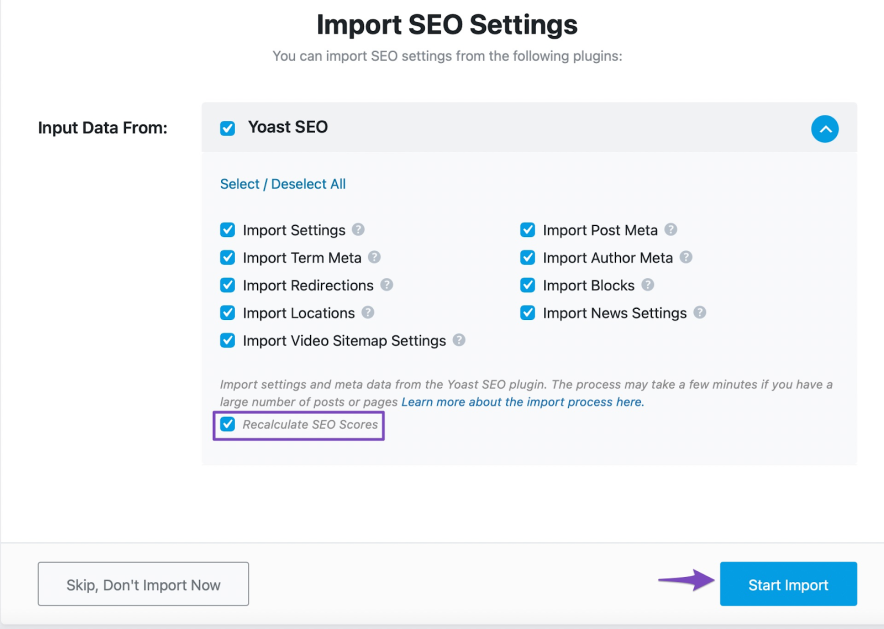
Rank Math Setup Wizard helps you easily migrate ALL your WordPress posts and settings from Yoast (or any other optimization plugin) to Rank Math.
So, is Rank Math Pro worth it? I say “Yes” for anyone who serious about growing their search traffic. However, remember that no tool is perfect, and SEO is an ongoing process.
Getting Started with Rank Math SEO Plugin: A Quick Intro
Rank Math is a handy WordPress SEO plugin that helps me optimize blog posts to improve my website’s search rankings.
This plugin gives me everything I need, from optimizing meta titles and descriptions to tracking keyword rankings to integrating with Google Search Console.
With over 3 million active users and a 4.9-star rating on the WordPress Plugin Repository, Rank Math is one of the leading SEO plugins. A free version is also available for download.
Here’s what its premium interface looks like;
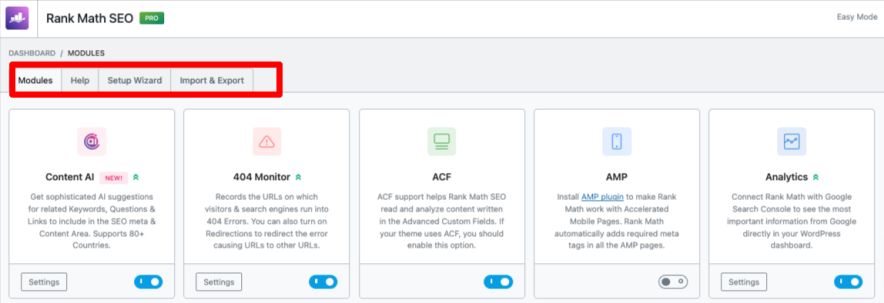
As you can see from the screenshot, its user interface is clean, beginner-friendly, and doesn’t require coding skills. We can easily configure settings, monitor 404 errors, add schema, and perform many SEO-related tasks.
Here’s how the Rank Math’s Post Editor screen looks like;

You can see multiple things, including my blog post preview, focus keywords, basic SEO suggestions, and an optimization score.
Rank Math Pro’s key modules include local SEO, image SEO, redirections, and rich snippet integration. The standout feature for me is Content AI, which helps me create SEO-friendly articles.
Here’s a quick 2-minute video of Content AI from the official website;
All in all, the Rank Math Pro plugin makes SEO easier and saves me a lot of time while creating SEO-optimized content. Whether you’re a newbie or an expert, this plugin can help you optimize your website for better rankings in Google.
My favourite Rank Math Pro Features
On-Page SEO: Optimize titles, meta descriptions, and blog posts with in-built suggestions.
Keyword Research: Identify relevant keywords to optimize pages.
Schema Markup: Implement rich snippets to improve search rankings.
404 Monitoring: Identify and fix broken links to maintain a user-friendly website.
Google Search Console Integration: Monitor website performance and fix issues directly within WordPress.
Rank Math SEO Plugin: Core Features, Benefits & Limitations
Let’s see the key features of this excellent SEO extension for WordPress!

Rank Math Content AI Module Explained
Rank Math has launched a new tool called Content AI that helps you generate content with just one click.
Its content AI module is a separate paid add-on. Pricing starts at $5 per month, and you get 5000 monthly AI credits to create content.
Rank Math’s Content AI tool streamlines my workflow by saving time on content creation and enabling bulk generation of SEO titles and meta descriptions.
It also supports unlimited site usage and lets me create content in 30 languages with a single click.
Besides, this SEO tool helps me summarize existing text, expand content, structure headings, optimize meta tags, identify relevant keywords, suggest links, and generate question ideas.
How to Configure Rank Math Content AI Module?
Install and activate the Rank Math plugin.
Go to Rank Math > General Settings > Content AI.
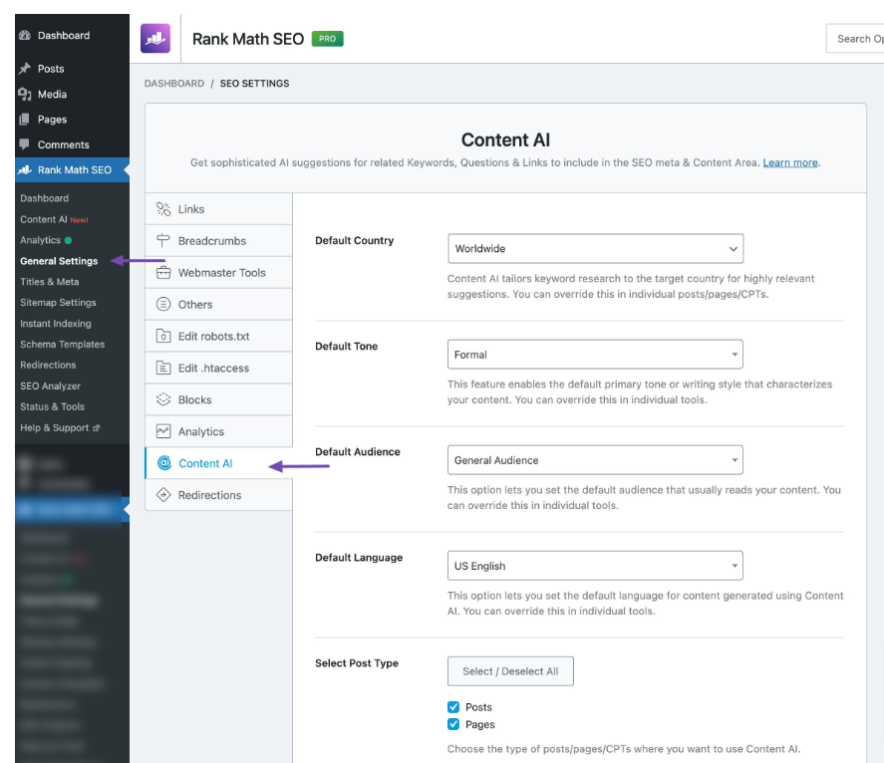
Quick note: If you can’t find these settings, please check if you’ve activated the Content AI module. You can do this by going to WordPress Dashboard > Rank Math SEO > Dashboard > Modules > Content AI.
Here are the next few steps to start with the Content AI feature in Rank Math.
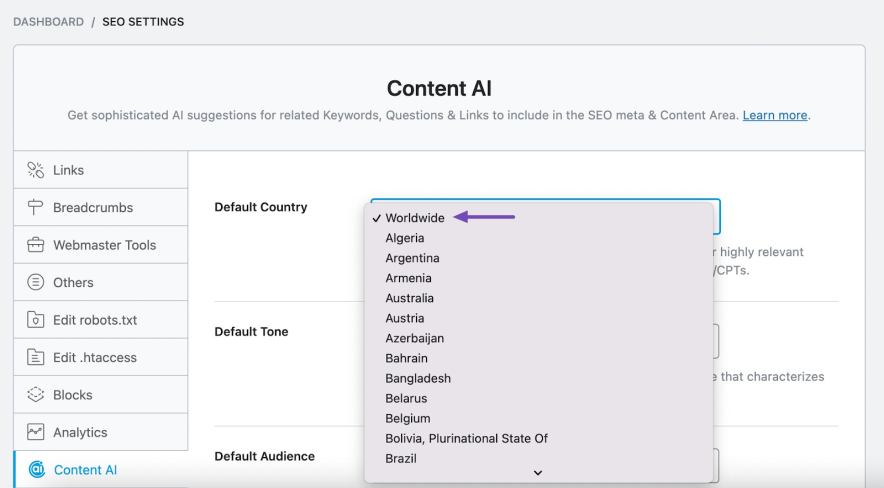
I’m targeting people from all over the world, I’ll select “Worldwide.”
By default, Content AI generates text in a formal writing tone. If I want to change this, I can select a different tone from the dropdown menu.

Then, pick my audience (gamers, general audience, fitness enthusiasts, etc).
I should pick the types of posts (e.g., blog posts and pages) I want to use content AI on.
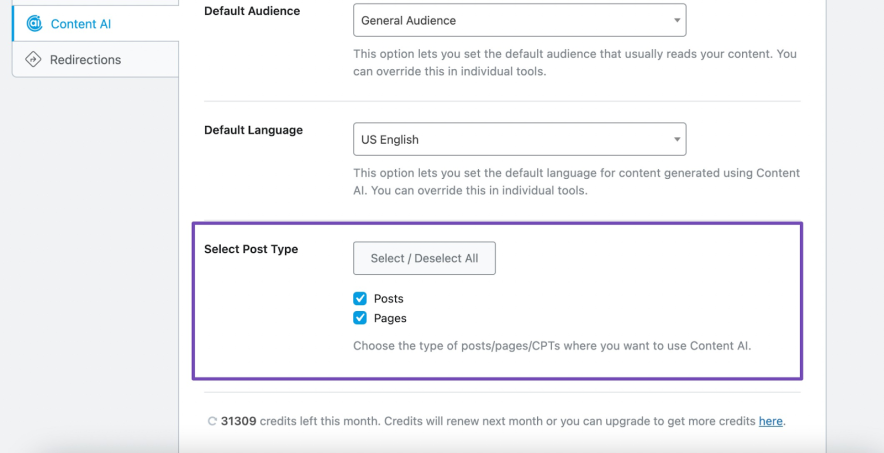
After tweaking Content AI settings, click “Save Changes” to activate them. That’s it!
I found a few issues, and I want to discuss them in my Rank Math Content AI review.
- It uses credits for each suggestion, so I need to be careful with how I use them.
- I can’t entirely depend on it for content creation because it lacks personalization for my target audience.
404 Monitor
Rank Math’s 404 monitor is a powerful tool for identifying and fixing broken links on my WordPress website. This feature is better than Yoast plugin!
Quick note: A 404 error occurs when a user tries to access a page that doesn’t exist on your website. It’s frustrating for users and can hurt your website’s SEO.
Benefits of 404 Monitor from Rank Math:
- It tracks 404 errors
- Displays their frequency (how many hits it generated) along with the access time
- It helps me understand their URL origin
Here’s what it looks like;
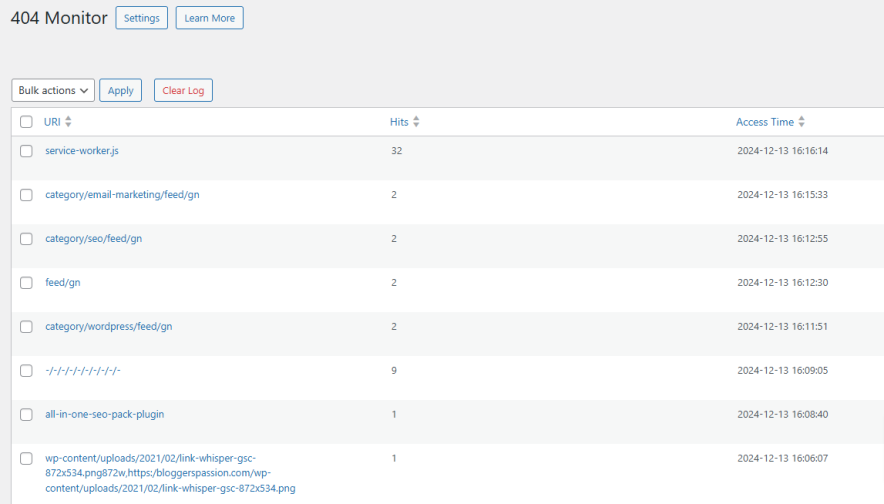
Rank Math’s 404 Monitor logs all 404 errors on my website. I can either export this data or use the Redirection Manager to easily fix broken links.
Note: The 404 data export option is available only in Rank Math Pro. I can export all 404 URLs generated in the 404 monitor with this feature.
The best part? I can choose to monitor all or only specific broken links.
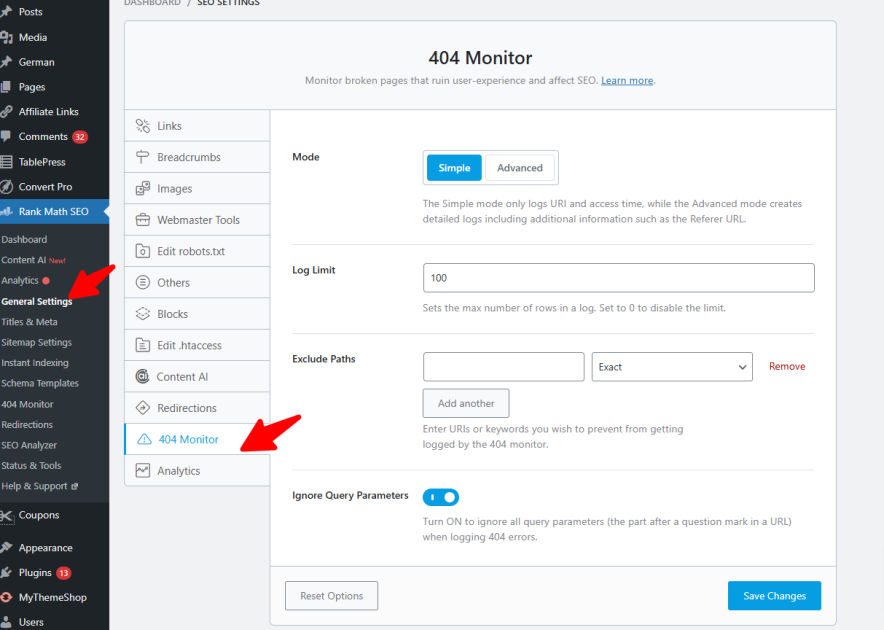
As you can see above, from General Settings < 404 Monitor, I’ll have full control over the following things.
- Log Limit: Manage log size by setting a maximum number of error logs.
- URL Exclusion: Filter out specific URLs from error logs.
- Keyword Exclusion: Prevent 404s with particular keywords from appearing in logs.
- Query Parameter Exclusion: Ignore 404s with query parameters to reduce clutter.
The 404 Monitor in Rank Math Pro is useful, but I noticed two drawbacks.
First, it can use a ton of web server resources, especially if my site has high traffic, slowing things down. Second, it doesn’t always combine similar errors, making it harder to manage redirects.
SEO Analyzer
SEO Analyzer is an excellent addition to Rank Math that most SEO plugins, like Yoast, lack.
I can check my website’s SEO analysis with one click. After installing Rank Math, I’ll click on the SEO Analysis tab to start the process.

Clicking “Start SEO Analyzer” will automatically analyze my site and give me a Rank Math score out of 100.

Here’s what it looks like;

As you can see, it gives me an overall SEO score. It helps me easily identify and fix SEO issues, improving my rankings.
It shows me all the warnings on my site, along with recommendations to fix them.
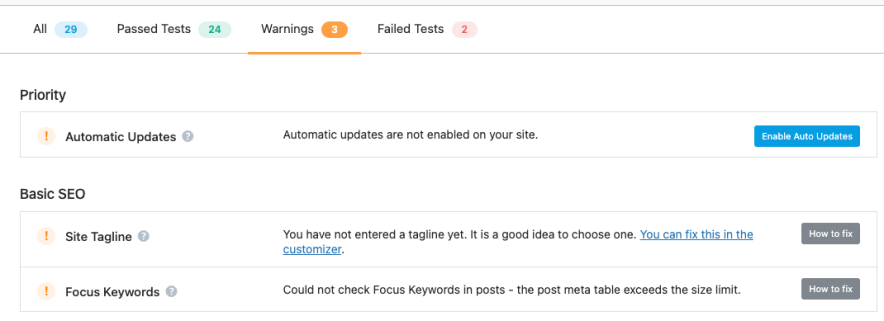
It also shows a list of all the failed tests that are preventing my site from getting better rankings.
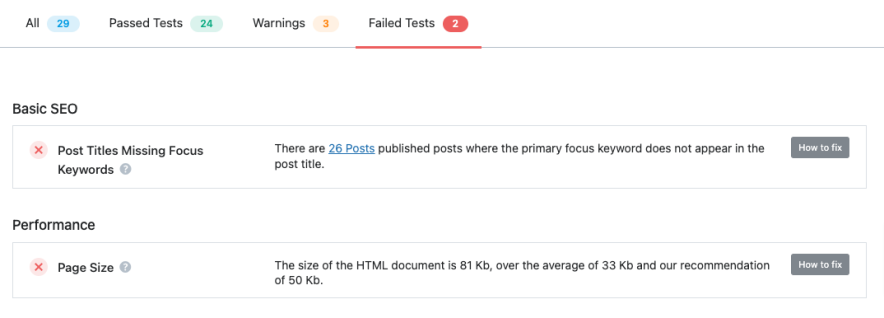
The key here is to prioritize fixing “failed tests” to improve rankings. This feature is NOT available in other alternatives like Yoast SEO or All in one SEO plugin.
What are the drawbacks I find in the SEO Analyzer feature from Rank Math?
It sometimes misses more complex SEO issues, like broken internal links or over-optimized content optimization errors.
Redirections
Most SEO plugins, including the free version of Yoast SEO, don’t have a built-in redirection manager. This means I’ll either need to upgrade to their premium version or install a separate redirection plugin.
Rank Math SEO, on the other hand, offers an advanced redirection manager even in its free version.
Here’s what it looks like;
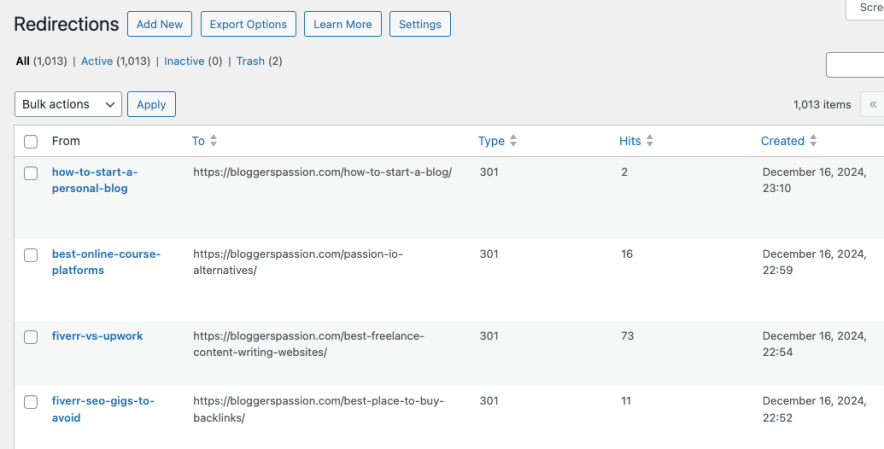
You can see, it is simple to create redirects and see how many visits each link has generated. It also contains several options for redirection.

When setting up redirects, I have the flexibility to choose from various types, such as:
- 301 permanent move
- 302 temporary move
- 307 temporary redirect
- 410 content deleted
- 451 content unavailable
What’s the drawback I found in the Redirections feature?
Although this is a great feature, one might require some getting used to, especially if you’re new to SEO and redirects.
Instant Indexing
Rank Math’s Instant Indexing feature lets me submit my URLs to IndexNow-enabled search engines.
This feature is NOT available in Yoast. Why is this feature helpful? It helps me index my website’s content really fast, even if I haven’t configured any webmaster tools.
To configure Automatic URL Submission, I simply need to enable the Instant Indexing module in my WordPress Dashboard under Rank Math SEO. This feature is available in Rank Math Free, so there’s no need for any additional setup.
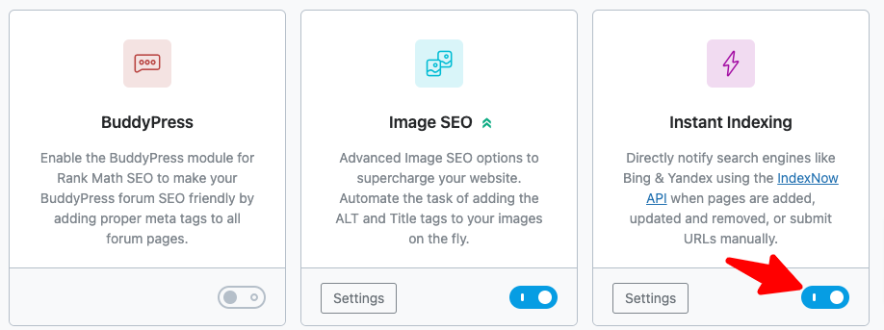
I can go to Rank Math SEO > Instant Indexing > Settings to fine-tune my automatic URL submission settings. Here, I can choose which content types I want to submit automatically.
Once I’ve made my selections, I’ll need to ensure that Rank Math has generated an API key.
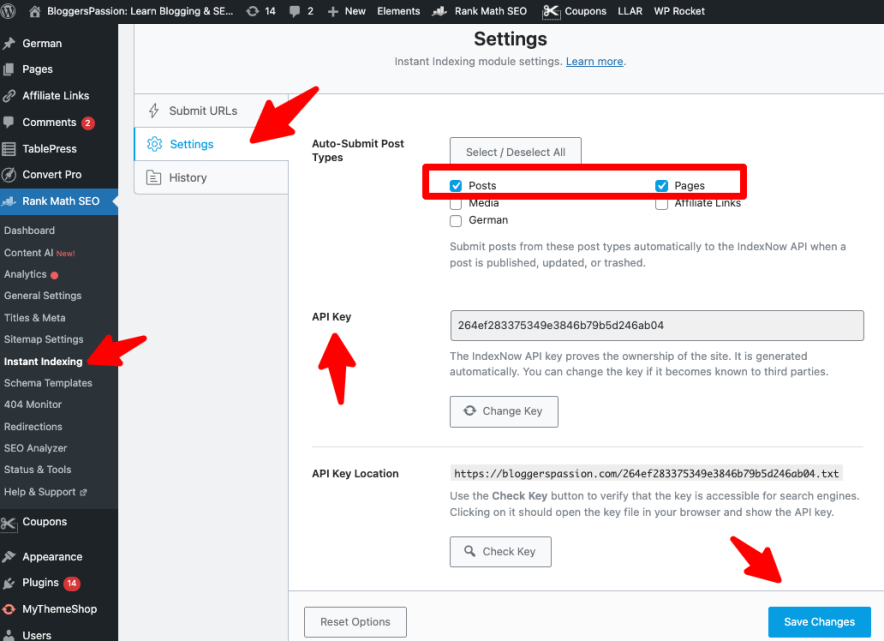
Finally, I can save my preferences by clicking “Save Changes.”
That’s it! Rank Math will automatically submit new or updated posts to IndexNow, speeding up their indexing. However, it won’t submit posts that are set to “NoIndex.”
What’s the potential drawback of this feature?
Automatic instant indexing can lead to over-indexing and excessive submissions, especially for websites with high-frequency content updates.
Rank Tracker
If I want to know how my SEO efforts are paying off, I should track keyword positions. Here’s where Rank Tracker comes in handy. It is an excellent feature that helps me see how well my website is doing in the search results.
I can easily integrate Rank Math with Google Search Console (GSC) to keep track of where my website ranks for different keywords.
I can easily find:
- All the keywords that my website is currently ranking for.
- The total number of clicks for every keyword.
- The average click-through-rate (CTR) for my keywords.
- The exact search engine ranking for each keyword.
Check how it looks!
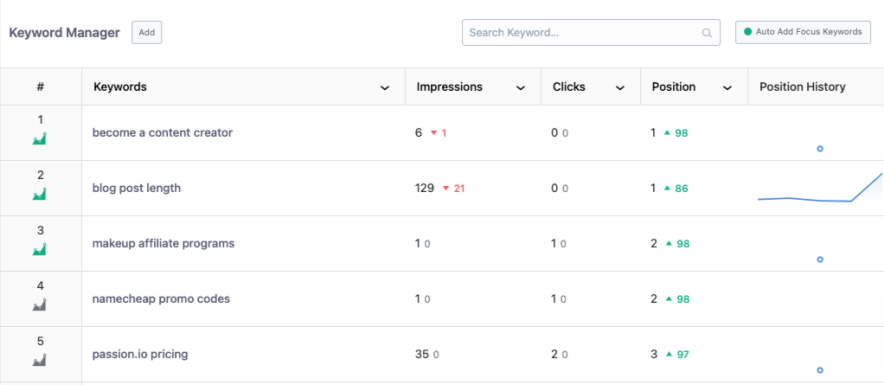
I can also track keywords that are ranking in top 3, top 10, top 50 and top 100 positions.
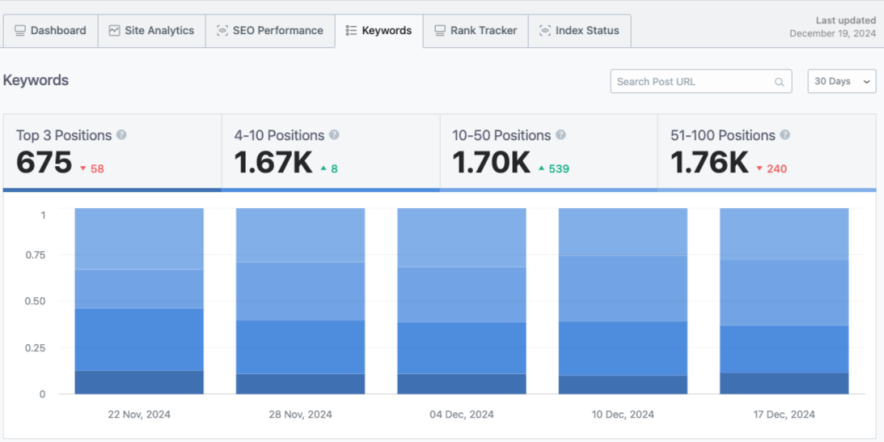
There’s one thing that sets Rank Math Pro apart from its competitors like Yoast is that it helps you identify which keywords are getting better rankings and which are losing traffic.
Have a look;

You can see that I can discover a list of the top winning keywords along with the top losing keywords. That way, I can make necessary changes to my content to maintain proper rankings.
Since Rank Math’s Rank Tracker relies on Google Search Console data, it’s limited to the keywords already tracked there. It doesn’t offer detailed competitor analysis or advanced tracking options like dedicated SEO tools.
LSI Keywords
LSI keywords (Latent Semantic Indexing) are a goldmine for boosting my search traffic.
Rank Math Pro makes it so easy for me to find highly relevant LSI keywords for my blog posts. This particular feature is NOT available in Yoast, which makes Rank Math a superior choice for many SEO professionals like me.
See, how it shows!

You can see that Rank Math starts suggesting relevant LSI keywords automatically. This helps me optimize my content for better rankings without worrying about keyword stuffing.
If I want to boost my blog traffic with LSI keywords, Rank Math has me covered. By simply connecting my account, I get unlimited keyword suggestions directly from Google; no extra tools needed.
I’ve found that Rank Math Pro’s LSI keyword suggestions are based on Google’s autocomplete data. For advanced keyword research, I’d still need another SEO toolkit such as Semrush or Ahrefs.
How to Optimize Rank Math Plugin for Better SEO?
Make sure to optimize the Rank Math plugin to maximize SEO benefits without overcomplicating your setup.
Here’s a crisp, actionable guide:
1. Complete the Setup Wizard Properly
When installing Rank Math, don’t rush through the setup wizard.
- Choose the correct website type (blog, business, portfolio, etc.)
- Connect your Google account for Search Console data
- Enable advanced options if you’re comfortable with SEO basics
This builds a strong foundation.
2. Configure Titles & Meta Tags
Go to Titles & Meta settings:
- Set SEO-friendly title templates
- Write compelling meta descriptions
- Enable meta robots (index/follow for important pages)
Make sure every post and page has a unique focus keyword.
3. Enable Schema Markup
Rank Math’s built-in Schema generator is powerful.
- Assign appropriate schema (Article, Product, FAQ, HowTo, etc.)
- Use FAQ schema to improve visibility in SERPs
- Customize schema for cornerstone content
Structured data improves click-through rates.
4. Optimize Content Using the SEO Score
Use Rank Math’s on-page analysis:
- Add focus keywords naturally
- Improve keyword placement in title, URL, and headings
- Optimize internal and external links
- Improve readability score
Treat the score as guidance; It should not be the ultimate goal.
5. Enable XML Sitemap
Ensure XML sitemaps are enabled and:
- Exclude unnecessary pages (tags, archives if not needed)
- Submit sitemap to Google Search Console
This helps search engines crawl efficiently.
6. Use Advanced Modules (Carefully)
I have discussed these modules in the above section!
Under Dashboard > Modules:
- Enable Redirections for broken links
- Use 404 Monitor to fix crawl errors
- Activate Image SEO to auto-add ALT tags
Only enable what you need to keep your site lightweight.
7. Optimize for Local SEO (If Applicable)
If you run a local business, enable the Local SEO module and add:
- Business name
- Address & contact info
- Opening hours
This improves visibility in local searches.
Rank Math is powerful, but SEO success depends on quality content, technical optimization, and backlinks. Use the plugin as a tool; not a shortcut.
From Flat Traffic to Consistent Growth: My Rank Math Experience
Within months of properly configuring the plugin and following a structured SEO process, I started seeing measurable growth inside Google Search Console.
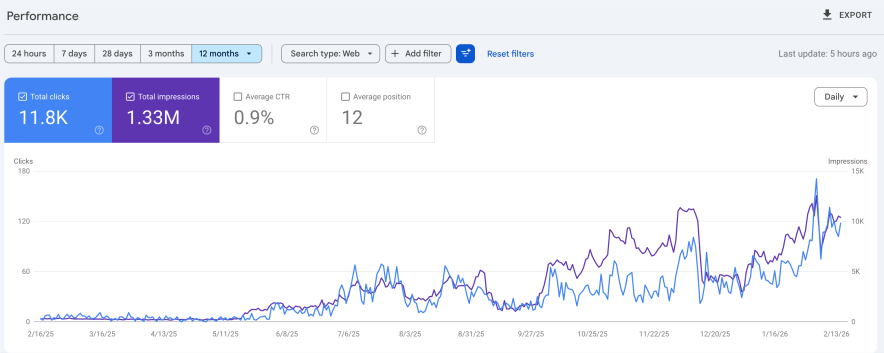
What Changed After Implementation?
Over the last 12 months:
- 1.33M impressions
- 11.8K clicks
- Average position: 12
- Clear upward trend in both impressions and clicks
The most important part? The growth is consistent and compounding.
In the early months, traffic was flat. But after properly optimizing titles & meta descriptions, adding structured schema (FAQ & Article), improving internal linking, fixing 404 errors and redirects, and optimizing old blog posts, I began seeing steady ranking improvements.
Rank Math didn’t magically increase my traffic overnight. But when used correctly, it became a powerful framework that helped me structure content, fill technical gaps, and steadily grow search visibility. If you stay consistent for 6–12 months, the results can genuinely surprise you.
What’s New In Rank Math Plugin?
Rank Math has introduced several noteworthy features recently that I want to mention in my genuine Rankmath review.
1. AI-Powered Content Tools
Rank Math now integrates advanced AI Content features that go beyond simple analysis. It includes a Blog Post Wizard and AI-generated Image ALT text tools, and 1-click fixes for SEO issues directly from Content AI.
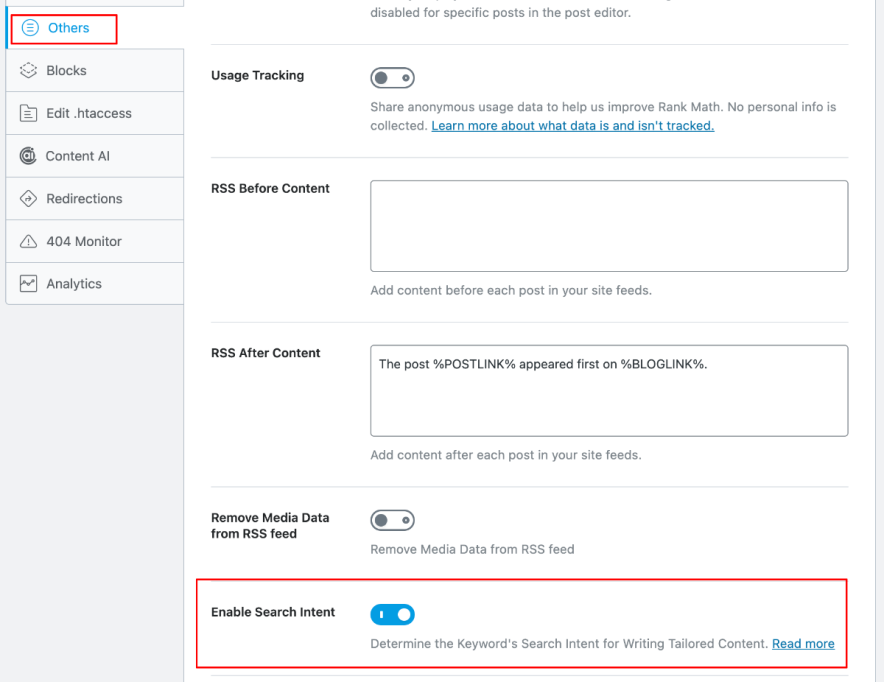
2. Search Intent Detection
Rank Math can now detect the search intent behind your focus keyword, helping you tailor content more precisely for what users are actually searching for (informational, commercial, navigational, etc.), which improves ranking relevance.
3. AI Search Traffic Tracking
A highly anticipated addition is the ability to track AI search traffic from AI-driven engines like Gemini and ChatGPT inside Rank Math Analytics. It is essential as AI search becomes more mainstream.
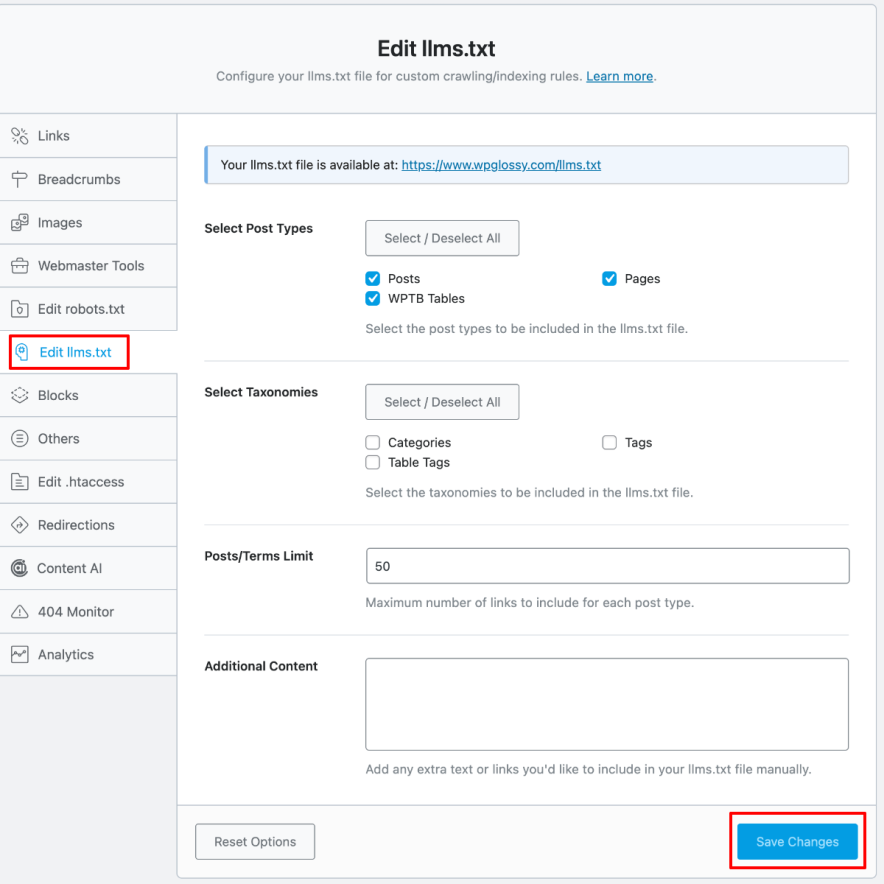
4. Robots.txt Validator + LLMs.txt Support
There’s now a built-in robots.txt validator (ensuring your directives are correct) and support for LLMs.txt (a new standard to help language models better understand indexing rules). These are advanced technical features often overlooked in other SEO plugins.
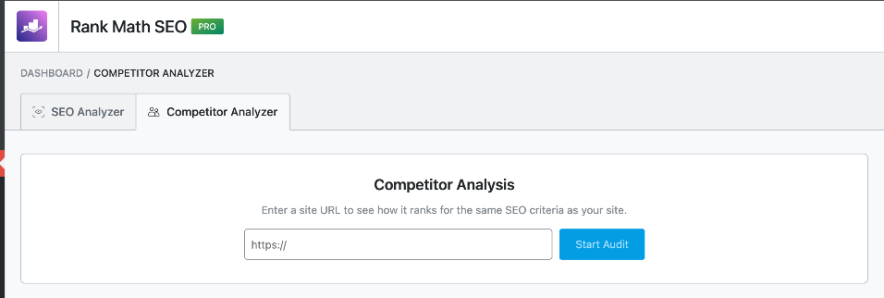
5. Competitor SEO Comparison Tools
Rank Math has added side-by-side SEO analysis with competitors, giving you insights into why others might be outranking you. It is a powerful feature for strategic SEO improvement.
6. Enhanced YouTube Integration
New settings allow you to insert a YouTube API key directly into Rank Math’s video sitemap settings so video metadata is fetched and indexed more accurately. It is a useful feature for video-focused sites.
7. More Schema Control
Rank Math continues expanding structured data support, including enriched Product Carousel Schema behavior (especially on shop and archive pages) and more flexible schema customization options.
Rank Math Reviews By Real Users
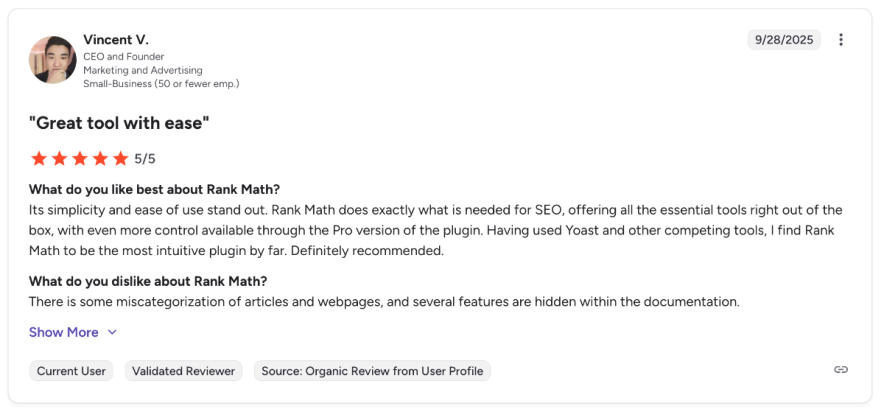
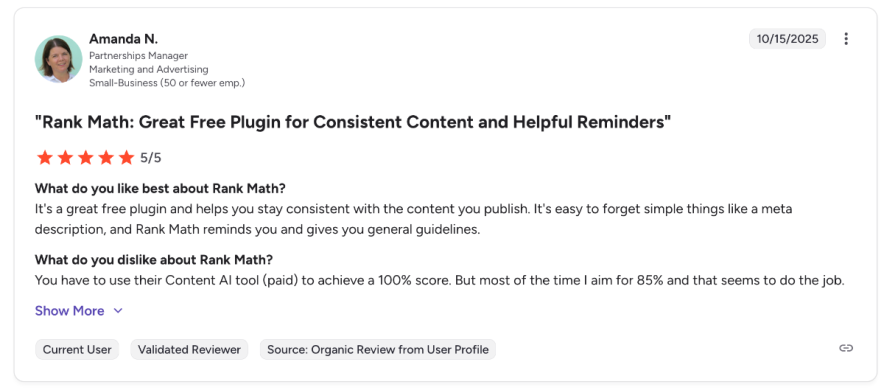
Thousands of WordPress users rely on Rank Math for technical and on-page SEO.
Here’s what they love and where they see the most value!
Rank Math Pro vs Free Version
Rank Math offers a free plan and three paid plans. Rank Math Pro, the entry-level paid plan, costs $98 annually and is ideal for full-time bloggers.
If you’re new to blogging, start with Rank Math’s free plan. As your blog grows and starts generating revenue, you can upgrade to the Pro version.
Here’s a comparison of KEY features missing in the Free version versus Rank Math Pro.
| Feature | Free | Pro |
|---|---|---|
| Track SEO Performance of Individual Posts | Not Available | Available |
| Detect Orphan Pages | Not Available | Available |
| Import GSC & GA Data from a Particular Country | Not Available | Available |
| Google AdSense Earning History | Not Available | Available |
| Automate Schema Implementation | Not Available | Available |
| Position History for Keywords & Posts | Not Available | Available |
| Check Ranking Keywords for Each Post | Not Available | Available |
| Track Top 5 Winning and Losing Keywords | Not Available | Available |
| Free Content AI Trial With Credits | 0 | 5000 |
| Tracked keywords | 0 | 500 |
| Integrated Google Analytics | Not Available | Available |
| Image SEO to automatically add ALT tags to your images | Not Available | Available |
Rank Math Pro Price Breakdown
At the time of writing my Rank Math Pro review, it offers three pricing packages, listed below.
1. Pro: If you’re a blogger or solopreneur, go with this plan. It costs $83.88/year and allows you to install the Pro version on unlimited personal websites. This plan is the MOST valuable plan for website owners, content creators and small businesses.
- Unlimited personal websites
- Track 500 Keywords
- Powerful Schema Generator
- Free Content AI Trial (5.0k Credits)
- 24/7 Support
- Google Data Fetch Frequency is 180 days
2. Business: If you need to use Rank Math Pro on multiple client websites, this is an excellent plant for you, which costs $251/year and offers support for up to 100 sites.
- Support for 100 client websites
- Track 10,000 Keywords
- Powerful Schema Generator
- Free Content AI Trial (12.0k Credits)
- 24/7 Priority Support
- There is no limit on Google Data Fetch Frequency
3. Agency: For agencies managing up to 500 client websites, Rank Math Pro’s Agency plan is perfect and priced at $599 per year.
- Support for 500 client websites
- Track 50,000 Keywords
- Free Content AI Trial (30.0k Credits)
- Powerful Schema Generator
- 24/7 Priority Support
- No Limit on Google Data Fetch Frequency
What if you’re not happy with their paid plans? Don’t worry; Rank Math paid plans come with a 30-day money-back guarantee.
While discussing pricing, I want to let you know we have a special Rank Math discount of 10% and you don’t need to enter a coupon to claim it.
Rank Math SEO vs Yoast: Real Comparison & My Switch Story
The free version of Rank Math offers many features that are available in Yoast’s premium version.
Yes, we can create sitemaps and redirects, add Schema markup, view social previews, get internal link suggestions, and monitor 404 errors, all without spending a penny. We need to get Yoast Premium to use these features.
Here’s a comparison highlighting why Rank Math is often considered superior to Yoast SEO.
| Feature | Rank Math | Yoast SEO |
|---|---|---|
| Content AI Integration | includes Content AI to optimize my content for search engines | Lacks integrated AI features for content optimization. |
| Keyword Suggestions | Offers free keyword suggestions through autocomplete feature | Does not provide built-in keyword suggestion features |
| Performance and Speed | Lightweight and fast, with fewer lines of code and features that can be easily turned on or off. | Larger file size with more memory usage and requests |
| Premium Features Availability | Offers features like sitemaps, redirects, Schema markup, social previews, internal link suggestions, and 404 monitoring for free. | Requires a premium subscription to access these features. |
| Schema Markup Support | Provides 18 pre-defined Schema types and 6 extra types, allowing multiple schemas per page. | Offers basic Schema support with limited customization options. |
| Support for Free Users | Dedicated, premium-level support available even to free users. | Limited support for free users |
| Single Membership for Multiple Sites | A single PRO membership covers all personal sites | Each license is typically for use on only one website. |
| Keyword tracking | Up to 500 keywords | Only up to 5 keywords |
| SEO Analyzer tool | includes an advanced tool to evaluate website performance. | Yoast SEO lacks a dedicated SEO analyzer tool! |
It is clear that Rank Math offers you many more features for free than Yoast does.
For more information on Yoast, dive into our detailed comparison of Yoast SEO premium vs free plugin.
Not only me, but most users have also switched from Yoast. Check the discussion on Reddit.
Pros & Cons of Rank Math Plugin
| Pros | Cons |
|---|---|
| Intuitive interface for easy setup and optimization. | Using its advanced features can be time-consuming for those new to SEO. |
| import settings from popular SEO plugins such as Yoast, AIO plugin, etc. | It leads to over-optimizing your content for target keywords. |
| Monitor site health, track keywords, and identify issues directly from the dashboard. | You need credits to use Rank Math’s AI tools for optimization. |
| lightweight plugin that never slows down your site. | |
| Built-in rich snippets and redirection tools. | |
| Rank Math is compatible with almost all WordPress themes and page builders. | |
| Automatically adds ALT tags for missing images. | |
| Rank Math’s robust keyword tracking feature allows you to monitor your website’s position in Google for target keywords. |
Ready to Move to Rank Math? Migration Tips
Quick note: You must check this great guide on setting up Rank Math on their official blog.
Let me show you how to migrate from Yoast to Rank Math.
Go to Rank Math’s “Import” tab, which shows all the SEO data from other plugins that you can bring to Rank Math.
This extension makes sure you don’t lose any important data when you switch.
The best part about Rank Math is that it automatically detects which SEO plugin I’m currently using and helps me easily decide which settings to import.
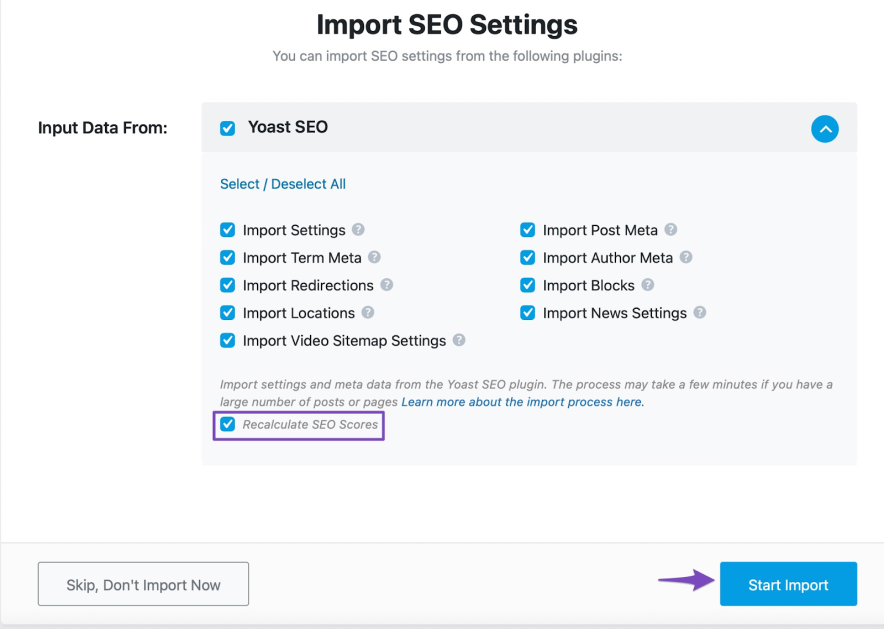
Click the “Start Import” button and wait for the import to finish.
Once the import reaches 100%, click “Continue” to move to the next step.
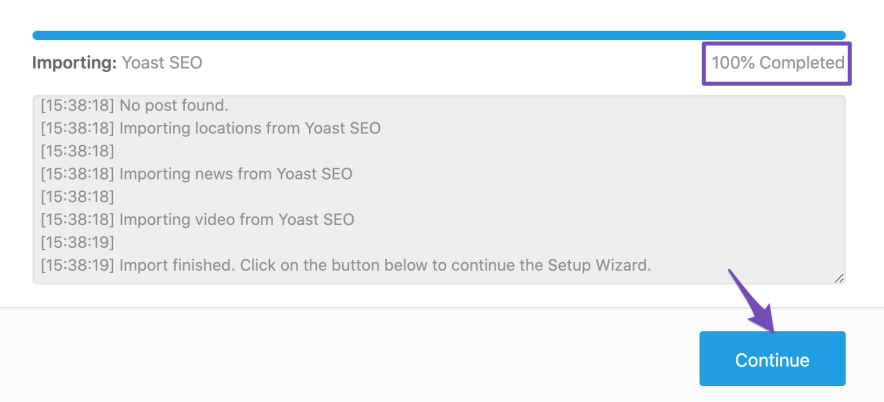
The rest of the migration process is straightforward. I’ll be guided through a few simple steps (such as connecting my site with Google Analytics, adding a logo, etc) to complete the setup. I just need to follow the on-screen instructions to finish the migration.
If you still have any questions about importing data from other SEO plugins, please don’t hesitate to contact Rank Math’s support team directly.
Looking Beyond Rank Math? Top 2 Alternatives
Although Rank Math is a powerful SEO plugin, it might not be the best fit for everyone.
There are too many of the top WordPress SEO plugins out there. Here are two top alternatives to Rank Math that can help you optimize your WordPress site for better rankings.
1. Yoast SEO
Yoast SEO is one of the most downloaded WordPress plugins that helps you optimize your content for search engines. With this plugin, you’ll get all the essential features like keyword optimization, canonical URLs, XML sitemaps, and more.
Here are some pros and cons of using Yoast:
Pros:
- Easy to use, and its simple interface makes it easy to get started with the plugin.
- Offers many features to help you optimize your website. Some of its key features include keyword analysis, title and meta description optimization, and content readability checks.
- It’s free version that’s good enough for most website owners.
Cons:
- Yoast offers limited customization options compared to Rank Math.
- Yoast’s plugin code is 1.5 times larger than Rank Math’s, which can ultimately slow down your website’s loading time.
2. AIOSEO (All In One SEO) Plugin
Another popular alternative to Rank Math is All in One SEO (AIOSEO). This plugin offers a full suite of SEO tools, including Link Assistant, keyword optimization, Robots.txt Editor, and social media integration.
Pros:
- Optimizes titles, meta descriptions, and content with its SEO optimizer
- Includes a video sitemap generator
- Automatically generate a WordPress XML sitemap
- Offers an “SEO Audit Checklist” to analyze your entire WordPress site for issues
- Contains local SEO features to optimize your website
- Presents extra features like advanced SEO analysis and internal linking suggestions.
Cons:
- Unlike Rank Math, AIOSEO doesn’t offer advanced features like Content AI, a schema generator, or Google Index Status tracking.
Top Rank Math Questions Answered
Here are some common questions about Rank Math, the top SEO plugin for WordPress.
Is Rank Math SEO free?
Yes, Rank Math offers a free version with essential SEO features. However, the Pro version offers advanced features like rank tracking, 404 monitoring, and more.
Do I have to remove other WordPress SEO plugins if I install Rank Math?
Yes, you should deactivate other best SEO plugins (such as Yoast, AIOSEO) when you install Rank Math.
Is it easy to migrate to Rank Math from other plugins?
Yes, switching is extremely easy. The plugin automatically detects your current SEO setup and allows you to import all your settings with a single click from various popular SEO plugins.
Rank Math Vs AIOSEO? Which SEO plugin Is Best?
Rank Math is better if you want more advanced SEO features for free, like multiple keywords and built-in tools, while AIOSEO is better if you want something simpler and easier to set up; overall, this best plugin for SEO ranking gives you more powerful features, and AIOSEO is more beginner-friendly.
What if I need any help with the Rank Math plugin?
Don’t worry, Rank Math offers extensive support. You can refer to their detailed documentation, knowledge base articles, active forum, or join their helpful Facebook group for assistance.
Wrapping Up: Rank Math SEO Plugin Review & Final Insights
I’ve been using Rank Math on multiple websites for years, and it never fails to impress with its user-friendly interface and powerful SEO features.
Even if you’re new to SEO, Rank Math makes it easy to set up your site and optimize content for higher search rankings. From meta tags to schema markup, it handles all the essentials efficiently.
If you want to boost your website traffic and improve search visibility, I highly recommend trying it. What are your thoughts on this Rank Math review? Share them in the comments below!


![12 Best WordPress SEO Plugins [Only List You Need to Improve Rankings in 2026]](https://bloggerspassion.com/wp-content/uploads/2019/02/best-seo-plugins-for-wordpress.webp)




i used yoast for a long time, and now i decide move to rank math after see many reviews of it…