


Stop words in SEO are common words, such as “the,” “in,” “a,” and “of,” that search engines may sometimes ignore when processing search queries.
They don’t carry much meaning on their own. But they play a KEY role in readability and natural language.
Here’s a simple example.
For example, someone might search for “hotels Dubai” while another person searches for “hotels in Dubai.”
Here’s the result for the first query:

Here’s the result where Google is recommending the same search results, despite using the stop word “in”:

The word “in” is a stop word here. Remove it, and the meaning of the search doesn’t change. Google understands that both searches are looking for the same thing.
The big question most bloggers have: Should you remove them or keep them?
That’s exactly what this guide covers. You’ll learn what stop words are, how Google handles them, and where to keep (or remove) them in your content.
Let’s get into it.
Does Google Ignore Stop Words?
No, Google doesn’t automatically ignore them. It looks at the full meaning of the search query.
Here’s a simple example.
Search for “office” on Google, and you’ll see results about workplaces, software, and office supplies.
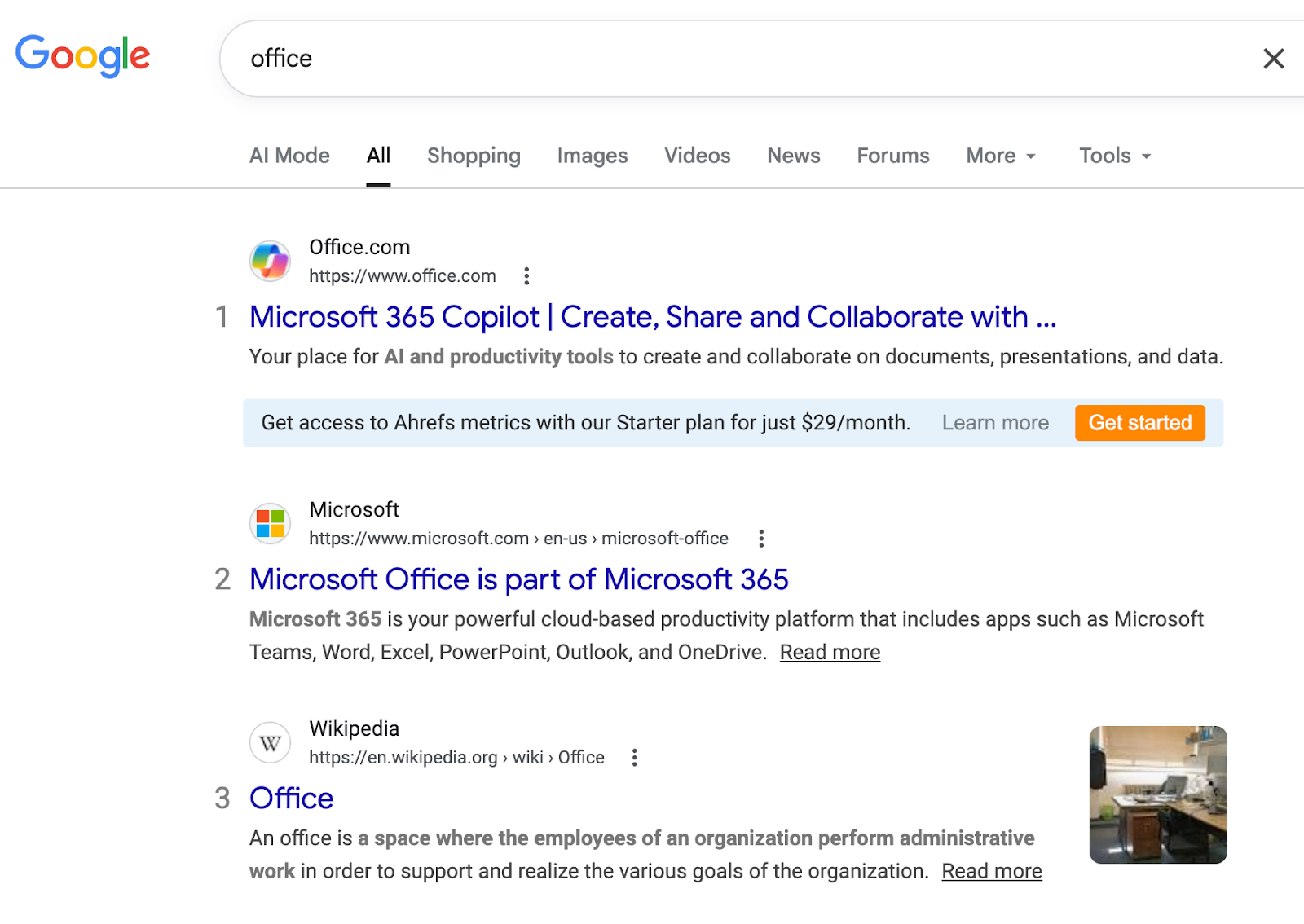
Now search for “The Office.”
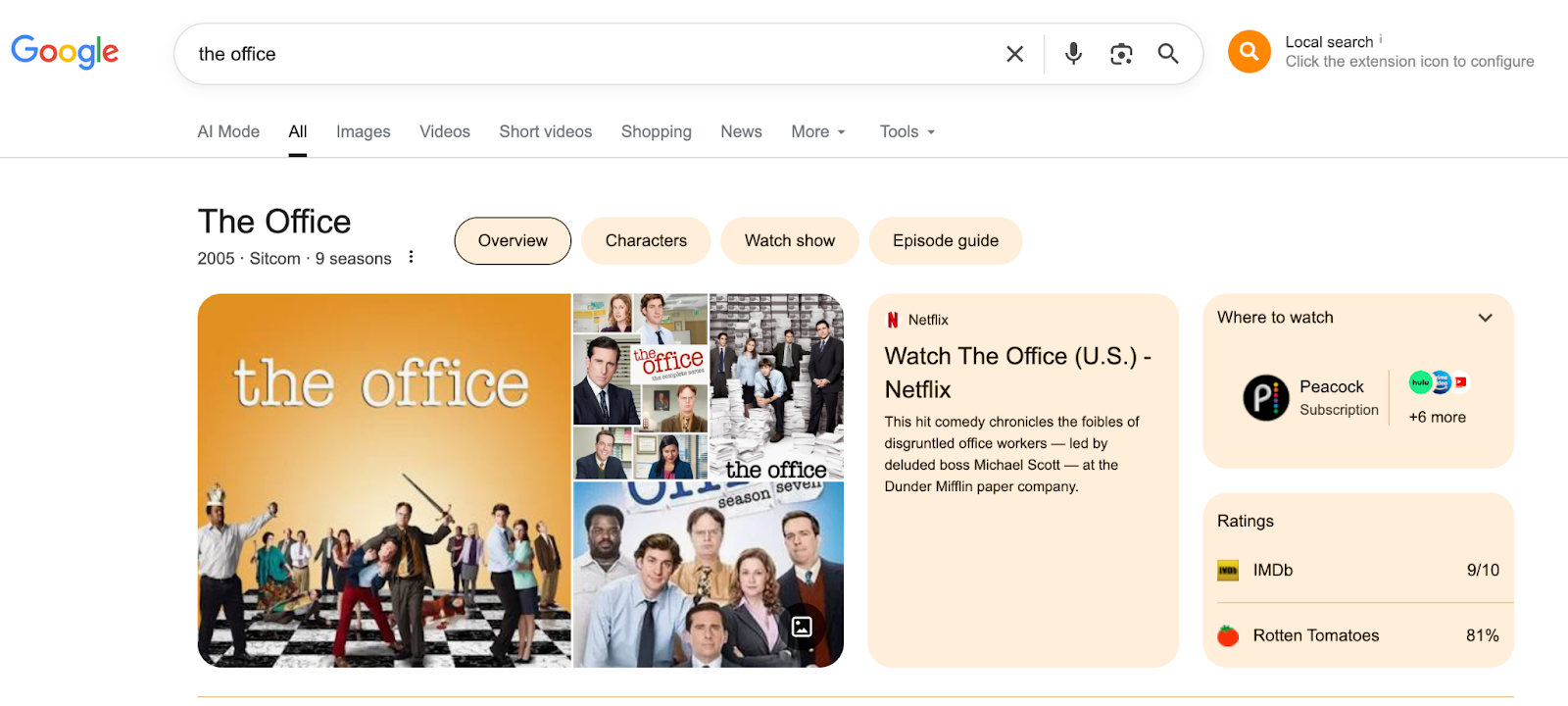
Suddenly, all the top search results are about the famous TV show.
“The” is technically a stop word. But here, it completely changes the meaning of the search.
That’s how NLP (Natural Language Processing) works, as Google reads the whole phrase to understand what the searcher actually wants.
Bottom line: Sometimes Google ignores stop words. But when they affect the meaning of a search query, Google definitely pays attention to them.
Stop Words List (175+ Common Words)

Here’s a full list of stopwords that search engines may filter out during indexing.
| Letter | Stop Words |
| A | a, about, above, actually, after, again, against, all, almost, also, although, always, am, an, and, any, are, as, at |
| B | be, became, become, because, been, before, being, below, between, both, but, by |
| C | can, could |
| D | did, do, does, doing, down, during |
| E | each, either, else |
| F | few, for, from, further |
| H | had, has, have, having, he, he’d, he’ll, hence, he’s, her, here, here’s, hers, herself, him, himself, his, how, how’s |
| I | I, I’d, I’ll, I’m, I’ve, if, in, into, is, it, it’s, its, itself |
| J | just |
| L | let’s |
| M | may, maybe, me, might, mine, more, most, must, my, myself |
| N | neither, nor, not |
| O | of, oh, on, once, only, ok, or, other, ought, our, ours, ourselves, out, over, own |
| S | same, she, she’d, she’ll, she’s, should, so, some, such |
| T | than, that, that’s, the, their, theirs, them, themselves, then, there, there’s, these, they, they’d, they’ll, they’re, they’ve, this, those, through, to, too |
| U | under, until, up |
| V | very |
| W | was, we, we’d, we’ll, we’re, we’ve, were, what, what’s, when, whenever, when’s, where, whereas, wherever, where’s, whether, which, while, who, whoever, who’s, whose, whom, why, why’s, will, with, within, would |
| Y | yes, yet, you, you’d, you’ll, you’re, you’ve, your, yours, yourself, yourselves |
Note: This list is NOT fixed. Different search engines and NLP tools may use slightly different stop word lists depending on the context.
How to Use Stop Words in SEO (By Location)
Here’s how to use stop words in different SEO elements like URLs, title tags, headings, and content.
1. Stop Words in URL Slugs
Tip: Remove them when you can, but don’t break the meaning.
Short and clean URLs are better for SEO and user experience. Stop words in URLs just add length without adding value.
For instance, a URL slug like “the-best-restaurants-in-London” could be simplified to “best-restaurants-London.”
Removing stopwords here is totally safe, as it doesn’t change what the page is about.
But be careful. Removing stopwords can sometimes make the URL awkward or unclear:
- /tips-start-blog/ ← awkward
- /tips-to-start-a-blog/ ← clear and natural
When in doubt, keep the stopwords. Readability ALWAYS matters for both users and crawlers.
2. Stop Words in Title Tags
Tip: Always keep them. Don’t remove stop words from your title tags.
Title tags are as important as URL slugs (if not more). But you should include stop words in your title tags.
The simple reason is that using stopwords in title tags can improve readability and overall user experience.
For example, “A Step by Step Guide to Starting Your Website” (with stopwords) might be more engaging than “How to Start Website” (without stopwords).
Remember, powerful title tags can influence your organic rankings by driving user clicks from search results. The key here is to include relevant keywords (even if they’re stop words) in your title tags.
However, keep title tags concise and informative. Remove unnecessary words, including stop words, that don’t add value to the context of your content.
The same rule applies to H1 tags and other headings. Write for humans first.
3. Stop Words in Body Content
Tip: Don’t worry about removing them. Just write naturally.
Your article is for readers first, not for search engines to analyze every single word.
Consider this sentence: “How to start an event blog that makes money.”
“How,” “to,” and “an” are stop words. Remove them, and you get:
“Start event blog makes money.”
Sounds awkward, right?
Stop words help sentences sound natural. Removing them doesn’t improve rankings, as it just makes your writing worse.
Write naturally. Google is smart enough to understand stopwords.
4. Stop Words in Meta Descriptions
Tip: Keep them for readability.
Meta descriptions don’t directly affect rankings, but they do affect clicks.
A natural meta description usually gets more clicks than a keyword-stuffed one. So write your meta descriptions like normal sentences, stop words included.
5. Stop Words in Anchor Text
Rule: Trim when possible, keep when needed.
Anchor text is the clickable text in a link. It helps Google understand what the page is about.
For internal links, use clear and descriptive text. Stopwords often aren’t needed.
- Example of weak anchor text: “Click here to read more about the best SEO tools.”
- Better anchor text: “Best SEO tools for beginners.”
But if removing a stop word makes the anchor text sound awkward, keep it.
When to Keep vs. Remove Stop Words (Quick Reference)
| Location | Keep Stop Words? | Reason |
| URL Slug | Remove (when safe) | Shorter URLs are better |
| Title Tag | Always keep | Affects CTR and readability |
| H1 / Headings | Always keep | Essential for readability |
| Body Content | Always keep | Essential for readability |
| Meta Description | Always keep | Affects CTR |
| Anchor Text | Sometimes remove | Keep only if needed for clarity |
Are Stop Words Bad for SEO?
No. Stopwords aren’t bad for SEO.
Gone are the days when search engines ignored common words just to process searches faster.
Today, search engines like Google use advanced Natural Language Processing (NLP) to understand the full meaning of a search query. Stopwords often play a key role in that understanding.
What really matters:
- Does your content sound natural?
- Does your URL structure make sense?
- Are you writing for people first?
If yes, you’re using stop words the right way.
FAQs | Stop Words in NLP
“The” is one of the most common stop words. For example, in the URL slug /what-are-the-best-WordPress-plugins/, you’d trim it to /best-WordPress-plugins/.
No, you can use stop words while creating content (URLs, tags, body content, etc), as they don’t harm your website’s SEO.
By removing fluff or stop words, search engines can reduce insignificant data in natural language processing (NLP), ultimately improving overall search efficiency.
No. Never remove stop words from titles or headings. It makes your content harder to read and can hurt your click-through rate.
In most cases, no. Google understands that “best SEO tools” and “the best SEO tools” mean the same thing. You’ll generally rank for both versions without doing anything special.
Stop words are grammatically necessary (like “the,” “in,” “and”). Filler words are unnecessary fluff added to sound more formal (like “in order to” instead of just “to,” or “due to the fact that” instead of “because”).
No. Google, Bing, and other search engines each have their own lists.
Final Thoughts
Stop words aren’t something you need to worry about.
The simple rule: write naturally, keep stop words in your titles and content, and remove them from URLs only when it makes sense.
Focus on quality. Focus on clarity. Google will handle the rest.
That’s it.
Got questions about stop words or how you’re using them on your site? Drop them in the comments below.

![How to do Keyword Research Correctly in 2026 for GEO & SEO (A to Z Tutorial]](https://bloggerspassion.com/wp-content/uploads/2019/02/how-to-do-keyword-research-like-a-pro-300x157.jpg.webp)





Really insightful post! I’ve always heard about stop words in SEO but never really understood their impact until now. It’s interesting how they can affect search engine rankings, and I appreciate the way you broke down when to use them and when to avoid them. The list you provided is super handy for quick reference. It’s also good to know that modern search engines are getting smarter in handling stop words, so we don’t have to worry as much as before. Looking forward to more tips like this—keep up the great work!